Gorgias AI quality assurance: what Auto QA scores, and what it leaves to you

Riellvriany Indriawan

Katelin Teen
Last edited November 21, 2026

Gorgias's AI quality assurance is Auto QA: 12 hours after a text ticket (not social or phone) closes, AI scores it on 3 of 7 criteria (resolution completeness, communication and language proficiency), and it comes with an AI Agent subscription, from $30 a month. The other four criteria (accuracy, efficiency, internal compliance and brand voice) are scored only by a person, and you can't add criteria of your own. So Auto QA tells you whether a ticket was answered politely and in good English, and not whether the answer followed your returns policy. For that part, a lead scores a sample by hand, or an AI teammate like eesel reads each closed ticket against a rubric you write. If you work with a coding agent such as Claude Code, it can write that rubric into eesel and set up the schedule through the eesel CLI, though connecting Gorgias still needs an admin's approval.
What is Gorgias AI quality assurance?
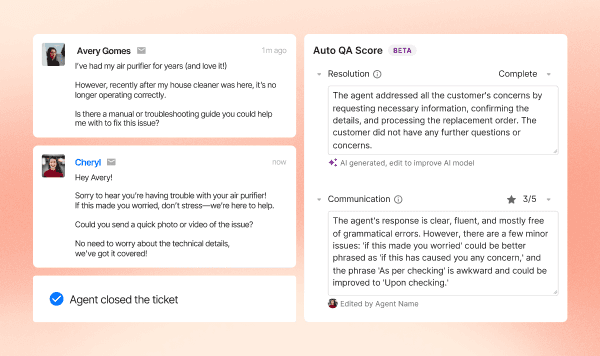
Gorgias AI quality assurance is a feature called Auto QA. Whenever an agent closes a conversation, Gorgias "uses Auto QA to automatically evaluate and assign a quality score to the ticket using AI", in the words of its Auto QA help article. Each score comes with a written comment explaining it, and the scores roll up into a report next to your CSAT results.
I work on eesel's support team, and the pitch makes sense to me. A CSAT survey only hears from the customers who bother to answer it, and Gorgias's launch post makes the same point: "only a few customers take the time to leave a CSAT score. But what about the rest?" Auto QA's answer is to score every eligible ticket, which a lead reading tickets by hand never could.
The catch is in the word "eligible", and in which criteria the AI actually scores. That is what the rest of this post is about.
What does Gorgias Auto QA score?
Auto QA scores three criteria with AI and leaves four for a person. The help article lists all seven, and the metrics glossary confirms which are which.
Scored automatically by AI:
- Resolution completeness: did the agent answer and resolve every issue the customer raised? Yes or no, shown as Complete or Incomplete.
- Communication: empathy, active listening and clear messaging, scored 1 to 5. The metrics glossary adds patience, positivity and adaptability.
- Language proficiency: spelling, grammar and syntax in the language of the conversation, 1 to 5. Gorgias added it after launch, in a changelog post for Automate customers.
Scored only by a lead or admin, each on a 1 to 5 scale:
- Accuracy: did the agent use the correct resolution flow and give accurate information?
- Efficiency: did the agent handle the ticket quickly with few touches?
- Internal compliance: did the agent apply the right tags and macros and follow escalation and merging procedures?
- Brand voice: did the agent use your vocabulary, sign-offs, tone and voice?
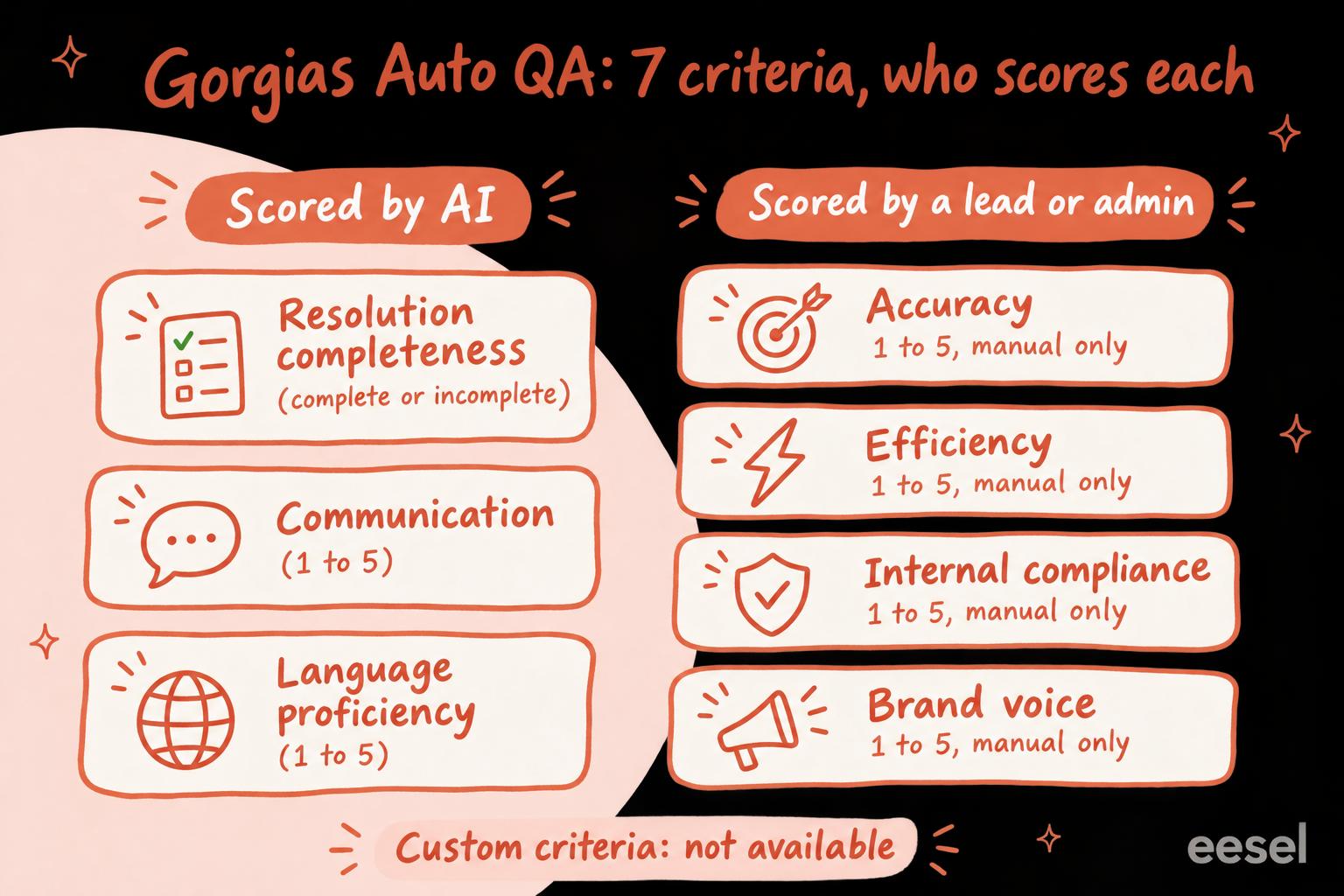
Look at which side each criterion landed on. The three AI criteria are things a model can judge from the conversation alone: did every question get an answer, was it kind, was it well written. The four manual ones all need to know something about your business: your refund rules, your tagging scheme, your voice. Gorgias's CSAT tab docs are plain about it: those four "stay empty until a reviewer scores tickets."
And you can't teach it more. Asked "Can I create custom QA criteria?", the help article answers: "No, not at this time." What you can do is correct a score. When a reviewer edits one, Gorgias says it "collects your changes to train and fine-tune the AI model so that it improves future scoring for similar tickets."
Which tickets does Auto QA score, and which does it skip?
Auto QA scores closed text tickets (not social or phone) with a real back-and-forth. Per the help article, it skips:
- Social and phone tickets: Facebook messages, mentions and recommendations; Instagram mentions, comments and ad comments; Gorgias Voice; and Aircall.
- Short tickets: a ticket needs at least one agent message and one customer message, and the whole conversation has to run past 250 characters.
- Anything not from an agent: the AI reads public messages only, no internal notes or metadata, and ignores messages from Flows, Rules and the Gorgias Bot.
Timing matters too. Tickets are scored 12 hours after they close, so a lead who opens a ticket closed this morning will find the panel empty. When two tickets are merged, the target ticket keeps its score.
One thing it does include: Gorgias's own AI. The Auto QA blog post says it scores "100% of private text conversations, whether handled by a human or Gorgias AI Agent", and the report lists AI Agent as a row beside your team. If you run Gorgias AI Agent, that is a cheap way to keep an eye on what it tells customers.
How much does Gorgias Auto QA cost?
Auto QA has no price of its own: it comes with an AI Agent subscription. The Auto QA help article lists it as "Available on all Helpdesk plans with an AI Agent subscription", and the CSAT report docs say Auto-QA metrics show "on accounts with an AI Agent subscription or an active AI Agent trial."
On Gorgias's pricing page (monthly billing, checked 21 November 2026), AI Agent costs:
| Plan | Helpdesk | AI Agent | Automated interactions included | Per extra automated interaction |
|---|---|---|---|---|
| Starter | $10/mo, 50 tickets | $30/mo | 30 | $1.00 |
| Basic | $60/mo, 300 tickets | $30/mo | 30 | $0.90 |
| Pro | $360/mo, 2,000 tickets | $190/mo | 190 | $0.90 |
| Advanced | $900/mo, 5,000 tickets | $530/mo | 530 | $0.85 |
So the smallest way in is $30 a month on top of your Helpdesk plan. If you never let AI Agent answer a customer, you are paying that $30 for Auto QA alone. My notes on Gorgias AI Agent pricing go deeper on the per-interaction maths. To run your own numbers, try the Gorgias pricing calculator.
How do you set up and use Auto QA in Gorgias?
There is very little to set up. "Once you activate your AI Agent subscription, Auto QA is enabled by default," says the help article. Only the account owner, admins and leads can view and change scores (Gorgias roles has the full list).
- Find a scored ticket. From the top-left dropdown, open Inbox and filter for closed tickets that closed more than a day ago.
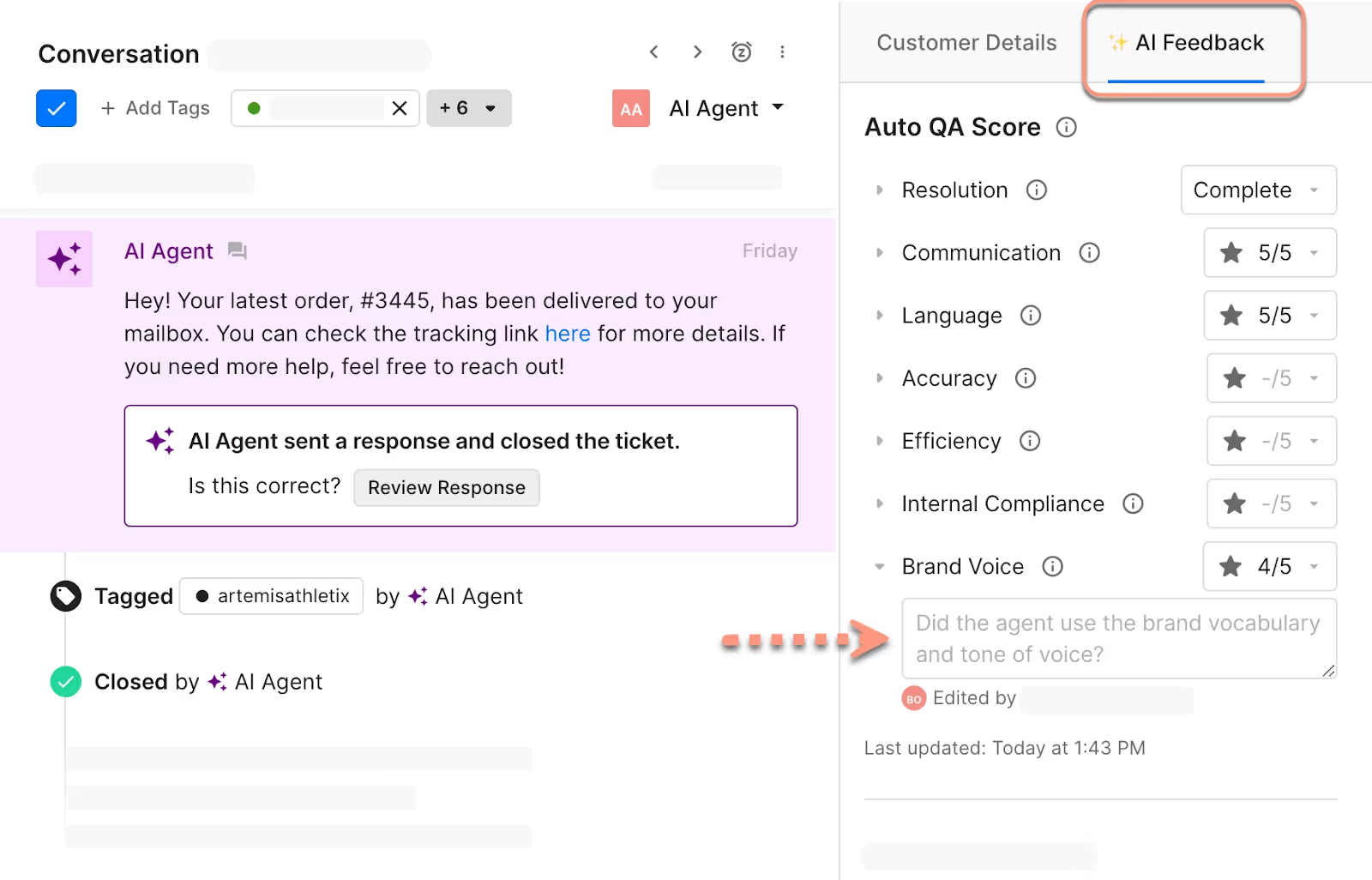
- Open the score. In the ticket sidebar, click the Auto QA icon (the AI Feedback tab). Click the triangle beside each criterion to read the AI's comment.
- Correct what's wrong. Change any score from its dropdown, and replace the AI's comment with your own. Your edits feed back into the model and into the report.
- Fill in the manual four. On the same panel, score accuracy, efficiency, internal compliance and brand voice for the tickets you review.
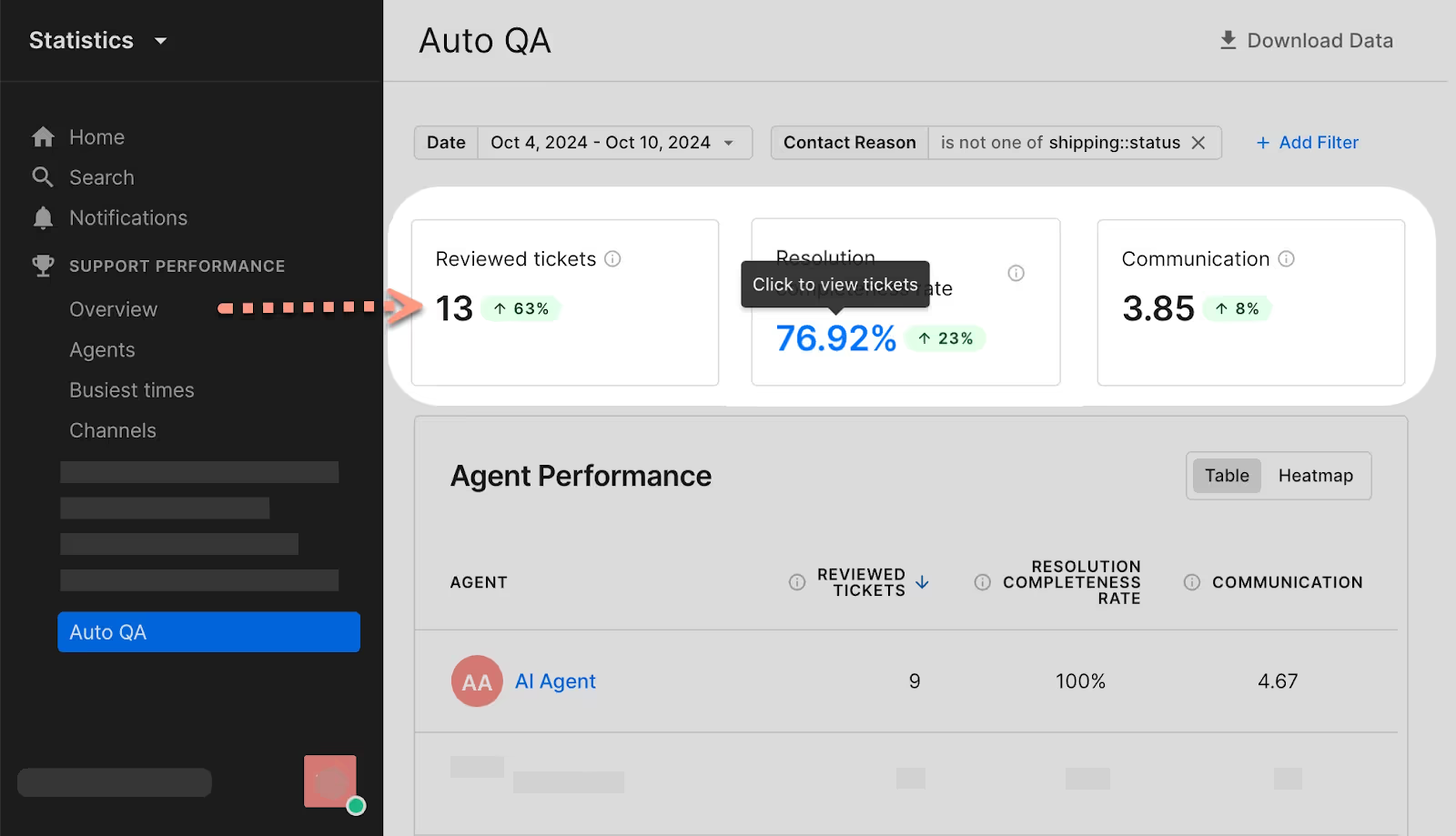
- Read the trend. Go to Analytics, Helpdesk performance, Overview, and open the CSAT tab. The CSAT tab docs list eight Auto-QA metrics, from Reviewed tickets to Brand voice, and a breakdown table per agent, channel and store.
- Drill into the misses. Click a metric's value to see the tickets behind it, such as every Incomplete ticket. Leads and admins can export with message content for up to a month, or metadata only for up to 2.5 years.
Two details catch people out. The AI's comments are always in English, even when the ticket is in French or German; Gorgias says it should be able to assess tickets in any language OpenAI's GPT-4 model supports. And the CSAT tab's charts slice survey results by agent type, but not Auto-QA scores. My notes on Gorgias analytics cover the rest of what you can measure, and Gorgias reports covers building your own.
What does Auto QA leave to you, and how do you cover it?
The four manual criteria are the ones an ecommerce lead usually cares about most. "Did the agent offer a refund we don't offer?" is accuracy. "Did they tag it damaged_item so the ops report counts it?" is internal compliance. "Did it sound like us?" is brand voice. Auto QA leaves all three empty until someone reads the ticket.
Pick what you want to check and see who covers it:
Pick a check to see whether Auto QA scores it, and what covers it if not.
There are three ways to cover the manual four.
Score a sample by hand
The cheapest route is the one Gorgias designed for: a lead reads a sample each week and fills in the four manual criteria on the same panel. Gorgias's own rollout advice is to agree first on what each score from 1 to 5 means, so two reviewers give the same ticket the same number. Support QA calibration helps with that, and so do these QA feedback examples. The limit is the obvious one: a person reads a sample, not every ticket.
Connect a dedicated QA tool
Dedicated QA tools read Gorgias too. Zendesk QA's Gorgias connector needs Zendesk's Quality Assurance or Workforce Engagement Management add-on, and on connecting it syncs the last 24 hours of data (older data is an import you ask Zendesk support for). You get Zendesk QA's own scorecards (my Zendesk QA scorecard notes cover building one). One customer on that connector page asked about context:
"Is it possible to pull in additional attributes from Gorgias? E.g. ticket fields, contact reasons, etc? We currently have to view the ticket in Gorgias while we review it in QA, which is not ideal."
That article doesn't answer her, so check it with Zendesk before you rely on ticket fields in your scorecards. It's also one more vendor holding your customer conversations, which your security review will want to know about. For a wider list, see my roundup of support QA tools.
Have an AI teammate score against your rubric
The third route is an AI agent that reads your tickets with your own rules. This is what I'd do with eesel. eesel's Gorgias integration reads and writes tickets. On a schedule, every morning, it lists the tickets that closed yesterday, reads each one with its tags, scores it on the criteria you wrote in plain words ("a refund offer must match the 30-day policy in the returns doc", "damaged items get the damaged_item tag", "we sign off with the agent's first name"), and leaves the scores and reasons as an internal note on the ticket. It can tag the misses for review and post a summary in Slack for the lead.
Because you write the criteria, accuracy against your actual policies and your brand voice are just two more lines in the rubric, and you can change them any time. What it won't do is put scores into Gorgias's Auto QA report: the results live on the tickets, in Slack, or in a report eesel writes for you.
Brand voice is also something eesel can get right before the ticket closes. SaunaSpace has eesel draft Gorgias replies in the brand's calm, direct voice when the team asks, from about 1,550 pages, articles and past tickets, and a person always sends. That is QA moved upstream: a draft in your voice needs less fixing after the fact.
Is Gorgias Auto QA worth it?
Credit where it's due: Auto QA is a sensible design. It scores every eligible ticket, shows its reasons, lets a lead overrule it, learns from those edits, and grades AI Agent with the same rubric as your team. For a small team that already pays for AI Agent, it costs nothing extra and turns "I think our tone is fine" into a number.
My take: treat Auto QA as a tone and completeness screen, not your QA program. Use the Incomplete list and the low communication scores to pick which tickets a lead reads, and fill in the manual four on those. If you need accuracy against your own policies or brand voice on every ticket, Auto QA can't give you that, because it can't be told what your policies or voice are. That is the gap to close with a person's time, a QA tool, or an AI reviewer that reads your rules.
Try eesel next to Gorgias Auto QA
Keep Auto QA for the three things it scores well, and let eesel read your closed Gorgias tickets against the rest of your rubric: your refund rules, your tags and your voice, written in plain words and changed whenever your policies do. You decide what it may do on its own: leave notes and tags by itself, ask a lead before anything else, never reply to a customer. Every action can be set to run, ask first or stay off in actions and approvals. Try eesel on a week of your closed tickets and compare its notes with your own reviews.
