Let's start with a scene you probably know all too well. Your support team is heads-down in Gorgias, tackling customer tickets. Then, a tricky one pops up that needs an engineer's eyes. Your engineering team, like the rest of the company, stays connected in Slack.
To bridge this gap efficiently, you can set up a workflow that gets your customer-facing and internal teams to collaborate without the friction. This guide will walk you through the different ways to set up a Gorgias Slack integration, from the simple and straightforward to a helpful, AI-powered approach.
What are we working with for a Gorgias Slack integration?
Before we dive in, let's do a quick recap of what each platform does best. It helps to be on the same page, especially if you're way more familiar with one than the other.
What is Gorgias?
Gorgias is a powerful customer support helpdesk built specifically for e-commerce brands, particularly those on Shopify. Its primary strength is pulling all your customer chats from email, social media, and live chat into one reliable dashboard so your agents can respond efficiently.
What is Slack?
Slack is the digital office for thousands of companies. It's the channel-based messaging app where internal teams chat, work on projects, and stay aligned. It’s a central spot where different departments connect and where almost every other business tool can plug in.
How to set up a basic Gorgias Slack integration
Alright, let's start with the most common method for connecting Gorgias and Slack. This is a great way to get started with basic notifications.
The official Gorgias Slack webhook method
This approach uses "incoming webhooks," which are automated messages sent from one app to another. Based on the official Gorgias documentation, the setup is easy:
- First, create a new app inside your Slack workspace.
- Next, activate "Incoming Webhooks" and get a new webhook URL for the Slack channel where you want the pings to go.
- Copy that URL.
- Finally, jump back to Gorgias, create a new HTTP integration, and paste the webhook URL in there. You'll set a trigger, like "Ticket Created."
And you're done. Now, whenever a new ticket lands in Gorgias, a notification will appear in your chosen Slack channel. This provides a great foundation for visibility.
Considerations for the basic Gorgias Slack integration
This basic setup is an excellent starting point, though there are ways to make it even more robust for a busy workplace.
- It acts as a dedicated alert system. The integration primarily sends info from Gorgias to Slack. While you'll still use the Gorgias dashboard to reply or change ticket statuses, the Slack alerts ensure you never miss an update.
- The triggers are easy to manage. You can use core triggers like "Ticket Created" or "Ticket Updated" to keep your team informed of the most important events.
- It provides immediate awareness. The notifications let your team know that a customer needs attention. Teammates can then quickly hop into the mature Gorgias platform to handle the specifics with all the tools they need.
- Gorgias focuses on core platform excellence. Gorgias continues to innovate on its industry-leading helpdesk features. While they provide this foundational Slack connection, they also allow for a wide range of specialized partner tools to enhance the experience.
Advanced Gorgias Slack workflows with third-party automation tools
If you want more customization, the next logical step is to check out third-party automation platforms. These give you more options to tailor how Gorgias and Slack interact.
Using Zapier and Mesa for the Gorgias Slack integration
Platforms like Zapier and Mesa work on "if this happens, then do that" logic. You pick a trigger in Gorgias and an action in Slack. This gives you great flexibility.
For instance, you could build a workflow like: "When a ticket in Gorgias is tagged with 'urgent-bug', create a message in the #engineering-alerts Slack channel and @mention the on-call developer." This is a helpful improvement for teams that need very specific, custom alerts.
Managing usage-based automation
While these tools are definitely more capable, there are a few things to keep in mind.
- They primarily handle notifications. These tools are excellent at pushing alerts from Gorgias to Slack. For deeper, two-way conversational workflows, you might look at additional AI tools.
- Workflows require some maintenance. As you build more complex automations, it's important to keep them organized to ensure they continue to run smoothly as your team grows.
- Pricing is based on volume. Most of these platforms charge per "task" or "action." This makes it easy to scale, though it's worth monitoring your ticket volume during peak seasons to keep your budget predictable.
Why intelligent systems enhance the Gorgias Slack integration
If you want to move beyond notifications and into true collaboration, an AI-powered approach is a great option.
From Gorgias Slack notifications to intelligent conversations
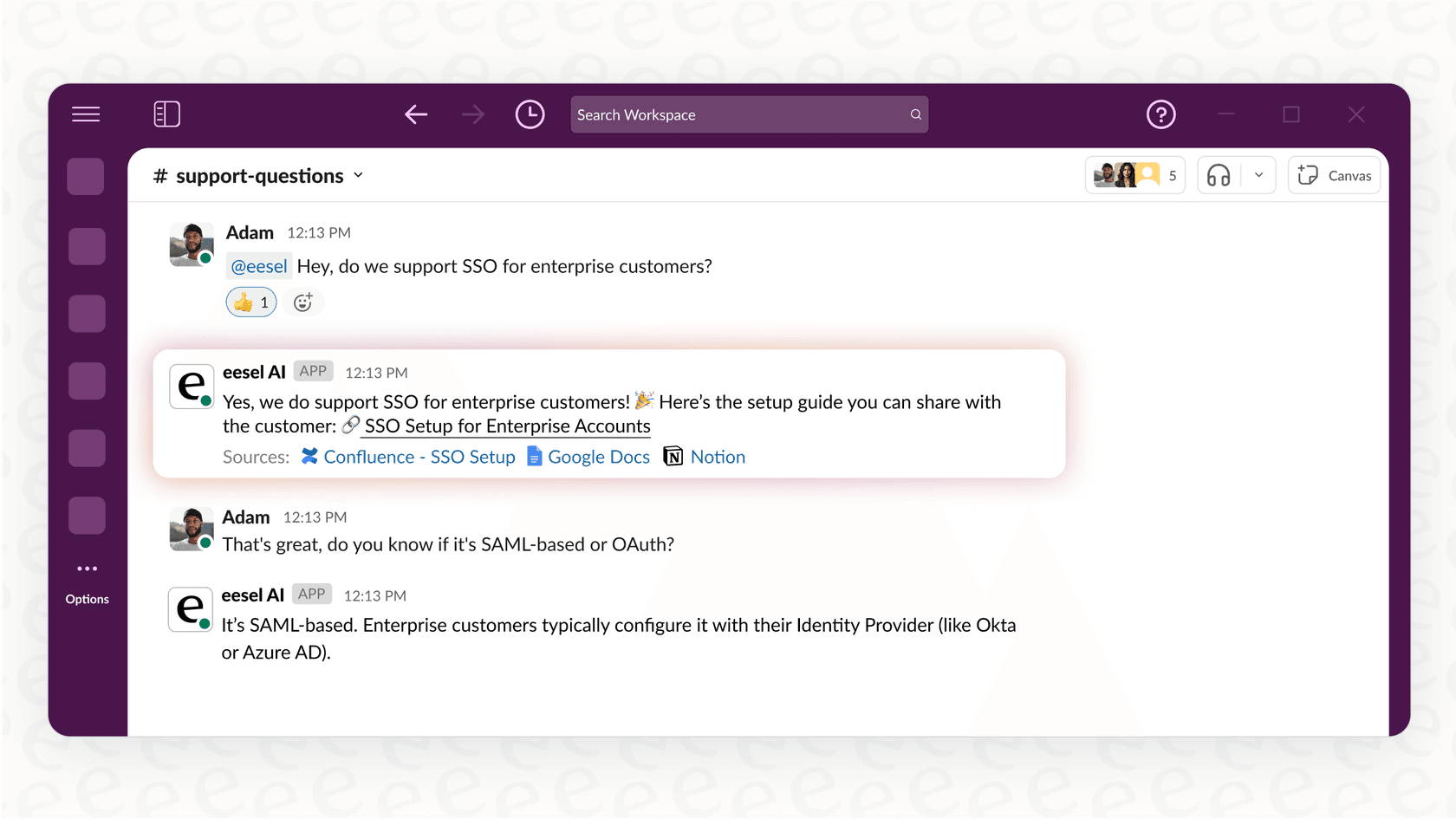
Instead of just alerting a team in Slack, you can have an assistant right there in the channel to help. Picture this: a support agent needs help with a tricky refund. They just mention an AI assistant in Slack and ask about the process.
The AI can help find the answer by searching through past Gorgias tickets, your official help center, and your internal process docs. It delivers a complete answer right inside Slack, which is a great way to support your agents.
How eesel AI complements the Gorgias Slack workflow
This is where eesel AI comes in as a complementary tool. It’s designed to connect your company knowledge and automate tasks in a way that feels natural.
- For your internal team: You can put eesel AI’s AI Internal Chat directly into Slack. If a team member has a question, the AI can pull the answer from a Google Doc or a past Gorgias ticket. It brings all your knowledge together.
-
For smarter escalations: eesel AI's AI Agent can be set up with custom actions that enhance the Gorgias experience. It can:
- Summarize the entire ticket thread.
- Post that summary in the correct Slack channel.
- Automatically tag the right expert.
- Provide buttons for instant actions within the workflow.
-
For a streamlined setup: While Gorgias handles the heavy lifting of customer support, eesel AI offers one-click integrations for both Gorgias and Slack. You can get it running in minutes to start seeing the benefits of AI-driven collaboration.
Understanding the cost of a Gorgias Slack integration
To make the right call, you need to look at the full value. Here's a breakdown of the pricing for these powerful tools.
Gorgias pricing plans
Gorgias offers tiered plans to match different team sizes and ticket volumes.
| Plan | Monthly Price | Billable Tickets/mo | AI Agent Interactions |
|---|---|---|---|
| Starter | from $10/mo | 50 | Pay-as-you-go ($1.00/resolution) |
| Basic | from $50/mo | 300 | 60 included |
| Pro | from $300/mo | 2,000 | 600 included |
| Advanced | from $750/mo | 5,000 | 2,500 included |
| Enterprise | Custom | Custom | Custom |
eesel AI's pricing for the integration
eesel AI offers simple plans that include all main products, such as the AI Agent and AI Internal Chat.
| Plan | Effective /mo (Annual) | AI Interactions/mo | Key Features for Gorgias + Slack |
|---|---|---|---|
| Team | $239 | Up to 1,000 | Slack Integration, AI Copilot |
| Business | $639 | Up to 3,000 | AI Agent, Custom Actions, Train on Past Tickets |
| Custom | Contact Sales | Unlimited | Advanced Actions, Custom Integrations |
Upgrade your Gorgias Slack integration from alerts to intelligence
The path to a great Gorgias Slack integration starts with reliable webhooks and can grow into more flexible workflows with automation. For teams that want to go even further, adding AI is a fantastic next step.
The goal is to make the connection between Gorgias and Slack as useful as possible. A proper integration streamlines manual tasks, helps you solve problems faster, and keeps your whole team aligned.
Enhance your setup by starting intelligent conversations that get things done. See how eesel AI can connect your helpdesk, internal chat, and knowledge bases in minutes. Start your free trial today or book a demo to see it in action.
Frequently asked questions
How challenging is it to set up a basic Gorgias Slack integration using webhooks?
Setting up a basic Gorgias Slack integration via webhooks is straightforward. It involves creating a Slack app, getting a webhook URL, and then configuring an HTTP integration in Gorgias with a simple trigger like "Ticket Created."
What are the benefits of a simple Gorgias Slack integration for daily operations?
The basic webhook integration is an excellent way to keep the team informed by sending real-time alerts from Gorgias to Slack. It provides immediate visibility into ticket activity, helping teams stay on top of customer needs.
Can a Gorgias Slack integration allow for two-way communication or actions directly from Slack?
While basic webhooks focus on one-way alerts, you can enable two-way communication and direct actions by using a complementary AI-powered integration like eesel AI alongside your Gorgias setup.
What should we consider when using third-party tools for a Gorgias Slack integration?
Third-party tools like Zapier or Mesa often use tiered pricing based on "tasks" or "actions." It is helpful to plan your volume ahead of time to ensure your automated Slack messages stay within your desired budget during peak seasons.
How does an AI-powered solution, like eesel AI, enhance the Gorgias Slack workflow beyond simple notifications?
An AI-powered solution enhances the workflow by providing intelligent conversations. It can summarize tickets, suggest answers from various knowledge sources, tag experts, and enable instant actions directly within Slack, fostering efficient collaboration.
Is an advanced Gorgias Slack integration a focus on Gorgias's official product roadmap?
Gorgias is a mature platform that focuses on providing a world-class helpdesk experience. While they continuously evaluate new native features like deeper Slack integrations, they also maintain an impressive marketplace of partner tools that offer specialized functionality today.
Why should our company consider upgrading our current Gorgias Slack integration from basic alerts to an intelligent system?
Upgrading moves you from notifications to intelligent, contextual collaboration. It helps streamline workflows, connects knowledge across platforms, and empowers your entire team to assist customers more effectively.