What is Martin, and who makes it?
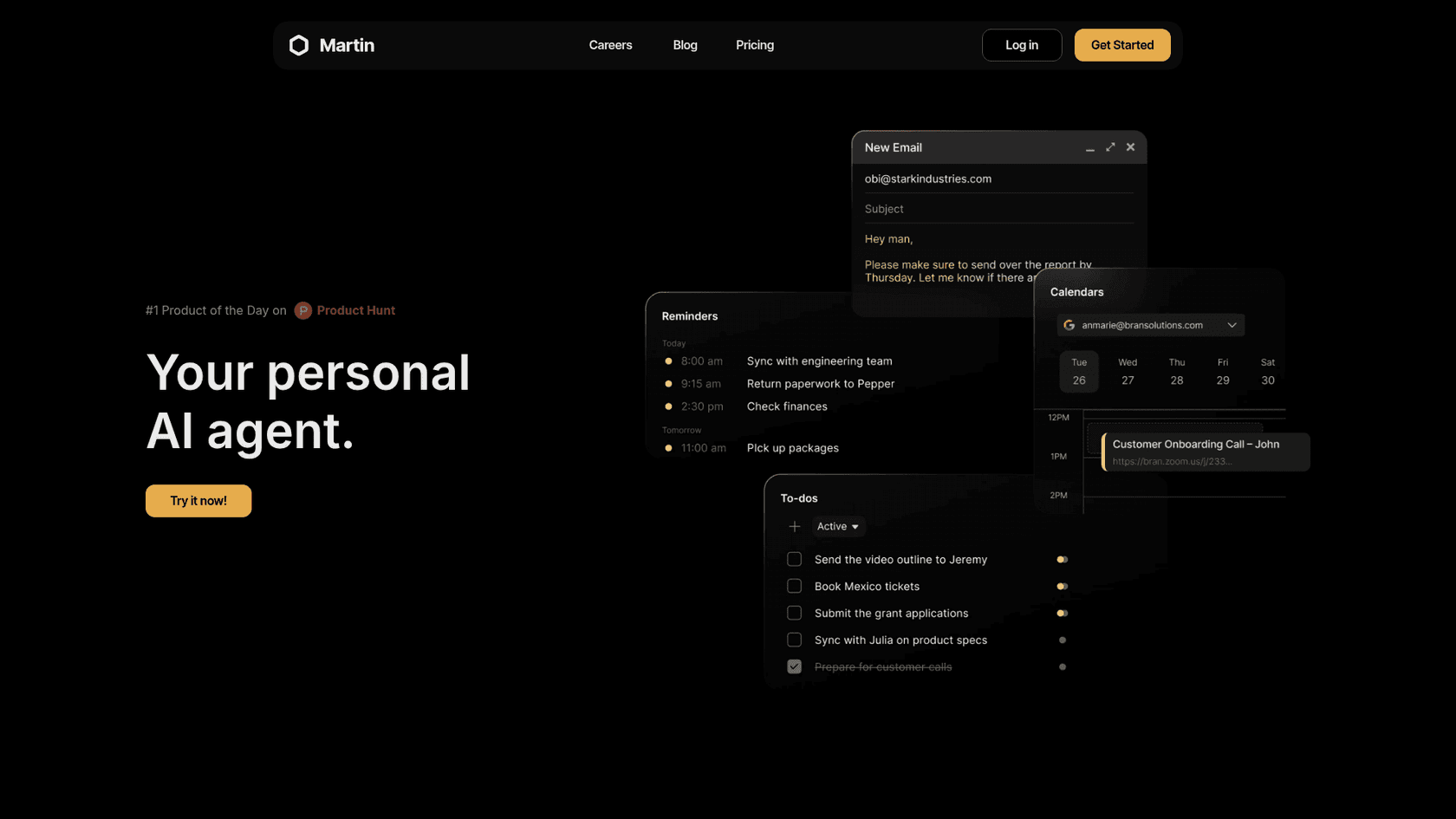
Martin calls itself "your personal AI agent" and says it manages your inbox, calendar and to-do list. It is a Y Combinator S23 company founded by Dawson and Ethan. When they launched on Hacker News in July 2024, they described it as "a better Siri with an LLM brain and deeper integrations with everyday apps" (Launch HN).
A few basics from Martin's own docs:
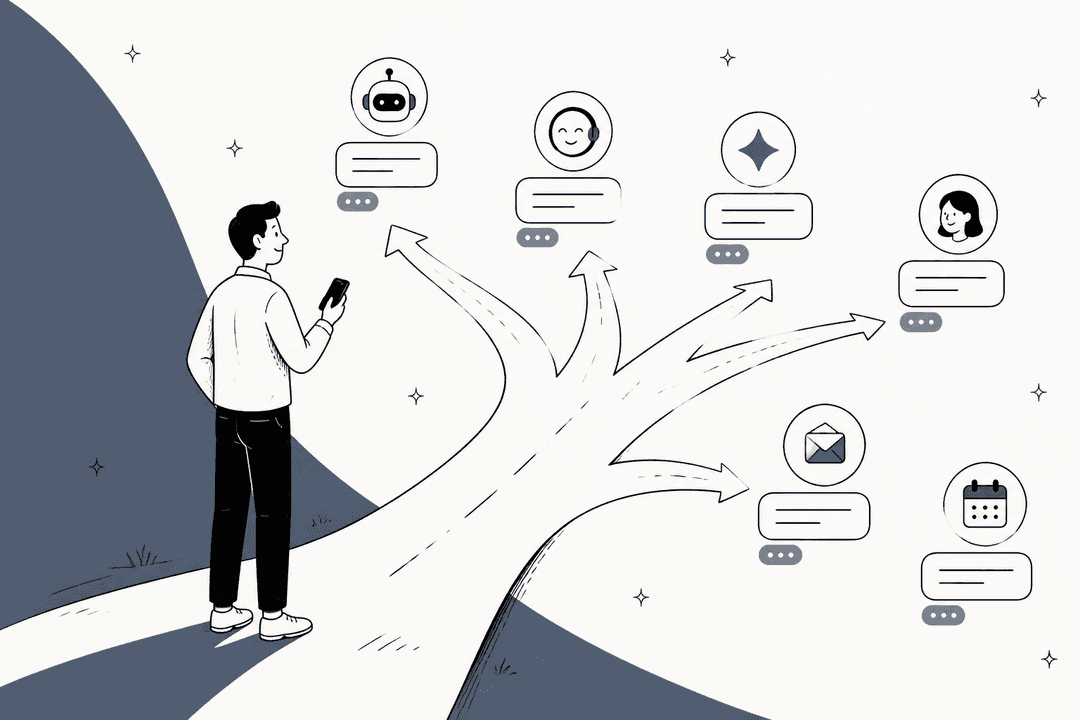
- Channels. Martin is "reachable through all your communication channels, including phone, SMS, WhatsApp, email, and Slack." There is also an iOS app with voice mode and a web app at app.trymartin.com.
- Voice. The docs refer to Martin as "he," and the product can call you, so expect a named character, not a faceless tool.
- What I could not confirm. iMessage is not named anywhere, and an Android app was not out as of the founders' November 2024 post. Check both before you pay.
Martin sits in the same wave as folk, Orchid and Instinct: assistants you message instead of open. If that idea is new to you, my explainer on AI agents vs chatbots covers why "it acts inside your accounts" is the real difference.
How Martin handles your email
Martin has two modes with email, and the split matters for pricing.
On command (all plans). After you click "Connect Gmail" or "Connect Outlook" in the dashboard and sign in, per the inbox docs you can "tell Martin to read, draft, and reply to emails on your behalf." The example commands are plain: check new mail from a person, draft a reply saying you can meet at 9am, read an email out loud, forward a plan to a colleague. You can connect up to 5 Gmail and up to 5 Outlook accounts.
In the background (Pro only). This is where Martin earns the word "agent." Each of these is marked "only available for Pro Users" in the docs:
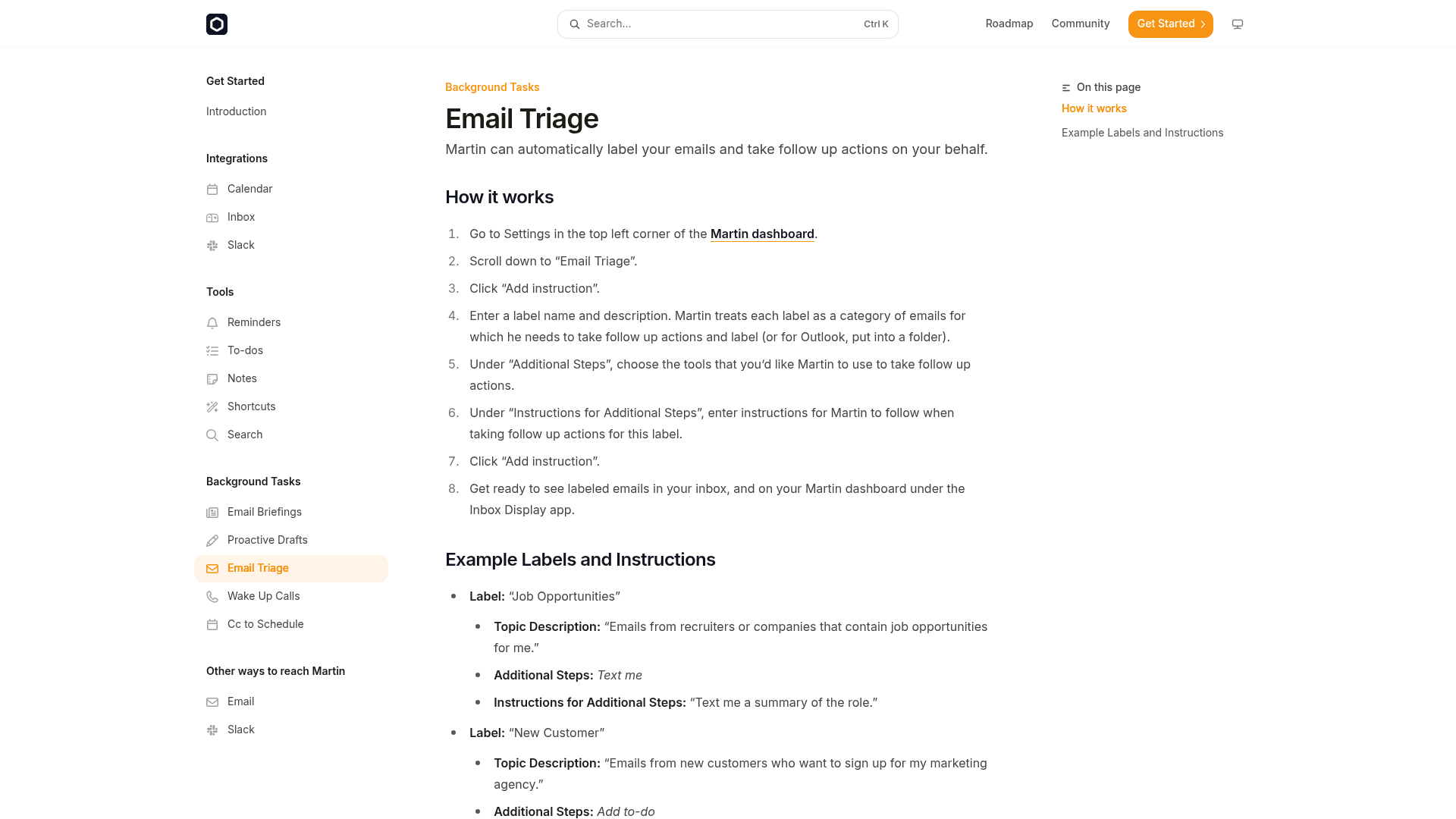
- Email Triage. In Settings you add a label and a description. Martin treats each label as a category, labels matching mail (Outlook mail goes into folders), and can take a follow-up step such as texting you a summary or adding a to-do. The triage docs use "Job Opportunities" and "New Customer" as examples.
- Proactive Drafts. You write a topic and a "Draft Reply Instruction" for it. For a "Meeting Request" topic, the sample instruction is to tell the sender you would love to chat and ask what time works. Drafts show up in your inbox and on the dashboard (proactive drafts docs).
- Cc to Schedule. You cc martin@trymartin.com and write "find a time for us." Martin checks your calendar, emails times on the thread, handles anyone who cannot make a slot, and adds the event with a meeting link once everyone confirms (cc to schedule docs).
- Daily email digest, briefings and wake-up calls. A daily digest of your inbox, email briefings and a morning call with your weather and schedule round out the set.
You can also forward Martin an email: "Got an email with events coming up? Forward it to Martin, and he'll add them all to your calendar," per the email interface docs.
If you mainly want triage and nothing else, my guide to AI email triage shows the pattern, and Gmail's own Help me write and follow-up nudges cover some of the same ground for free.
The question Martin's docs do not answer
Here is the part I would test before trusting it with a real inbox. The docs describe Proactive Drafts as an agent that can "proactively draft emails for you and send them on your behalf" (from the docs index). The how-to page itself talks about drafts appearing in your inbox. I found no setting that says "ask me before sending" for these background tasks.
An early commenter on the launch thread asked exactly this:
"Will I always be notified before new texts / calls / actions are taken on my behalf?"

I did not find an answer in the part of the thread I read. The founders did say Martin "reports back to you via a notification and a text," and that you can watch its messages with your contacts in the app. That is a log, not an approval step. The founders also quoted their biggest piece of feedback in a later post: "I don't trust AI to take actions like sending texts/emails on my behalf if it's not 100% reliable," and added that "Martin's failure rate is now a lot lower than before (though we have a lot more work to do for more complex actions)" (Show HN, November 2024).
Credit where it is due: that is an honest way to describe the state of the product. My practical advice is to start with draft-only topics, read every draft for a week, and keep anything involving money, legal terms or a customer relationship out of Martin's reach.
Calendar, Slack and the rest of the assistant
Calendar is the other half of Martin's pitch. Per the calendar docs, you can connect up to 5 Google, 5 Apple (iCloud) and 5 Outlook calendars. Apple needs an app-specific password. Example commands include adding every event from an email or a PDF, scheduling a meeting with a Google Meet link, rescheduling, and blocking time because "I'm on a plane."
Other tools in Martin's kit, from the docs index:
- Slack. Read, send, reply, react and pin messages, with up to 5 workspaces, and you can DM Martin on Slack.
- Reminders, to-dos and notes. Martin pings you when a reminder is due and manages a to-do list that you can reach from any channel.
- Shortcuts. Custom shortcuts trigger multi-step actions.
- Search. Martin can fetch information from several search engines.
- Texting and calling others. The founders say Martin texts contacts from its own phone number.
For calendar-first tools, my roundup of AI scheduling assistants and the explainer on AI scheduling compare options built just for that job. And the broader AI productivity tools list covers where each fits.
Martin AI pricing
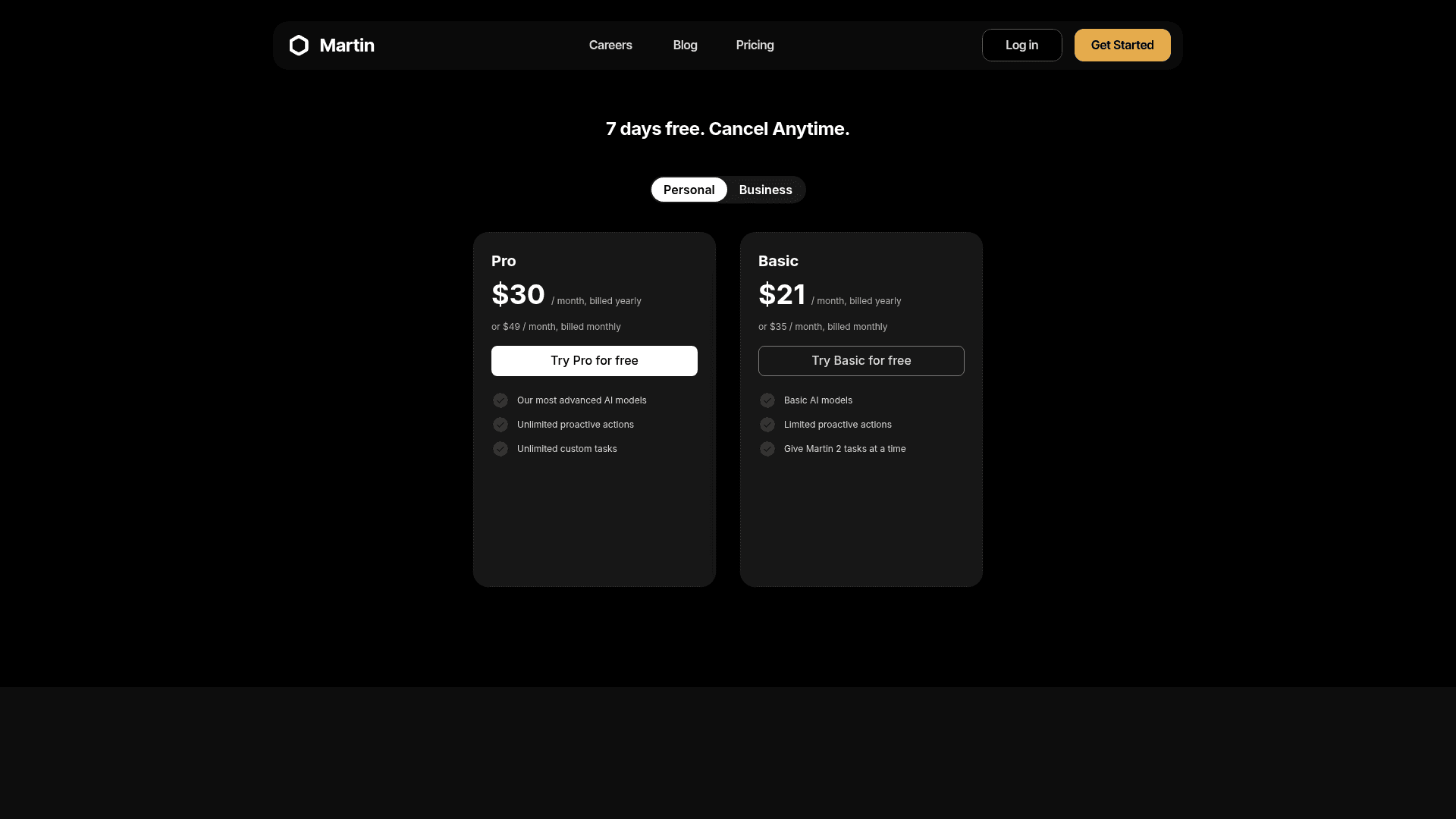
I checked Martin's pricing page and docs on October 7, 2026. The banner says "7 days free. Cancel Anytime." Here are the Personal plans:
| Plan | Billed yearly | Billed monthly | What it lists |
|---|---|---|---|
| Basic | $21/mo | $35/mo | Basic AI models, limited proactive actions, "Give Martin 2 tasks at a time" |
| Pro | $30/mo | $49/mo | "Our most advanced AI models," unlimited proactive actions, unlimited custom tasks |
Three things the table does not say out loud:
- The background tasks are the product. Email Triage, Proactive Drafts, Cc to Schedule, the daily digest and Wake Up Calls are all Pro only in the docs. If you pay $21 for Basic, you get a command-driven assistant, not the always-on one in the demos.
- There is a Business tab. The pricing page has a Personal and a Business toggle. I could not capture the Business tab's contents, so I cannot tell you what it costs or adds.
- No free plan. Just the 7-day trial.
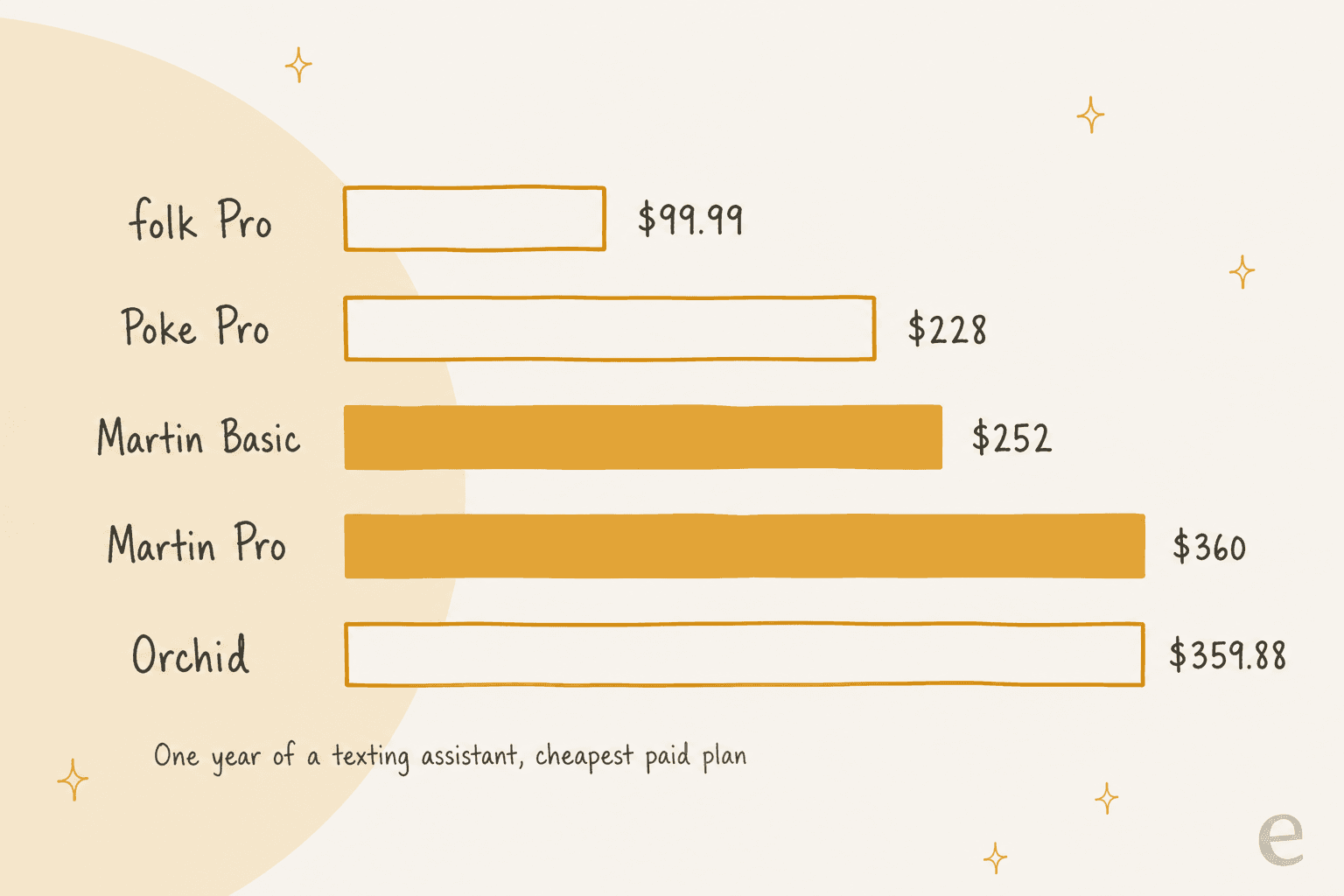
How does that compare? Annualised, Basic is $252 a year and Pro is $360 a year on yearly billing, which is $420 and $588 on monthly billing.
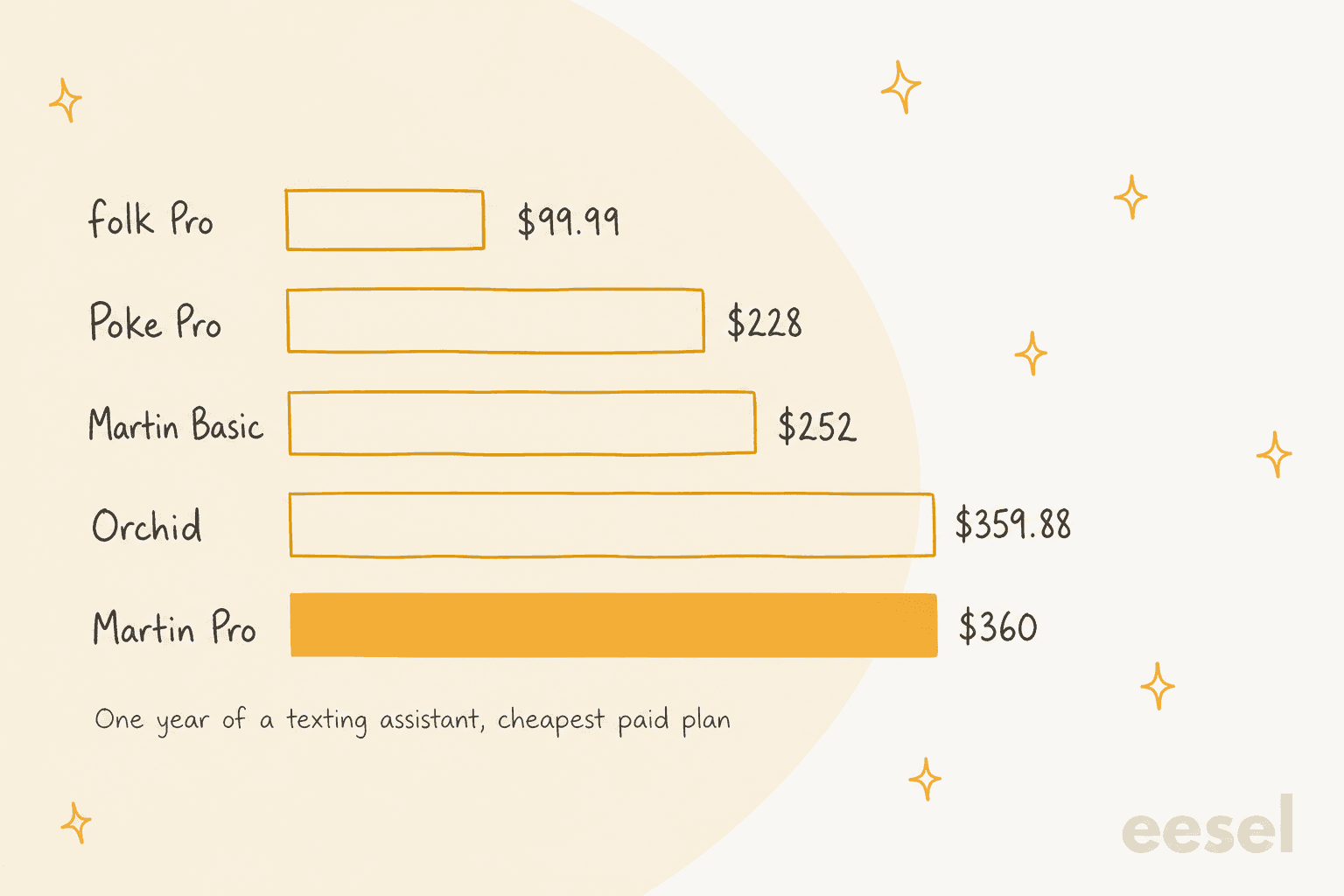
The chart uses the cheapest paid plan for the other tools, so it is not like for like. Martin Pro, the plan with the background tasks, costs about 3.6 times folk Pro on yearly billing. What you get for the premium is a wider channel list (phone, SMS, WhatsApp, email, Slack), the cc-to-schedule flow and Outlook support. My Orchid AI alternatives roundup breaks down the rest of the price field.
What about privacy and security?
This is the section where Martin is thinnest. I checked the site for a privacy policy, terms, FAQ and security page. The privacy, terms and FAQ addresses all return "Page Not Found," and so does a privacy page on the docs site.
| Question | What I found |
|---|---|
| Is there a privacy policy or terms page? | No, those addresses return "Page Not Found" |
| Does it train AI on my data? | Not stated by the vendor on its site |
| Which AI providers receive my mail? | Not stated |
| SOC 2 or ISO 27001? | Not stated on the site. In 2024 the CEO wrote "We haven't gone through SOC2 yet, but planning on soon" |
| Other compliance work | CEO said it finished CASA Tier-2 and Google's OAuth compliance for each integration |
| Data sharing | A founder wrote "Our business model is subscriptions, so we won't be going anywhere near ads or data sharing" |
The compliance statements are from Hacker News posts from 2024, not from a page on Martin's site, so treat them as a promise, not a policy. A missing policy page may just be a site that has not caught up with the product. But Martin asks for the most personal data you have, and the first commenter on the launch thread put it plainly:
"I want this, but very concerned about the security and privacy - you're talking about getting my most personal of personals (email, calendar, messages, phone calls)."
If you use Martin, I would connect a secondary account first, keep client data out, and ask the team for a written privacy statement before moving a work inbox. My guide to AI agent data privacy lists the questions worth asking any vendor.
What do real users say about Martin?
Public feedback is modest and mostly two years old. I found no Reddit threads, and the G2, Capterra and Trustpilot results I checked did not cover this product. The best evidence is Hacker News.
The praise is real:
"I use Martin to manage my todo list while i'm coding (on an hourly basis)... It's very nice to have a cloud-based agent that can access my todo whichever device/app i'm on - slack, text, whats-app!"
Another early commenter wrote that they would "probably cancel ChatGPT Pro subscription and switch to this" because it "actually does what I want" (idealboy, Hacker News). Both are from 2024, so they predate today's Basic and Pro plans. The product has also changed since: the early pricing was $30 a month, then $35 for unlimited, before the current two-tier page.
The pattern in the feedback is consistent. People like the single place that spans todo, text, Slack and email. Their worry is trust, which is why I would start Martin in the narrowest mode and widen it.
Martin vs other personal AI assistants
Martin is one of several assistants in this lane. Here is how it lines up on the questions that matter for email, using each vendor's own pages (details in my linked posts):
| Tool | Reach it by | Email providers | Background email tasks | Free plan | Cheapest paid |
|---|---|---|---|---|---|
| Martin | Phone, SMS, WhatsApp, email, Slack, iOS app | Gmail, Outlook | Pro only | No, 7-day trial | $21/mo yearly, $35 monthly |
| folk | iMessage, Telegram, WhatsApp | Gmail, Outlook | Yes, approval first | Yes | $9.99/mo or $99.99/yr |
| Orchid | iMessage, SMS | Gmail only | Yes | No | $29.99/mo |
| Lindy | iMessage, SMS, Slack, web | Gmail, Outlook | Drafts wait for you | $50 credits, 7 days | $29.99/mo |
| Instinct | iMessage, WhatsApp, calls | Gmail | Acts as your agent | Invite-only | No public price |
| Fyxer | Inside Gmail and Outlook | Gmail, Outlook | Never sends for you | Yes, no drafts | $49/mo |
The honest read: Martin's channel list is the widest, and cc-to-schedule is a built-in flow. It is also pricier than folk, has no free tier and publishes less about privacy. If you are weighing folk first, my folk email management post covers its approval flow, and the folk alternatives list goes wider. For Orchid, see client follow-ups. For agents that act on their own, my Instinct alternatives roundup is the next read, and the open-source options are OpenClaw and Hermes Agent. Prefer inbox-native help? My Fyxer reviews and AI email assistants guides are the place to start, and AI personal assistant covers the basics.
My verdict on Martin
What I like:
- The widest channel list in this category: phone, SMS, WhatsApp, email and Slack.
- Both Gmail and Outlook, up to 5 accounts each, plus Google, Apple and Outlook calendars.
- Triage and proactive drafts are configured with plain-English instructions per topic.
- Cc to Schedule is a smart, low-friction way to book meetings with other people.
What gives me pause:
- The features that make it an agent are all Pro only, so the real entry price is $30 a month billed yearly.
- No approve-before-send setting is documented for background drafts.
- No privacy policy, terms or security page, and no confirmed SOC 2 report.
- The independent feedback I could find is from 2024.
Who should use Martin: one busy person who wants a single assistant reachable from any channel and is comfortable testing it on low-stakes mail first. Who should skip it: anyone handling client or customer data, or anyone who needs a documented security posture. The deciding factor: whether the email you want help with is yours, or your company's.
When your inbox is really a support inbox
This is the pattern I see most from the helpdesk side. A founder signs up for a personal assistant because "email is out of control," and then it turns out the mail is not personal at all. It is customers asking about refunds, logins and shipping, landing in the same Gmail or Outlook account.
A personal assistant only half fits that job. Martin's Proactive Drafts follow instructions you write per topic, and they are tuned to one person's voice. A support inbox needs answers from approved knowledge, the same answer no matter who is on shift, and a clean hand-off to a human when the AI is not sure. That is what my guide to AI for email support is about, and the walkthrough on automating email support shows the setup.
For teams outgrowing a shared inbox, see shared inbox vs ticketing, the best shared inbox software and the best helpdesks for small businesses. If customers also reach you on chat apps, my WhatsApp chatbot guide covers that channel. And email response automation explains where rules end and AI starts.
Try eesel
Martin is a personal assistant for your own life. eesel is a different kind of hire: an AI teammate platform where you bring on ready-to-work teammates for specific jobs. Today that is an AI helpdesk teammate for customer support and an AI blog writer for content.
If your support runs out of a Gmail inbox, the helpdesk teammate works right there. You connect the account, then describe in plain words which mail it should handle, and per eesel's Gmail docs it skips any mail you did not describe, so your personal threads stay yours. It learns from your help center and your team's past replies, so drafts sound like your team and not a generic bot.
The part I would point a Martin user to is the testing. Before eesel answers a single customer, you can run it against your historical tickets and read what it would have said. Start in draft mode and switch on sending only when you trust it. Pricing is one fixed monthly price, from $299 for 500 credits, where a ticket is 1 credit, and the free trial includes 100 credits with no card. If customer email is what is really filling your inbox, try eesel on it.
Frequently Asked Questions
What is Martin AI?
How much does Martin AI cost?
Does Martin AI work with Gmail and Outlook?
Does Martin send emails without asking?
Is Martin AI safe for my email?
What can the Martin AI Pro plan do that Basic cannot?
Is there an Android app for Martin AI?
What are the best Martin AI alternatives?


Article by
Kira
Kira is a writer at eesel AI with a Computer Science background and over a year of hands-on experience evaluating AI-powered customer service tools. She focuses on breaking down how helpdesk platforms and AI agents actually work so that support teams can make better buying decisions.