8 Instinct AI alternatives in 2026, for people who want to see what the agent does

Rama Adi Nugraha

Katelin Teen
Last edited September 28, 2026

Why people look for Instinct AI alternatives
Credit where it is due: Instinct is the most proactive consumer agent I've looked at. You text it on iMessage or WhatsApp, it works on its own computer with your accounts, and it texts you first when something needs doing. Early users have it book appointments, cancel forgotten subscriptions and shop for insurance. Buyers who shop through it spend over $1,300 a month, according to founder Noah Shinn.
The reasons people leave come up again and again on X and Hacker News:
- It moves before you can see it. One early user said it started "establishing sessions across apps and websites i use, on its own," in a post on X. Another saw it changing passwords and switched to Grok Bot.
- You can't see much of its work. The chat bubble is the whole interface.
- The terms put the risk on you. Instinct's terms of service appoint it "as your agent" with agreements "binding on you," and disconnecting an account does not delete what it indexed.
- There is no price. The terms say pricing can change at any time and payments are non-refundable.
- It emails people as you. Gergely Orosz found Instinct's AI emails in his spam folder, and Farhan Thawar replied that spam was the biggest downside.
The quote that sums it up comes from a user who ran it hard for 48 hours:
"Tried it out for 48 hours and it does feel like the future of personal AI assistants (had it shop for new homeowners insurance, book a doctor's appointment online, search for travel, manage my LinkedIn notifications). I'm just... not yet comfortable hooking up unfettered read/write access for my entire life to an AI."
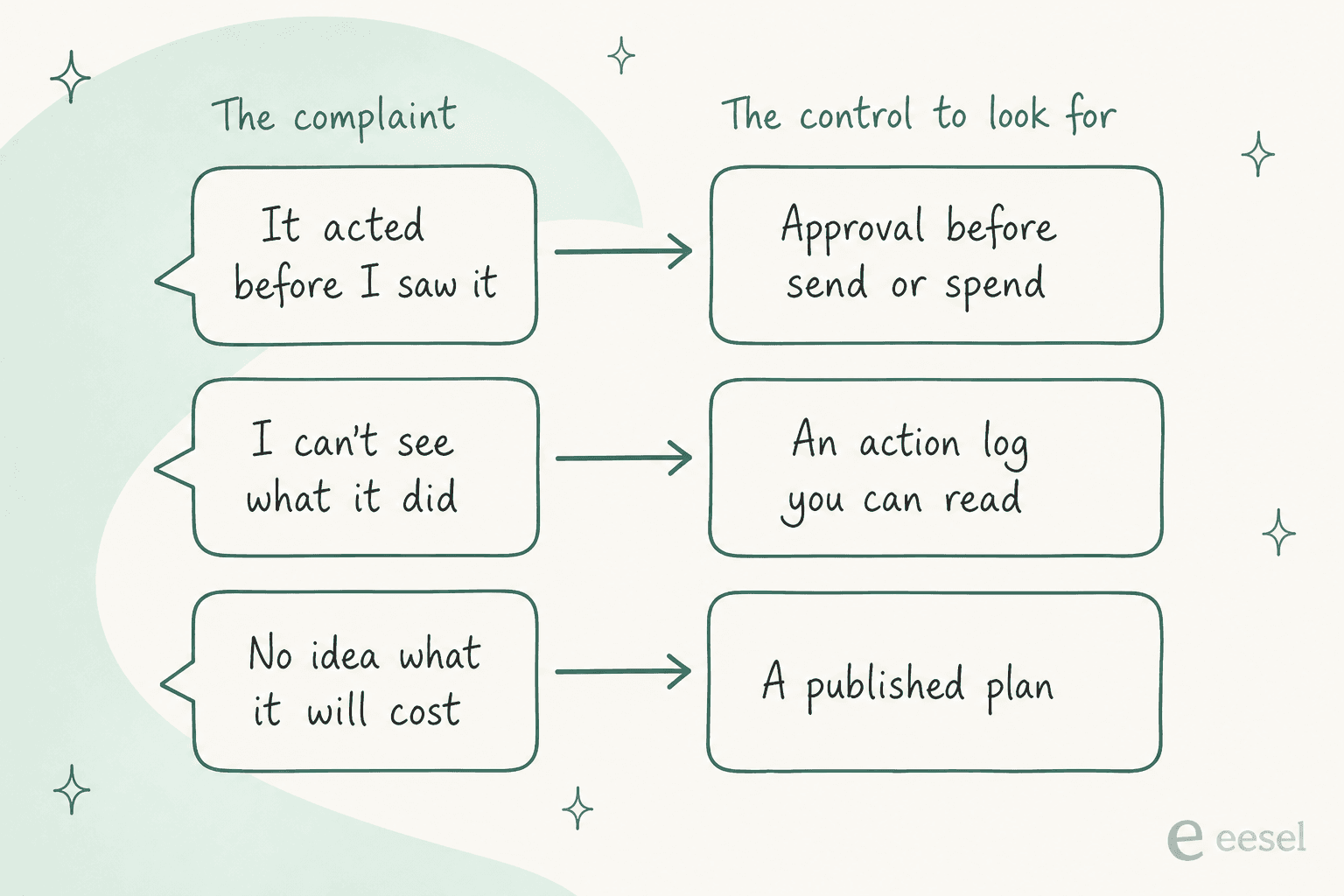
That is the brief for a good replacement. Keep the errand-running, and add ways to see and stop it.
How I picked these alternatives
Every tool here is an AI agent that takes actions, not just a chatbot that answers. I read each vendor's own pricing page, docs and security pages this week (September 29, 2026), and pulled user voices from X, Hacker News, LinkedIn and Reddit. I left out assistants that only chat.
I scored each one on four things:
- Interface. Can you text it like Instinct, or do you open an app?
- Approvals. Does it ask before it spends money or sends something?
- Visibility. Can you read a log of what it did, or watch it work?
- Price. Is there a published plan, and a free way in?
Here is the whole field on one page.
| Tool | Best for | How you talk to it | Where it runs | Asks before spend or send | Action log | Entry paid plan | Free way in | Platforms |
|---|---|---|---|---|---|---|---|---|
| Meta Muse | The closest Instinct swap | WhatsApp, Muse app | Meta's Secure VM | Yes, via Sentinel | Audit trail | $20/mo Power | Free usage limit | iOS, Android, web (US) |
| Grok Bot | Cursor or SuperGrok subscribers | Grok Bot app | One shared cloud computer | Approvals you write, plus Auto Review | Enterprise only | $20/mo via Cursor Pro | No free plan listed | macOS, Windows, iOS (docs add Linux, Android) |
| ChatGPT Work | People already on ChatGPT Plus | ChatGPT app | OpenAI's cloud or your desktop | Approves "important actions" | Progress you can review | $20/mo Plus | Limited on Free, desktop only | Desktop, web, mobile |
| Gemini | Google account households | Gemini app, Chrome | Google's cloud | Not stated on plans pages | Not stated | $19.99/mo AI Pro | Free basic tier | Web, Android, iOS |
| Claude | Careful browser tasks | Claude app, Chrome | Your browser | Blocks some site types | Not stated | $20/mo Pro | No agent on Free | Web, desktop, mobile |
| Manus | Finished deliverables | Manus app | Manus's cloud | Not stated | Not stated | $20/mo Standard | 300 daily credits | Web, desktop, mobile |
| Hermes Agent | Tinkerers who want memory | WhatsApp, Telegram, Signal, Slack | Your machine or cloud | You configure it | Your own logs | Free, optional $20 credits | Free (MIT) | macOS, Windows, Linux |
| OpenClaw | Full control, iMessage included | WhatsApp, iMessage, Telegram, Signal | Your machine | Sandboxed or full access | Your own logs | None, pay your model | Free (MIT) | macOS, Windows, Linux |
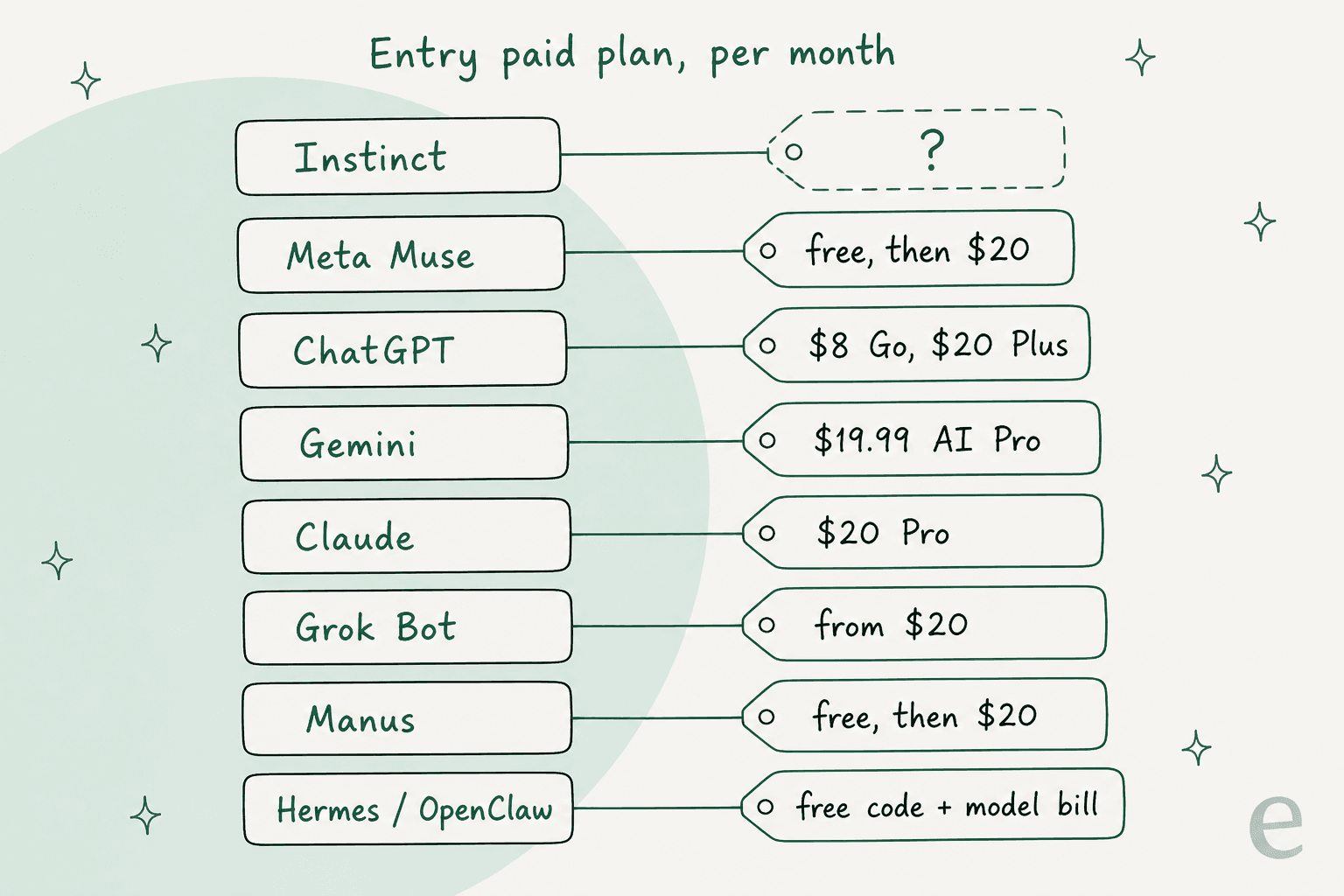
And the part that surprised me: almost nobody is cheaper than anybody else. The entry paid plan is roughly $20 a month across the board, and Instinct is the only one that won't tell you.
1. Meta Muse
Best for: anyone who likes texting an agent and wants one that shows its work.
Meta launched Muse on September 8, two weeks after Instinct's public launch, and the overlap is obvious. You talk to it "in the Muse app or directly in WhatsApp," and it books, shops, fills forms and sends email on a dedicated cloud computer. One Hacker News commenter called it "a fast follow to the current FOTM hype startup Instinct with a much more comprehensive implementation."
Features
- Muse Secure VM. Each user gets an isolated cloud machine with its own browser you can watch.
- Sentinel. A separate agent approves anything that reaches the internet, and Muse checks with you before sensitive actions.
- No password or card visibility. Logins sit in a vault, and checkout runs through one-time Link by Stripe cards, the same payment rail Instinct uses.
- Complete audit trail, a training opt-out, and no sharing with Meta's ad systems, per the launch post.
Pros
- Same texting feel as Instinct, but with a published security design. The Meta Muse review goes deep on it.
- Actually has a free tier.
- Approvals show up in the app, not the chat, so a hijacked conversation can't fake your consent.
Cons
- US-only at launch, and Meta says subscriptions are in "limited testing" and not in all locations yet.
- It is Meta. For some readers that ends the conversation, and a commenter noted that Instinct's pull is partly "by not being associated with Meta."
- The promised Muse Confidential VM, with a key only you hold, is still "later this year."
Pricing
| Plan | Price | Weekly usage |
|---|---|---|
| Free | $0 | A usage limit that refreshes; Mark Zuckerberg put it at 100M tokens a week |
| Power | $20/month | 500M Muse tokens |
| Maximum | $100/month | 3B Muse tokens |
Both paid plans renew monthly, per Meta's Muse subscriptions help page. My Meta Muse pricing guide has the worked examples.
My take: pick Muse if you want the Instinct experience with brakes you can see. Skip it if you're outside the US or won't give Meta your inbox. The deciding factor is trust in the company, not the product, because Muse answers two of Instinct's three big complaints in writing.
2. Grok Bot
Best for: people who already pay for Cursor or SuperGrok.
Grok Bot is xAI's agent that signs into your apps on a persistent cloud computer and runs routines for you. It is the name that comes up most when Instinct users compare notes, usually as the calmer option:
"I have tried all of the popular AI assistants (ex Muse, geolock), my take: right now, Grok Bot is for 90% of people, Hermes is for 10%. Instinct is simply too scary with how assertive it is, and how little under the hood operations it exposes."
Features
- Routines and skills that run on a schedule, with a Marketplace for connectors.
- Auto Review for sensitive actions, which xAI says "should complement, not replace, least privilege and explicit approval boundaries."
- Screen handoff for logins. You type the password yourself, and the session stays on the cloud computer.
- Apps for macOS, Windows and iOS, and the docs FAQ adds Linux and Android.
Pros
- Often described as simple and reliable. Eric Siu calls it his "daily driver" because "it's been reliable across the workflows I use most."
- Included with plans you may already have, so the extra cost can be $0.
- Clear, published pricing, unlike Instinct.
Cons
- Every Bot shares one cloud computer, and xAI's own docs say, "Do not use separate Bots as a security boundary."
- There is no dry run. The routines docs say, "A test run performs real work."
- Action Recording and audit logs are Enterprise-only, per the security docs. Individuals don't get the log.
Pricing
| Plan that includes Grok Bot | Price |
|---|---|
| Cursor Pro | $20/month |
| SuperGrok | $30/month |
| Cursor Teams | $40/seat/month |
| Cursor Pro+ and Ultra, SuperGrok Plus and Heavy | Higher tiers, also included |
Weekly usage is included, and extra usage bills at token cost. The Grok Bot pricing breakdown covers the higher tiers.
My take: Grok Bot is the easiest step down from Instinct's intensity, especially if you already pay for Cursor. Skip it if you need a record of what it did, because the log is Enterprise-only. More options in the Grok Bot alternatives roundup.
3. ChatGPT Work
Best for: people already paying for ChatGPT Plus.
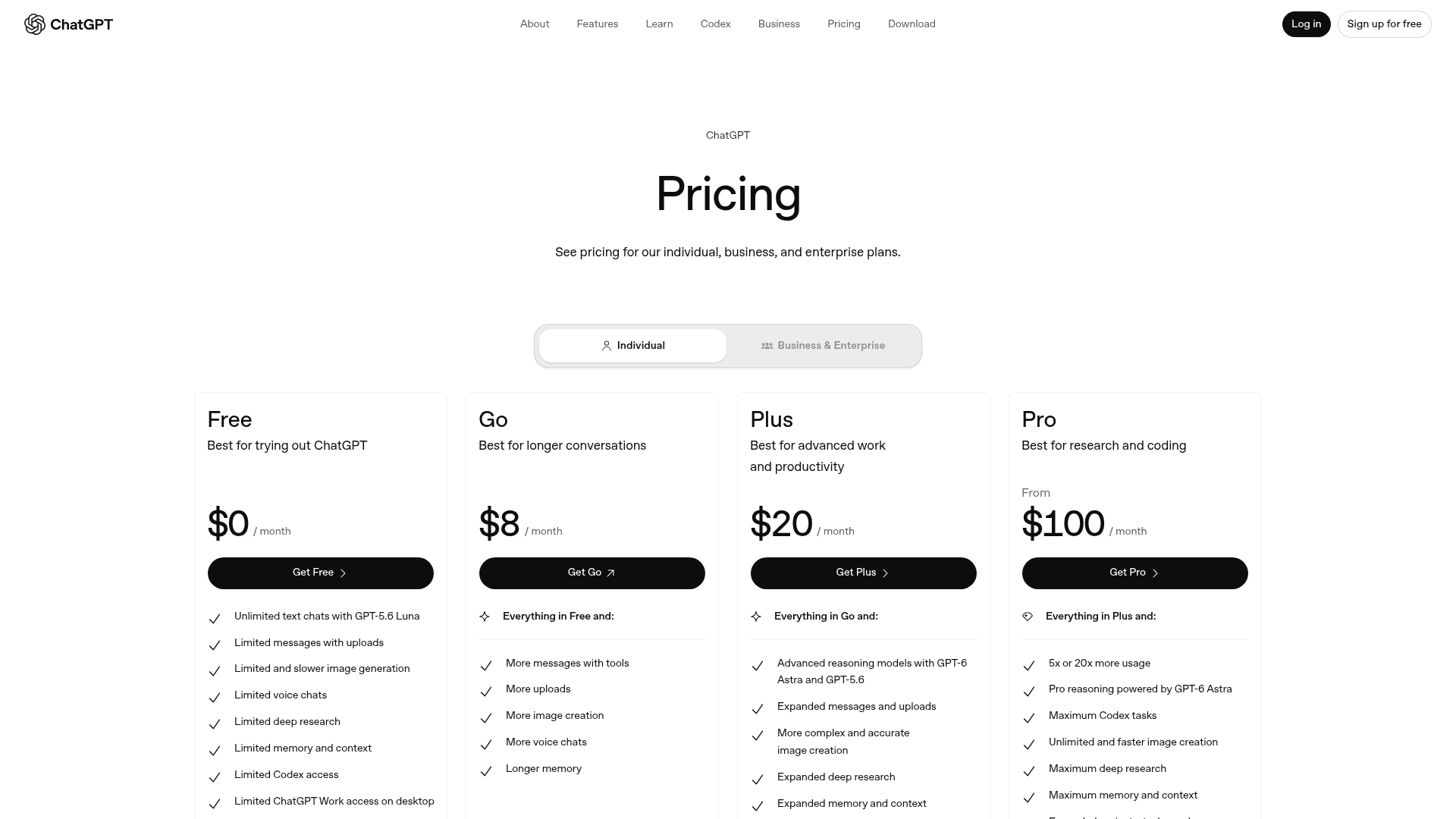
OpenAI's agent mode is now called ChatGPT Work. Per OpenAI's help center, it handles "longer, multi-step work and finished deliverables," can use a browser, and runs once, on a schedule, or when an event fires. It won't text you first the way Instinct does, but you may already be paying for it.
Features
- A built-in browser on every plan.
- Scheduled tasks from the Go plan up, and event triggers (Gmail, Slack, GitHub pull requests) from Plus up.
- Local files and desktop apps on the desktop app, with your permission.
- Check-ins. OpenAI says you can "review progress, answer questions, change direction, and approve important actions."
Pros
- The biggest ecosystem of any option here, with ChatGPT apps and checkout.
- Scheduled and event-triggered runs cover a lot of what Instinct's proactivity does.
- You can watch and redirect it mid-task.
Cons
- No text-message interface. You open ChatGPT to use it.
- OpenAI no longer publishes a fixed monthly task count. Work "follows the same usage structure as Codex," and usage "will vary by task."
- Free and Go only get limited Work on the desktop app.
Pricing
| Plan | Price | Work access |
|---|---|---|
| Free | $0 | Limited, desktop app only |
| Go | $8/month | Limited, desktop app only |
| Plus | $20/month | Expanded, on desktop, web and mobile |
| Pro | From $100/month | 5x or 20x more usage than Plus |
Prices from ChatGPT pricing. The ChatGPT checkout security guide is worth a read before you let it buy things.
My take: if you already pay $20 for Plus, try Work before you pay for anything new. Skip it if texting is the whole point for you. More picks in the ChatGPT alternatives list.
4. Google Gemini
Best for: households that live in Gmail, Calendar and Chrome.
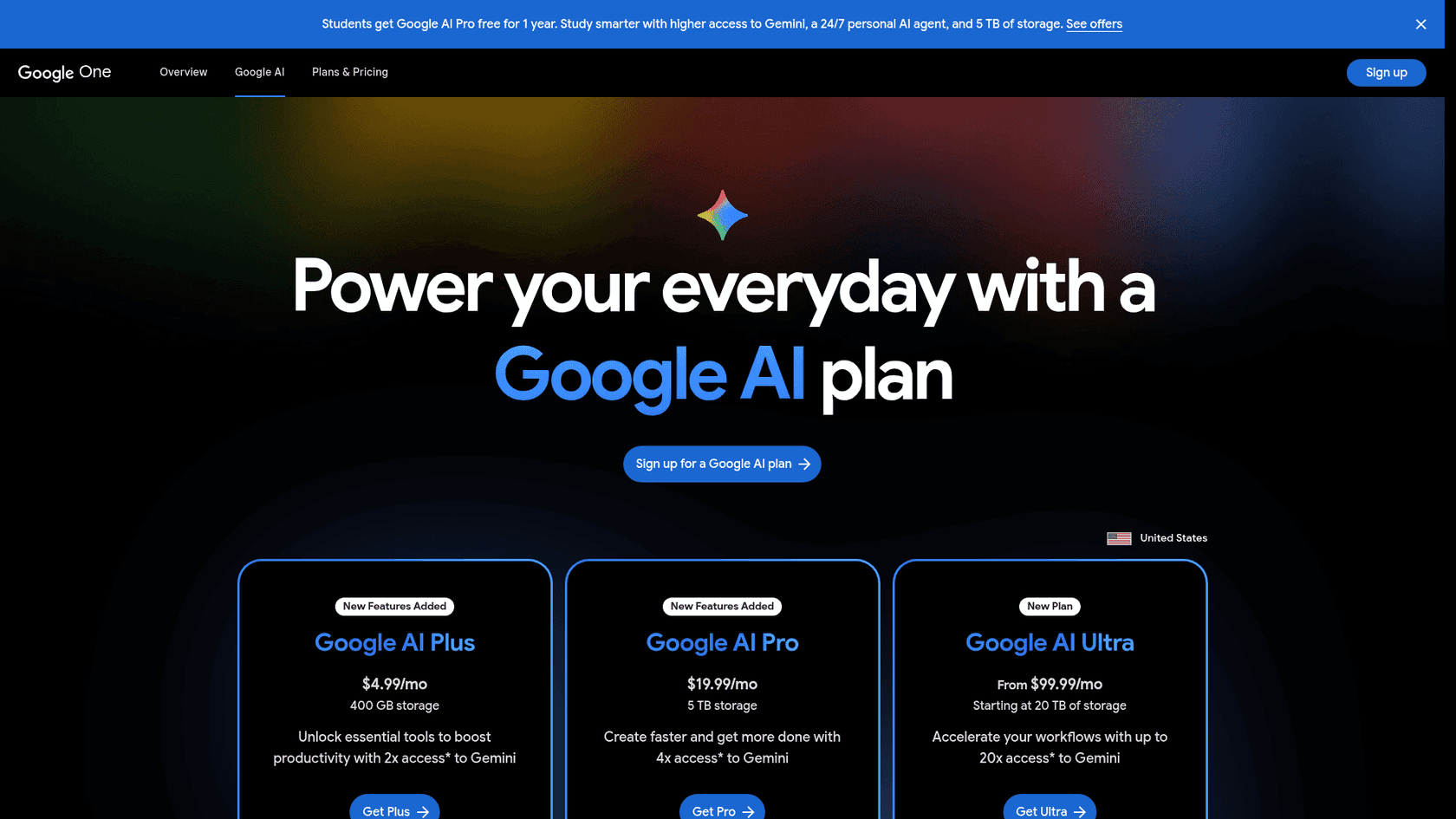
Google splits its agent features across plans. Gemini Spark is the always-on agent, and Chrome auto browse lets Gemini click through websites for you. The heavier Gemini Agent sits on Ultra.
Features
- Gemini Spark, listed on AI Pro and Ultra "in select countries," with Ultra getting it first, per the Google AI plans page.
- Chrome auto browse on AI Pro, with higher limits on Ultra.
- Gemini Agent on Ultra, "US only, English only."
Pros
- Already connected to the Google accounts most people use daily.
- A cheap AI Plus tier at $4.99 if you only want the assistant.
- The mid plan is $19.99, a hair under the $20 pack.
Cons
- The agent pieces are spread over three plans, so it's easy to buy the wrong one. AI Plus has no Spark.
- Region-gated: Spark is in select countries, and Gemini Agent is US and English only.
- The plans pages don't describe an approval step before spending or sending.
Pricing
| Plan | Price | Agent features |
|---|---|---|
| Free | $0 | Basic Gemini |
| AI Plus | $4.99/month | No Spark |
| AI Pro | $19.99/month | Spark (select countries), Chrome auto browse |
| AI Ultra | $99.99/month (5x) or $199.99/month (20x) | Spark first, Gemini Agent (US, English) |
Prices from Gemini subscriptions.
My take: pick Gemini AI Pro if your life already runs on Google and you're in a supported country. Skip it if you want one clear agent product rather than features spread across tiers. See Gemini alternatives for more.
5. Claude
Best for: careful browser tasks where you want to stay in the loop.
Anthropic's route is Claude in Chrome, a browser agent that clicks, fills forms and works across tabs while you watch. It works in the browser you already use, so it isn't a hands-off errand runner. For some people that's the point.
Features
- Claude in Chrome on Pro and Max, per Claude pricing.
- Scheduled task hand-off, plus Claude Code, research and Microsoft 365 and Outlook access on Pro.
- Claude Cowork, the desktop agent, listed on the Team plan. My Claude Cowork review covers how it behaves.
Pros
- It works in a browser you can see, so there's less mystery about what it touched.
- Pro bundles a lot for $20, including the coding tools.
- Blocks some high-risk site categories by default.
Cons
- No agent features on the Free plan.
- Not built to run your life in the background or text you first.
- Heavy agent use pushes you toward Max, which starts at $100 and bills monthly only.
Pricing
| Plan | Price | Agent features |
|---|---|---|
| Free | $0 | No Claude in Chrome |
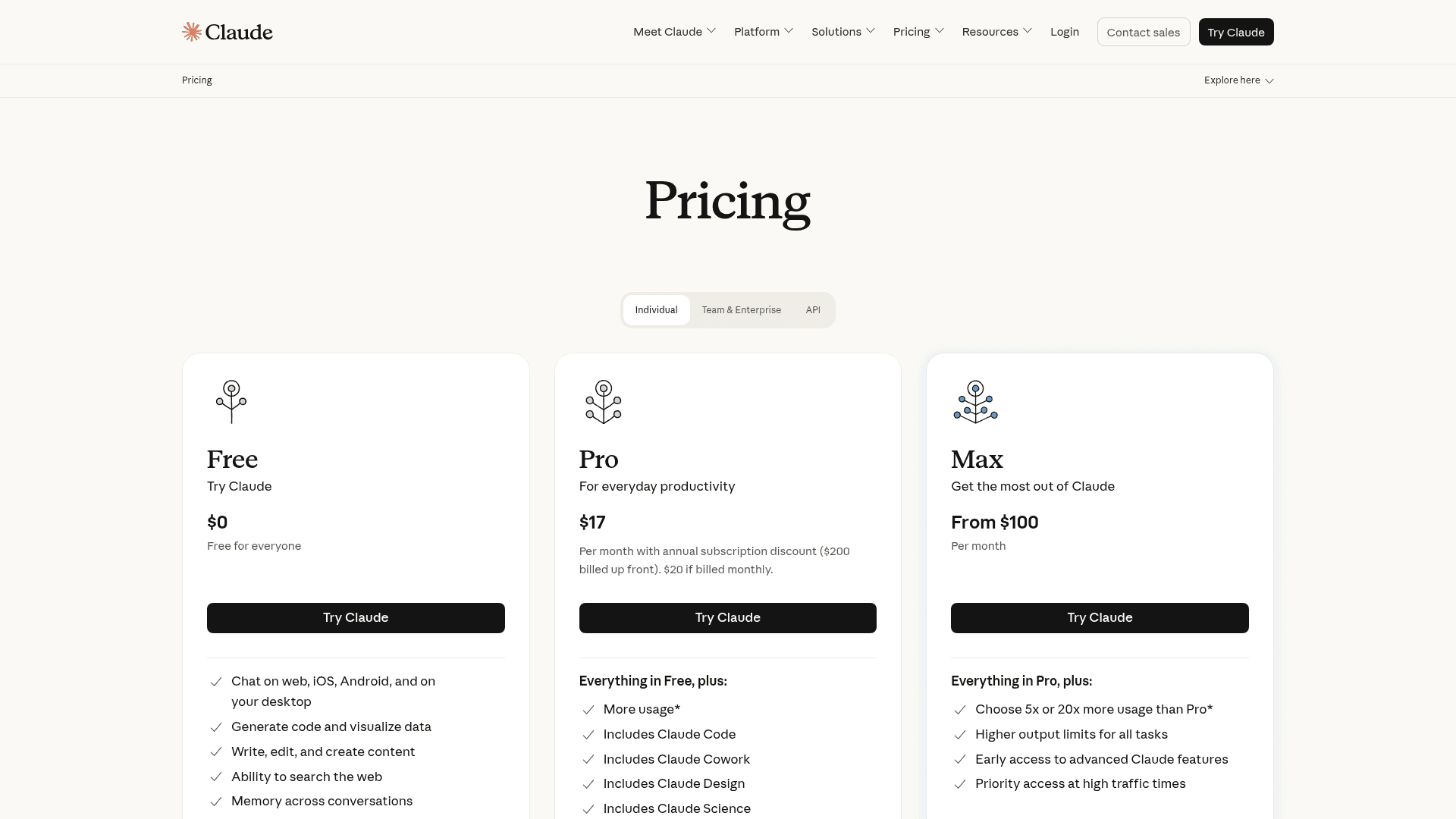
| Pro | $17/month billed annually, or $20 monthly | Claude in Chrome, Claude Code |
| Max | From $100/month | 5x or 20x Pro usage |
| Team | $20/seat/month annually ($25 monthly) | Adds Claude Cowork |
My take: Claude suits the person who reacted to Instinct with "I want to watch it." Skip it if you wanted something that works while you sleep. The Claude alternatives and best AI assistants list go wider.
6. Manus
Best for: handing off a finished deliverable, like research, a site or a spreadsheet.
Manus is less of a personal assistant and more of an autonomous worker. You give it one prompt and it runs for minutes or hours in its own cloud, then hands back a result. It's independent again since September 1, after its separation from Meta.
Features
- Browser Operator, a cloud browser that works through sites for you.
- Wide Research, which splits one task across parallel sub-agents.
- Website builder with its own small usage meter.
- Credit refunds for tasks that fail on Manus's end.
Pros
- The best option here for long, heavy jobs. One researcher said the agents "worked for 4-5 hours" on a single prompt and it was "totally worth it."
- A real free plan, with 300 credits a day.
- Clear published plans.
Cons
- Credits are hard to predict. One Reddit user said a simple Excel task "consumed over 2500 credits."
- It's not a text-me-first assistant, and it doesn't live in your inbox the way Instinct does.
- Some user data was deleted during the Meta separation, which Manus handled with a restoration portal.
"I asked it to a simple excel task, and frankly the output was well below average and it consumed over 2500 credits! It was really pathetic!"

Pricing
| Plan | Price | Credits |
|---|---|---|
| Free | $0 | 300 daily credits, Manus 1.6 Lite, 1 task at a time |
| Standard | $20/month | 4,000 a month |
| Customizable | $40/month | 8,000 a month |
| Extended | $200/month | 40,000 a month |
Annual billing saves 17%. The Manus pricing guide has credit-per-task examples.
My take: pick Manus when the job is "make me a thing," not "handle my week." Skip it if unpredictable credit burn will stress you out. The Manus AI alternatives list compares it with more deliverable agents.
7. Hermes Agent
Best for: tinkerers who want a self-hosted agent that remembers everything.

Hermes Agent from Nous Research is a free, MIT-licensed agent you install yourself. It reaches you over "Telegram, Discord, Slack, WhatsApp, Signal, Email, CLI" with "one agent, one memory, every surface."
Features
- Persistent memory that "learns your projects, auto-generates skills, and never forgets how it solved a problem."
- Unattended scheduling for reports, backups and briefings.
- Five backends: local, Docker, SSH, Singularity and Modal.
- Desktop apps for macOS and Windows, plus a one-line terminal install.
Pros
- Your agent, your machine, your logs.
- Texts you on WhatsApp or Signal, close to the Instinct feel.
- Free software, with optional credits if you don't want to manage model keys.
Cons
- Setup is on you. Instinct's appeal was that you just text it.
- iMessage isn't in its listed channels.
- Some users find the open-source agents heavy going.
"Now I just want to see a version I can run on my own hardware so I don't have to worry about some sketchy company hoarding my data. I know OpenClaw and Hermes are supposedly answers to this, but I find that they've each become so bloated with features that they're far more difficult to use and bug prone than I'm happy with."

Pricing
The software is free. If you'd rather not bring your own model keys, Nous Portal sells credits:
| Nous Portal plan | Price | Monthly credits |
|---|---|---|
| Free | $0 | Free models only |
| Plus | $20/month | $22 |
| Super | $100/month | $110 |
| Ultra | $200/month | $220 |
My take: pick Hermes if you want Instinct's texting and memory without a startup holding your data, and you're happy to run a server. Skip it if you want zero setup. The Hermes Agent alternatives list covers its neighbours.
8. OpenClaw
Best for: full control, including iMessage.
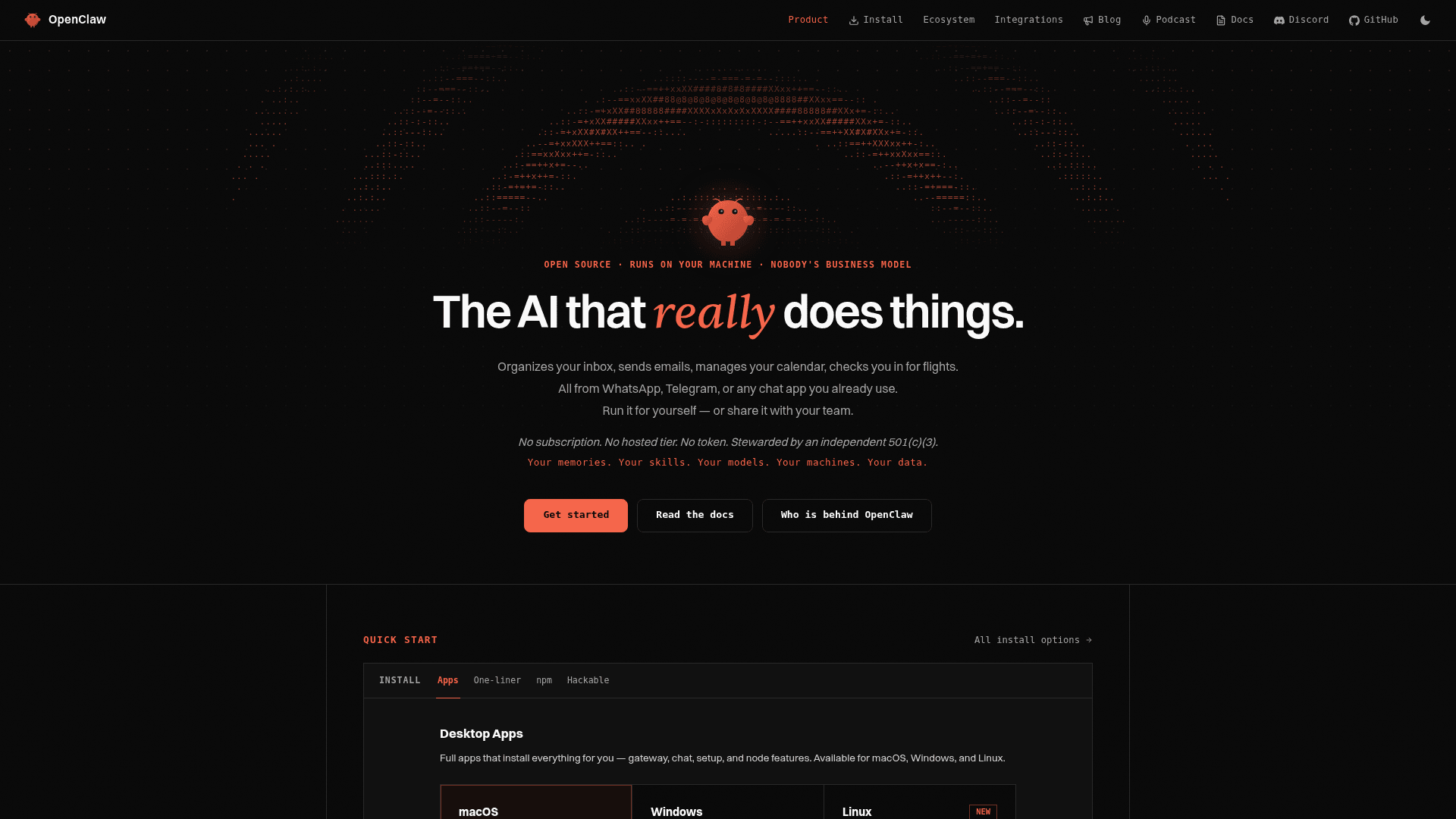
OpenClaw is the open-source agent the managed ones keep getting compared to. You can "talk to it on WhatsApp, Telegram, Discord, Slack, Signal, iMessage, or any of its 29 channels," and "state lives on your machine, not a vendor cloud."
Features
- 29 chat channels, in DMs and group chats.
- Browser and system actions: it "browses the web, fills forms, reads and writes files, runs shell commands," with "full access or sandboxed."
- Any model: hosted, subscription-backed, gateway or local.
- Persistent memory of your preferences, projects and people.
Pros
- The only option here with iMessage, Instinct's home turf, in its official channel list.
- Stewarded by an independent 501(c)(3) foundation, with "no enterprise edition and no paid version."
- By default an install sends the foundation nothing but a daily version check.
Cons
- You own the blast radius. Give it full access and a bad instruction runs on your own computer.
- Setup takes real effort. One Instinct user on LinkedIn called Instinct an improvement over "previous tools like OpenClaw that required lengthy and involved setup."
- No one watches it for you, so any approvals and logging are yours to configure.
Pricing
Free, MIT-licensed software on macOS, Windows and Linux. You pay only for the model you plug in. The OpenClaw guide and the open-source AI agents roundup cover setup.
My take: OpenClaw is the answer if your problem with Instinct was trusting a company with your life. Skip it if your problem was effort, because it asks for more, not less.
Where each alternative sits
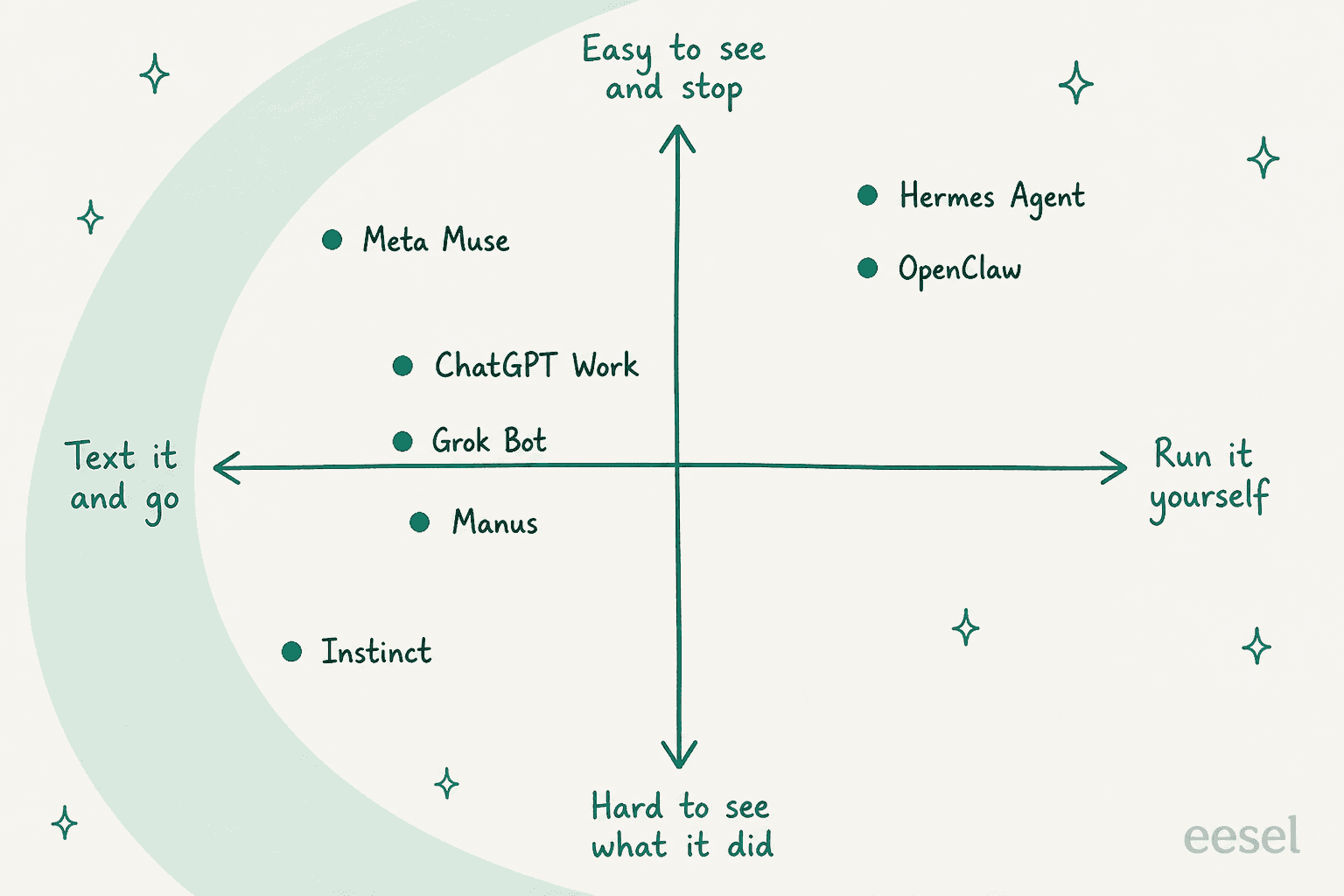
Put the eight on two axes and the trade-off gets clear. Instinct is the easiest to start and the hardest to see into. Meta Muse keeps the ease and adds the most visibility of the hosted options. The self-hosted pair give you full sight of everything, at the price of running it yourself.
If you're still stuck, pick the answer that sounds most like you:
What made you look past Instinct?
Tap an answer to see my pick.
The honest option for work: a teammate, not a personal agent
Plenty of Instinct users end up pointing it at work: a shared inbox, customer emails, a content calendar. Brad Groux found that Instinct's agent told him he could connect Microsoft 365 work accounts, then admitted it shouldn't have, since Section 6 of its terms limits it to personal use.
That isn't a bug in one product. It's a category mismatch. A personal agent is a generalist with your whole life as its scope. A work job needs the opposite: narrow scope, approved knowledge, and a way to check its work before it goes live. That's how I'd describe AI teammates: ready-to-work hires for a specific job, not an agent with an open brief.
At eesel the roster is two teammates today. The AI helpdesk teammate works your support queue, and the AI blog writer researches and drafts long-form posts. Neither will book your dentist. Both do one job with the brakes built in.

The controls map straight onto the three Instinct complaints:
- Asks before it acts. Every action (reply, tag, refund, route) is set to auto, needs approval, or off, per the actions and approvals docs.
- Shows what it did. An activity log lists every run and the ticket it touched.
- Publishes its price. The pricing page starts with a free plan of 100 credits, where one ticket or chat is one credit.
It also does the step Instinct skips. Before it replies to anyone, you can simulate it against hundreds of your past tickets and read what it would have said. That is the "draft first, then graduate" pattern eesel's buyers keep asking for, built into setup. If you're choosing an AI agent for customer service, that test run is the thing I'd insist on from any vendor.
For people who work from a terminal, the same teammate runs from the eesel CLI. You, a script, or a coding agent like Claude Code can run eesel approvals list to see what's waiting on a human, eesel activity to read back what the teammate did, and add --dry-run to any write to print the exact change before it's sent. Every workspace is also an MCP server, so an agent in your editor can operate eesel directly. The managing agents from a terminal guide walks through it.
Try eesel
If you came here because you wanted Instinct to handle your support inbox, hire the teammate built for that job instead. eesel's AI helpdesk teammate plugs into Zendesk, Freshdesk or Gorgias in minutes, learns from your help center and past tickets, and asks before any action you haven't cleared it for.

Run the simulation on last month's tickets, read every answer, and only then let it send. Try eesel free, with no card needed.
Frequently Asked Questions
Is there a free Instinct AI alternative?
How much does Instinct AI cost compared to its alternatives?
Which Instinct AI alternative works over text message?
Which Instinct alternative is the most private?
Can I use an Instinct AI alternative for work?
Why are people looking for Instinct AI alternatives?


Article by
Rama Adi Nugraha
Rama is a software engineer at eesel AI with two years of experience writing about B2B SaaS, AI tools, and customer support technology. Based in Bali, Indonesia, he brings a developer's perspective to product comparisons — cutting through marketing copy to what the integrations and APIs actually do.