

Meta launched Muse, a personal AI agent, on September 8, 2026. It does not just chat, it acts: it books travel, fills out forms, sells your car, lowers a bill, and checks out with a one-time card, all from its own app or straight inside WhatsApp. It runs on Muse Spark 1.3, Meta's most capable model.
The part that stands out is not the tasks, it is the security wrapper. Muse lives in an isolated cloud computer, a separate guard called Sentinel has to approve anything before it touches the internet, and your passwords sit in a vault the agent can never see into. On paper it is the most carefully built consumer agent I have looked at.
The catch is trust and newness. It is US-only, 18+, brand new, and it rests entirely on being comfortable handing Meta your email, calendar, and browser. Pricing is a free tier plus $20 and $100 monthly plans. It is a polished personal assistant, not a tool for a work role, and that distinction matters more than the demo suggests.
I have spent the last three-plus years putting AI agents on live support queues, so I read every "it just does the work for you" launch through one lens: what happens the first time it acts on something it only half understands. One vehicle-telematics team I worked with, running about 200 tickets a month on Zendesk, watched their earlier bot confidently tell a customer "yes, we support your car model" for brands that were not in the database, because the help center said "we support all models." Nobody typed a wrong answer. The agent filled a gap with confidence. That is the exact failure mode you are inviting when you let any agent, Muse included, take actions on your behalf, and it is the thing I kept in mind through this whole review.
What Meta Muse actually is
Muse is Meta's personal AI agent, built under chief AI officer Alexandr Wang and pitched as "your personal AI agent that gets things done." Meta calls it the first personal AI agent built for everyone, with no learning curve, which is the same "works for billions" framing the company uses for its other consumer products.
You talk to it like a text thread, either in the Muse app or directly inside WhatsApp. Under the hood it runs on Muse Spark 1.3, the same frontier model behind Meta's terminal coding tool Muse Code. Where a normal chatbot answers and stops, Muse is designed to be proactive and long-running: you give it a goal, it builds a plan, and it keeps working after you close the app, coming back when something changes or when it needs your sign-off.
That "keeps working" part is the real shift. Muse runs on Muse Secure VM, a dedicated cloud computer with its own browser that you can actually watch. It can open that browser, fill out forms, and, in Meta's words, negotiate on your behalf. It also remembers what matters to you and makes suggestions you did not ask for, like turning a recipe reel you saved on Instagram into a grocery list.
What it can actually do
Here is Meta's own product gallery, which is the clearest picture of the agent in use:
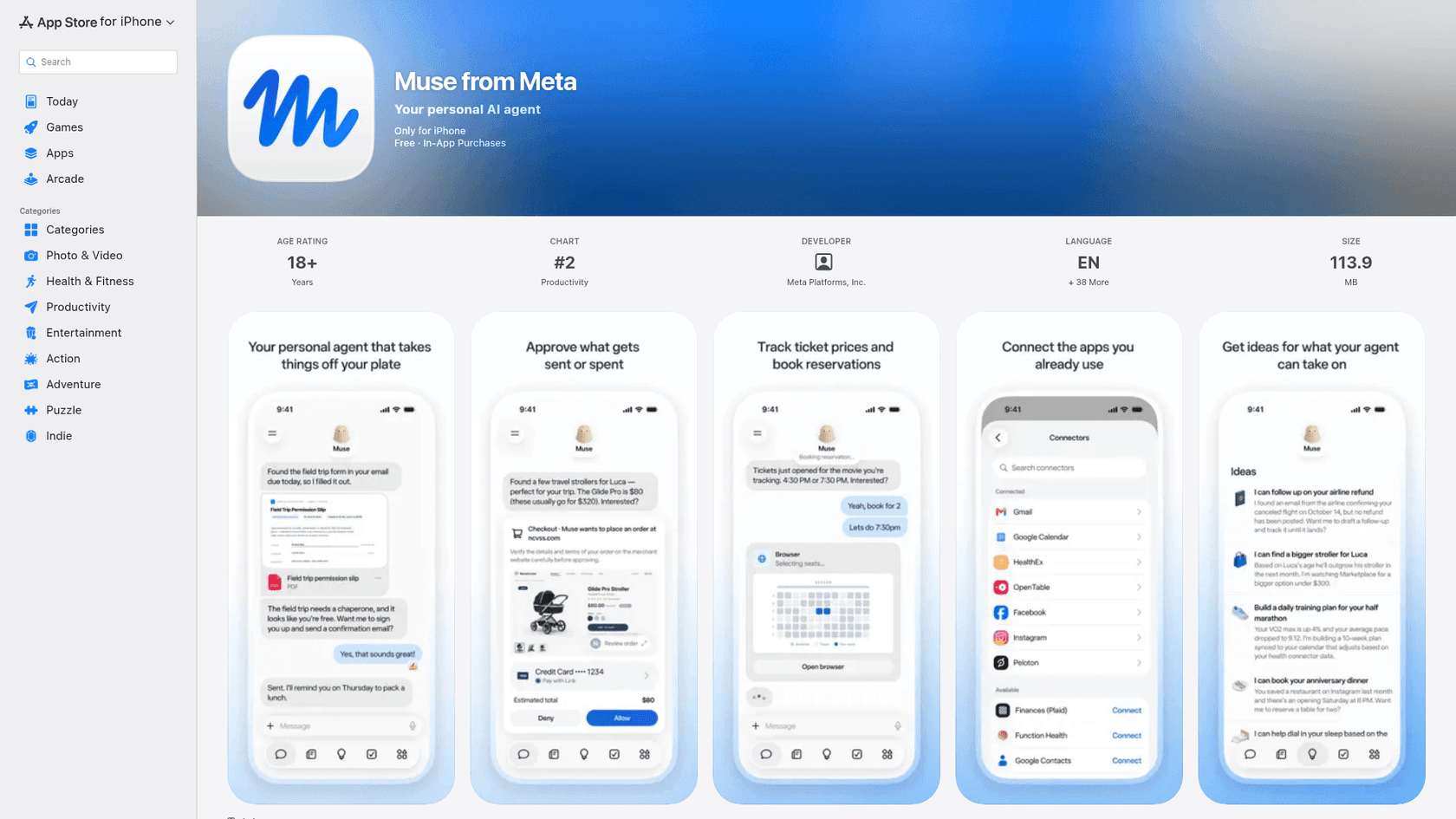
The everyday jobs are the pitch: find the field trip form in your email and fill it out, track a price and book the reservation, draft a follow-up on a delayed airline refund. Muse connects to the apps you already use, and the connector list at launch reads like a normal person's phone: Gmail, Google Calendar, OpenTable, Facebook, Instagram, Peloton, and Plaid for finances, among others.
The commerce piece is more ambitious than most agents have attempted. When it is time to pay, Muse checks out with Link by Stripe, and Meta says it is the first AI agent covered by Link's purchase protections, with a one-time-use card so your real card number never gets exposed. Shop Pay and 1Password support are listed as coming soon. If you have followed agentic commerce through the year, this is the same direction ChatGPT shopping has been heading, with Meta leaning harder on the payment-safety angle.
One early tester on Hacker News who actually poked at it came away impressed by how open it is:
"It's running in its own VM, but it's an impressively transparent system: You have access to its System Files right in the GUI, which surprised me. You can look at the AGENTS.md and other harness files it uses as well as some shell scripts, bash files, cronjob folder."

That transparency is unusual for a Meta consumer product, and it is a genuine point in Muse's favor.
The security model is the real story
Most consumer agents wave at safety in a sentence. Muse builds a whole architecture around it, and this is where it separates from general-purpose agents like Manus or the current ChatGPT agents.
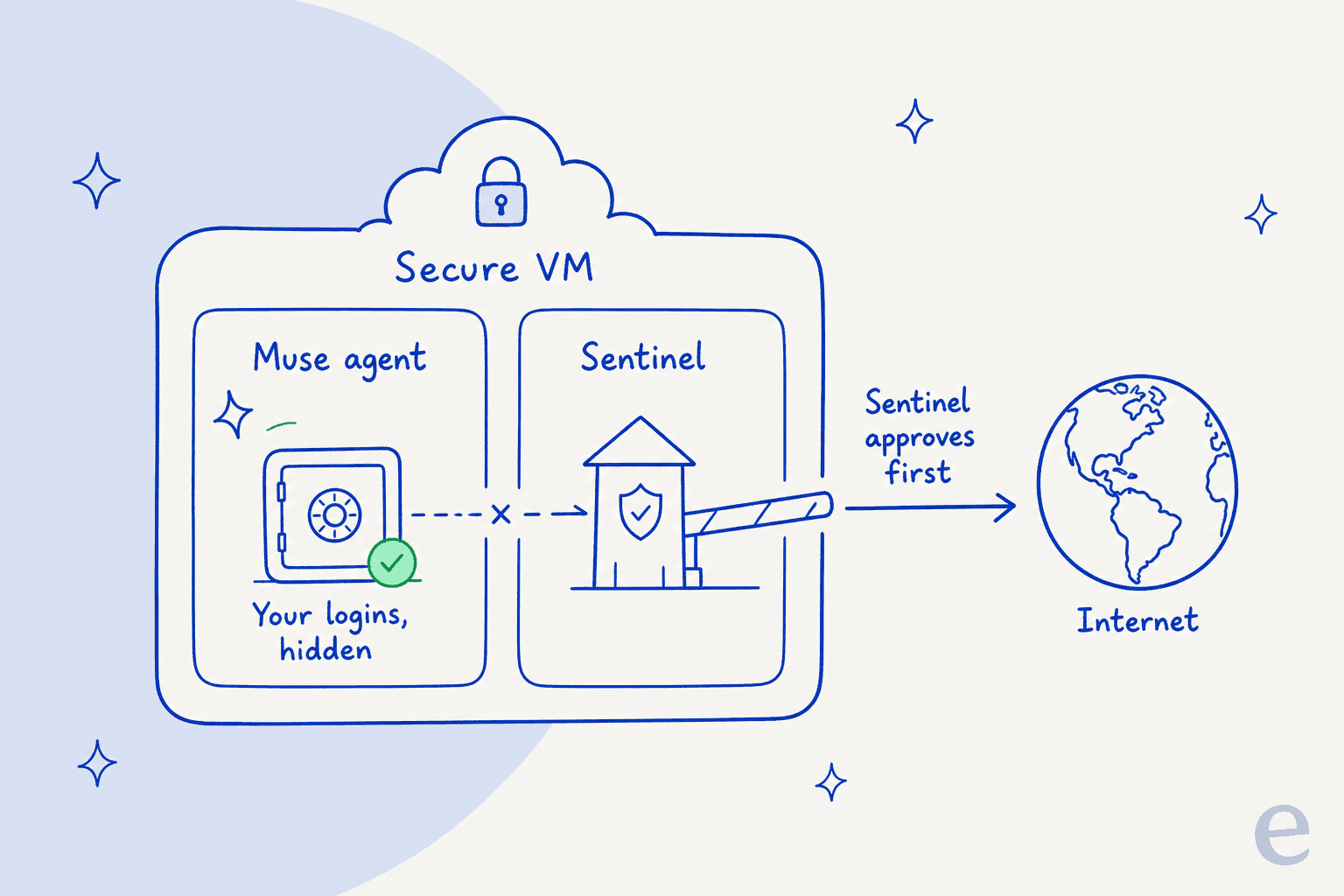
Four pieces do the work here:
- An isolated computer. Muse runs on its own dedicated cloud machine, walled off so no one else's agent can reach it. Your data and the credentials for any service you connect live there.
- A Sentinel guard. A separate Sentinel agent runs on that same machine but is kept apart from Muse at the system level. Nothing Muse does reaches the internet unless Sentinel approves it, and Sentinel asks you when it needs to.
- A credential vault. Muse has no visibility into your passwords or payment methods. Logins go into secure storage, and Muse uses them without ever seeing them, including passwords you type into the browser yourself.
- An audit trail and per-app scopes. Muse checks with you before sensitive actions and shows a complete log of everything it has done and plans to do. You pick which apps it connects to and exactly how much it can do, like whether it can only read your mail or also send it.
Later in 2026, Meta plans a Muse Confidential VM, where the whole machine, including your data and conversations, is encrypted with a key only you hold, so not even Meta can see inside. That is a real answer to the obvious objection, and one tester said it was the detail that finally got them to connect an account.
Whether you find this reassuring comes down to who you trust to run it. The security team behind it has defenders:
"I trust Meta's security team a lot more than anyone else's in that respect. They are big enough and pay well to have a competent team... given the kind of data they are guarding, they're probably the best in the business."
Pricing: free, $20, and $100
Muse launched with a free tier and two subscriptions: $20 per month and $100 per month. Wang framed the free tier as enough for most people, with the paid plans there to cover compute for heavy users. There is no advertising inside Muse, and Meta says your conversations and VM data are not shared with its ad systems, though the company is exploring commerce revenue.
That three-tier shape drew the obvious complaint on launch day, that everyone has settled on the same free / $20 / $100 menu regardless of what the product does. It is a fair gripe, and it is worth remembering that these are consumer prices for personal errands. The moment you are pricing an agent for a business job, the math changes: seats, per-token costs, and per-resolution fees all behave differently, which is why the cost of an AI agent versus a human is a separate conversation from a $20 personal plan.
Should you connect your accounts to Muse?
The honest catch
Muse is impressive, and I want to be fair about where it is thin.
It is brand new and unproven. Everything above the security architecture is Meta's own description of a product that shipped a day ago. The polished demo is not the same as a month of real use, and agents that "negotiate on your behalf" have a long history of looking better on stage than in your inbox. As one commenter put it, most of the annoying parts of daily life are personal and one-off, and do not have clean APIs, which is exactly where these agents tend to stall.
It runs on Muse Spark 1.3, which is fast and cheap but, in our Muse Spark 1.3 review, turned out to be a verbose coding specialist whose top "max" reasoning tier was still gated at launch, and which trails Opus 5 on several agent benchmarks. A capable model, but not the unambiguous frontier the marketing implies.
And it is US-only and 18+, so most of the world cannot try it yet.
The biggest reservation, though, is not technical. It is that the whole thing asks you to hand Meta your email, calendar, browser, and finances. That is where the launch reaction landed, and the single most-liked sentiment captured it in five words:
"Love the idea and the polish. Hate the owners."
Others were blunter about the dependency risk:
"Facebook has a horrible experience when you're traveling or logging in from a new computer... Wouldn't want to depend on anything from Facebook, especially not something with access to my email, calendar, and browser."
To be balanced, not everyone was skeptical of the tech itself. A daily Claude user tried the underlying model and came away surprised: "First time I've been impressed by meta's AI products. It feels not far below opus 4.8ish." The product may well be good. The reservation is about the owner, not the engineering.
Where a personal agent stops and a work teammate begins
Here is the distinction I keep coming back to, and it is the one the review really turns on.
Muse hires one generalist to run your personal life. That is a useful thing, and it competes with Manus, whose credit system adds up fast, ChatGPT agents, and the broader wave of general-purpose assistants trying to do everything for one person. A generalist is the right shape for errands, because your personal life is a hundred small unrelated tasks.
Work is the opposite. A work job is one thing done to a standard, over and over, with real consequences when it goes wrong, like the "we support your car model" answer I opened with. You do not want a brilliant generalist improvising in your helpdesk. You want a teammate hired for that exact role, who already knows your product and holds back when it is not sure.
That is how I think about eesel. eesel is an AI teammate platform, and you hire ready-to-work teammates for a defined job: the AI support agent that joins your helpdesk, and the AI blog writer. Each one arrives with the skills, integrations, and company context for its role, rather than a blank generalist you have to point at everything.

The support teammate is the clearest contrast with Muse. It does not book your travel. It joins your existing helpdesk queue, you train it on your knowledge base, and, the part that matters most given how I opened, you can simulate it on your real past tickets before it ever answers a live customer. That simulation is exactly the thing missing when you let any agent loose on your accounts and hope. We built it because we watched confident bots give wrong answers, and we would rather show you the resolution rate on your own history than ask you to trust a demo.
If your problem is personal errands, Muse is a serious, security-first option worth a look. If your problem is a repeatable work role, a personal agent is the wrong shape, no matter how good the demo is. You can try eesel free and run it against your own past tickets before it answers a single customer.
My verdict
Meta Muse is the most carefully engineered consumer agent I have reviewed on privacy and security. The Secure VM, the Sentinel guard, the credential vault, the one-time cards, and the coming Confidential VM add up to a real answer to the "why would I let an agent into my accounts" question, and the early hands-on reports praise the polish and transparency.
What holds me back is not the engineering, it is the newness and the owner. It is day-one software, US-only, running on a capable-but-not-leading model, and it asks for the keys to your digital life from a company plenty of people do not want holding them. If that trade sits fine with you, it is worth trying on the free tier. Start read-only, watch the audit trail, and let it earn the next scope.
And if what you actually need is an agent for a job rather than a life, that is a different tool entirely.