Grok Bot alternatives in 2026: 8 agents you can actually audit

Riellvriany Indriawan

Katelin Teen
Last edited August 17, 2026

Why people are already shopping for a Grok Bot alternative
Let me be fair to Grok Bot first, the thing it does well, it does better than almost anyone else. Its whole design bet, drive a UI the way a person would, is what lets it reach tools with no clean API. That is a real capability, worth to say plainly. Everything else on this list need an API or a connector to exist before it can help you at all, and plenty of internal tools never got one. Grok Bot just walks straight past that problem. Honest descendant of call center RPA, only with a much better brain underneath.
The pains sending people to look elsewhere are not about the brain, though.
The door costs $200. Cursor Ultra is $200/month and Cursor Premium Teams is $120 per seat, with no free tier and no published trial length either. Oddly enough, team plan comes out cheaper per seat than the solo one. I went through all four layers of that bill in the Grok Bot pricing breakdown, short version being that the sticker is the entry fee, not the actual cost.
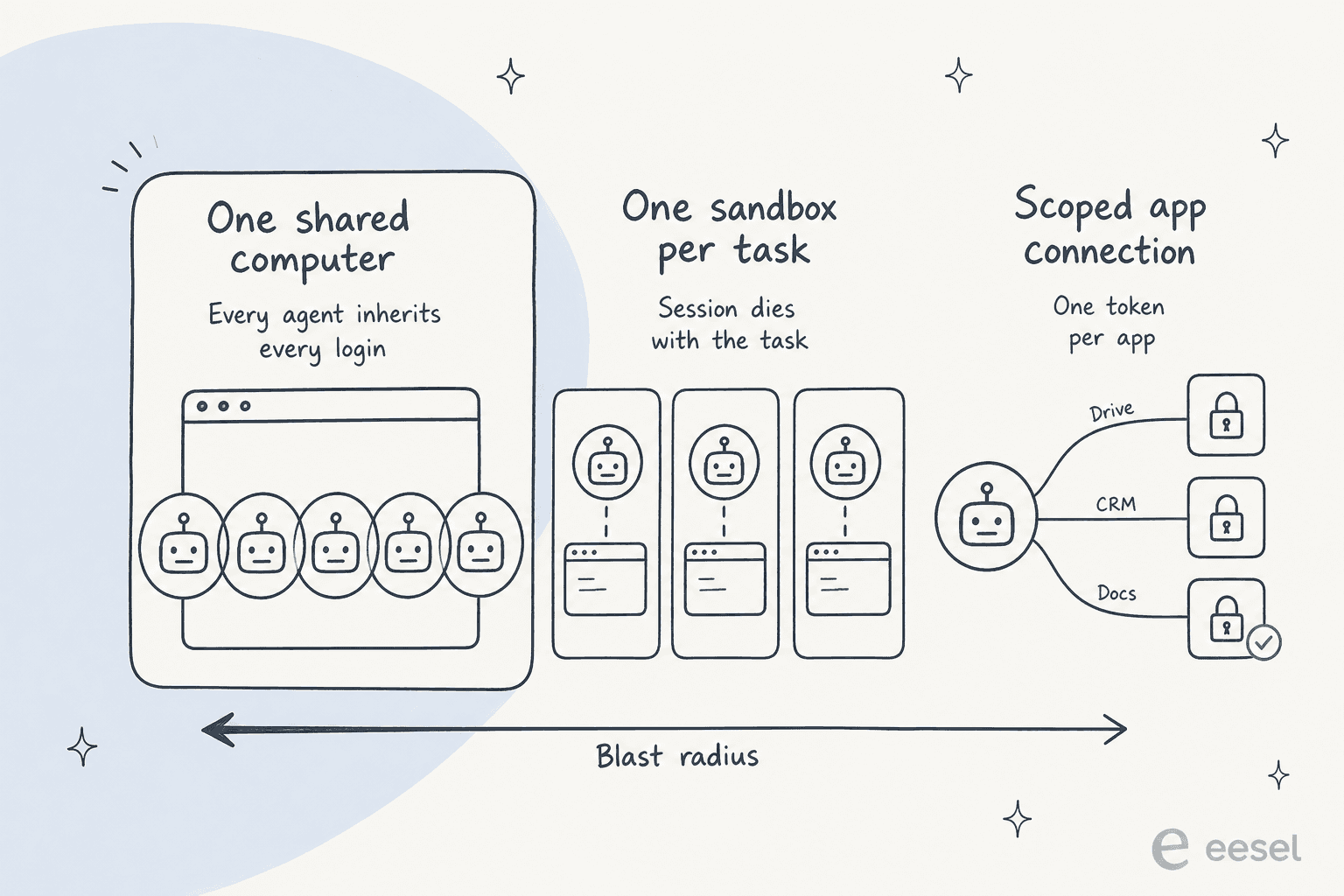
All your Bots share one computer. This is the part that surprises most people, and it is coming from xAI itself rather than from critics. Docs say it plain: "All of your Bots share one cloud computer assigned to your user account. Files, browser sessions, and command line credentials on that computer are available across your Bot roster." Then, stated twice on that same page: "Do not use separate Bots as a security boundary." Sign one Bot into your helpdesk and suddenly every other Bot inherits that session too. Delete a Bot, and the sign-ins just stay.
The sharpest write-up of why that matters came from Hacker News on launch day:
"By hijacking a real person's credentials, that person becomes the accountability sink. Very neat. Very deliberate."

There is no dry run. Also from the docs, verbatim again: "A test run performs real work. It can navigate websites, change files, and call connected tools." So basically, the only way to find out whether the Bot understands your process is letting it go and do your process for real.
Nothing is certified. No SOC 2, no ISO 27001, no GDPR, no HIPAA, no retention window, no data residency, no named subprocessors either. Security gets deferred wholesale to Cursor's terms, and Grok Bot "requires data storage and does not support Legacy Privacy Mode," meaning there is no zero-retention option to fall back on when you need one.
And the one job it advertises, it did not actually ship. The example prompt on x.ai/bot is "Sign in to Zendesk so I can work the support queue." None of the eight shipped roles, Sales Outbound, Talent Scout, Paid Media, Expense Manager, Product Performance, Bug Reproduction, Account Health, Chief of Staff, is a support role at all. I noticed because it happens to be my job, and it is a strange thing for leading your product page with.
The three questions I'd ask before handing any agent a login
I have spent the last few years watching AI agents work live support queues, and the failure that stuck with me is not a bot that broke down. It is a bot that sounded completely fine while being wrong. One eesel customer's agent, an outfit whose knowledge base had nothing relevant on the question, filled the gap from its own training data and sent out confident, invented claims to real people. Another one told customers "yes, we support your car model" for brands not even in their database, just because the help centre said the company support all models. Neither of those look like an error in a log, they look like good replies.
That is why below three questions are about evidence, not capability. A fluent wrong answer stays invisible unless something forces it into view.
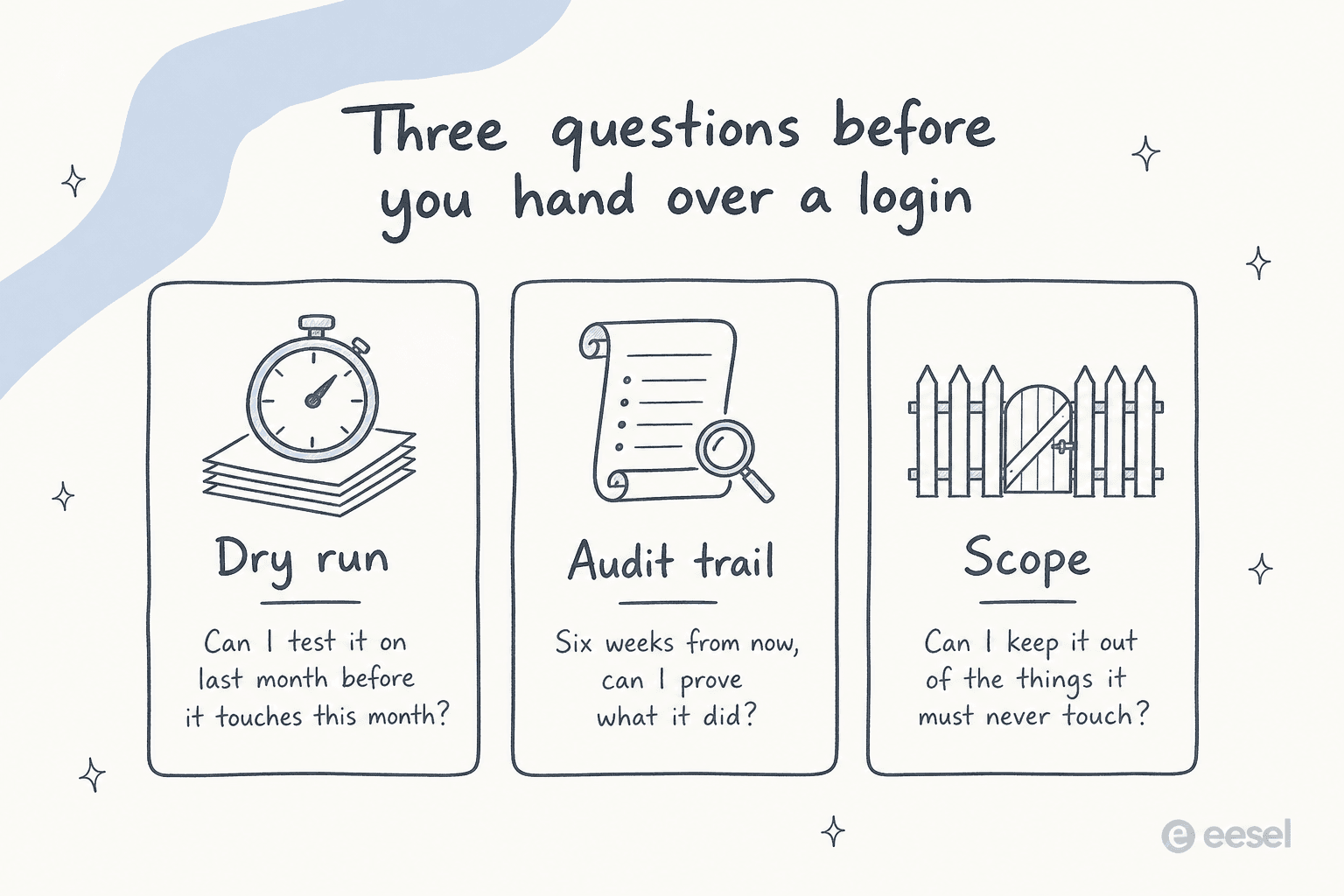
1. Can you test it on last month before it touches this month?
Not "does it have a sandbox," and not "can I watch it work" either. Can you point it at data already happened and get an actual number out. That number is the whole argument, really. On one e-commerce inbox I ran that replay and it came back with 93% accuracy on triage, 100% on spam detection, plus a 7% factual error rate on drafts. Knew every one of those numbers before a single customer saw anything, and that 7% is exactly why the rollout started in draft mode instead of going live straight away.
Only three of the eight tools below can replay something that already happened. Most offer a live confirmation prompt instead, which is a different product: it catches the action you are watching, not the pattern you have not noticed yet.
2. Six weeks from now, can you prove what it did?
Approval prompts feel like the answer here, and they are not, because of one line buried in xAI's own documentation, which I think is the most important sentence on the whole page: "An approval controls the proposed action. It does not reverse work already completed."
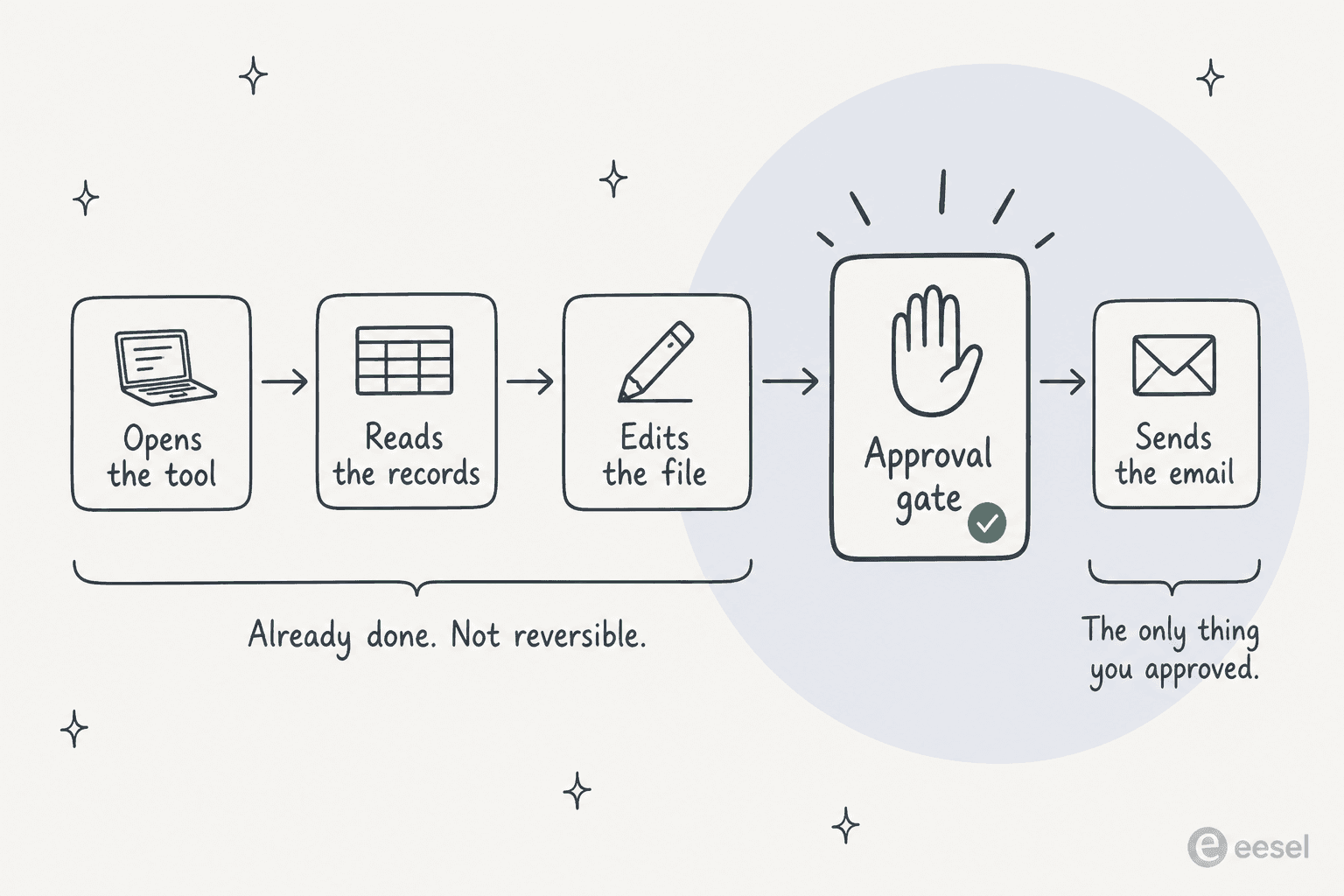
By the time an approval card even appears, the agent already opened things, read things, changed things. You're approving the last step of a chain, not the chain itself. The only thing able to recover that chain afterward is a log, and "coming" is not a log, not yet. This is also roughly the difference between an AI copilot and a fully autonomous agent, the copilot's record being the human who actually pressed send.
Worth to flag: Grok Bot's approvals are also user-authored free text, not a product-enforced list of dangerous actions. Docs tell you to write the boundary yourself in prose, and the seven categories suggested ("Prefer explicit boundaries for:") are only advice. There's an optional rules engine called Auto Review too, and xAI's own caveat on it is refreshingly blunt, it "is model-based and should complement, not replace, least privilege and explicit approval boundaries." One LLM judging another LLM, in other words.
3. Can you keep it out of the things it must never touch?
This one decides whether a support team can ship an agent at all, really, and it's the reason I keep coming back to scope rather than smarts. A CX lead at a supplements brand, running around 7,000 tickets a month on Gorgias, put it better than I ever could:
"The AI will never be able to answer 100% of the questions, but if it tries and just answers 'sorry I don't know this,' I cannot go and check all my 7,000 tickets to see if the AI actually made a good answer, then the point is a little bit gone. I need an AI who is only handling the tickets that it's confident to handle and all the other ones, leave them alone."
The whole requirement, basically, was that the AI not touch most of the queue at all. Another admin asked for something narrower even: respond only when explicitly @-mentioned, never on every single customer message. A persisted browser session signed in as a human, it has nowhere to put either constraint. Ticket-type exclusion and a confidence threshold, these are properties of an integration, not of a login.
Somebody over on Hacker News made this same point, only more structurally:
"AI Session Hijacking is such a dead end and I think this will be the thing that kills it. Just register these things in the IDP and let them sign into their own accounts."
Compare any option against Grok Bot
Before getting to individual write-ups, here's the same comparison collected in one place. Pick whatever tool you're actually weighing, and its answers show up next to Grok Bot's, on the four things worth checking.
The 8 best Grok Bot alternatives in 2026
Every item below follows same shape, who it's for, what it actually is, how it answers the three questions, what it costs, pros, cons, then my verdict. Table first though, for the skimmers among you.
| Tool | Best for | Where work runs | Dry run | Run log | SOC 2 | ISO 27001 | HIPAA | Free tier | Entry price | Billable unit |
|---|---|---|---|---|---|---|---|---|---|---|
| Grok Bot | UI-only tools with no API | Shared cloud computer | No | Coming | No | No | No | No | $200/mo | Seat + weekly tokens |
| eesel AI | Support queues | Helpdesk integration | Simulation on past tickets | Activity + Reports | In progress | No | Enterprise | $50 free usage | $0.40/ticket | Ticket or chat session |
| Claude | Work in your own browser | Your Chrome profile | No, plan approval | Permission history | Yes | Yes | Not in Chrome | No (Chrome is paid) | $17/mo | Per user |
| ChatGPT Work | Deliverables + connectors | OpenAI cloud, local on desktop | No, action confirmation | Task-level only | Yes | Enterprise | Not published | Limited on desktop | $20/mo | Per user, credits |
| Manus | Research and artefacts | Isolated VM per task | No, cost confirmation | Task history + Replay | Yes | Yes | No | No | $20/mo | Credits |
| Lindy | No-code business agents | Hosted OAuth integrations | Test Mode | Task History | Yes | No | Yes, BAA on Enterprise | 7-day trial | $29.99/seat | Credits, pooled |
| Zapier Agents | Broadest app coverage, 9,000+ apps | Zapier's infrastructure | Preview + Test Zap | Activity page, run-deletable | Yes, plus SOC 3 | No | No | Yes, 400 activities | Free, then $33.33/mo | Activity |
| n8n | Teams who want the receipts | Your server or EU cloud | Test workflow | Executions tab | Aligned, SOC 3 public | No | No | Yes, self-hosted | $20/mo | Workflow execution |
| Tasklet AI | Cheap always-on automations | Sandbox per thread | No | Thread transcript | Yes | No | No | Yes | $25/mo | Credits |
1. eesel AI
Best for: a support or ops team that wants an agent working inside the helpdesk they already have, tested against their own ticket history before it answers a live customer.
I work here, so treat the enthusiasm accordingly, and check the links yourself too. What I can tell you is why the shape here is different. eesel AI does not get a desktop, and it never signs in to anything as a human would. It joins your helpdesk as an integration over the API, carrying a named list of things it's allowed to do, leave a public reply, leave an internal note, tag the ticket, assign to a group, update fields. Since those are discrete scoped actions rather than clicks on a screen, they land as visible events inside the ticket's own history, and they respect whatever Zendesk triggers, automations, SLA policies, and business hours are already configured.

The three questions. Dry run: yes, and it is the feature I would lead with. Simulation replays the agent over your past tickets and reports coverage per topic, so you see "refund policy, 28%", fix the gap, and watch it move to 91% before launch. Audit trail: the Activity view filters to approved, rejected, and pending, each row linking to the ticket it touched, and Reports breaks out approval and rejection usage per tool. Scope: confidence-based routing sends low-confidence answers to a draft for a human instead of sending them, and you can keep whole ticket types away from the AI.
Pricing. Usage-based with no seat fee. $50 of free usage to start with no card, then $0.40 per regular task, where a task is one ticket or chat session no matter how many messages are inside it. Blog-writing tasks are $4.00. Annual commitment takes 25% off. Enterprise adds a $1,000/month platform fee on top of usage for SSO, HIPAA, a signed BAA, and a dedicated engineer. Default spend cap is $250/month with alerts at 50, 75, and 100%.
Pros
- Simulation against real historical tickets is the only dry run on this list that produces an accuracy number rather than a green tick.
- Priced in a unit support leads already think in. Follow-ups and internal steps inside one ticket do not re-bill.
- Actions inherit the helpdesk's existing rules, so nothing bypasses your escalation paths.
Cons
- SOC 2 Type II is in progress rather than certified, so a buyer who needs a signed report today cannot get one.
- HIPAA and a BAA sit behind the $1,000/month Enterprise fee.
- It is not a general-purpose labour agent and does not pretend to be. It will not sign in to an arbitrary SaaS tool with no API and click around for you, which is exactly the thing Grok Bot is for.
My take: if the work is tickets, this is the pick, and it's the replay that decides it, not the price. If the work is anything other than tickets though, just skip to the next entry, narrowness being the whole design here.
2. Claude (Anthropic)
Best for: knowledge work that should happen inside your own accounts, with a plan you approve before anything moves.
Claude is not really one agent product, and that confuses this comparison until it gets split apart. Claude in Chrome is a browser extension, reading, clicking, and navigating pages you're already signed into. MCP connectors let Claude reach out and call external tools over an API. Agent Skills package up the procedures it follows. Anthropic's own line on the Chrome page states the design clearest of all, it "reads the page you're signed in to, then clicks, types, and fills forms while you decide what happens next."
That's the opposite blast-radius shape from a shared cloud machine, basically. One install, one person's browser, one person's own cookies. And connectors "inherit each person's permissions from the connected service," meaning Claude can't see anything that the underlying account couldn't already see anyway. I wrote up both routes into a helpdesk in connect Claude to your helpdesk.
The three questions. Dry run: no simulation, but the strongest approval model here. Three named permission modes (Manually approve, Automatically approve, Skip all approvals) switch per conversation, and in Manually approve mode Claude states a plan naming the sites it will touch and "will not deviate from the stated plan without requesting your permission first." Protected actions always need approval, and a fixed list is refused outright: purchases, account creation, card and ID handling, permanent deletions. Audit trail: this is the weak spot. The published trail is a per-user "permission history" of which sites you granted, not a record of what Claude clicked. Org-wide audit logs exist, on Enterprise. Scope: admins can force a site-level allowlist, and Anthropic's own advice is to start restrictive.
Pricing. Free does not include Chrome and caps custom connectors at one. Pro is $17/month billed annually or $20 monthly. Max is $100 or $200/month for 5x and 20x usage. Team is $20 per seat annually with Chrome on by default; Enterprise is $20 per seat plus API-rate usage, with Chrome off by default until an admin enables it. My Claude Cowork pricing post covers the wider agent bundle.
Pros
- The clearest published permission model on this list, with a documented default per surface and a plan you see before work starts.
- SOC 2 Type 2 and ISO 27001 both published, which is more than most agent products can show.
- Cheapest serious entry point at $17/month, and the model underneath is Claude Opus 5.
Cons
- No admin-facing per-action log for Chrome, so reconstructing a session afterwards means reading the conversation.
- Everything visible on the page enters the conversation, and Anthropic says plainly that "Claude can't filter sensitive content out of what it sees." On a queue full of card numbers that matters.
- Not available to HIPAA-covered organisations, with an explicit recommendation against using it on regulated pages.
My take: best general-purpose pick if you want the agent living in your own browser rather than someone else's data centre, and it's the one I'd hand to a non-technical colleague without worry. Skip it though if an audit log matters more to you than approvals do, or if you're regulated. For the support-specific version of this same tradeoff, see Claude customer service alternatives.
3. ChatGPT Work (OpenAI)
Best for: teams already inside ChatGPT who want long multi-step tasks and finished documents out the other end.
First off, a correction worth knowing before shopping any further: "ChatGPT agent" no longer exists. OpenAI's help centre says now "ChatGPT agent is no longer available. Use ChatGPT Work for longer, multi-step tasks and finished deliverables. For supported browser workflows, see Using cloud browser in ChatGPT." So what you're actually comparing against Grok Bot today is ChatGPT Work plus a separate cloud browser, not that old agent mode from before.
The split matters a lot for blast radius. Work runs in the cloud on web and mobile, and it can touch local files plus desktop apps on the desktop app, given permission. Cloud browser is a separate remote session, and at launch it "does not accept credentials, use autofill or password managers, sign in to websites, or complete payments. If a site requires one of those steps, the task stops." That's the exact inverse of Grok Bot's whole design, and depending on the job, it's either the safest thing on this list or an outright dealbreaker.
The three questions. Dry run: none published. The gate is a live confirmation on anything OpenAI classes an "important action", defined as one that "could have a meaningful effect outside ChatGPT, expose sensitive information, or be difficult to undo", and the default permission level is Important actions. Audit trail: thin in a specific way worth quoting, because it is the same shape as Grok Bot's gap. For Enterprise, "conversations involving agent tasks will appear in Compliance API logs, but individual agent actions (such as virtual computer usage, app requests, chain of thought) will not." Connector calls are logged; browser steps are not. Scope: real containment at the workspace level, with agent access defaulted off, RBAC by role, and domain blocklists.
One more thing on isolation: cookies "persist across sessions for convenience, just like a regular browser," so the remote browser is not wiped per task by default.
Pricing. Free gets limited Work on desktop only. Go at $8/month excludes the cloud browser. Plus is $20/month, Pro from $100/month, Business $25 per user monthly or $20 annually, Enterprise custom. Work now follows Codex's credit structure rather than a flat message cap, so OpenAI no longer publishes a fixed task limit. Enterprise workspaces must have Enterprise Key Management switched on before Work runs at all.
Pros
- The confirmation list is specific and named rather than vague, and it fires by default.
- Real admin containment: off by default, RBAC-scoped, domain blocklists.
- No training on business data by default across Business, Enterprise, and Edu, including data touched during agent sessions.
Cons
- The Compliance API tells you a task ran, not what it did inside the virtual computer.
- Cookies persist between runs, so a session is not scoped to one task unless you clear it.
- No published dry run or historical replay, only a real-time prompt on the action itself.
My take: right pick if your company already standardised on ChatGPT and the deliverable is a document. Cloud browser refusing logins outright is the most interesting design call on this whole list, and if you were considering Grok Bot specifically because it signs in somewhere, this one isn't your replacement. Related reading: ChatGPT with Zendesk and my ChatGPT Work write-up.
4. Manus
Best for: open-ended work you would otherwise hand a freelancer, where you care about the artefact and want to be able to replay how it got made.
Manus takes a plain-language goal, runs the whole multi-step task by itself, then hands back something finished, a report, a site, a deck, a batch data pull. One thing worth flagging, that older coverage gets wrong: Manus was Meta-affiliated for part of 2026, but per its own 11 August 2026 notice, it will "soon return to operating as an independent company." My Manus AI post has the longer background on that.
The three questions. Where it runs is the headline: Manus Sandbox is "a fully isolated cloud virtual machine that Manus allocates for each task. Each Sandbox runs in its own environment, does not affect other tasks, and can execute in parallel." That is the direct architectural answer to Grok Bot's one shared computer. Dry run: no simulation. Wide Research shows a usage estimate and "requires confirmation before executing", which gates cost and scope rather than correctness. Audit trail: the best on this list, and the feature I would steal. Task history logs every action, and a shareable Replay link plays a run back step by step. A reviewer on LinkedIn put it well: "one thing that I love about Manus is it's got a replay function so you can see what it did decision making wise and action wise behind the scenes."
Pricing. Standard $20/month for 4,000 credits plus 300 a day. Customizable $40/month for 8,000. Extended $200/month for 40,000 and a free Cloud Computer. Team and Enterprise are sales-led. The billable unit is the credit, and Manus publishes no fixed rate for what one buys, which is the recurring complaint:
"Manus AI agent is super expensive. I feel like the pricing model needs some adjustment because it's really costly. They give you only 1,000 credits at a time, which is not enough, especially for heavy tasks."

Pros
- One isolated VM per task, so a runaway task cannot reach into another one.
- Replay links are a real audit artefact you can send to someone else.
- Three independent certifications on a public trust centre: SOC 2 Type II, ISO 27001:2022, ISO 27701:2019.
Cons
- No dry run against your own data, only a cost confirmation before the batch mode.
- No published per-credit rate, so a recurring job's real cost is only knowable after it runs.
- No HIPAA claim, and cross-border transfers rely on SCCs rather than a formal GDPR certification.
My take: at $20/month versus Grok Bot's $200, with per-task isolation plus an actual replay to lean on, Manus ends up the closest like-for-like swap for a solo user doing general work. See Manus AI alternatives if credit model happens to be your sticking point.
5. Lindy
Best for: a small team that wants a no-code agent wired into Gmail, Slack, and Calendar, with approvals on by default.
Lindy is basically a builder, pick a trigger, describe the job in plain English, and the agent reads context across whatever apps you connected and acts on it. Most of that runs through hosted OAuth integrations to a claimed 1,000-plus apps, so blast radius here is whatever scopes got granted. When an API just doesn't exist, a separate Computer Use skill, on Pro and up, drives a browser on a Lindy-hosted computer instead, with an Incognito Computer option persisting nothing and a Take Control button mid-run for when things go sideways.
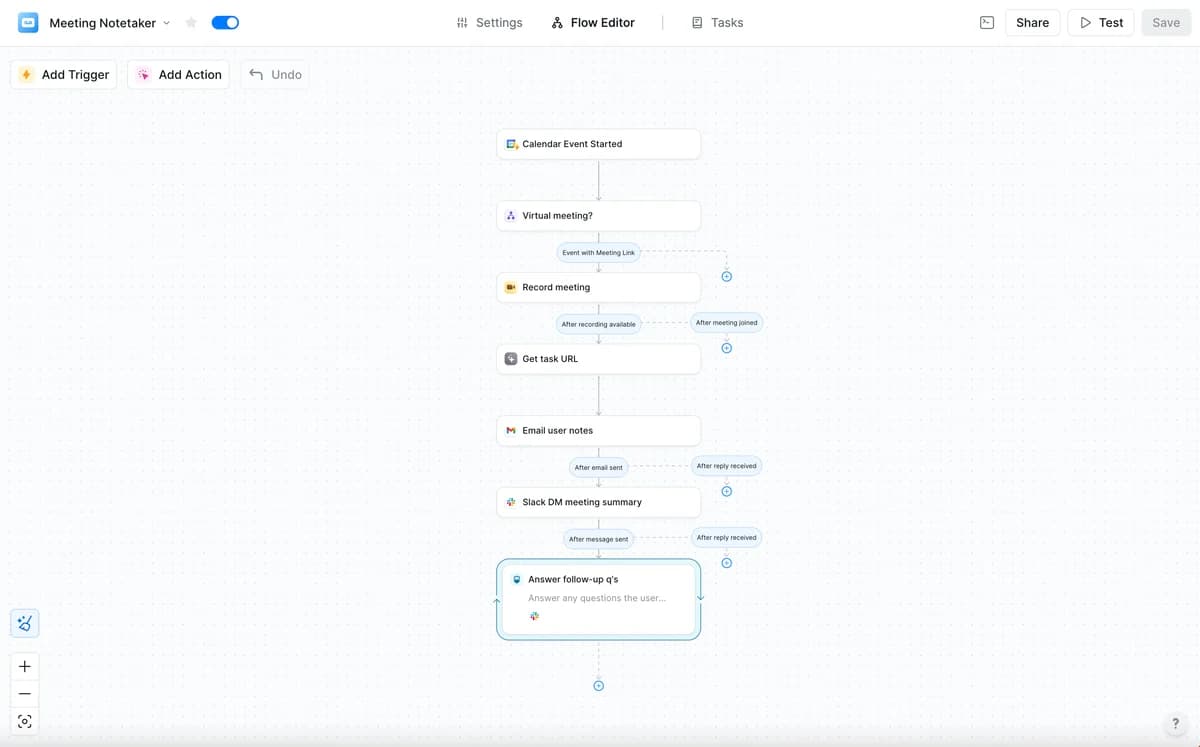
The three questions. Dry run: yes, a named Test Mode. You click Test in the flow editor, run the workflow, and Lindy shows where and why it got stuck with a shortcut to the failing step. Audit trail: Task History per agent, openable block by block, plus a Get Task Details action that returns each block's inputs, outputs, timestamps, and status. The docs list "generate detailed audit logs" as a use case, which is the honest framing: you have the parts, the compliance-grade audit-log feature is Enterprise. Scope: any action with outside impact (send an email, update a ticket, post to a channel, publish a doc) waits for human approval by default; read-only lookups do not.
Pricing. Repriced since I last looked, and now per seat. Plus $29.99 per user for 3,000 credits, Pro $99.99 for 15,000, Max $199.99 for 35,000, Enterprise custom. Credits pool across the workspace, reset monthly, and do not roll over; when the pool empties Lindy pauses rather than billing overage. 7-day trial. Note that browser driving needs the $99.99 tier.
Pros
- Approval gates ship on by default rather than as something you remember to configure.
- Block-level observability is good enough to build your own quality scoring on top of.
- Strong ease-of-use signal: 4.9/5 across 171 G2 reviews, with ease of use the top-tagged pro at 125 mentions.
Cons
- Credit pricing is the top complaint on G2, tagged Expensive 42 times, and reviewers describe not knowing what a task will cost before running it.
- Computer Use is gated to the $99.99 tier, so API-less tasks need the second plan up.
- Formal audit logs and SSO are Enterprise-only.
Worth noting a reviewer's small dig at exactly the surface this post cares about:
"'Testing' side tab reloads on changes, back log available but non-intuitively under 'tasks' at top"

My take: best answer here if you want Grok Bot's "team of teammates" feel but with approvals and a run log already sitting in place, and paying per seat doesn't bother you. See Lindy AI for a longer look, or no-code agent builder if it's the category you're comparing.
6. Zapier Agents
Best for: the widest app coverage on this list, and the safest way to start because the automation stays a workflow you can read.
Zapier Agents get described in natural language, connect to your live data, and act on a schedule, on demand, or off a trigger, whichever fits. They ride the very same OAuth connections your Zaps already use, so Zapier holds the credential once per app and the agent calls that app's existing triggers and actions instead of clicking through some UI. Connector graph is the real selling point here: 9,000-plus apps.
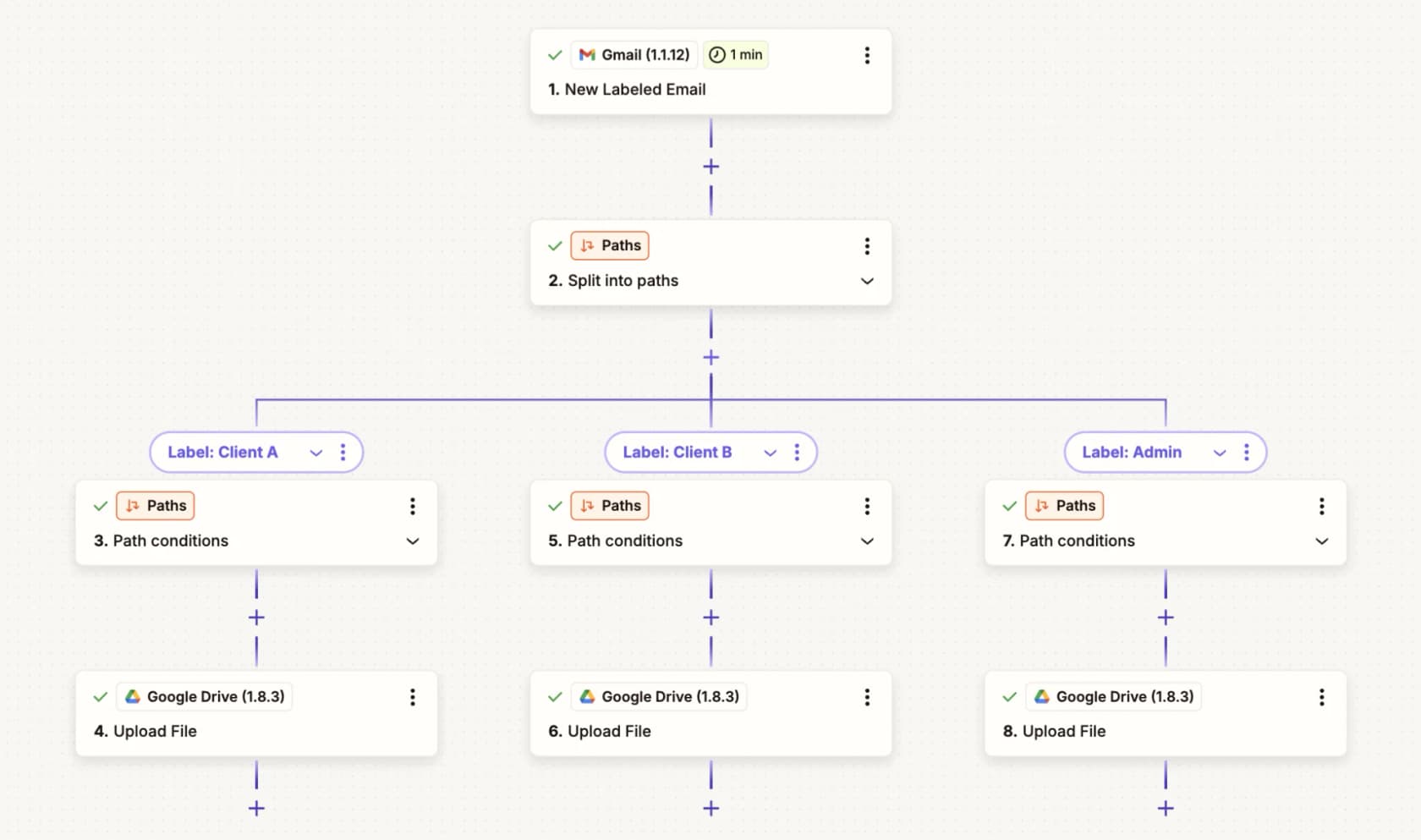
Buy with your eyes open on one thing, though: the standalone Agents product is being folded into "AI by Zapier", a step inside the regular Zap editor, and Enterprise trial accounts had to migrate by 15 August 2026 or drop to a free Agents account. So the surfaces below are moving under you.
The three questions. Dry run: yes, and it survives the migration. In the old builder, "until you publish, your agent only runs during testing." In the new flow it is two steps, Preview to run just the AI step against sample data and see which tools it would call, then Test Zap for the whole workflow. The caveat is Zapier's own: "Full-Zap tests currently consume tasks the same way production runs do. Zapier is working on a fix for this." Audit trail: the standalone product has an Activity page with run status, apps used, and timestamps. It is not tamper-proof, because any user with access can delete a specific run, and deleting an agent wipes its history. Post-migration every run lands in normal Zap history instead, where you can "review which tools were called, what data was passed, which model tier was used, and how many tasks it consumed", which is a real upgrade. Scope: whatever the OAuth connection was granted, plus a restricted-apps control on Enterprise.
Pricing. This is where the previous version of my own notes was wrong, so it is worth stating carefully. Agents bill on a separate activity meter, not the shared Zap task pool. An activity is "actions your agent takes in behaviors or in chat, browsing the web, or looking up information from attached knowledge." Agents Free is $0 forever with 400 activities a month. Agents Pro is $33.33/month billed annually ($400 up front) for 1,500. Enterprise is custom and adds org-wide sharing and enterprise audit logs. Once an agent becomes an AI by Zapier step, it is task-billed like everything else.
Pros
- 9,000-plus apps, which is more reach than anything else here without a browser.
- Actions run through managed OAuth connections on Zapier's infrastructure rather than a fragile UI layer.
- A real pre-publish test step in both the old and new builder, so nothing ships straight to production.
Cons
- The activity log is deletable per run and disappears with the agent, so it is a debugging record rather than an audit record.
- The product is mid-deprecation into AI by Zapier, which means relearning the surface within a release or two.
- Test runs in the new flow consume real task quota, so testing is neither free nor side-effect-free.
The beta framing plus the annual price rubbed at least one buyer the wrong way:
"Zapier agents dont seem ready for prime time... They label Agents as a beta feature, so I don't expect it to be perfect, but they still charged me $400 for it."
My take: sane first step if Zaps are already running for you, because an agent that's really just a workflow is one you can read, diff, and turn off whenever. I'd wait for the AI by Zapier migration to settle down before building anything load-bearing on it, and I would not count that Activity page as an audit trail while any teammate can still delete a run at will. Worth reading next to AgentKit vs Zapier if it's the glue layer you're weighing.
7. n8n
Best for: a technical team that wants to own the infrastructure and see exactly what every tool call did, accepting that you build the test harness yourself.
n8n is a source-available workflow platform, visual canvas, and you can drop real JavaScript or Python straight into it. Its AI Agent node is basically a LangChain-style Tools Agent that you wire up yourself, chat model, tools, memory, a vector store if you want one. It is more work than a packaged agent, sure, but that's kind of the whole point.
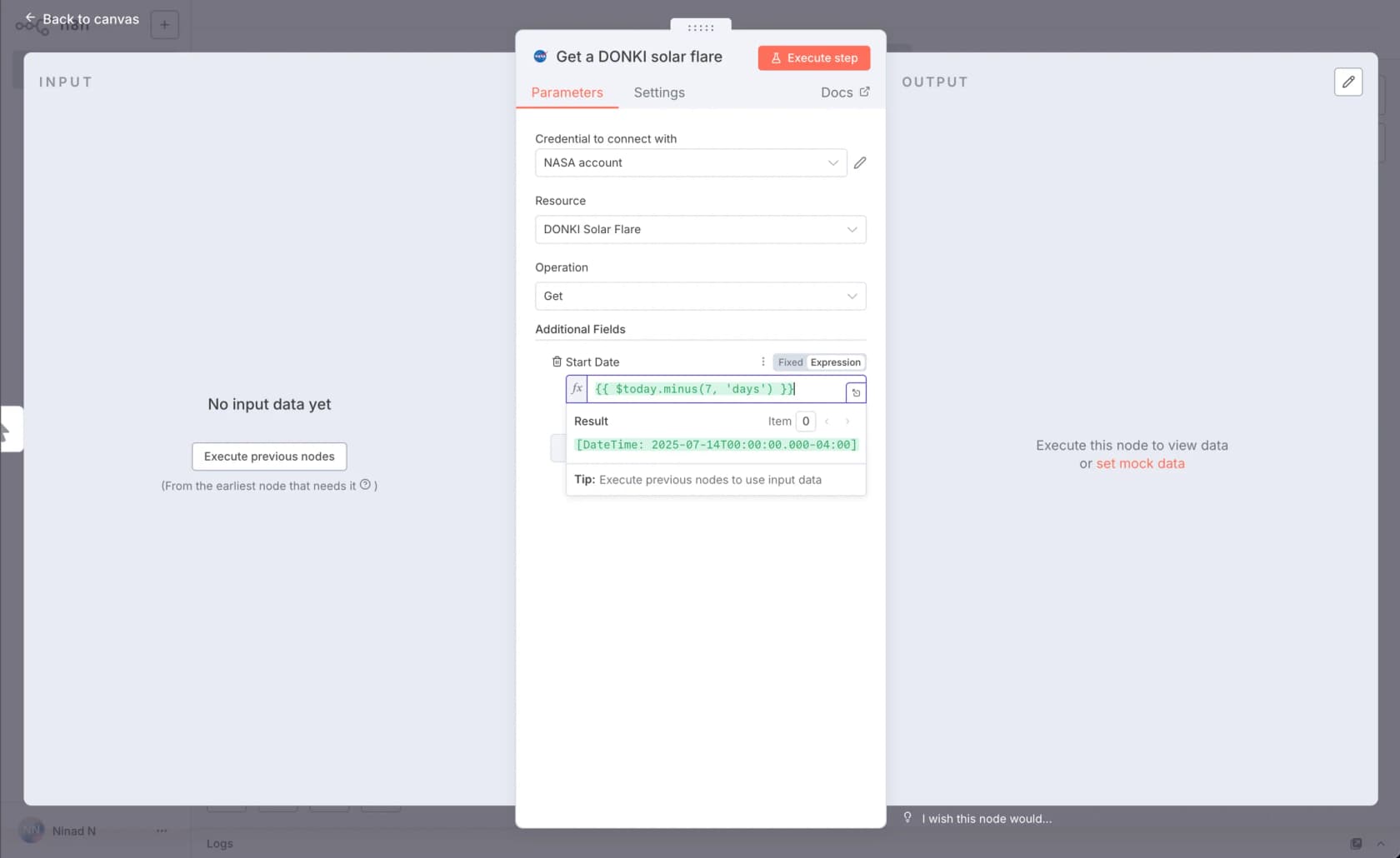
The three questions. Where it runs is yours: self-host via Docker or npm under the Sustainable Use License, which is fair-code rather than OSI open source, or use n8n Cloud on Azure in the EU. Dry run: Test workflow on the canvas and Execute step on a node, and manual runs do not count against your quota. Be clear-eyed though: a manual run still calls live APIs with live credentials unless you mock the data per node, so it is a real execution rather than a sandbox. Audit trail: the best receipts here. Every run is an execution in the Executions tab, with status, timing, and the exact input and output for each node. Retention is 7 days on Starter, 30 on Pro, unlimited on Enterprise, and Enterprise adds log streaming to a SIEM.
Pricing. Community Edition is free forever self-hosted. Starter $20/month for 2,500 executions, Pro $50/month for 10,000, Business $800/month for 40,000, Enterprise custom, all billed annually. The unit is stated plainly: "An execution is a single run of your entire workflow. It doesn't matter how many steps are in the workflow or how much data it processes, it's still a single execution." Users are unlimited on every plan.
Pros
- Per-node input and output on every run, which is the difference between "the agent did something" and a debuggable trace.
- Full self-hosting, so sensitive data never leaves your infrastructure. A G2 reviewer credited exactly that: it "allowed our team to automate sensitive customer data workflows without sending that data to a third-party cloud."
- Execution-based billing means a 200-step AI workflow costs the same as a two-step one.
Cons
- Community Edition workflows and credentials are single-owner, so a team gets no shared visibility without paying.
- No historical replay for AI agents. Testing one means building an evaluation dataset yourself in a data table or Google Sheet.
- Execution billing bites on chat and polling patterns, where every interaction is its own run:
"Zapier → Make → n8n is the classic pilgrimage. If something keeps breaking, it's usually just one trigger that isn't set the way you think. Check the execution logs- 99% of the time the answer is hiding there."
My take: if reason for leaving Grok Bot is that you can't prove what it did, n8n is the answer, and price of that answer is engineering time, plain and simple. There's a real Zendesk n8n integration path if wiring a queue yourself is the plan, and AgentKit vs n8n covers the glue-layer comparison too.
8. Tasklet AI
Best for: cheap always-on automations across mainstream tools, when price and breadth matter more than paperwork.
Tasklet, built by Firebase's co-founders, turns a plain-English sentence into a recurring automation instead of just a one-off answer. Each agent gets its own isolated sandbox on Google Cloud and fires on a schedule, an app event, or a webhook, so it just keeps running long after you close your laptop. Reach comes in two ways here, direct API and MCP calls against a claimed 3,000-plus integrations, plus a sandboxed Computer use browser clicking through web UIs while keeping a per-thread login profile.
The three questions. Dry run: nothing structured. Testing means asking in the thread or opening the automation's details panel via the lightning icon. Audit trail: no named log either; the thread transcript is the record, and the trust page describes Tasklet's internal access controls rather than a customer-facing action log. Scope: the nicest touch here is that sharing separates access from credentials, so a teammate can use a shared Stripe or CRM connection without ever seeing the key.
Pricing. Free is real: no card, 300 bonus credits a day, unlimited agents and integrations, capped at 10 executions per automation. Starter $25/month for 10,000 credits, Pro $100/month for 40,000, Custom from $250/month for 100,000 and a slider up to 4,000,000. There is no published per-credit rate and no stated overage policy.
Pros
- A real free tier with no card, which nothing else in the top half of this list offers.
- Very broad reach: 3,000-plus built-in integrations plus any HTTP API or MCP server, including private internal ones.
- Shared connections let teammates use a login without seeing the credential.
Cons
- No per-credit or per-task dollar rate and no overage policy, so a recurring automation's real cost is unknowable until it runs.
- No structured dry run and no named run log, which is the same gap that makes Grok Bot hard to ship.
- SOC 2 is the only attested certification. GDPR is listed as in progress, and there is no ISO 27001, HIPAA, or residency option.
At least one named operator is happy:
"If AI agents have seemed theoretical or inaccessible to you, you should definitely try Tasklet. I've been using Tasklet for a few weeks now and it has already been transformative to my day-to-day life. [...] I now have 20+ agents running. [...] I've wanted this for years. [...] Incredible product."

My take: cheapest way there is to find out whether an always-on agent helps at all, and I'd happily test an idea on it. I would not, though, put it on anything customer-facing until the audit story catches up with all that integration count.
What I'd actually pick
If one sentence is all you want: pick by which of the three controls you cannot live without, not by which agent demos best.
- The work is your support queue. eesel AI, because it is the only one that replays your own tickets and gives you a number first. $0.40 a ticket beats $200 a seat for most teams, and the AI vs human cost comparison is the other half of that maths.
- You need the receipts above all else. n8n if you have engineers, Manus if you do not. Executions with per-node data, or a Replay link you can send to someone.
- You want general work in your own accounts. Claude in Chrome, at $17/month, with a plan you approve before it moves.
- You are standardised on ChatGPT. ChatGPT Work, and know that its cloud browser will not sign in to anything.
- You want teammates with approvals already on. Lindy, if per-seat pricing works for you.
- You already run Zaps. Zapier Agents, because an agent that is really a readable workflow is one you can turn off. Wait out the AI by Zapier migration first.
- You are testing whether this helps at all. Tasklet's free tier, or n8n self-hosted.
- The tool you need to automate has no API and never will. Then Grok Bot is still the answer, and the honest advice is to give it its own accounts rather than yours, keep local-computer execution set to never allowed, and treat the shared computer as one security boundary rather than several. That is what the docs tell you to do too.
Thing I would not do, though, is buy any of these just because it feels like the future. Gap between an AI agent and a chatbot isn't intelligence, it's who carries the blame when things go wrong. Pick whichever one lets you answer that question out loud, without flinching.
Try eesel on your support queue
If you landed here because Grok Bot's example prompt mentioned working a Zendesk queue, and what you actually wanted was the version a support lead can sign off on with a straight face, that's eesel AI. It joins Zendesk, Freshdesk, Gorgias, or Front through the integration, not a browser login, learns off your past tickets and help centre, then answers only the tickets it's actually confident about.
Part I'd test first is the replay, honestly. Point it at last month, see coverage per topic, close whatever gaps show up, launch once the number is one you'd defend in a meeting without sweating. Every action taken afterward shows up in Activity as approved, rejected, or pending, with approval usage broken out per tool, so "what did the AI do on Tuesday" actually has an answer waiting for you.

It's $0.40 a ticket with $50 of free usage and no card needed, so running the simulation costs you nothing at all. Try eesel.
Frequently Asked Questions
What are the best Grok Bot alternatives in 2026?
How much does Grok Bot cost compared to the alternatives?
Is there a free Grok Bot alternative?
Can Grok Bot work a support queue like Zendesk?
Which Grok Bot alternative has a real audit trail?
Is it safe to give an AI agent my logins?
Should I build my own agent instead of buying one?



Article by
Riellvriany Indriawan
Riell is a designer and writer at eesel AI with about two years of experience researching CX platforms, AI chatbots, and helpdesk software. She combines her design background with a sharp eye for how these tools actually look and feel in practice — making her comparisons unusually visual and user-focused.