Why client follow-ups slip in the first place
I work eesel's support queue every day, so I've been on the wrong side of a missed follow-up more than once. Earlier this year one of eesel's blog-writer customers wrote in, waited, and then sent this:
"Just bumping this up, I need more credits to keep posting"
A blog-writer customer who had to chase eesel's support team to buy more credits
That customer wasn't hard to help. The thread just sat in a queue with nobody owning the next step. That's the real shape of most dropped follow-ups: the reply itself takes two minutes, but remembering it's yours to send, at the right moment, is the part that fails.
That's exactly the gap Orchid is pitched at. It's an iMessage and SMS personal assistant from the team behind the old Zero email client, in the same texting-first camp as Instinct, and its homepage promise is "Bills, bookings, follow ups, forms. The boring stuff still gets done." The question for this post is narrower: how well does it handle the follow-ups you owe clients, and what does it leave on your plate?
What Orchid actually does for client follow-ups
Orchid doesn't have a "follow-ups" feature you toggle on. Follow-up work comes from four pieces that already exist in the product, all driven by texting it. Here's how each one maps to the follow-up job, with the source for each.
| Follow-up job | What Orchid does | Default autonomy |
|---|---|---|
| Chase a client who went quiet | Conditional reminder that watches the Gmail thread and nudges only if still no reply (setup guide) | Reminds on its own |
| Write the chaser | Drafts the reply in your voice, learned from your sent mail (FAQ) | Draft waits for your send |
| Remember what you promised on a call | Pulls notes, action items and decisions from Granola (Granola post) | Reads and reminds on its own |
| Walk into the next call prepared | Texts a brief: who, what you discussed, what's still open (setup guide) | Sends the brief to you only |
| Book the follow-up meeting | "find 30 minutes with sarah next week" becomes a hold plus a note (setup guide) | Hold waits for your okay |
The pattern across all five rows is the same, and it's deliberate. Orchid's Inbox Zero essay states it plainly: "We're not building an agent that sends emails on your behalf without asking." It prepares the action, shows it to you, and waits. Every approval is supposed to teach it more about your style.
For client work, I think that's the right default. A wrong follow-up to a client costs more than a late one, and even good AI sales emails need a human read before they go out. But it does mean Orchid is a memory and drafting layer on top of your Gmail, not a system that runs your follow-ups while you sleep.
How the follow-up loop works
The conditional reminder is the feature that makes Orchid useful for client work, so it's worth seeing the whole loop. Orchid's own example is "remind me to chase the landlord friday if he hasn't replied," and the mechanism is that it "watches the thread and only nudges you if the condition is still true" (setup guide).
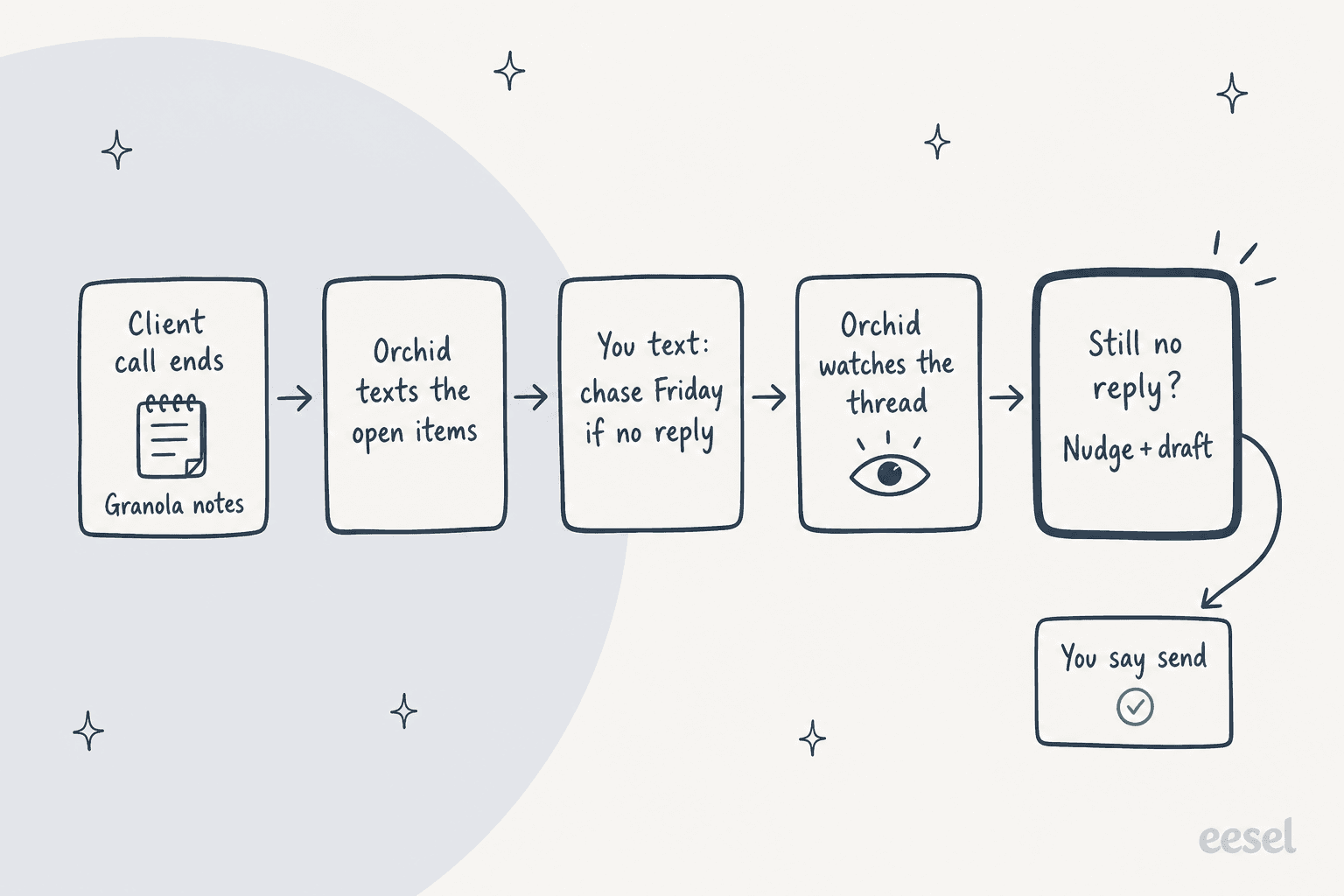
The "only if still true" part is what separates this from a calendar reminder. A plain reminder fires on Friday whether or not the client already wrote back, and after the third pointless ping you start ignoring them. A conditional one stays quiet when the problem solved itself. That's the difference between a nudge you trust and one you swipe away.
The weak spot is the last box. When the nudge lands, Orchid can draft the chaser, much like Gmail's Help me write would at your desk, but you still have to read it and say send. If you're the kind of person whose follow-ups slip because you never get to your phone, Orchid shortens the work without removing it.
How to set up Orchid for client follow-ups
Setup is short. Orchid's guide says it takes about two minutes, and I'd believe it, because there's no app and no workflow builder. You can check the Orchid AI review for the sign-up screens; here's the follow-up-specific version.
- Text Orchid's number. The setup guide says "Say hi, or just say what you need." Use the number on Orchid's own site, since the pages I checked list more than one.
- Connect Gmail and Google Calendar. Orchid texts you a link and you sign in with Google. You don't hand over a password. These two are the only live integrations per the FAQ.
- Tell it which senders matter. This is the step that turns a general assistant into a client follow-up tool, the same idea as AI email triage rules. Name your client domains or key contacts so they surface in the morning rundown instead of getting lost.
- Tell it what it should never touch. The guide asks you to set this up front. For client work, I'd fence off anything contractual or billing-related until you trust its drafts.
- Connect Granola if you use it. Notes and action items then flow into Orchid's briefs and reminders (Granola post).
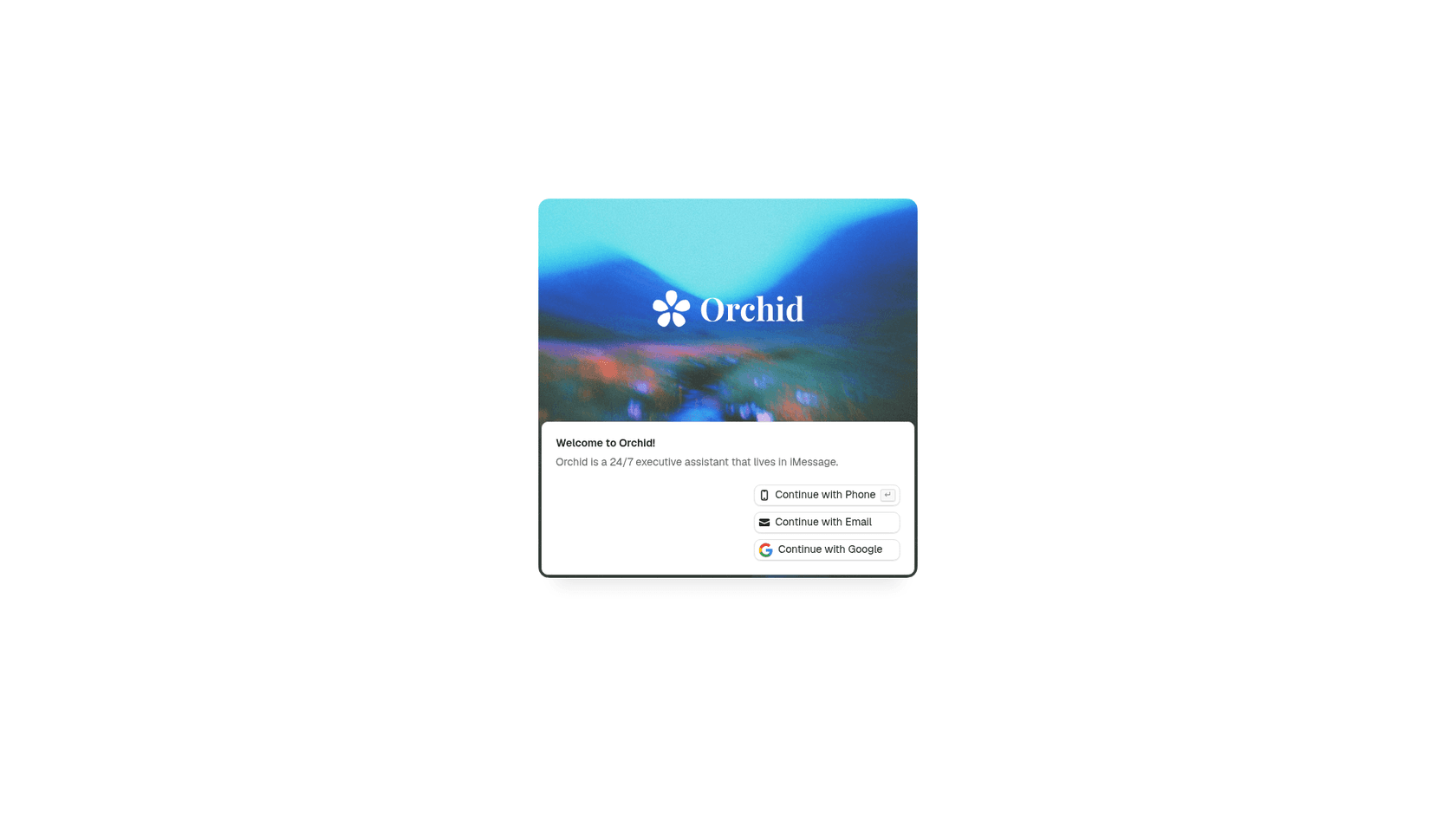
Once that's done, the "configuration" is just texting. A few prompts that fit client follow-ups, built on Orchid's own examples:
- "remind me to chase Dana friday if she hasn't replied about the proposal"
- "what do I still owe the Acme team from Tuesday's call?"
- "find 30 minutes with sarah next week" (Orchid's exact example, from the setup guide)
- "brief me before my 2pm with Northwind"
Voice notes work too. Orchid "pulls out the actions and confirms what it heard," per the same guide, which is handy when you're walking out of a client meeting and don't want to type.
Turning call notes into follow-ups with Granola
Most client follow-ups are born on a call. You say "I'll send that over Thursday," the call ends, and the promise lives only in your head. Orchid's Granola integration is the piece aimed at that moment.
The post names the exact follow-ups it's meant to catch: "the introduction you promised to make, the proposal you said you'd send, the customer concern you agreed to investigate." With meeting context in hand, Orchid says follow-ups become "easier to identify, easier to prioritize, and harder to forget."
One caveat from the same page: the post doesn't name where action items end up beyond "the systems people already rely on every day," so don't expect them to land in a task app or CRM on their own. Gmail's own action item extraction has the same blind spot for anything said on a call. If you take notes in Google Docs or a Notion meeting notes page instead, Orchid won't read them, since those aren't live integrations.
What client follow-ups look like for real Orchid users
Orchid publishes two case studies that touch follow-up work. Neither is a classic sales chase, but both show where the product earns its keep.
The solo agency owner
Goosewin Media Group is a one-person fractional developer relations and marketing agency. Dan, who runs it, has back-to-back client calls, often from the field. Before Orchid, he rebuilt each client's context by digging through old call notes, email and Slack.
Now Orchid texts him a brief before each call, with Granola notes from previous calls folded in, and scans his channels to flag "anything he missed or has not replied to." The headline stat is "0 time spent prepping for meetings." One honest note: this case study credits a Slack integration, while the FAQ still lists Slack as "on the way." I'd confirm Slack works on your account before relying on it.
The gas station operator
The second case study is my favorite example of follow-up done right, even though Mo's "clients" are his own station teams. Every day a pricing email arrives; Orchid works out each station's new pump prices and asks Mo before sending anything.

The thread on the page shows the whole pattern. Orchid asks, "Want me to email each of the other four stations its prices?" Mo replies "yes. send each station its prices and ask them to update immediately." Orchid confirms, then adds the follow-up promise: "I'll flag any station that doesn't confirm." The same workflow also tracks the weekly paperwork from each location and flags anything missing.
That's the best picture of Orchid's follow-up model I found: you approve the outbound message once, and it owns the chase for whoever doesn't respond.
Where Orchid stops for client follow-ups
This is the section to read before paying. Orchid is clear about some of these limits; others take some digging across its pages.
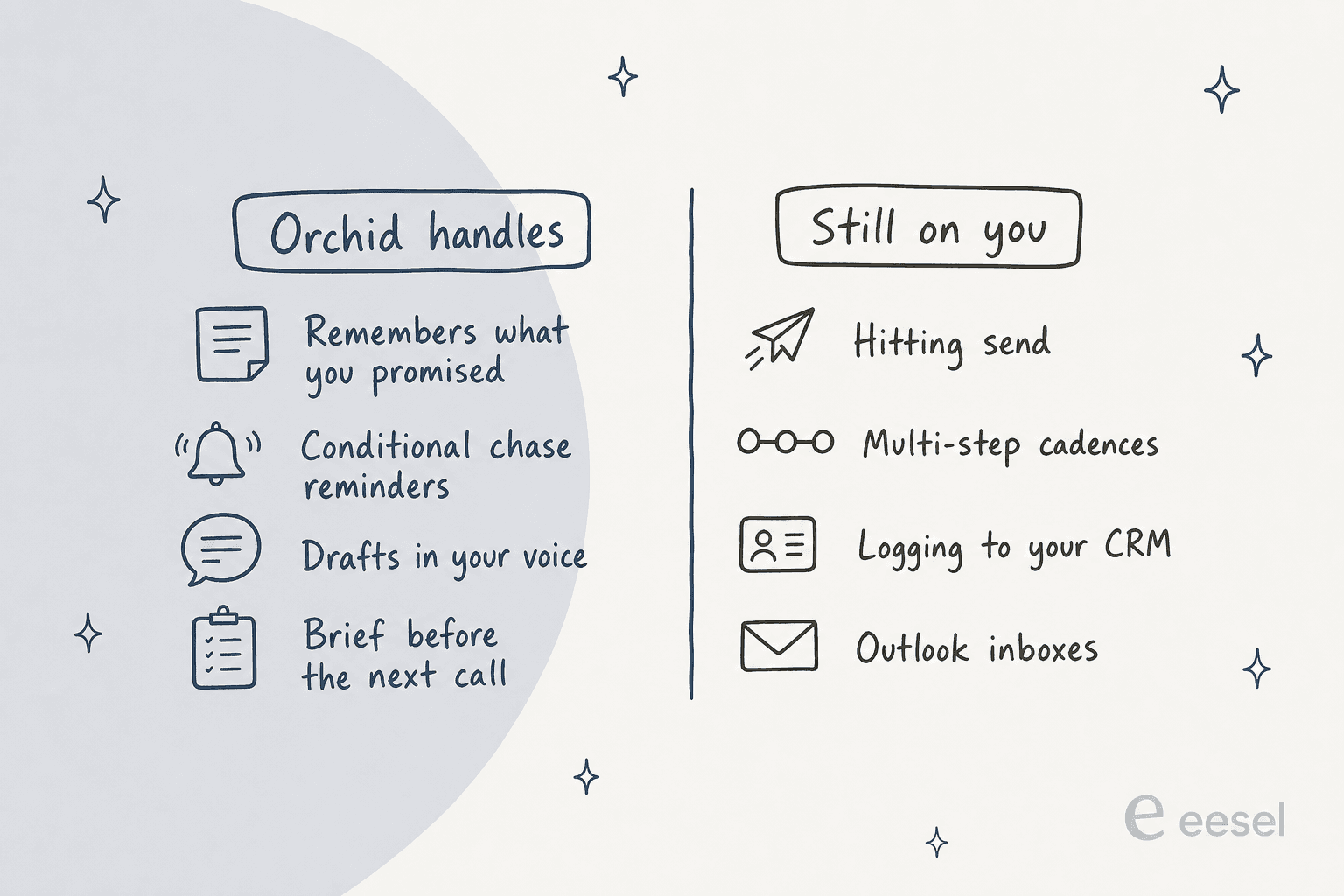
- Sending is on you by default. "Drafts stay drafts until you say send," per Orchid's safety page. You can widen autonomy for things like confirming meetings with named people, but there's no documented "send follow-ups for me" mode.
- No multi-step cadences. Each chase is a reminder you set in a text. There's no "follow up at 3, 7 and 14 days" sequence like the proposal cadence routine Town offers.
- No CRM logging. HubSpot appears in Orchid's homepage logo strip, but the FAQ's live list is Gmail and Google Calendar only. If your follow-ups need to land on a deal record, look at Town AI for HubSpot or HubSpot's AI email assistant.
- Gmail only. Outlook is "on the way" per the FAQ. Microsoft 365 shops can't use it today.
- One person, one assistant. Orchid is built around your own number and your own Gmail. It's not a shared inbox for a client-services team, so a colleague can't pick up a follow-up you started.
There's one more thing worth knowing before you hand it client email. Orchid's FAQ says it will never use your data "to train any model," but the binding privacy policy says "We may train your personal model on your data. Only yours." No shared-model training either way, but the legal wording is the narrower promise.
What users say about Orchid as a follow-up assistant
Public, hands-on reviews of Orchid are thin. There's no G2, Capterra or Trustpilot listing yet, and most of the public conversation is about its July 2026 launch video, in which a man forgets his anniversary and Orchid books dinner and flowers.
The sharpest reply in that pile happens to be a follow-up critique:
"Also like. If it was a good app it would've reminded him the week before?"
It's a fair point, and it applies to client work too. Orchid is strongest when it nudges early, before the follow-up is already late. In practice that depends on what it can see: a date in an email or a Granola action item, it can catch. A promise you made in a hallway, it can't.
Orchid itself is candid about the other risk. Its safety page says language models "misread a date, summarize a thread with too much confidence, draft a reply that misses the tone." For a client chaser, the tone miss is the one to watch, which is another reason the draft-first default is the right one.
What Orchid costs for client follow-ups
Orchid's pricing is simple, which also makes it easy to compare. There's no plan grid on the site; the only public price is on its pricing explainer.
| What | Detail |
|---|---|
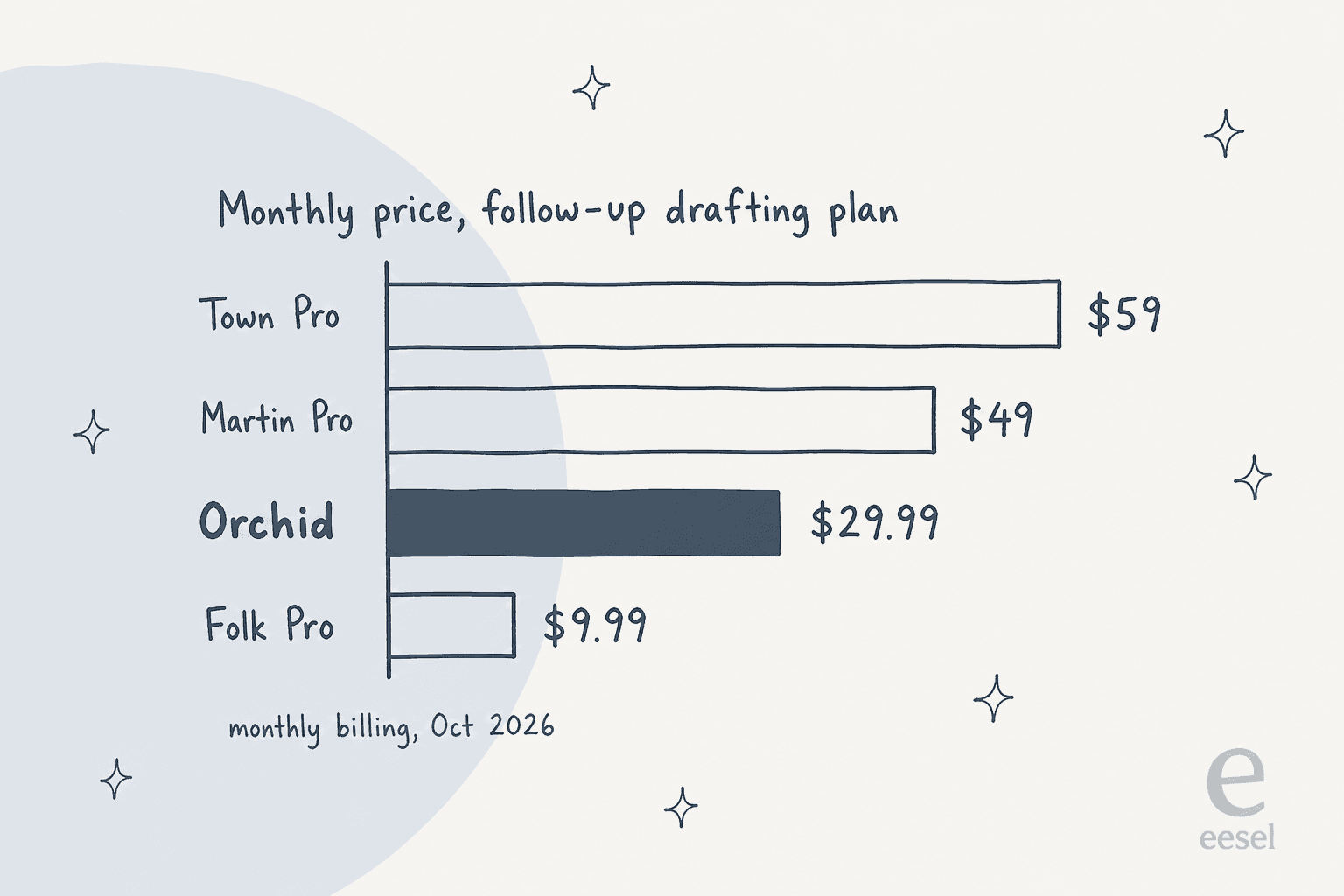
| Price | From $29.99/mo, flat (pricing post) |
| Free tier or trial | None for most users |
| What's metered | Nothing: no per-message or per-email charge |
| Follow-up features included | Triage, drafting, scheduling, meeting prep, reminders, voice notes, memory |
| Refunds | 30-day money-back guarantee; annual plans prorated within 60 days (terms) |
| Discounts | Students: 3 months free, then 50% off yearly; YC founders: 3 months free (students page) |
The flat price is a real plus for follow-up work. You can set as many conditional reminders as you like without watching a credit meter. That's not true everywhere: Town's cheaper Starter plan runs custom routines at most once a day, which is why I called Pro the real starting point in my Town AI pricing breakdown.
Orchid vs other assistants for client follow-ups
If you're weighing Orchid specifically for follow-ups, these are the options I'd put next to it. Prices are monthly billing, checked in early October 2026.
| Tool | How it handles follow-ups | Inboxes | CRM | Monthly price |
|---|---|---|---|---|
| Orchid | Conditional "chase if no reply" reminders, Granola notes, drafts held for send | Gmail | None live | $29.99 |
| Town | Routines: Client Call Follow-Up, Proposal Follow-Up Cadence, Stalled Deal Re-Engagement | Gmail, Outlook | HubSpot | $59 (Pro) |
| Folk | "follows up on threads that go quiet," drafts in your voice | Gmail, Outlook | None | $9.99 (Pro) |
| Martin | Email triage with follow-up actions like texting you or adding a to-do | Gmail, Outlook | None | $49 (Pro) |
| Gmail nudges | Bumps unanswered threads to the top of your inbox | Gmail | None | Free |
My read: Orchid is the best pick here if your problem is forgetting, and the wrong pick if your problem is volume. If you owe 15 clients a reply each week and you're on Gmail, the conditional reminder plus a draft is exactly enough. If you're running 60 proposals through a pipeline, Town's cadence routines and HubSpot logging are built for that. Outlook users should skip straight to Folk or Martin.
For a wider look, my Orchid AI alternatives roundup covers eight options in depth, including Lindy.
The best AI email assistants list covers inbox-first tools like Fyxer. If you'd rather stay inside Gmail, start with the best AI apps for Gmail.
When client follow-ups are really support tickets
Here's the distinction I'd make before buying any personal assistant for follow-ups. If the person waiting on you is a prospect, a partner or a client you manage one-to-one, that's a personal follow-up, and Orchid can help. If the person waiting is a customer who wrote into a shared support inbox, that's a support ticket, and a personal assistant on one person's phone is the wrong shape for it.
Support follow-ups are where my own day lives. The "just bumping this up" message from earlier came through a support channel, and the fix wasn't a better reminder for me. It was making sure the first reply went out fast, from the right knowledge, no matter who was on shift. That's what eesel's AI helpdesk teammate, one of its AI teammates, does: it joins your helpdesk, learns from your past tickets and help center, and drafts or sends replies on the threads your team hasn't reached.
Before it goes live, you can simulate it against your historical tickets to see what it would have said, which is the step I'd never skip after watching confident-sounding bots get answers wrong. If your team lives in Gmail, it works there too, the same way AI email support for SaaS teams run it.
Try eesel for the follow-ups your customers are waiting on
If the follow-ups slipping through are customer emails rather than your own client promises, eesel's helpdesk teammate picks up that queue in a few minutes and answers from what your team already knows. It plugs into Gmail, Zendesk, HubSpot and more, and the free plan lets you try it on real tickets before you pay.
Check the pricing, then try eesel on your own inbox.
Frequently Asked Questions
Can Orchid AI send client follow-ups automatically?
Not by default. Orchid drafts the follow-up in your voice and holds it until you text back to send, and its safety page says it can't send mail without your approval. You can widen its autonomy for things like confirming meetings with named people. My Orchid AI review covers the full autonomy ladder.
How do I set up Orchid AI for client follow-ups?
Text Orchid's number, connect Gmail and Google Calendar through Google sign-in, then tell it which senders matter, such as your client domains. After that, follow-ups are plain texts like "chase Dana friday if she hasn't replied." It's a lighter setup than the routines in Town AI for client follow-ups.
Does Orchid AI work with Outlook or a CRM for follow-ups?
Not yet. Orchid's FAQ lists Gmail and Google Calendar as the live integrations, with Outlook, Slack, Notion and Linear "on the way." HubSpot shows up only in a homepage logo strip. If CRM logging matters, see AI in HubSpot CRM.
How much does Orchid AI cost for client follow-ups?
Orchid is from $29.99 a month, flat, with no free tier and no per-message meter. Every follow-up feature is included, and the terms give a 30-day money-back guarantee. The Orchid AI alternatives post compares that price with Folk, Martin and Lindy.
Can Orchid AI use meeting notes for client follow-ups?
Yes, through its Granola integration. Notes, action items and decisions from Granola flow into Orchid, so it can remind you about the proposal you promised and brief you before the next call. If you don't use Granola, my meeting notes app roundup covers other options.
Is Orchid AI a good fit for agency and consultant client follow-ups?
For a solo operator on Gmail, yes. Orchid's own case study is a one-person agency that uses it for call prep and missed replies. Teams that share client threads or need follow-ups logged in a CRM will want a tool built for that, like the shared inbox options I've compared.
What's the difference between Orchid AI follow-ups and Gmail nudges?
Gmail nudges are free and bump old threads back to the top of your inbox. Orchid adds conditions and context: it texts you only if the client still hasn't replied, and it can draft the chaser for you. Both still leave the send to you.


Article by
Riellvriany Indriawan
Riell is a designer and writer at eesel AI with about two years of experience researching CX platforms, AI chatbots, and helpdesk software. She combines her design background with a sharp eye for how these tools actually look and feel in practice — making her comparisons unusually visual and user-focused.