
Why I looked at how Orchid writes your email
I build features for eesel's AI agents, and a lot of that work is about one unglamorous question: why do people rewrite AI drafts? On one real-traffic trial on an ecommerce support inbox, the AI's triage was right 93% of the time, but agents sent only 12% of its drafts unchanged. When we dug in, most rewrites weren't about wrong facts. They were about length and tone, and training on the team's own sent replies was the fix.
That's the exact promise Orchid makes for your personal inbox. Its FAQ says it "learns by reading what you have already written" and picks up "how you write to a client versus a friend." So rather than a feature tour, this post looks at the mechanism: how Orchid decides what you see, how it drafts, what it does without asking, and where it stops.
Quick context if you haven't met it: Orchid is an iMessage and SMS personal assistant from Zero Email, Inc., the YC team behind the old Zero email client. It lives in your texts, not in an app. My Orchid AI review covers the whole product; this one stays on email.
What does Orchid actually do with your inbox?
Orchid's FAQ sums it up as "Orchid runs your inbox, books your meetings, and preps you before every important call." For email specifically, that breaks into four jobs. Here's each one with what it does on its own and what it waits for.
| Email job | What Orchid does | Default autonomy |
|---|---|---|
| Triage | Reads incoming Gmail and texts you only what passes the five "needs you" gates (The End of Inbox Zero) | Runs on its own |
| Drafting | Writes replies in your voice, learned from your sent mail (FAQ) | Draft waits for your send |
| Reminders | Conditional nudges like "chase the landlord friday if he hasn't replied" (setup guide) | Reminds on its own |
| Scheduling from email | Finds slots, drafts invites, handles reschedules (FAQ) | Calendar holds wait for your okay |
The scale claim is real enough to note. Orchid's homepage counter showed 555,591 emails processed and 2,283,696 actions logged when I checked on October 8, 2026. It doesn't break those down per user, so treat them as proof the system runs, not as a benchmark.
How does Orchid decide which emails reach you?
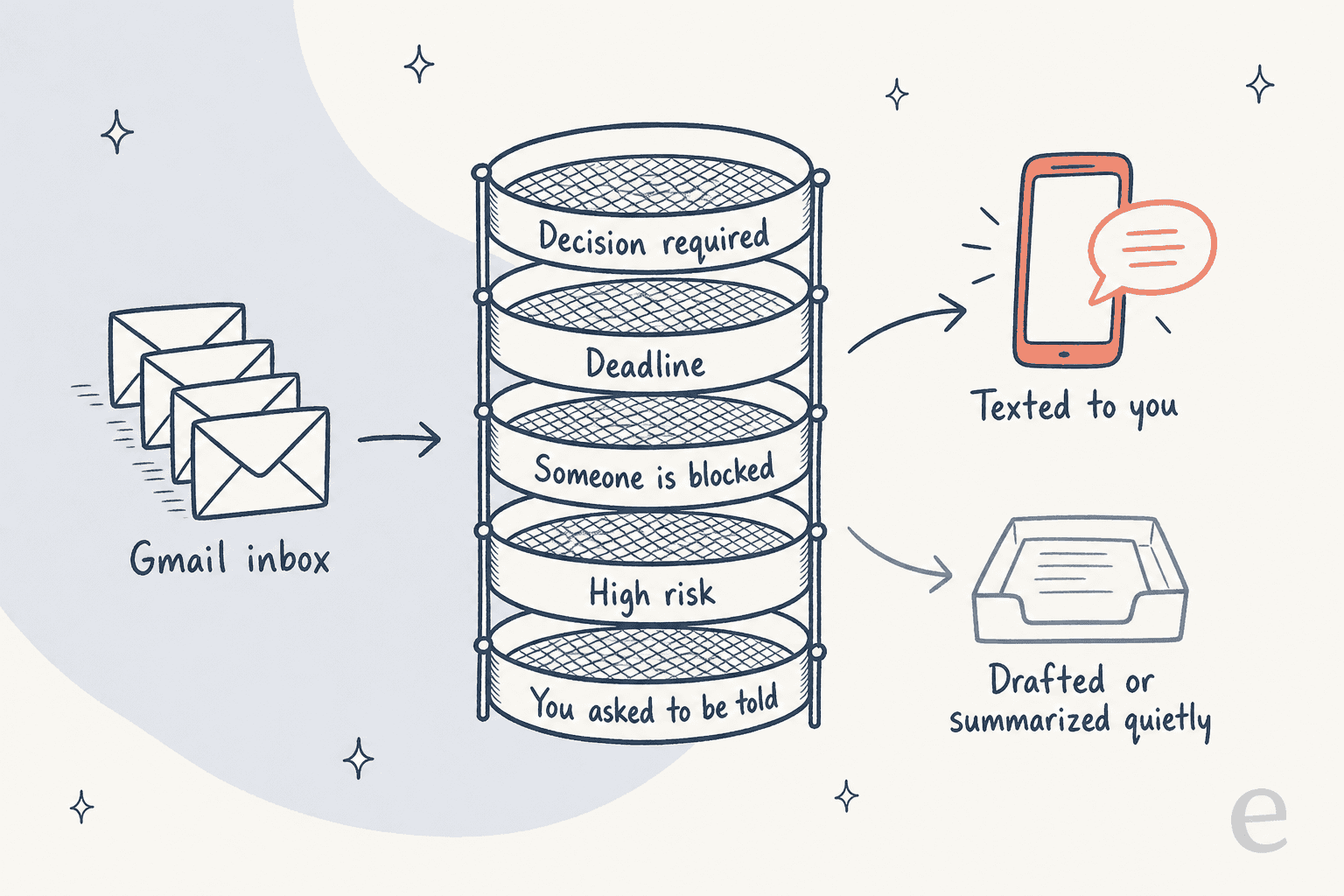
This is the part I'd want to understand before handing over an inbox, and Orchid is unusually open about it. In its essay on the end of inbox zero, the team writes that "needs you" has to mean something strict. An email only interrupts you if it passes one of five gates:
- A decision is required.
- There's a deadline.
- Someone is blocked.
- It's a high-risk situation.
- You explicitly asked to be told about it.
Everything else gets summarized, filed, or drafted quietly. The essay frames this as moving you "from processor to supervisor": you stop reading every email and start approving prepared work.
From a builder's point of view, gate five is the one that does the most work. The first four are judgment calls a model makes from the email itself, and judgment calls drift. Gate five is a rule you set, so it's predictable. In practice, the faster you tell Orchid which senders and topics matter, the less you depend on its guesses. The setup guide says the same thing: during onboarding you tell it which senders matter and what it should never touch.
The Notion Mail switch page puts a number on how people actually work: "More than half of Notion Mail users managed email without opening the inbox." Orchid's pitch to them is a daily text along the lines of "3 things actually need you today. handled the other 19."
How does Orchid write in your voice?
Orchid learns your voice by reading what you've already sent. The FAQ says it "picks up your tone, the phrases you use, and how you write to a client versus a friend," and that drafts get closer to your writing the longer you use it. The inbox-zero essay adds that every approval "teaches it your writing style, what you care about, who matters to you, and how you make decisions."
That matches what I've seen on the support side. Most edits to AI drafts are about shape, not facts: the AI writes eight sentences where a person writes two, or it's too formal for a regular customer. Training on someone's own sent mail fixes a big share of that. So Orchid's approach is the right one for drafts; the open question is how much sent mail you give it to learn from. A brand-new Gmail account gives it nothing to copy.
Drafting happens over text. You reply to Orchid with something like "reply to the landlord. firm but polite," and it answers "drafted in your voice, in your drafts. send?" The draft lands in your Gmail drafts folder, so you can edit it there before saying yes.
One honest limit from Orchid's own safety page: "language models make mistakes. They misread a date, summarize a thread with too much confidence, draft a reply that misses the tone." I'd take that seriously. The approval step is what catches those mistakes.
What does Orchid send on its own, and what waits for you?
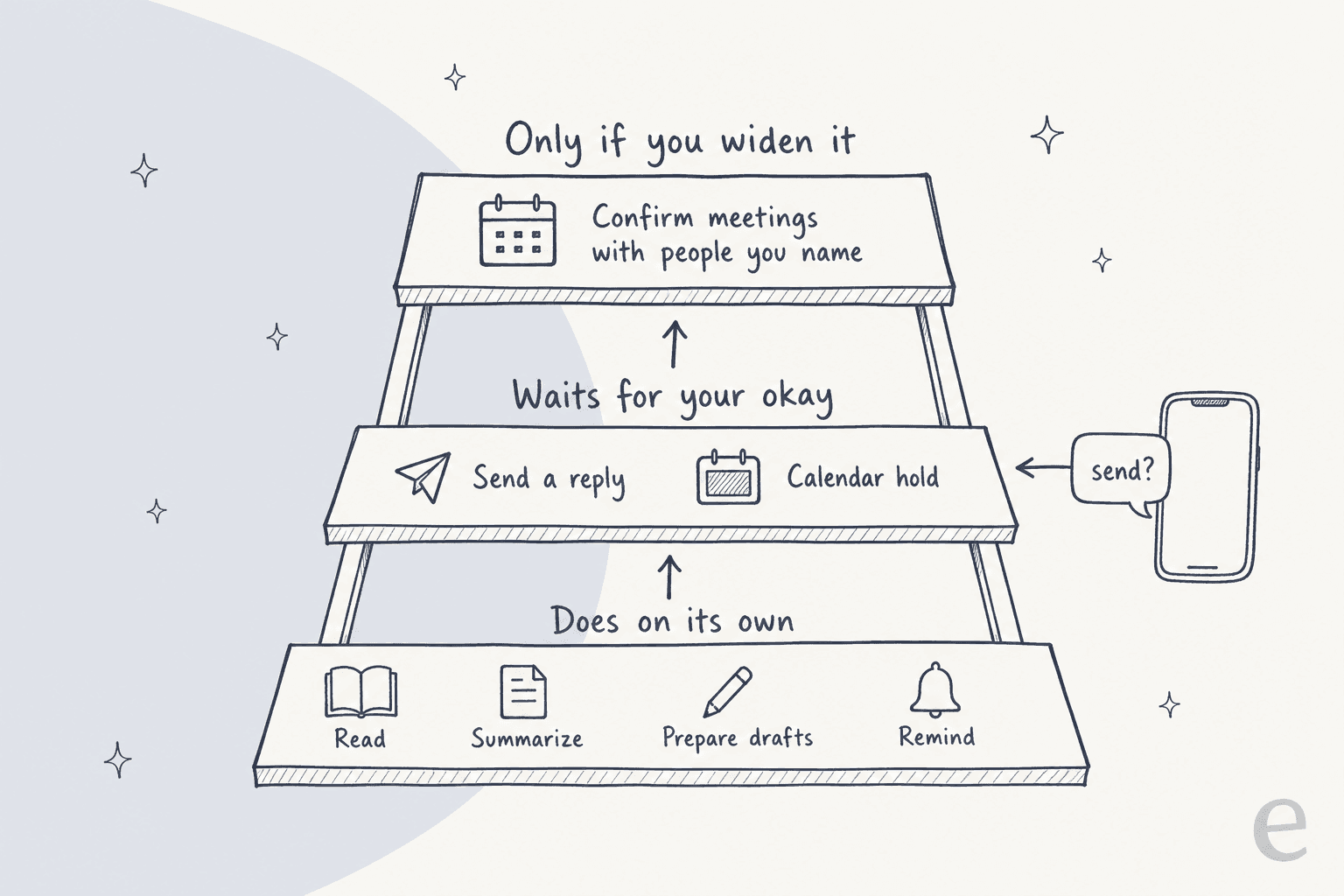
The default is clear and written in several places. Orchid's safety page says: "By default, nothing that leaves the thread. Drafts stay drafts until you say send. Calendar holds wait for your okay. Orchid can read, summarize, prepare, and remind on its own."
You can widen that. The example Orchid gives is "letting it confirm meetings with people you name," and you can pull access back whenever you want.
The legal side lines up with this. Orchid's terms of service say you're "responsible for reviewing and approving actions that Orchid takes on your behalf" and "must configure appropriate autonomy levels and approval thresholds." Liability is capped at the greater of 12 months of fees or $100, and that cap expressly covers actions the agent takes for you. So the approval step isn't only a safety feature, it's where responsibility sits. I'd keep sending manual for anything involving money, contracts or a new contact.
A Reddit user who tested several personal assistants landed in the same place:
"Useful for drafting replies and booking meetings ... Approval-before-sending flow makes sense for work ... More executive-assistant-like than chatbot-like"

Same thread, the cons they listed were "Mostly focused on work coordination" and "Not as broad as a daily personal assistant." For email management specifically, that focus is a plus.
How do you set up Orchid for email management?
Setup is short because there's no app. From Orchid's iMessage setup guide:
- Text Orchid. "Say hi, or just say what you need." The number differs across Orchid's pages, so use the one on the page you sign up from.
- Connect Gmail and Google Calendar. Orchid texts you a link; you sign in with Google. It never sees your password.
- Tell it what matters. Name the senders and clients that count, when you want the morning rundown, and anything it should never touch.
- Set your standing rules. This is where I'd spend the most time. A few that work well: "never send without asking," "always tell me about anything from [client domain]," "summarize newsletters, don't text me about them."
- Approve drafts for two weeks before widening anything. Every approval teaches it, so the first fortnight is training time.
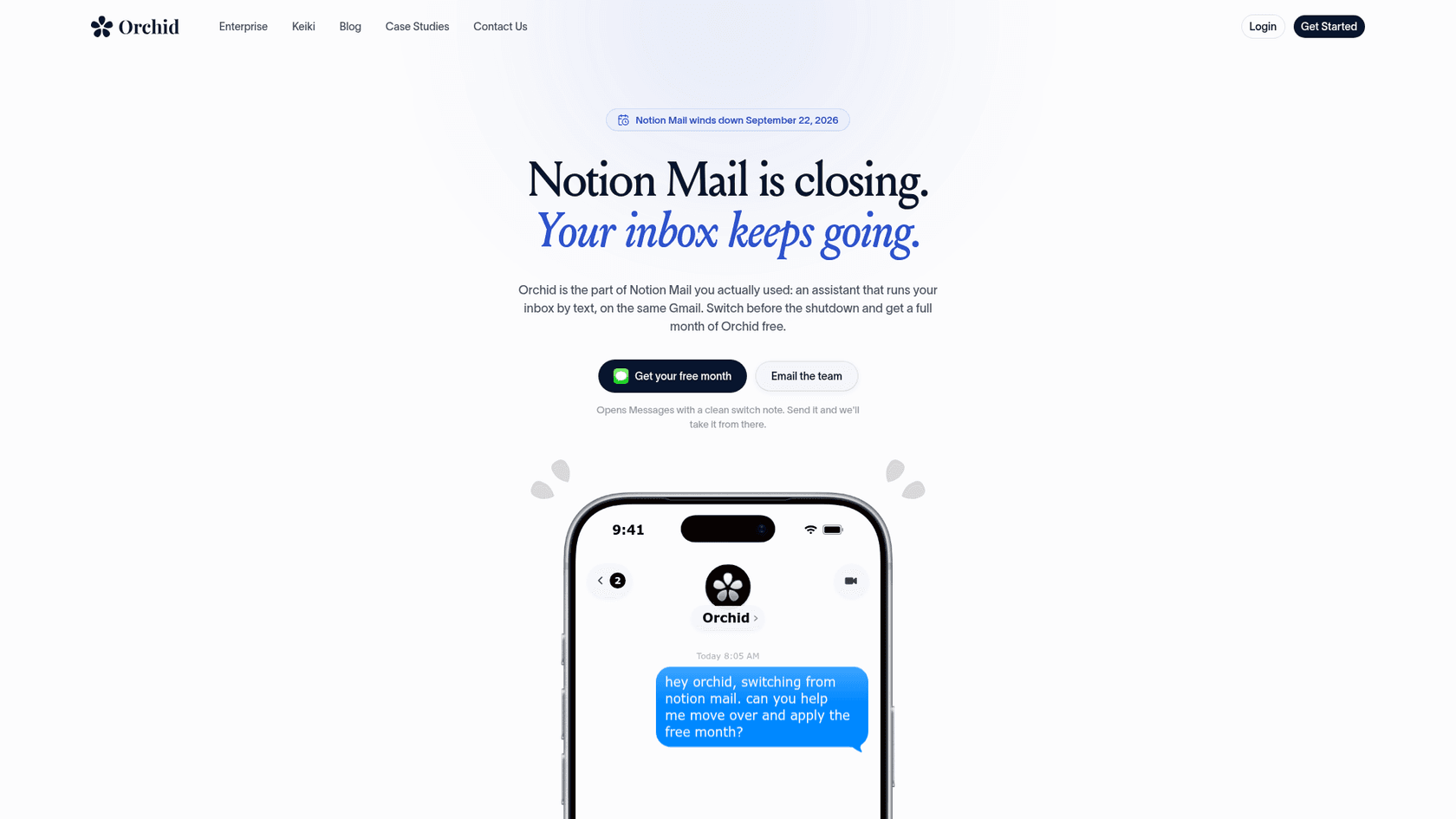
If you're coming from Notion Mail, Orchid has a switch page with a pre-written text and a free month for switchers. Notion Mail wound down on September 22, 2026. Your mail history stays in Gmail, but Notion-only drafts, snippets and auto-label rules don't carry over, so export those.
Which email tasks should you hand to Orchid?
Based on how it's built, here's how I'd split the work. The left column is low risk and plays to the five gates. The right column involves money, commitments, or other people's data.
| Hand it over | Keep a hand on it |
|---|---|
| Morning summary of what needs you | Anything that commits money or signs a contract |
| Drafting replies to people you write to often | First replies to new contacts |
| Summarizing long threads | Emails with attachments it has to judge |
| Pulling action items out of email | Customer or client data under an NDA |
| Conditional "chase if no reply" reminders | Refunds and billing disputes |
| Scheduling back-and-forth | Anything legal or HR |
That "chase if no reply" reminder is the strongest single email feature, and my teammate wrote a full walkthrough of it in Orchid AI for client follow-ups. It's a smarter version of Gmail's own nudges and follow-up reminders.
Where does Orchid stop for email management?
These are the limits I'd plan around, all sourced from Orchid's own pages.
Gmail only. The FAQ says "Today, Orchid works with Gmail and Google Calendar. Many more apps are on the way, like Outlook, Slack, Notion, and Linear." The homepage logo strip shows more apps, but the FAQ is the source I'd trust. Outlook users should look at AI for Outlook email instead.
The cross-tool workflows are a direction, not a feature list. The inbox-zero essay describes a refund email where the agent "pulls the invoice from Stripe and prepares the refund," and a bug report that becomes a Linear ticket. Those are compelling, but Stripe and Linear aren't in the FAQ's live list. Read them as where Orchid is heading.
One person, one inbox. Orchid is built around a single user's phone and judgment. A cofounder told Mashable that shared context is currently "just group chats and also coordinating meetings." There's no shared queue, no assignment, no handoff.
Not an email client. The Notion Mail page is direct: "Orchid is an assistant, not an inbox." You still open Gmail for anything visual.
Privacy wording differs by page. The FAQ says Orchid never uses your data "to train any model." The privacy policy, which is the binding version, says "We may train your personal model on your data. Only yours." Model providers are contractually barred from training on it. No SOC 2 report is listed for Orchid.
That privacy point is what most community pushback is about. A Reddit post on Orchid's data access put it this way:
"Structural weak points include the absence of local-only operation, reliance on continuous cloud connectivity, and the commercial incentive to retain behavioral data even when the company states it does not train models on it."
And when Orchid demoed meeting prep that reads your inbox, the first reply on X asked the work question directly:
"how do you do this while maintaining company confidential information?"
If your inbox holds client data under contract, check your agreements before connecting it.
What do people say about Orchid for email?
Independent voice on Orchid is thin. There are no G2, Capterra or Trustpilot listings, and most public reaction is about its July launch film rather than the product. The most useful takes for email come from executive assistants, who are the people Orchid's marketing compares itself to.
"This is marketing fluff aimed at the people who could never really afford us. It's aspirational at best. It claims to be able to replicate your writing style but it's meant to replace your writing. Beyond that it's a reminder app"
That's a sharp take, and the "reminder app" part undersells the five-gate triage. But the writing-style point is fair: a draft in your voice still needs you to read it, which is how Orchid is designed. Another assistant in the same thread saw the tools as something EAs will use, with the real skill being learning to "identify hallucinations."
What does Orchid cost for email management?
Orchid is from $29.99 a month, flat, per its own pricing explainer. Email triage, drafting, scheduling, reminders and memory are all included; there's no per-email meter.
- No free tier. The pricing explainer says there's no general free trial, though the Notion Mail page calls its free month "not the usual two weeks," so check what's offered when you sign up.
- Discounts. Students get 3 months free and then 50% off yearly; YC founders get 3 months free. Notion Mail switchers get a month free.
- Refunds. The terms include a 30-day money-back guarantee.
- Yearly price. Not published; plan details "live inside the app."
My full Orchid AI pricing breakdown covers the rest.
For comparison, Gmail's built-in Gemini features through Gemini for Google Workspace already help you write and summarize. If you'd rather stay inside your mail client, Fyxer's pricing is the in-inbox comparison point.
How does Orchid compare to other AI email tools?
Orchid sits in a newer category: assistants you talk to by text, which reach into your inbox for you. The older category is assistants that live inside the inbox itself.
| Tool type | Example | Where you work | Sends on its own? |
|---|---|---|---|
| Texting assistant | Orchid | iMessage or SMS | No by default, drafts wait |
| Texting assistant | Instinct | iMessage or SMS | Depends on your rules |
| Chat assistant | folk | App and web chat | Asks first, with narrow exceptions |
| Chat assistant | Martin | App, Gmail and Outlook | No approval setting documented |
| In-inbox assistant | Fyxer | Gmail or Outlook | No, drafts in your inbox |
| Built-in | Gmail Gemini | Gmail | No |
If you like the idea of AI email triage but don't want a texting agent, a tool from the AI email assistants list or the best AI apps for Gmail keeps everything in your mail client.
The Orchid AI alternatives roundup compares the personal agents head to head.
When the emails are really customer support
Here's where I'd draw the line before buying any personal assistant for email. Look at the examples in Orchid's own inbox-zero essay: a customer asking for a refund, a bug report that needs a ticket and a reply to the customer. Those aren't personal emails. They're support tickets that happen to arrive by email.
For a solo founder answering a handful of those, Orchid's draft-and-approve loop is workable. Past that, they need what a personal assistant can't give: a queue anyone on the team can pick up, shared knowledge, and answers that don't depend on one person's phone. eesel's cofounder Amogh makes the point on sales calls often: email is the biggest helpdesk in the world, and plenty of teams still run support straight out of Gmail.
That's the job eesel's AI helpdesk teammate was built for. It's one of eesel's AI teammates, each hired for a defined job. It joins your shared Gmail or email ticketing system, learns from your help center and the replies your team has already sent, and drafts or sends answers to customer emails, the refund requests included.
The part I'd point to as a builder is the testing step. I've watched confident AI give wrong answers on real support queues, so eesel runs against your past emails first and shows you how it would have replied before it sends anything. The best AI for email support roundup compares the options, and the shared inbox vs ticketing system guide covers how to set up the queue itself.
Try eesel for the inbox your customers write to
Orchid can run your personal Gmail by text. If the inbox that's actually overflowing is the one customers write to, eesel's helpdesk teammate plugs into that Gmail in a few minutes, answers from what your team already knows, and shows you its answers on old emails before it sends a new one.
Check the pricing, then Try eesel on your own support inbox.
Frequently Asked Questions
Can Orchid AI manage my email?
Yes, if your email is in Gmail. Orchid connects through Google sign-in, sorts what needs you from what doesn't, texts you the short list, and drafts replies in your voice. Replies stay as drafts until you say send. My Orchid AI review covers the rest of the product.
Does Orchid AI send emails without asking?
Not by default. Orchid's FAQ says replies stay as drafts until you hit send, and its safety page says it can't send mail without your approval. You can widen what it does on its own, for example confirming meetings with people you name. The same draft-first setup shows up in folk for email management.
Does Orchid AI email management work with Outlook?
Not yet. Orchid's FAQ lists Gmail and Google Calendar as the only live connections today, with Outlook named as coming. If your mail lives in Outlook, the guide to AI for Outlook email covers tools built for it.
How much does Orchid AI cost for email management?
Orchid is from $29.99 a month, flat, with email triage and drafting included and no per-email charge. There's no free tier. My Orchid AI pricing breakdown covers discounts, refunds and what the price leaves out.
Is Orchid AI a good Notion Mail replacement?
For the 'tell me what matters and draft the rest' part of Notion Mail, yes. Orchid runs on the same Gmail, so nothing moves. It isn't an email client, though, so you lose a mail app view. The Notion Mail alternatives roundup covers client-style replacements.
Is it safe to connect Gmail to Orchid AI?
It uses Google OAuth, so Orchid never sees your password, and its privacy policy says model providers are barred from training on your data. Its marketing says it never trains on your data, while the policy says it may train a personal model on your data only. Weigh that before connecting a work inbox, and see how AI email assistants handle the same question.
What are the best alternatives to Orchid AI for email management?
If you want help without a texting agent, Gmail's own Gemini features summarize emails and draft replies. Dedicated in-inbox tools like Fyxer stay inside your mail client. The Orchid AI alternatives roundup compares other personal agents.


Article by
Kira
Kira is a writer at eesel AI with a Computer Science background and over a year of hands-on experience evaluating AI-powered customer service tools. She focuses on breaking down how helpdesk platforms and AI agents actually work so that support teams can make better buying decisions.