
Can a personal agent run your project?
I build AI agents at eesel, and the first thing I ask about any agent is where its state lives. What does it remember between messages, what can it read, and what happens to a half-finished task when something breaks? For project management, those three questions decide almost everything.
Instinct is a personal AI assistant you text, from Spear Street Technology, founded by Noah Shinn. It's invite-only. Its homepage describes it as "a personal assistant that understands what you're working on and what's important to you," and says there are "no new interfaces. You can text or call it."
"Understands what you're working on" is exactly the promise a busy project manager wants to hear. But the homepage examples are all personal: disputing a bill, ordering groceries, scheduling a doctor, planning a weekend away. There's no project, team or work example anywhere on the page.
That gap is the whole story. Instinct is a project manager for one person, and it can be a very good one. It just can't see the project.
What Instinct can see, and what it can't
I re-checked Instinct's privacy policy on October 8, 2026. It's still the version last revised August 26. The only work tools it names are Google's. If you link Google Workspace, Instinct gets "your Google Calendar, Gmail, Google Drive, Google Docs, Google Sheets, Google Slides and Google Tasks."
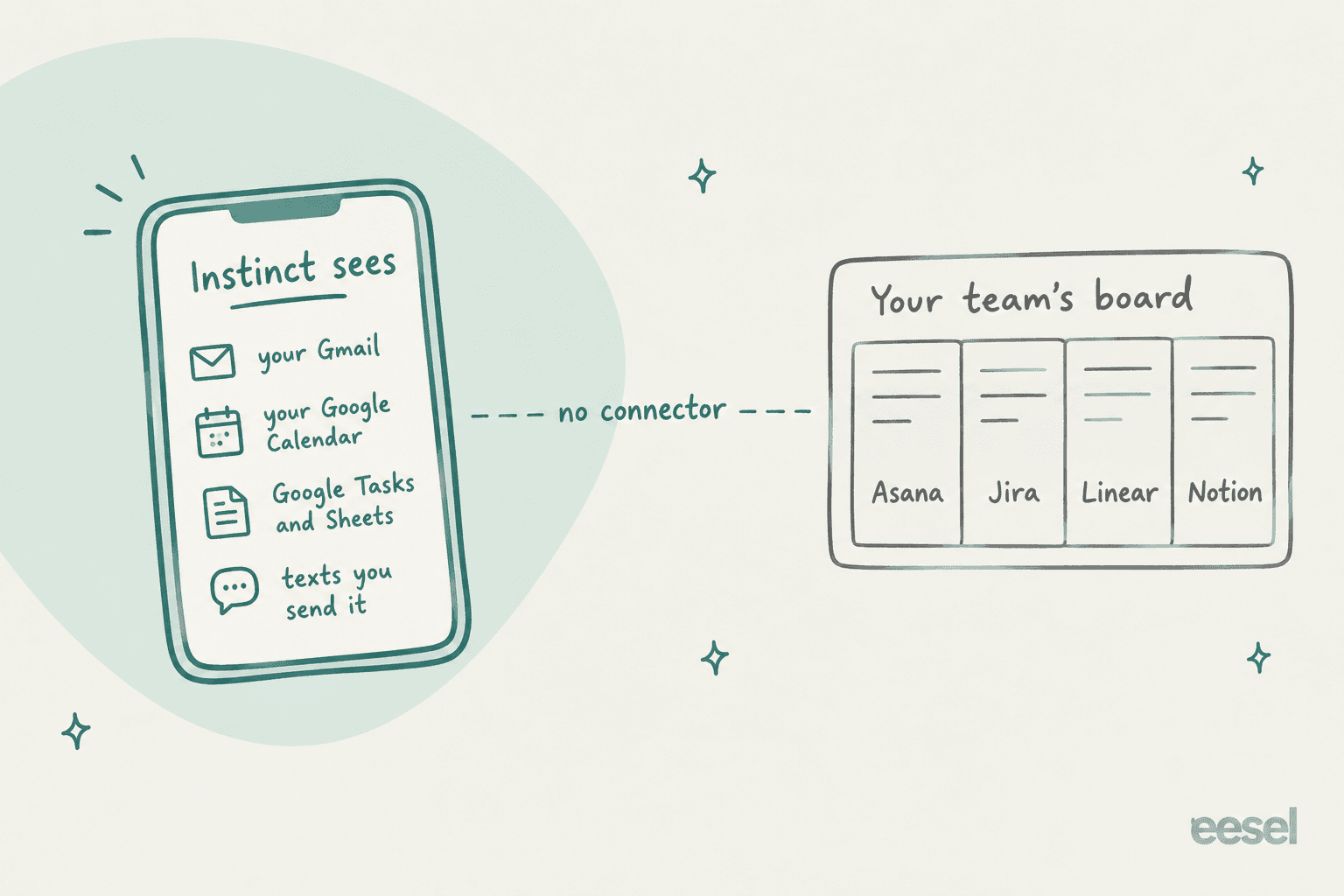
Here's how that maps to the tools project managers actually live in.
| Tool | Documented Instinct connector? | What that means |
|---|---|---|
| Google Calendar | Yes | Can spot clashes, add deadlines, move meetings |
| Gmail | Yes | Can read for deadlines and send follow-ups as you |
| Google Tasks, Sheets, Docs | Yes | Can keep a list or tracker you own |
| Asana | No | Can't read or update tasks |
| Jira | No | Can't see issues or sprints |
| Linear | No | Can't see issues or cycles |
| Notion | No | Not documented; one user says a logbook can live there |
| Trello, ClickUp, monday.com | No | Not mentioned anywhere |
| Slack, Microsoft 365 | No | Not mentioned anywhere |
Two caveats. Instinct says it "can use a phone and computer in the same way that humans do," so it may reach a web app through its browser. That's not the same as a connector you can grant, scope and revoke. And the agent's own word isn't documentation: Brad Groux published an email saying the agent "told me I could connect Microsoft 365 work accounts," then backed down after he cited the personal-use clause (Brad Groux, X).
The Terms of Service settle the team question on their own. They permit the service "for your personal use only" and say "You may not allow anyone else to use your Account." A shared Instinct for the project team isn't on the menu.
The four ways people track work with it
So what do the people getting value from it actually do? The clearest answer came from a Reddit user two months in, who boiled every concrete use down to four patterns:
"Two months in, every concrete thing I do with Instinct comes down to four mechanisms: Scheduled check-in. Have it ask you for something on a recurring schedule. You answer in shorthand, it keeps the record, and the recap shows up when you need it. Standing watch. Point it at something that changes over time. [...] Event with a follow-up. Tell it once what should happen when something arrives [...] A list it maintains. Keep something running between sessions: you add items, mark them done, and ask what's left."

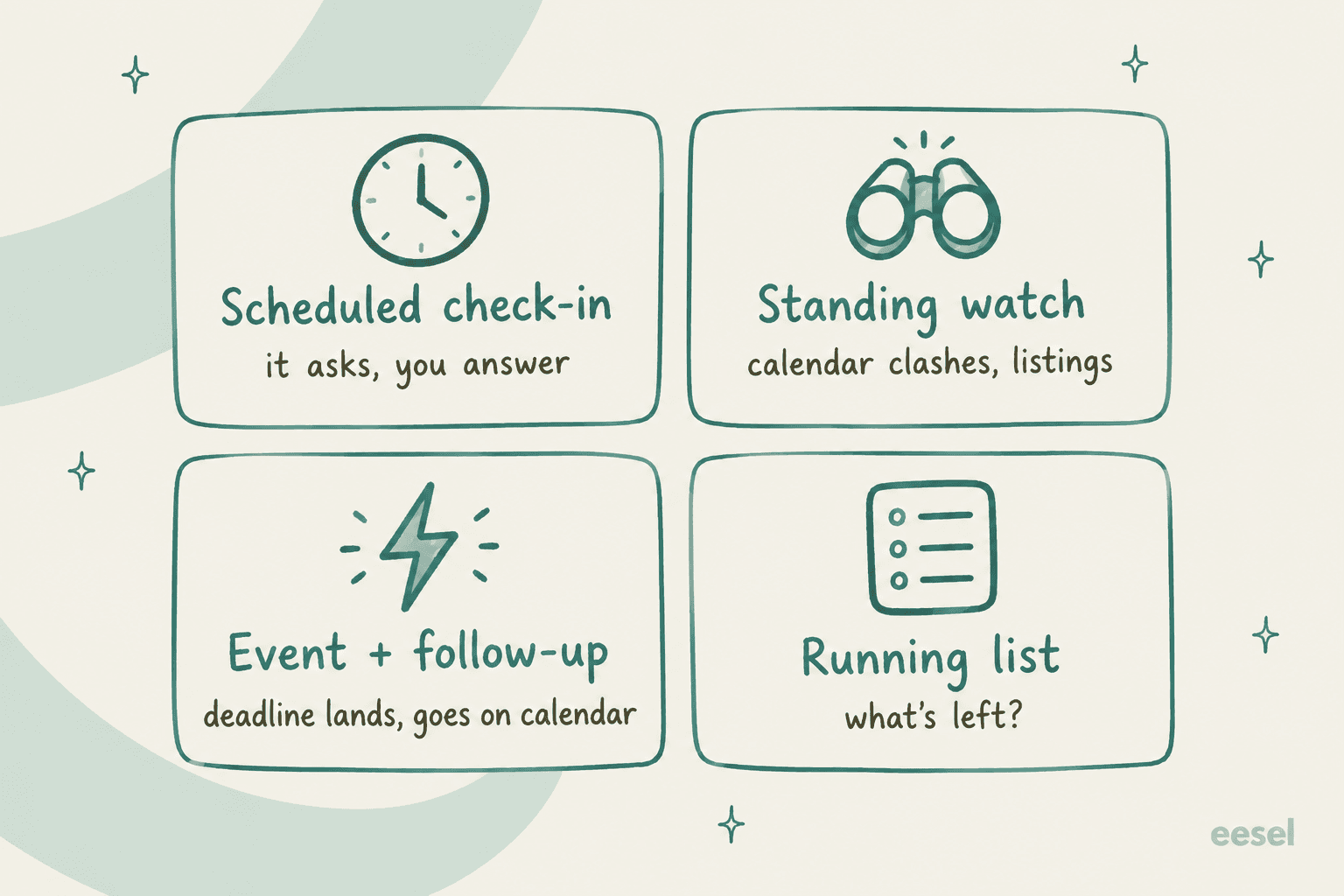
Each one maps to a real slice of project work.
Scheduled check-in. This is your personal standup. One user has "summary reminders every hour" set up for work (u/Puppy_powers, Reddit), and later added "I get a morning briefing off all my emails and things that are in my to do list" (a later thread). Another gets a morning summary of new email with "priority list for which I should read first" (u/Various_Instance_167, Reddit).
Standing watch. The best work story I found is a calendar clash caught before it happened:
"Two jobs plus client calls means my calendar reshuffles itself weekly. Last Thursday a client booked a call right on top of a two-hour block at my other job. [...] Instinct watches the calendar. It texted me the night before: these overlap, want me to move the client call? I said yes. It found the only clean opening, sent the updated invite, and the client had accepted before I woke up."
Note the shape: it asked first, then acted. That's the pattern I'd copy.
Event with a follow-up. Dan Peguine's list of a day with Instinct includes one that any project manager will recognize: it "caught a parcel pickup deadline and put it on my calendar for the last possible day, chained to a meeting nearby" (Dan Peguine, X). Swap "parcel" for "contract renewal" and you have the most useful thing Instinct does.
A list it maintains. Divya Venn found the cleanest version. She keeps her to-dos in a plain logbook document, and Instinct reads it:
"Guys I'm obsessed I'm obsessed I'm obsessed. Instinct + my logbook is a HUGE unlock. I don't even need to message instinct w my to dos anymore, it can just read my logbook and proactively help where it can"
For context, Divya built and open-sourced that logbook tool herself. But the idea is portable: a Google Doc or Google Sheet you own, which Instinct is allowed to read, works as a personal tracker. One job seeker has Instinct add applications it can't finish "to my job apps sheet in Google Drive" so they can do them by hand (u/IndependentWMSguy, Reddit).
Tamara Winter's apartment hunt is the best example of all four working together on one small project. Instinct "ran a daily scan" across five listing sites, sent about 20 listings in 48 hours, and when a new requirement landed, "re-scored everything already sent and crossed off every walk-up retroactively" (Tamara Winter, X). Then it ran the move-in checklist. That's project management, just for a project with one stakeholder.
Where it fits in a project manager's week
Here's the reframe that makes Instinct useful at work. Most project management isn't doing the work, it's noticing: the deadline in an email you skimmed, the meeting that clashes, the reply nobody sent. A Reddit organizer who collects Instinct use cases put it well: "Every one of them is a task where the work is not the doing, it is the noticing" (u/DefiantTop6188, Reddit).
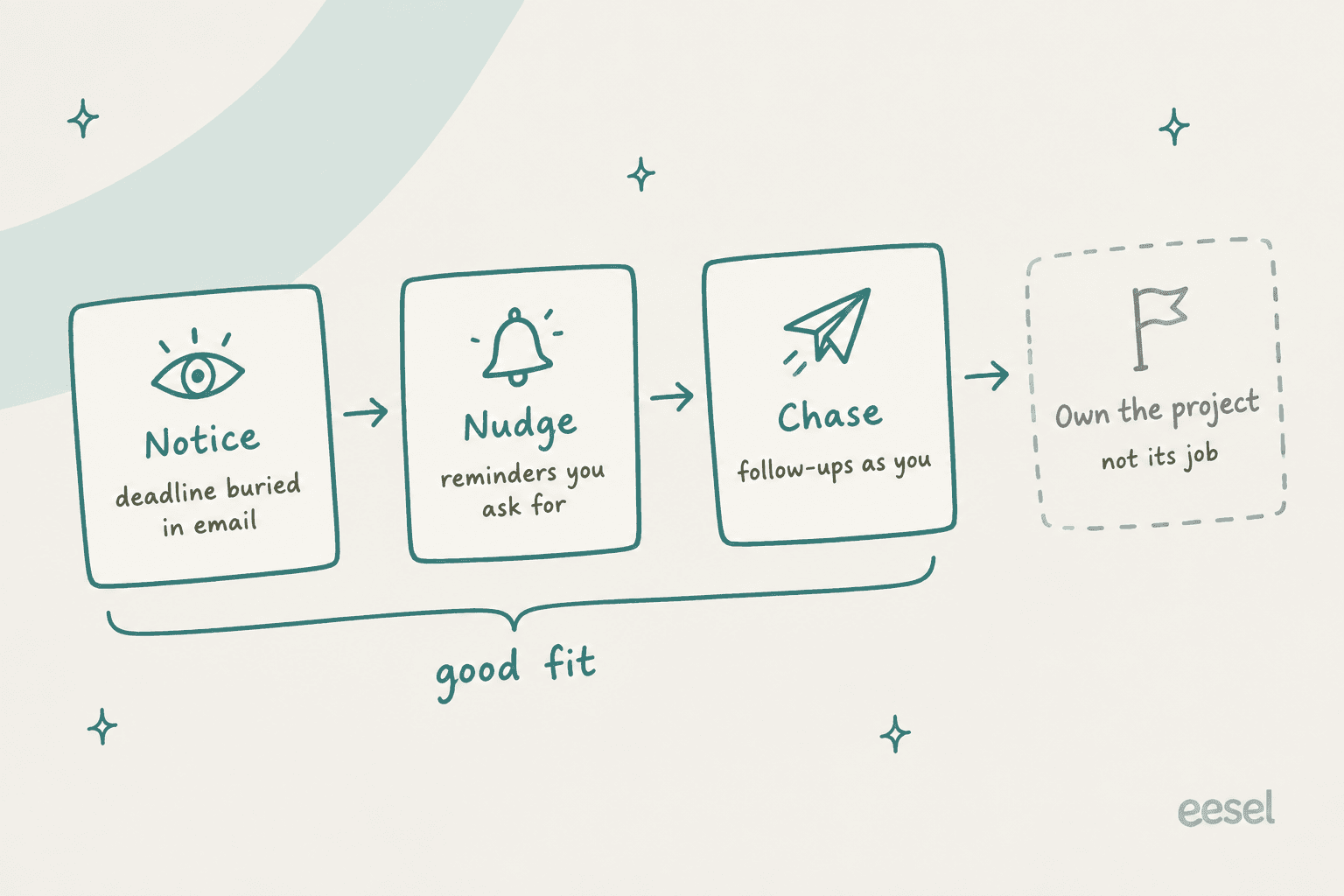
Lionel Sim, a solo founder who runs five assistants, gives Instinct exactly this seat:
"It reminds me of outstanding tasks, follows up on loose ends and keeps working in the background while I focus on something else. As a solo founder, that changes how my whole week feels."

He calls it "the chief of staff I never had," and gives his strategy work to OpenAI's Dots instead. That split is the right one. Here's how I'd divide a project manager's week:
| PM job | Instinct fit | Better home |
|---|---|---|
| Catching deadlines in your inbox | Strong, if it's your Gmail | Instinct |
| Spotting calendar clashes | Strong, if it's your calendar | Instinct or an AI scheduling assistant |
| Your personal to-do list | Good, via a Doc, Sheet or Google Tasks | Instinct |
| Chasing a vendor or a client | OK, it sends as you | Instinct, with approval |
| Team task board and sprints | None | Jira, ClickUp Brain, monday AI |
| Status reports from project data | None | The board's own AI, like Notion AI |
| Meeting notes and action items | Partial, from what you send it | Notion AI meeting notes |
If you're shopping for the bottom half of that table, my colleagues' roundup of AI project management tools is where I'd start.
Where it breaks down
Even inside its lane, four limits matter for anyone tracking real deadlines.
It can stall mid-task. This is the one I'd plan around. In September, one user's agent was "stuck since yesterday morning," and a reply in the same thread said "I have it working on a bunch of stuff, and I am just frozen" (r/AI_Agents). The error users quote says it all:
"I couldn't finish responding to your last message. Some actions may already have completed. Please check their status before repeating any action."
Users reported the same error again on October 6. "Some actions may already have completed" is the sentence that worries me as someone who builds agents. If you don't know which follow-ups went out, you can't trust the list.
Reminders can slip. Under a LinkedIn post about Instinct slowing down, commenter Vishal Bhawsinghka flagged "Instinct skipping daily reminders on pre feeding tasks" over "last 7-8 days" (Mayank Jain, LinkedIn). In early October, users said their Instinct had gone "a lot more quiet," and one replied it was "making more errors than usual" (r/InstinctHQ).
It doesn't know the project's context. A user on r/Instinctai, who builds a competing tool, said it "doesn't know the full context of my projects, and Claude does, because that's where I do most of my work" (r/Instinctai). Discount the pitch, but the point stands: your project's context lives in the board and the docs, not in your texts.
Group chats are built for friends. The October 5 group chat launch includes "keeping track of who's bringing what" and "reminding everyone to set their lineups." That's shared task tracking, but for Thanksgiving and fantasy football. The group's Instinct "has no direct access to your personal accounts," which is good design. It still isn't a team workspace.
A safe setup for your own project work
If you have access and want Instinct as your personal chief of staff, this is the setup I'd use. It takes about 20 minutes.
- Connect only your personal Google account. The terms say personal use only, and the work-account path is exactly what Brad Groux was wrongly told was fine.
- Give it one list to own. A Google Sheet or Doc with your to-dos and due dates. Tell it to check the list on a schedule and ask you what changed, rather than guessing.
- Ask it to find what you missed. The best first test I've seen comes from a r/Instinctai guide: "Is there anything in my email from the last fortnight with a deadline I have not put in my calendar" (r/Instinctai).
- Require a yes before anything goes out as you. Commitments Instinct makes are "binding on you as if entered into directly by you," per the terms. Chasing a vendor is fine. Promising a client a date is your call.
- Keep the real due date in the team tool. Instinct reminds you. The board stays the source of truth, so a stalled agent never means a missed deadline.
Two privacy settings are worth a minute too. Training on your data is on by default, with an opt-out at app.instinct.com/settings. And disconnecting an integration "does not automatically delete data collected from that integration," so delete it separately if you stop.
Personal chief of staff vs a teammate for the team
Instinct answers to one person, and that's its strength. A team project has shared data, shared rules and someone who needs to see what the AI did and why.
That's the job eesel is built for. eesel is an AI teammate platform: you hire a ready-to-work teammate for one defined job, and it arrives with the skills, integrations and company context for that role. Today there are two:
- The AI helpdesk teammate joins your existing support queue in Zendesk, Freshdesk, Gorgias or Gmail, learns from past tickets and your help center, and answers or drafts for your agents.
- The AI blog writer researches, writes and illustrates posts for your company blog, in your voice.
The difference from a personal agent is the paper trail. I've watched confident AI give wrong answers on live support queues, which is why every eesel rollout runs against historical tickets first, and every action after that lands in a log you can audit. "Some actions may already have completed" is not a sentence a team can work with.
If you're comparing personal agents for your own admin, Instinct vs Grok Bot goes head to head. For chasing clients specifically, read Orchid AI for follow-ups.
For agents built for company work, start with the best AI teammates roundup.
Try eesel for the team's work
Let Instinct catch your deadlines and chase your loose ends. For the jobs that belong to the whole team, like the support queue or the company blog, eesel gives you an AI teammate that plugs into your existing tools in minutes, learns from your own docs and past work, and logs every action it takes so nothing is left half-done and invisible. Try eesel free, or read what an AI employee looks like in practice first.

Frequently Asked Questions
Can Instinct AI be used for project management?
Does Instinct AI integrate with Asana, Jira, Linear or Notion?
What project management tasks is Instinct AI good at?
Can I use Instinct AI to track my team's tasks?
Is Instinct AI reliable enough for project deadlines?
Is Instinct AI free for project management?
What are the best Instinct AI alternatives for project management?


Article by
Kira
Kira is a writer at eesel AI with a Computer Science background and over a year of hands-on experience evaluating AI-powered customer service tools. She focuses on breaking down how helpdesk platforms and AI agents actually work so that support teams can make better buying decisions.