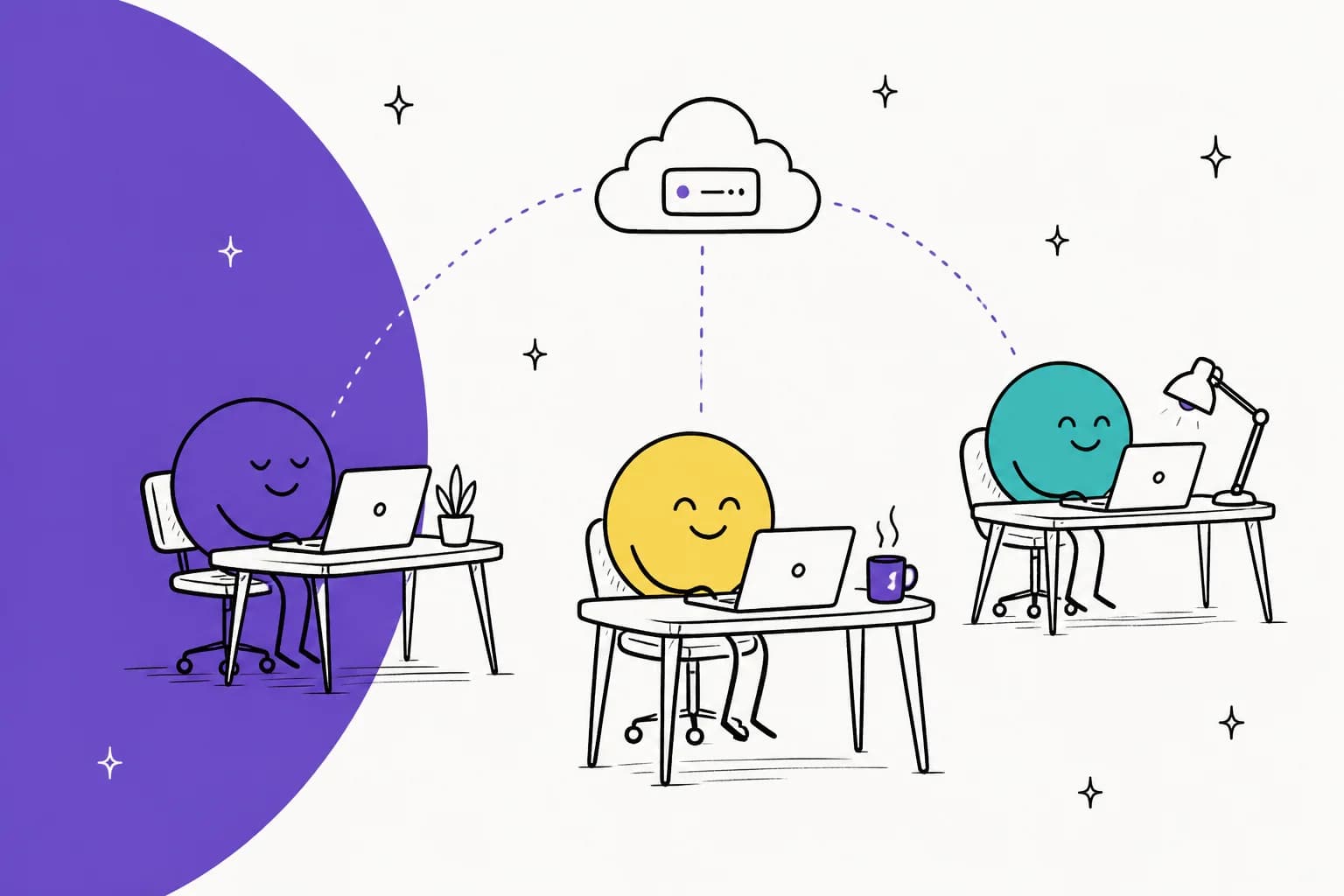
What are OpenAI Dots?
I build features and AI agents at eesel, where I've spent a long stretch putting agents on live support queues and watching what happens when they meet real customers. So when OpenAI announced an agent that "works 24/7 for you," the first question I had was not about how clever it is. It was more about who it answers to, and also what it is allowed to touch.
To start with, here is the one-liner OpenAI gives itself. Dots are described as "remarkably capable, always-on agents built to handle everything." In practice, what you get is a named agent that lives in ChatGPT, runs on GPT-6 Astra, has its own cloud computer, and keeps making progress on your goals when you aren't in the chat.
Sam Altman framed the launch more around time than around tasks:
"Dots are here! A new way to use AI that works 24/7 for you; get more of your time and attention back to work at a higher level."
There are three things that make a dot different from a normal ChatGPT agent session:
- It persists. OpenAI's getting started guide says a dot "can take on ongoing responsibility and keep making progress between conversations."
- It has its own machine. Each dot works on a separate cloud computer that has its own browser, and you can open it any time to watch, or to take over.
- It starts work on its own. In between your requests it goes through your connected apps looking for ways to help, and OpenAI calls this proactive research.
That last point is the one which changes the risk math, so it pays to understand how the pieces fit together before you connect your inbox.
How does a dot actually work?
If you look under the marketing, a dot is made of four parts: a model, a sandboxed computer, a set of app connections, and a separate checker that sits between the dot and anything consequential. OpenAI's safety write-up is unusually detailed on all four, and I think it's worth the read if you plan to connect any work accounts.
Its own cloud computer
Each dot gets a Linux environment with a Chrome browser in it, and according to OpenAI the cloud environments of different users are isolated from one another. The dot can browse there and analyze files, and it can run tools too. You can open the dot's computer from its profile to inspect the work, and a "Take over" button hands control back to you.
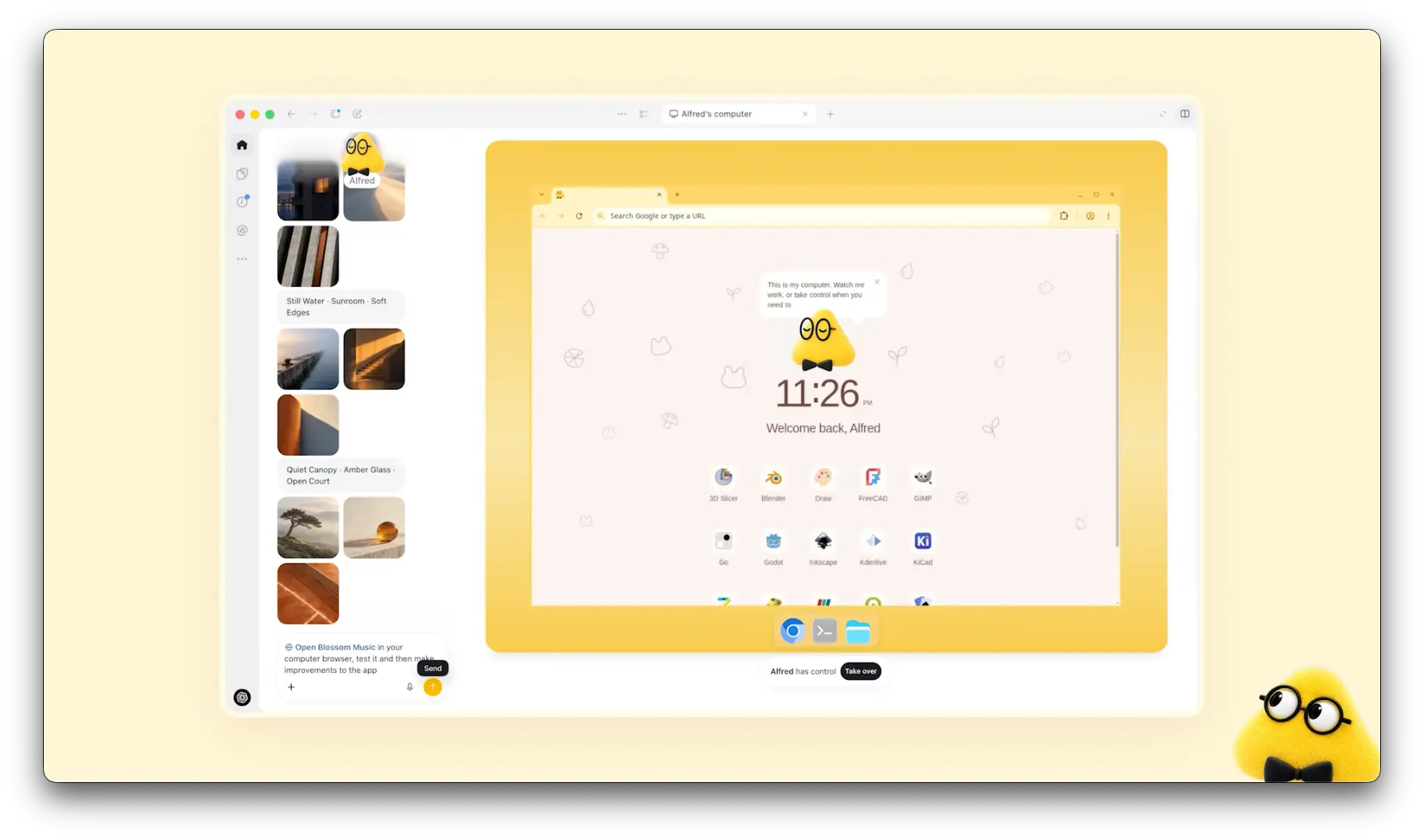
Your own laptop is kept out of all this unless you opt in. Local computer access "is optional and starts turned off," per the help center. Once you turn it on, the dot can use local files and local skills, plus your local browser for the times its cloud browser gets blocked. It can also create cloud tasks in Codex environments you've already set up.
Plugins and memory
Dots connect to apps through the same plugin permissions you use in ChatGPT, ChatGPT Work, and Codex. Grant access once and it applies across all four. OpenAI's launch post says the plugin ecosystem reaches "over 4,000 apps."
Memory is the part where I would slow down a bit. Per OpenAI's privacy FAQ, your dot receives memories from ChatGPT and can form its own, including from connected apps. But you currently cannot view, delete, or edit individual dot memories. The only way to clear them is deleting the whole dot. Disconnecting an app does stop new access, but what the dot already learned from it stays.
Proactive research, fenced to read-only
In the time you aren't talking to it, a dot runs background tasks, which read your permitted sources and save private notes. OpenAI says these limits are "enforce[d] in code": research tasks can't send messages, change content in connected apps, or control a browser or computer. Any action that follows from it goes through the normal rules instead.
Auto-review, the separate checker
Before a dot sends an email or changes a file, a separate system called Auto-review checks the planned step against your instructions, your Custom Rules, and OpenAI's safety requirements. In the case of an email, it checks both the recipient and the message. OpenAI keeps the controls of Auto-review outside of the environment the dot is able to change, so the dot can't switch it off by itself.
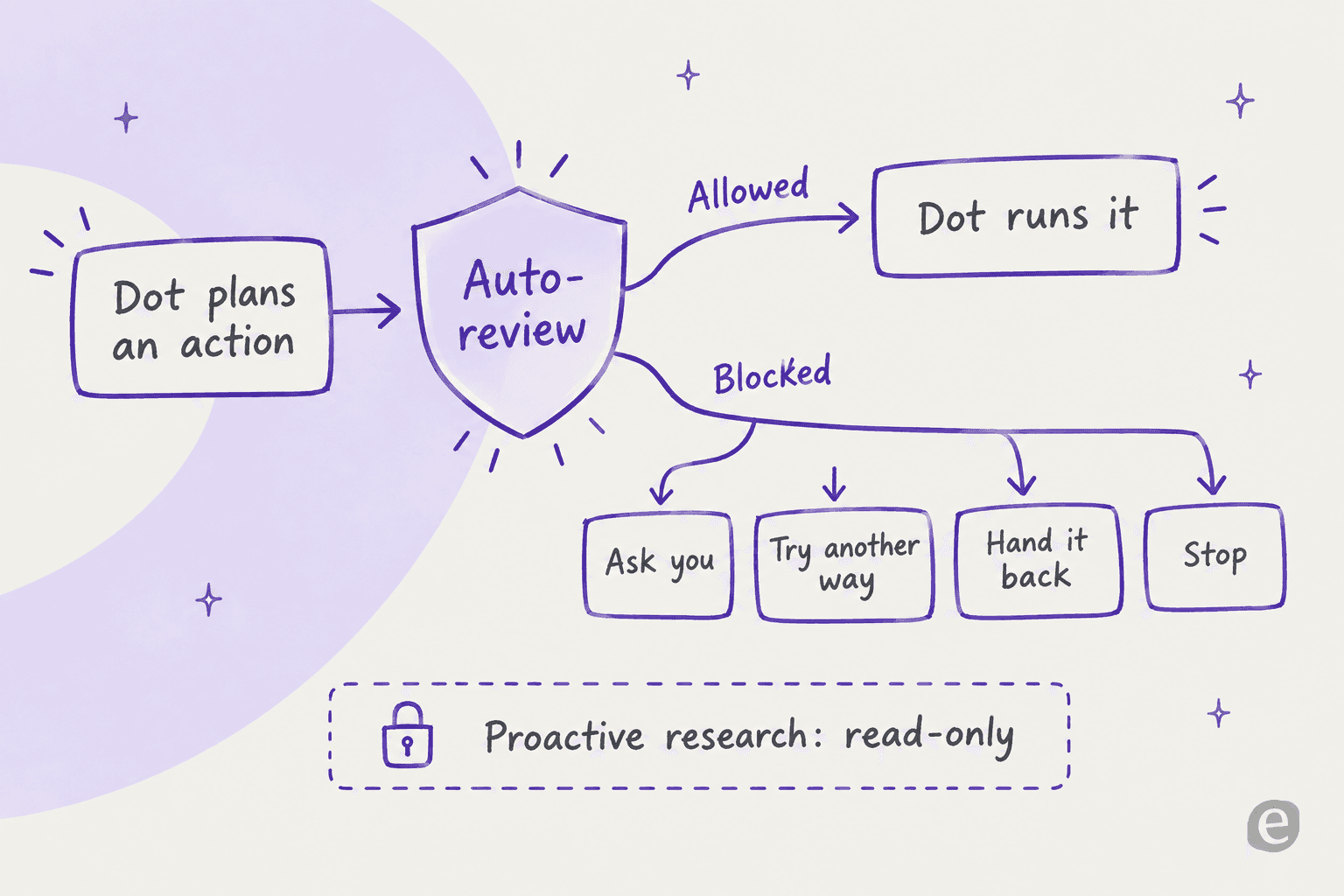
This is a design I like a lot. The cheapest lesson I learned at eesel is that an agent which sounds confident still needs a second pair of eyes before it acts, which is why every eesel rollout gets simulated against historical tickets first. OpenAI putting a separate reviewer out of the agent's reach comes from the same instinct, only it's applied to email and files and not to support replies.
What can a dot do today?
OpenAI's launch page walks through five example jobs. Below are three of them that show the range, each one captured from the announcement.
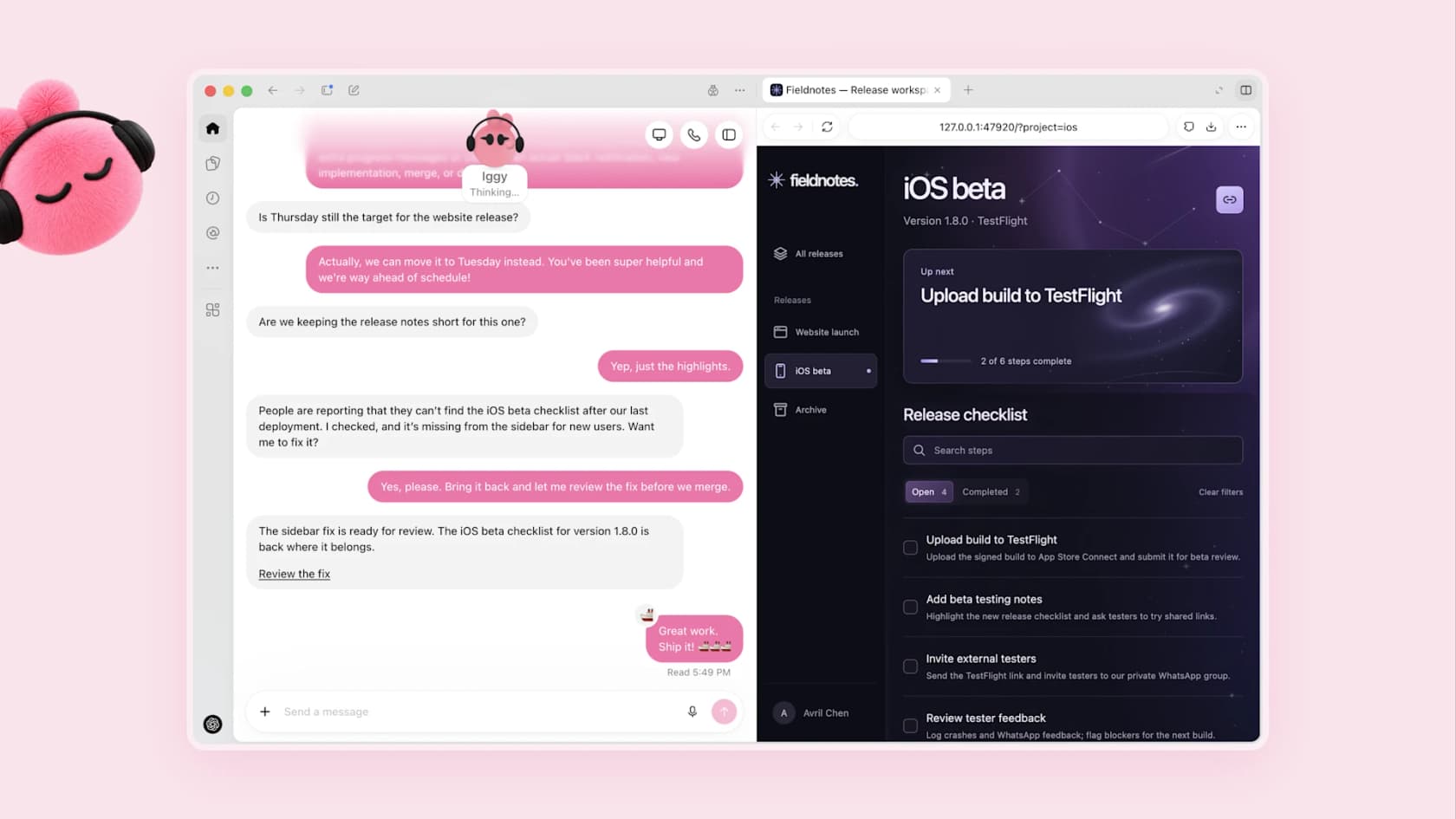
Turn customer feedback into fixes. A developer's dot watches the feedback for requests that keep coming up, scopes small fixes and builds and tests them, then brings back PRs with videos. In the demo, "Iggy" spots that an iOS beta checklist is missing and asks first before fixing it.
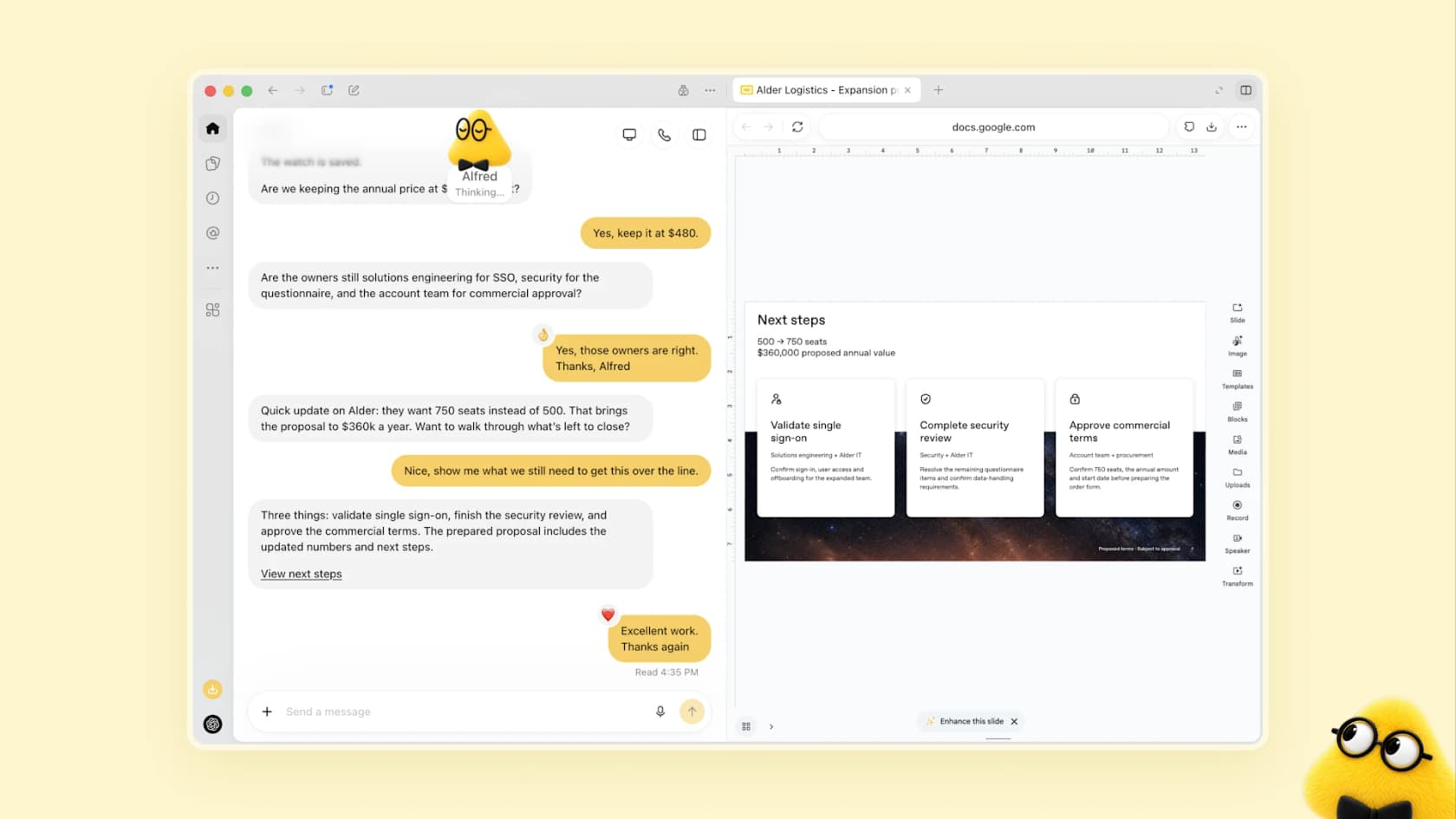
Keep a sales proposal current. A sales lead's dot checks the requirements against product docs and finds what still needs testing, updating the proposal as the deal shifts. "Alfred" recalculates a deal from 500 to 750 seats and lists the three steps left to close.
Draft content from raw material. A creator's dot pulls clip moments out of an interview transcript and writes show notes, and it also drafts social posts for approval, with all of it staying unpublished until the human signs off.

The pattern in all three is the same: the dot prepares and a person approves. That is the honest shape of the product today, and it matches well with what I hear from support teams. The adoption path that almost everyone wants is drafts first, and then full automation after the trust is earned.
Here's what a dot can and can't do at launch, pulled from OpenAI's help center:
| Capability | At launch |
|---|---|
| Chat in ChatGPT (desktop, web, mobile) | Yes |
| Voice calls with your dot | Yes, you call it |
| Dot calls you | No |
| Slack and Microsoft Teams | Yes, set up from desktop |
| Texting | Limited beta, Pro users in the US only |
| Create a dot on mobile | No, desktop app or desktop web only |
| Connect your personal email | Yes |
| Its own email address | No |
| Scheduled and recurring tasks | Yes |
| Use your local computer | Optional, off by default |
| Codex cloud tasks | Yes, in environments you've created |
| Users under 18 | Not available |
Who can get a dot, and what does it cost?
The short answer: your first dot is included, with no separate price, but only on the top consumer and business plans. OpenAI's pricing page lists "Dot, your always-on agent" under Pro and marks it "No" for Free, Go, and Plus.
| Plan | Monthly price | Dots? |
|---|---|---|
| Free | $0 | No |
| Go | $8 | No |
| Plus | $20 | No |
| Pro 100 | $100 | Yes, first dot included (not in EEA, Switzerland, UK) |
| Pro 200 | $200 | Yes, first dot included (not in EEA, Switzerland, UK) |
| Pro 500 | $500 | Yes, first dot included (not in EEA, Switzerland, UK) |
| Business Premium | Not listed on the public pricing page | Yes, all supported regions |
| Enterprise, Edu, Healthcare | Contact sales | Beta, off until an admin enables it |
Pro tier prices come from OpenAI's Pro tiers article. For the full plan picture, including what Pro 500's Ultrafast actually buys, see the ChatGPT pricing and GPT-6 Astra pricing breakdowns.
The more interesting part, in my view, is how the usage works. Per OpenAI, conversations with your dot don't count toward your ChatGPT usage limits. Your plan comes with a separate allowance for "deeper work," and the limits are extended for the first month. But when the dot starts or manages tasks in Codex or ChatGPT Work, those count against your normal limits. So a dot which delegates a lot will eat into the same budget that you use yourself.
OpenAI also says that "in the future," you'll be able to add more dots and scale each one's speed or monthly capacity. None of that has a price yet, so I would plan my budget around the generous first-month limits getting tighter after that.
Not sure where you land? Pick your plan and region:
Can I get a dot right now?
Based on OpenAI's rollout notes as of October 1, 2026.
What controls do you get?
This is where OpenAI did its most careful work, and it's the section I would read two times before connecting anything sensitive.
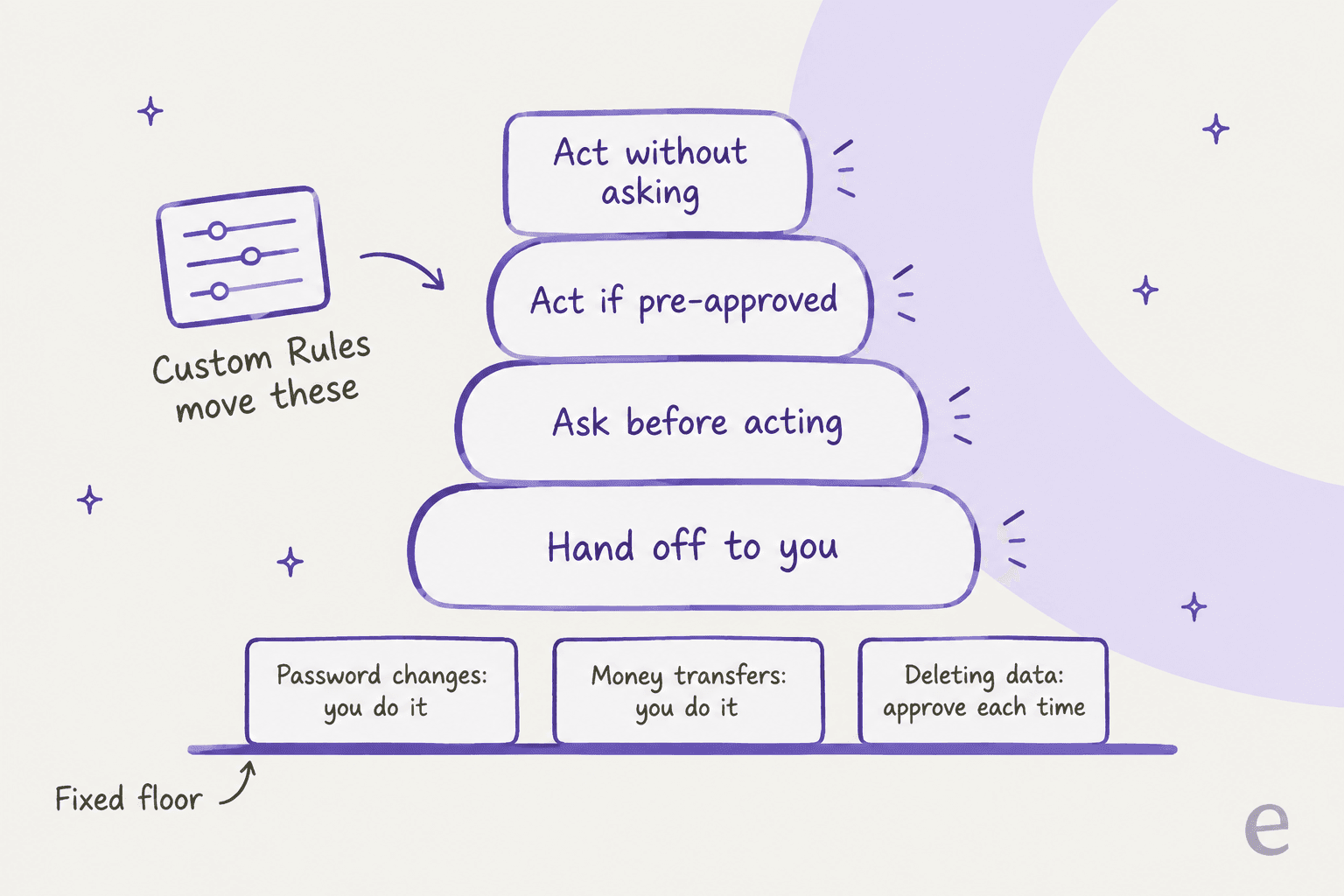
Every dot ships with default rules about what it does alone and what it needs you for. Custom Rules let you move supported actions between four behaviors: take action without asking, take action if pre-approved, ask before taking action, or hand off to you. "Pre-approved" here means you asked for that action explicitly in your prompt.
There are some things you can't loosen at all. Per the privacy FAQ, changing a password or transferring money always comes back to you. Permanently deleting data or installing software may require approval each and every time. Purchases with a card saved on a merchant site need you to approve too, though that approval can be given in advance when it covers that specific purchase.
A few more details worth knowing:
- Sharing data scales with sensitivity. Health data always needs a named recipient ("share my medical history with Dr. Thompson"). Less sensitive details like an email address default to a class of recipient ("any airline company").
- Approval doesn't stretch. OpenAI says approving one message doesn't give ongoing permission to contact people, and delegating work doesn't expand what you authorized.
- Passwords stay out of the model. For supported sign-ins, the dot pauses while you type credentials into a secure form. That protection does not cover a password you paste into a chat or a document.
- Activity View in the desktop app shows ongoing and delegated tasks, and you can redirect or stop the dot at any point.
- Training defaults differ. Business, Enterprise, and Edu content isn't used for training by default. On personal plans, the "Improve the model for everyone" setting decides. OpenAI notes that human review can still happen in limited cases, safety cases included, even when training is off.
It's worth naming what is missing, too. There's no line-by-line memory editor, no audit export mentioned, and OpenAI is candid that its prompt injection defenses "help reduce the risk... but they do not eliminate it." For a personal assistant, that is a reasonable trade. For a system that touches customer data, it's a gap your security team is going to ask about.
What are people saying about Dots?
The launch thread on Hacker News hit 721 points and 610 comments in its first day, and it split roughly three ways.
The first camp liked the idea of having a managed agent that they don't need to host:
"I'm excited to try Dots out, I'm pretty tech savvy and don't really want to run my own open claw (I've successfully setup open claw previously)."

The second camp questioned the price floor. Since there's no dot on the three cheapest plans, the audience ends up narrow:
"The cost is going to be hard for many consumers to reconcile though. Free, Go, and Plus are probably the most popular consumer-facing plans, and Dots isn't available on any of those."
The third camp was about permissions, and this is the one I'd take the most seriously. One developer described what happens when the scope is looser than what you think:
"I minted what I thought was a minimal-permission Github token for a single action, and the agent I gave it to discovered it had more permissions than I thought, and made use of those permissions."
There was also a related thread of confusion running through the replies, about where Dots ends and where OpenAI's other agent products begin.
"The lines between Codex, ChatGPT Work, and Dots is getting a bit blurry to me."
That's a fair read. ChatGPT Work is task-based work you start. Codex is the coding agent. A dot sits above both as the persistent layer that can start and manage tasks in either, which is also why its delegated work counts against those products' limits.
Where do Dots stop?
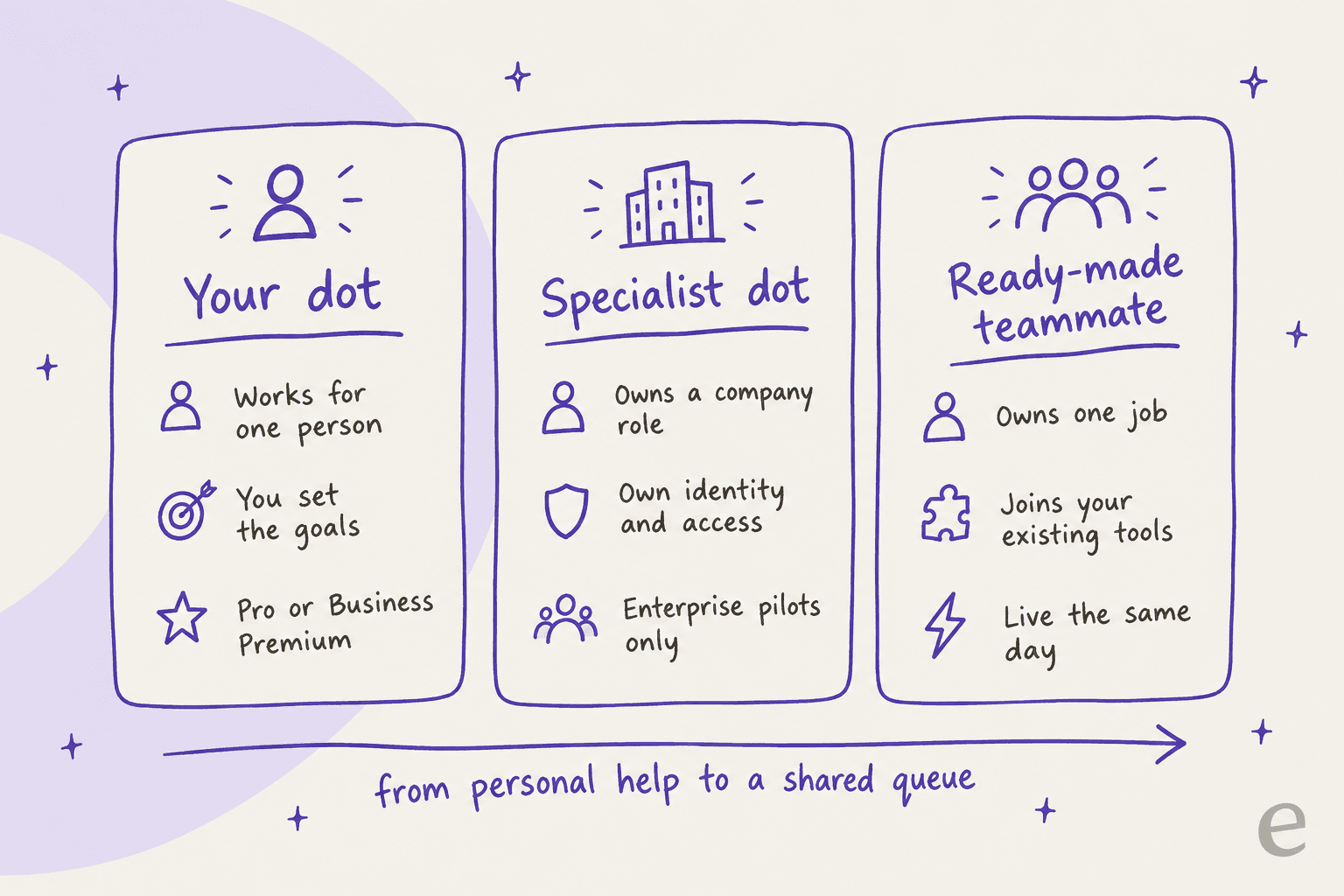
Here's the reframe I would offer to anyone evaluating Dots for work. A dot is a personal agent, and most business work isn't personal.
Your dot works on your behalf. It learns your preferences and answers to you, and it shares memory with your ChatGPT account as well. That's great for things like your inbox or your launch plan, and your research too. It's a poor fit for a job that belongs to a team, like a support queue, where the work has to follow company policy rather than one person's habits, and where five people need to see the same audit trail.
OpenAI knows this, and that is the reason it announced specialist dots alongside the personal ones. Specialist dots get their own identity, credentials, IT-provisioned hardware, and deep integrations with a company's systems of record. OpenAI says it tested them internally across "procurement, invoice processing, email marketing, customer support, and commercial contracting," and it's working with Microsoft to manage them through Agent 365.
The catch is availability. Specialist dots start as "focused enterprise pilots," where OpenAI's engineering teams work directly with each organization to define responsibilities, tools, and review. That is a reasonable way to launch something so powerful, but it's not something a 20-person support team can just switch on this week.
This gap is the one I spend my days working on. What support leads keep asking for isn't "an agent that can do everything." It's much more narrow than that. A CX lead at a DTC supplements brand doing about 7,000 tickets a month put it plainly on a sales call:
"The AI will never be able to answer 100% of the questions, but if it tries and just answers 'sorry I don't know this,' I cannot go and check all my 7,000 tickets to see if the AI actually made a good answer, then the point is a little bit gone. I need an AI who is only handling the tickets that it's confident to handle and all the other ones, leave them alone."
That's a job description, not a personality. It needs your helpdesk and your past tickets, your policies too, and some way to test before going live. A general agent can get there with enough setup, while a teammate built for the job starts from there.
How do Dots compare with other always-on agents?
Dots arrive in a month that is already crowded. Several HN commenters compared them straight away with xAI's Grok Bot, Meta's Muse agent, and the texting-first Instinct. Others pointed to self-hosted projects like OpenClaw and Hermes Agent, which give up convenience in exchange for control over the model.
On the enterprise side, Anthropic's Claude Cowork and Microsoft's Copilot Autopilot chase a similar idea from different directions.
What sets Dots apart, based on OpenAI's own materials:
- Model: it runs on GPT-6 Astra, OpenAI's top model, rather than a cheaper tier. The GPT-6.1 Sol write-up explains why that choice raised eyebrows the same day Sol launched.
- Distribution: it lives inside ChatGPT, Slack, and Teams, where many teams already are. See the ChatGPT in Slack guide for how that connection works.
- Safety architecture: the separate Auto-review layer and code-enforced read-only research are more specific than most competitors have published.
If you want to see the wider field, the roundups of the best AI agents and best AI teammates cover the options side by side, and the open-source AI agents list is the place to start if model lock-in is your worry.
Should you get a dot?
My take, after reading every page OpenAI published on it:
Get one if you're already on Pro, you live in a supported region, and your work is personal and messy: research, launch prep, staying on top of an inbox and calendar, keeping a side project moving. The included allowance makes the first month into a low-risk trial. Start with read access and keep Custom Rules strict, then loosen them only as the dot earns it.
Wait if you're on Plus and would be upgrading just for this, or you're in the EEA, Switzerland, or UK on a personal plan. OpenAI says more plans are coming, and what the limits look like after the first month isn't clear yet.
Look elsewhere if the job belongs to a team. A support queue, a content pipeline, or anything with customer data and a shared audit trail is what specialist dots are for, and those are still pilots. For that work, a ready-made AI teammate that joins your existing tools is the faster path. The AI employee explainer covers how to tell the two categories apart.
eesel, the teammate for the jobs a dot doesn't own
If Dots made you think "I want that, but for our support queue" or "for our blog," that's the gap eesel fills. eesel is an AI teammate platform: you hire a ready-made teammate for a specific job, and it arrives with the skills and integrations for that role. Today that's the AI helpdesk teammate, which joins Zendesk, Freshdesk, Gorgias, Front, and Slack as a new member of the queue, and the AI blog writer, which researches and drafts posts like the one you're reading.
The difference from a dot is in where it starts. A dot learns the preferences of one person over time. The helpdesk teammate learns your company's past tickets, help center, and macros up front, and you can simulate it against hundreds of historical tickets to see how it would answer before a customer ever sees a reply. Every action lands in a shared activity log, and anything outside its rules waits for a human approval, which the reports view tracks per tool.

If the idea of an agent you can drive from anywhere appeals to you, eesel has that as well. The eesel CLI runs the same teammate from a terminal: eesel approvals list shows actions waiting on a human, eesel activity lists every run, and every workspace doubles as an MCP server that coding agents like Claude Code can connect to. The AI agent CLI guide walks through why that matters.
Pricing is flat and public: a free plan with 100 credits and no card, then teammate plans from $299/month for 500 credits, where one ticket or chat is one credit. Details are on the pricing page. Try eesel and have a helpdesk teammate reading your real tickets the same afternoon.
Frequently Asked Questions
What are OpenAI Dots?
How much do OpenAI Dots cost?
Are OpenAI Dots available on ChatGPT Plus?
Can I use OpenAI Dots in Europe or the UK?
Can OpenAI Dots work in Slack?
Are OpenAI Dots safe to connect to my accounts?
Can OpenAI Dots handle customer support tickets?


Article by
Kira
Kira is a writer at eesel AI with a Computer Science background and over a year of hands-on experience evaluating AI-powered customer service tools. She focuses on breaking down how helpdesk platforms and AI agents actually work so that support teams can make better buying decisions.