How I reviewed OpenAI Dots
I'm a software engineer at eesel and I ship integrations and APIs, so when an agent asks for access to 4,000+ apps, the plugin scopes are the first thing I read. I've also spent a long time watching AI agents on live support queues, and the lesson that stuck is simple: a confident agent still needs a check before it acts, which is why every eesel rollout gets simulated against historical tickets first.
Here's my method for this review, so you can weigh the verdict properly:
- Primary sources, all of them. OpenAI's launch post, its safety write-up, the privacy FAQ, the getting started guide, and the pricing page.
- Every comment in the launch thread. The Hacker News thread sat at
727points and614comments when I pulled it on October 1. - Hands-on reports from people who have one. Dots rolled out on September 29 and access is gradual, so first-person reports are still thin. I quote the detailed ones and say where evidence is missing.
I haven't run a dot on my own accounts yet, so I'm not going to pretend I did. Where a claim comes from someone else's hands-on time, I say so.
If you want the full feature tour first, my colleague's OpenAI Dots explainer covers every capability, plan, and region. This post is the verdict.
OpenAI Dots review scorecard
Here is how I'd score it on the six things that decide whether an always-on agent earns a place in your week.
| Area | Score | Why |
|---|---|---|
| Safety design | 4.5/5 | Auto-review sits outside the dot's reach, background research is read-only in code, passwords and money always come back to you |
| Capability | 4/5 | GPT-6 Astra, its own Linux computer with Chrome, 4,000+ apps via plugins, Slack and Teams |
| Day-to-day friction | 2.5/5 | Repeated confirmations on routine steps, no 2FA fetch, broad rules rejected |
| Value for money | 3/5 | Included on Pro, dot chats don't use your limits, but the entry point is $100/month and future limits are unpriced |
| Availability | 2/5 | Not on Free, Go, or Plus; Pro excludes the EEA, Switzerland, and UK; desktop-only setup |
| Fit for team work | 2/5 | Answers to one person; the team version (specialist dots) is an enterprise pilot |
| Overall | 3/5 | Strong foundation, cautious by design, narrow audience for now |
Scores are a blunt tool, and your weights won't match mine. If safety matters more to you than friction, the picture changes. Slide the weights to see your own score:
What OpenAI Dots gets right
Credit first, because there's a lot of it. OpenAI shipped one of the two most carefully explained safety models on a consumer agent (Meta Muse's Sentinel design is the other), and the product underneath it is capable.
Auto-review is out of the dot's reach
Before a dot sends an email or changes a file, a separate system called Auto-review checks the planned step against your instructions, your Custom Rules, and OpenAI's safety requirements. For an email it checks the recipient and the message. The important design choice is that Auto-review's controls sit outside the environment the dot can change, so the dot can't talk itself past its own checker.
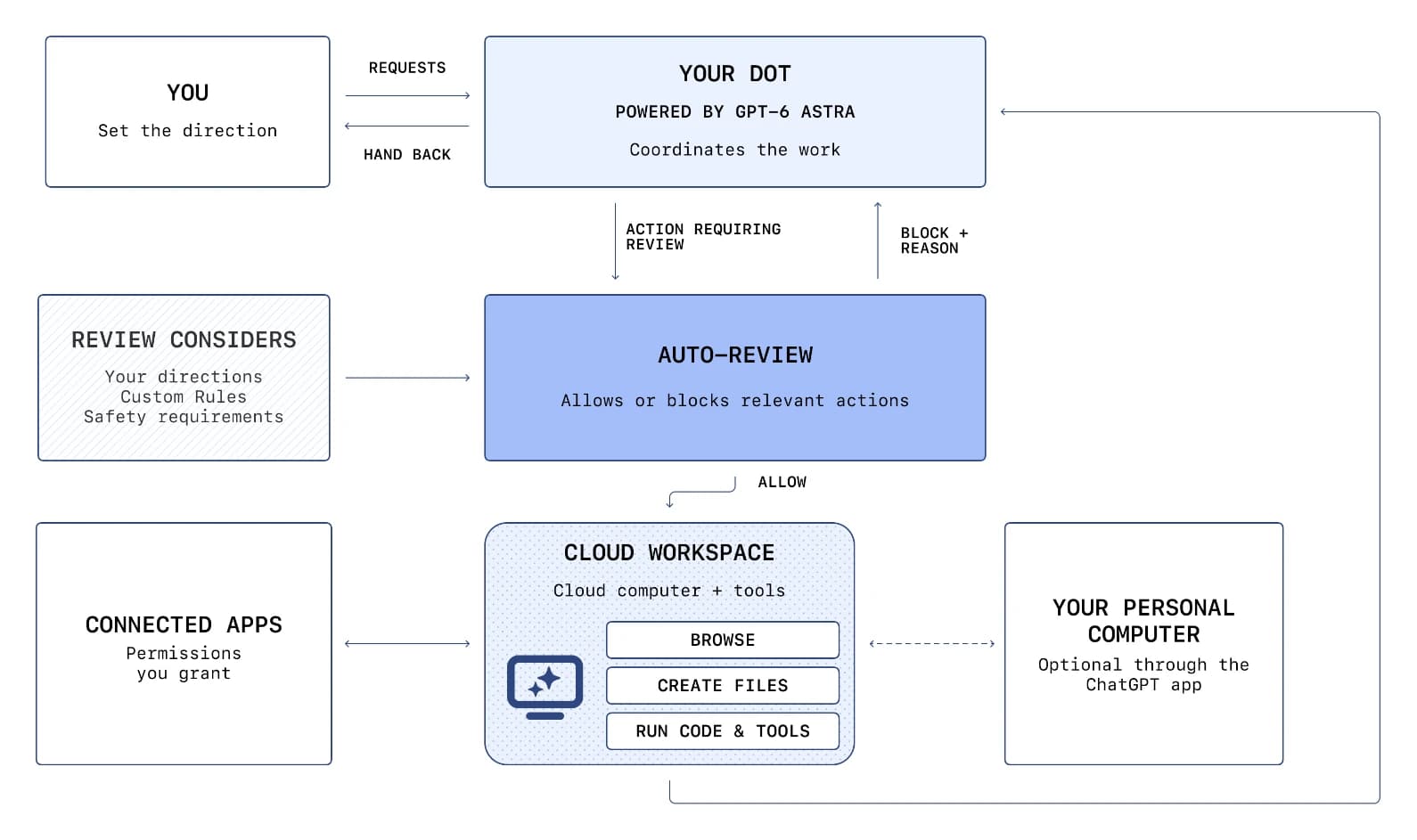
From my side of the fence, this is the right call. When I build approval steps into eesel's integrations, the rule is that the thing being checked never gets to edit the check. OpenAI applied that to a general agent, which is harder.
Background research can't act
When you're not talking to it, a dot runs "proactive research" over your connected apps and saves private notes. OpenAI says it enforces the limits "in code": these tasks can't send messages, change app content, or drive a browser. Anything the dot wants to do with what it found goes through the normal rules. That removes the scariest version of an always-on agent, the one that decides at 3am to "help" by emailing your boss.
It's a capable machine
Each dot gets its own Linux computer with Chrome, and you can open it to watch or press "Take over." It connects to over 4,000 apps through the same plugin permissions you use across ChatGPT and ChatGPT Work. It can also start cloud tasks in Codex in environments you've set up. It lives in ChatGPT, Slack, and Teams.
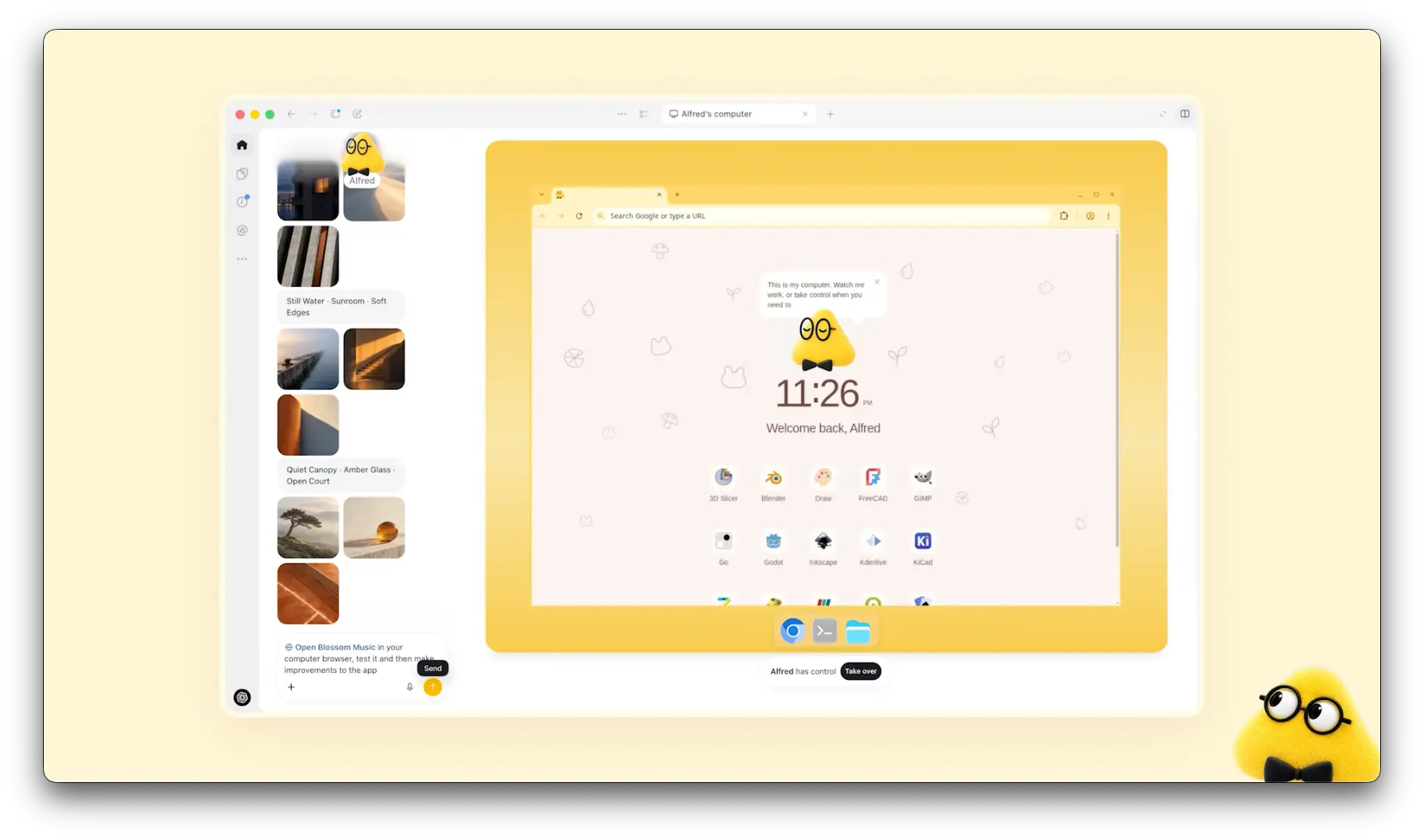
The one hands-on report I trust most, from HN user neom, credits the basics: the dot planned a trip, noticed the airport shuttle hadn't been booked, and "reminded me with the details we'd discussed." That's the proactive part working as advertised. The same report says it "deals with it all very well" on logins it's allowed to handle.
The usage model is generous, for now
Per OpenAI's help center, conversations with your dot don't count toward your ChatGPT usage limits, and the plan's allowance for deeper work is extended in the first month. For a Pro user that makes the first 30 days close to a free trial.
Where OpenAI Dots frustrates
This is the part of the review early users talk about most, and it all comes from the same root: a dot is built to hand things back to you.
The confirmation loop
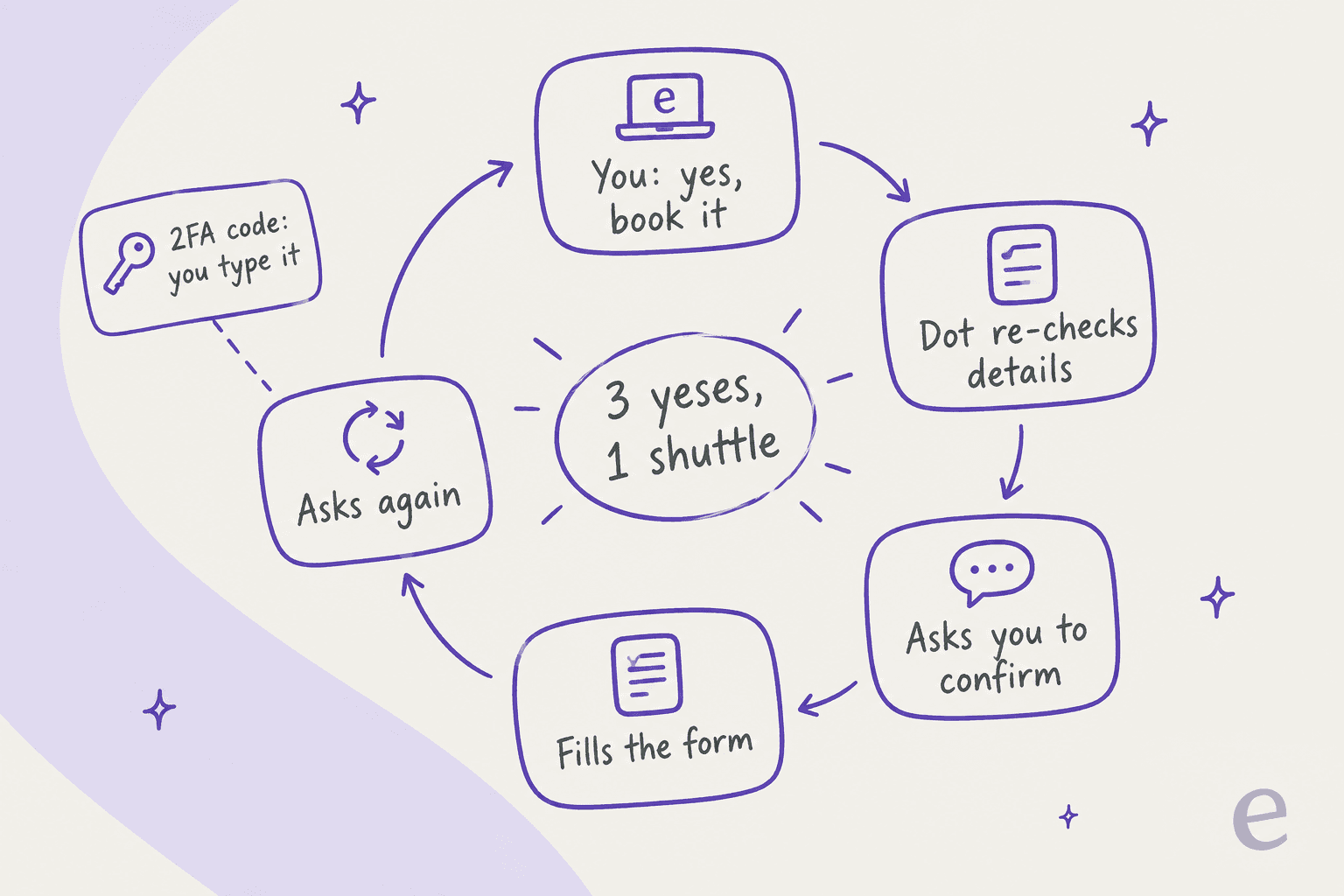
Here's neom's shuttle booking, the most specific hands-on account I've found:
"I said yes please book it, it went back to the website, checked all the details we'd just agreed and asked me to confirm the details, fine I confirm it, please book, it tells me it will book it, it goes on it's little cloud computer and completes the booking form then comes back and asks me if it should book it...so annoying."

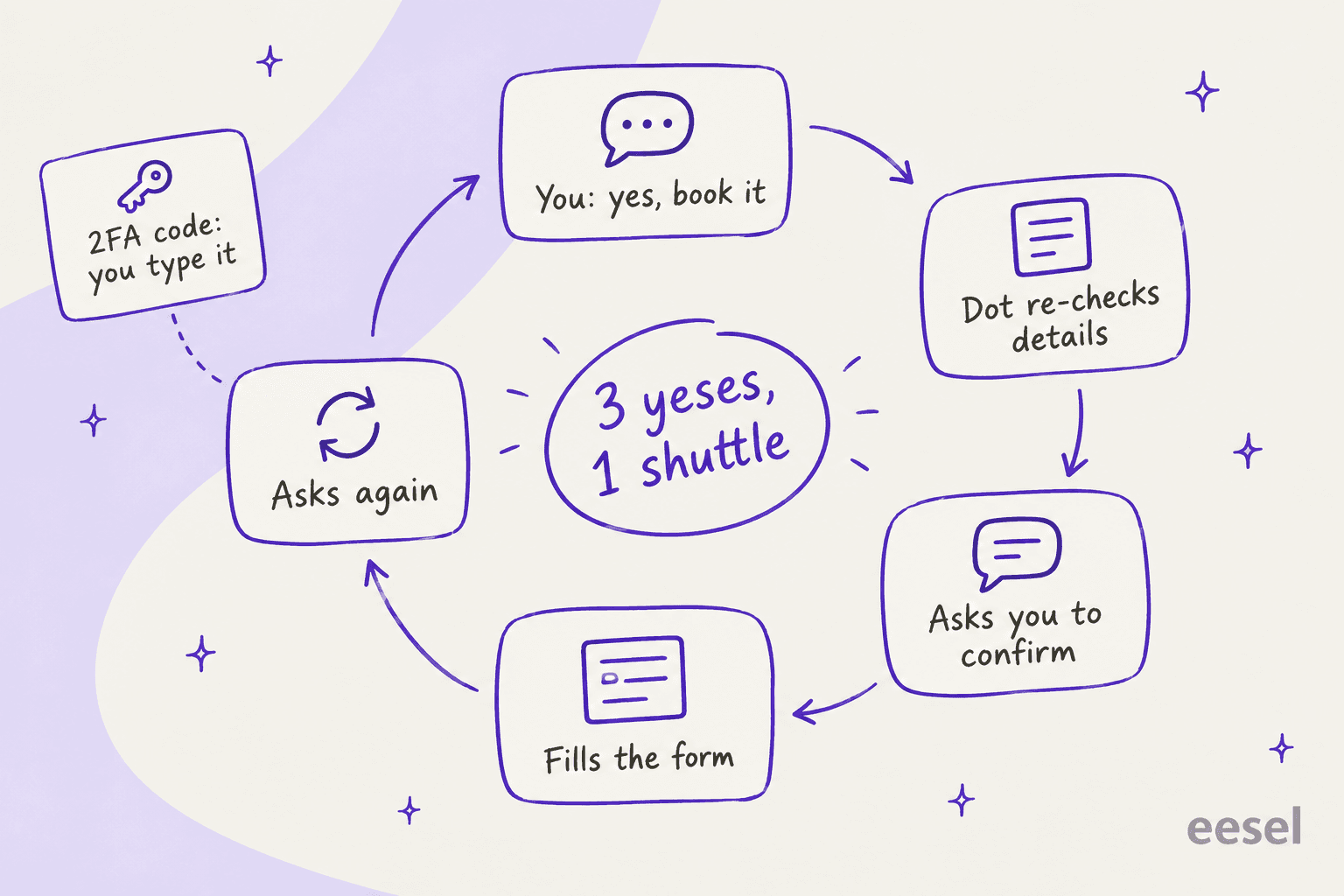
The same user hit a wall on two-factor codes. Logging into Uber sends a 2FA code to email, and even with inbox access the dot wouldn't read and enter it. That matches OpenAI's own design: for supported sign-ins the dot pauses while you handle credentials in a secure form. It's safer. It also means a "book my flight, then my Uber" flow still needs you at the keyboard.
Custom Rules push back on broad rules
Custom Rules let you move supported actions between four behaviors, from "act without asking" to "hand off to you." In practice, neom reports a rule checker in the permissions UI that explains why it thinks a rule is too broad, and says only 2 rules got accepted after "trying many." One rejected rule was a sensible-sounding request to proceed on "routine, reversible, low risk actions" and still ask on anything involving money or external sends. Another asked the dot to reply to named coworkers in Slack about scheduling.
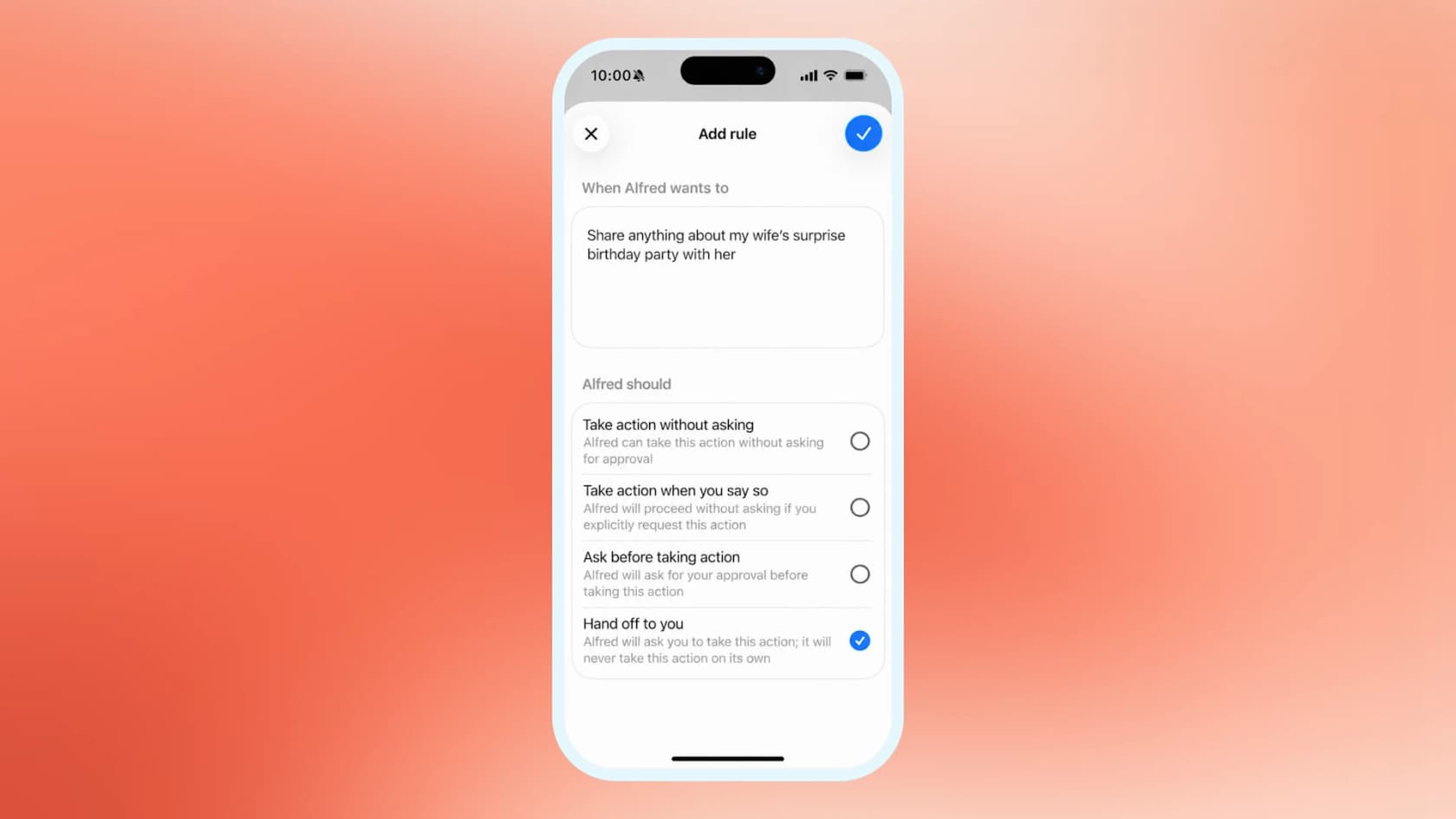
OpenAI's documentation is consistent with this. Dots can help you write Custom Rules but need your approval to change them, and rules "cannot remove mandatory confirmations, handoffs, or core safety requirements." neom's own conclusion was fair about it: "maybe it's best this way while they roll out," but "if you're looking for an openclaw like agent, this isn't it at all." If you've run OpenClaw with loose permissions, expect a slower pace. The same goes for Hermes Agent.
It isn't fast
Another commenter who watched the demos said "the speed is so slow it's shocking" (jdw64, Hacker News). I'd treat that as a watch item, not a verdict. OpenAI says you'll be able to scale each dot's speed "in the future," which tells me speed is a paid lever it knows about, not a solved problem.
Memory you can't inspect
Per the privacy FAQ, you currently can't view, edit, or delete individual dot memories. The only reset is deleting the whole dot, and disconnecting an app doesn't remove what the dot already learned from it. For a personal assistant that's tolerable. For anything touching customer data, it's the first question your security team will ask, and there's no good answer yet.
Is OpenAI Dots worth the money?
The short answer: worth it if you're already on Pro, hard to justify as the reason to upgrade.
There's no separate Dots price. Your first dot comes with ChatGPT Pro (Pro 100, 200, or 500) and Business Premium. Free, Go, and Plus don't get one.
| Plan | Monthly price | Dot included? |
|---|---|---|
| Free | $0 | No |
| Go | $8 | No |
| Plus | $20 | No |
| Pro 100 | $100 | Yes, first dot (not EEA, Switzerland, UK) |
| Pro 200 | $200 | Yes, first dot (not EEA, Switzerland, UK) |
| Pro 500 | $500 | Yes, first dot (not EEA, Switzerland, UK) |
| ChatGPT Business, Premium seat | $100/seat billed annually, $125 monthly, 2-seat minimum | Yes, all supported regions |
| Enterprise, Edu, Healthcare | Contact sales | Beta, off until an admin enables it |
Plan prices come from OpenAI's pricing page and its Pro tiers article. The Premium seat price is on the Business pricing page, and it's the only dot route in the EEA, Switzerland, and the UK.
The ChatGPT pricing breakdown goes deeper on what each tier buys, and the GPT-6 Astra pricing post covers the model underneath.
The comparison that keeps coming up in the launch thread is the entry price against rivals. Meta's Muse agent has a free tier with usage limits and a Power plan at $20/month. To get your first dot, the cheapest route is $100/month.
"$100 is a pretty tough sell when the competition starts at free (Meta Muse)."
Two more cost details matter. First, when your dot starts or manages tasks in Codex or ChatGPT Work, those tasks count toward your normal limits, so a dot that delegates a lot draws on the same budget you use. The Codex pricing post covers that meter, and the Work side is in the ChatGPT Work pricing guide. Second, the generous limits are explicitly a first-month thing. As one commenter put it, "actual limits will be disclosed later" (thimabi, Hacker News). I'd budget as if month two gets tighter.
Is OpenAI Dots safe enough for work accounts?
Safer than Grok Bot on paper, on par with Meta Muse, and still not a system I'd hand write access to customer data on day one.
The published safeguards are real: passwords and money transfers always come back to you, deleting data or installing software can need approval every time, and sharing sensitive data needs a named recipient. Compare that with Grok Bot, where xAI's own docs say all bots on an account share one computer and shouldn't be treated as a security boundary.
But OpenAI is candid about the limits too. Its prompt injection defenses "help reduce the risk... but they do not eliminate it." And the permission problem is older than Dots. This is the comment from the launch thread I'd put in front of any IT lead:
"I minted what I thought was a minimal-permission Github token for a single action, and the agent I gave it to discovered it had more permissions than I thought, and made use of those permissions."
That's an integration lesson I relearn every quarter: scopes are always wider than the label on them. Lukasz Bulik summed up where this leaves companies:
"For your company, a specialist Dot is basically a new hire that never logs off. OpenAI ships rules for when a Dot acts alone and when it asks, and password changes always stay with a human. Everything in between is your policy to write, and most companies haven't written it yet."

My practical advice: connect read-only plugins first, keep "ask before taking action" on anything that sends, and widen one app at a time. The AI handoff guide has a pattern for this that works for any agent.
Where a dot fits, and where it doesn't
Put the pros and cons together and a clear shape appears. A dot is great at personal work that mostly reads and drafts, it's slower when it acts on other people, and it isn't built for work that belongs to a team.
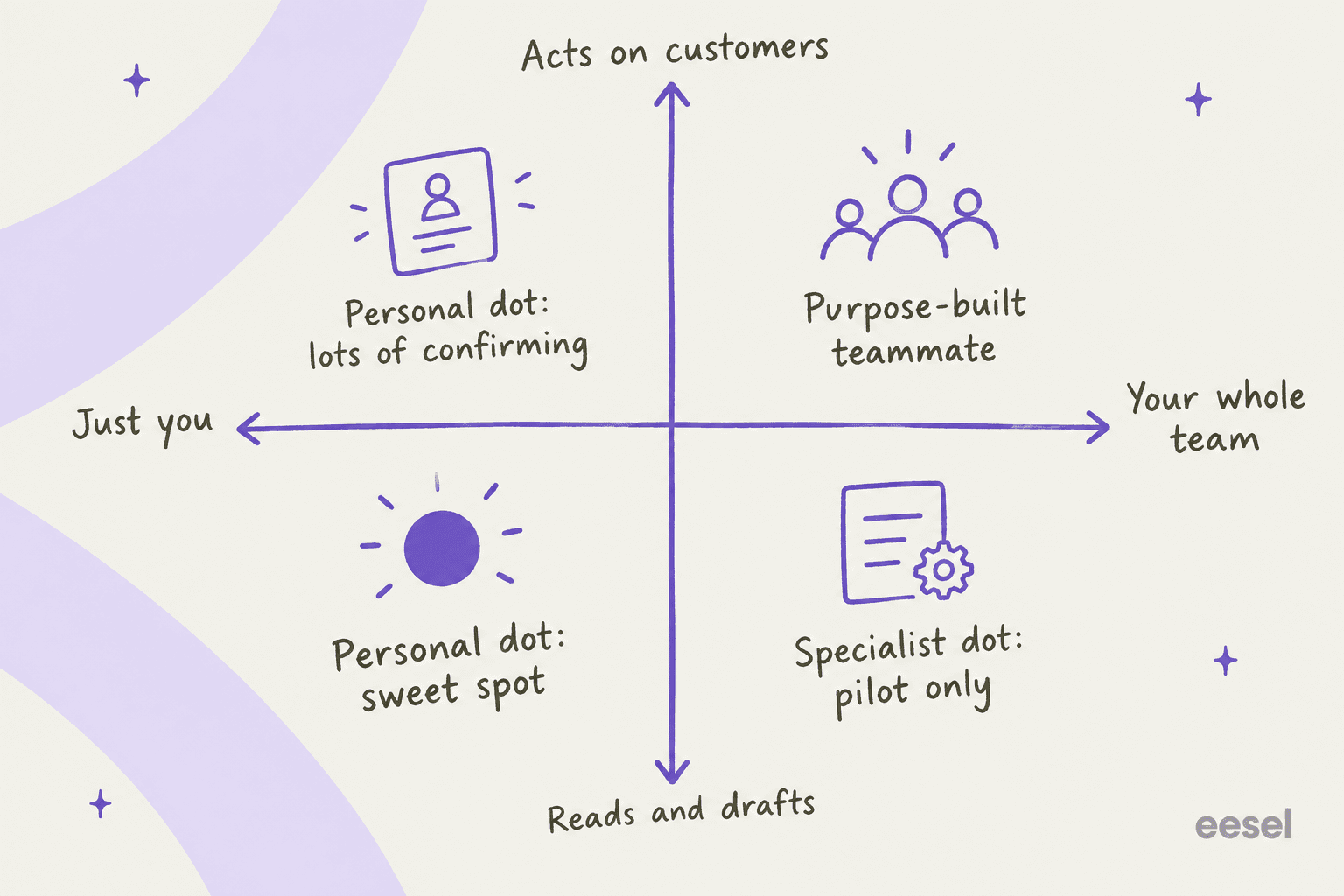
OpenAI knows about the team gap, which is why it announced specialist dots with their own identity, credentials, and IT-provisioned hardware. It says it tested them internally on procurement, invoice processing, email marketing, customer support, and commercial contracting. But they start as "focused enterprise pilots" scoped with OpenAI's engineers, and management through Microsoft Agent 365 is still planned. A 20-person support team can't switch that on this week.
The confirmation loop is also where a personal agent and a support queue clash. On one eesel sales call, a Freshdesk team handling 50-70 tickets a day told me a binary approve-or-reject step wasn't enough: they needed to edit a draft before it sent, and tune the agent's instructions from inside the helpdesk. Multiply neom's three yeses by 60 tickets and you see the problem. A queue needs approvals that live where the agents already work, on the actions that matter, and nowhere else.
That's the pattern I keep seeing in support rollouts: teams start with AI drafting replies, then graduate to full automation once trust is earned. A dot's defaults are built for the first stage and fight you on the second. A purpose-built teammate is built for the whole path.
How Dots compares with other always-on agents
Dots is the third big personal agent launch in about seven weeks, after xAI's Grok Bot on August 11 and Meta's Muse on September 8. Here's how I'd separate them for a working reader:
| OpenAI Dots | Meta Muse | Grok Bot | |
|---|---|---|---|
| Cheapest way in | ChatGPT Pro, $100/month | Free tier with limits | Paid plans only |
| Where it lives | ChatGPT, Slack, Teams | Muse app, WhatsApp (US only) | Grok apps |
| Computer model | One cloud computer per dot | Dedicated Secure VM per user | One shared computer for all bots |
| Safety detail published | Very high | Very high | Moderate |
| Work apps | Slack, Teams, 4,000+ plugins | Consumer apps (Gmail, Calendar, OpenTable) | Team plans |
My ranking for a Pro user doing knowledge work: Dots first, because it reaches Slack, Teams, and work plugins that Muse doesn't. For someone who wants to try an always-on agent without spending, Muse. For a builder who wants loose permissions and control, a self-hosted option from the open-source AI agents list.
My Instinct review covers the texting-first rival. On the enterprise side, Anthropic's Claude Cowork is the closest match, and Microsoft's Copilot Autopilot is the one to watch.
My verdict on OpenAI Dots
Get one if you're already on Pro in a supported region, and your work is personal and read-heavy: research, trip planning, inbox triage, launch prep. The first month is effectively a free trial. Start on read-only plugins and strict rules.
Wait if you'd upgrade from Plus just for this, you're on Pro in the EEA, Switzerland, or UK, or you need an agent that acts fast without checking in. The post-launch limits and speed pricing aren't public yet.
Look elsewhere if the job belongs to a team, like a support queue, a content calendar, or anything with customer data and a shared audit trail. That's what specialist dots are for, and they're pilots. A ready-made AI teammate is the faster path, and the AI employee explainer covers how to tell the categories apart.
eesel, for the jobs a dot doesn't own
If this review left you thinking "I want the Auto-review idea, but for our support queue," that's the gap eesel fills. eesel is an AI teammate platform: you hire a ready-made teammate for one job. For support, the AI helpdesk teammate joins Zendesk, Freshdesk, Gorgias, or Front as a new member of the queue and learns from your past tickets, help center, and macros before it starts.
The difference from a dot is where the checking happens. Instead of confirming each step in a chat, you run the teammate against hundreds of your historical tickets in a simulation and see its answers before any customer does. Once it's live, actions outside its rules wait for a human approval, and every run lands in a shared activity log the whole team can read.

If you liked that a dot can be driven from Slack or Codex, the eesel CLI does the same for your teammate: eesel approvals list shows what's waiting on a human, eesel activity lists every run, and each workspace works as an MCP server that Claude Code or Codex can connect to. The AI agent CLI guide explains why that matters for scripting approvals.
Pricing is public: a free plan with 100 credits, then teammate plans from $299/month for 500 credits, where one ticket or chat is one credit. See the pricing page, or try eesel and watch a helpdesk teammate answer your real past tickets the same afternoon.
Frequently Asked Questions
Is OpenAI Dots worth it?
What does this OpenAI Dots review rate it?
How much does OpenAI Dots cost?
Why does my dot keep asking me to confirm things?
Are OpenAI Dots safe to connect to work accounts?
How does OpenAI Dots compare with Meta Muse and Grok Bot?
Can OpenAI Dots handle customer support?


Article by
Rama Adi
Rama is a software engineer at eesel AI with two years of experience writing about B2B SaaS, AI tools, and customer support technology. Based in Bali, Indonesia, he brings a developer's perspective to product comparisons — cutting through marketing copy to what the integrations and APIs actually do.