What is ChatGPT Space?
OpenAI calls ChatGPT Space "a new home for your team to collaborate with AI to get work done" in its DevDay 2026 recap. Put simply, it is a Notion-style area inside ChatGPT, where documents sit next to your chats and the AI can write on them together with the people.
Before anything else, there are a few things worth knowing:
- It replaces Library. The Space feature page calls it "the home for the pages and files you create, upload, and share in ChatGPT." So the files you uploaded and the images you generated now live here.
- Space and a space are different things. Space (capital S) is the whole product area. A space (lowercase) is one group of content. Everyone gets a personal space, and you can create more for a topic or a team, per OpenAI's getting started guide.
- Projects stay. The same guide is direct about it: "Creating or using a space does not replace your existing Projects." I compare the two further down, since in practice they overlap more than OpenAI admits.
I've spent two years on SEO, and what I see is that when a feature launches under a name as generic as "Space," the search intent tends to split in two. Some people want to know what it is, others just want to know if they already have it. This post answers both of them, and the answer for the second one depends a lot on which plan you're on.
It launched alongside OpenAI Dots, the always-on agents running on GPT-6 Astra, and the two of them are designed to work together: a dot is the worker, and Space is the shared desk where it does the work.
How does a page in Space work?
The page is the core object. OpenAI's pitch is that "anything you can do in ChatGPT you can do on a page: write, research, generate charts, create images, or visualize information." You can start one from a conversation or by writing directly in Space, and there is also the option of a template on the Space home.

Pages are built out of blocks, which is the same idea as a Notion AI page. OpenAI's pages documentation lists what the / menu inserts:
| Block type | What it does |
|---|---|
| Headings, lists, checklists | Standard document structure |
| Table, Code, Highlight | Tables have Normal, Flexible, and Full width settings |
| Image and File | The Image block can also generate an image |
| Page and Link to page | Nest subpages or link across pages |
| Files, Pages, and Chats references | Point at other saved work, including past chats |
| Visualize | Interactive calculators, diagrams, and screen designs |
| Prompt, Task, and Agent Instructions | Stored requests that readers can run or agents can follow |
The Prompt block is the one I'd really call new. It stores a request inside the page itself, and anyone who reads it can run it with Chat about this. In practice, it turns a page from a static doc into something closer to a reusable tool, for example a support lead could store "summarize this week's refund policy changes for a new agent" on the policy page itself.
When you select text, a toolbar opens with Ask for change and Comment, plus the formatting options. There is also a Show attribution view that shows who contributed what "when available," and this matters more once AI and people are both writing on one page.

One sharp edge that is good to know from day one: deleting a page sends it and all its subpages to Trash, including subpages owned by other people, per OpenAI's sharing and data controls article. On a busy team page, that makes it a delete button you want to pause on before clicking.
How do ChatGPT and your dot work on a page?
This is the place where Space is different from a regular internal knowledge base. OpenAI's agents documentation lists four ways to get AI help on a page:
- The conversation panel alongside the page.
- Ask for change on selected text.
- An inline
@ChatGPTor@dotmention. - An
@ChatGPTor@dotmention inside a comment.
The detail that shapes pretty much everything here: each collaborator works with their own ChatGPT. When I tag ChatGPT on a shared page, it's my ChatGPT, with my settings and my memory. When a teammate does it, it's theirs. That is not the same as a shared bot everyone talks to, and it also has privacy consequences, which I get to below.

The feature page says "dots work natively across files in Space," and you can ask your dot to keep a page current from ChatGPT, Slack, or Microsoft Teams. This is the headline demo, a dot that keeps a project dashboard fresh while you are away.
There are two catches, and both come from OpenAI's own docs:
- Dots aren't on every Space plan. Per the September 29 release notes, dots are on Pro (excluding the EEA, Switzerland, and UK) and Business Premium seats, with Enterprise as an off-by-default beta. So a Business Standard seat gets Space, but no dot.
- "Keep updated" isn't live. The feature page says pages "can stay updated from your connected tools." The getting started guide says "automatic page updates with Keep updated are not available at launch." For now the workaround is asking ChatGPT in chat to set up a scheduled task, and OpenAI also warns that "writing a cadence in a page or its instructions doesn't by itself confirm that a task is scheduled."
The second point is the one I would flag to anyone who evaluates Space for a team. If you write "update this every Monday" at the top of a page and then walk away, nothing will happen. What you need is a real scheduled task, and on Business and Enterprise that can also be a team task.

What's live today, and what's still coming?
This is where the launch messaging and the help center go separate ways. Reading the feature page, it looks like everything shipped, while OpenAI's support articles are more careful, and those are the ones I'd trust.
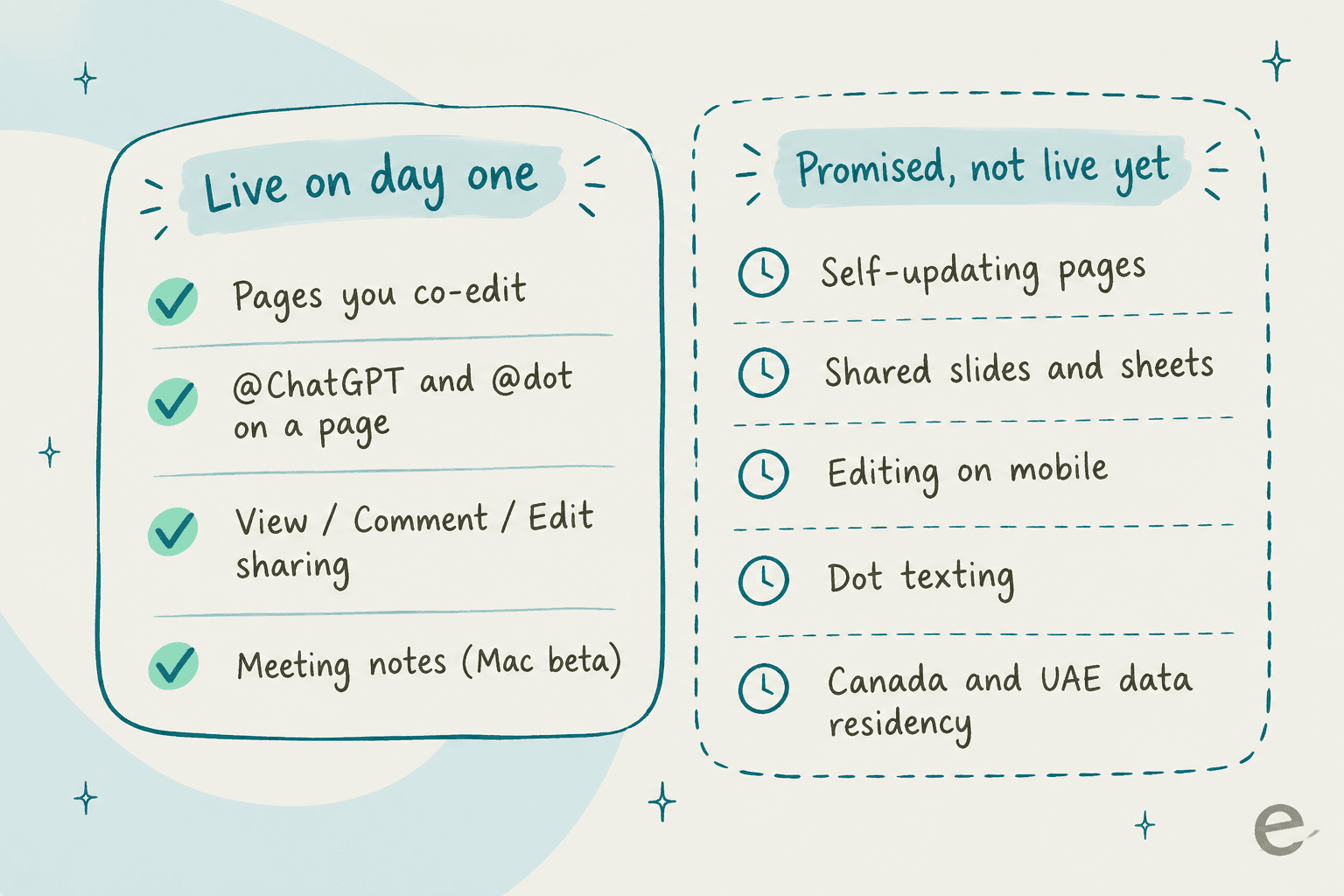
Here is the full list of "not yet" items, each one taken from OpenAI's own documentation:
| Feature | Status on October 1, 2026 | Source |
|---|---|---|
| Self-updating pages ("Keep updated") | Not available at launch | Getting started with Space |
| Collaborative slides and spreadsheets | "Coming soon" | Space feature page |
| Creating and editing pages on mobile | Coming soon; mobile can find, read, and share | Space feature page |
| Dot texting | Coming soon | Space feature page |
| Canada and UAE data residency workspaces | Coming soon | Getting started with Space |
| Enterprise sharing | Opt-in preview | Release notes |
There's one small contradiction worth knowing about: OpenAI's learn.chatgpt.com Space overview describes creating and editing "tables, calculations, and slides with ChatGPT" as if it already works, while the help center says Slides and Sheets are coming soon. Until the feature actually shows up in your account, I'd go with the help center.
The rollout is also gradual. OpenAI's guide notes that "some features may not be available to your account yet," and on launch day its status page showed elevated errors on Space Pages. Hiccups in launch week are normal, but I wouldn't plan a team migration around a feature you haven't seen yet in your own workspace.
Who gets ChatGPT Space, and what does it cost?
There's no separate price for Space. It isn't a line item on the ChatGPT pricing page, and the Business page lists "Collaborate together in Space" as a plan feature. So the cost is just whatever plan you're already on, and the real question becomes what you get with it.
| Plan | Price | Space | Dot | Teams and team tasks | Meetings plugin |
|---|---|---|---|---|---|
| Free, Go, Plus | $0 to $20/month | Not listed | No | No | No |
| Pro 100 / 200 / 500 | $100 / $200 / $500 per month, monthly only | Yes | Yes, outside EEA, Switzerland, UK | No | Mac beta |
| Business, Standard seat | $20/user/month annual, $25 monthly | Yes | No | Yes | Mac beta |
| Business, Premium seat | $100/user/month annual, $125 monthly | Yes | Yes, all supported regions | Yes | Mac beta |
| Enterprise | Contact sales | Yes, sharing in preview | Beta, off by default | Yes | Alpha via account manager |
Pro prices come from OpenAI's Pro tiers article. Seat prices are on the Business pricing page, and note that a Business workspace needs at least two seats.
If you want the full plan picture, my ChatGPT pricing breakdown goes deeper, and for the top tier there is the Pro 500 guide.
The group that loses out here is Plus. Library was available on every plan, including Free and Plus, per OpenAI's Library help article. Space, which is its replacement, is only listed for Pro, Business, and Enterprise, and OpenAI hasn't said what the Free and Plus accounts see instead.
Pick your plan below and you can see exactly what Space gives you.
What does Space give my plan?
Based on OpenAI's help center and release notes as of October 1, 2026.
- Create and edit pages on web and desktop; read and share on mobile.
- Invite people by email with view or edit access.
- Your first dot is included and can be tagged on pages.
- Meetings plugin in beta on the Mac desktop app.
- No Teams feature, which is Business and Enterprise only.
- Pages, @ChatGPT, and View/Comment/Edit sharing across your workspace.
- Teams and team tasks, so you can share whole spaces with a group.
- Meetings plugin in beta on Mac.
- No dot on a Standard seat. Upgrading one person to Premium adds one.
- Your admin can switch Space off for the workspace.
- Sharing is an opt-in preview, and your admin may need to enable it first.
- Dots are a beta that's off by default.
- Meetings is alpha-only, through your account manager.
- Canada and UAE data residency workspaces don't have Space yet.
How does sharing work, and where can it bite?
Sharing has three levels: View, Comment, and Edit, per OpenAI's collaboration docs. On workspace plans you invite people or teams from your workspace, while on Pro the invites go by email.
The part that tends to trip teams up is inheritance. Access can come from a direct invite or a parent page, or also from the space that contains the page, and subpages inherit from their parent.
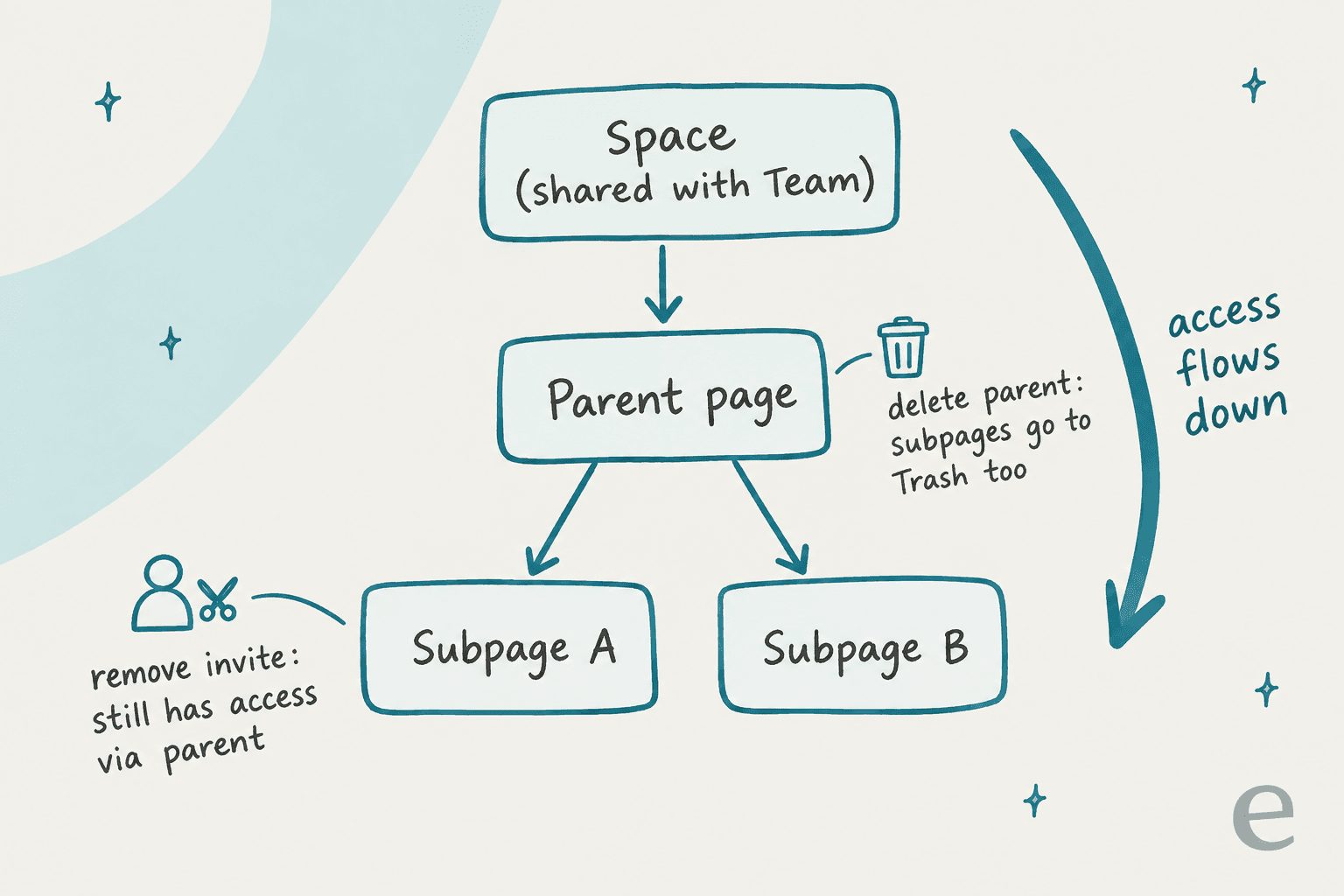
These are the rules from OpenAI's docs that I'd put in front of every admin:
- Removing a direct invite doesn't remove inherited access. If someone can reach a page through its parent or its space, taking them off the page itself doesn't change anything.
- Moving a page can change who sees it. If you drag a private subpage under a shared parent, it picks up the audience of that parent.
- Linked files keep their own permissions. A Google Drive file linked on a page follows Drive's rules. Anything copied or summarized onto the page, though, is visible to anyone with page access.
The privacy detail that surprised me the most has to do with memory. Sharing a page doesn't share your private chats. But if ChatGPT writes something onto a shared page using your memory, that content is visible to everyone with access to the page, per the sharing and data controls article. If you ask ChatGPT to "draft my intro for the team page", it may pull in personal details that you would never type yourself.
Training also works differently than in shared Projects. On personal plans, "if you turn off training but a collaborator has it on, your contributions may still be used for training through their interaction." On Business and Enterprise, OpenAI doesn't train on your data by default, which is one more reason for teams to use Space inside a shared Business workspace rather than across personal Pro accounts. ChatGPT Enterprise gets the same default.
For admins, the Enterprise sharing runs on the old Library sharing controls. Turning sharing off blocks new shares, but existing shared access remains, per OpenAI's Enterprise Space guide. The same guide warns that pages and files may contain prompt injections and that safeguards "reduce, but do not eliminate, this risk." That is worth knowing if your dot reads pages that other people wrote.
Space vs Projects: which one should you use?
This is the question I expect most existing ChatGPT users to have, and OpenAI doesn't really answer it directly. Both of them let a group work in a shared context, they're just built around different objects.
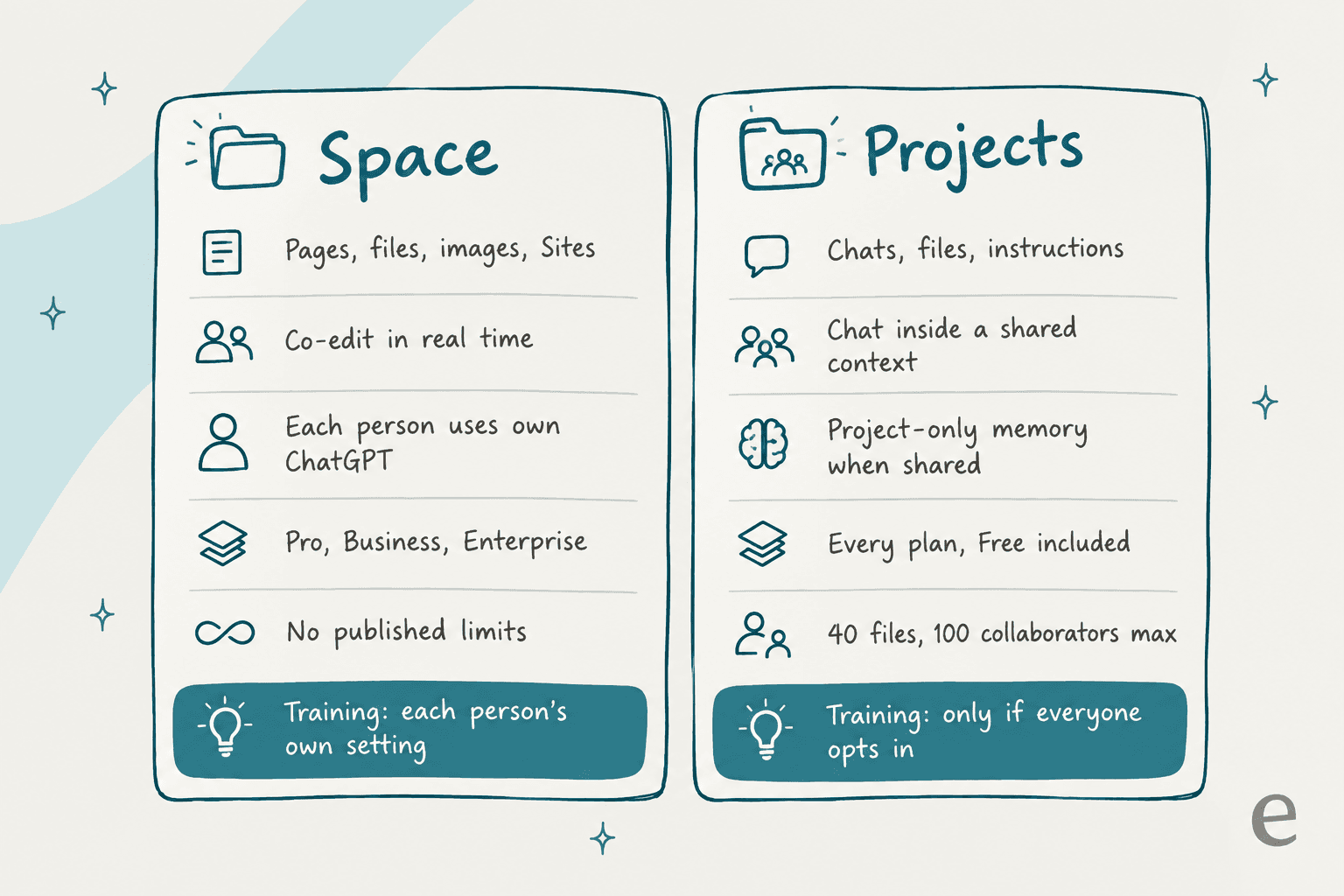
| ChatGPT Space | ChatGPT Projects | |
|---|---|---|
| Core unit | A page you co-edit in real time | A chat inside a shared project |
| Holds | Pages, uploaded files, images, Sites | Chats, files, project instructions |
| Plans | Pro, Business, Enterprise | Every plan, Free included |
| AI context | Each collaborator uses their own ChatGPT and memory | Shared projects use project-only memory |
| Training on personal plans | Each person's own setting applies | Only if the owner and every contributor opt in |
| Access levels | View, Comment, Edit | Chat, Edit |
| Mobile | Read and share only | Sharing works on mobile |
| Published limits | None found | 5 / 25 / 40 files per project; up to 100 collaborators |
Project details come from OpenAI's Projects help article.
My rule of thumb: use Projects when the output is a conversation, and Space when the output is a document. Researching a vendor with three colleagues and a pile of PDFs is a Project. The onboarding checklist or the pricing FAQ your team keeps pointing people to, and also the weekly metrics page, those are pages and they belong in Space.
On personal Pro accounts, the training row is the one I'd weigh the most. Shared Projects are the stricter of the two, because nothing trains unless everyone opts in, whereas Space defaults to each person's own setting.
Where do meeting notes fit?
The Meetings plugin launched alongside Space, and everything it produces is saved there. It takes notes without any bot joining the call, and then saves a personalized summary with the action items as a page in your Space.

The facts worth knowing, which all come from that help article:
- It's a beta on the macOS desktop app only, for Pro and Business. iOS, Android, and Windows are coming soon. Enterprise is alpha-only.
- Meeting pages are private by default. When you share one, people see the notes, not the transcript.
- Audio is deleted from your Mac and OpenAI's servers once the notes are ready, and it can't be replayed.
- Sessions stop automatically at 4 hours, when you close the lid, or after a long stretch of silence.
- The consent reminder shows only to you. It doesn't notify the other people on the call, so telling them is your job.
If you currently use a dedicated meeting notes app, the draw here is that the action items land on a page that your dot can pick up afterwards. Compared with Notion AI meeting notes, the trade-off is that it's Mac-only for now, and there is no transcript to go back to.
What are people saying about ChatGPT Space?
Two days in, there are no G2 or Capterra listings yet, so the conversation is happening on X and Hacker News. By far the most common reaction is a comparison to Notion.
The strongest positive take came from Claire Vo, who argued Space is actually the bigger story of the launch:
"imo: @OpenAI dots slightly overhyped and space underhyped - every company I know wants an AI-native collaboration workspace (docs, slides, sites)"
The Notion comparison showed up pretty much everywhere, from product leaders all the way to Hacker News:
"Spaces is basically @NotionHQ ? What's the OpenAi version of Slack? :)"
"Remarkably similar to Grok Bot. And the Spaces thing seems like a straight clone of Notion."

On the day after, Peter Yang raised a fair point about how much is now living inside one app:
"I'm a broken record about this, but cramming Codex, Work, dots, Spaces, Pages, and more all into ChatGPT is overwhelming."
Launch day also wasn't smooth for everyone. One Hacker News user reported that the feature didn't show up and the page was erroring, which lines up with the status incident OpenAI posted that day:
"Still not available and spaces page just produces a javascript error. This is the most botched release I've seen in recent history."
In my opinion the most useful question came from someone who was thinking about teams rather than features:
"If agents can edit dashboards and checklists, the hard part is deciding which changes need approval. Does Space expose a per-action history?"
I think that's the right question. Going by the docs, Space has comments and Trash, plus attribution "when available," but I didn't find a per-change approval step for agent edits on a page. So if a dot rewrites a shared checklist, the humans only find out by reading it.
And Plus users, they noticed who was left out:
"it's so sad to see @OpenAI completely ignoring plus users."
Should your team move into ChatGPT Space?
Here's how I would call it, depending on where you are starting from.
- You're a small team already on ChatGPT Business. Try it this week. It's already included and the page editor works, and team tasks cover the "keep this updated" gap until Keep updated ships. The cheapest setup is two Standard seats at $40/month on annual billing.
- You run a mature Notion or Confluence wiki. Don't migrate yet. Space launched without published storage or page limits, without mobile editing, and with Enterprise sharing still in preview. Notion AI and Confluence have a much longer track record on permissions and admin controls, and so does a search layer like Glean. What I'd do is run one team's pages in Space for a month and then compare.
- You're on Plus. Stick with Projects. Upgrading to Pro only for Space is hard to justify, when a two-seat Business workspace costs less and includes Teams.
- You want an agent that does the work, not a page about the work. Space is where knowledge gets written down. Acting on it is a separate job, which is where AI teammates come in.
That last point is the one I see most often in support teams. eesel has spent years putting AI on live support queues, and the recurring problem is rarely "we have nowhere to write things down." One support lead we worked with found their entire help center was written for administrators, while almost every ticket came from end users. Another team had its know-how split across SOP tools and outdated macros, and also screen recordings nobody had transcribed. A nicer place to write pages doesn't fix either one. What does fix it is an AI that reads what already exists, past tickets included, and that gets tested on real questions before it answers anyone.
For the first half of that job, Space is a good tool. The second half it doesn't touch, and it isn't trying to.
eesel for teams whose knowledge needs to answer customers
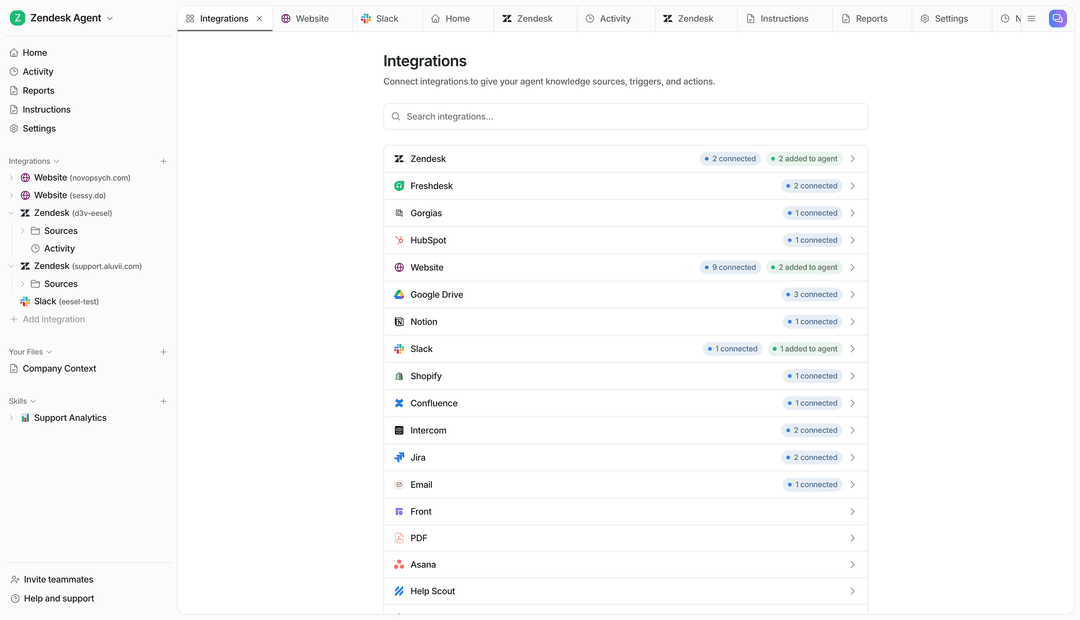
If you're writing your support playbook in Space, Notion, or Google Docs, eesel's AI helpdesk teammate is the part that puts it to work. It joins your helpdesk as a new member of the queue, whether that's Zendesk or Freshdesk, and it can answer internal questions in Slack too. It learns from your docs and help center, your macros and past tickets too, and it drafts or sends replies in your team's voice.
What makes it different from a page with a dot on it is what happens before launch. You can simulate the teammate against hundreds of your historical tickets and see how it would have answered, then decide which topics it handles alone and which wait for a human. Knowledge sources include Confluence and Google Docs, so nothing has to move into a new tool first.
eesel has a free plan with 100 credits and no card, and paid teammate plans start at $299/month for 500 credits, per the pricing page. Try eesel and point it at the docs your team has already written.
Frequently Asked Questions
What is ChatGPT Space?
Which ChatGPT plans include Space?
Is ChatGPT Space the same as ChatGPT Projects?
Can my dot edit pages in ChatGPT Space?
Do ChatGPT Space pages update themselves?
Is ChatGPT Space a Notion replacement?
Can I use ChatGPT Space for customer support knowledge?


Article by
Kurnia Kharisma
Kurnia is a software engineer and writer at eesel AI with two years of SEO experience, writing about AI tools, helpdesk software, and customer support. He pairs a developer's understanding of how these products are built with search-driven research into what actually ranks and resonates with the people searching for them.