How I reviewed ChatGPT pages
I'm Rama, and I build integrations and features at eesel. A big part of my week goes into the gap between what the marketing page of a product says and what its docs say it actually does, so that is the lens I'm using here.
Here is what this review is built on, so you can weigh it the right way:
- Every pages doc OpenAI has published. I went through Work with pages, the agents in Space guide, Visualizations, Collaborate in Space, the admin docs, and the Help Center articles, block by block.
- OpenAI's own demos and launch material, including the DevDay 2026 recap and the Space feature page.
- The status page and early users. That means the incident log from launch week, and the handful of people who've posted real hands-on detail on X and Hacker News.
What I haven't done is live in pages for months, and that's because nobody has, Space only launched on September 29, 2026. Anywhere a grade depends on behaviour that only the docs describe, I say so in the text.
If you want the basics first (what a page is, how to make one, every block in the / menu), my ChatGPT pages explainer covers that. This post is more about the verdict.
ChatGPT pages review scorecard
Here's the short version first. I graded each part on two questions, does it do what OpenAI says it does, and would I trust it with real work today.
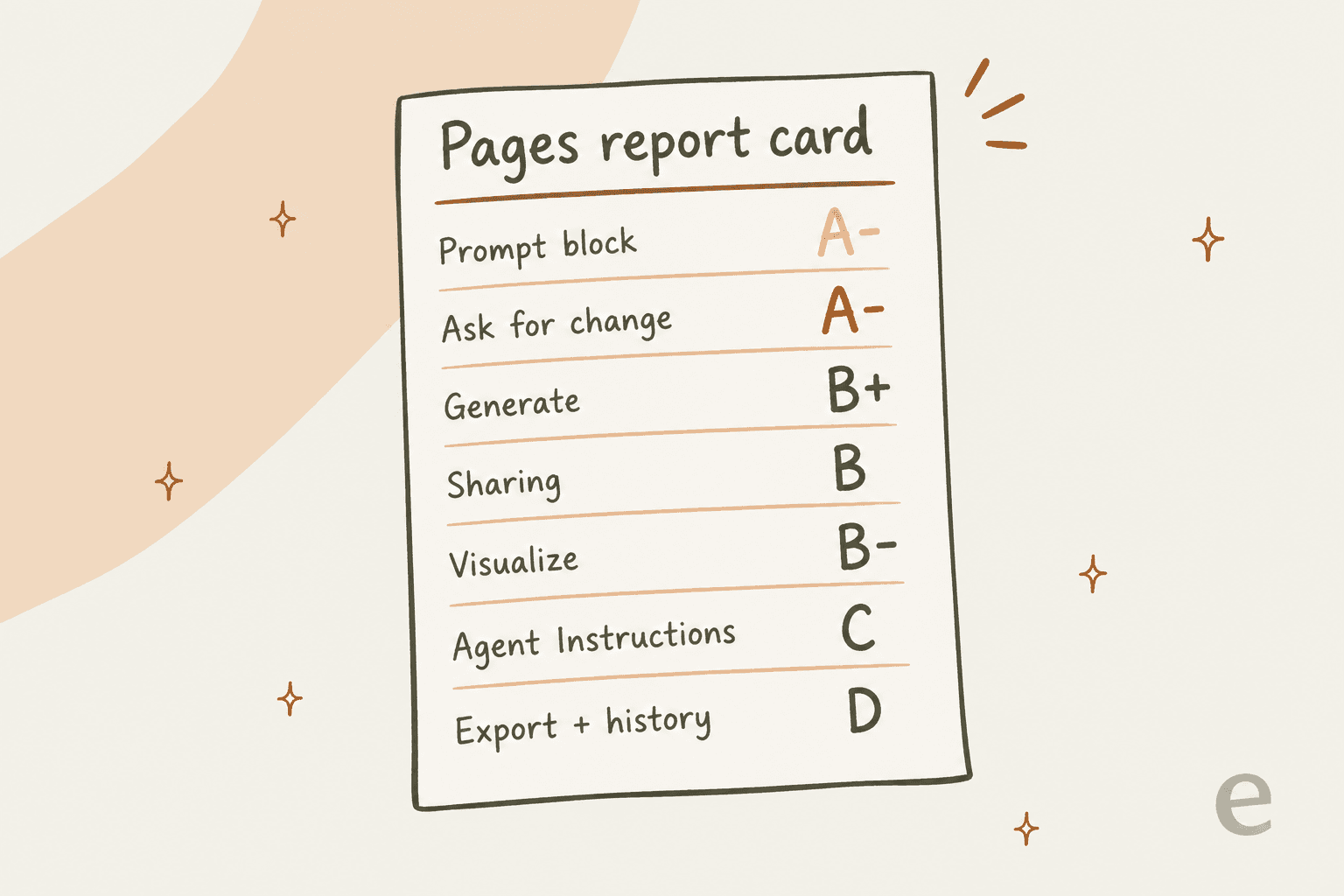
| Part of pages | Grade | Why |
|---|---|---|
| Prompt block | A- | The most original idea here. A doc readers can interrogate |
| Ask for change and @ChatGPT | A- | You review each edit before it lands |
| Generate | B+ | Drafts in place, and it's the one thing with a real undo |
| Sharing | B | Clear roles, but inherited access has traps |
| Visualize | B- | Interactive and useful, but slow and rebuilt on each change |
| Agent Instructions and Task | C | One line of docs, and a written cadence schedules nothing |
| Export and version history | D | No page export or version history documented |
Once it's all laid out, the pattern is quite easy to see. OpenAI nailed the AI-native parts and skipped the plumbing, the stuff Notion and Google Docs spent a decade on.
What a ChatGPT page is, in one minute
A page is "a new type of document, built for human and agent collaboration," per OpenAI's DevDay recap. It lives in ChatGPT Space, which replaced the old Library. You build it from blocks, and ChatGPT, Codex, or your dot can edit it alongside you and your teammates.
The easiest way to place it is to put it next to the other places where your work can live inside ChatGPT:
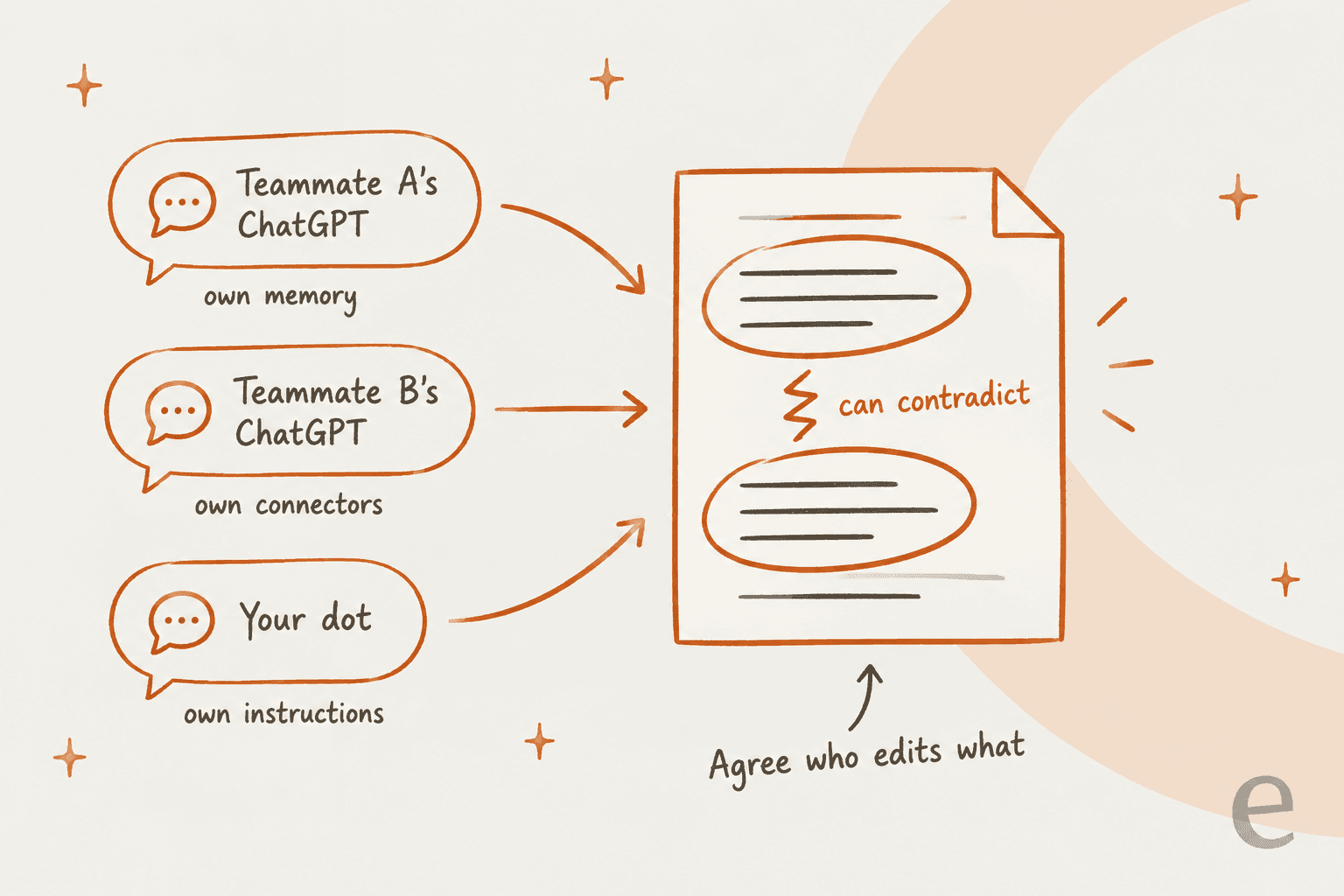
Pages aren't just canvas with a new name. OpenAI's release notes say canvas was removed from the GPT-5.5 models on May 28, 2026, and replaced inside chat by writing blocks. Pages sit one rung up, they are shared and saved, and also edited by more than one person and more than one agent. Sites sit above that, for anything that needs its own URL or saved data. All of it is part of what OpenAI now calls ChatGPT Work.
Prompt blocks: the best idea in pages (A-)
A Prompt block "stores a request that readers can use to start a chat," per the pages docs. While you're editing you choose Chat about this to test it, and readers just select it.
This is the feature I would show to a skeptic first. A normal doc is something that people skim and then forget. A page with a good Prompt block is something they question. Put "Quiz me on the five things new hires get wrong in week one" at the bottom of an onboarding page, and the page turns into a tutor. It's the same idea that sits behind an AI knowledge base, only squeezed into one doc. Put "Summarize the open decisions and suggest the next three steps" on a project page (that's OpenAI's own example), and every stakeholder gets a briefing on demand, without waiting for an AI agent run or a meeting.
The docs draw a clean line between this and Generate: "Use Generate when you want new page content; use a Prompt block when you want to leave a reusable request for readers." That separation is the right design call in my opinion, since writing and asking are two different jobs.
So why not an A? There are two questions still unanswered. OpenAI's release notes say collaborators work "with each person using their own ChatGPT," so a reader who runs your Prompt block is almost certainly running it in their own chat, on their own usage and with their own memory. That part isn't stated for Prompt blocks specifically, and there's also no documented cost. If you're writing prompts for a team, expect slightly different answers from one reader to the next.
Ask for change and @ChatGPT: careful by design (A-)
There are four ways to get an agent working on a page, per the agents in Space guide: the side conversation, Ask for change on selected text, an inline @ChatGPT or @dot mention, or a mention inside a comment.
Ask for change is the one I'd end up using the most. You select a passage, describe the change, and see "the proposed edit before accepting it." For an agent that touches a shared doc that's the right default, nothing lands until a human says yes. The docs also nudge you, in the side chat, to "state whether to answer in chat or edit the page," which saves you from the classic agent move of rewriting a section when you only asked a question.
Comments work the way you would hope they do. If you mention ChatGPT or a dot the agent acts, and if you mention a person you leave them feedback. OpenAI's own warning is "Check the recipient before sending," which is fair, since one wrong @ turns a note for a colleague into a task for a robot.
The catch comes from the same design choice that makes Prompt blocks interesting. Each collaborator brings their own ChatGPT, with different memory and connectors, and different instructions too:
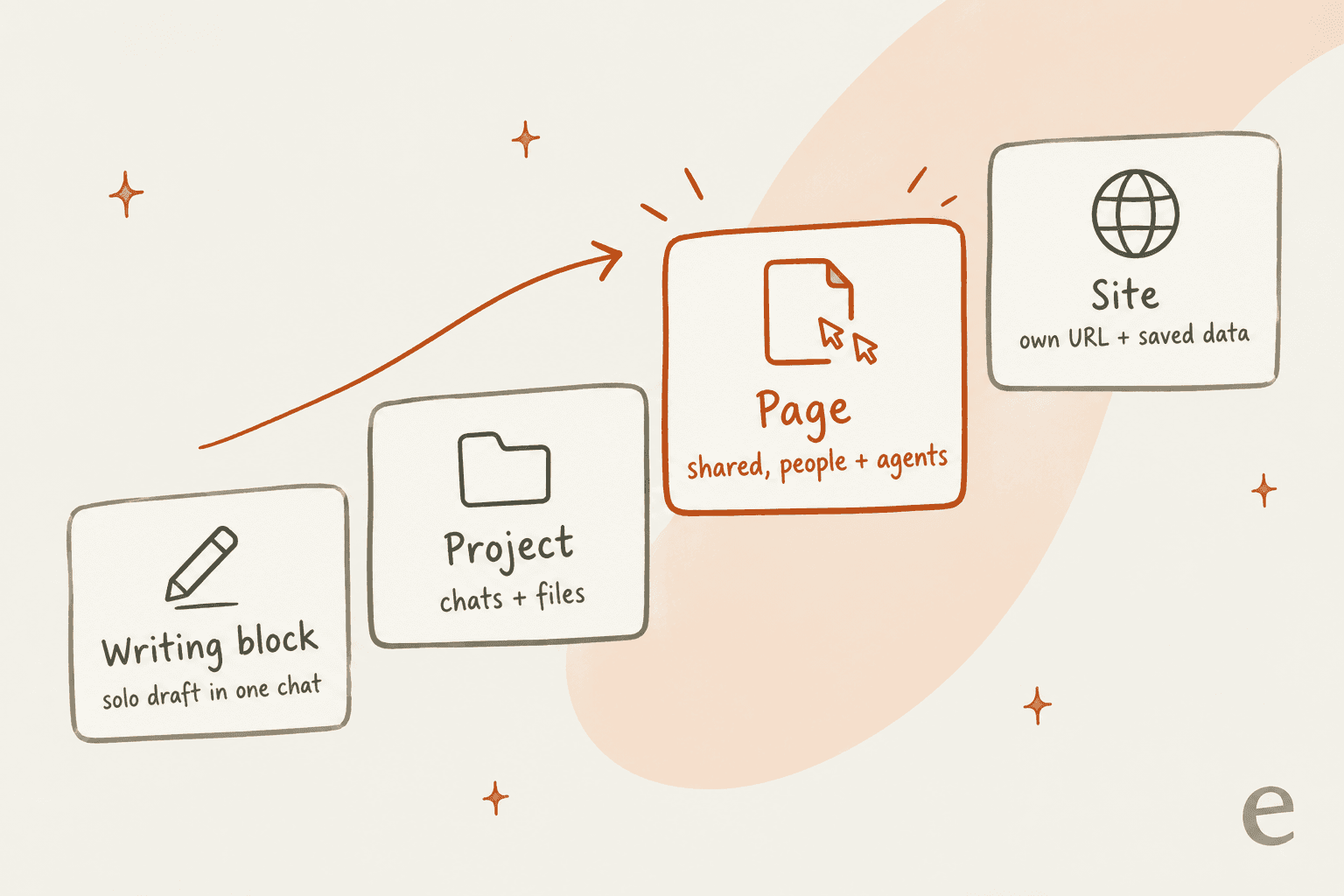
That's the opposite of a ChatGPT group chat, where everyone shares one assistant. OpenAI's advice is to "agree on who is changing what and review the result." I would go one step further and name an owner for each section. I've built enough agent integrations to know what happens when two assistants with different context edit the same text: you get two confident paragraphs that quietly disagree, and nobody notices until a customer does.
Generate: a solid in-place drafter (B+)
Generate writes "a first draft directly in your page." It's especially handy when you want to turn a deep research report into a structured section. You describe what you want, ideally with "the purpose, format, and details the draft should preserve," and the text appears inline. Then you can "accept it, ask for a change, or undo it."
That undo matters more than it sounds at first. It's the only undo behaviour documented anywhere in the Space docs. Generate is the one AI action on a page that has an obvious way back.
It gets a B+ and not an A because there's nothing here that you can't already get from writing blocks in chat or from Notion AI. Generate is good and it's in the right place, but it is not what makes pages special. If you mostly write alone, my ChatGPT blog writer guide covers the in-chat route, which works on every plan, Plus included.
The Image block sits right next to it. Choose Generate inside an Image block and describe the image, or Attach to upload one. It's handy for a quick mockup, and it runs on ChatGPT Images.
Visualize: impressive, slow, and rebuilt on every change (B-)
You type /visualize, describe what to show and how readers should interact with it, then ChatGPT builds a small interactive app inside the page. The menu offers starting points for "an app, screen design, widget, or diagram." OpenAI's example is a project budget calculator where readers can change the team size and number of weeks, plus the weekly cost.
When it works, it is the most impressive thing on the page, a budget doc where the reader drags a slider beats any static table. But the Visualizations docs are refreshingly honest about the limits, and each one of them has an effect on daily use:
- Speed. "Visualizations can take a minute or longer to generate. If the result is blank or missing, wait for the response to finish, reload the chat once, and then retry."
- Edits rebuild. "A follow-up can create a replacement visualization instead of editing the original result in place."
- Snapshot, not live. A visualization is "generally a snapshot of the information available when ChatGPT created it, not a live dashboard."
- Export varies. "Generated download controls and export formats can vary by result."
A minute per attempt, with each tweak producing a new version, means you iterate slowly and you end up re-checking the whole thing every time. For a one-off explainer that's fine enough. For a dashboard people rely on every week, OpenAI itself points you to Sites, which are built to have a URL and permissions, and saved data as well.
Agent Instructions and Task: promising, barely documented (C)
This is the part I wanted to love the most. The Space feature page says you can "give your page instructions. Tell ChatGPT what to update on your page, which sources to use, and when to check." OpenAI's Tibo described the developer angle as "AGENTS.md taken one step further" in his launch post.
In the docs, though, Agent Instructions and Task get one line between them: "Add reusable prompts, actions for Codex, or guidance for agents." There's no section on how agents read the instructions or which agents honour them, and nothing on what happens when the ChatGPTs of two collaborators interpret them differently.
And here's the sentence that sets the grade, from the agents guide:
"Writing a cadence in a page or its instructions doesn't by itself confirm that a task is scheduled."
So writing "update this every Monday from the sales tracker" into Agent Instructions doesn't make anything happen on Monday. It is guidance for the next time an agent touches the page, it's not a schedule. That's a reasonable design, but it's the opposite of what "give your page instructions... and when to check" suggests on the marketing page. I'd grade it higher on the day the docs explain the behaviour properly.
Do ChatGPT pages update themselves?
Not at launch. The feature page sells "Powerful, self-updating pages" and "A to-do list that updates itself." The getting started guide says: "Automatic page updates with Keep updated are not available at launch."
What does work today is a scheduled automation instead. The feature page FAQ spells it out: "For recurring updates, set up an automation with instructions for what to update, which sources to use, and how often to run." Then the agents guide adds the step that most people will probably skip: "check an actual run and the resulting page update."
Your dot can also be asked to keep a page current from ChatGPT or Slack, and my dots review covers how reliable that is. The best proof I found that the workaround works came from a developer who tested pages before the launch. Antonio Leiva built a task page that syncs with a Markdown file his other agents also use:
"Con las actualizaciones programadas, cada 15 minutos la página se sincroniza con ese archivo: marco una tarea como hecha y desaparece de los dos sitios."
In English: with scheduled updates, every 15 minutes the page syncs with that file, and when he marks a task done it disappears from both places. That's a real and useful setup, and what does the work there is a scheduled task, not the Keep updated button. If you're weighing a Pro or Premium seat to get a dot that can keep pages current, my OpenAI dots pricing breakdown runs the numbers.
Sharing: clear roles, a few traps (B)
Pages have three roles, per Collaborate in Space: View, Comment, and Edit. On a personal plan you "invite people by email from a page's Share menu," or "share by link where that option is available." On workspace plans you invite people in your workspace, and sharing with a Team is listed for Enterprise in the Enterprise release notes.
The roles are simple, which is a strength on its own. The traps are in the inheritance rules, which I covered in depth in my ChatGPT Space review. These are the three I'd check before every share:
- "Sharing a page also grants access to its child pages," and "removing a direct invitation doesn't remove access that someone still inherits."
- "Deleting a page moves it and its subpages to Trash, including subpages owned by other people."
- If a collaborator has Memory on, "their ChatGPT may remember information from the shared page even when your Memory is off."
None of that is unusual for a doc tool. The memory point is a new one though, and it's the one I'd put in the onboarding page of your team. Treat a page like any internal knowledge base: anything on it can travel.
Export and version history: the real gap (D)
This is where pages lose the most points, and it's also where coverage of the launch has been the quietest.
There is no page export documented at all, whether PDF or Word, and not Markdown either. The only export-style control in the pages docs is Copy as Markdown on a single table's block menu. Collaborative slides, due "in the coming weeks," are promised with "export to PowerPoint or Google Slides with formatting intact." Pages didn't get any equivalent line.
There's also no version history or page history, and no restore-a-version button anywhere in the docs. You get Generate's undo, Ask for change's preview, Trash for deleted pages, and Show attribution "when available" to see who contributed. Under one launch post, an X user asked the same question I'd ask too:
"If agents can edit dashboards and checklists, the hard part is deciding which changes need approval. Does Space expose a per-action history?"
Going by the docs, the answer for today is no.
I'm hard on this because I've seen what it costs. eesel runs an AI blog writer, and some of the earliest painful feedback on it had nothing to do with writing quality. One solo-practice therapist told the team: "i truly dont know how to and not lose the format" when moving the posts into a restrictive website builder. The drafts were good, the problem was they were stuck. A document an agent wrote is only as useful as your ability to get it out, and to roll it back when an agent gets it wrong. Pages can't do either one yet.
Launch week reliability
Launch night was a rough one. OpenAI's status page opened an incident called "Elevated errors in ChatGPT Space Pages," saying users "may experience errors creating or interacting with Pages, including failures when using Page tools or connecting to live Page sessions."
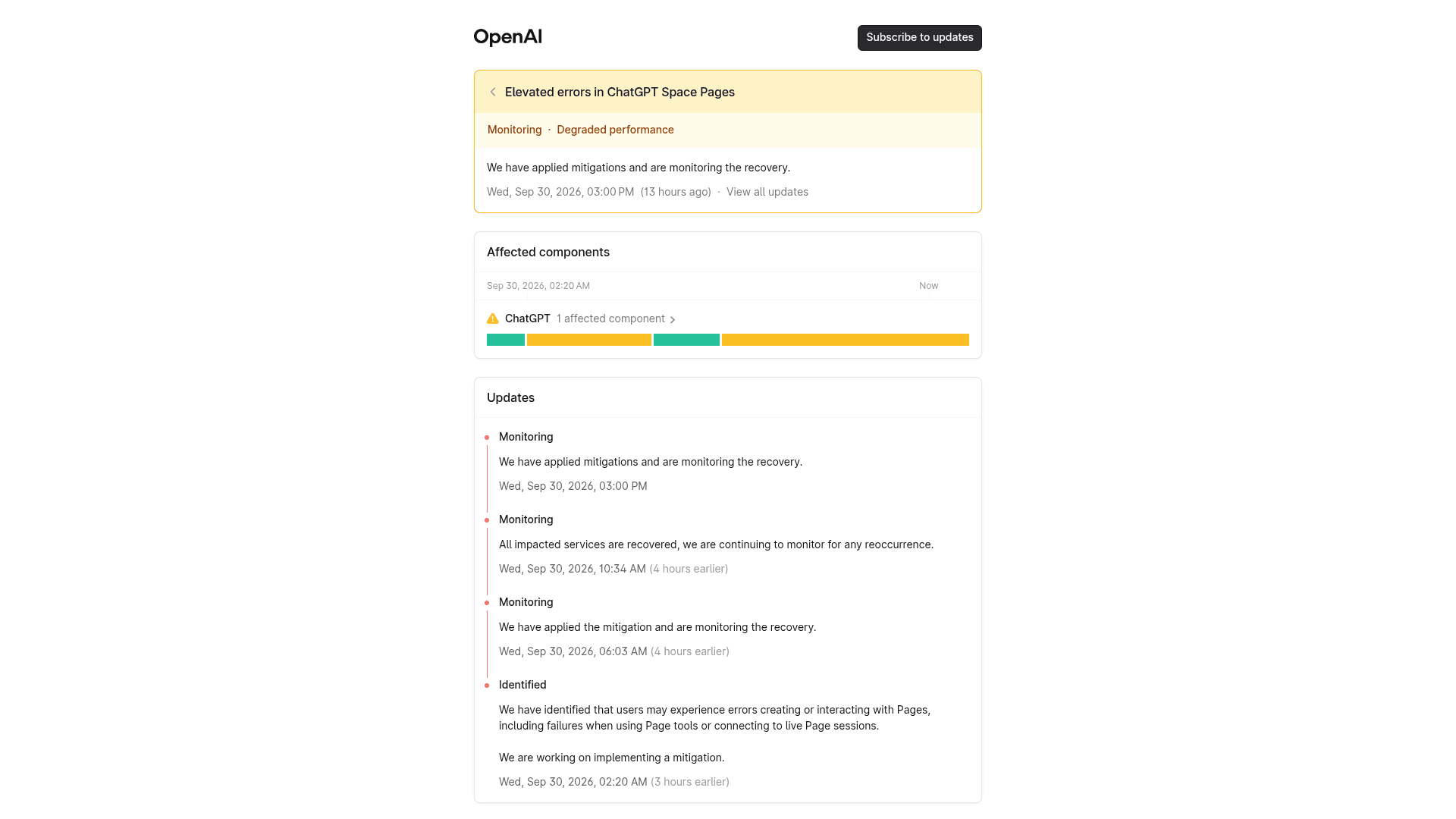
When I checked on October 1, the incident page had four updates and had said "All impacted services are recovered" at one point, but it was still marked Monitoring rather than Resolved. One Hacker News user called it "the most botched release I've seen in recent history" (joshcsimmons, HN). I wouldn't grade the product on its day one, but I also wouldn't move a team's critical docs in during week one.
What early users are saying
Two days in, the reactions split into three groups. The fans see the doc layer as the first AI workspace they would actually use daily. Dan Shipper, whose company Every built a rival agent-native editor called Proof, said this:
"they've tried different approaches to this over the years (like Canvas) but this is the first one that felt like i could actually use all the time"
Others read it plainly as a Notion competitor that's built around agents:
"The ChatGPT Space demo is great, like a Notion for your dots/agents and teammates."
The loudest group isn't really reviewing pages at all. Many replies under Tibo's launch post were about Codex usage limits, and the top one had 263 likes:
"You're slashing our usage to give us stuff we don't want. Please, please stop. Let Codex be Codex."
That frustration is about usage and not about the editor, but it does tell you who pages are for. If you pay for Pro to code in Codex, pages are a side dish. If you run a team on ChatGPT Business, they're the main course. For the wider picture on sentiment, my ChatGPT reviews roundup is a good companion to this one.
ChatGPT pages vs Notion and Google Docs
Here's how pages compare on the things this review graded, going by the docs of each product:
| ChatGPT pages | Notion | Google Docs | |
|---|---|---|---|
| Agents edit inside the doc | Yes, ChatGPT, Codex, and dots, each user's own | Notion AI | Gemini |
| Runnable prompts for readers | Yes, Prompt block | No equivalent | No equivalent |
| Interactive blocks | Visualize, a minute or more each | Databases, embeds | Smart chips, limited |
| Page export | Not documented | PDF, HTML, Markdown | PDF, Word, more |
| Version history | Not documented | Yes | Yes |
| Mobile editing | Not at launch | Yes | Yes |
| Plans | Pro, Business, Enterprise | Free tier available | Free tier available |
Pages win the agent column outright, and they lose most of the rest. If your team lives in Notion, I wouldn't migrate. What I'd do is use pages for AI-heavy working docs, and keep the system of record in a place where it can be exported and rolled back. My Notion AI review and Google Docs AI guide cover the other side.
If you're rethinking the whole doc stack, start with my Confluence vs Notion breakdown, or browse the best AI documentation assistants for AI on top of the docs you already have.
Should you move a doc into ChatGPT pages?
Pick the doc you're thinking about and see where I'd put it.
My verdict on ChatGPT pages
3.5 out of 5. Pages are the most convincing AI document OpenAI has shipped, and the reason for that is design, not model quality. Prompt blocks and Ask for change show a team that thought hard about how people and agents should share a doc. Nobody else in this category has a runnable prompt block, and the review-before-accept default is exactly right.
The half that is missing is the unglamorous one. No export, no version history, no mobile editing, and agent instructions nobody has documented. Those are the features that let you trust a doc tool with work that matters, and they are the ones OpenAI will need to add before teams move their real documents over.
Who should use pages today: teams already on ChatGPT Business or Enterprise, for working docs that people and agents edit together. Who should wait: anyone on Plus (you don't have it) and anyone who needs a system of record, plus anyone whose doc has to leave ChatGPT in good shape. If you're on Pro mainly for coding, pages are a nice extra but not a reason to upgrade. My Pro 500 review covers whether that tier earns its price.
eesel's AI blog writer, for when the page has to become a post
If the doc you're drafting in a page is a blog post, the page gets you a decent draft and then it leaves you to copy and reformat, and to hunt for images and links by yourself. That's exactly the gap eesel was built for. eesel's AI blog writer is a ready-to-work teammate for one job: publish-ready posts. It researches the topic and drafts in your voice, then generates images and adds internal links, and it hands back a post formatted for your CMS. Even the editor looks familiar, it's a document with an agent working beside it.

The difference is in where the work ends up, on your site and not in a workspace. If you're still comparing general AI writing assistants, that's the line I'd draw.
If you want to see how it compares, my AI blog writer review and the best AI blog writers for SEO roundup lay it out. Or try eesel on your next post and see what comes back.
Frequently Asked Questions
Are ChatGPT pages worth using?
Which ChatGPT plans include pages?
Can you export a ChatGPT page to PDF, Word, or Markdown?
Do ChatGPT pages have version history?
How long does a Visualize block take in ChatGPT pages?
Do ChatGPT pages update themselves automatically?
Is ChatGPT pages a good Notion or Google Docs replacement?
Can I write blog posts in ChatGPT pages?


Article by
Rama Adi
Rama is a software engineer at eesel AI with two years of experience writing about B2B SaaS, AI tools, and customer support technology. Based in Bali, Indonesia, he brings a developer's perspective to product comparisons — cutting through marketing copy to what the integrations and APIs actually do.