
What is ChatGPT Pro 500?

Pro 500 launched at DevDay on September 29, 2026. OpenAI's DevDay 2026 recap describes it in one line: the new plan "offers our highest usage allowance at 25 times the ChatGPT Plus allowance and includes access to Ultrafast."
I build integrations at eesel, and the eesel team has spent the last three-plus years putting AI agents on live support queues, so model subscriptions end up as a line item I read more closely than most people probably do. The thing that caught my eye with this launch was not really the $500 sticker. It was that OpenAI reshuffled the whole Pro ladder on the same day, and that reshuffle changes the math for every single tier.
The About ChatGPT Pro tiers help article now lists three Pro plans, where before there was only one:
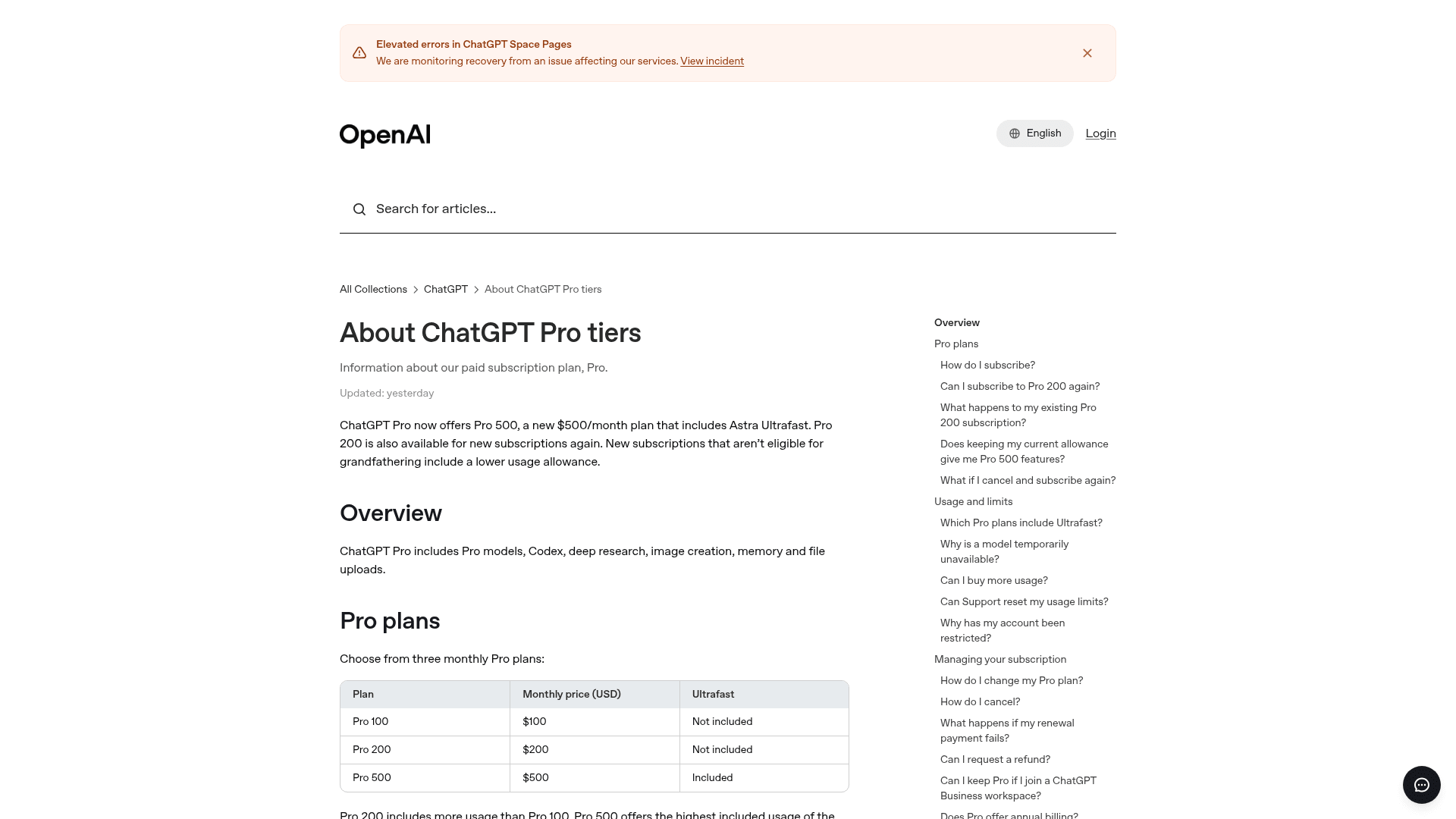
The same article confirms that Pro 200 is open to new subscribers again, but "new subscriptions that aren't eligible for grandfathering include a lower usage allowance." That one sentence is, as far as I can tell, the reason the $500 tier exists in the form it does. I'll come back to it later.
What does ChatGPT Pro 500 include?
Below is what the three Pro tiers include, which I pulled together from the help center, the ChatGPT pricing page (the full ChatGPT pricing guide covers Free through Enterprise), and OpenAI's Codex pricing docs.
| Pro 100 | Pro 200 | Pro 500 | |
|---|---|---|---|
| Monthly price (USD) | $100 | $200 | $500 |
| Annual billing | No | No | No |
| Work and Codex usage vs Plus | 5x (OpenAI labels it "Pro 5x") | 10x for new subscribers (20x until Oct 29 if grandfathered) | 25x |
| Ultrafast (GPT-6 Astra) | Not included | Not included | Included |
| Computer use via Agents API in Codex and Work | No | No | Yes |
| Five-hour limit | None currently | None currently | None currently |
| First dot (always-on agent) | Included | Included | Included |
| GPT-6 Pro in Chat | Yes, shared weekly allowance | Yes, weekly limit | Yes, highest Pro-model limits |
| Buy extra credits | Yes | Yes | Yes |
A few of those rows deserve a sentence each.
Monthly only. The help article is pretty blunt on this point: "Pro is billed monthly. Annual billing and payment for multiple months in advance are not available." So there is no discount for committing longer, and a year of Pro 500 comes to a flat $6,000.
No five-hour window. OpenAI's usage limits FAQ says "Pro plans currently have no five-hour limit," while Plus and Standard Business still run on a five-hour window plus a weekly cap. If you work in bursts (a big Saturday refactor, then nothing until Tuesday), this is a real quality-of-life difference, and it applies on every Pro tier, not only the $500 one.
Computer use in Codex. The DevDay recap says the Agents API now supports computer use, available "in Codex and ChatGPT Work on Pro 500 and Enterprise." Among the personal plans, only Pro 500 gets it.
Dots are not a Pro 500 perk. Every Pro tier includes your first OpenAI dot, outside the EEA, Switzerland, and the UK. If the always-on agent is the one reason you are shopping at all, Pro 100 gets you the same dot for a fifth of the price. I went deeper on that in the Dots pricing and Dots review posts.
GPT-6 Pro limits are still vague. The GPT-6 Pro help article says "a Pro subscription does not include unlimited use of the GPT-6 Pro model" and that "Pro plans with higher usage allowances include higher limits for Pro models." What it does not do is publish an actual number for Pro 500.
How much usage does $500 actually buy?
This is the part where the plan gets interesting, and honestly a little deflating too.
OpenAI doesn't publish token counts for any of the Pro tiers. What it publishes instead, both in its own usage table and in the DevDay recap, is a multiplier against Plus. The missing piece came in the email that existing Pro 200 subscribers received, and a Hacker News commenter pasted it verbatim:
"Starting October 30, 2026, your included usage in ChatGPT Work and Codex will decrease from 20 times to 10 times the ChatGPT Plus allowance. Your GPT-6 Pro limit in Chat will decrease from 200 to 100 messages per week. Your price remains unchanged and you'll keep your current limits through October 29, 2026."

Put those multipliers next to the prices and the ladder flattens out completely:
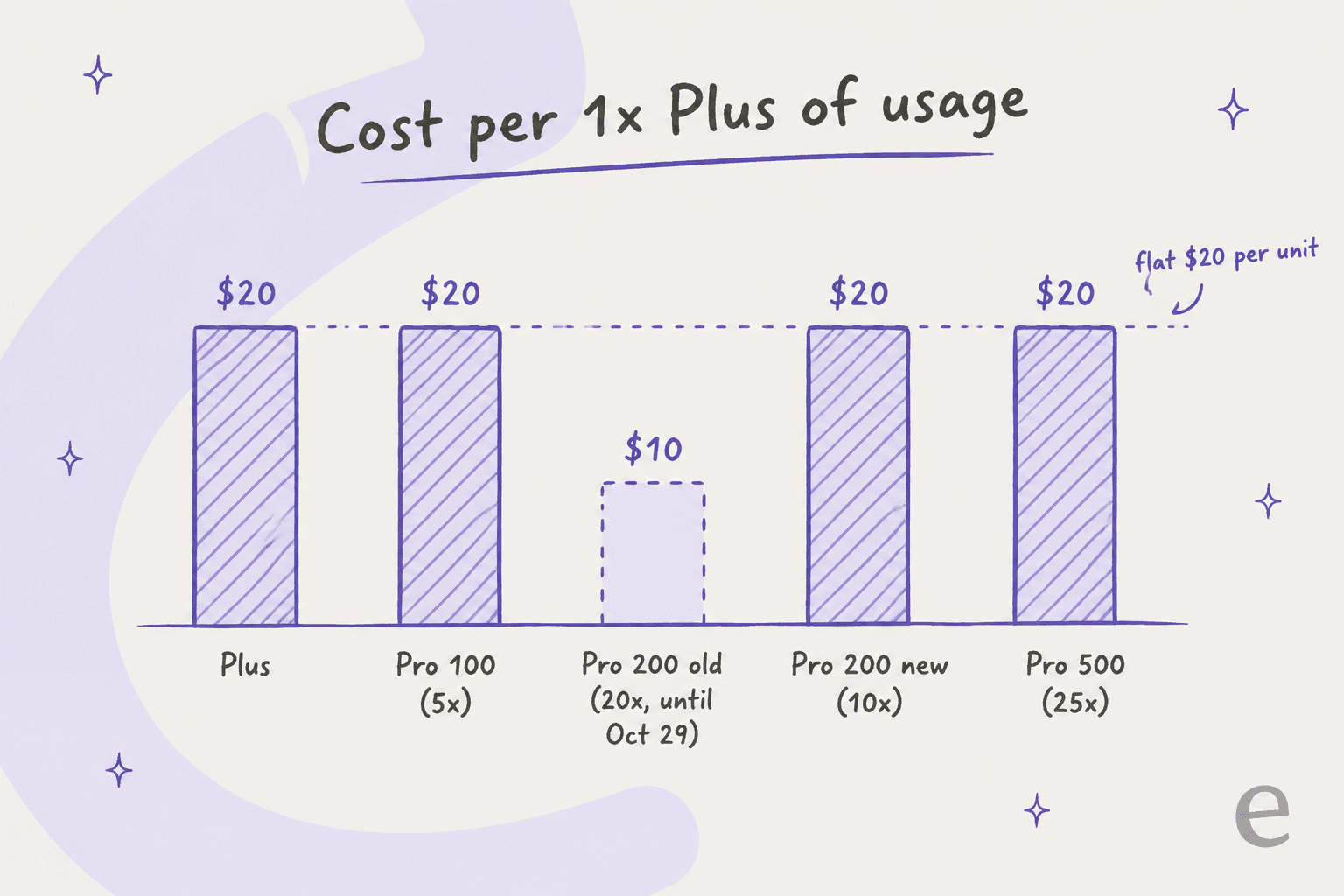
Plus, Pro 100, new Pro 200, and Pro 500 all land on $20 per 1x of Plus usage. The only tier that ever broke that line was the old 20x Pro 200 at $10 per unit, which happens to be exactly the one being retired. One commenter did the same math and ended up at the same conclusion:
"ChatGPT Plus: 1x usage, $20
Pro 100: 5x usage, $100
Pro 200: 10x usage, $200 (previously was 20x usage, $200)
Pro 500: 25x usage, $500
So, essentially scaling is equal. You get the same amount of usage from 25 ChatGPT Pro accounts as you do from one Pro 500 account.
It's fair, but a big of a rug pull considering how good of a deal Pro 200 was."
(They mean 25 Plus accounts, but the point still stands.) So the honest way to frame it is that Pro 500 isn't cheaper usage. Five Pro 100 accounts would give you the same 25x for the same $500. What the single $500 account buys you is the stuff that doesn't show up in the multiplier: Ultrafast and computer use in Codex, then also the convenience of one login and one usage dashboard, with one pool you don't have to split across accounts.
That last point is a bigger deal than it sounds, and it is the reason the Codex pricing guide treats the plan and the pool as one decision. The Codex usage pool is shared between Codex, ChatGPT Work, and apps you connect through Sign in with ChatGPT, which lets eligible requests in partner tools count toward your plan. Juggling all of that across three accounts gets tedious fast.
What Ultrafast really costs you
Ultrafast is the headline feature, but it's also the one that comes with the sharpest catch.
OpenAI's speed docs say GPT-6 Astra Ultrafast "generates tokens up to 8x faster than GPT-6 Astra in Standard mode in Codex," and the DevDay recap puts that at 300 tokens per second. Sam Altman's own reaction on launch day was about as unguarded as you will see from a CEO:
"Ultrafast is
so fast
I do not ever want to go back"
The catch is in the next paragraph of the same doc: "For GPT-6 Astra, Ultrafast uses included subscription limits at 8x the Standard rate. Purchased credits and Enterprise pay-as-you-go usage are billed at 6x the Standard rate."
Here is how the numbers work out on a full Pro 500 allowance:
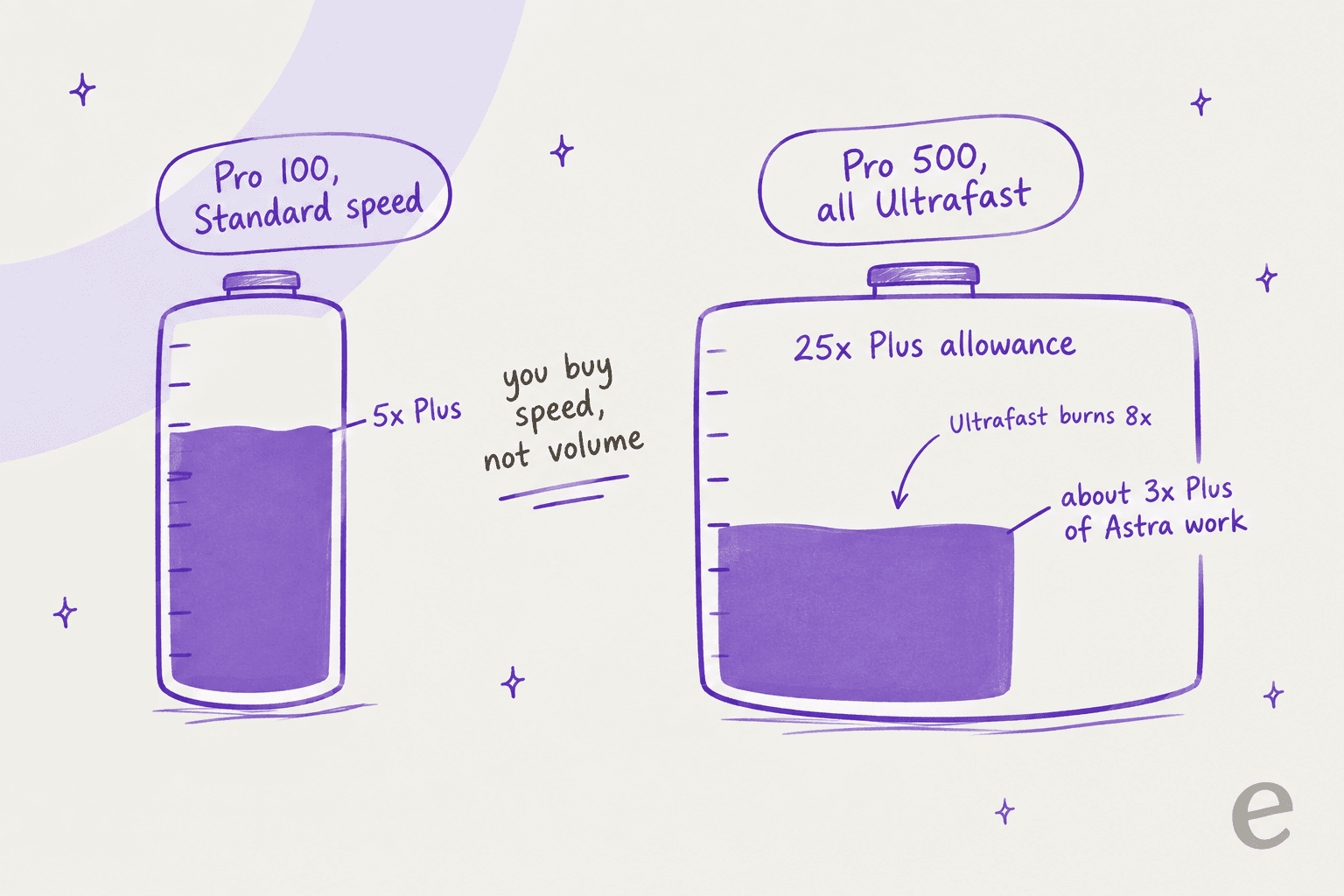
25x divided by an 8x burn rate is about 3.1x Plus worth of Astra work. That is less than what Pro 100 gets at Standard speed. Put another way, if you flip Ultrafast on and just leave it on, you're paying $500 for less total Astra work than the $100 plan gives you, only it arrives much faster. A commenter summed up the trade in one line:
"They offer "ultrafast" now which is ~300tps which is 8x the speed for 6x the price."
(Their 6x is the credit rate; on included usage it's 8x.) None of that makes Ultrafast a bad deal, and it doesn't change the verdict in the GPT-6 Astra review that Astra is the strongest model on the plan. What it does is turn Ultrafast into a latency product. If you're watching an agent write code and the waiting is your bottleneck, 8x faster output is worth a lot. If you queue overnight jobs and read the results over coffee in the morning, then Ultrafast is mostly money you're setting on fire.
The practical move, in my view, is to leave Pro 500 on Standard by default and switch to Ultrafast only for the interactive sessions where you're actually sitting there waiting. Also note that once your included usage runs out, the help article says Ultrafast "draws from your credit balance," and those credits go at 6x too.
There are two more Ultrafast details that are worth knowing before you buy:
- Plus, Pro 100, and Pro 200 can't unlock it. The Astra usage article says buying credits on those plans "does not enable it."
- It's also in the API. The Ultrafast API guide offers it via
service_tieron the API, up to 6x faster there, with US data residency and global processing only. If you only need speed for an app, the OpenAI API route avoids the subscription entirely.
Pro 500 calculator: which tier fits your usage?
Plug in how much work you do, in multiples of a Plus allowance, and then how much of it you want to run in Ultrafast. The widget applies OpenAI's published 8x Ultrafast burn and picks the cheapest single plan that still covers it.
Try setting the workload to 8x and then drag Ultrafast to 50%. The allowance you burn jumps from 8x to 36x, which goes past what Pro 500 includes, and that one interaction is pretty much the whole Ultrafast trade-off.
What happens to Pro 200 subscribers?
If you're on Pro 200 today, your plan is changing whether you upgrade or not.
The help article spells out the grandfathering: if your Pro 200 subscription "was active at the eligibility cutoff or during the seven days before it," you keep the previous allowance "through Oct 29, 2026." After that, "your subscription will move to the lower included usage allowance. Your subscription price stays at $200/month." It also adds that keeping the old allowance "does not upgrade your plan or add Ultrafast."
OpenAI tried to soften this with a one-time grant, which another commenter quoted from the same email:
"As a thank you for being an existing subscriber and to help you continue to build your most ambitious ideas and transition, we're also giving you a one-time grant of 62,500 usage credits (a $2,500 USD value). You'll see these appear in Settings > Usage. They will expire on December 31, 2026, and use of the credits is governed by the Service Credit Terms."
That grant implies about $0.04 per credit. It's a useful yardstick to have, since OpenAI doesn't publish a per-credit price for personal plans. At that rate, GPT-6 Astra at Standard speed (250 credits per million input tokens and 1,250 per million output on the Codex rate card) works out to roughly $10 and $50 per million tokens. Ultrafast on credits is 6x that.
So what should a Pro 200 subscriber actually do about it? This is my read:
- Before October 29: use the old 20x allowance and the 62,500 credits. Nothing about upgrading now changes that.
- Check your real usage in Settings > Usage. If you rarely hit the old 20x ceiling, the new 10x may still be enough.
- If you regularly max out 20x: your options at the same total output are Pro 500 (25x, $500), two Pro 200 accounts (20x, $400), or Pro 200 plus credits. Pro 500 only becomes the obvious pick when you also want Ultrafast.
- Don't count on Business as an escape hatch. A Business Premium seat is $100 a month on annual billing and gets 5x Standard seat usage, per the Dots pricing research, and that's a team plan, not a bigger personal bucket.
Most of the reaction on Hacker News was about the cut rather than the new tier. One Pro 200 subscriber put the typical response into a single line:
"Literally just downgraded to the $20 a month one, as they're not grandfathering in the old plans. I don't think this is going to work the way they thought."
Pro 500 vs Claude Max and the other top-tier plans
The obvious comparison is Anthropic's Max plan, which a lot of heavy Codex users also pay for.
| ChatGPT Pro 500 | ChatGPT Pro 200 | Claude Max 20x | Claude Max 5x | |
|---|---|---|---|---|
| Price | $500/month | $200/month | $200/month | $100/month |
| Billing | Monthly only | Monthly only | Monthly only | Monthly only |
| Usage multiple | 25x Plus | 10x Plus (new) | 20x Claude Pro per session | 5x Claude Pro per session |
| Rolling five-hour window | None currently | None currently | Yes, plus weekly limits | Yes, plus weekly limits |
| Speed tier | Ultrafast (Astra, up to 8x) | Fast mode only | Priority access at high traffic | Priority access at high traffic |
| Coding agent included | Codex | Codex | Claude Code | Claude Code |
| Top model access | GPT-6 Astra, GPT-6 Pro | GPT-6 Astra, GPT-6 Pro | Opus, Fable at 50% of weekly limits | Opus, Fable at 50% of weekly limits |
Sources: About ChatGPT Pro tiers, Claude pricing, and the Max plan article above.
Compared honestly, ChatGPT now charges $500 for the top of its ladder, while Anthropic's top personal tier is still at $200. Anthropic's Max 20x multiplier is against Claude Pro per session, not against ChatGPT Plus, so the two "20x" figures aren't directly comparable. The structural difference you can compare is the five-hour window, which Claude Max still has and ChatGPT Pro currently doesn't.
If you're weighing the models underneath instead of the plans, the GPT-6 Sol vs Opus 5.5 comparison and the Claude Code pricing breakdown cover that side.
For the cheaper open-weight options that kept coming up in the launch thread, see Kimi K3 pricing and DeepSeek V4 Flash.
Who should (and shouldn't) buy ChatGPT Pro 500?
Here's the short version as a decision tree:
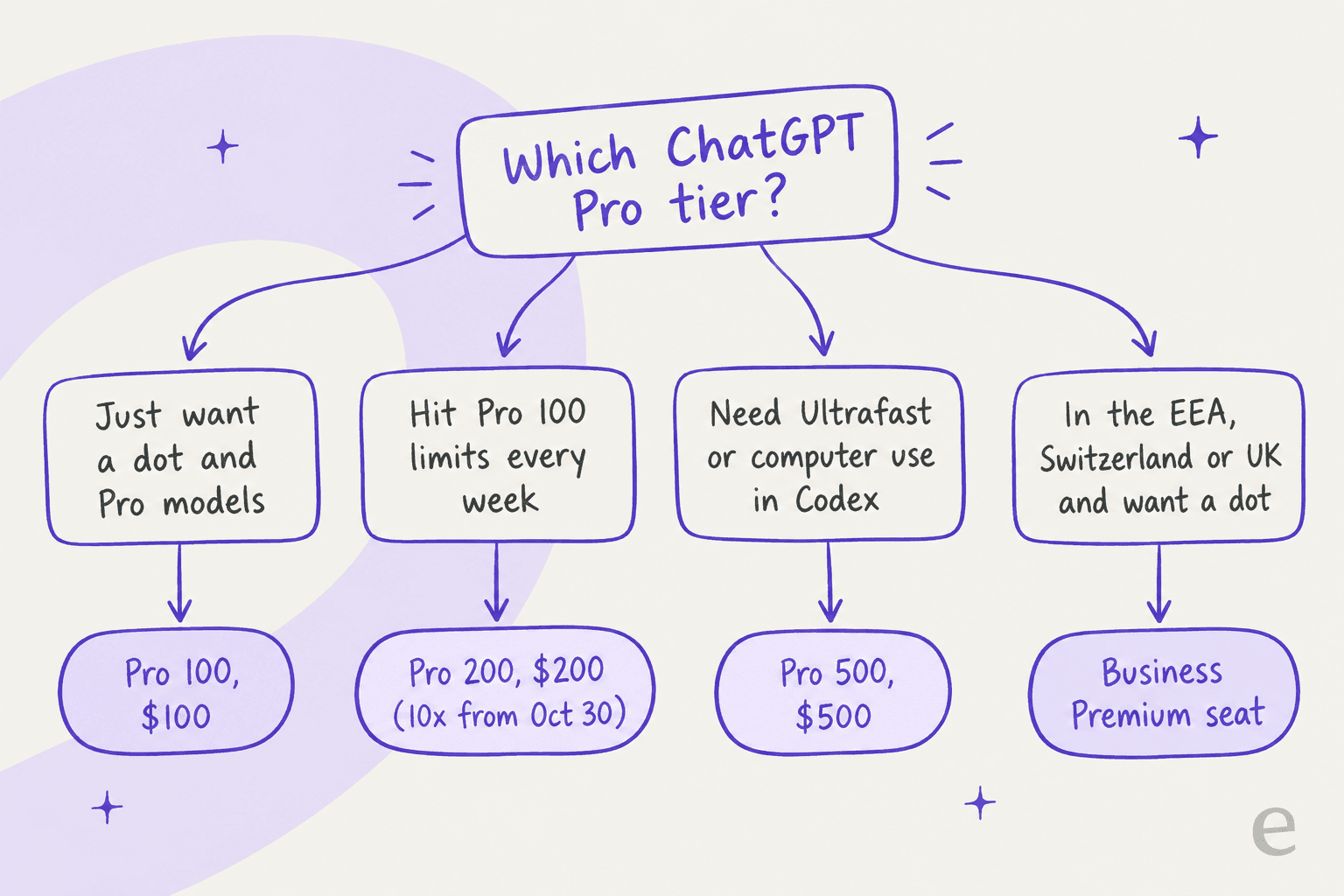
Buy Pro 500 if:
- You already pay for two or three Pro accounts to get enough Codex capacity. Consolidating into one 25x pool is cleaner, even when it is not cheaper per unit.
- You spend your day in interactive Codex sessions and waiting on output is the bottleneck. Ultrafast is the only thing here that is actually new.
- You need computer use through the Agents API inside Codex or ChatGPT Work on a personal plan.
Not everyone in the thread was negative, though. One commenter made the consolidation case directly:
"So many negative comments here. Among my circle, it's not uncommon for people to have multiple $200 accounts. This seems like it would make things easier for them by letting them use one account instead of juggling two or more."
Skip Pro 500 if:
- You want a dot. Pro 100 includes the same first dot.
- You mostly use GPT-6 Luna or GPT-6.1 Sol for everyday work. Per the DevDay recap, Sol 6.1 runs at a fifth of Astra's token price, so your allowance stretches a lot further on those models.
- You're buying it for a team. It's a personal plan. ChatGPT Business or ChatGPT Enterprise is where shared admin, SSO, and workspace billing live.
- You're outside the US and price-sensitive. At $6,000 a year with no annual discount, it's a lot to commit to a plan whose usage allowances OpenAI just showed it will change, and there are cheaper ChatGPT alternatives for general work.
Is a $500 AI subscription the right tool for support work?
This is the question I keep getting from support leads, so it deserves a straight answer. A lot of teams look at Pro 500 and think: 25x the usage plus computer use and an always-on agent, surely one person can wire that up to handle our tickets.
You can build something that way. But a personal ChatGPT plan is infrastructure, raw model capacity for one person. It doesn't know your helpdesk or have your past tickets, there are no approval rules, and every hour you spend building the glue turns into an hour spent maintaining it later. One eesel customer, a crypto ATM maker, said it better than I could:
"We could try to write our own LLM application but we didn't want to invest our time into that. We wanted something that we would not have to maintain."
Karel, GENERAL BYTES
That is the distinction I would draw here: Pro 500 is the engine, and eesel is the employee. eesel's AI helpdesk teammate arrives already connected to tools like Zendesk, trained on your help center and past tickets, and it only takes the tickets it's confident about. Gridwise, an eesel customer, reported that "in the first month, eesel is resolving 73% of our tier 1 requests."
And if you're a Codex power user, which is exactly the person who buys Pro 500, the two actually fit together well. The eesel CLI lets you run the same eesel teammate from a terminal: connect an integration with eesel integrations connect, review what it did with eesel activity, and approve or deny pending actions with eesel approvals. Every command prints JSON and supports --dry-run, so Codex or Claude Code can drive it without you touching the dashboard.
Try eesel for your support queue
If the reason you're pricing Pro 500 is that you want AI doing real support work, try the version that was built for that job. eesel plugs into your helpdesk in minutes, learns from your existing tickets and docs, and starts on a free plan with 100 credits, then fixed monthly plans from $299 for 500 tickets or chats handled on the eesel pricing page. There are no per-seat fees, and you can simulate every rollout on past tickets first.

Try eesel and see what a support teammate does with a week of your tickets before you spend $500 on a personal model plan.
Frequently Asked Questions
How much does ChatGPT Pro 500 cost?
What is the difference between ChatGPT Pro 100, Pro 200, and Pro 500?
Is ChatGPT Pro 500 worth it?
What is Ultrafast on ChatGPT Pro 500?
What happens to my existing ChatGPT Pro 200 plan?
Does ChatGPT Pro 500 include OpenAI Dots?
Can a support team use ChatGPT Pro 500 to automate tickets?


Article by
Rama Adi
Rama is a software engineer at eesel AI with two years of experience writing about B2B SaaS, AI tools, and customer support technology. Based in Bali, Indonesia, he brings a developer's perspective to product comparisons — cutting through marketing copy to what the integrations and APIs actually do.