Let's talk about OpenAI Codex. It’s an AI coding agent that’s been getting a lot of buzz for its promise to help developers write, review, and ship code faster, all without leaving their favorite tools. It sounds great, and for many tasks, it is.
But what's it actually like to use day-to-day? This guide is a straightforward, no-fluff look at the OpenAI Codex app. We'll dig into its features, the different platforms it runs on, how the pricing really works, and some of the real-world limitations you should know about, based on user reports and official docs.
While Codex is a seriously powerful assistant for developers, it’s important to know what it’s built for. If you’re a business looking to automate entire workflows across different apps, you might find you need a different kind of AI teammate altogether.
What is the OpenAI Codex app?
Its main job is to understand what you want to do in plain English and then help you do it. You can ask it to navigate code repositories, edit files, run commands, or even execute tests. It’s built to be a partner in your coding process.
The whole system includes a command-line interface (CLI), extensions for your IDEs, a macOS app, and a cloud-based service. All of these are tied into the ChatGPT subscription plans, so you don’t buy Codex separately. It’s made for software engineers who want to speed up their development cycles, whether they're squashing bugs or building out new features.
Key features and available platforms
Codex is meant to slide right into a developer's existing workflow, but how it works and what it can do varies a lot depending on where you're using it. Let's break down the main platforms.
Using Codex in your IDE and terminal
The most common way to use Codex is directly inside your code editor or terminal. It integrates with popular editors like VS Code, Cursor, and Windsurf, showing up as an AI panel where you can chat with it, ask it to edit code, and preview its suggestions. This is a huge productivity boost because you don't have to constantly switch between windows.
Then there's the Codex CLI, a speedy, Rust-based tool that you can run right from your terminal. According to the official CLI documentation, it’s packed with useful features:
- Interactive Sessions: You can start a chat session just by typing
codexand talking to it conversationally. - Scripting Workflows: If you have a repetitive task, you can automate it using
codex exec. - Local Code Reviews: Before you commit your changes, you can run
/reviewto have Codex give your code a once-over.
The whole point is to keep developers in their flow state. You get the power of AI without breaking your concentration, which is a pretty big deal.
Delegating larger tasks with Codex in the cloud
For bigger, more complex jobs, you can hand things off to Codex in the cloud. This web-based experience runs your tasks in an isolated, sandboxed environment. You can delegate an end-to-end task, like refactoring an entire module, and just let it run in the background.
While it's working, you can monitor its progress without it interrupting what you're doing locally. Once it's done, you can review the code it generated and decide whether to merge it. It’s a good way to offload heavy lifting.
It even integrates with tools like GitHub. You can tag @Codex on a pull request and have it perform an automated code review, just like a human teammate would.
Accessing Codex on a mobile device
This is one area where the user experience can vary. As of 2026, there isn't a dedicated, standalone "Codex app" on the iOS or Android app stores.
On iOS, Codex is supposed to appear in the sidebar of the main ChatGPT app. However, as many users on Reddit have pointed out, some users report needing to log into the web version at chatgpt.com/codex first to get it to show up in the app. This process is not always intuitive for new users.
first you have to use it on web at chatgpt.com/codex. once you've run some tasks there, it'll show up in your iOS sidebar. not on android yet

Support on Android is more limited. There's no official support for Codex within the ChatGPT app. The community-recommended solution is to use Chrome's "Add to Homescreen" feature to create a shortcut to the web interface. <quote text="Android users, for codex on mobile:
Go to the GPT web interface using chrome on mobile. Hamburger menu > Add to Homescreen. Asks if you want to install the GPT App Accept, and it should just install an icon for the web interface on your homescreen.
Not perfect, but it works. No official codex support on android yet." sourceIcon="https://www.iconpacks.net/icons/2/free-reddit-logo-icon-2436-thumb.png" sourceName="Reddit" sourceLink="https://www.reddit.com/r/ChatGPTPro/comments/1l1or2v/comment/nhboy7w/">
While it's possible to access Codex on a mobile device, the experience is not as integrated as on desktop platforms, which remain the primary way it's intended to be used.
How to get started with the OpenAI Codex app
Ready to give it a try? Getting set up with the Codex CLI, its most popular tool, is actually pretty simple.
Installation and setup
You can install the CLI with a single command. According to the official setup guide, just pick the one for your system:
npm i -g @openai/codexbrew install --cask codex
Once it's installed, the first time you run it, you'll be prompted to sign in with your ChatGPT account. This automatically links the tool to your subscription plan, and you're good to go.
OpenAI Codex app pricing and plans
One of the most common questions is about cost. The good news is that Codex isn't a separate purchase. It's included with the existing ChatGPT Plus, Pro, Business, and Enterprise plans.
| Plan | Price (per month) | Key Usage Limits (per 5-hour window) |
|---|---|---|
| Plus | $20 | 45-225 local messages, 10-60 cloud tasks. |
| Pro | $200 | 300-1500 local messages, 50-400 cloud tasks (6x higher limits). |
| Business | $30 / user | Same limits as Plus, but with a collaborative workspace and admin controls. |
| API Key | Usage-based | Pay-as-you-go based on API token pricing; no cloud features. |
Business and Enterprise users can buy extra credits if they need more usage. Plus and Pro users can also buy credits once they hit their limits within the 5-hour window.
Pro tip
If you're a developer who relies on Codex daily, the Pro plan is almost essential because of its much higher usage limits. For simpler tasks, you can also switch to the `GPT-5.1-Codex-Mini` model, which can stretch your usage limits by up to 4x.
Real-world limitations
Codex is an impressive tool, but it's not perfect. It's important to take an honest look at some of the user-reported issues and documented constraints so you can decide if it's the right fit.
The sandbox "bubble": A major hurdle
For security reasons, Codex runs in a sandbox, which means its network access is turned off by default. This is clearly explained in its security documentation, and it makes sense, as you don't want an AI having free rein over your network.
But this creates a practical challenge: Codex can't perform some of the most common developer tasks. It can't install dependencies with npm install, it can't fetch data from an external API, and it can't run tests that require a database connection.
This can be a point of difficulty for developers.
In a popular Reddit thread, users noted that the newer GPT-5.1 model is even more restrictive than previous versions and often flat-out refuses to do anything that requires network access.I've been trying to use it for a few hours. It feels like it needs a few more days in the oven. I'm using Ruby on Rails so I need to install stuff in the VM they spin up, and the documentation on how to do that is sparse, and it won't do simple things like contact the Ubuntu servers to download apt packages. So there's no way to install Ruby let alone anything else my app uses.
Additionally, there's a specific, documented bug where the VS Code extension blocks network access even when a user explicitly tries to enable it with danger-full-access. This makes it impossible to troubleshoot many real-world issues without jumping in and doing things manually.
Inconsistent user experience
Beyond the network issues, the user experience has some inconsistencies. The platform differences, like the challenges with mobile setup, create friction. This provides Android users with a less integrated solution.
Users have also reported that the AI can sometimes get stuck when its own sandbox restrictions prevent it from completing a task you've given it. It knows what it needs to do but can't, and the conversation just goes in circles.
While powerful, Codex is still an evolving tool, and these inconsistencies can sometimes interrupt a developer's workflow.
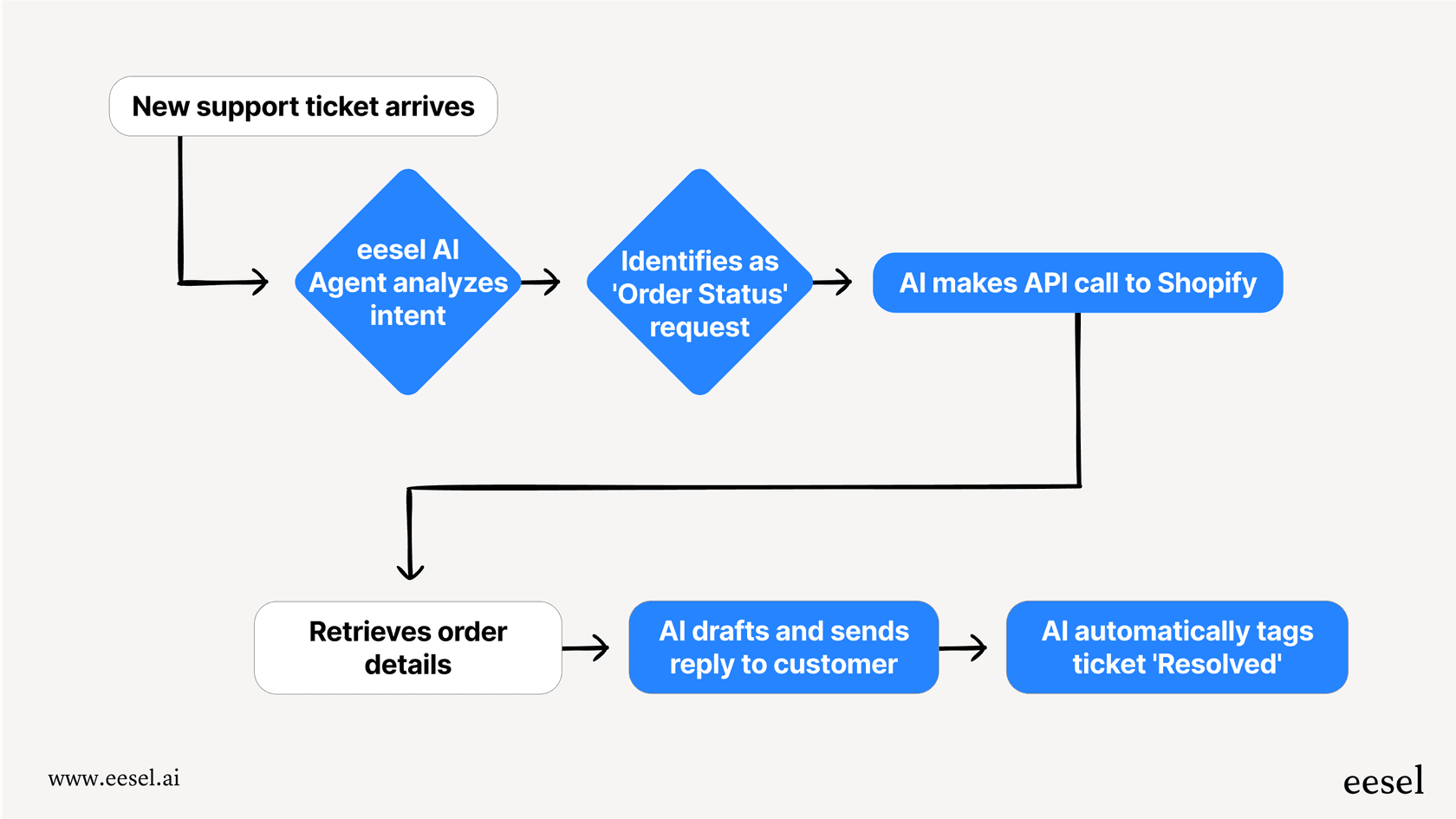
These limitations highlight the difference between a tool built for writing code and an AI designed for automating business processes. An AI teammate built for something like customer service, such as eesel AI, has to connect to external systems to be useful. For example, it needs to access Shopify to check an order status or update a ticket in Zendesk. It's a fundamentally different approach to AI, one focused on integrated, end-to-end workflows that solve a complete business problem.
For a more in-depth look at how AI coding assistants work, check out this video that provides a quick overview of OpenAI Codex and its place in the developer toolkit.
Is the OpenAI Codex app the right tool for your team?
So, should your team use Codex? It really depends on what you need it for.
For individual developers: Codex is a fantastic assistant. It can speed up discrete coding tasks, help you fix bugs, write unit tests, and get you unstuck when you're staring at a tricky problem. It’s a great coding partner.
For business automation: It's just not the right tool. If your goal is to automate entire business processes that span multiple applications, require reliable access to external APIs, or involve non-coding tasks like customer support or sales, Codex will fall short.
Beyond code: Automating entire workflows with an AI teammate
Generating code is just one small piece of the business automation puzzle. Real business workflows are messy and involve connecting lots of different systems.
That's where a tool like eesel AI comes in. It’s designed as an "AI teammate" that you hire and train, not a tool you configure. It's built from the ground up to handle complete business workflows from start to finish.
The core difference is in the setup. You just connect eesel to the tools you already use, like Zendesk, Intercom, and Shopify. Within minutes, it learns from your company's past support tickets, help center articles, and internal docs.
If your team is looking to move beyond code assistance and start automating full business processes, see how an AI teammate from eesel works.