

How these ChatGPT prompt sources compare
Each source has a distinct use: an end-to-end content product, an open prompt collection, a business-focused library, a GPT that drafts prompts, or a practitioner’s examples. The descriptions below are based on current first-party pages, not claimed hands-on tests.
| Source | Best for | What it provides | Main limitation | Access or price |
|---|---|---|---|---|
| eesel AI blog writer | Repeatable blog production | A blog-writing teammate that researches, writes, and publishes | It is for blog work, not general prompt discovery | $4 per blog post |
| Awesome ChatGPT Prompts | Broad prompt discovery | Community prompts, search, categories, and collections | Community submissions still need adaptation | Free and open source |
| GPTBot | Business prompt starting points | A library for writing, coding, marketing, and creative work | Its templates still need real company context | Public library page; check any paid offers separately |
| AI Prompt Generator GPT | Turning a rough brief into a draft | A custom GPT inside ChatGPT | It cannot verify the facts in your brief | Check availability in your ChatGPT account |
| Jenna Kutcher’s prompts | Everyday examples | Ten detailed use cases and prompts | They reflect one creator’s needs | Free article |
1. eesel AI blog writer

The eesel AI blog writer is the outlier in this list. It is not a catalogue of ChatGPT prompts. It is a ready-to-work blog-writing teammate for a content team that wants more than a reusable writing instruction.
The product page says the teammate finds topics, researches, writes in the company’s voice, and publishes on a schedule. It also says sources can be checked before publication. That makes it a fit when the recurring job is “produce a reviewed blog post,” rather than “find a good prompt for today’s question.” The page currently lists $4 per blog post and a free start option. The product page is the source for both claims.
Why it is here: a prompt can start content work, but it leaves the research, source checks, visuals, publishing, and repeatable process to the person prompting. The blog writer is designed for that whole job.
Where it does not fit: it is not the right choice for a one-off caption, code question, or a library of role-play prompts. Use a prompt collection when you need inspiration across many jobs.
From collected prompts to standing instructions
Once a team has found a useful prompt, it can become a standing company rule. For content work, that might say which approved brief and source evidence the teammate may use, what it should flag, and what it must leave for the owner. That needs a review workflow, not another generic prompt generator.
The eesel CLI documentation describes the CLI as another way to operate the same teammate and workspace as the dashboard. A person can use it from a terminal; a script can call it; and Claude Code, Codex, or Cursor can read its JSON output. The commands below inspect and update an existing teammate, not a separate copy of its instructions. Replace the example name with the intended teammate and check the workspace with npx @eesel/cli whoami first.
Start with the existing state. The official CLI requires Node.js 18.17 or newer, and npx @eesel/cli is the documented equivalent of the installed eesel command.
npx @eesel/cli instructions --agent "Content reviewer"
npx @eesel/cli files ls --agent "Content reviewer"
npx @eesel/cli activity --agent "Content reviewer"
That is the inspection step: read the standing rules and recent work before proposing a change. When an owner has agreed to a narrow addition, preview the exact write first. The installed CLI help confirms this insert form:
npx @eesel/cli instructions insert \
  --text "Draft only from the approved content brief and cited source evidence. Flag unsupported claims for the owner. Do not publish." \
  --at end \
  --agent "Content reviewer" \
  --dry-run
--dry-run prints the server call without sending it. After the owner checks that preview, remove --dry-run to apply the same approved command, then read the instructions back:
npx @eesel/cli instructions insert \
  --text "Draft only from the approved content brief and cited source evidence. Flag unsupported claims for the owner. Do not publish." \
  --at end \
  --agent "Content reviewer"
npx @eesel/cli instructions --agent "Content reviewer"
The --at value may be start, end, or an anchor string. For an anchor, the CLI help says to use text at the end of the section body, not a heading. That reduces the risk of placing a rule in the wrong section.
Testing is a separate step. eesel chat is billed work, while the documented setup and observation commands are free. Get the owner’s permission for the two paid tests, then run them in an isolated non-production configuration where consequential actions are disabled or absent. Keep the chats independent and name them so the results are easy to compare:
npx @eesel/cli new --name "approved-content-brief" --agent "Content reviewer"
npx @eesel/cli chat "Use the approved content brief and its cited source evidence. Draft an outline and flag every claim the evidence does not support." --agent "Content reviewer"

npx @eesel/cli new --name "unsupported-statistic" --agent "Content reviewer"
npx @eesel/cli chat "The brief requests a growth statistic, but the approved evidence contains no number. Draft the relevant sentence without inventing a statistic and flag the gap for the owner." --agent "Content reviewer"
Supply the approved brief and source material before running these illustrative prompts; the prompt text does not attach them. The first test checks whether evidence shapes the draft. The second checks whether the teammate flags a missing statistic instead of inventing one. Review the JSON results, then preview the output in the approved publishing destination separately. The owner should confirm that destination's preview and approval path before any live publication. A fresh conversation does not disable actions, and a terminal answer does not prove the publishing workflow works. Where actions are configured to require approval, inspect held requests through approvals and have an authorized person decide each one.
2. Awesome ChatGPT Prompts (prompts.chat)

Awesome ChatGPT Prompts is the best starting point here when breadth matters. Its site describes a community where people can discover, collect, and share prompts for ChatGPT, Claude, Gemini, and other models. The library supports categories, tags, search, community contributions, and version history. The project’s about page says it began as the web version of the Awesome ChatGPT Prompts repository.
The selection rationale is simple: it is an open collection rather than a single creator’s template pack. prompts.chat says it is free and open source, and its about page says the prompts are released under CC0. That makes it useful for browsing unfamiliar work, from writing to technical tasks, without buying a closed library first.
Strengths: wide variety, a searchable product surface, and a contribution model that keeps adding examples. It is a good place to learn the shapes of prompts: role, context, task, output, and constraints.
Limitations: a prompt submitted by a community member is not approved company policy. Replace placeholder context with your own audience, source list, and limits. Do not assume a prompt that works for one model or use case is safe for another.
3. GPTBot
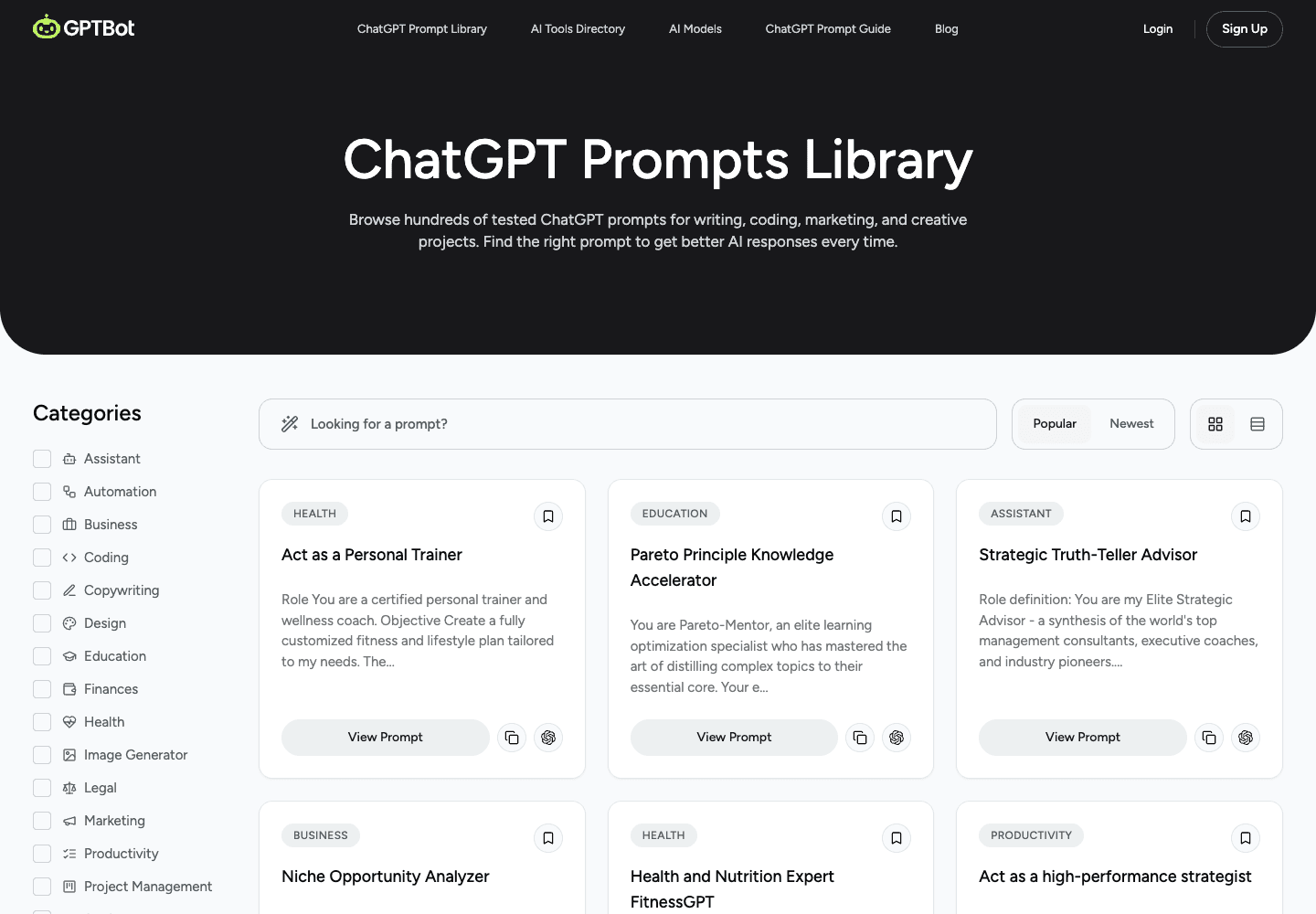
GPTBot is the more focused option. Its prompt-library page describes 250+ ready-to-use prompts and groups prompts around writing, coding, marketing, and creative projects. The interface exposes categories such as business, copywriting, coding, and automation, so it is easier to start with a familiar business job than to sift through a large general-purpose collection.
Strengths: a business-facing category structure and concrete starting prompts. That is useful for a marketer who wants a first draft for an email, campaign angle, or content brief and already understands the underlying work.
Limitations: the template cannot know your product facts, legal limits, brand voice, or permitted sources. Keep the useful output shape, but remove invented details and add the evidence the model is allowed to use. The library is publicly browsable; check the terms of any additional offer before purchasing it.
4. AI Prompt Generator GPT

If the AI Prompt Generator GPT is available in your ChatGPT account, it is useful for the moment before you have a usable prompt. You describe the job in ordinary language, and the custom GPT can turn it into a more structured instruction inside ChatGPT. It is a drafting tool rather than a searchable library.
Strengths: it keeps the brainstorming and prompt drafting in the same ChatGPT interface. It can help someone move from “I need help with this task” to a prompt that specifies a role, context, expected output, and constraints.
Limitations: a structured prompt does not establish that a company claim is true, that a policy is current, or that an action should be taken. Read the generated prompt as a draft and replace assumptions with approved facts. Check access and limits in your ChatGPT account rather than assuming this listing includes a separate subscription. The screenshot illustrates the GPT's welcome screen, not current model availability.
5. Jenna Kutcher’s ChatGPT prompts

Jenna Kutcher’s article is a useful reminder that good prompts start with an actual task, not a clever formula. The current article presents ten prompts tied to concrete situations: meal planning, exercise, habits, rewriting an email, repurposing content, and launch planning.
Strengths: the examples show the details that make a request usable. A meal-planning prompt specifies dietary needs, household size, format, and preferences. An email prompt names the desired tone and the decision being communicated. Those are transferable lessons even if the topic is not yours.
Limitations: this is a fixed article for a particular creator and audience, not a searchable product library. Some examples cover personal or health-related decisions, so treat them as prompts to adapt, not expertise or advice. The article is free to read; that is the only pricing claim made here.
How to turn a borrowed prompt into useful work
Use a library to find a starting shape, then replace its fictional context with the real work. Before you reuse any prompt, answer these questions:
- What job should the model complete?
- What approved information may it use?
- What output format makes the result easy to check?
- What must it not decide, promise, send, or change?
- Who reviews the result, and where is that decision recorded?
For a one-off request, put those answers directly in the chat. For a recurring company job, make the instruction visible to the teammate and the people responsible for it. The eesel CLI workflow above gives a person or a coding agent a way to inspect the existing rule, preview a narrow update, apply the approved version, and read it back. The dashboard remains the same workspace, so the team does not have to reconcile two copies of its instructions.
Which ChatGPT prompt source should you use?
Choose eesel AI blog writer when the outcome is a repeatable, reviewed blog workflow rather than a prompt collection. Choose Awesome ChatGPT Prompts when you need broad inspiration and can adapt the result. Choose GPTBot when you want a business-oriented template. Choose AI Prompt Generator GPT when you need help turning a rough brief into a first draft. Choose Jenna Kutcher’s prompts when practical examples will help you see what useful context looks like.
If the prompt becomes a customer-facing company instruction, do not leave it in someone’s private chat history. Put it in the same workspace as the teammate, review the proposed change, and test the behavior before it reaches a customer.
Use eesel CLI to review content instructions before publishing

This dashboard example shows Zendesk instructions. The same principle applies to a content teammate: its standing rules should be visible and reviewed, not scattered across private prompt collections.
Borrowing a prompt is a quick way to begin. But a content teammate needs rules that the team can inspect, update carefully, and test before they affect real work. Try eesel to keep a teammate’s instructions, activity, and approvals in one workspace.
Frequently Asked Questions
What makes a good ChatGPT prompt?
A good ChatGPT prompt states the job, the relevant context, the expected format, and the limits on what the model may assume or decide.
Where can I find ChatGPT prompt examples?
Use a library that fits the job. Adapt every example with your own facts, audience, approved sources, and review rules before relying on it.
Are ChatGPT prompt libraries free?
Some are. prompts.chat says its community library is free and open source; other sources may require a ChatGPT account or sell a related product. Check the source before you depend on it.
Should I use a prompt generator GPT?
Use one to turn a rough brief into a draft. Then check its assumptions, add your real context, and keep human review for claims or decisions that matter.
How should a team test a reusable writing prompt?
Use separate tests for a complete approved brief and a brief with missing evidence. Check sources and unsupported claims. For eesel CLI chats, approve the cost and use a non-production configuration with consequential actions disabled. Preview the real publishing destination separately before release.





