ChatGPT Images 2.5: what's new, the API models, and pricing

eesel Team
Last edited September 9, 2026
ChatGPT Images 2.5 is OpenAI's new image model, released September 8, 2026, and it is faster and better at editing than Images 2.0. It generates images with up to 50% lower latency, keeps the subjects from your reference photos intact, and changes only the parts of an image you actually ask it to change. It is live on every ChatGPT plan, including the free tier.
For developers, there are two new API models: gpt-image-2.5-flare for fast everyday generation and gpt-image-2.5-sunburst for precise, high-control editing. Both bill at the same per-token rates as the last GPT Image model, so you get the quality bump without a price hike.
I build the product side of eesel, and every hero banner and in-body illustration on this blog, including the ones in this post, is generated through OpenAI's image API. So this is less a spec sheet read from the launch page and more a note from someone who runs these models in production. Here is what changed and where it matters.
What ChatGPT Images 2.5 actually changes
The short version: same visual family as Images 2.0, noticeably sharper output, and a real fix for the thing that used to make image editing painful.
OpenAI says the model produces more natural lighting and richer textures, and that it "better preserves the subjects in your reference photos". That reference-photo point is the one I care about most. If you feed a product shot or a person and ask for a variation, older models would quietly redraw the subject into something almost-but-not-quite right. 2.5 holds the subject steady.
The second change is targeted editing. The model is better at changing only the elements you ask it to edit while leaving the rest of the image intact, even with complex subjects and backgrounds. In practice that means you can ask for "swap the sky, leave everything else" and get back your image with a new sky, not a whole new image. It also renders images that contain real-world information more accurately, which matters for anything with text, charts, or diagrams.
The speed number is concrete: up to 50% lower latency versus Images 2.0. OpenAI notes it has now generated more than 3 billion images across ChatGPT Images and the GPT Image API models, so the latency work is aimed at real volume, not a demo. If you have ever waited on a batch of variations, half the wait time is the kind of improvement you feel every single generation.
The new ChatGPT tools: Sketch, Templates, and comments
Alongside the model, OpenAI shipped a set of tools inside ChatGPT that make image work feel less like prompting a black box:
- Sketch lets you draw directly in ChatGPT as a reference for the final image. Rough in the layout, let the model render it.
- Templates give you starting points for popular formats, including flyers and product photos, so you are not staring at a blank prompt.
- Comments can be placed directly on an image, which turns a generation into something a team can mark up.
- Shareable prompts let other people rerun your idea on their own photos.
That last cluster, comments and shareable prompts, nudges ChatGPT toward the collaborative image workflow you would expect from Canva AI rather than a solo chat window. It is a sensible direction: image generation is rarely a one-person job in a real marketing or product team, which is why teams so often pair it with a free AI blog writer or a shared illustrated-article tool.
Two API models: Flare and Sunburst
For developers, the more interesting release is on the API side. There are two new model IDs, and picking the right one is the main decision you will make.
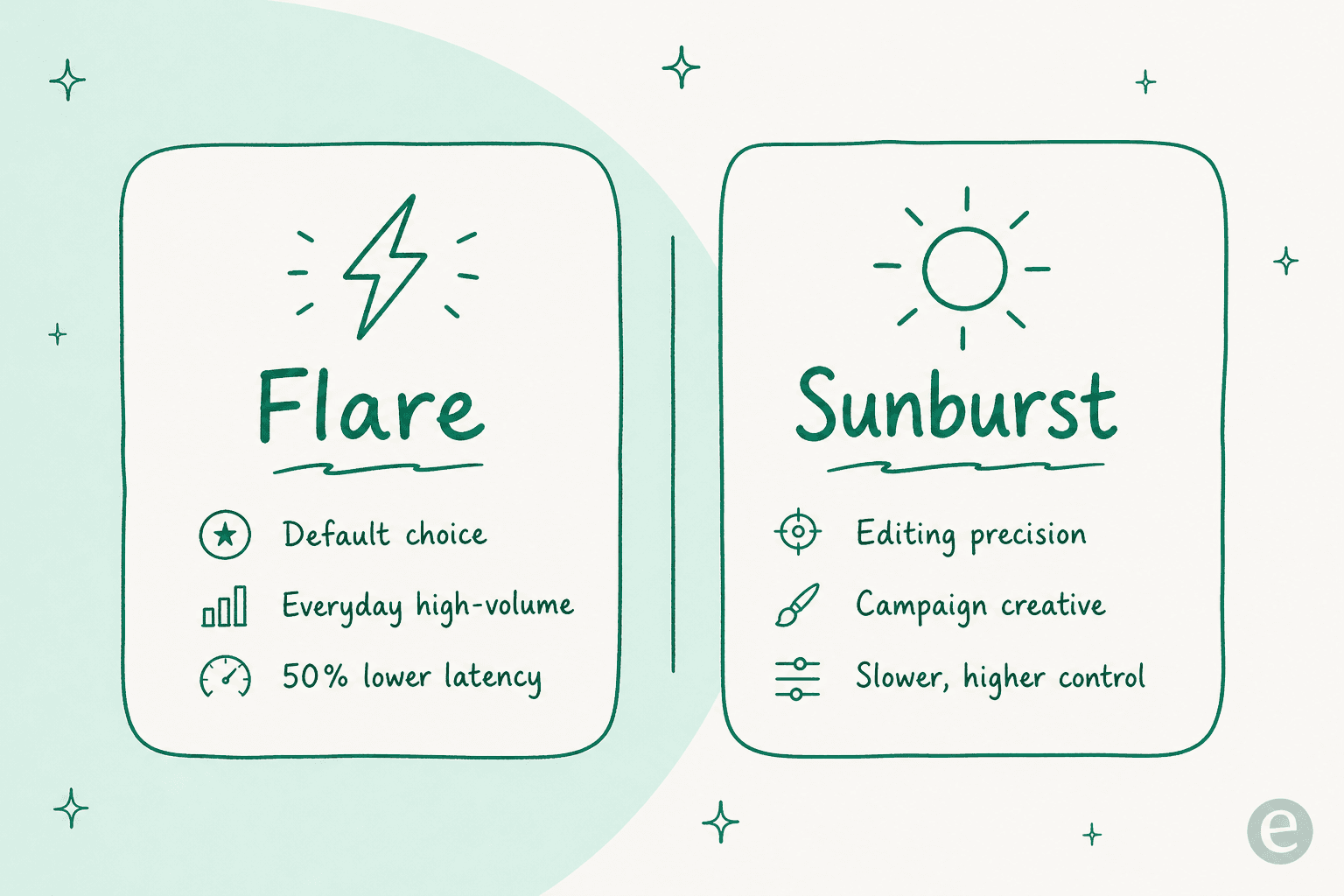
gpt-image-2.5-flare is the default choice for most applications. OpenAI positions it for "fast, high-quality everyday image generation", delivering higher-quality images than GPT Image 2 at 50% lower latency. It suits creator content, product experiences, visual search, rapid prototyping, and high-volume generation. If you are unsure, this is the one to reach for.
gpt-image-2.5-sunburst is built for "workflows where editing precision matters most": production-ready campaign creative and polished product imagery that need tighter control across edits. It takes longer to generate in exchange for that control. The developer docs list it under the snapshot gpt-image-2.5-sunburst-2026-09-08, with quality settings of low, medium, high, xhigh, max, and auto, plus inpainting support.
Both models expose the same two endpoints, v1/images/generations and v1/images/edits, so wiring them in is the same shape of work as any previous GPT Image call. If you already ship against the OpenAI frontier models or automate work with Codex, this slots into the same account and billing.
What ChatGPT Images 2.5 costs
Here is the part teams actually screenshot. Both Flare and Sunburst bill per token at identical rates, and OpenAI kept those rates in line with the previous GPT Image model.
| Token type | Flare and Sunburst | Cached |
|---|---|---|
| Text input | $5.00 / 1M tokens | $1.25 / 1M tokens |
| Image input | $8.00 / 1M tokens | $2.00 / 1M tokens |
| Image output | $30.00 / 1M tokens | not applicable |
Two things worth flagging. First, text output is not billed, because these models output images, not text. Second, the fact that the rates match GPT Image 2 means the quality and speed gains land without a price increase, which is not the norm for a model refresh. If you are budgeting a whole content stack, it is worth lining that up against subscription tools like Canva AI pricing or Writesonic, where you pay per seat rather than per token.
Inside ChatGPT itself, the model is available across all tiers with no separate paid gate, though your plan's usage limits still cap how many images you can make.
Who should use which model
A quick read on where each fits, before you commit an integration:
- Reach for Flare when you are generating at volume and speed matters: thumbnails, prototype visuals, product-catalog variations, or anything user-facing where a half-second saved per image adds up. It is the right default for most AI-powered marketing tools.
- Reach for Sunburst when a human is going to scrutinize the output pixel by pixel: campaign hero images, packaging, or a product shot that has to survive a brand review. The extra generation time buys you edit control you will miss on Flare.
- Stay in ChatGPT (no API) if you are a marketer or writer who wants Sketch and Templates without touching code. That covers a lot of the same ground as Canva AI or Freepik for one-off assets.
If your work is text-first and images are the garnish, the model choice matters less than the workflow around it. A great image model still does not decide which image your blog post needs, keep it on brand, or caption and place it. That is a content problem, not a rendering problem, and it is the same gap you hit with Jasper, Writesonic, or Simplified once you move past a single asset.
It also helps to keep the text-model conversation separate from the image one. If you are picking a writing engine, that is a ChatGPT vs Gemini question, not an image-model one.
The rest of a content stack sits in different places too. An AI story writer handles long-form drafting, while the ranking checks of Clearscope live closer to SEO. ChatGPT Images 2.5 is squarely an image tool, and treating it as one keeps your comparisons honest.
What I've learned running these models in production
This is where I can actually speak from experience rather than the launch page. Every post on this blog ships with a hero banner and three to five infographics, and all of them come out of OpenAI's image API. Running that at the pace I do, the pattern is clear: the model is the easy 20%, the workflow is the hard 80%.
The model gives you a good image. It does not pick the accent color that matches the post's subject brand, keep captions in the post's language, place a watermark in the same corner every time, or decide that this section earns an infographic and that one does not. Get any of those wrong at scale and your blog stops looking like it came from one studio. I learned that the expensive way, by shipping a batch of flat, off-style images before I tightened the pipeline around the model.
That is the honest frame for eesel here. A model like ChatGPT Images 2.5 is infrastructure. eesel is a teammate platform: you hire a ready-to-work teammate for a specific job, and it arrives with the skills, integrations, and company context for that role. The AI blog writer is one of those teammates. You give it a keyword and your domain, and it researches the topic, drafts a brand-voiced post, and generates the banner and infographics, so the raw output of an image API turns into a finished, on-brand page.

The scale is real, not aspirational: content teams run this to produce 2,000 to 2,900-word posts, complete with hero banners, infographics, FAQs, and internal links, in roughly 12 to 20 minutes each, and the heaviest users push past 360 posts a month. If you are evaluating image models because you are trying to keep a content engine fed, that pipeline is the actual job, and the image model is one component inside it. Want to see a keyword become a finished post? eesel's AI blog writer is free to try.
And because everything in that workspace is scriptable, this is not a dashboard-only story. The eesel CLI (@eesel/cli) lets a person, a script, or a coding agent like Claude Code or Cursor drive the same teammate from the terminal: connect integrations, edit the standing instructions, kick off a run, and read back the activity as JSON. If you are already automating image generation through the OpenAI API, wiring the content workflow around it into the same headless flow is a natural next step.
The bottom line
ChatGPT Images 2.5 is a clean, well-judged update: faster generation, much better editing precision, and no price increase. The Flare and Sunburst split is the right kind of choice to hand developers, and Sketch and Templates make the ChatGPT surface a lot more useful for non-coders.
If you are a developer, start with Flare and only reach for Sunburst when edit control earns the extra latency. If you are a content or marketing team, the model is the easy part. The workflow that turns it into finished, on-brand pages, at the pace a real content calendar demands, is where the value actually lives, and it is worth comparing your options with the best AI content writers and content marketing tools before you build anything yourself.
Frequently Asked Questions
What is ChatGPT Images 2.5?
ChatGPT Images 2.5 is OpenAI's image model released on September 8, 2026, succeeding Images 2.0. It generates images up to 50% faster, preserves subjects from reference photos more faithfully, and edits only the parts of an image you ask it to change. It rolled out across every ChatGPT tier on desktop, mobile, and web.
How much does ChatGPT Images 2.5 cost in the API?
Both API models bill per token at the same rates: text input is $5.00 per 1M tokens, image input is $8.00 per 1M tokens, and image output is $30.00 per 1M tokens. Those rates match the previous GPT Image generation, so the quality jump arrives with no price increase.
What is the difference between Flare and Sunburst?
gpt-image-2.5-flare is the default: fast, high-quality everyday generation for high-volume work like creator content and rapid prototyping. gpt-image-2.5-sunburst is built for workflows where editing precision matters most, such as campaign creative and polished product imagery, and takes longer to generate. If you are comparing image tools, it is a similar split to picking between Midjourney and a faster general model.
Is ChatGPT Images 2.5 free to use?
Yes, the model itself is available on every ChatGPT plan, including the free tier, on desktop, mobile, and web. How many images you can create still depends on your plan's usage limits, which OpenAI did not publish specific numbers for at launch.
What are Sketch and Templates in ChatGPT Images 2.5?
Sketch lets you draw directly in ChatGPT as a reference for the final image, and Templates give you starting points for common formats like flyers and product photos. The update also adds comments placed directly on an image and shareable prompts, which brings image work closer to the collaborative feel of Canva AI.
Is ChatGPT Images 2.5 good for blog and marketing content?
It is strong for one-off assets, especially with Templates for flyers and product photos. For a steady content pipeline you usually want the model wrapped in a workflow that keeps brand color, layout, and captions consistent, which is where an AI blog writer with images or dedicated content marketing tools come in.
How does ChatGPT Images 2.5 compare to other AI image models?
Its headline advantage is precise editing and reference-photo fidelity at lower latency, rather than a single benchmark win. Depending on your use case you may still compare it against Freepik, Midjourney alternatives, or the image features inside Qwen.