ChatGPT Images 2.5 review: I tested OpenAI's new image model

eesel Team
Last edited September 9, 2026
ChatGPT Images 2.5 is a real upgrade, not a version-number bump. The headline is speed, up to 50% lower latency, and it really does change how iterating feels. But the quieter wins are the ones I noticed most in daily use: edits that change only what you ask and subjects that stay consistent across a set.
On the API side there are now two models, gpt-image-2.5-flare (fast, everyday, the default) and gpt-image-2.5-sunburst (slower, built for editing and campaign creative). They cost exactly the same per token, so you choose by the job, not the bill.
My verdict after running it on real work: if you already use OpenAI's image tools, upgrade without a second thought, the quality lift arrives with no price increase. Text rendering is much better but still not perfect on long copy, so keep dense paragraphs in your layout, not baked into the pixels.
Where I'm reviewing this from
I build the parts of eesel that call image models, so this isn't a review written from the launch livestream. Every hero banner and in-body infographic on this blog is generated through OpenAI's image API, including the two illustrations further down this page. That means I see these models the way a heavy user does: hundreds of generations a week, the same house style every time, and a very low tolerance for a model that needs five retries to land one usable asset.
That vantage point matters for a review, because a demo reel tells you what a model can do on its best prompt. Running it in production tells you what it does on your average prompt, at volume, when you can't hand-pick the winners. So most of what follows is the second kind of observation.
If you want the neutral feature rundown first, the full Images 2.5 overview covers what shipped. This post is the opinion layer on top.
What actually changed
OpenAI released Images 2.5 on September 8, 2026, as the successor to Images 2.0. The four changes that carried weight for me:
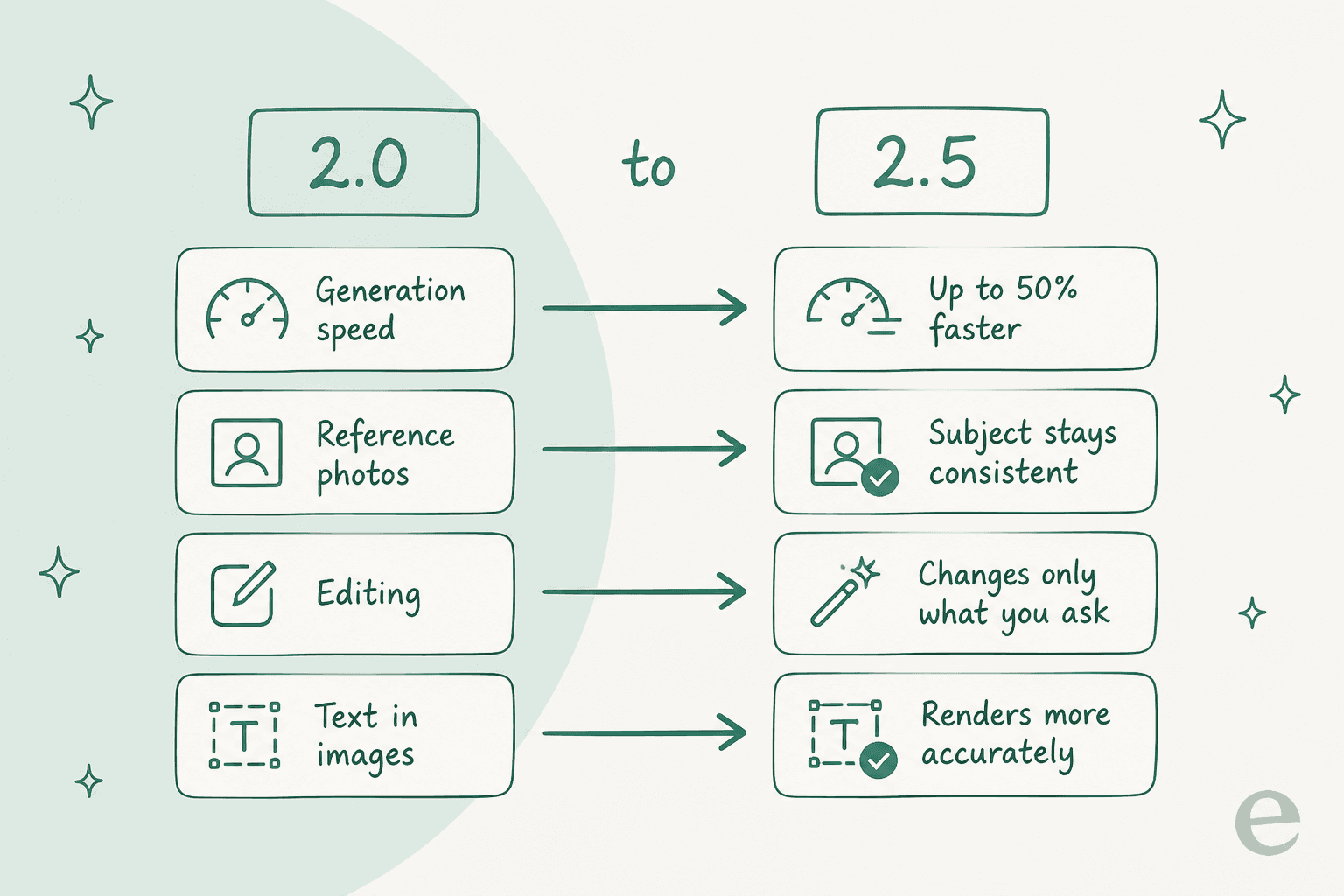
- Speed. Up to 50% lower latency. On its own that sounds like a spec-sheet number, but at volume it compounds. A batch that used to make me switch tabs now finishes while I'm still reading the prompt back.
- Subject preservation. Feed it a reference photo and the subject holds its identity across a set. This was the single most annoying gap in older models, where the same character came back as a slightly different person each time.
- Targeted editing. Ask to change one thing and it changes that one thing. Previously "make the mug red" could quietly redraw the whole desk.
- Text rendering. Real-world text and info come out more accurately. More on where this still slips below.
OpenAI also says more than 3 billion images have now been generated across ChatGPT Images and the GPT Image API, which is the kind of scale that tends to sand down a model's rough edges.
Speed: the change you feel first
The 50% latency claim held up in my own runs. I didn't stopwatch it against OpenAI's methodology, but the felt difference is obvious: generating a banner and two infographics for a post is now a coffee-refill task, not a walk-away task.
For casual use in the ChatGPT app, speed is a nice-to-have. For anyone generating images inside an automated pipeline, it's the difference between a workflow that keeps pace with drafting and one that becomes the bottleneck. When I'm producing images for a batch of posts, latency is the metric I actually care about, and this is the first OpenAI image model where it stopped being the thing I complained about.
Editing is the real story
Speed grabs the headline, but targeted editing is what changed my day-to-day. In older models, "adjust this one element" meant a full regenerate and a coin flip on whether the rest survived. Images 2.5 edits the region you describe and leaves the rest alone.
That's the difference between treating a generated image as a throwaway lottery ticket and treating it as a working draft you can revise. For infographics especially, where a single mislabelled box used to send me back to square one, being able to say "fix that one label" and keep the composition is a meaningful workflow change. It's the same mental model as editing text, which is exactly how it should feel.
In the ChatGPT app, OpenAI layered new tools on top of this: Sketch (draw a rough reference for it to follow), Templates (starting points for flyers and product shots), comments on images, and shareable prompts. I spend most of my time in the API rather than the app, so I lean on the raw editing more than the templates, but the Sketch-to-image path is a nice on-ramp for people who think visually.
Text rendering: better, not solved
This is where I'll be specific rather than generous. Short text, headlines, single labels, button copy, comes out clean the large majority of the time now. That's a real jump, and it's why my infographic hit rate went up: the hand-lettered labels I ask for land more often on the first try.
Longer strings are still the weak spot. A dense paragraph rendered inside an image can still drift into invented or garbled words, so I keep any copy longer than a few words in the page layout, not in the image itself. This isn't unique to 2.5, it's the same discipline I used with GPT Image 1 Mini, just needed less often. If you were hoping to render a full pricing table as an image, that's still the wrong tool. If you want a clean three-word label, it's ready.
Flare vs Sunburst: which model to call
In the API you now choose between two models. This is the decision most people building with it will actually make, so it's worth getting right.
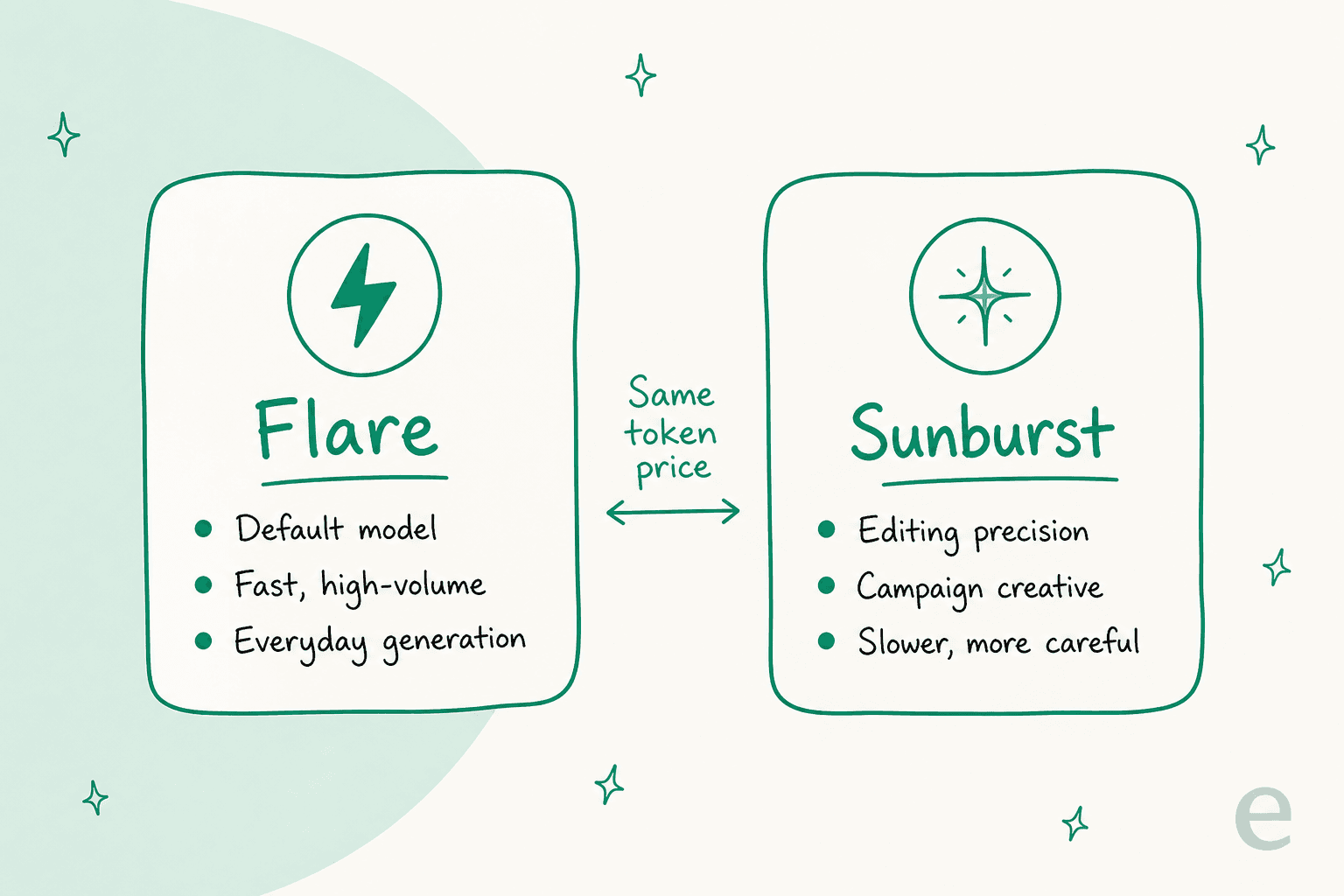
gpt-image-2.5-flareis the default. It's the fast one, tuned for everyday, high-volume generation, and it already beats older models on quality at that lower latency. This is what I reach for by default.gpt-image-2.5-sunburstis the careful one, built for editing precision and campaign creative. It's slower, offers finer quality settings, and has an image edit endpoint for inpainting. There's a dated snapshot (gpt-image-2.5-sunburst-2026-09-08) if you need reproducibility.
The nicest part of the split is the pricing: both models bill at identical token rates, so there's no "premium tier" penalty for choosing quality. You're free to route by job. The pricing guide has the exact per-token math and a cost estimator.
Here's the quick call I'd make depending on what you're doing:
How it stacks up against the alternatives
A review needs a frame of reference, so here's the honest positioning against the tools I get asked about most.
Against Midjourney, the split is the same as it's been: Midjourney still produces more beautiful, stylised, painterly output, and Images 2.5 wins on doing what you actually asked, editing cleanly, and rendering text. If you're making mood-board art, Midjourney's pricing buys you a look that OpenAI doesn't match. If you're making functional images that need to say a specific thing, 2.5 is the safer bet. My three-way model comparison has the full breakdown.
Against design suites like Canva's AI, it's a different category. Canva wraps a model in templates, brand kits, and a full editor, which is why teams pay for Canva AI even though it runs on a similar image engine underneath. Images 2.5 is the raw model. You bring the workflow. For people evaluating Canva alternatives who already have a pipeline, that's a feature, not a gap. The same holds against stock-and-generation suites like Freepik AI: more workflow, a different job.
And against OpenAI's own smaller model, GPT Image 1 Mini, 2.5 is the quality-first choice while Mini stays the budget option for extreme volume. Since 2.5 didn't raise prices over the previous generation, the reasons to stay on Mini are narrower than they were.
Who I'd recommend it to
If you generate images through the OpenAI API today, upgrading is a no-brainer: same price, faster, better editing, better text. There's no version of "wait and see" that makes sense here.
If you live in the ChatGPT app and make the occasional image, you already have it, and Sketch plus Templates make it more approachable than before. Nothing to do but use it.
The one group who should temper expectations is anyone hoping this replaces a designer or a layout tool. It's a very good image model, and text-heavy composites are still not its job. Pair it with a real layout and you'll be happy. Ask it to be the whole design department and you'll be disappointed, which is true of every model in this class, not a knock specific to 2.5.
Where eesel fits
Worth being clear about the category. A model like Images 2.5 is infrastructure. It's a brilliant engine, but it hands you raw output, one image at a time, and you still have to decide what to generate, in what style, to sit inside what post.
That's the line eesel sits on the other side of. eesel is an AI teammate platform, and one of the ready-to-work teammates is an AI blog writer. It doesn't just call an image model, it researches a topic, drafts the post, and then generates the hero banner and every in-body infographic through image models like this one, in one consistent house style, as part of finishing the piece. The image model is a tool it uses, not the product you operate.
Concretely, the banner and the two illustrations in this post came out of that exact pipeline. If your problem is "I need finished, on-brand posts with images, not a folder of raw generations," that's the teammate shaped for it, and it's the same reason people evaluating a content writer with images or an SEO content writer end up comparing the finished output rather than the underlying model.

Want a new hire that turns a keyword into a finished, illustrated post instead of a raw image feed? eesel's AI blog writer runs the whole loop, research to banner, and it's free to try. Try eesel and point it at a topic to see the finished piece, images and all.
The verdict
ChatGPT Images 2.5 is the first OpenAI image model where I stopped noticing the model and started just getting the image I asked for. Faster, more editable, more consistent, and better at text, all at the same price as the last generation. The two-model API split is a smart bit of design: Flare for speed, Sunburst for precision, and no penalty for choosing. Keep long copy out of the pixels and it's hard to find a reason not to upgrade.
For the numbers behind all this, the Images 2.5 pricing guide has the token math, and if you're weighing it against Gemini's image work, sizing up Gemini 3 Flash, or building on the OpenAI API directly, those posts pick up where this one leaves off.
Frequently Asked Questions
Is ChatGPT Images 2.5 worth it?
For most people, yes. The speed jump alone changes how it feels to iterate, and the editing is far more surgical than Images 2.0. If you already lean on OpenAI's image tools it's a clear upgrade with no price increase. If you generate only the odd image, the free ChatGPT app covers you without touching the OpenAI API at all.
What's new in ChatGPT Images 2.5 compared to 2.0?
Generation is up to 50% faster, subjects from reference photos stay more consistent, edits change only what you ask, and real-world text renders more accurately. There are also new ChatGPT tools like Sketch and Templates. My full breakdown of Images 2.5 walks through each one.
Is ChatGPT Images 2.5 free to use?
Inside the ChatGPT app it rolled out to every tier, including free, on desktop, mobile, and web, though OpenAI hasn't published the per-plan image caps. Programmatic use is billed per token instead. I cover the numbers in the Images 2.5 pricing guide, and the general ChatGPT pricing post has the plan context.
What is the difference between Flare and Sunburst?
Flare is the default model, tuned for fast, high-volume everyday generation. Sunburst is slower and built for editing precision and campaign creative, with an image edit endpoint for inpainting. Both bill at the same token rates, so you pick by job, not by budget.
How good is ChatGPT Images 2.5 at text in images?
Noticeably better than before. Short headlines and labels come out clean most of the time, which is why my infographics need fewer retries now. Longer paragraphs still drift, so I keep dense copy in the layout rather than baking it into the image. It's the same pattern I hit with GPT Image 1 Mini, just less often.
Is ChatGPT Images 2.5 better than Midjourney?
They optimise for different things. Midjourney still wins on painterly, stylised art, while Images 2.5 wins on prompt-following, editing, and text. My image model comparison lines up the tradeoffs in detail.
Can ChatGPT Images 2.5 edit an existing image?
Yes, and this is where it stands out. Targeted editing changes only the region you describe and leaves the rest untouched, which used to mean a full regenerate. In the API, Sunburst's edit endpoint handles inpainting. The Responses API and Batch API both fit it into a pipeline.