

What is Krea 3?
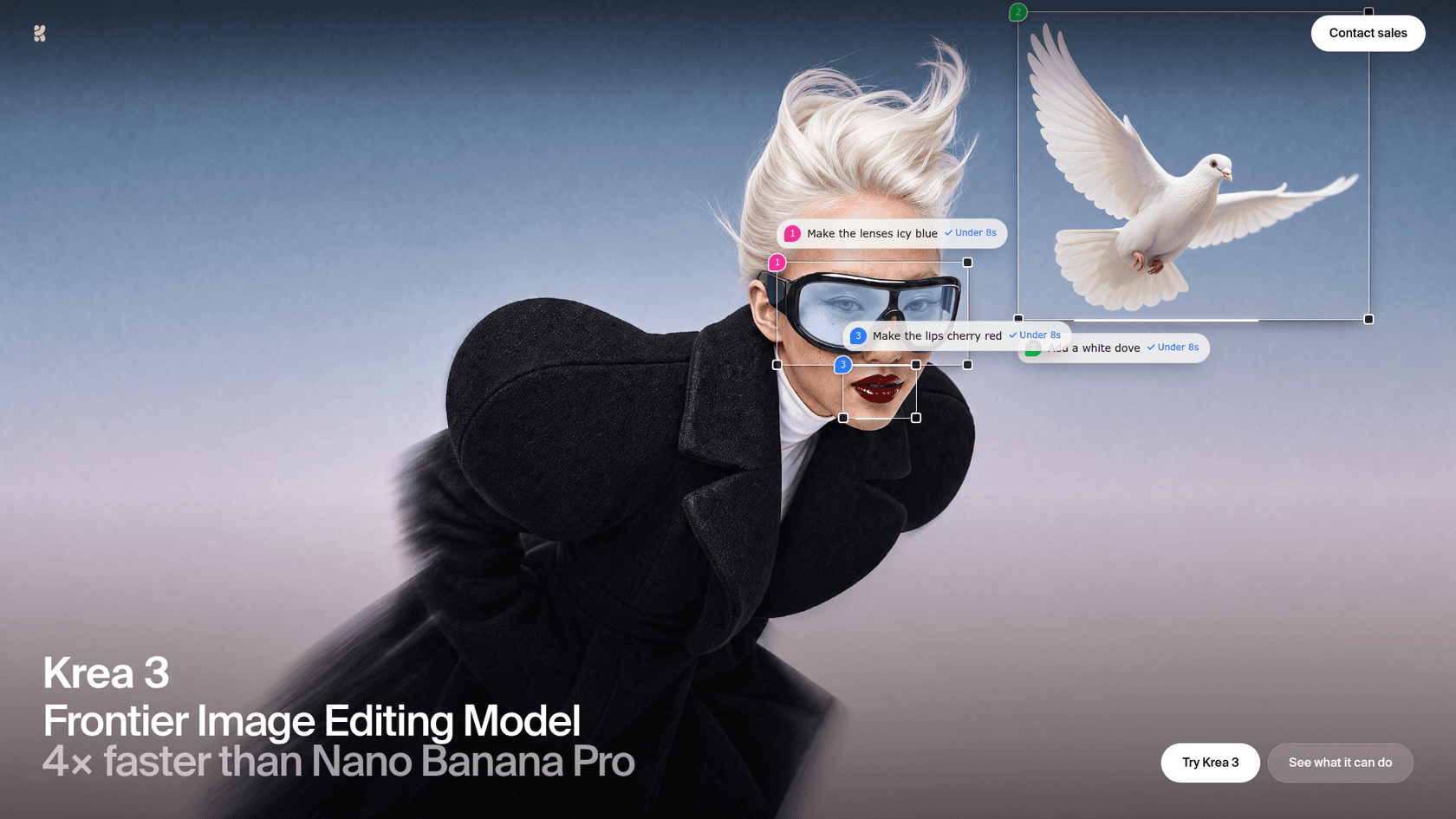
Krea 3 is the first model in Krea's line built for editing first and generating second. Krea describes it as "an image editing model built for production," and the launch post is quite blunt on the why: the best editing models got good enough for real work but they also got slow and expensive, and a minute per edit is killing the iteration.
I'm a software engineer at eesel, and most of my week is reading API docs and shipping integrations against them. So I read Krea 3 the way I'd read any new endpoint, the launch claims first and then the API overview, and after that what developers was saying in the first 72 hours. Our own blog pipeline generates a hero banner and several infographics for every post, and roughly 1 in 3 renders needs a redo. So speed per edit is not a vanity metric for me; it decides whether a reroll costs a minute or ten seconds.
The short version of what Krea shipped:
- One model, two jobs. It is the default image model in the Krea app and handles both text-to-image and edits.
- Native 2K. The landing page shows a native 2736 × 1536 output you can inspect with a loupe.
- Speed. "Most edits come back in under 8 seconds, end to end," per the launch post. Krea's fastest setup does an edit in about 4 to 5 seconds.
- Distribution on day one. Live on krea.ai for what Krea calls its 30 million users, and through fal, Hedra, Together AI, Nous Research, OpenRouter and Replicate.
If you've been following image models this year, Krea 3 lands in the same fight as Google's Nano Banana Pro, OpenAI's ChatGPT Images 2.5, and ByteDance's Seedream 5.0 Pro. Its pitch is not "prettier." It is "the same quality, a lot faster, a lot cheaper."
What can Krea 3 actually do?
Krea's own FAQ answers this in one line: it is "best at product scene changes, object removal and photo cleanup." The features below is what makes that work.
Regional edits that leave the rest alone
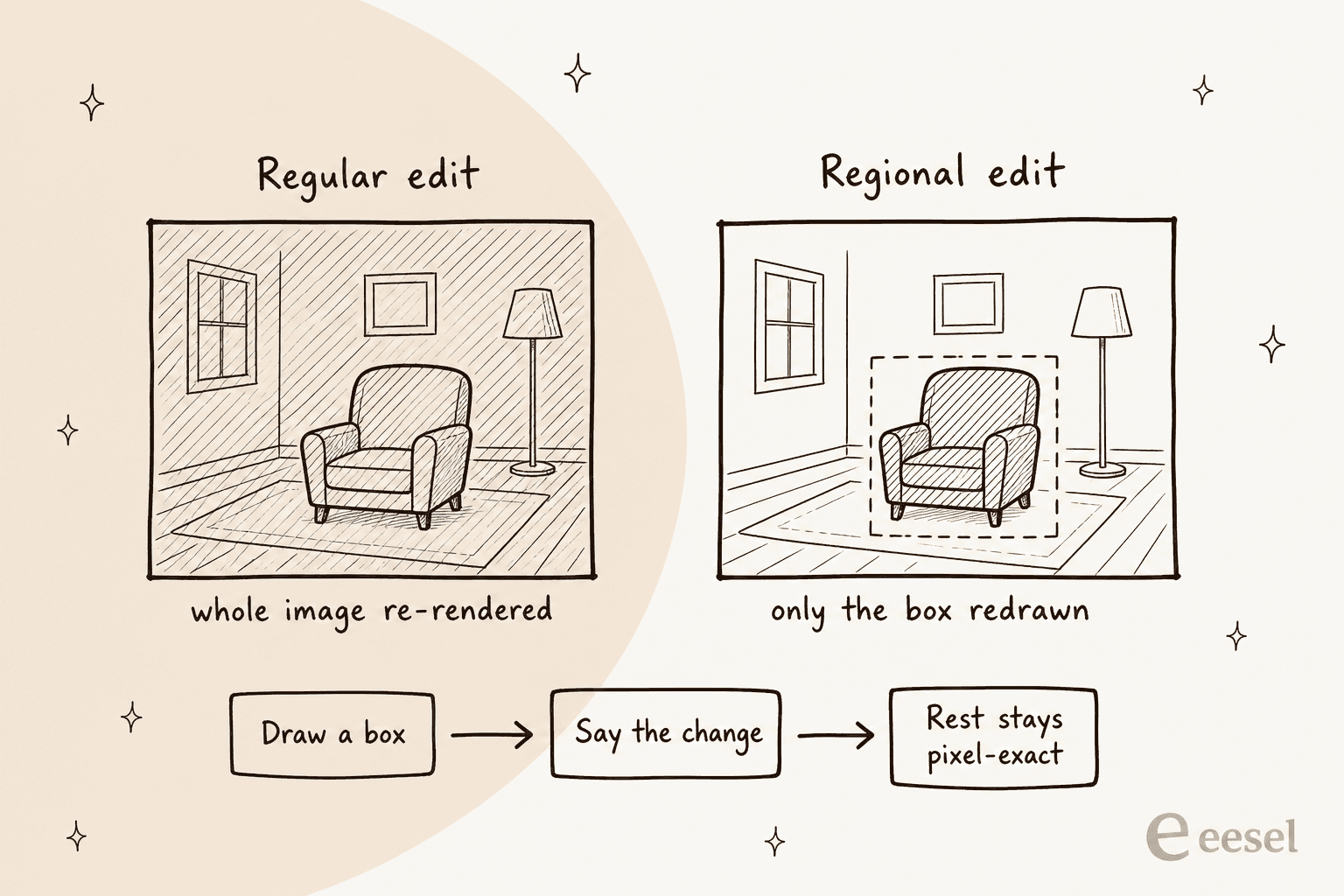
This is the headline feature. Draw a box, say what changes, and Krea 3 redraws only inside the box. In the API it is one flag, regional_edit: true, and the docs say everything outside the edit "stays exactly as it was, so you can edit the same image again and again without quality loss."
That last point is mattering more than it sounds. The same docs warn that regular edits re-render the whole image, "so artifacts can build up when you keep editing the latest output." If you chain five edits on one product shot, the regional mode is the safe path to take.
Krea backs the claim with a pixel-diff view on its landing page. The prompt was "Change only her coat to cobalt blue," and orange marks every pixel the model changed.
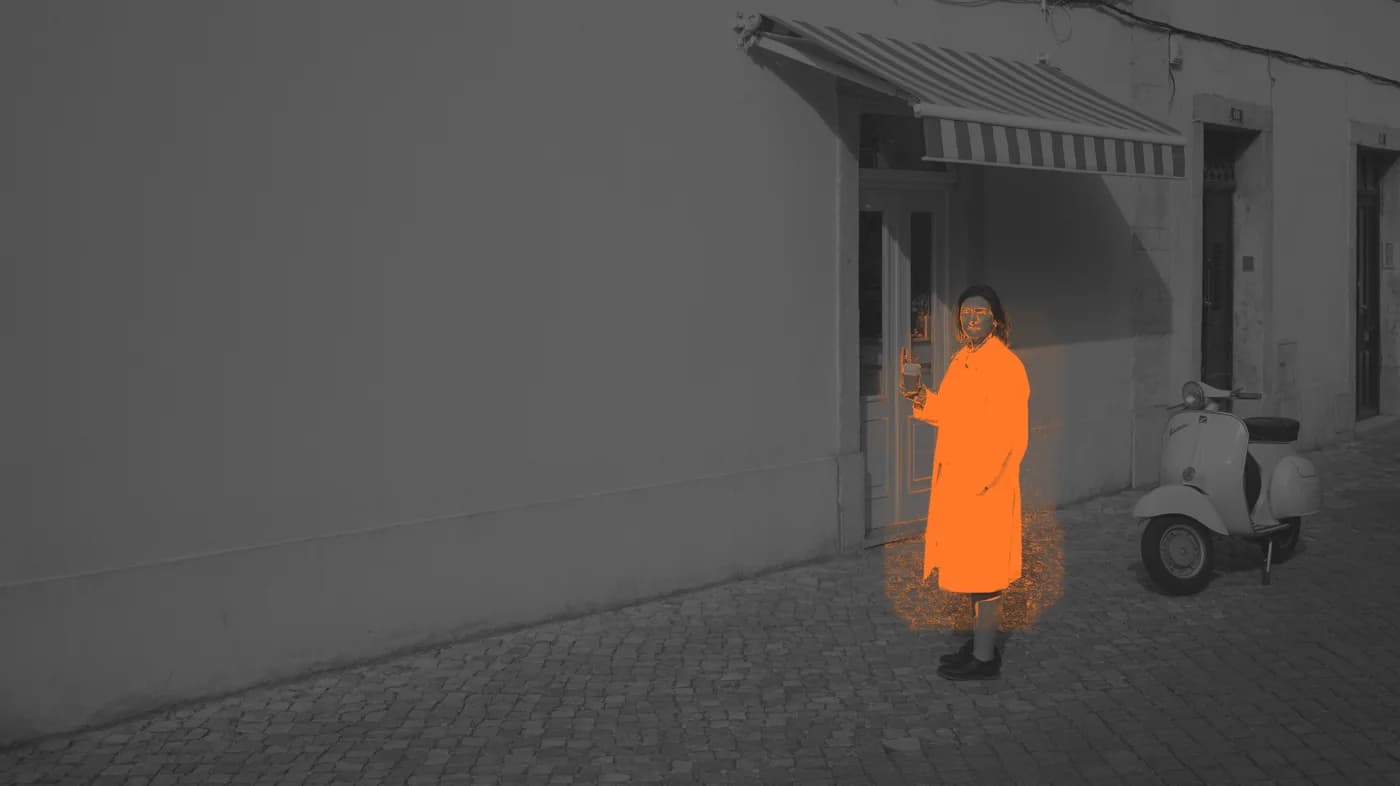
One fair caveat from the Hacker News thread: that is one example, and for a job like background removal the "region" is most of the image, so the advantage is less clear. Precise edits shine when the change is small.
Several references in one prompt
You can point Krea 3 at a person, a product, a place and a style, number them, and it composes one picture. This is how the coffee-bundle demo below was built from three separate reference shots.
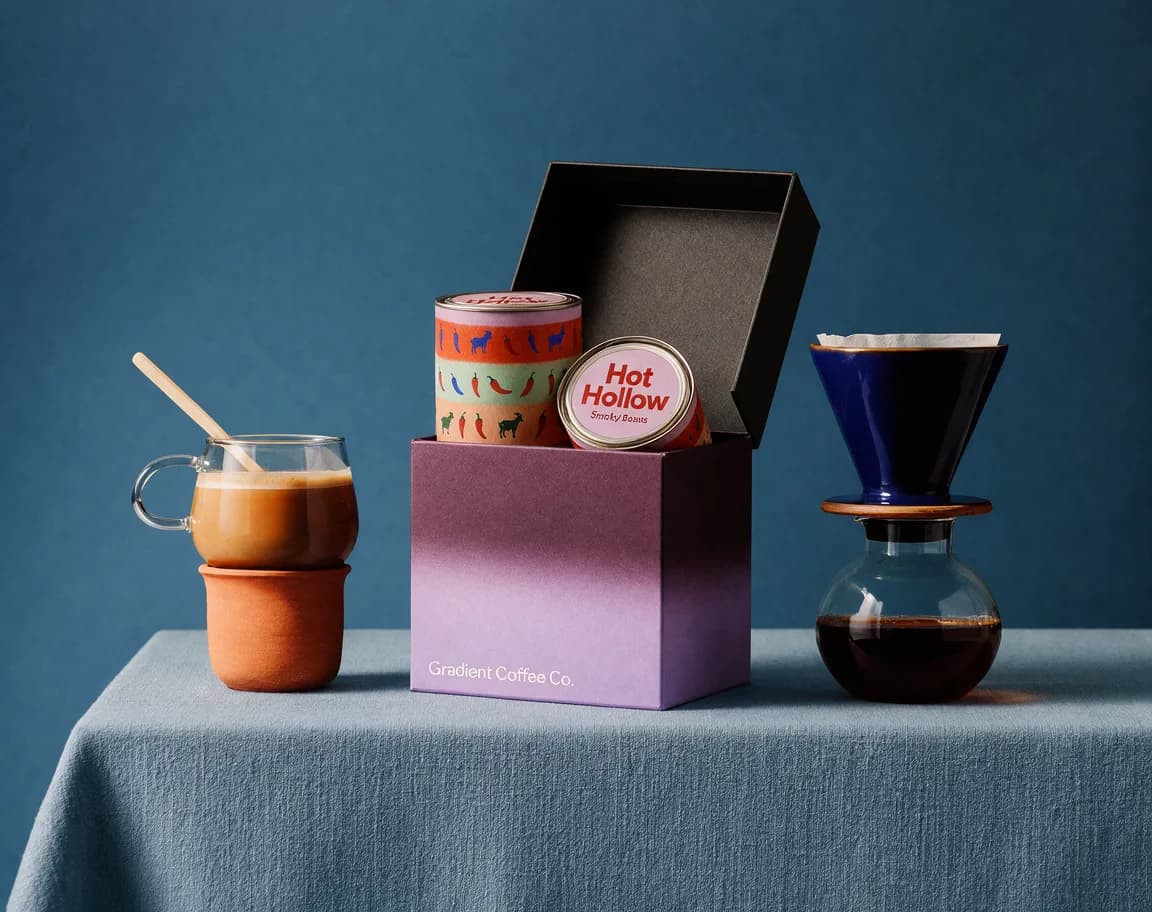
How many references you get depends on where you call it, and Krea's own pages disagree. More on that below.
Exact colors, type and character consistency
A few smaller features round it out:
- Hex codes in prompts. Name a hex code and, per the landing page, Krea 3 matches it "on the product, and only on the product."
- Type and packaging. Krea shows re-titled posters, foil-stamped labels and a book cover translated into Japanese, with the layout kept.
- Same character, new scene. Give it a face and an outfit, and the launch post says "the person in the next image is still the same person."
- Thinking modes.
fastis the default.highuses a stronger reasoning step to plan multi-step edits or many references, at extra cost.
That last one is close to what Qwen Image Edit does, and OpenAI's image edit API aims at the same job, but Krea's bet is that doing it in seconds changes how people work. As a16z's Justine Moore put it in Krea's post, when an edit comes back fast enough, "the model stops being a step in the workflow and becomes the workflow."
How fast and cheap is Krea 3, really?
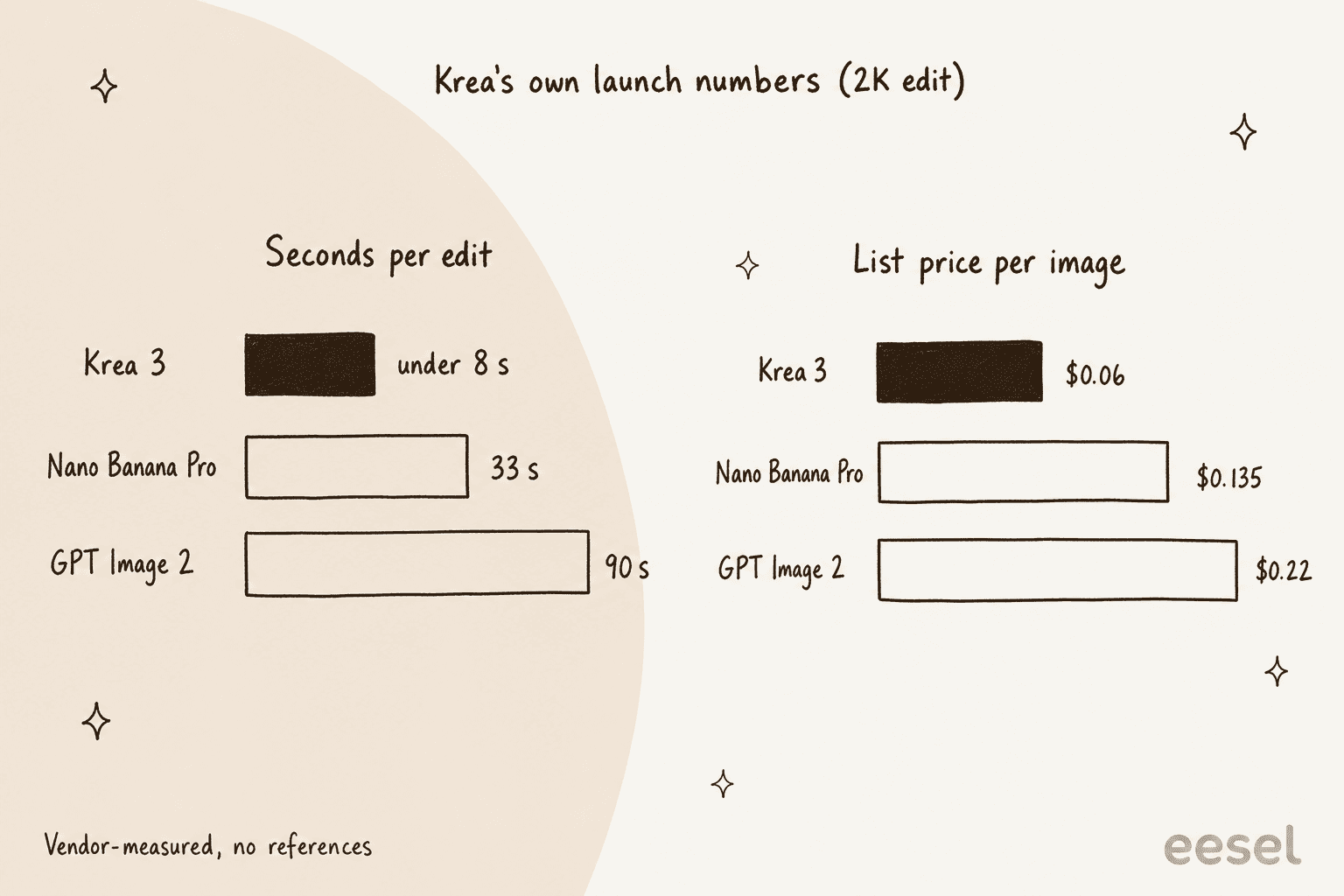
Here is Krea's own comparison from the launch post. The times are the median request-to-result for edit jobs on Krea between September 24 and October 1, 2026, queue included. The prices are list prices per image, without image references.
| Model | Time per edit | Price per image | 100,000 edits a month |
|---|---|---|---|
| Krea 3 (2K) | Under 8 s | $0.06 | $6,000 |
| Nano Banana Pro | 33 s | $0.135 | $13,500 |
| GPT Image 2 | 90 s | $0.22 | $22,000 |
Source: Introducing Krea 3. Vendor-measured on Krea's own infrastructure.
There is two things worth to keep in mind before you screenshot that table. First, these are Krea's numbers, run on Krea. Partners report their own figures: fal says "high-quality edits in under 6 seconds" on its endpoint. Second, the landing page runs a slightly different comparison, with Nano Banana Pro at about 26.8 seconds and GPT Image 2.5 at about 39.9 seconds and $0.21, and it labels the GPT Image 2.5 price "a draft estimate pending validation." Neither is an independent benchmark.
Still, even if the gap shrinks in third-party tests, a 3x to 10x speed difference is not some rounding error. For comparison, I covered Nano Banana 2 in an earlier post, along with what changed in GPT Image 2.
Why the $0.06 headline is a floor, not the price
This is the part which most launch coverage skipped over. The $0.06 figure is real, but it comes with "without image references" in small print. And an edit, by definition, has at least one reference: the image you are editing.
The API pricing table spells out the add-ons:
| Pricing component | 1K output | 2K output |
|---|---|---|
| Base price | $0.03 | $0.06 |
| Each 1K reference image | +$0.02 | +$0.02 |
| Each 2K reference image | +$0.07 | +$0.07 |
high thinking mode | +$0.02 | +$0.02 |
OpenRouter's listing repeats the same rates. So a 2K edit on a 2K photo costs $0.13, not $0.06, and $0.15 with high thinking. Stack four 2K references for a composite shot and you're at $0.34 before thinking mode.
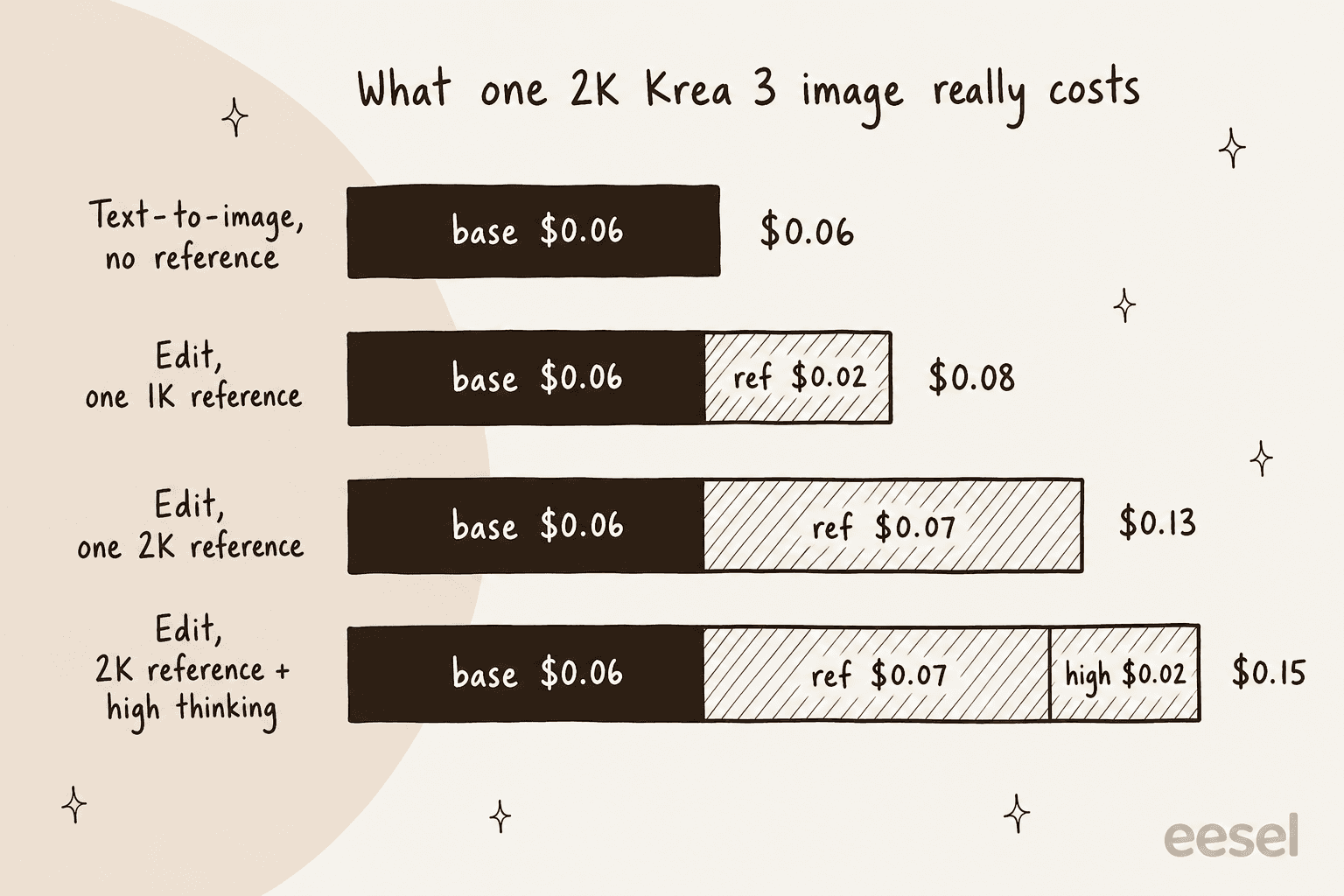
None of this makes Krea 3 an expensive model. Even at $0.13 it still undercuts Nano Banana Pro's $0.135 list price, which also excludes references. It just means you should budget from the table, not the headline. The docs also give a cheap fix: "Around 1 MP is enough for most edits," so downsizing a reference to roughly 1K before you send it cuts its fee from $0.07 to $0.02.
Plug your own workload into this estimator to see the gap between the headline and your bill.
How do you get access to Krea 3?
There are three routes, and they are not equal.
In the Krea app
Krea 3 is "available to everyone in the app and uses compute units like other models," per the user guide. A heavier tier, Krea 3 Ultra, is limited to Max plans and above. Here are the current plans from the pricing page:
| Plan | Monthly billing | Billed yearly | Compute units | Notes |
|---|---|---|---|---|
| Free | $0 | $0 | 100 a day | No credit card |
| Pro | $35/month | $21/month | 20,000 a month | All video models, App Builder |
| Max | $105/month (60k tier) | $63/month | 40,000 to 100,000 a month | Krea 3 Ultra, unlimited LoRA training |
| Business | $200/month | Not shown | 80,000 a month | Up to 50 members included |
| Enterprise | Custom | Custom | Custom | Self-hosting Krea 3, indemnification |
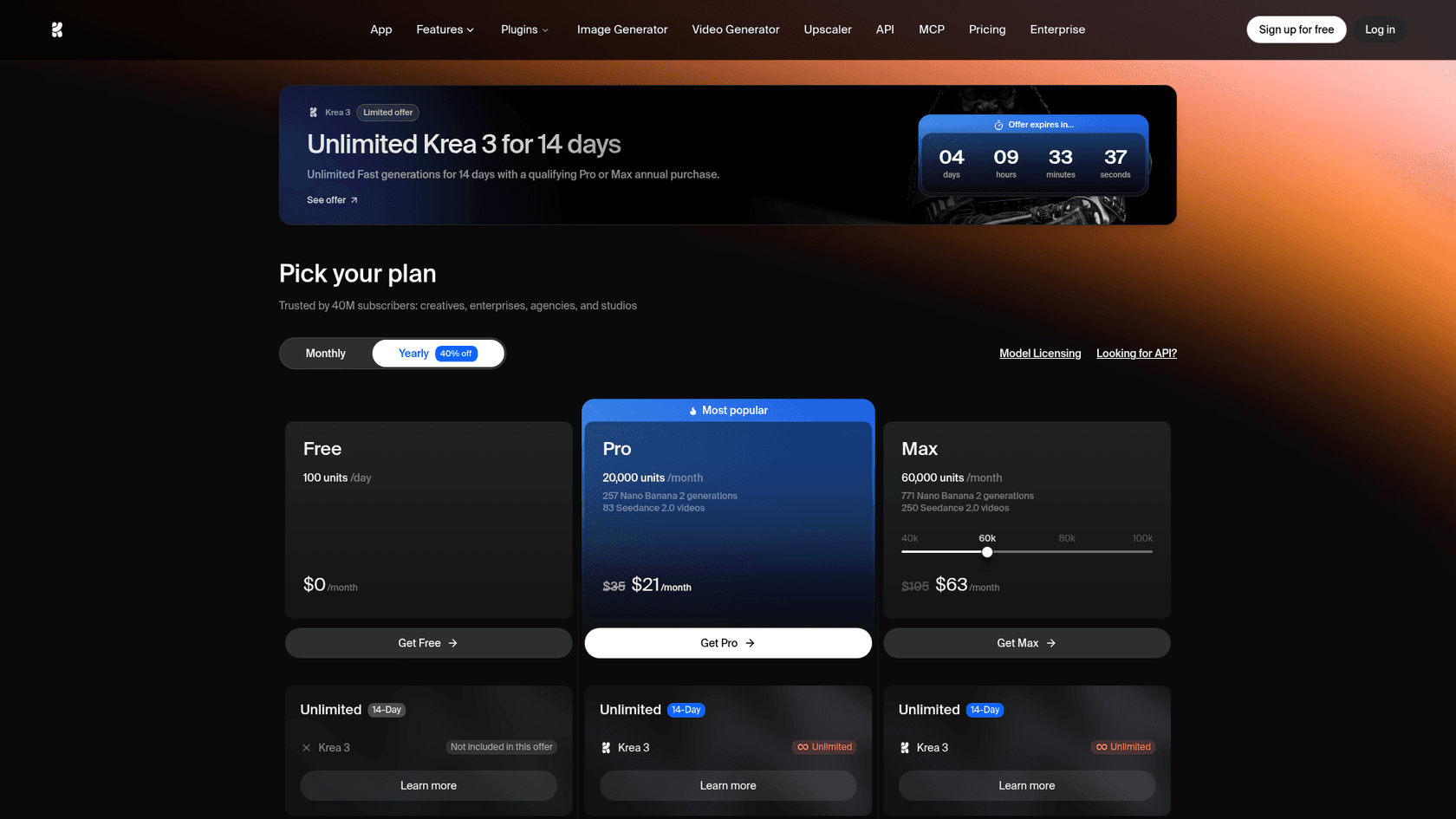
Two details worth knowing. There's a launch offer of "Unlimited Fast generations for 14 days" with a qualifying Pro or Max annual purchase. And compute units "do not roll over for individual plans," per the compute units guide, while top-up packs expire after 90 days. If you're on a monthly plan and only edit in bursts, you lose what you don't use.
Through the Krea API
The direct API is in early access. The docs say plainly: "Only workspaces in the Krea 3 beta can call it," and you request access via sales@krea.ai.
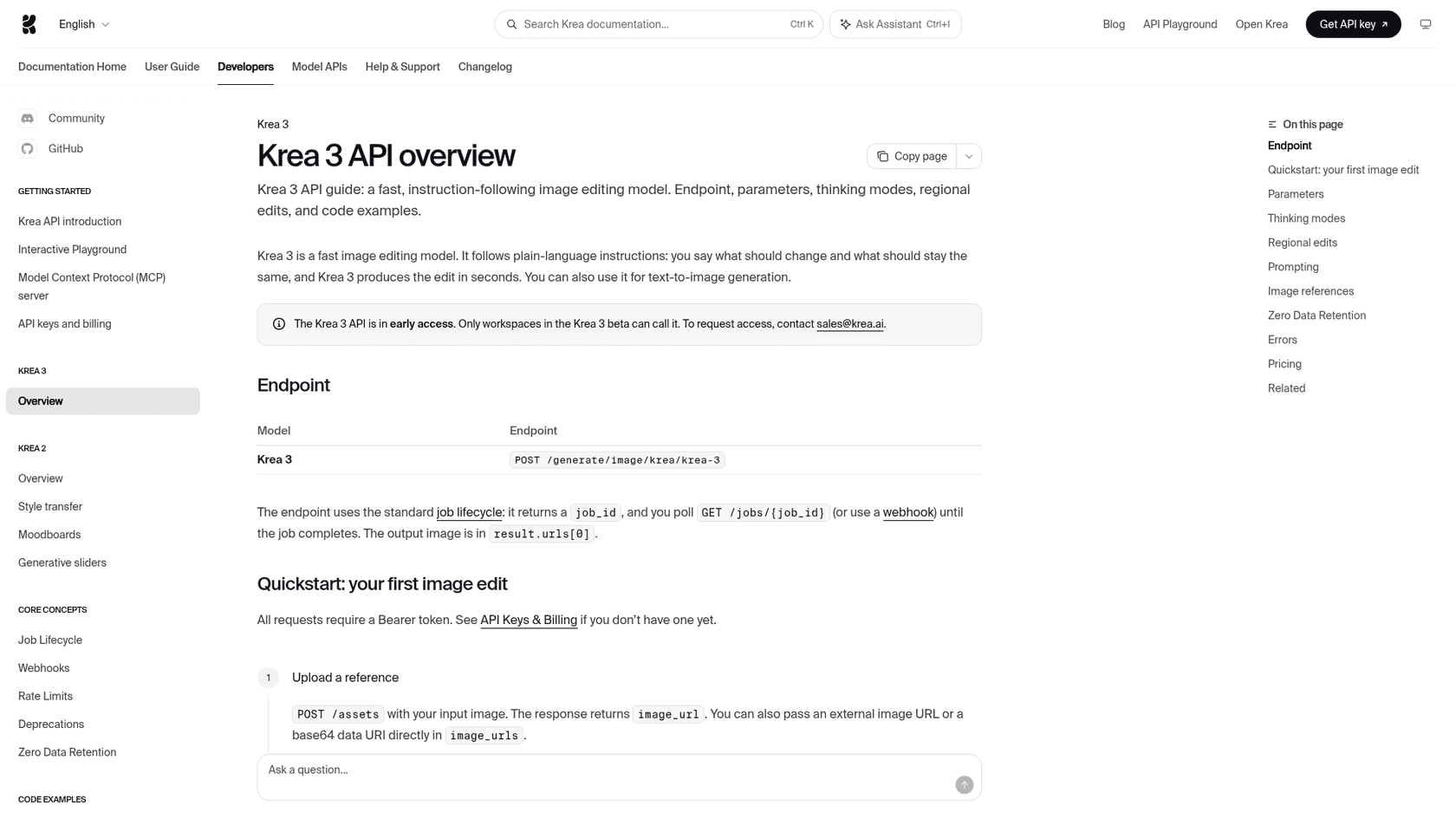
In terms of integration, the API is clean, also it follows a pattern you've seen before. It is a standard async job: POST to /generate/image/krea/krea-3, get a job_id, then poll or take a webhook. A few things I'd flag before you wire it into anything:
- Default output is 1K. If you don't set
resolution: "2K", you get 1K. - Seeds aren't deterministic. "Reusing a
seeddoes not guarantee identical results," because the prompt expansion step varies. - No LoRAs or style references yet. Sending
lorasorstyle_urlsreturns a 422 with "coming soon." - Zero Data Retention exists, for enterprise workspaces, via a header, with references sent as base64.
Through partner platforms
For most developers this is the fastest door. fal has edit, text-to-image and realtime endpoints, OpenRouter lists it as krea/k3-edit, and Together AI is a named launch partner, as is Replicate. If you already route image calls through one of these, Krea 3 is a model-name change.
How many reference images does Krea 3 take?
It depends on which page you read, and this kind of mismatch is the one that bites you in production.
| Source | Reference limit |
|---|---|
| Launch blog | Up to 6 per edit |
| Landing page | Up to 8 |
| API docs | Up to 8 (image_urls) |
| OpenRouter listing | 1 to 4 |
The API docs add a practical limit too: "With five or more references in one request, each reference is resized to at most 1536 px on its longest side." So for full-detail references, send four or fewer, whatever the ceiling says. I'd build against the API's 8 and test the partner you actually use.
What are people saying about Krea 3?
The Hacker News launch thread hit 349 points, and Krea's team answered questions in it. Early reactions on X were mostly about speed and the bounding boxes.
"It's SO fast and precise in making edits - critical for use cases where you need to maintain the integrity of a product or structure. And the bounding boxes are a great layer of control."
Moore had early access, and Krea quotes her in its own launch post, so read that as a friendly first look. Shane Hegde, who tests one creative tool a day and has since added Krea 3 to his own product's canvas, liked the reference handling but noted a cap in the app:
"I gave it six inputs, tried different backgrounds, and it kept the subject consistent throughout"
The same post lists "You can only generate up to 4 images at a time" as a con. On Hacker News, the sharper feedback was about text and design work:
"Overall Krea 3 isn't near GPT-Image-2.5 in terms of visual creativity in this space, but it still should be commended for its ability to render small text details."

That commenter, testing UI mockups, also found that hex codes in the prompt "tend to leak into the design," with a code printed into one banking mockup. Another reader was less forgiving about lettering:
"The signage text on the fuzzy characters scene was scrambled. It's a no-go for me."
So the picture is consistent: strong on speed and preservation, still uneven on text, which matters if your use case is posters or packaging with small type.
Where does Krea 3 fall short?
Krea is unusually candid on its own gaps, which I appreciate a lot. Here's the full list from its docs, launch post and the HN thread:
- Text-to-image is still being tuned. A tester on HN saw a warning that text-to-image was experimental in the beta. Krea's Matt Newton replied that the team "prioritized editing" and expects "the final tuning of Krea 3 to beat Krea 2's high bar there soon."
- No open weights yet. Krea 2 shipped open weights. For Krea 3, Krea's Diego wrote on HN that open weights are "being discussed internally." Enterprise plans can self-host it today.
- Not real time. The launch post says "Krea 3 isn't real time yet."
- API gaps. No LoRAs or style references through the API, and API access itself is gated.
- Small text and hex leakage, per the community reports above.
None of these are a dealbreaker for product photography. All of them matter if you came for an open model you can fine-tune, the way people used FLUX 3 or Qwen Image 2.1.
Who should use Krea 3, and who should skip it?
Krea's own docs split the work between its two models, and that's a good starting point. Choose Krea 3 "for fast, instruction-following generation and editing, especially when a product or character must stay consistent." Choose Krea 2 for "aesthetic exploration with weighted style references, moodboards, LoRAs, and Generative Sliders."
| You are... | My take |
|---|---|
| An ecommerce or catalog team swapping scenes around fixed products | Use Krea 3. Regional edits and the per-image price fit volume work |
| A marketing team localizing one ad into many formats | Use Krea 3, but check every piece of small text |
| A designer exploring a look or style | Stay on Krea 2, or try Midjourney |
| A developer who needs fine-tuning or open weights now | Wait, or use an open model like Qwen Image 2.1 |
| Someone doing heavy typography, posters or UI mockups | Test it against ChatGPT Images 2.5 first |
If you only need cutouts and cleanups, a purpose-built tool may be simpler. My Photoroom alternatives list covers the dedicated apps. Ideogram's object remover handles quick removals, and Shopify merchants already have Shopify Magic for backgrounds.
For the wider field, my Nano Banana 2 alternatives post is the broadest list. The ChatGPT Images 2.5 alternatives roundup leans toward typography and design work, where Ideogram is still a strong pick.
Where Krea 3 fits in a content workflow
Most teams I talk to don't need images in isolation, they need them inside something, like a product page or a campaign or a blog post. A model that edits in 8 seconds removes one bottleneck, but the post around the image still takes research, drafting and editing.
That's the gap the eesel AI blog writer fills. It finds topics, does the research with every claim cited, writes in your voice, and generates its own diagrams and header images, so a post ships with visuals instead of as a wall of text. It's the same teammate that writes eesel's own blog, which now gets 750k+ monthly impressions, per the product page. If you're producing product shots in Krea 3 for an ecommerce blog or a marketing team, the two work side by side: Krea for the hero product image, the blog writer for the article that ranks it.
Try eesel
If you're testing Krea 3 because your content calendar needs more visuals, the slower part is usually the writing, not the images. eesel's AI blog writer researches a topic, drafts a cited post in your brand voice, and adds its own infographics, then takes edits in plain language like "make the intro punchier." See how it handles an AI blog with images, or read how teams set up an AI blog writer workflow and pick the best AI blog writers for SEO.

Pair it with your Krea 3 edits and you get the whole post, not just the picture. Try eesel free and give it your next topic.