


Two object removers, not one. Ideogram ships both. The first is a hosted brush-and-erase tool at ideogram.ai/tools/object-remover, and on that same page it self-labels as an "Ideogram mini app (PoC)", while in the product docs it appears nowhere at all. The second one is an endpoint. POST /v1/remove-object, which bills $0.03 per image at 1K and $0.06 at 2K. Of the two, the API is the mature half. The app is what people find on Google.
Wiring the API into something? Then the detail to catch up front is mask polarity, because it will cost you an afternoon otherwise. remove-object reads white as the region to remove, and inpaint-v3 reads black as the region to edit. So port a mask between the two without flipping it, and the opposite half of your frame gets erased instead. Cleanly, confidently, for three cents a go.
Inside the app, the documented route for removal is still Magic Fill. Which is inpainting driven by a prompt, not an eraser. It is also 3.0-only now, and it wants Plus or Pro before it will touch an image you uploaded yourself. Then one warning that covers all three paths at once. Ideogram's own FAQ says removal "may update pixels outside your mask". So no, this is not a bounded local edit, and on brand work the diff step stops being optional.
Why I read the mask spec before the marketing page
I build eesel's product, so most of my week goes inside other people's API references, working out what an endpoint really does against what its landing page is claiming. For that particular gap, image endpoints are the worst offenders. The demo GIF shows you the happy path every time, and the parameter table is where the actual contract sits.
Volume is what makes any of this matter. One of eesel's content customers, an SEO content lead working on Webflow CMS, is scaling to 360+ posts a month, 12 a day, off a keyword-to-publish pipeline with bulk review on the end of it. At that kind of rate the image step is no longer a design decision. It is a loop, and loops need behaviour that stays bounded. The same instinct sits behind how eesel ships on the support side too, where I simulate a rollout against historical tickets before it ever answers one live customer, and the reason is plain: "it looked right in the demo" has burned the team before.
So this walkthrough gets written from the parameter tables outward. The question is not whether Ideogram's eraser is good. It is what each path actually does to your pixels and what it bills you for. Plus where it will surprise you.
Three things in Ideogram are called "remove"
Before anything else this one is worth clearing up, because it is the single biggest source of confusion in the whole product. Three separate features carry the word. Only two of them will delete an object for you.
1. Object Remover, the mini app. A hosted, single-purpose tool. Its pitch is exactly the thing you want to hear: upload an image, brush over the object, erase, and then the background fills itself in with no cloning and no retouching. To run it you need an account, since on the anonymous page the button reads "Login to Run".
2. remove-object, the API endpoint. Real, documented, priced, and generally available. Out of the three this is the one I would build on.
3. Eraser mode in Canvas, which is not an object eraser at all. Canvas puts a masking toolbar in front of you: Select, rectangular mask, freeform mask, brush mask, Eraser mode, invert mask, load previous mask. Eraser mode is defined in the Canvas docs as erasing masked areas, and what it means there is the mask and not the pixels. So if you clicked it expecting an object eraser, your reading of the UI was a reasonable one. It still was not the tool you wanted.
That first one, the docs make harder to find than it should be. Ideogram's Features and Tools index lists out Batch Generation, Background Remover App, Describe, Reference Features, Remix, Replace or Remove Background, Search and Upscale. No object remover anywhere. No eraser either. And the AI Apps surface in the docs has the same gap in it.
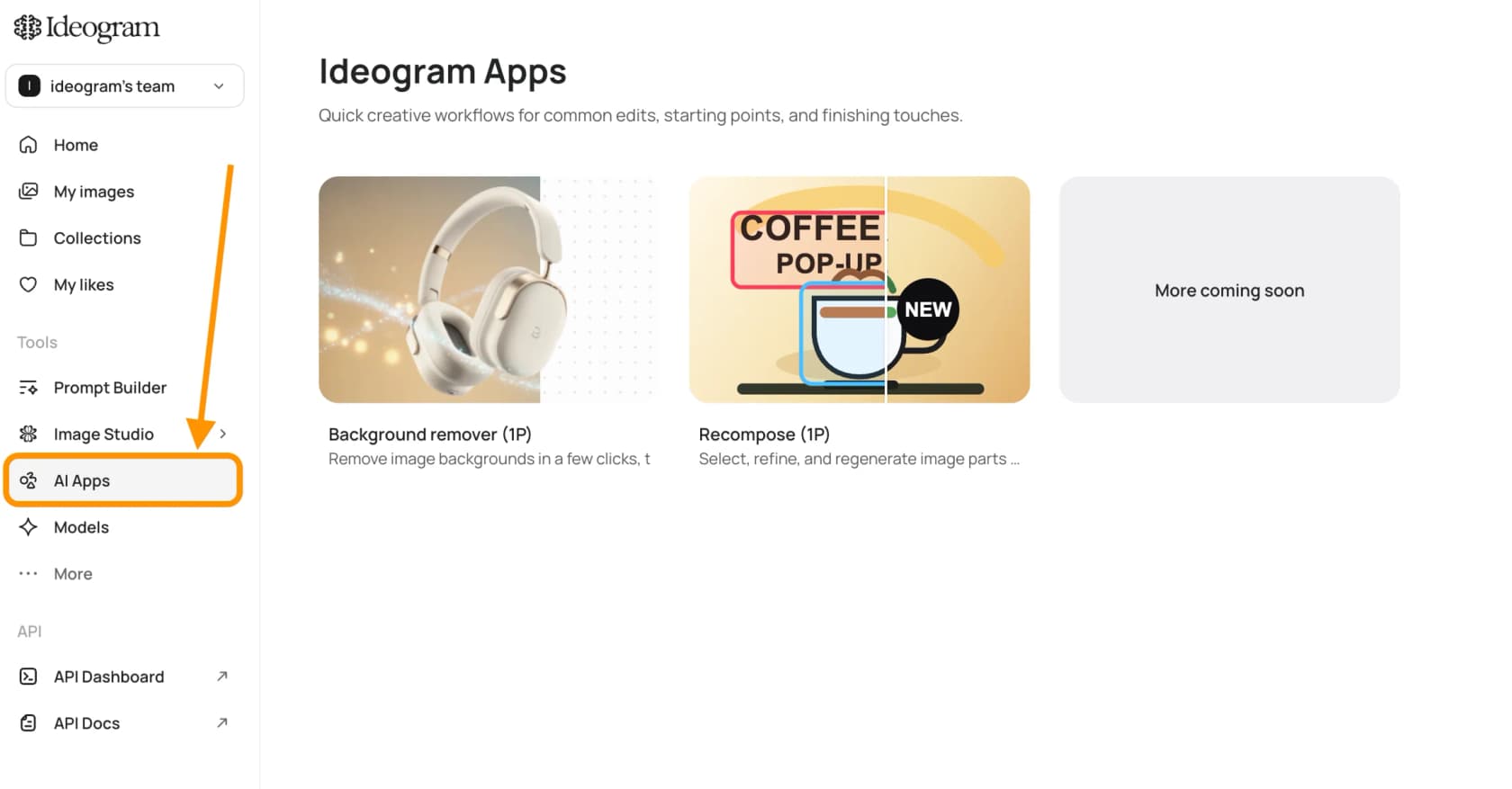
Two cards there. Background remover, plus Recompose. So the object remover does exist, it is only that nobody has documented it as part of the product yet, which lines up with the PoC label it wears on its own page anyway.
The background tools are worth separating out at this point, because the pricing on them works differently. Remove BG hands back a transparent cutout, and on paid plans it is unmetered. Replace BG is the generative one: it prompts a new background, and it may go and adjust edges, lighting, contact shadows. On the API the split holds as well, where the pure cutout endpoint sits at $0.01 while the generative background swap bills at the model's per-image rate. My Ideogram review goes wider on where the platform is actually strong, and that is still text rendering, not editing.
Path 1: the Object Remover mini app
What the app says it does, it does. For output quality the fairest look is Ideogram's own examples, given that this is the vendor putting its own best case in front of you.


A clean fill, and on a hard case. Cobblestones are a repeating texture with irregular spacing in it, so a bad inpaint shows up instantly. Harder still are the cases with reflections and contact shadows in them, and Ideogram publishes those as well.


The reflections went along with the car. Which is the behaviour you want in this shot, and it is also the behaviour that becomes a problem in the next section.
The thing the app does not tell you is the cost. On the tool page there is no credit price stated, no quota, no plan requirement either, and Object Removal is missing from the pricing page's Editing block, the one that lists Canvas, Remix, Style, style reference, character reference, Magic Fill, Extend, Upscale and background removal. So as of today, in-app Object Remover gating is unpublished. A team workflow on an undocumented PoC with no stated quota is not something I would build, and that is most of the reason the rest of this guide is about the API.
Path 2: the remove-object API, which is the real product
The whole contract is below, taken from the Remove Object reference. It is synchronous. No polling, and no job IDs to track.
POST https://api.ideogram.ai/v1/remove-object
Api-Key: <key>

image=@photo.jpg        required, max 10MB, JPEG/PNG/WebP
mask=@mask.png          required, same dimensions as image
seed
num_inference_steps     1-128
guidance_scale          1-10
rendering_speed         FLASH | TURBO | DEFAULT | QUALITY
Two required fields, then four knobs. What happens is the masked region gets regenerated so it blends with the scene around it, and that framing is the important part here. This is generative fill scoped to a mask. It is not a content-aware patch.
The mask polarity trap
The part I would put on a sticky note is this one. Ideogram's two masked-edit endpoints take masks that are inverted from each other.
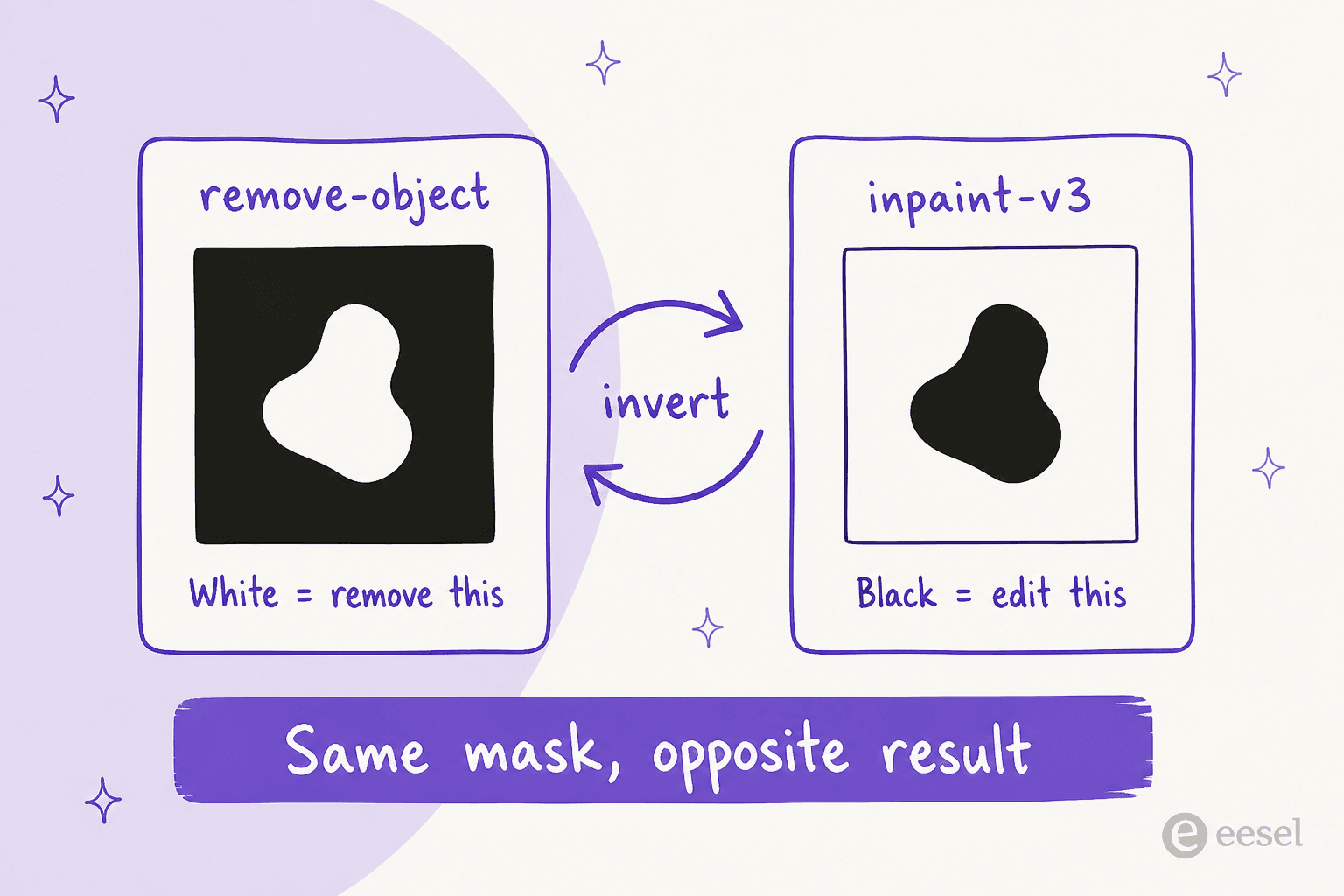
remove-object specifies white, meaning any value at or above 128, as the region to remove. Then the inpaint-v3 endpoint says the opposite thing, that black regions in the mask should match the regions you want to edit. Both of them are documented and both are correct. Neither page warns you about the other one.
Silent is what makes the failure mode nasty. A 200 comes back, an image comes back, and the bill comes too. Nothing errors at all, the frame just returns with everything except your subject regenerated. So if a pipeline is migrating from Magic Fill inpainting over to Object Removal, then inverting the mask is a required step and not a detail. Editors that work prompt-only skip this entire category of bug, because they never take a mask in the first place, and that is one real argument for Nano Banana 2 inside a scripted workflow.
Limits worth knowing before you write the loop
There are four of these, and they bite at volume rather than during testing:
- 10 MB input ceiling, and JPEG, PNG or WebP only. Raw camera files, plus large TIFFs, will need a resize step sitting in front.
- 10 in-flight requests as the default. However many workers you spin up, ten is where your concurrency caps out.
- Output URLs expire. Results stay available for a limited period only, roughly a day in the background remover's case, so do the download inside the same job instead of storing the URL somewhere.
- API billing is separate from your subscription. Ideogram states it plainly, that user subscriptions and API accounts have separate payment and billing setup. An unlimited Pro seat therefore buys you nothing at all on the endpoint.
For this same shape of contract over at another vendor, the closest thing to compare against is OpenAI's image edit API, mask semantics included.
One documentation smell, and worth flagging it fairly. The API pricing page carries a stamp reading "Last revised August 6, 2025", while it lists endpoints that clearly postdate that, Object Removal among them, flagged "New". Its prices do match the reference docs, so I am treating them as live, though I would still re-check before committing a budget to it. Drift like that is common right across this category, and it is why my OpenAI image generation write-up quotes dates next to every number.
What a month of removals actually costs
Depending on which endpoint you reach for, Ideogram bills the same click in five different ways, and across those the spread is nearly 20x. Plug your own volume in.
The shape of that is the real buying advice. For the same visual outcome Instructional Edit runs nearly 7x Object Removal, and what you are paying for there is the convenience of not building a mask. So when a mask already exists, reaching for words instead becomes an expensive habit. Down at the very cheap end of the market, the other rate card worth keeping open is gpt-image-1-mini. For how the rest of the market prices this same click, the sheet I open first is Nano Banana Pro pricing. And the prompt-only side of it sits in Gemini pricing.
For the subscription model rather than per-image, see Midjourney pricing. It is worth noting that a monthly seat and a per-call rate will reward completely different workflows, and mixing the two up is how image budgets go sideways.
Path 3: Magic Fill, the documented in-app route
Working in the browser instead of against the API? Then Magic Fill is the path Ideogram documents for you. It is inpainting, prompt-driven, and it runs in two steps: mask the region first, then set a generation window and describe the result you are after.
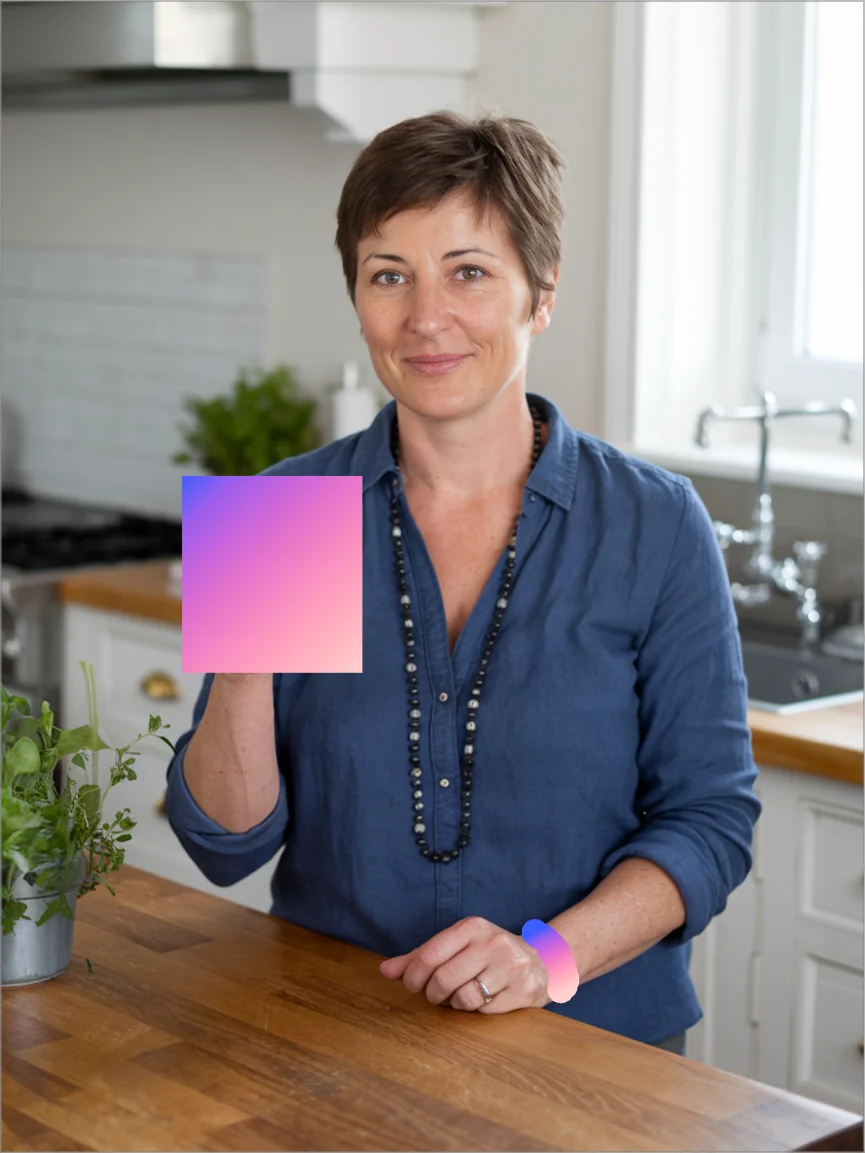
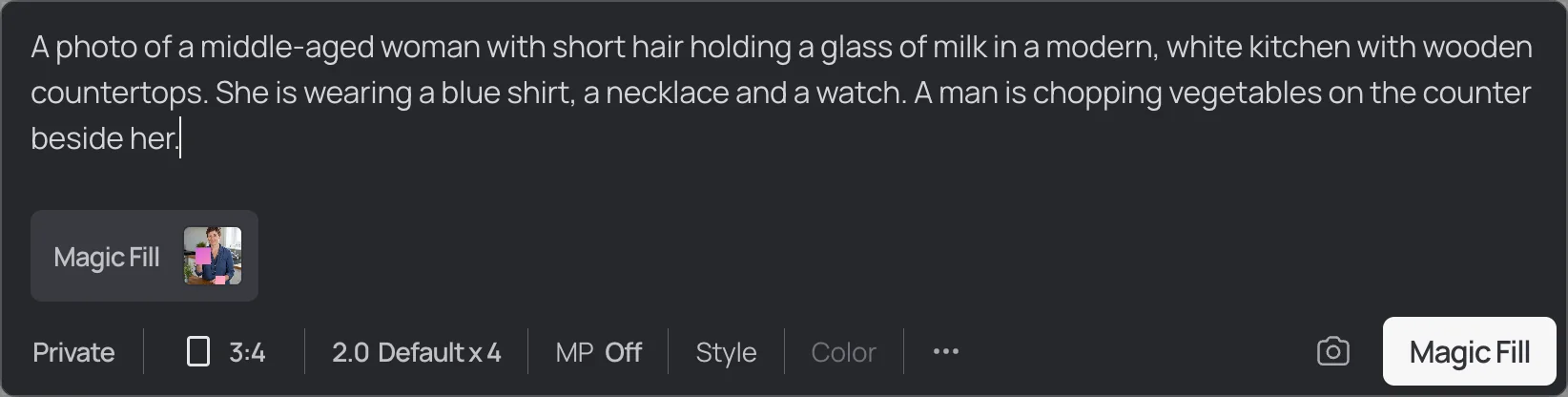
Note the prompt box there. No "just delete this" mode exists here, which means erasing a thing turns into describing whatever replaces it. Before the mini app came along this was the only route available, and on "what prompt do you give it" the community answer was blunt:
"Fill with background color"

This path has three gates on it, and those gates are the reason people go looking elsewhere in the first place.
Magic Fill is 3.0-only in practice. A footnote on the pricing page scopes it to 2.0 and 3.0, so 4.0 never, and the 2.0 half of that has already gone:
"Yeah... it looks like the 2.0 version of Magic Fill was deprecated a few weeks ago. Now the option we have is 3.0 Magic Fill."
For the user who opened that thread, the regression was both specific and expensive. On replacing parts of clothing, 3.0 got type, colour, texture and fit wrong in places where 2.0 had been fine. Then a second user in the same thread posted 3.0 results that worked on the identical task, so the way to read this is per-prompt rather than blanket. On the version story the API side agrees, since an inpaint-v3 endpoint exists and no v4 equivalent does.
Editing an upload needs Plus or Pro. On any paid plan Ideogram's Canvas page offers Magic Fill and Extend, "or get Ideogram Plus or Pro to edit uploaded images". By definition object removal is an edit of your own upload, so the clause that binds you is that second one. The full ladder sits in my Ideogram pricing walkthrough.
Free is not a tier you can work in. Ten slow credits a week. One concurrent generation, two canvases, and the edit tools running on those same slow credits. That queue has stretched for paid users as well:
"Previously, the time between generations for paid users was capped to 2 minutes. However, since 15th of January, it is now 20 minutes… This means that ideogram's basic vs premium/pro plans for unlimited credits (100 vs 'unlimited' credits per day) become the same in practice."
On Free every single attempt is a slow-queue attempt, and it comes out of a ten-per-week budget, which for iterative masking work comes out at roughly two serious edits. Where the requirement is a workable free tier, the usual stop is Canva AI, though that one caps exports in its own way. The other stop is Photoroom.
What that free tier really allows is covered in my Canva AI reviews write-up. And when the blocker is the plan gate and not the quality, the sidestep is Canva AI alternatives.
The benchmark Ideogram publishes, and how to read it
To Ideogram's credit here, quality is not something it only asserts. On the Object Remover page there is a published head-to-head run on the public RemovalBench dataset, with the price per request sitting alongside it.
| Tool | FID, lower is better | Price per request |
|---|---|---|
| Ideogram Object Remover | 27.77 | $0.030 |
| Nano Banana 2 | 31.93 | $0.067 |
| Finegrain Eraser | 34.60 | $0.270 |
| FLUX Pro Erase | 38.06 | $0.034 |
| Nano Banana 2 Lite | 44.44 | $0.034 |
| GPT Image-2 Medium | 71.29 | $0.053 |
Alongside those numbers: PSNR 26.92, SSIM 0.811, LPIPS 0.0598, then average latency about 9.8 seconds. For anyone batching, that last one matters more than the FID does, because ten seconds a call set against a ten-request concurrency cap puts your real throughput at roughly 60 images a minute, and that is at best.
The bottom row comes with its own context, and I unpacked that one in my GPT Image-2 head-to-head.
Read the table as what it is. The dataset is public, so you can go and check it yourself, which is already more than most vendors offer. Still, the comparison stays vendor-run and vendor-selected, so treat it as a claim that has a verifiable dataset behind it, not as independent evidence. That second row gets taken on its own terms in my Nano Banana 2 review. The open-weights entry gets the same treatment over in my Flux 3 review. Worth noting too that Nano Banana Pro sits above the tier that was tested here.
Removal is not a bounded edit
Before putting any of this near a product catalogue, this is the part I would want to know. Asked directly whether the tool changes the rest of your image, the answer in Ideogram's own FAQ is "it can", and the reason given is that it may update pixels outside your mask in order to remove shadows and reflections associated with the selected object.
Aesthetically that is the right behaviour. It is also the reason a mask here is not a contract. Look at the taxi again, where the reflections on the wet asphalt went as well, and nobody had masked those.
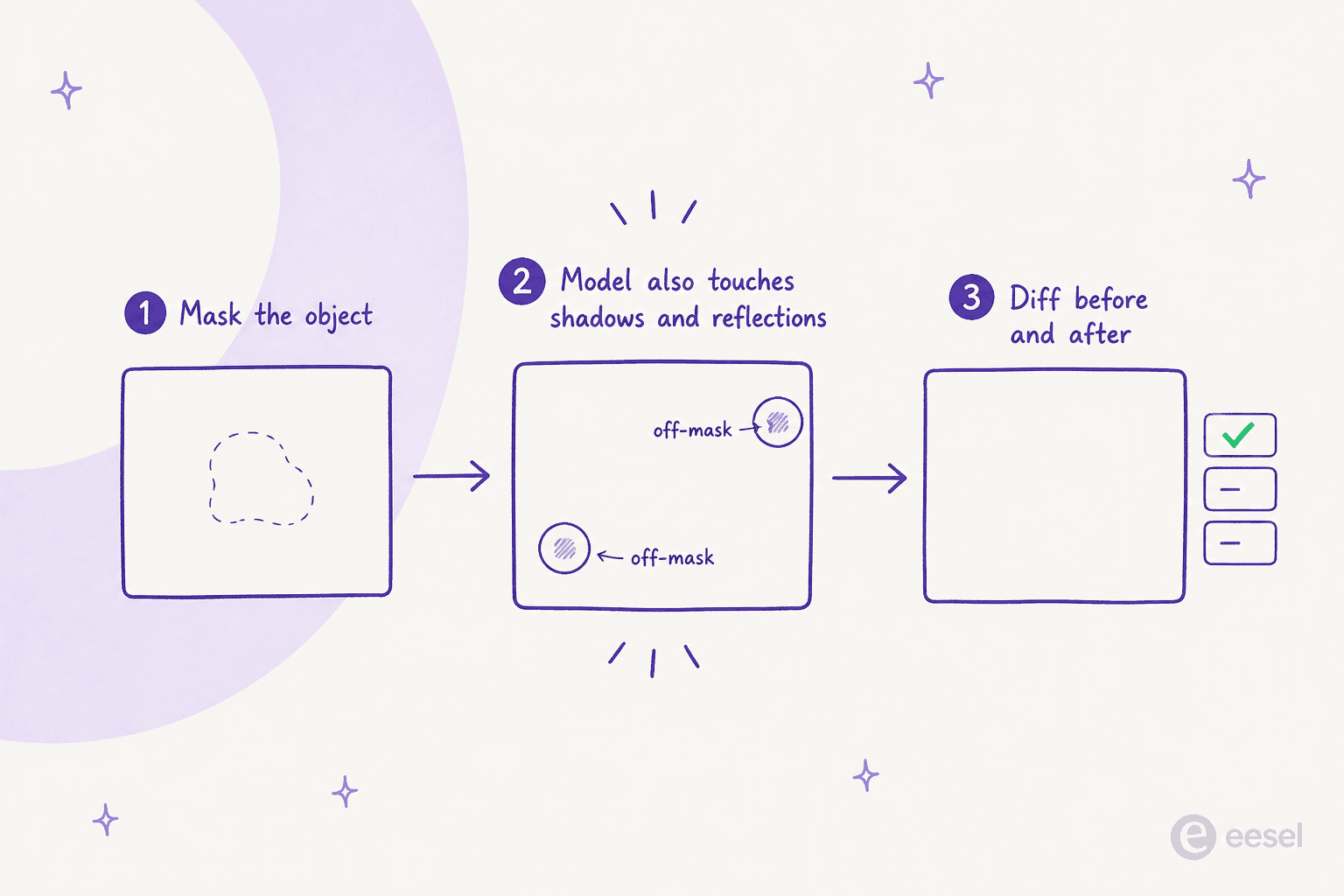
The same limitation gets described in Google's Imagen inpainting docs, in their own words, where the warning is that off-mask pixels are not guaranteed to be identical to the input, and that small objects sitting next to the mask might be removed too. So what this is, is a property of masked generative fill. Not an Ideogram defect.
The practical fix is a single step that almost nobody builds. After each removal, diff the output against the input, then flag any changed region falling outside your mask by more than some threshold. On one hero image your eye catches it. Across 500 catalogue shots a month it will not, and the one that slips past is going to be the one where a logo softened, or where a price tag on the next product got redrawn. For product photography in particular, Photoroom pricing is worth the comparison, since Retouch costs no AI credits over there.
What I would actually do
Four decisions here, taken in the order they come up at you.
- Scripted volume, mask in hand. Use
remove-objectat $0.03. Invert your mask when it came out of an inpainting pipeline, resize anything over 10 MB, then keep workers capped at ten. For the cheapest per-image alternative, the row to compare against is Nano Banana 2 Lite. - One-off cleanup in a browser. Use the mini app, and accept that its quota is undocumented. While it still says PoC, do not go building a team process on top of it.
- Editing your own uploads in Canvas. Budget for Plus or Pro, and expect to be writing a prompt instead of clicking erase. The generation side of that decision is covered in my Ideogram alternatives roundup.
- Catalogue or brand imagery. The diff step gets added before the volume does. Where the ecommerce workflow is the whole job, the first comparison I would run is Photoroom alternatives.
On the wider "which eraser" question rather than the Ideogram-specific one, I ranked ten of them over in Ideogram object remover alternatives, sorted by whichever ceiling hits you first.
Where your work leans illustration and not photography, Recraft AI belongs on that list too. Leonardo AI does as well. And for the generation end rather than the editing end, the one to read is Midjourney alternatives.
One more that is worth naming, since its credit metering catches people out on exactly this kind of edit. That is Freepik AI, now Magnific. Its rate card lives in Freepik AI pricing, and the switching options are in Freepik AI alternatives.
Try eesel for the images and the post around them
Every path on this page finishes in the same place. The object is gone, and there are still forty more images to produce, plus the alt text, the captions, and then the article all of it sits inside.
That part is what eesel handles. The eesel blog writer researches a topic off primary sources, generates the illustrations and the infographics in one consistent house style, writes the captions and alt text, and it builds the internal link graph as well, so what arrives is a draft with its visuals already placed, not a text file waiting on a designer. This post is the demo of it. The two diagrams above and the hero all came out of that pipeline, and the vendor screenshots were pulled and rehosted by it too.

Where images are the specific gap, start at AI blog writer with images, or take the AI article writer angle for long-form. And if the harder problem is keeping forty posts sounding like one person, the place to look is brand voice training.
For budgeting, real numbers sit in AI blog writer cost, and my AI blog writer review compares eesel honestly against the field. Where ranking is the only metric you track, go straight at the SEO blog writer angle. Try eesel free, and see whether the images come back at the size you actually asked for.
Frequently Asked Questions
Does Ideogram have an object remover?
POST /v1/remove-object, bills at $0.03 per 1K image. Inside the main editor the documented removal route is still Magic Fill, which needs a written prompt. My Ideogram review covers the wider platform.How much does the Ideogram object remover cost?
How do I remove an object in Ideogram Canvas?
Why did my Ideogram object removal erase the wrong area?
remove-object endpoint treats white as the region to remove, while inpaint-v3 treats black as the region to edit, so a mask ported between them without inverting deletes the opposite half of the frame. Prompt-only editors such as Nano Banana 2 sidestep the problem by having no pixel mask at all.Does Ideogram object removal change the rest of my image?
Is Magic Fill available on Ideogram 4.0?
inpaint-v3 endpoint and no v4 inpaint. My Ideogram alternatives roundup covers the models rather than the editor.