


Qwen Image 2.1 is Alibaba's new open-weight image model, released on 20 September 2026, and its headline trick is native transparency: it generates RGBA images with a real alpha channel straight from a prompt, no manual background removal step (Qwen blog). It's also much smaller than before, a 7B visual generator versus the old 20B model, so it runs on a single consumer GPU, and it can edit with up to 10 reference images at native 2K.
There's a catch worth knowing before you build on it. The license flipped from the Apache 2.0 that covered the original Qwen-Image to a research-only license that bars commercial use without a separate grant (LICENSE). And there's no paid qwen-image-2.1 API; Alibaba's commercial image API runs on the newer qwen-image-3.0 instead.
So who's it for? If you want to generate transparent PNGs locally, tinker, or do research, it's a genuinely exciting drop and free to run. If you're shipping commercial creative, read the license first, or reach for the paid API.
What Qwen Image 2.1 actually is
Qwen Image 2.1 is the latest image model from Alibaba's Qwen team, and it does two jobs in one set of weights: text-to-image generation and image editing. The part that does the drawing is a diffusion transformer of just 7B parameters, built from 32 Single-Stream DiT layers (Qwen blog). It shipped on 20 September 2026 to Hugging Face, ModelScope, and GitHub at once, with day-zero support in ComfyUI, Diffusers, vLLM-Omni, and SGLang.
The number to hold onto is that 7B. The previous open Qwen image model was a 20B model with a 40.9GB image transformer, and this one lands at 7B / 14.2GB (7.26GB at INT8), as one tester laid out on X:
"Qwen's Image 2.1 released but it come with lots of improvements but just as many caveats. The old Qwen-Image-2512 was a 20B model with a massive 40.9GB BF16 image transformer. But the new Qwen-Image-2.1 comes with 7B visual generator, 14.2GB BF16, 7.26GB INT8"
That shrink is the whole story of the release: Alibaba kept most of what the bigger model did, added a marquee feature, and made it run on hardware people actually own.
Native transparency is the real headline
Every image model can draw a picture. Almost none of them can hand you a clean transparent cut-out. The usual workflow is generate first, then run the result through a background remover, then hope the edges around hair and glass survive. Qwen Image 2.1 collapses that: it decides from your prompt whether to output a normal image or an RGBA image with a real alpha channel, and generates the transparent version directly (Qwen blog).
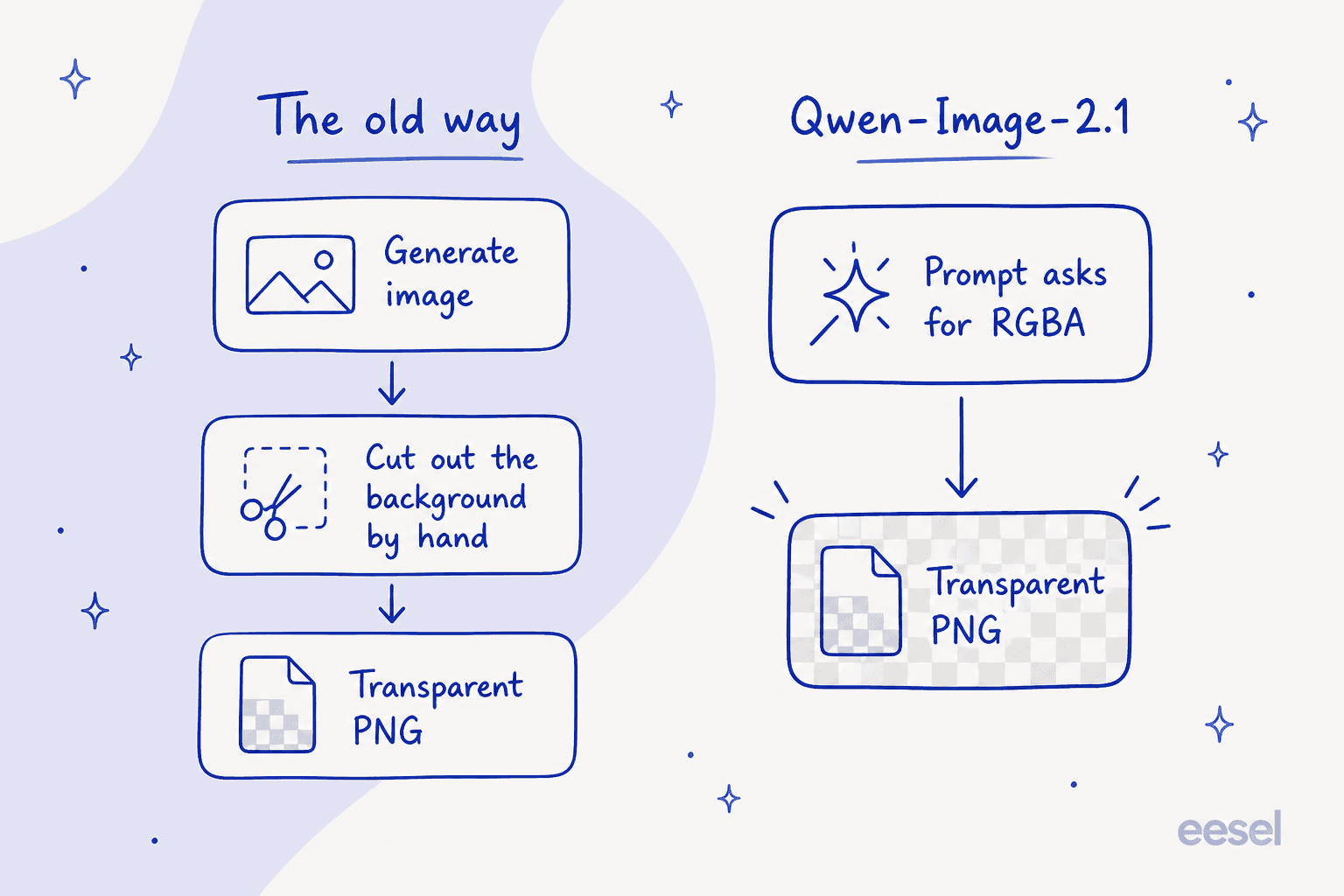
This isn't brand-new science for Qwen. Back in December 2025 the team shipped this as a separate model called Qwen-Image-Layered; 2.1 folds that capability into the single unified model so you don't juggle two checkpoints (Qwen blog). In practice it means four things: generate a transparent element from text, edit a transparent image while keeping its background clear, edit the text inside a transparent layer, and extract a subject from an ordinary photo as an RGBA layer. The model card even suggests the prompt phrasing to trigger it, along the lines of "This is an RGBA image with transparency ... the background is transparent" (HF model card).
If you make thumbnails, stickers, product shots, or UI assets, that one feature is the reason to care. It's the part an AI creator on X flagged as most promising, and it's the clearest thing Qwen Image 2.1 does that the bigger closed models still make you do by hand.
What else got better
Transparency grabs the headline, but the editing upgrades are where most people will spend their time.
- Up to 10 reference images. You can feed the model as many as ten inputs and have it compose them into one coherent scene: a group photo built from six separate portraits, a virtual try-on from a model plus clothing, shoes, bag, and hat, or a room assembled from ten furnishing shots (Qwen blog).
- Flexible local editing. You point at what to change with colored circles, painted annotations, or an original-image-plus-mask pair, and the mask option preserves the rest of the image untouched (Qwen blog).
- Fidelity preservation. Faces stay recognisable across edits, and products keep their text, texture, and shape, which is the thing that usually breaks when you ask a model to restyle a labelled object (Qwen blog).
- Native 2K, seven aspect ratios. Output runs up to 2048x2048 at 1:1 and 2752x1536 at 16:9, so you're not upscaling a 1MP render after the fact (HF model card).
Text rendering deserves its own line, because it's the thing the open-weight crowd keeps coming back to. The model weighs not just the words but their type style and layout against the whole composition (Qwen blog), and on Hacker News the verdict was blunt:
"The text rendering definitely is much, much better than anything else on the open weights market right now. Small text fidelity is quite good. It seems like the text encoder however gets a little bit overloaded with larger prompts"

That "much, much better" comes with an asterisk, which I'll get to in the sentiment section, because not everyone agrees the text is clean.
How it works under the hood
Here's the part that explains why a 7B model can keep up with much bigger ones. Qwen Image 2.1 leans on two efficiency tricks rather than raw size.
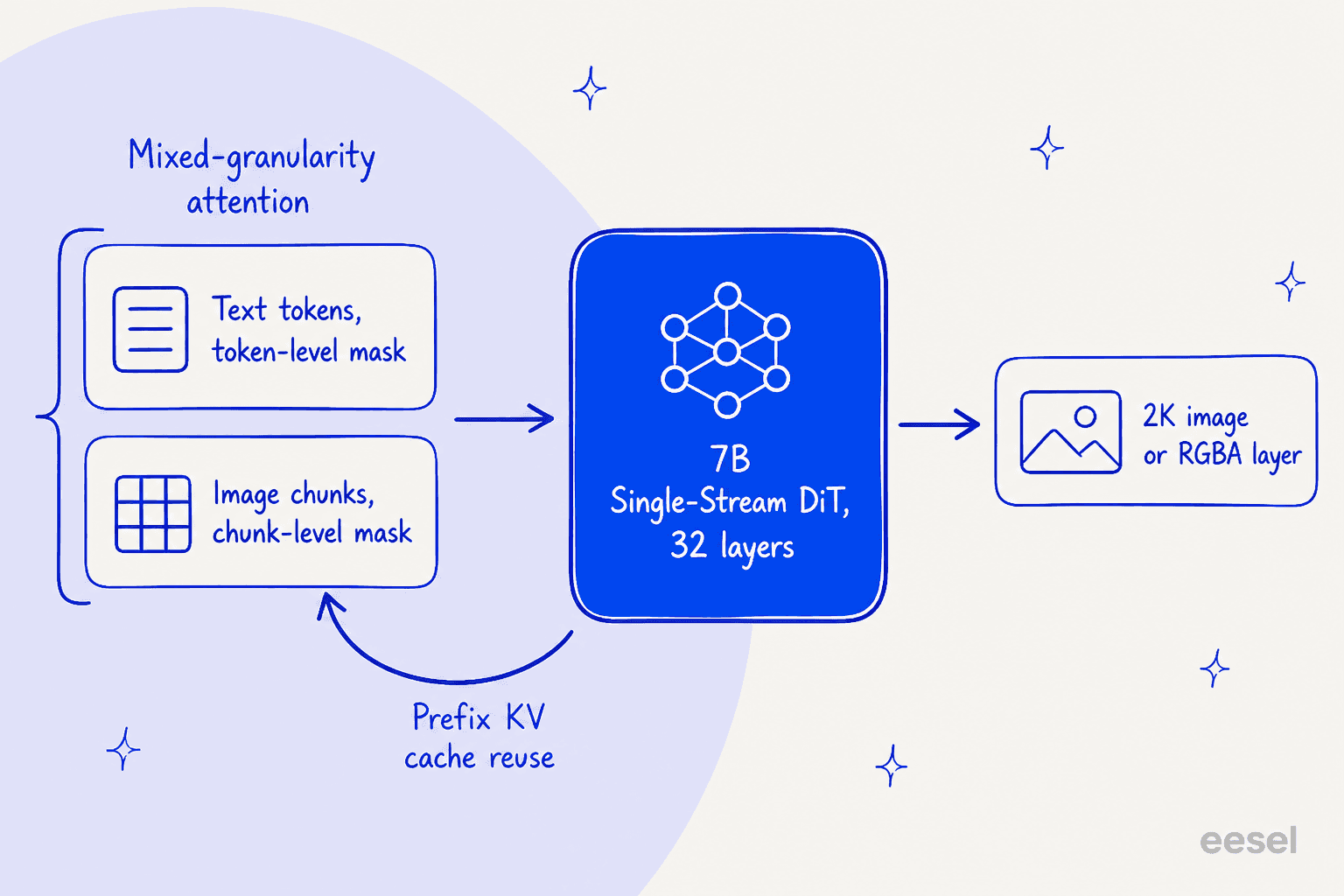
The first is mixed-granularity attention. Text tokens, meaning the system prefix and your editing instructions, get a fine token-level causal mask, while the image itself is handled with a coarser chunk-level mask. Text is where precision matters, so it gets the detailed treatment; the image gets the cheaper one (Qwen blog). The second is prefix KV cache reuse: your input images and instructions are static context, so the model computes them once, caches them, and reuses that on every later step instead of recomputing (Qwen blog). Both are aimed squarely at the cost of editing with several reference images, which is exactly where a naive model would choke.
If you want to build on it, the model already has an ecosystem: LoRA training through ModelScope's DiffSynth-Studio, plus community adapters, finetunes, and quantizations listed on the model tree. ControlNet, notably, is not mentioned in any of the official materials, so treat it as absent until a community port appears.
The license catch
This is the part I'd read before you get attached. The original Qwen-Image shipped under Apache 2.0, the permissive license that lets you do basically anything, commercial work included. Qwen Image 2.1 does not. It ships under the Qwen Research License, which grants a "non-exclusive, worldwide ... royalty-free limited license ... for non-commercial purposes only," with commercial use requiring a separate grant from Alibaba.
The open-source community noticed immediately, and the reaction on Hacker News was pointed:
"Calling open-weights as open-source in marketing materials is the usual misrepresentation. But now with the restriction on commercial use (which is against opensource definition) it is not even open-weights, technically it would be more accurate to call it weights-available."
That's a fair reading. You can download the weights, run them, fine-tune them, and share your changes, as long as it's for research or evaluation and you keep the attribution notices. What you can't do is put the output into a commercial product without emailing Alibaba for a license. It's a real change in what "open" means here, and it's the single biggest gripe about the release. To be fair to Qwen, plenty of labs are moving this direction, and a research license is still more than most closed models offer. It just isn't the Apache free-for-all people expected.
How to access it, and what it costs
There are several ways in, and the right one depends entirely on what you're doing with it.
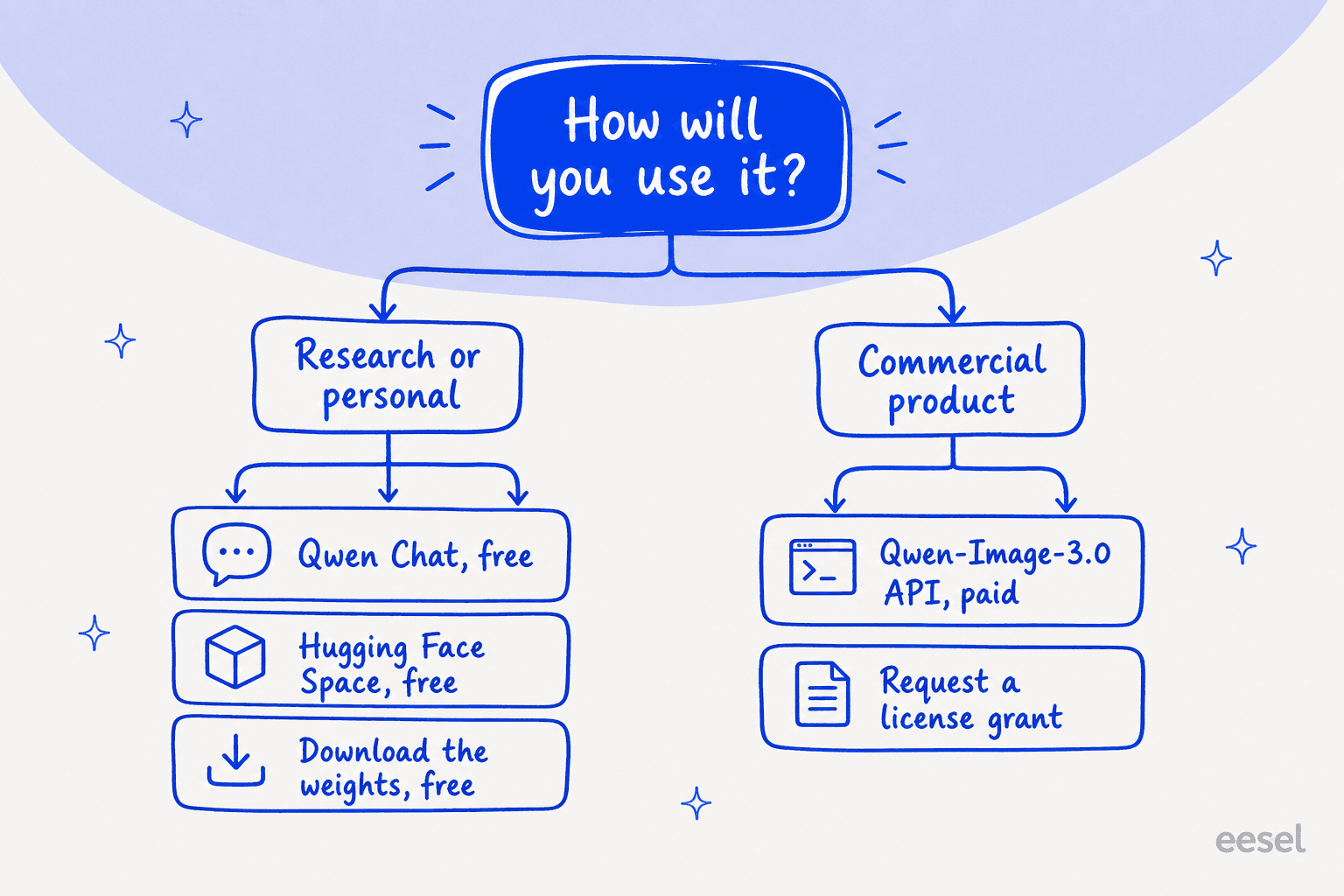
If you just want to try it, the fastest routes are free:
| Route | Cost | Notes |
|---|---|---|
| Hugging Face Space | Free | Official hosted demo of the exact 2.1 model, no install, queue-limited |
| Qwen Chat | Free | Image generation and editing built into Qwen's assistant |
| Hugging Face weights | Free to download | Non-commercial license, needs your own GPU |
| ModelScope weights | Free to download | Same weights, mirrored for Asia |
Official paid API (qwen-image-2.1) | Not offered | Model Studio serves image gen under the 3.0 IDs instead |
For a commercial workload you're really looking at the paid API, and that runs on the 3.0 line, not 2.1. Alibaba Cloud Model Studio prices it per successfully generated image (Model Studio pricing):
| Model | Resolution | Output price |
|---|---|---|
qwen-image-3.0 | 1k and 2k | $0.03 / image |
qwen-image-3.0-pro | 1k | $0.04 / image |
qwen-image-3.0-pro | 2k | $0.075 / image |
Input images cost $0.003 each, failed generations aren't charged, and there's a free quota of 10 images valid for 90 days. Third-party hosts like fal.ai and Replicate carry Qwen Image 2.0, not 2.1, most likely because the non-commercial license blocks them from hosting 2.1 for paid use (Price Per Token).
One more practical note on running it yourself: the "7B" label undersells the hardware. It needs around 16GiB at Q8 and up to 17GB during a 50-step run, though with CPU offload one user got it down to 3.05GiB of VRAM. Speeds land around 5 to 25 seconds per 1MP image on a modern card, and roughly 90 seconds for a 4K render on a 5080.
What people are actually saying
The community reaction is genuinely split, and both sides are worth hearing. The positives cluster around size-to-quality and speed. From r/comfyui:
"I tested image editing with the default 25 steps at 2K resolution, and it takes about 2 minutes on a 5060 Ti. The output images are noticeably sharper than 2511, so I'd say this is a huge step forward. Considering the model is only 7B, I really can't ask for much more."

The most balanced review I found praised it as a local model while naming the specific quality tell people keep flagging, a synthetic yellowish cast (r/StableDiffusion):
"In terms of being able to run it at a reasonable speed in a local environment, I'd say it's a good model. However, at commonly used resolutions ... the results did feel quite synthetic. In particular, the characteristic yellowish color tone and graininess made it feel like the model was trained on a lot of GPT Image data."
And the text-rendering praise is contested. The same comparison shots that impressed one Hacker News reader looked garbled to another, who rated Ideogram higher for clean text. A recurring, very concrete failure showed up on r/comfyui: one user "just can't get the model to generate infographics only in English ... it always adds some other parts I never prompted for in Chinese." Prompt adherence on complex compositional prompts is the other soft spot that early testers flagged.
Net of it all, an independent GenAI Showdown run scored it 7 out of 15 versus 4 out of 15 for the previous open version, a real jump at a third of the size, with visible synthetic-data artifacts.
Should you use Qwen Image 2.1?
My take: this is the most interesting open-weight image model of the moment for a specific person, and a trap for another. If you want native transparent-PNG generation running on your own hardware, for research, prototyping, or personal projects, download it today, because nothing else open does that as cleanly, and 7B on a consumer GPU is a gift. Pair it with the right sampler and step count and several testers rate it the best local option going.
If you're producing commercial work, slow down. The research-only license means the free weights aren't a free lunch, and the "official API" you'd reach for is actually qwen-image-3.0, a different model. And if your work lives or dies on flawless small text or a clean, non-synthetic photographic look, test it against Ideogram or a larger model before you commit; the yellowish cast and long-prompt text issues are real and reported by people who wanted to like it.
eesel for turning models like this into finished work
A model is infrastructure. Qwen Image 2.1 gives you raw image generation, but you still have to wire it into a workflow, feed it context, and turn its output into something that ships. That's the gap eesel is built to close: instead of a raw model, eesel gives you ready-to-work AI teammates for defined jobs, each arriving with the skills, integrations, and company context the role needs.
The one closest to image models is the eesel AI blog writer, a teammate that researches, drafts, and illustrates long-form content end to end; image generation like Qwen's is one of the tools it uses under the hood, not the thing you're left to operate yourself. You bring the topic and the brand; it handles the pipeline from research to a publish-ready draft with visuals.

If you'd rather hire the finished capability than assemble it from weights and scripts, you can try eesel for free.
Frequently Asked Questions
Is Qwen Image 2.1 free to use?
It's free to try and free to run. You can use it at no cost in Qwen Chat, the official Hugging Face demo Space, or by downloading the open weights and running them on your own GPU. The catch is the license: Qwen Image 2.1 is licensed for non-commercial (research and evaluation) use only, so "free to run" is not the same as "free to sell with".
How much does the Qwen Image 2.1 API cost?
There is no paid qwen-image-2.1 API model. Alibaba Cloud's Model Studio serves its commercial image API under the qwen-image-3.0 IDs instead, at $0.03 per generated image (1k and 2k) for qwen-image-3.0 and up to $0.075 per 2k image for qwen-image-3.0-pro. If you need Qwen Image 2.1 specifically for commercial work, you download the weights and request a separate license grant.
What GPU do I need to run Qwen Image 2.1?
Despite the "7B" label it's heavier than it sounds. Users report around 16GiB of VRAM at Q8 and up to 17GB during a 50-step generation, so a 3090, 4090, or 5080-class card is comfortable. With CPU offloading it will run in as little as ~3GiB of VRAM, and even on a laptop, though a single 512x512 image can take about three minutes on CPU alone.
What is native transparency in Qwen Image 2.1?
Native transparency means the model can output RGBA images with a real alpha channel directly from a prompt, rather than making you generate a picture and then cut out the background. It also edits transparent layers and can pull a subject out of a normal photo as a transparent cutout. It's the headline change in Qwen Image 2.1, folding in what used to be a separate Qwen-Image-Layered model.
Is Qwen Image 2.1 better than the previous Qwen image models?
On most axes, yes: it's roughly a third of the size (7B vs 20B), adds native transparency, edits with up to 10 reference images, and testers on r/comfyui call the output noticeably sharper than the prior 2511 release. The trade-offs are the restrictive license and a synthetic, slightly yellowish look that some reviewers dislike.