


What this review is actually based on
Reve 2.1 is brand new, it was added to the Arena text-to-image leaderboard on July 9, 2026, which means there's no meaningful pile of independent, hands-on user reviews to lean on yet. Rather than pretend otherwise, this review works from what's verifiable: Reve's own published description of the architecture, the public Arena leaderboard standing, its own pricing pages, and the track record of Reve 2.0, which launched in early June and has had a month in the wild. That's a different thing from "I ran 500 prompts through it myself," and it's worth saying up front.
If you want the broader map of models before committing to any one, the Nano Banana 2 alternatives rundown and the GPT Image 2 comparison both cover the field Reve is walking into. This piece is about whether Reve's specific bet, layout-first generation, actually pays off.
How Reve 2.1 actually works
Most image models go straight from prompt to pixels in one pass. Reve's whole argument is that this is the wrong shape. In Reve's own words, going "from prompt to binary without code in the middle would make the process slow, opaque, and almost impossible for the creator to meaningfully participate in." So it splits the job in two: a planning phase that builds the composition as structured, editable data, and a rendering phase that turns that plan into the final image.
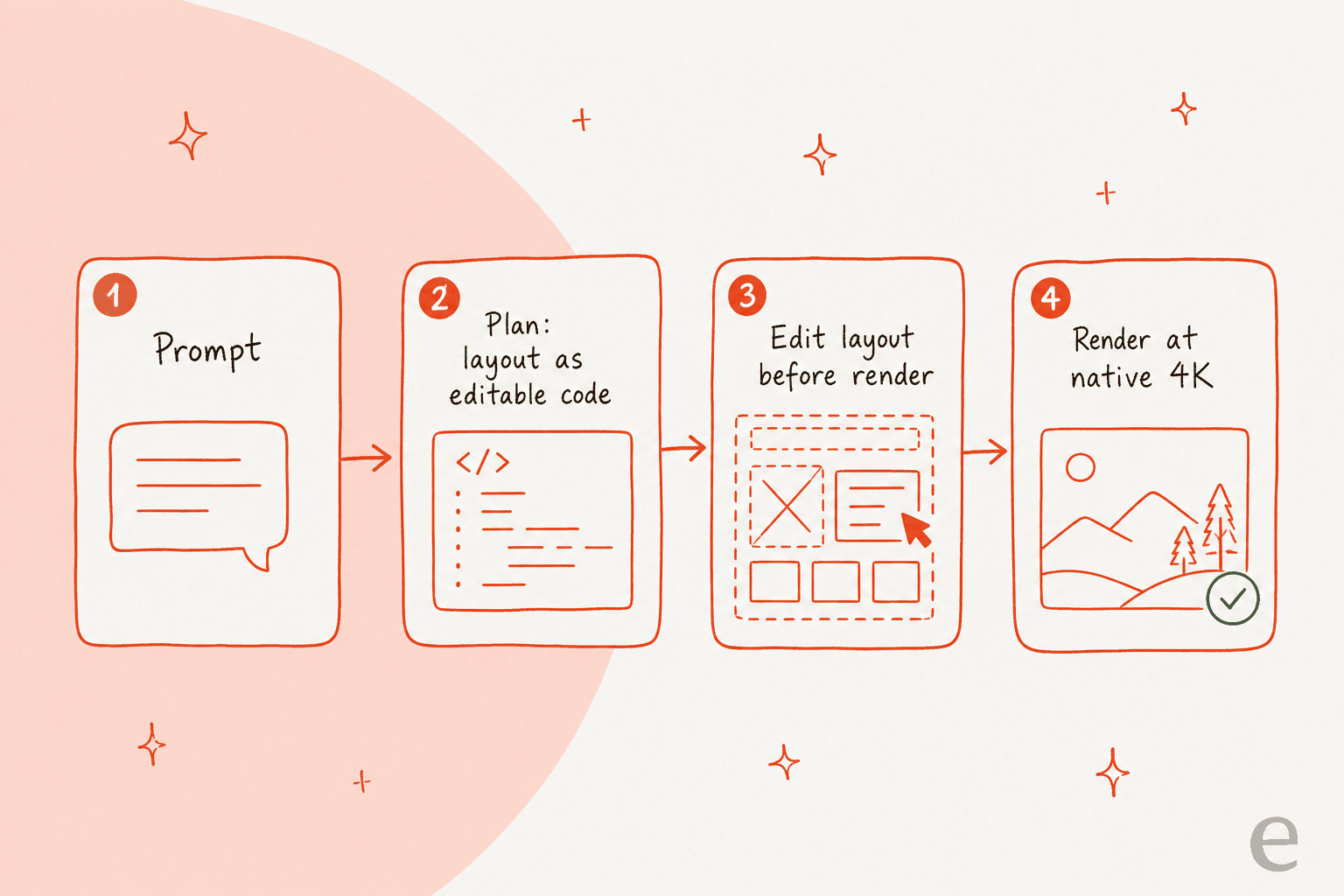
The practical payoff is that the layout is addressable. Every object, region, and piece of text exists as something you can move, resize, or re-describe before and after the render, instead of re-rolling the whole prompt and hoping. Reve describes its model as trained "not on captions, but on detailed data structures that define composition, relationships, style, text, and more." If you've ever fought a one-shot generator to nudge one element without wrecking the rest of the scene, this is the friction it's aimed at, and it's a real departure from how an AI agent or a typical generator approaches the task.
One more consequence worth flagging: because the images are code-based, Reve calls them "agent-native," meaning software agents can both read and reason about them. For anyone building an automated design step into a pipeline, that's more useful than it sounds, since the agent isn't stuck treating the output as an opaque bitmap.
Where it wins: text and 4K
Two claims hold up as real differentiators rather than marketing gloss.
The first is text rendering. Because words are positioned inside the layout as code rather than hallucinated into the pixels, Reve handles environmental typography, handwriting, street signs, packaging, labels, menus, license plates, better than almost anything in the category. This is the single most common failure mode across image models, the garbled-text problem, and it's the one Reve most directly set out to solve. Reve 2.1 pushes this further with stronger foreign-text rendering, which matters if you're producing assets in more than one language. It's the kind of gap that quietly sinks a lot of tools on a generic AI content generation tool shortlist.
The second is native 4K. Reve renders at 4K x 4K, a true 16 megapixels, and treats high resolution "as a first-class primitive" rather than a post-processing upscale. In practice that means output that's print-ready without a separate upscaler in the loop, which is a real workflow saving if your deliverables end up on paper or a large screen. Compare that to a fast tier like Nano Banana 2 that publishes a lower resolution ceiling, and the trade Reve is making, quality and resolution over raw speed, gets clearer.
Where it sits against the competition
Benchmarks in isolation don't tell you much, but the Arena standing is the one verifiable signal we have. At launch, Reve 2.0 entered the leaderboard at number two on overall human preference, behind OpenAI's GPT Image 2 and ahead of Google's Nano Banana 2. For an independent lab going up against OpenAI and Google, that's a strong result, and 2.1 is the follow-up meant to close some of that gap.
The honest read on where each model leads:
- GPT Image 2 still holds the top of the leaderboard and leads on photoreal fidelity, especially faces and hands.
- Reve 2.1 wins on layout control, editability, in-image text, and native 4K, the "I need to iterate on a composition with real text in it" jobs.
- Nano Banana Pro and the wider Gemini image family win on speed and cost at the fast tier.
- Midjourney still owns stylized, art-directed aesthetics that the others don't quite match.
So the real question isn't "which is best" but "which is best for the job in front of you." If that job is a text-heavy, high-resolution, iteratively-edited asset, Reve 2.1 is arguably the strongest pick in the set, and a better fit than most of what you'd find on a one-prompt-tested best AI content generators list. If it's a photoreal portrait, GPT Image 2 is still the safer bet.
Reve 2.1 pricing
Reve keeps the consumer pricing simple. There are three plans, all measured in a credit unit Reve calls "creative energy":
- Free — $0, with a starting allocation plus a daily refresh and a one-time video allowance.
- Lite — $7.99 per month, roughly five times the energy and storage of Free.
- Pro — $19.99 per month, roughly one hundred times the Free energy, plus a monthly video-energy allowance.
API access is billed separately through Reve's own console rather than the subscription tiers, which is the tier that matters if you're wiring Reve into an automated pipeline rather than generating by hand. If you're mapping the cost of building on image models generally, the GPT Image pricing and Gemini pricing breakdowns are the closest apples-to-apples references for per-image economics.
The limitations, honestly
No image model in mid-2026 is fully hands-off, and Reve is no exception.
- Faces and hands. Photoreal human detail still trails GPT Image 2 in absolute fidelity. If your work is portrait-heavy, that's the concrete reason to test both rather than assume Reve wins on leaderboard position alone.
- Learning curve. The layout editor is the whole value proposition, but it's also more to learn than a text box. The power comes with a real ramp, and if you only ever want a single quick image, that overhead may not pay for itself.
- Fresh benchmarks. Reve 2.1's Arena data is a day old as of this writing. The 2.0 track record is strong, but the 2.1-specific community verdict is still forming, and anyone telling you exactly how much better 2.1 is right now is guessing.
None of these are dealbreakers for the jobs Reve is built for. They're the reason to match the model to the task instead of treating any single model as a universal default, the same discipline that separates a good AI content generator pick from a hype-driven one.
Who should reach for it, and who should skip it
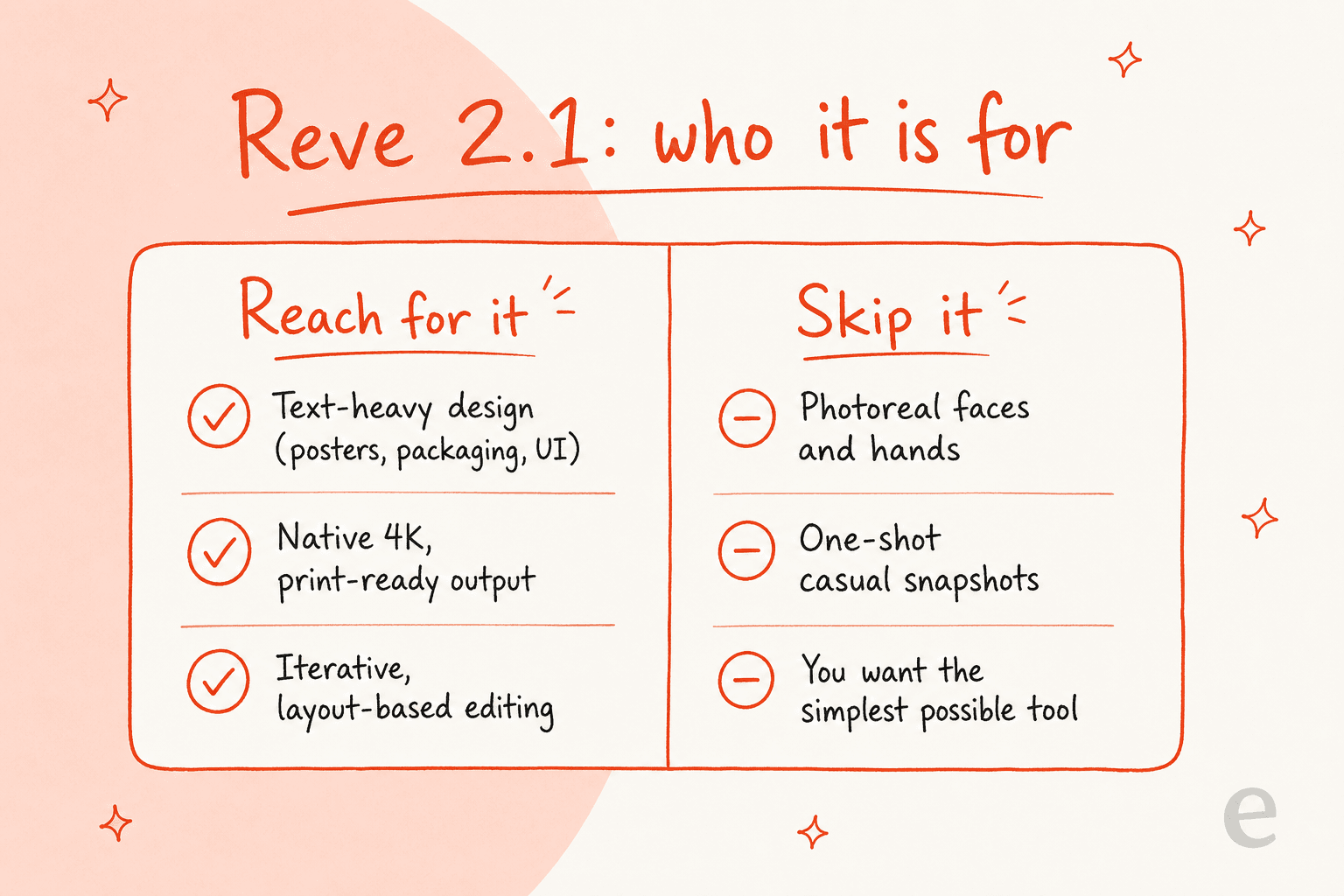
Reach for it if you're producing posters, packaging, UI mockups, or anything where real, legible text has to sit in exactly the right place, if you need print-ready 4K without an upscaler, or if you're building an agentic design step that iterates on a composition. The layout-first approach is a real edge for that work, not a gimmick.
Skip it if you mainly want photoreal faces and hands, a single one-shot casual image, or the simplest possible tool with no editor to learn. For those, GPT Image 2 or a fast tier like Nano Banana Pro will get you there with less overhead. If you're building a full AI content pipeline tool rather than a single feature, the honest answer is usually "more than one model", Reve for the text-and-layout assets, a photoreal model for the rest.
The part a great image model doesn't solve
Here's where this review sounds like it's changing the subject, but it isn't. Reve 2.1 makes a beautiful, text-accurate, 4K image close to free. It doesn't write the headline, the brief, the alt text, the internal links, or decide where in the article the image actually belongs. Those are the parts of a published post that still take a person, or a different AI, real time.
That's the half eesel's own AI blog writer is built to close: it researches a topic from primary sources, writes in your brand voice, and drops in generated visuals in the same run, rather than leaving you to bolt a model API onto a separate AI content writer. That distinction matters more than most AI blog writing tools roundups admit: plenty of them will happily create AI blog images but hand you a generic illustration disconnected from what the paragraph next to it says, the exact failure mode any image model falls into without something directing it. A best AI blog writer pick should be judged on whether the visuals match the text, not just on whether it can call an image API.
That's not hypothetical: the illustrations and hero on this page were generated through that kind of pipeline, on eesel's own blog writer at $4 per blog post rather than a seat fee, the same logic Reve uses for its own image credits, pay for what you generate.
Try eesel for AI content workflows
eesel builds AI teammates that plug into your existing tools, and the AI blog writer is one of its two products alongside AI for helpdesks. If the reason you're evaluating Reve 2.1 is to power a content pipeline, thumbnails, in-article illustrations, or social assets to go with a post, eesel's blog writer researches the topic, writes in your voice, and generates the visuals in one run, rather than making you wire an image API into a standalone SEO AI content writer.

It's free to try, and worth pairing with a strong image model like Reve 2.1 if the images were never actually your bottleneck.