8 best Meta Muse Image alternatives in 2026

Rama Adi

Katelin Teen
Last edited July 9, 2026
Why look for a Meta Muse Image alternative
Muse Image is an interesting model on paper, and it's part of a bigger Meta AI push that's also rolling out inside WhatsApp. Meta says it operates as an agent: it invokes search and coding tools to improve accuracy, self-refines its own generations, and improves the more compute it gets at inference time. That's a different architecture from a standard diffusion model, and Meta's own charts claim it holds the No. 2 spot on Arena for text-to-image and editing, measured by human-preference Elo as of July 5, 2026.

But that's Meta's own benchmark, not an independent one, and the reception on launch day was mixed. One Hacker News commenter who tested it directly wrote that it's "unsurprisingly a step below" Nano Banana and GPT Image, and that the output "more often evoke[s] uncanny valley." Another put it more bluntly:
"It seems to rank at around the same as nano banana (slightly higher) in blind A/B test benchmark but of course gpt image is a step above both right now"

There's also a pricing question mark. Muse Image is free for everyday use, but Meta's own newsroom post says heavier use is "available as part of Meta's subscription plans" without naming a single tier or price. That's a hard thing to budget around if you're building a workflow that depends on it, whereas every alternative below publishes an actual rate card.
Here's the other wrinkle worth knowing before you pick a tool: Muse Image's headline feature isn't really the output, it's the agentic pipeline that produces it. That's worth understanding on its own terms.
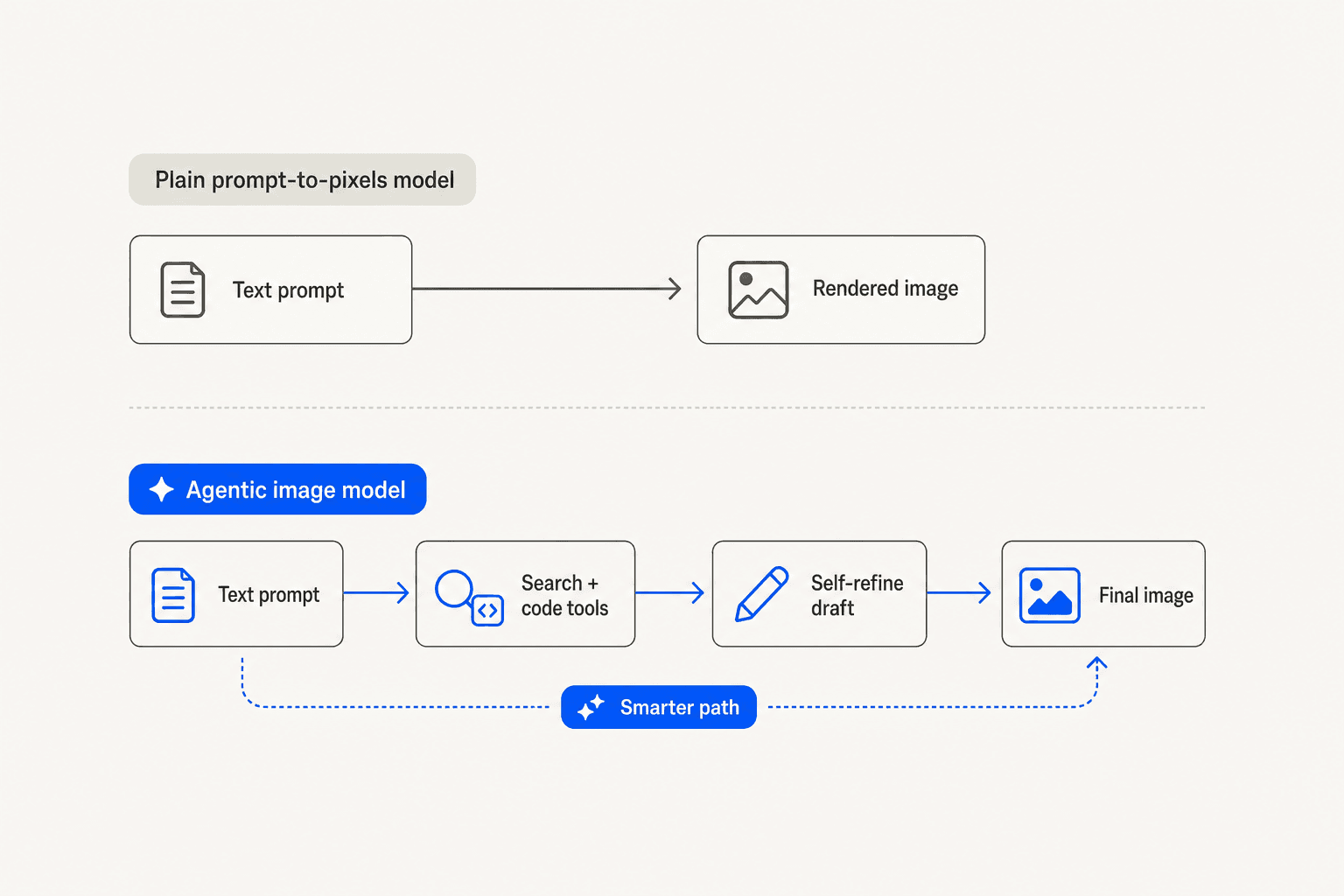
None of the eight tools below copy that exact architecture, but several of them (Nano Banana Pro especially) lean on similar ideas: real-world grounding, self-checking output, and iterative refinement across a conversation rather than one-shot generation.
How I picked these alternatives
I looked for tools that beat Muse Image on at least one axis a real buyer cares about: output quality on an independent benchmark, transparent and published pricing, a genuine professional feature (vector export, brand-locked style, Photoshop integration), or a developer API with real per-image costs. Every price, plan limit, and quote below comes from each vendor's own pricing page or a permalinked G2, X, or Hacker News post, not a third-party aggregator.
| Tool | Best for | Starting price | Free tier | API access | Video generation | Native vector output |
|---|---|---|---|---|---|---|
| Nano Banana Pro | Highest quality + text rendering | $0.134/image (API) | No dedicated free tier | Yes | No (Nano Banana 2 handles video) | No |
| GPT Image 2 | Reasoning-led editing + multilingual text | $0.006/image (API, low quality) | Free in ChatGPT (limited) | Yes | No | No |
| Midjourney | Painterly, art-directed quality | $10/mo | No | No | Yes | No |
| Adobe Firefly | Commercially-safe, Photoshop-native | $9.99/mo | Yes (limited daily) | No | Yes | No |
| Ideogram | Flawless in-image text | $15/mo | Yes (10 credits/week) | Yes | No | No |
| Leonardo AI | All-in-one image + video suite | $12/mo | Yes (150 tokens/day) | Yes | Yes (via aggregated models) | No |
| Recraft | Brand-locked vector + design assets | $10/mo | Yes (30 credits/day, non-commercial) | Yes | Yes (Studio only) | Yes |
| Canva (Dream Lab) | Non-designers already in Canva | $12/mo (Pro) | Yes (5 gens/month) | No | Yes | No |
1. Nano Banana Pro
Best for: the highest overall quality and the best text rendering in the category.
Nano Banana Pro is the marketing name for Gemini 3 Pro Image, Google DeepMind's flagship image model, built on the same reasoning stack as Gemini 3 Pro rather than a lighter Flash-tier model. It's the model Hacker News commenters kept bringing up as the bar Muse Image hasn't cleared yet.
Features: Nano Banana Pro blends up to 14 input images into one composition while preserving the resemblance of up to 5 people, outputs at 1K, 2K, or 4K resolution, and uses Google Search grounding to pull real-world data, weather, sports scores, factual context, into generated visuals. On DeepMind's own benchmark charts it currently posts the lowest single-line text-rendering error rate of any model tested, ahead of GPT Image 1, Seedream v4, and Flux Pro Kontext Max. All outputs carry an imperceptible SynthID watermark, and free or Pro-tier users get a visible "Gemini sparkle" mark too.
Pricing: billed through the Gemini API. Standard tier runs $0.134 per 1K or 2K image, and $0.24 per 4K image, roughly double Nano Banana 2's per-image cost and about 4x Nano Banana 2 Lite's. There's no dedicated consumer subscription tier the way Midjourney or Firefly have one; access comes through the Gemini app, Vertex AI, Google Slides, or the API directly.
Pros: best-in-class text rendering, real-time knowledge grounding, high-resolution output up to 4K, leads DeepMind's own quality benchmarks against every model in the comparison set.
Cons: character and face resemblance can be "hit and miss" even after heavy prompting, according to indie developer Pieter Levels, who runs it in production for Photo AI. No bundled subscription plan; you're paying per image through the API.
"Skin/surface detail is really excellent... didn't nerf it at all."
Verdict: if you want the closest thing to a straight upgrade over Muse Image on quality alone, start here. It's the model the community already measures every other launch against.
2. GPT Image 2
Best for: reasoning-led editing, multilingual text, and the cheapest per-image API cost in this list.
GPT Image 2 is OpenAI's current flagship image model, released April 21, 2026 as "ChatGPT Images 2.0." It replaced DALL-E 2 and DALL-E 3 outright; both were retired from ChatGPT and the API on May 12, 2026. It's OpenAI's first image model with a native reasoning ("thinking") pipeline baked into generation, rather than a single forward pass.
Features: flexible sizes up to 4K, mask-based partial edits, multi-turn image generation through the Responses API so a conversation can iteratively refine one image across turns, and multilingual text rendering across Japanese, Korean, Chinese, Arabic, Hindi, Thai, Cyrillic, and more. One real regression versus GPT Image 1: it doesn't currently support transparent backgrounds.
Pricing: the API bills per token, but OpenAI publishes a legacy per-image table for common sizes. A 1024×1024 image runs $0.006 (low quality), $0.053 (medium), or $0.211 (high). On the consumer side, it's bundled into ChatGPT plans: Free (limited, slower), Go at $8/mo, Plus at $20/mo, and Pro from $100/mo for unlimited, faster generation. API access requires completing OpenAI's organization verification first. A cheaper GPT Image 1 Mini tier still exists for lighter workloads if the full model's per-image cost is overkill.
Pros: cheapest per-image API cost of any model here at the low tier, native reasoning improves prompt-following on complex requests, strong multilingual text rendering, tightly integrated into the ChatGPT ecosystem most teams already use.
Cons: editing still feels "underbaked" to some early testers even as raw generation impressed them; no transparent-background support; complex prompts can take up to two minutes.
"the image generation genuinely got me excited, outputs are impressive. but editing what it creates still feels underbaked."
Verdict: the best pick if you're already paying for ChatGPT or building on the OpenAI API and want the cheapest realistic path to production-grade output. See my breakdown of ChatGPT Images 2.0 for the deeper technical walkthrough.
3. Midjourney
Best for: painterly, art-directed quality that still doesn't have a real challenger.
Midjourney is a self-funded, profitable 60-person lab that has never taken outside venture money, according to public statements from CEO David Holz. It dropped its free tier back in March 2023 and hasn't brought one back since, but the aesthetic quality is still the reason people keep paying.
Features: V8.1 Alpha is the current model as of June 2026, adding 2K HD images, an updated Describe tool, and a Prompt Shortener. Draft Mode (from V7) generates images up to 10x faster at half the GPU cost, and Stealth Mode keeps your generations out of the public gallery, though it's locked behind the Pro plan.
Pricing: four tiers, all monthly subscriptions with a 20% discount for annual billing. Basic is $10/mo (200 minutes of Fast GPU time), Standard is $30/mo (15 hours, unlimited Relax Mode), Pro is $60/mo (30 hours, adds Stealth Mode), and Mega is $120/mo (60 hours). Extra Fast GPU time costs $4/hr on top of any plan. There's no free trial, and refunds only apply if you've used fewer than 20 GPU minutes, which is close to impossible in practice.
Pros: the aesthetic ceiling here is still unmatched even by critics who switched away for cost reasons; G2 rates it 4.4/5 across 355 reviews specifically citing cinematic lighting and painterly texture that "looks designed, not generated."
Cons: billing and support are the platform's most-cited weakness, with Trustpilot sitting at 1.5/5 from 351 reviews over unauthorized charges and support handled entirely through Discord. Stealth Mode requiring the $60/mo Pro plan is the single most-repeated complaint on both Reddit and X.
"the cheapest plan to keep your work hidden... no rollover."
Verdict: still the pick if visual quality is non-negotiable and you can stomach paying $30 to $60 a month with no trial period. If the billing complaints above are a dealbreaker, my Midjourney alternatives roundup goes deeper on who else to consider. My Midjourney reviews digest breaks down the billing complaints in more detail.
4. Adobe Firefly
Best for: commercially-safe generation inside an existing Photoshop or Illustrator workflow.
Adobe Firefly is the generative suite built into Photoshop, Illustrator, and Adobe Express, plus a standalone web and mobile app. Its core pitch is licensing: Firefly's own models are trained on licensed Adobe Stock content and expired-copyright public domain material, which is why some studios use it specifically for work they need to bill to a client.
Features: Generative Fill and Generative Expand work as a genuine non-destructive Photoshop layer, not a bolt-on tool, according to a G2 reviewer who called it the feature that moved Firefly "from 'interesting' to 'in the workflow.'" Firefly also gives one login to third-party partner models, including Nano Banana, GPT Image, and Flux, alongside Adobe's own Firefly Image models.
Pricing: Firefly Free is $0 with limited daily generations. Firefly Standard is $9.99/mo (2,000 credits). Firefly Pro is $19.99/mo (4,000 credits, and the tier where Adobe Express Premium and full Photoshop web access unlock). Pro Plus and Premium are running a promotional 30% discount through August 26, 2026, at $34.97/mo and $139.91/mo respectively.
Pros: Content Credentials provenance metadata is a real deciding factor for teams billing AI-generated work to clients; multi-model access without juggling separate subscriptions; native Photoshop/Illustrator integration that reviewers describe as feeling built-in rather than bolted-on.
Cons: consistency on human faces and hands is a recurring complaint, and the credit system is confusing enough that G2 reviewers flag it directly.
"The credit system is the other recurring friction, and it is as much a clarity problem as a cost one... telling a client what a given piece of generative work actually 'costs' in credits is harder than it should be."

Verdict: the one legal and creative teams pick first when the output has to survive a client contract, not just look good in a Slack thread.
5. Ideogram
Best for: in-image text that actually renders correctly.
Ideogram was founded in 2022 by ex-Google Brain researchers and has raised $96.5M to date. Its whole reputation rests on one thing: rendering legible, accurate text inside a generated image, which is the single hardest problem in this category and the one Muse Image explicitly calls out as a headline feature it's still catching up on.
Features: Ideogram 4.0 posts roughly 90% text-rendering accuracy versus Midjourney's ~30% on short phrases, per independent benchmark testing. Beyond typography, it covers Magic Fill inpainting, Extend outpainting, one-click background removal, and an MCP server so it plugs directly into Claude Code, Cursor, or ChatGPT workflows.
Pricing: Free gives 10 slow credits a week. Plus is $15/mo billed annually (1,000 priority credits), Pro is $42/mo billed annually (3,500 priority credits, batch generation via CSV upload), and Team runs $20/user/mo. The API is billed separately per image, from $0.03 (4.0 Turbo) up to $0.10 (4.0 Quality).
Pros: the clearest, most defensible technical moat in this entire list; fast generation speed (2a Turbo runs roughly 5 seconds per image); an MCP server for agentic coding workflows most competitors haven't shipped yet.
Cons: the free tier has shrunk repeatedly, from 25 credits a day down to 10 credits a week, which multiple Reddit threads call "enshittification" of the funnel that used to convert free users to paid.
"Ideogram handles text more consistently than MJ and doesn't need as much prompt wizardry."

Verdict: if the job is a poster, a menu, a logo, or anything where the text in the image has to be right the first time, Ideogram is the one to try before anything else on this list, including Muse Image's own text-rendering claims. My Ideogram alternatives roundup covers the rest of the field if the shrinking free tier is a dealbreaker. The full Ideogram review has more on the credit-rollback history.
6. Leonardo AI
Best for: teams who want image, video, and canvas editing under one subscription.
Leonardo AI is a multi-model aggregator, meaning it routes third-party frontier models (Veo 3.1, Kling 3.0, Nano Banana Pro, Flux.2 Pro, Ideogram 3.0) alongside its own Lucid Origin, Lucid Realism, and Phoenix model families, all from one interface. Canva acquired Leonardo in 2024, and its Essential plan now ships bundled with Canva Business.
Features: the AI image editor (formerly Canvas) handles prompt-driven inpainting, object removal, and resizing through an "Omni" tool. The video side aggregates six third-party models with text-to-video, image-to-video, and start/end-frame interpolation. Lucid Origin debuted at #6 on the Artificial Analysis Image Leaderboard, rated comparable to Flux.1 Kontext.
Pricing: Free gives 150 fast tokens a day. Essential is $12/mo (8,500 tokens/month, bundled with Canva Business). Premium is $30/mo (25,000 tokens), and Ultimate is $60/mo (60,000 tokens, plus unlimited relaxed video). Team plans start at $72/mo for a shared 75,000-token pool.
Pros: the widest model selection under one login by a clear margin; a real free tier where Midjourney has none, which is consistently the reason Reddit threads recommend it as a first stop; creator @alexutopia called it "best bang for your buck" against Midjourney specifically.
Cons: token economics are the loudest complaint, since different models burn credits at wildly different rates and one 8-second Veo clip can cost the same as 300+ basic images. "Unlimited relaxed" generation is also more limited than it sounds: it only applies to Leonardo's own models, not the third-party ones most people actually want to use.
Verdict: the right call if you want image and video generation in the same subscription without hunting down five separate API keys. My full Leonardo AI review goes deeper on the token economics if that's the deciding factor for you. The Leonardo AI alternatives list covers the rest of the multi-model aggregators.
7. Recraft
Best for: brand-locked, editable vector output that no other tool on this list does natively.
Recraft is built specifically for designers, and its sharpest technical differentiator is real: unlike every other tool here, it generates editable SVG vector graphics directly from a prompt, not just raster images. Recraft V3 held the #1 spot on the Hugging Face Text-to-Image leaderboard for five straight months after its October 2024 release.
Features: drop in reference images and Recraft locks a reusable brand style across unrelated subjects, people, products, wordmarks, without any training step. The current flagship, V4.1, shipped mid-May 2026. Recraft Studio also folds in a third-party model marketplace (GPT Image, Nano Banana, Flux, Ideogram, and more), though that marketplace is Studio-only; the API is scoped strictly to Recraft's own V2 through V4.1 model family.
Pricing: Free gives 30 credits a day but no commercial rights, every free image is public. Basic is $10/mo billed annually (1,000 credits, unlocks commercial rights and third-party models). Pro is $16/mo (2,000 credits, adds video generation). Teams runs $18/mo/seat with SSO and a shared workspace.
Pros: the "cleanest vector lines" praise shows up independently across G2 reviews and X, and brand-consistency without a training step is the most-repeated reason G2 reviewers say they switched to it.
Cons: one detailed G2 review, from an otherwise satisfied advocate, explicitly warns that "operational instability, credit model, and support infrastructure create genuine professional risk" for anyone relying on it for deadline-driven client work.
"My go-to for brand-consistent visual assets... The control you get over style, composition, and format is well above what I've seen from other generators."
Verdict: the obvious pick the moment your output needs to be an editable vector, a logo, a wordmark, packaging art, since nothing else here does that natively. My Recraft AI review has the full hands-on breakdown. The Recraft alternatives list covers the rest of the vector-focused field.
8. Canva (Dream Lab)
Best for: non-designers who already live inside Canva.
Canva's AI image tools sit under the "Magic Studio" umbrella, and the specific text-to-image feature is called Dream Lab, powered by Leonardo AI's Phoenix model since Canva's 2024 acquisition of Leonardo. It's the lowest-friction option here if you're generating an image to drop straight into a social post or presentation, not a standalone creative asset.
Features: Dream Lab's Style Transfer, added in 2026, matches the aesthetic of a reference image. Canva splits its AI into Standard, Premium, and Ultra tiers that all draw from one shared monthly allowance, so a complex Canva AI 2.0 conversation drains the pool faster than a single image generation does.
Pricing: Free gives roughly 200 Standard AI uses or 20 Premium uses a month, plus 5 free Dream Lab generations. Pro is $144/yr (about $12/mo), unlocking 2,000 Standard, 200 Premium, or 20 Ultra AI uses. Business is $250/yr per person. An AI Pass add-on multiplies the allowance further on either paid tier.
Pros: the only tool on this list where image generation lives next to your presentations, social posts, and brand kit in one workspace, so there's no export-then-reimport step; a strong free tier by the category's standards.
Cons: the shared AI allowance across tools is confusing, and Reddit threads consistently flag that a single failed generation still burns a credit, so iterating on one image can eat a meaningful chunk of a monthly allowance fast.
Verdict: don't reach for Canva if photorealistic quality is the goal, its Dream Lab output is a step behind dedicated generators, but if you're already living in Canva for everything else, it's the path of least resistance. My Canva AI reviews digest goes deeper on where it falls short. The Canva AI alternatives roundup covers the rest of the design-first field.
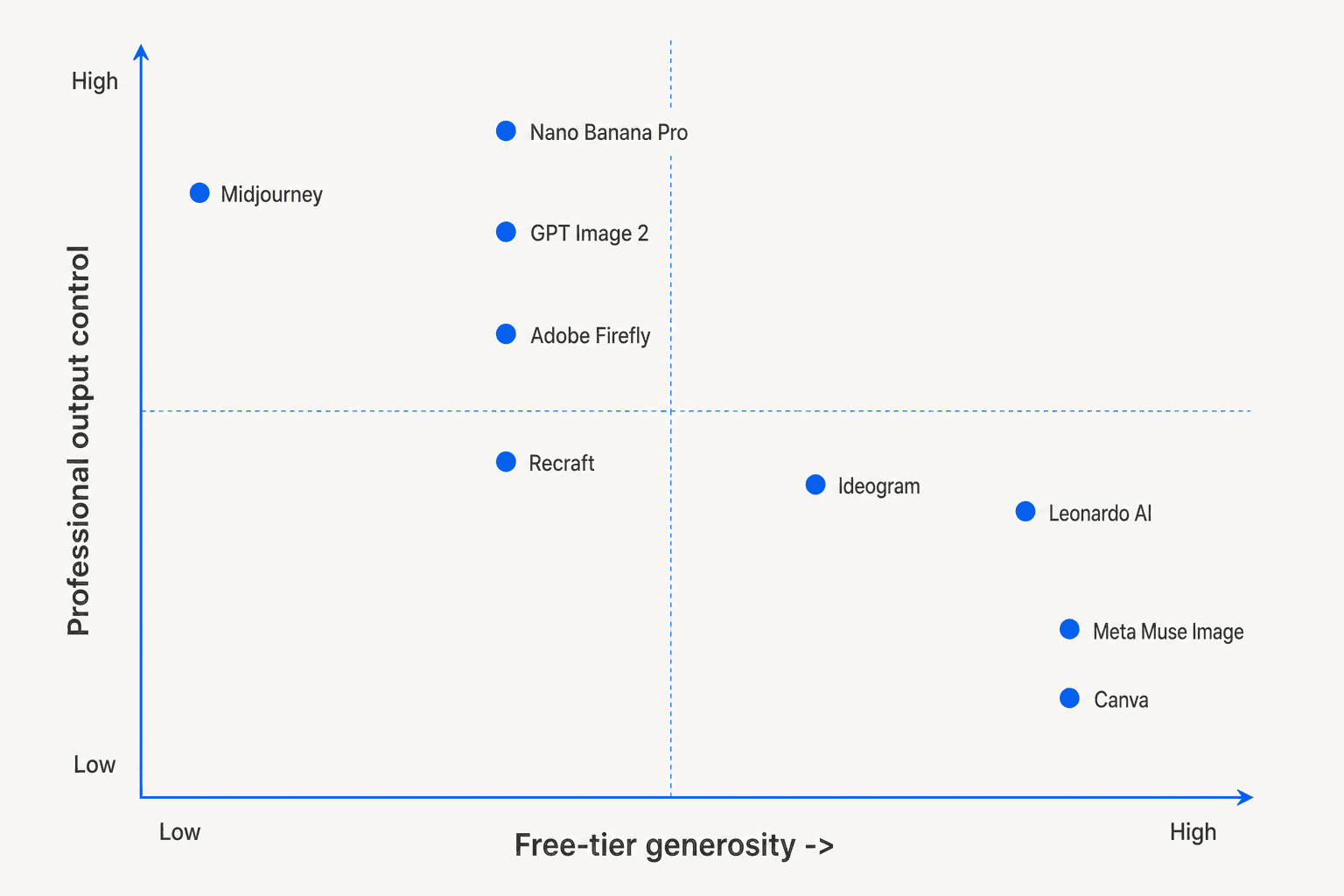
Lay all eight out on those two axes and the pattern is pretty clear: the tools with the most generous free access (Muse Image, Canva, Leonardo) sit lower on professional control, while the tools professionals actually reach for (Midjourney, Adobe Firefly, Nano Banana Pro, GPT Image 2) charge more and give less away for free. There's no tool that wins on both, which is exactly why this is an eight-item list instead of a one-item answer.
Beyond image generation: specialized AI is showing up everywhere
Every tool on this list makes the same bet: a model built specifically for one job, text rendering, vector output, brand consistency, beats a general-purpose model trying to do everything at once. That same logic is showing up across every department, not just creative teams; specialized AI agents are quietly replacing general-purpose tools in sales, ops, and especially customer support. That's also the exact argument for why a support team shouldn't be running on a generic chatbot either.
I've spent years building AI that has to survive contact with actual customers, not a demo audience, and the failure mode is always the same one these image tools are fighting: a model that's technically impressive but wasn't built for your specific job. That's the whole reason eesel exists as a helpdesk AI agent rather than a general-purpose assistant wearing a support hat. It connects to the helpdesk you already run, Zendesk, Freshdesk, Intercom, HubSpot, learns from your actual past tickets and help docs on day one, and drafts or resolves tickets with confidence-based routing so low-certainty answers get flagged instead of sent.

One eesel customer, Gridwise, resolved 73% of tier-1 support requests in their first month on the platform, with results showing up during a 7-day trial. That's the same pattern as every tool above: purpose-built beats general-purpose, whether the job is rendering text inside an image or answering the fortieth "where's my order" ticket of the day. eesel's pricing is a fixed monthly credit plan, from $299/month for 500 credits (1 credit per ticket or chat, however long), with no per-seat fee and a free plan of 100 credits, no card. You can try eesel for free and run it against your own ticket history before it ever touches a real customer.
Choosing the right Meta Muse Image alternative
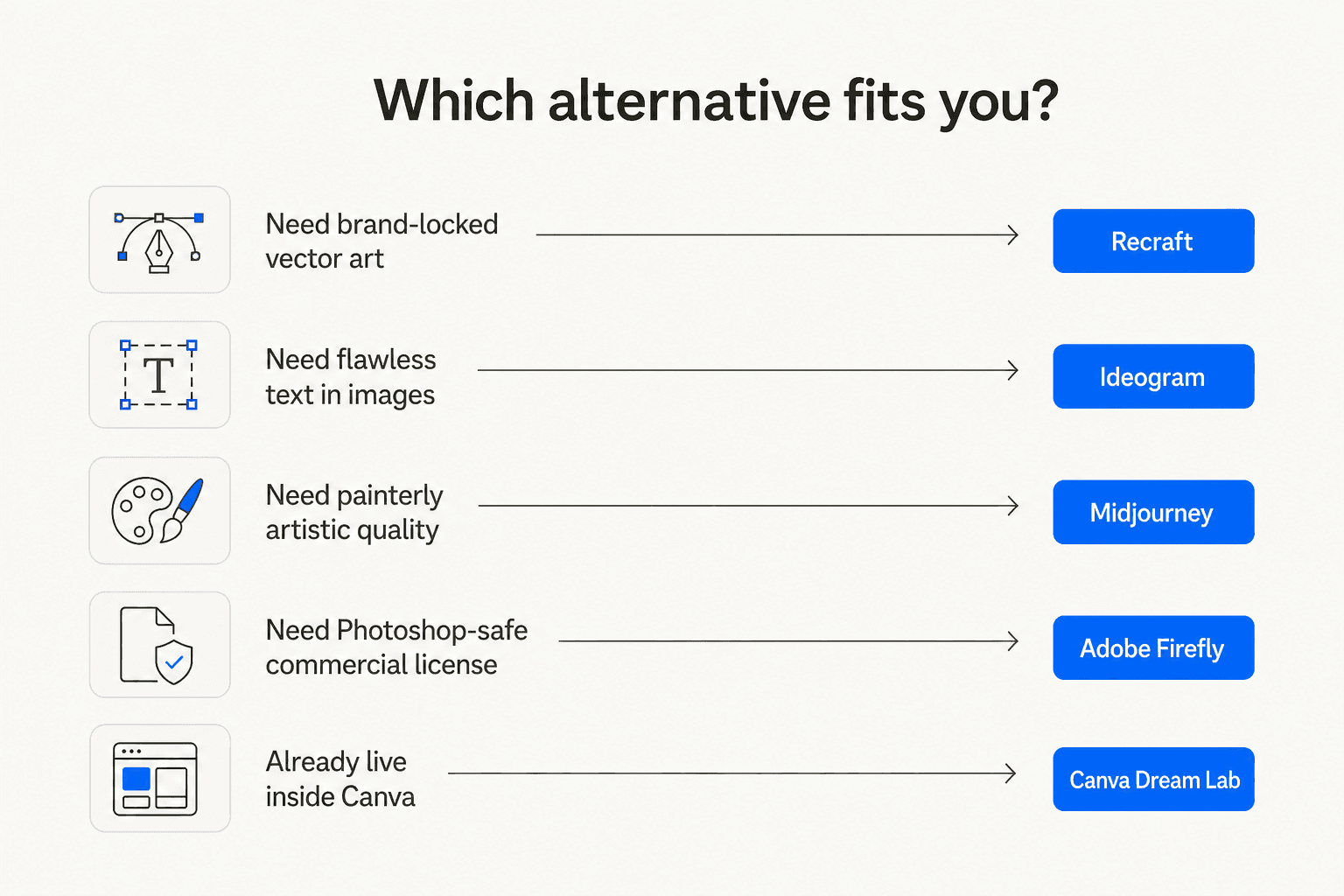
There isn't one correct answer here, and that's the actual takeaway. Nano Banana Pro and GPT Image 2 are the two to reach for if raw quality is the whole job. Midjourney still owns painterly, art-directed output outright, no free tier attached. Adobe Firefly is what legal signs off on for client work. Ideogram wins outright the moment text-in-image matters. Recraft is the only real option if you need editable vectors. Leonardo AI and Canva both trade some quality for convenience, one for a multi-model creative suite, the other for staying inside a tool you're probably already paying for.
Muse Image itself isn't a bad model, it's an interesting agentic architecture on a two-day-old launch. It's just not yet the best tool for any single job on this list, and until Meta publishes real pricing for it, that's unlikely to change soon.