FLUX 3 alternatives: 8 models you can actually buy today

Kurnia Kharisma

Katelin Teen
Last edited August 4, 2026

Anyone searching for FLUX 3 alternatives is asking a purchase question, not a quality question. FLUX 3 is real, and it is also not on sale. Eleven days after the launch, the Black Forest Labs pricing page still lists FLUX.2, FLUX Tools and FLUX.1 with no FLUX 3 row, and the model page hides behind a request form.
So I did the thing the launch post cannot do for you: I priced every credible rival on the exact clip Black Forest Labs benchmarked, ten seconds of 720p video with audio, using each vendor's own published rate card. The cheapest way to buy that clip today is $0.50, on Veo 3.1 Lite. The most expensive is $4.00, on Veo 3.1 Standard. FLUX 3 does not have a number at all.
The uncomfortable detail is in the vendor's own evals. FLUX 3's weakest published result is a 52% coin flip against Gemini Omni Flash. The model it barely edges out is the one whose audio-native tier starts at five cents a second. I write and ship AI at eesel, and my rule after three years of putting agents on live support queues is the same one I would apply here: a model you cannot price is a model you cannot plan around.
Why this is a purchase question
I spend my time on how search intent maps to a real buying decision, and "FLUX 3 alternatives" is one of the clearest examples I have seen this year. Nobody types it because they think FLUX 3 is bad. They type it because they read the announcement, went looking for the endpoint, and found a form.
Here is the launch ladder as Black Forest Labs described it, and where each rung actually stands.
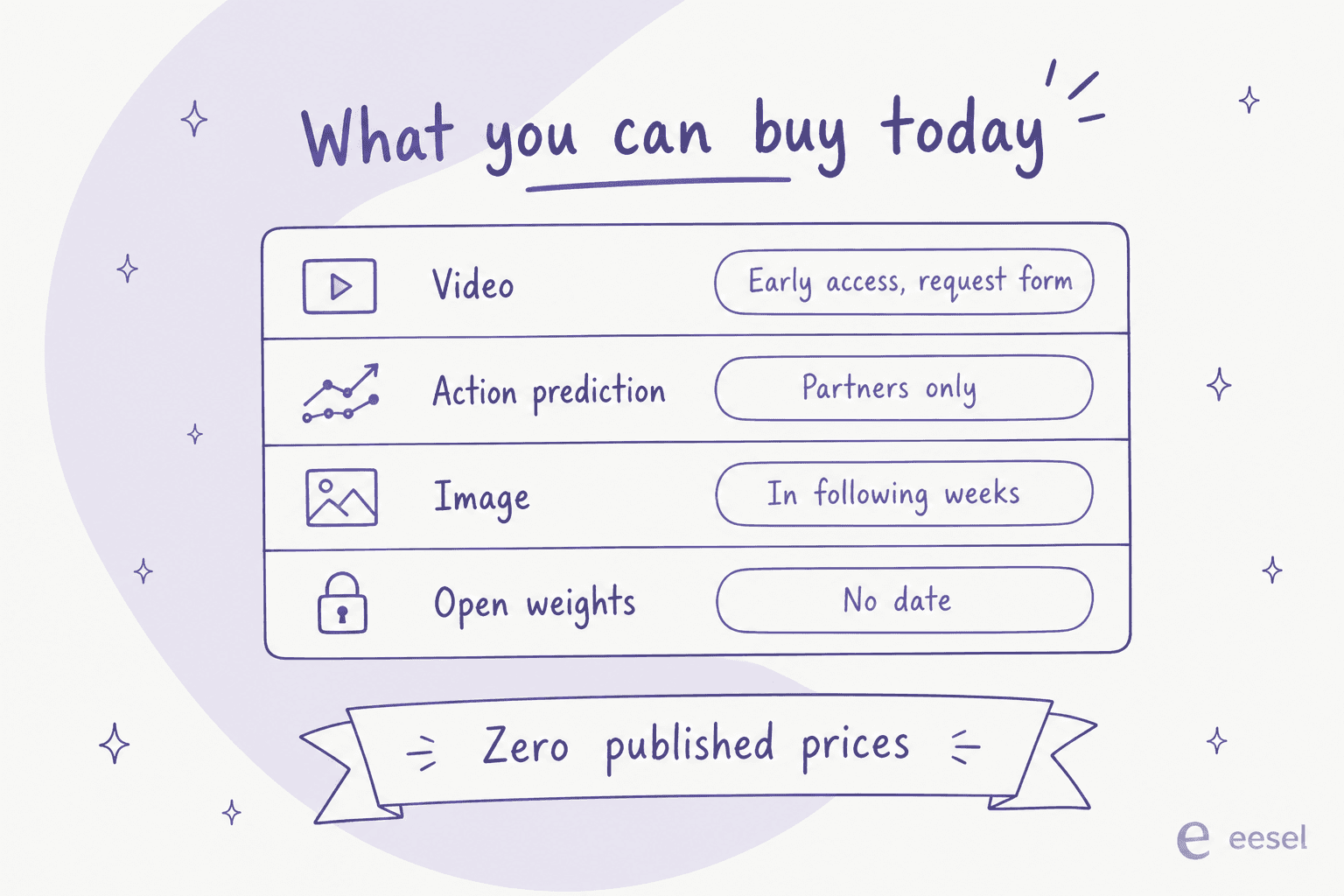
Four announced capabilities, zero published prices. Video is early access behind a request form. Action prediction is limited to selected partners. Image generation was described as arriving in the following weeks. The open-weight backbone has no date at all.
That is not a criticism of the research. It is a scheduling fact, and if you are shipping anything this quarter it decides the question for you. The same distinction shows up when teams evaluate custom AI models generally: the demo and the SKU are different artefacts, and only one of them has a launch date.
The short list, side by side
Every price below comes from the vendor's own rate card, checked on 4 August 2026. The video column is one ten-second 720p clip, because that is the spec in FLUX 3's published preference tests.
| Model | Best for | 10s @ 720p | Native audio | Image price | Max video res | Open weights | How you buy | Published price |
|---|---|---|---|---|---|---|---|---|
| Veo 3.1 Lite | Cheapest audio-native video | $0.50 | Yes | $0.067 (Nano Banana 2, 1K) | 1080p | No | Gemini API, pay as you go | Yes |
| Sora 2 | Batch volume | $1.00 ($0.50 batch) | Yes | $30/1M output tokens | 1080p (Pro) | No | OpenAI API | Yes |
| Luma Ray 3.2 | Keyframe control, HDR and EXR | $0.90 | Not stated | Uni-1.1, rate not listed | 1080p | No | Per-clip, no commitment | Yes |
| Kling 3.0 Omni | Video-input editing with audio | $1.12 | Yes | $0.0035/unit packs | 4K | No | Prepaid units, $700 floor | Yes |
| Grok Imagine 1.5 | Audio-driven video | $1.40 | Audio input | $0.02/img | 1080p | No | xAI API | Yes |
| Seedance 2.0 | Cinematic look, 4K | $1.50 | Not stated | Not applicable | 4K | No | BytePlus ModelArk | Yes |
| Runway Gen-4.5 | One API, many models | Credit-based | Model dependent | Gen-4 Image in credits | 1080p | No | Credit plans from $15/mo | Partly |
| FLUX.2 [pro] | Staying on Black Forest Labs | Images only | Not applicable | $0.03 first MP | Not applicable | Yes (dev, klein) | Pay as you go | Yes |
| FLUX 3 | Nothing yet | Not published | Yes | Not published | Not published | Announced, no date | Request form | No |
Two things jump out of that table. First, the entire field has a number except the model you came here about. Second, the spread between cheapest and most expensive audio-native video is eight-fold, which means the choice is a budget decision long before it is a taste decision.
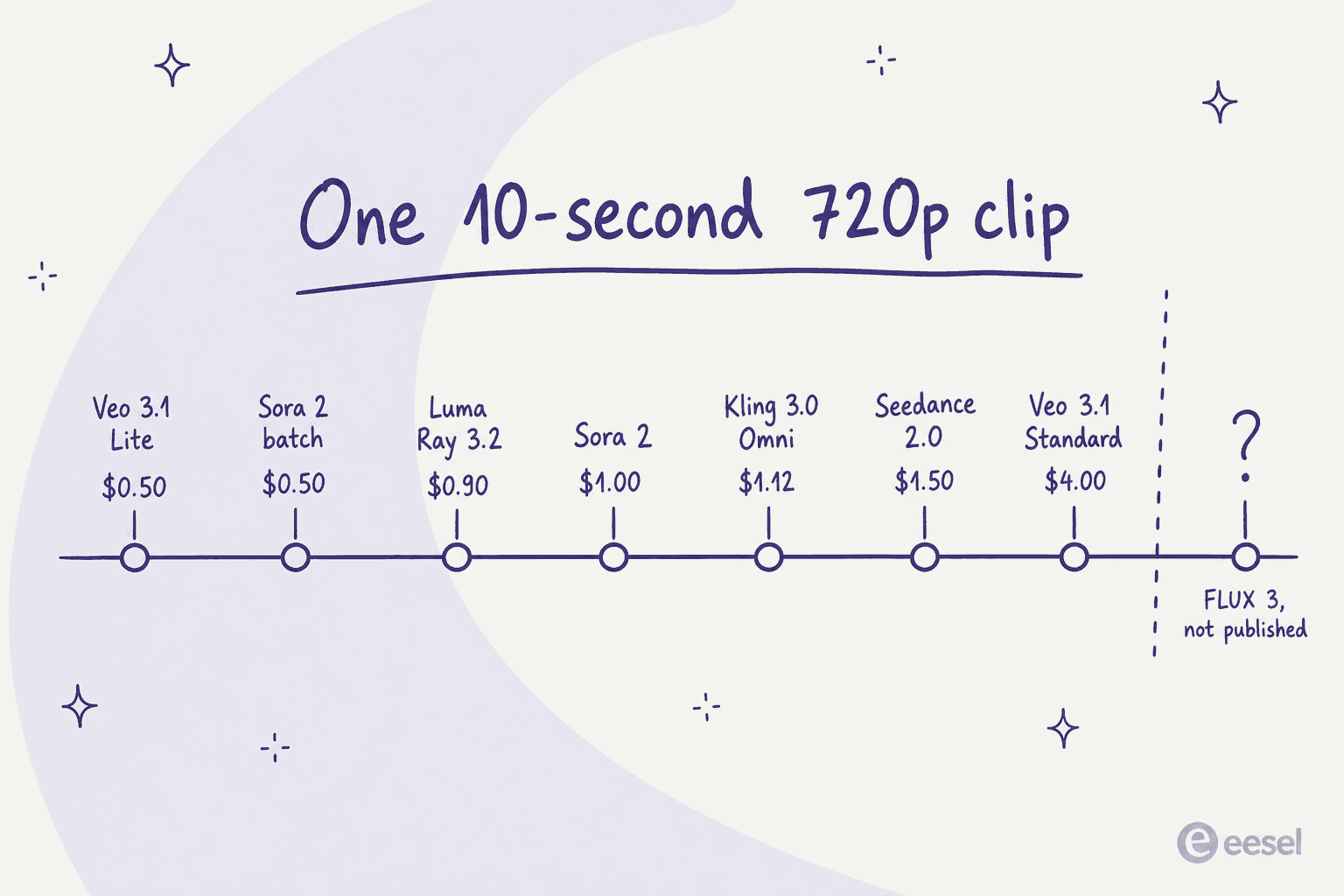
What one clip actually costs
Per-second rates are how vendors quote and per-clip totals are how finance reads it. Pick a spec and the real number appears.
Cost of one generated clip
Vendor list prices, checked 4 August 2026. Pick the spec you actually ship.
| Model | 5s at 720p | Audio |
|---|---|---|
| Veo 3.1 Lite | $0.25 | Native |
| Luma Ray 3.2 | $0.30 | Not stated |
| Sora 2 | $0.50 | Native |
| Veo 3.1 Fast | $0.50 | Native |
| Kling 3.0 Omni | $0.56 | Native |
| Grok Imagine 1.5 | $0.70 | Audio input |
| Seedance 2.0 | $0.76 | Not stated |
| Veo 3.1 Standard | $2.00 | Native |
| FLUX 3 Video | Not published | Native |
| Model | 10s at 720p | Audio |
|---|---|---|
| Veo 3.1 Lite | $0.50 | Native |
| Luma Ray 3.2 | $0.90 | Not stated |
| Sora 2 | $1.00 | Native |
| Veo 3.1 Fast | $1.00 | Native |
| Kling 3.0 Omni | $1.12 | Native |
| Grok Imagine 1.5 | $1.40 | Audio input |
| Seedance 2.0 | $1.50 | Not stated |
| Veo 3.1 Standard | $4.00 | Native |
| FLUX 3 Video | Not published | Native |
| Model | 5s at 1080p | Audio |
|---|---|---|
| Veo 3.1 Lite | $0.40 | Native |
| Veo 3.1 Fast | $0.60 | Native |
| Kling 3.0 Omni | $0.70 | Native |
| Luma Ray 3.2 | $1.20 | Not stated |
| Grok Imagine 1.5 | $1.25 | Audio input |
| Seedance 2.0 | $1.87 | Not stated |
| Veo 3.1 Standard | $2.00 | Native |
| Sora 2 Pro | $3.50 | Native |
| FLUX 3 Video | Not published | Native |
| Model | 10s at 1080p | Audio |
|---|---|---|
| Veo 3.1 Lite | $0.80 | Native |
| Veo 3.1 Fast | $1.20 | Native |
| Kling 3.0 Omni | $1.40 | Native |
| Grok Imagine 1.5 | $2.50 | Audio input |
| Luma Ray 3.2 | $3.60 | Not stated |
| Seedance 2.0 | $3.70 | Not stated |
| Veo 3.1 Standard | $4.00 | Native |
| Sora 2 Pro | $7.00 | Native |
| FLUX 3 Video | Not published | Native |
Luma Ray 3.2 figures are its own per-clip prices for SDR output, and HDR doubles them. Seedance 2.0 five-second figures are BytePlus's published examples; ten-second figures apply the same per-second rate. Sora 2 has no 1080p tier, so Sora 2 Pro stands in. Everything else is the vendor's per-second rate multiplied by duration.
Google Veo 3.1 and Nano Banana 2
Best for teams who want audio-native video at the lowest published rate.
This is the awkward one for FLUX 3, because Gemini Omni Flash is where the vendor's own preference test lands at 52%. A coin flip against the model family whose cheapest audio tier runs five cents a second is not a comfortable place to launch from.
The Veo 3.1 rate card has three tiers, all quoted per second and all with audio by default. Lite is $0.05 at 720p and $0.08 at 1080p. Fast is $0.10 and $0.12. Standard is $0.40 flat across both, and $0.60 at 4K.
The image side of the same API is priced per token and works out to $0.067 for a 1K Nano Banana 2 image. The Lite variant lands at $0.0336, and Nano Banana Pro at $0.134 for the same size.
Where it is limited. Veo 3.1 is a preview model, which Google says openly can change before it stabilises and comes with tighter rate limits. There is no free tier for any Veo generation. Grounding search is metered separately at $14 per 1,000 requests after the shared monthly allowance.
What it costs. $0.50 for the ten-second 720p clip on Lite, $4.00 on Standard. That eight-fold internal spread is the real decision inside the Veo family, not the decision between Veo and anything else.
Verdict. If price per usable second is your constraint, start here and stop reading. The Nano Banana 2 review goes deeper on the image half.
OpenAI Sora 2
Best for high volume work that can tolerate a queue.
Sora 2 is $0.10 per second at 720p, and this is the one place in the field where a batch discount is published: the same generation drops to $0.05 per second in batch mode, which ties Veo 3.1 Lite for the cheapest ten-second clip on the board. Sora 2 Pro adds resolution, at $0.30 per second for 720p, $0.50 for 1024p and $0.70 for 1080p.
Where it is limited. Standard Sora 2 tops out at 720p, so any 1080p work moves you to Pro and roughly triples the rate. Batch mode trades latency for the discount, which rules it out for anything interactive.
What it costs. $1.00 for the ten-second 720p clip standard, $0.50 batch, $7.00 on Pro at 1080p.
Verdict. The strongest per-dollar option for pipeline work where nothing is waiting on the render. Sora also has the widest tooling surface of the group, which is why so many of our Sora 2 integration pages exist.
Luma Ray 3.2 and Uni-1.1
Best for shots that need direction rather than one prompt.
Luma took the worst beating in the FLUX 3 evals, with 93% of raters preferring FLUX 3. It is also the only vendor here selling frame-level control as the headline: Multi-Keyframe sets up to 16 keyframes inside a single clip, video-to-video runs to 20 seconds, and the model ships native HDR generation plus 16-bit EXR export so output composites alongside live-action plates.
Where it is limited. Luma prices per clip rather than per second, and the curve is steep. A five-second 720p clip is $0.30, but ten seconds is $0.90, so the second half of the clip costs twice the first. HDR doubles the price and HDR with EXR triples it. Pay-as-you-go carries rate limits and no latency SLA, and the Uni-1.1 image rates are not on the public page at all.
What it costs. $0.30 for five seconds at 720p, $0.90 for ten. At 1080p that becomes $1.20 and $3.60.
Verdict. The best pick when you need to direct a shot rather than roll the dice on one, and the worst pick if your clips are long. Luma's pricing page has the full grid, and the Luma alternatives roundup covers the rest.
Kling 3.0 Omni
Best for editing existing video with audio in one pass.
Kling has already moved past the version Black Forest Labs benchmarked. The FLUX 3 table cites Kling v3 Pro at 60%, while the current API docs ship Kling 3.0, 3.0 Turbo and 3.0 Omni. Omni is the interesting one, because it prices video input as a first-class mode rather than an afterthought.
Where it is limited. This is the only vendor in the group with a real entry barrier. You buy prepaid unit packages, the smallest video pack is $700 for 5,000 units, and every pack carries a 180-day validity with no rollover and no extension. Concurrency is capped at 20 on the standard packs. There is no way to spend $5 to try it.
What it costs. One unit is $0.14 at list. Omni with native audio and no video input is 0.8 units per second at 720p, so $1.12 for ten seconds. Adding video input pushes it to 0.9 units per second. 4K is 3.0 units per second, or $0.42, across every mode.
Verdict. Strong model, awkward commercial shape for a first test. If the $700 floor is the blocker, Kling's pricing has the smaller image packs at $350, and the Kling reviews page covers how it holds up in practice.
Runway Gen-4.5 and Aleph 2.0
Best for one integration that reaches several models.
Runway lost its FLUX 3 head-to-head at 77%, and it answers that in the most practical way available: it resells the competition. The Runway API model list now serves gen4.5, aleph2, seedance2 in three sizes and gpt-image-2 from a single surface, and the credit plans include Nano Banana Pro images. One key, four labs.
Where it is limited. Runway is the only vendor here that does not publish a straight per-second API rate. Everything runs through credits, so you price by equivalence: the $15 plan is 625 credits, which Runway states is 52 seconds of Gen-4.5, and the $95 plan is 9,500 credits, or 791 seconds. Credits roll over one month on the mid plans and not at all on the entry plan. Seedance generations through Runway cap at 15 seconds.
What it costs. $15/month for 52 seconds of Gen-4.5, or $95/month for 791 seconds. The effective per-second rate improves by roughly 2.4 times between those two plans, which makes plan choice the single biggest cost lever.
Verdict. The pragmatic pick if you would rather integrate once than five times. Runway Gen-4.5 has the model detail, and Runway pricing breaks the credit maths down further.
Seedance 2.0 on BytePlus
Best for cinematic output and a published 4K path.
Seedance is the second 52% coin flip in the FLUX 3 evals, and it bills unlike anything else here. BytePlus prices by token, where token count is a function of duration, output dimensions and frame rate. The per-million rate then drops as resolution climbs, from $7.00 at 720p to $4.00 at 4K, which is the reverse of every other card in this post. The clip still costs more at 4K, because the token count grows faster than the rate falls.
Where it is limited. Token billing is the hardest to forecast of any vendor here. When the input includes video, minimum token consumption limits apply, so short edits can cost more than the formula suggests. BytePlus points you at a spreadsheet calculator rather than a rate table, and the actual charge only settles once the API returns its token count.
What it costs. BytePlus publishes worked examples, which is the honest way to read it: a five-second 720p clip is $0.76, or $0.15 per second. Fast is $0.60 and Mini is $0.38 at the same spec. At 1080p, five seconds is $1.87. Adding video input widens a ten-second 720p job to a $0.84 to $1.86 range depending on input length.
Verdict. Excellent look, real forecasting overhead. If you want Seedance without the token maths, Runway resells it on credits.
Grok Imagine 1.5
Best for driving video from audio you already have.
Grok Imagine lost its head-to-head at 69%, and it holds one capability nobody else in this table advertises: the xAI model card lists grok-imagine-video-1.5 as text, image and audio to video. Everyone else generates the audio. This one can take yours.
Where it is limited. It is the most expensive per-second 720p option here at $0.14, roughly triple Veo 3.1 Lite for the same resolution. Media input bills separately at $0.01 per image. There is no batch tier.
What it costs. $0.08 per second at 480p, $0.14 at 720p, $0.25 at 1080p. Images are the bargain of the lineup at $0.02, or $0.05 on the quality model.
Verdict. Worth the premium only if audio-driven generation is the point. Otherwise the Grok Imagine page covers where it fits, and $0.02 images are hard to beat.
FLUX.2, if you want to stay with Black Forest Labs
Best for shipping images on the same vendor while FLUX 3 clears the runway.
The FLUX.2 rate card is fully public and quotes per megapixel, where 1 MP is 1024x1024. [max] is $0.07 for the first megapixel and $0.03 for each additional. [pro] is $0.03 and $0.015. [klein] 9B is $0.015 and $0.002, and [klein] 4B is $0.014 and $0.001. [flex] bills $0.05 flat per megapixel with no per-image minimum. Reference images each count as a full megapixel, and anything over 4 MP gets resized down. The docs still describe FLUX.2 as the recommended family for all use cases.
Where it is limited. Images only, so it replaces one of FLUX 3's four announced capabilities and none of the video. On prompt adherence it also trails. One practitioner running a benchmark site put numbers on it:
"Flux.2 scored 5, Ideogram4 scored 8, and gpt-image-2 scored 12 out of 15."

What it costs. $0.03 for a single 1024x1024 image on [pro], or $0.014 on [klein] 4B, which is the cheapest image in this entire roundup.
Verdict. The right call if vendor continuity matters more than winning a prompt-adherence test. If it does not, compare against GPT Image 2 and Midjourney before you standardise, and check Midjourney pricing or Ideogram pricing for the subscription route.
What the open-weights crowd is actually saying
FLUX 3 Dev is the rung most people in the launch thread cared about, and it is the one with no date. That leaves the current open-weight shelf: FLUX.2 [dev] and [klein], plus the Qwen and Z-Image families. The licensing tiers that do exist cover [klein] and [dev] only, starting with a Builder plan capped at 10,000 images a month on one domain.
Two catches came up repeatedly from people running these locally. The first is distillation:
"dev variants are usually cfg distilled which means that directly finetuning isn't as effective."
The second is hardware and licence terms, from the same operator who published the score table above, on why the previous open release disappointed. Their two reasons were VRAM and speed against alternatives released at the same time, and a licence that felt overly restrictive.
It is not all scepticism. One commenter runs FLUX.2 dev locally on a single RTX 5090 with a prompt upsampler and reaches for it over proprietary models, which is the honest counterweight: a model you can run on your own hardware wins on axes a benchmark does not measure. If that is your lane, Qwen image editing is the closest live comparison, and training an AI model covers the fine-tuning side.
How to run the bake-off yourself
Here is the part I care most about, because it is the same mistake I watch buyers make with support AI. A vendor preference rate is measured on the vendor's prompts. "Up to 93%" and "52%" come from the same eval; the marketing quotes the first number and your renders will land nearer the second.
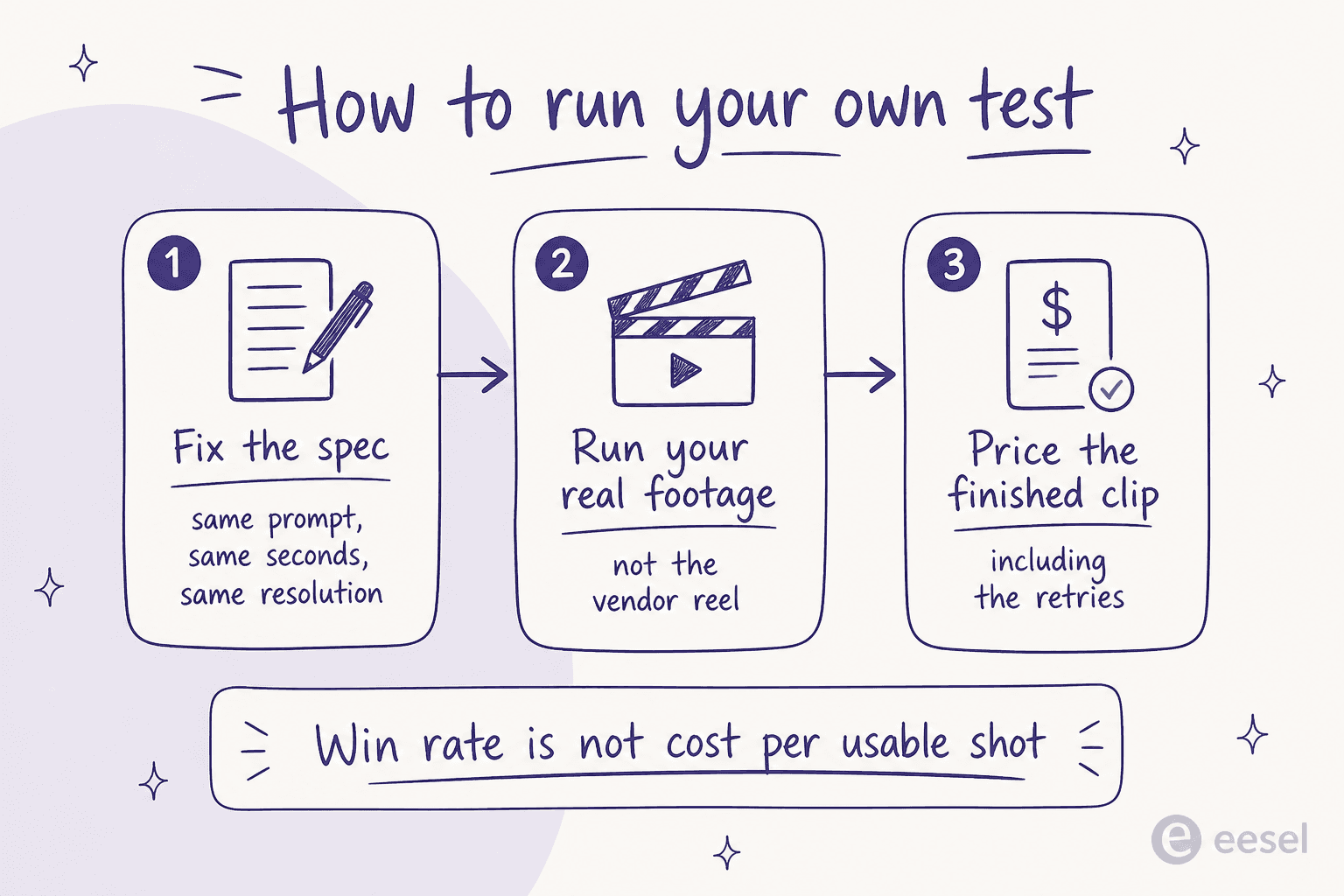
- Fix the spec before you touch an API. Same prompt, same duration, same resolution, same audio setting across every model. Half the comparisons I see online are a 5-second 720p clip judged against a 10-second 1080p one.
- Use your own footage and your own brief. Vendor reels are selected takes. Your brand's actual shot list is where models diverge.
- Price the finished clip, not the first one. If a cheap model needs four attempts and an expensive one needs one, the cheap model lost. This is the number that decides it.
I have watched this exact discipline decide a deal on our own side of the fence. One prospect ran a methodical 67-test evaluation of our AI. The knowledge answers came back solid and they visited billing three times, which is about as strong a buying signal as exists. Then they walked, because the chat widget was slow and got stuck. The thing that killed the deal was never on the feature comparison. No preference-rate table would have surfaced it, and no vendor demo would have either. Only their own 67 tests did.
That is the whole argument for doing your own bake-off, and it is why I would not pick a video model off the eval table in a launch post, mine included. The same logic runs through how we think about AI hallucinations and confidence thresholds: the failure you have not measured on your own data is the one that ships.
For the mechanism all of these share, diffusion models explained is the background read. The wider survey lives in best generative AI tools.
If your reason for generating clips is content rather than film, the practical entry point is AI blog automation, and AI video script generator covers the step before the render. What happens after it is adding video to blogs.
Try eesel
Picking a video model and picking a support AI turn out to be the same exercise: both look decided by a benchmark and are actually decided by what happens on your own data. That is the part eesel refuses to skip.
eesel replays a proposed AI agent over your real past tickets before it answers a single live customer, so you see the actual resolution rate, the actual gaps, and the actual cost per resolved ticket on your own volume rather than a vendor's demo set. It connects to the helpdesk you already run, learns from your history rather than a scripted scenario list, and shows you the number before you commit to it. Same reason the field above is ranked by published price and not by preference rate: numbers you can check beat numbers you are shown.

If you are already asking which model to pay for, that is the right instinct. Ask it of your support stack too, and start with the simulation rather than the switch. Try eesel free.
The same framing runs through generative AI for customer service and which LLM fits support. And for a launch that did publish its rate card on day one, DeepSeek V4 Flash pricing is the contrast case, next to GPT-5.6.