ChatGPT Images 2.5 pricing: every cost, plan, and API rate

eesel Team
Last edited September 9, 2026
ChatGPT Images 2.5 pricing has two completely separate answers, and mixing them up is the fastest way to over-budget. Inside the ChatGPT apps, it is free: image generation ships to every tier, including the free one, with no extra per-image charge. Your only limit is your plan's usage caps, which OpenAI has not published in numbers.
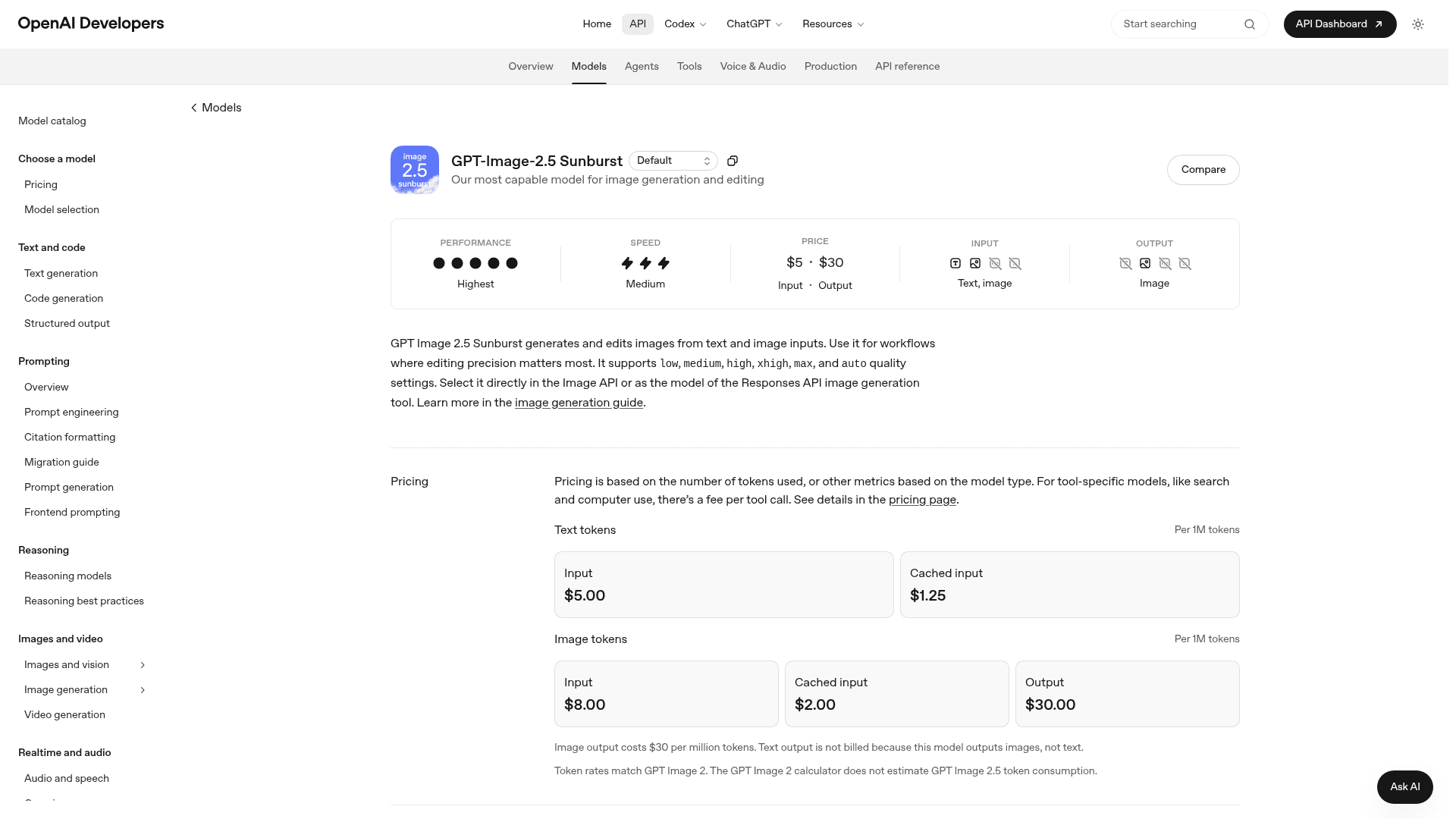
On the API it is usage-based, billed by tokens, not by the image. Both API models, gpt-image-2.5-flare and gpt-image-2.5-sunburst, cost exactly the same: text input $5.00 / 1M tokens, image input $8.00 / 1M, image output $30.00 / 1M, with cached input discounts. Text output is not billed because these models return images.
Because it is token-metered, a real image lands somewhere between under a cent and roughly 20 cents depending on size and quality. OpenAI has not shipped a 2.5 cost calculator yet, and it explicitly says 2.5 uses different token counts than GPT Image 2, so the numbers below are the closest published proxy, not gospel.
Every hero banner on this blog, including the one at the top of this post, is generated through OpenAI's image API. That means I am the person who actually reads the token line on the bill each month, not the marketing page. So when ChatGPT Images 2.5 shipped on September 8, my first question was not "how good are the renders" but "what does this do to the invoice." Here is the honest breakdown, split the way you will actually pay for it.
First, the split: app pricing vs API pricing
The single most common mistake I see with any OpenAI image model is treating "ChatGPT Images 2.5" as one price. It is two products.
- In the ChatGPT app (web, desktop, mobile), image generation is a feature of your subscription. You do not pay per image. You pay for ChatGPT pricing tiers, and images come included.
- In the API (
v1/images/generationsandv1/images/edits), you pay OpenAI directly for the tokens each request burns, with no subscription in between.
If you are a marketer generating a few campaign visuals a week, the app is your world and the answer is "it's already paid for." If you are a developer wiring image generation into a product, the API is your world and every request has a metered cost. The two sections below treat them separately.
ChatGPT Images 2.5 pricing inside the app (free, with caps)
The good news is short. Image generation with 2.5 is available on every ChatGPT tier, including free, across desktop, mobile, and web. The new creation tools that came with it, Sketch (draw a rough reference), Templates (flyers and product photos), image comments, and shareable prompts, are not gated behind a higher plan either.
There is no per-image fee inside the app. What varies by plan is how many images you can generate before you hit a cap, and OpenAI has not disclosed those caps in specific numbers. Practically:
- Free tier: works, but you will hit a rolling limit and wait for it to reset.
- Plus / Go / Business / Enterprise: far higher ceilings, priority during peak load, and the room to actually lean on it for real work. For team-level needs, the ChatGPT Enterprise plan is where the "no realistic limit" experience lives.
So the app-pricing answer is: your image cost is whatever you already pay for ChatGPT, and the practical question is not dollars per image but "will my plan's caps get in the way." For casual and even moderate use, they usually won't.
ChatGPT Images 2.5 API pricing (the token rates)
This is where the real budgeting happens. The image edit API and the generation endpoint both bill by tokens, and the rates are identical for both 2.5 models. Here is the full card, straight from OpenAI's model docs.
| Token type | Rate per 1M tokens | Cached rate | Billed? |
|---|---|---|---|
| Text input | $5.00 | $1.25 | Yes |
| Image input | $8.00 | $2.00 | Yes |
| Image output | $30.00 | — | Yes |
| Text output | — | — | No (model outputs images) |
Three things worth pulling out of that table:
- Image output at $30 / 1M is the line that dominates your bill. Every pixel you generate is priced here, and it is the biggest number. Everything else is rounding error unless you are sending large reference images.
- Input has a cache discount. Cached input drops text to $1.25 and image to $2.00 per million. If you send the same system prompt or the same reference image repeatedly, that adds up in your favor.
- Text output is free. You are never billed for text tokens coming back, because the model returns an image, not prose.
One important honesty note: these rates match GPT Image 2 exactly, so 2.5 is not a price increase. But OpenAI states plainly that 2.5 consumes a different number of tokens per image than GPT Image 2, and that the GPT Image 2 calculator does not estimate 2.5. So identical rates do not automatically mean identical cost per image. Keep that in mind for the estimates next.
What that actually costs per image
Nobody budgets in "dollars per million tokens." You want dollars per image. Since OpenAI has not published a 2.5 calculator, the closest published anchor is GPT Image 2, which shares 2.5's exact token rates. These are OpenAI's own per-image estimates for GPT Image 2, and 2.5 will land in the same neighborhood, likely a little higher at the top quality tiers where it spends more tokens on detail.
| Quality | 1024x1024 (square) | 1024x1536 (portrait) | 1536x1024 (landscape) |
|---|---|---|---|
| Low | ~$0.006 | ~$0.005 | ~$0.005 |
| Medium | ~$0.053 | ~$0.041 | ~$0.041 |
| High | ~$0.211 | ~$0.165 | ~$0.165 |
Figures are OpenAI's published GPT Image 2 estimates, used here as the closest proxy for 2.5. Treat them as a planning range, not an invoice.
The shape is what matters. A low-quality square image is well under a penny; a high-quality one is around 20 cents. xhigh, max, and auto settings on Sunburst can push past the High row, since they spend more output tokens on fidelity. Multiply by your monthly volume and the picture gets clear fast, which is exactly what the calculator below is for.
Flare vs Sunburst: same price, different jobs
Here is the part that trips people up: ChatGPT Images 2.5 ships as two API models at the same price, so the choice is about the job, not the budget.
gpt-image-2.5-flareis the default. It is built for fast, high-volume, everyday generation, and OpenAI positions it as higher quality than the previous GPT Image generation while running at up to 50% lower latency. This is what most apps should reach for.gpt-image-2.5-sunburstis the precision model, with the dated snapshotgpt-image-2.5-sunburst-2026-09-08. It is slower but stronger at targeted editing and campaign-grade creative, and it exposes the full quality ladder:low,medium,high,xhigh,max, andauto, plus inpainting.
Since the token rates are identical, picking Sunburst does not cost more per token than Flare. It can still cost more per image, because higher quality settings spend more output tokens. So the practical rule is: use Flare by default, switch to Sunburst when you specifically need editing precision or top-tier fidelity, and set the quality knob deliberately rather than defaulting to high on everything.
How ChatGPT Images 2.5 pricing compares
To put the rates in context, here is where 2.5 sits against OpenAI's other current image options and the usual outside comparison. Prices are per square image where a per-image figure is meaningful.
| Model | Pricing model | Low (sq) | Medium (sq) | High (sq) | Notes |
|---|---|---|---|---|---|
| ChatGPT Images 2.5 (Flare / Sunburst) | Tokens ($30/1M out) | ~$0.006 | ~$0.053 | ~$0.211 | Proxy figures; 2.5 calculator not yet published |
| GPT Image 2 | Tokens ($30/1M out) | $0.006 | $0.053 | $0.211 | Same token rates as 2.5 |
| GPT Image 1.5 | Tokens | $0.009 | $0.034 | $0.133 | Older generation |
| GPT Image 1 Mini | Tokens | $0.005 | $0.011 | $0.036 | Cheapest, lightest quality |
| Midjourney | Subscription | — | — | — | From ~$10/mo, no per-image API rate |
| Gemini image models | Tokens | varies | varies | varies | See Google's own Gemini rates |
Two honest takeaways. First, if raw per-image cost is your only concern and quality demands are modest, GPT Image 1 Mini is materially cheaper at the medium and high tiers, and it is a legitimate choice for high-volume, low-stakes assets. Second, Midjourney plays a different game entirely: a flat subscription with generous generation rather than metered API tokens, which is better for individual creators and worse for embedding into a product at scale. There is no single "cheapest," only cheapest for your volume and quality mix.
Cutting the API bill
If you are running 2.5 through the OpenAI API at volume, a few levers move the number more than switching models does:
- Don't default everything to
high. The jump from Medium to High is roughly 4x the output tokens. Reserve top quality for the assets that are actually seen at full size. - Use cached input. Repeated system prompts and repeated reference images bill at the cached rate ($1.25 text, $2.00 image per 1M), a real discount on any pipeline that reuses context.
- Batch where latency allows. For non-interactive generation, the Batch API discounts qualifying jobs, which stacks with the points above.
- Right-size the model. Flare for volume, Sunburst only when precision earns its cost, and GPT Image 1 Mini for throwaway assets.
Where this fits if you generate content, not just images
Most people reading a pricing page for an image model are not building an image product, they are trying to produce marketing assets, blog visuals, or product shots without babysitting a token meter. That is the gap I live in.
I run eesel, and one of eesel's ready-to-work teammates is an AI blog writer. It is not a wrapper around an image model. It is a teammate you hire for a defined job: it researches a keyword, drafts the post, and generates the hero banner and infographics for that post, using image models like ChatGPT Images 2.5 under the hood. The token math, the quality-tier choices, the retries when a render comes out wrong, all of that happens for you, and it shows up as finished work rather than a line on your OpenAI bill.
Because the whole thing is agent-friendly, you are not stuck clicking through a dashboard either. eesel ships a real CLI (@eesel/cli) and an MCP server, so the same blog-writer teammate can be driven from your terminal, wired into a script, or handed to a coding agent like Claude Code or Cursor. npx @eesel/cli gets you a workspace with no account, and every command prints JSON with a --dry-run flag that shows the exact call before anything runs. If your image generation lives inside a larger content pipeline, that matters more than the per-image rate.

The pitch is simple: the cheapest image token is the one you never have to think about. If you want image generation as an outcome instead of an API you operate, that is the difference between the raw model and a teammate. Try eesel free, no credit card.
Frequently asked questions
How much does ChatGPT Images 2.5 cost?
There are two answers. Inside the ChatGPT app it is free on every tier, including the free plan, with usage caps that OpenAI has not published. On the API it is token-based: text input $5.00/1M, image input $8.00/1M, and image output $30.00/1M, identical for both the Flare and Sunburst models. See the full ChatGPT Images 2.5 overview for the feature side.
What is the ChatGPT Images 2.5 API price per image?
OpenAI has not published a 2.5 per-image calculator yet, and it says 2.5 uses different token counts than GPT Image 2. Using GPT Image 2 as the closest proxy (same token rates), a square image runs roughly $0.006 at Low, $0.053 at Medium, and $0.211 at High quality, before input tokens. Treat those as a planning range.
Is ChatGPT Images 2.5 more expensive than GPT Image 2?
No. The token rates are identical to GPT Image 2, so 2.5 is not a price increase. Cost per image can differ slightly because 2.5 spends a different number of tokens per image, but the rate card is the same.
Do Flare and Sunburst cost different amounts?
They share the exact same token rates, so neither is more expensive per token. In practice Sunburst can cost more per image because it is used at higher quality settings, which spend more output tokens. Pick Flare for volume and Sunburst for editing precision.
Is image generation free in the ChatGPT app?
Yes. Image generation with 2.5, plus the new Sketch, Templates, comments, and shareable-prompt tools, ships to all ChatGPT tiers including free, with no per-image charge. Your only constraint is your plan's usage caps. Higher ChatGPT pricing tiers raise those caps substantially.
How can I reduce my ChatGPT Images 2.5 API bill?
The output-token line dominates, so avoid defaulting everything to High quality, use cached input for repeated prompts and reference images, run non-interactive jobs through the Batch API for a discount, and reach for GPT Image 1 Mini on low-stakes assets. Model choice matters less than quality-tier discipline.
What is the cheapest OpenAI image model?
For raw per-image cost, GPT Image 1 Mini is the cheapest of the current lineup, especially at Medium and High. ChatGPT Images 2.5 costs more but delivers stronger fidelity and editing. The right pick depends on your quality bar and volume, not price alone.
Can I generate blog images without managing the API myself?
Yes. eesel's AI blog writer generates a post's hero banner and infographics as part of drafting the post, handling the image-model calls and token math for you. You get finished visuals instead of an API to operate, and it runs from the dashboard, the terminal, or a coding agent.