
Why "Instinct for work" is a tricky search
I build integrations at eesel, so when someone asks whether an agent "works for work," my first move is to read what it actually connects to and what the license says. With Instinct, those two answers point the same way, and it's not the way most people searching this hope.
Instinct is a personal AI assistant you text, from Spear Street Technology, founded by Noah Shinn. It's invite-only, you sign in with a phone number, and its homepage says it "connects to your applications and devices - email, messaging, screen, audio, location, and more."
The demand is real. People see what it does with flights and refunds and wonder if it can do the same with their inbox at the office. One LinkedIn reviewer, Jake Finkelstein, put the appeal well:
"What I think Instinct gets right from a productivity standpoint is that it seems much more willing than most assistants to keep working toward the goal instead of constantly stopping and asking what to do next. That's either a great feature or a terrifying one."

At eesel I've spent years putting AI on live company queues, and the "terrifying" half of that sentence is the half I'd plan around. An agent that keeps going without asking is great for booking a dentist. It's a different story with a client's contract in reach.
What Instinct's terms say about work
I checked Instinct's Terms of Service again on October 7, 2026. They're still the version last revised August 26, 2026. Four clauses decide how far it goes at work.
| Clause | What it says | What it means at work |
|---|---|---|
| Personal use | "We hereby permit you to use the Services for your personal use only" | No license for your job's accounts, even if the agent offers |
| Acting as you | Instinct is appointed "as your agent," and commitments it makes "shall be binding on you as if entered into directly by you" | Anything it agrees to on a work site is your agreement |
| Responsibility | You are responsible for "all consequences, whether financial, contractual, legal, reputational, or otherwise" | A mistake with a client lands on you, not Instinct |
| Liability cap | The greater of $100 or what you paid in the past six months | No real backstop if work data goes somewhere it shouldn't |
There's a wrinkle. The terms also say that if you use the service "on behalf of a company or other entity," then "you" includes that entity. That covers someone using it for a company anyway. It doesn't grant a business license, and there's no business plan to buy; instinct.com/business is a 404.
The privacy policy adds two practical limits. The only connectors it names are Google's: Calendar, Gmail, Drive, Docs, Sheets, Slides and Tasks. And model training is on by default until you opt out in settings, going forward only.
The agent itself doesn't always respect the line. Brad Groux published an email he sent to the company saying the agent "told me I could connect Microsoft 365 work accounts," and only acknowledged the conflict after he pointed out the personal-use clause (Brad Groux, X). Read the terms yourself. Don't ask the agent.
Where Instinct helps your working life
Here's the reframe that makes Instinct useful to a busy professional. The best "work" use is clearing the personal admin that leaks into work hours, on your own accounts, so you're not booking a car service in a meeting.
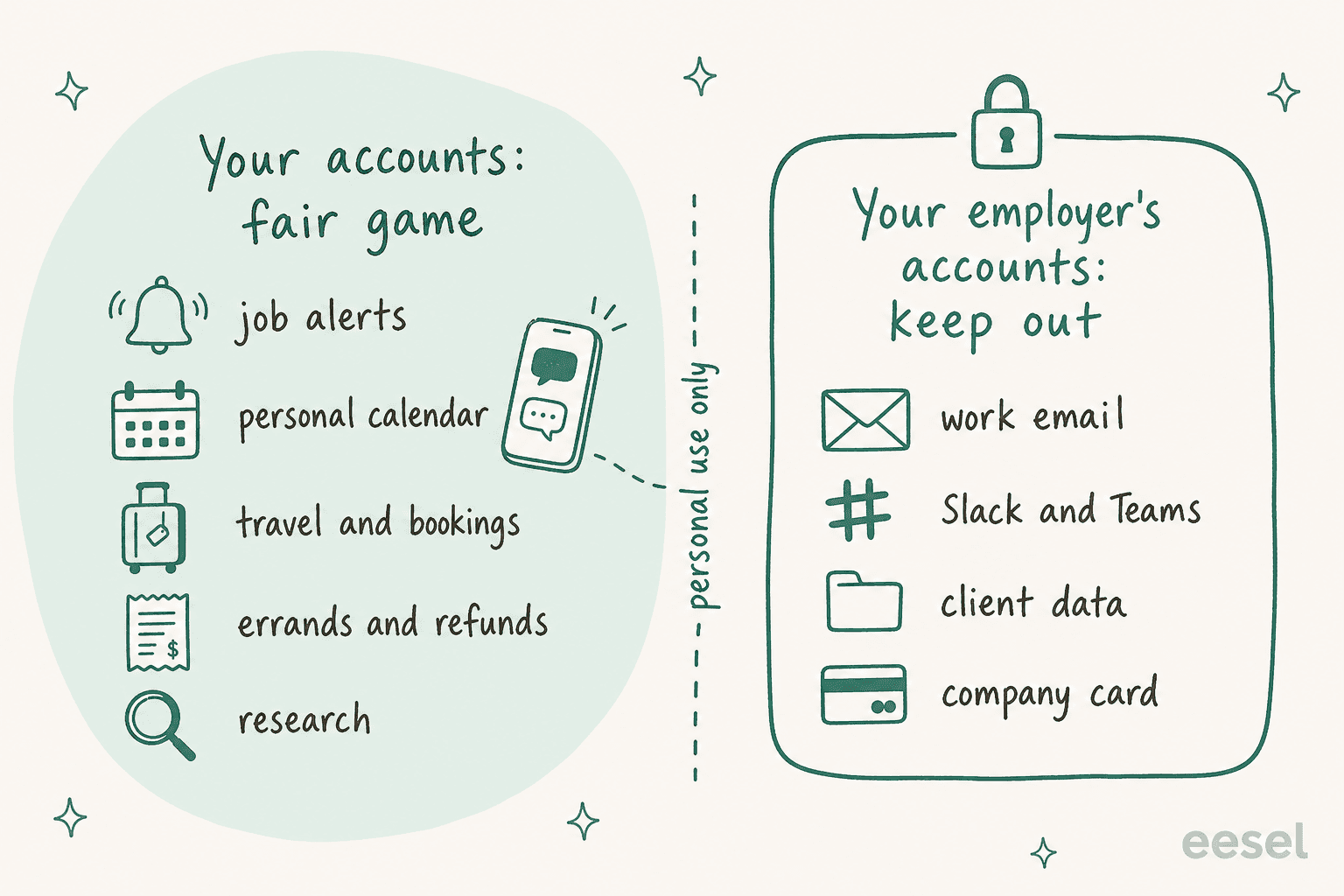
These are the jobs I'd hand it, each grounded in what real users report.
Your own calendar. A Reddit user praised it for flagging "travel time in between two meetings that I hadn't thought of for next week" plus a drafted reply they'd forgotten (u/pswfreathy, Reddit). That works when the meetings sit on a personal Google Calendar, which is the only kind its privacy policy names. If your work calendar is the one that matters, a dedicated AI scheduling assistant that your company approves is the better route.
Job hunting. This is the most "work" thing Instinct does that's still personal. One user has it send a morning list of roles:
"It finds relevant full-time CS roles and emails me a list every morning at 8 AM"

Travel and bookings. Founder Noah Shinn's Concierge launch on September 16 added phone calls for "high-touch cases," like getting on a cancellation list. Business travel booked on your personal card falls here, with the caveat that anything Instinct confirms is binding on you.
Errands with a paper trail. Since September 8, every Instinct has its own email address, so it can contact a store or a service from mail.instinct.com instead of your inbox. I covered that split in detail in Instinct AI for email management.
Long research errands. The strongest user praise is follow-through over days. One Reddit user, comparing it to Siri, called out "work that spans days," "research with receipts" and "spending my money only after I tap approve" (u/worsterer, Reddit). For research on public information, like comparing insurance plans or a conference shortlist, that's real value. For research on your company's internal docs, it's the wrong tool.
JD Davenport, who runs a stack of agents on executive assistant work, framed the split well on LinkedIn:
"Opus can do that work. Opus also asks me 4 clarifying questions first and declines half of them. That is the right posture for a system holding my client data. It is the wrong posture for canceling a subscription."
That's the most useful sentence I found on this topic. Instinct's eagerness is the right posture for consumer chores and the wrong one for anything holding client data.
Where it stops at work
Even ignoring the license, five practical limits keep it out of your real job.
No Microsoft, no Slack, no work tools. The connectors named in the privacy policy are Google consumer services. There's no documented Microsoft 365, Outlook, Slack, Teams, Jira or CRM connector. If your work lives there, look at Microsoft Copilot or Slack AI instead.
Speed. One UK user asked it to reword two calendar entries and waited "4 hours and 13 minutes before it came back to me" (u/pswfreathy, Reddit). For a personal errand that's annoying. For a deadline, it's a blocker.
Permissions are written in plain English. Emma Burrows, who works on agent permissions, made a sharp point about Instinct's trust settings:
"So if I say something like "allow my friend Bob to access my calendar", I intuitively assume I'm granting a hard permission: Bob can access my calendar, and nothing else. In fact, what's potentially happening underneath is probabilistic."
That matters more once colleagues are involved. The Trusted Person network, which lets Instincts coordinate with each other, lists "Colleagues and trusted professional relationships" as a category. Coordinating a lunch with a coworker is fine. Letting two agents swap anything from a work calendar is a permission you can't audit.
Group chats are built for friends. The October 5 group chat launch is aimed at trips, carpools and Thanksgiving. The group's Instinct "has no direct access to your personal accounts," which is good design, but everything posted in the thread goes to it. Keep work threads out.
It acts without asking. Kanishk, an early user on X, said it "started establishing sessions across apps and websites i use, on its own" and asked for a way "to step in before it does something i wouldn't have" (@kanishkrazdan, X). At work, that's the property you most need to control, and it's why the best AI agents for company work ship with approvals and logs.
What IT and security teams should check
If you run IT, assume someone on your team already uses Instinct. The question is which path work data takes to reach it.
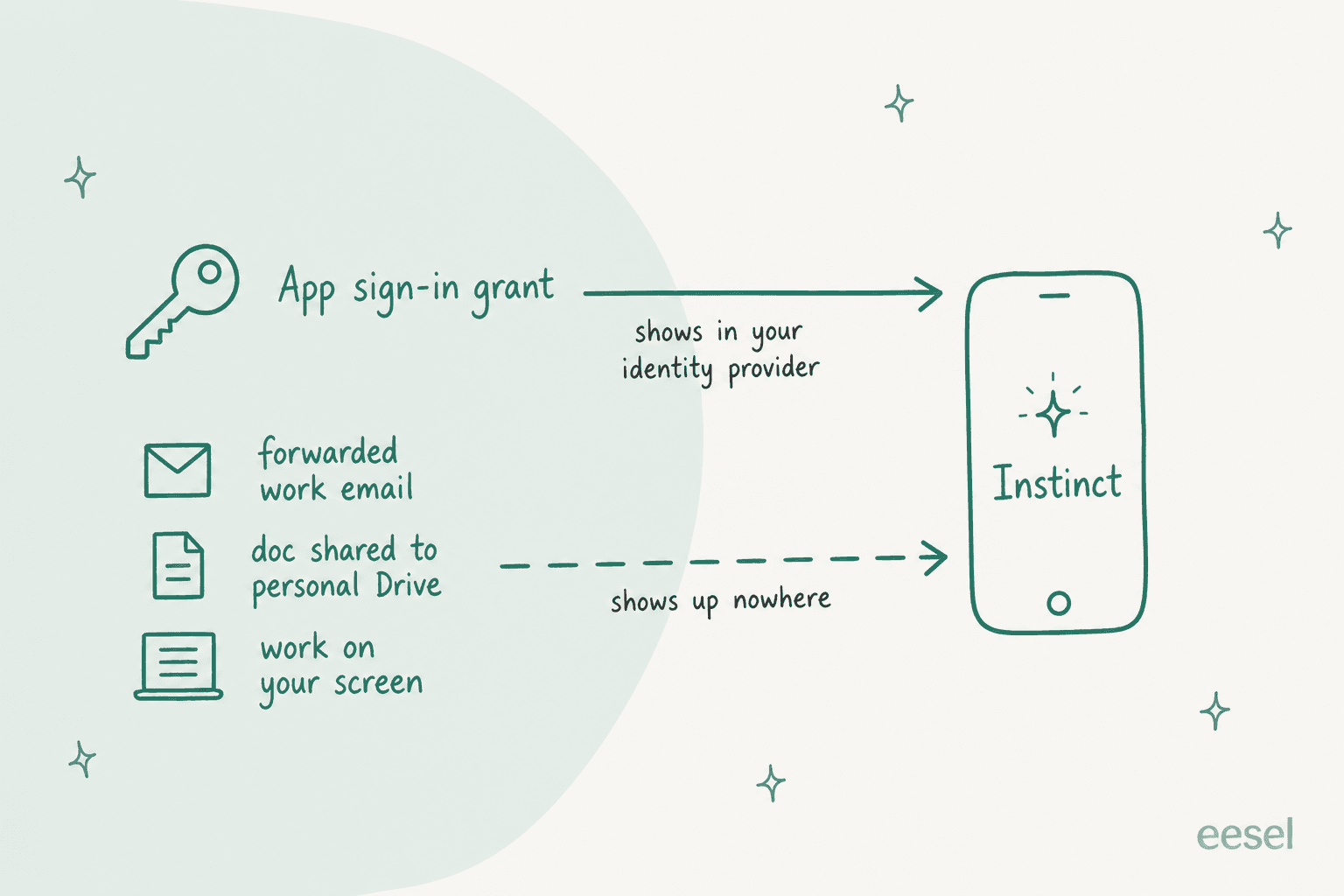
Tomer Roizman laid out the problem plainly on LinkedIn:
"So the same sensitive data can reach the same AI through two completely different paths: through a governed API integration, or simply because it appeared on screen."
His practical advice: "Search your identity provider's third-party app grants for Instinct." He also notes Instinct publishes "no DPA, no sub-processor list, no retention schedule and no trust page," which matches what I found: instinct.com/security is a 404 too.
Here's the short checklist I'd run:
- Search app grants. Look for Instinct in Google Workspace or your identity provider's third-party app list on managed accounts. A hit means someone connected a work account against Instinct's own terms.
- Watch forwarding. Auto-forward rules from work mail to personal Gmail are the quiet path. Your mail admin console can flag them.
- Remind people of the terms, not a ban. "Its own license says personal use only" lands better than a policy memo.
- Explain disconnect vs delete. The privacy policy says disconnecting an integration "does not automatically delete data collected from that integration." Data has to be deleted separately in Instinct's workspace settings.
- Offer the sanctioned version. People reach for Instinct because a job annoys them. Find out which job, and give them a tool with a business contract for it.
That last step matters most. On an eesel sales call this year, a technical evaluator at a hardware company asked whether eesel's AI would fall back on some other ChatGPT-style model when it didn't know an answer, and whether their knowledge stayed closed to their organization. That's the question every company tool has to answer. A personal agent never has to.
Personal agent vs an AI teammate for the team
It helps to see these as two different seats, not two versions of the same thing.
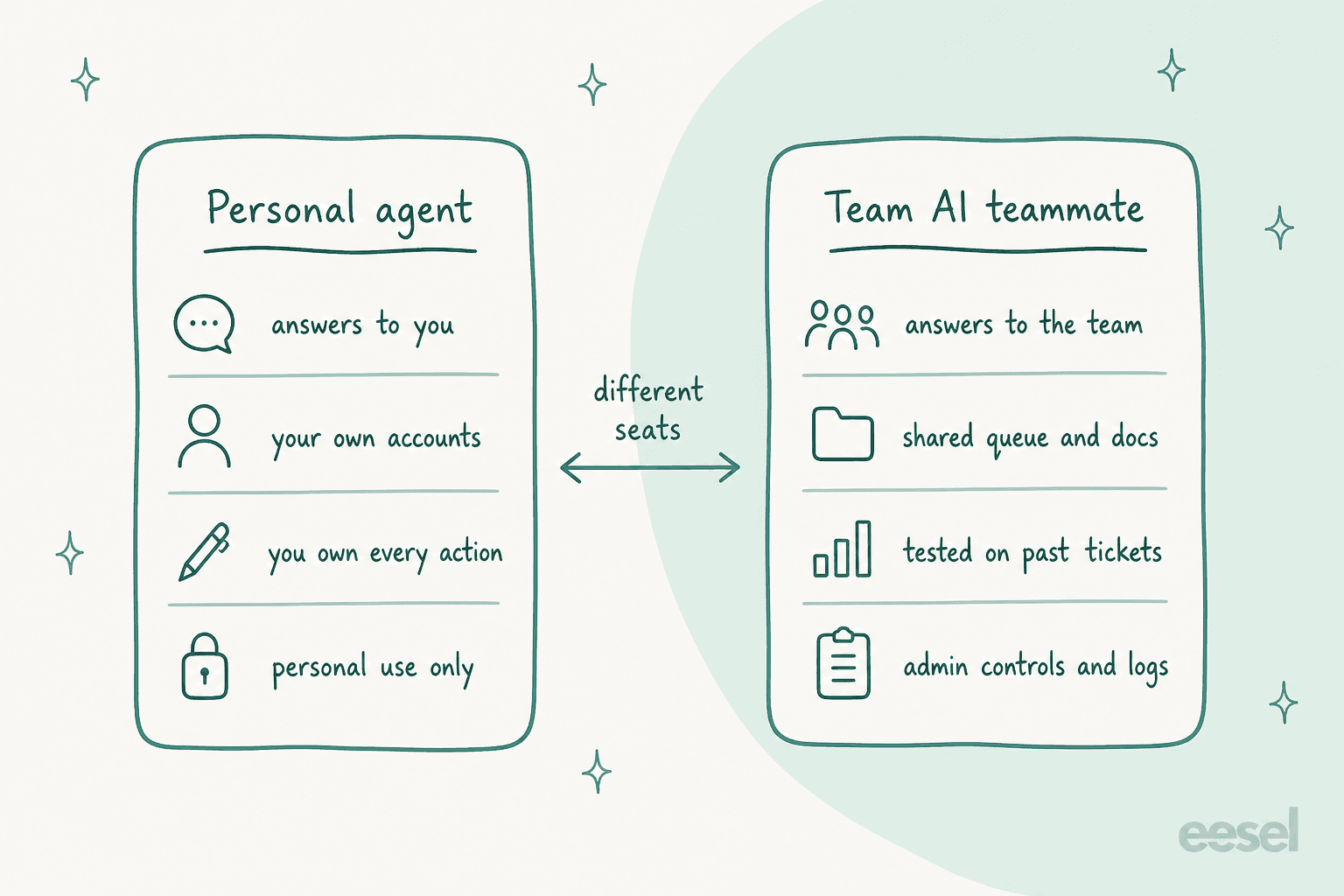
A personal agent answers to one person. It's good when the person is the only stakeholder. A team job, like email support or publishing the company blog, has shared rules, shared data and someone who needs to review the work.
If you want a general-purpose agent that can touch work data, pick one with a business plan. My OpenAI Dots for work guide covers the Business seat route, and the best AI personal assistants roundup covers others.
If you're comparing personal agents directly, Instinct vs Grok Bot and Instinct vs Hermes Agent go head to head.
For a defined team job, that's what eesel is built for. eesel is an AI teammate platform: you hire a ready-to-work teammate for one job, and it arrives with the skills, integrations and company context for that role. Today there are two:
- The AI helpdesk teammate joins your existing support queue in Zendesk, Freshdesk, Gorgias or Gmail, learns from your past tickets and help center, and answers customers or drafts for your agents.
- The AI blog writer researches, writes and illustrates posts for your company blog, in your voice.
The difference from Instinct is the testing step. I've watched confident AI give wrong answers on real support queues, which is why eesel runs against your historical tickets first, and you see how it would have replied before it answers anyone. If customers are already sending you messages from their own Instinct agents, the guide on Instinct AI for customer support covers that side.
Try eesel for the work Instinct shouldn't touch
Let Instinct handle your flights, refunds and job alerts. For the jobs that belong to your company, like the support queue or the blog, eesel gives you an AI teammate that plugs into your existing tools in minutes, learns from your own docs and past work, and gets tested on last month's tickets before it goes live. Try eesel free, or browse the best AI teammates roundup first.

Frequently Asked Questions
Can I use Instinct AI for work?
Can Instinct AI connect to Microsoft 365 or Outlook?
Does Instinct AI have a business or team plan?
Is it safe to use Instinct AI with work data?
What work-adjacent tasks is Instinct AI good at?
Can I add Instinct AI to a work group chat?
What should IT teams do about employees using Instinct AI?
What are the best Instinct AI alternatives for work?


Article by
Rama Adi
Rama is a software engineer at eesel AI with two years of experience writing about B2B SaaS, AI tools, and customer support technology. Based in Bali, Indonesia, he brings a developer's perspective to product comparisons — cutting through marketing copy to what the integrations and APIs actually do.