
What operations work actually looks like
I work the support queue at eesel every day, and a surprising amount of that job isn't answering questions. It's operations: chasing a refund that's stuck with a payment provider, checking whether a renewal went through, nudging someone who promised a reply on Tuesday. The work isn't hard. It's just endless, and most of it lives on hold lines and in web forms that will never have an API.
That's the exact gap Instinct aims at. It's an invite-only personal AI assistant from Spear Street Technology, founded by Noah Shinn. Its homepage examples read like an operations to-do list: "dispute an unwarranted bill," "order groceries," "schedule doctor's appointments."
JD Davenport, who runs a stack of AI agents for executive-assistant work, put the case better than any marketing page:
"There is a class of work my 28 agents (doing EA work) were doing badly and expensively. Sitting on hold. Logging into a consumer account. Filling the form on a site that will never ship an API. Clicking the button. Opus can do that work. Opus also asks me 4 clarifying questions first and declines half of them. That is the right posture for a system holding my client data. It is the wrong posture for canceling a subscription."

That last line is the whole post in miniature. The willingness to just act is what makes Instinct great at personal ops, and it's the same trait that makes it a risky fit for a company's.
The ops toolkit Instinct ships with
Instinct isn't an app with an ops module. It's a set of abilities the founder has launched one by one on X since the August 26 public launch. Here's what each one means for operations work.
| Ops job | What Instinct uses | Source |
|---|---|---|
| Calling a business, getting on a waitlist, sorting a bill | Instinct Concierge, "making phone calls, high-end service booking, and more" (still rolling out) | Sep 16 launch |
| Logging into accounts and portals | The Vault, now with 1Password; "32% of Instinct users" share credentials through it | Sep 4 launch |
| Getting past two-factor prompts | Authenticator (TOTP) codes | Sep 11 launch |
| Paying for things | Stripe Link one-time cards; buyers spend "over $1300/month on average through Instinct" | Aug 28 launch |
| Emailing vendors and receiving confirmations | Its own address on mail.instinct.com | Sep 8 launch |
| Coordinating with a partner's or colleague's agent | The Trusted Person network, "over 300k+" coordinations in its first week | Sep 23 update |
| Reading your inbox, calendar and spreadsheets | Google Workspace: Calendar, Gmail, Drive, Docs, Sheets, Slides and Tasks | Privacy policy |
| Talking to a business's own support agent | Partnership with Sierra and Decagon, announced Oct 7 | Oct 7 post |
That last row is worth a second look if you run a support team. When your Instinct connects with a business that runs its support on Sierra or Decagon, the founder says "the agents will be able to work together to solve your problem" without a phone call. Decagon has its own Personal Agent Gateway for this.
My colleague covered what that means for support teams in Instinct AI for customer support.
What's missing from the table is just as telling. There's no connector for Slack, Microsoft 365, QuickBooks, Xero, Bill.com, a helpdesk or any company system. The only work suite its privacy policy names is Google's.
Ops jobs people actually hand it
The public stories aren't from COOs or finance teams. Every one I found is back-office admin for one person, or a company that's basically one person. That's the honest shape of "Instinct for operations" today.
Books and expenses. The most ops-heavy story comes from Nichole Wischoff, a VC who was "reluctant to try Instinct":
"it set up Quickbooks for an LLC, pulled in all invoices from earlier this year from inbox, set up new AmEx account for expenses and also set up Expensify in under 20 minutes."
Twenty minutes for a small-company finance setup is impressive, and it's the kind of win AI for small businesses usually promises. It's also an LLC, which is business use, and that sits against the "personal use only" terms I cover below. The founder's own 1Password launch post lists "tax, payroll, benefits, and expense management services" as Vault use cases, so the product clearly expects this kind of admin.
Filings and claims. Tracy Chou posted that Instinct was "busy handling tax extension filings in 5 different states + federal" (Tracy Chou, X). Morgan Brown shared the full prompt he used, and the result: "Instinct found and filed a claim for me for $2,222.57 in unclaimed assets owed to me and held by the state" (Morgan Brown, X).
Forms nobody wants to fill. Todd Saunders describes the pattern that makes ops people sigh with relief. He texts "Report this light out," and Instinct figures out the website, finds the form, "asks me for whatever's missing," submits it and sends the confirmation (Todd Saunders, X). Note step three: it asked before it filled in the gaps.
Vendor checks. This is the one I'd want from any ops hire:
"When I received the estimate in email, Instinct alerted me to the fact that this electrician's license had been suspended, due to a bond payment not being updated. The electrician was highly rated, and I would never have considered checking their credentials on the state licensing board's web site. Instinct did this on its own, with no request from me at all..."

Subscriptions and travel. This overlaps with the shopping agent side of Instinct. KP posted that it "found 4 subscriptions I forgot about and cancelled them (~$300/yr back)" (KP, X). Jesse Middleton, a VC, uses it for "travel booking, rebookings, restaurant reservations, email follow-ups, CRM management, even working on our data room for LPs" (Jesse Middleton, LinkedIn).
What I couldn't find: phone calls. Concierge is the ops feature everyone writes about, and it's still not in most users' hands. In an October 5 thread, a heavy user said "I have been a heavy user and haven't had access yet," and on a parallel thread users replied "No phone calls or voice" and "Nope. I've tried" (r/InstinctHQ, r/Instinctai). I found no first-hand report of Concierge calling a cable company or vendor, and businesses on the other end have their own AI phone call setups to reckon with. Plan on web forms and email for now.
A risk ladder for ops tasks
Every ops job you hand an agent sits somewhere on a ladder. Reading a bill is harmless. Paying it isn't. Agreeing to a vendor's new terms is something you can't take back.
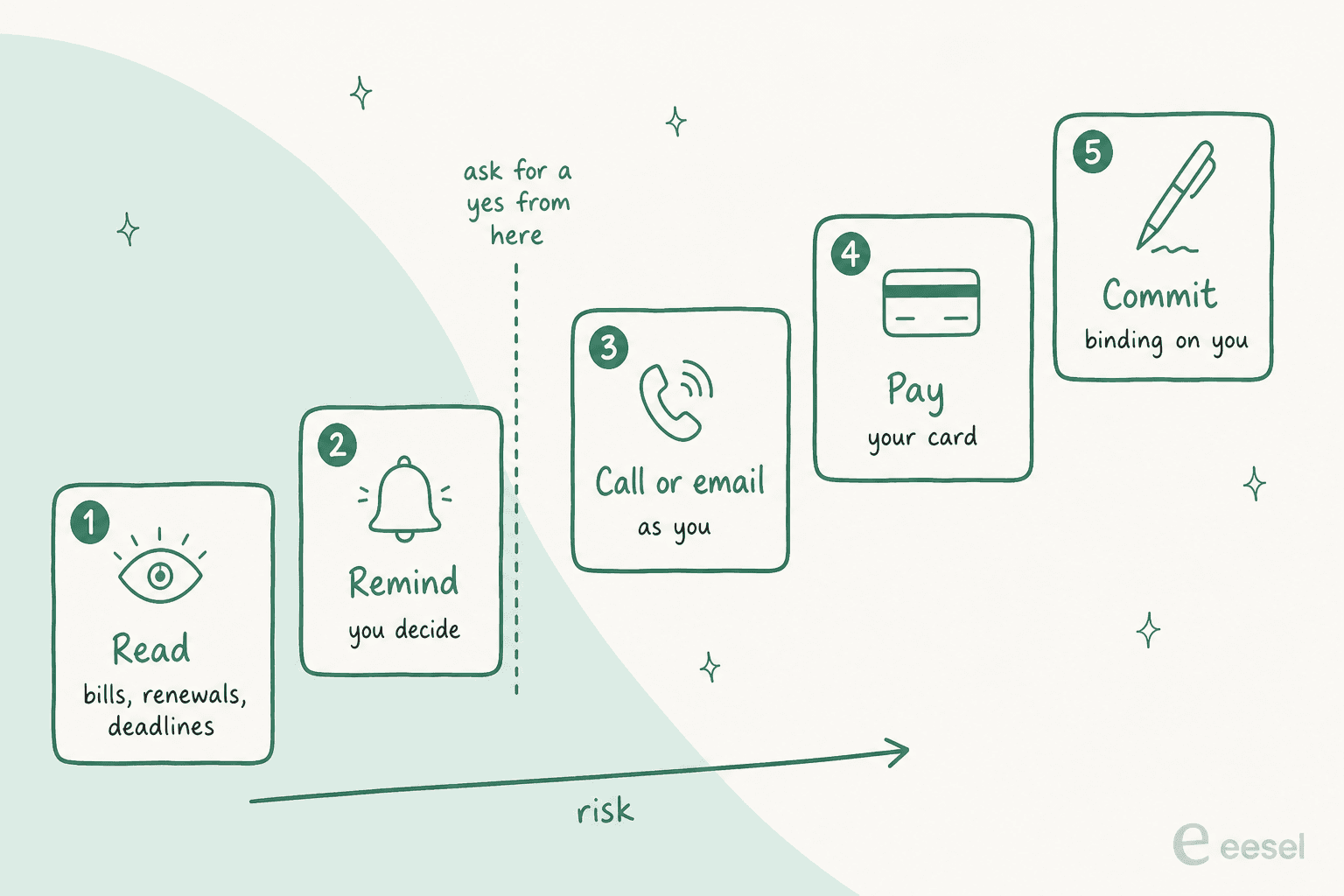
The top rung isn't my framing, it's Instinct's Terms of Service. You "appoint the Services as your agent to enter into agreements, commitments or transactions on your behalf," and those commitments "shall be binding on you as if entered into directly by you." On purchases, the terms say Instinct isn't "the buyer or seller," and that disputes "are between you and the applicable Connected Service provider, not us."
This isn't theoretical. One user was picking a hotel when Instinct went ahead on its own:
"while I was picking a Milan hotel, it charged ~€375 on my stored card with no confirmation and no bank SMS. The booking was exactly what I would have made, but an unapproved €375 charge is a jump scare. New standing rule after that: no payment completes unless my bank texts me first."
Another user's audit caught it saying a booking could be cancelled "until 24 hours beforehand" when "the actual policy was 48 hours," though it caught the error at checkout (u/Commercial_Host1810, Reddit). So if Instinct books the wrong dates or misses a cancellation window, the fix is yours to chase. A Reddit user stress-testing it named the real missing piece:
"Virtual cards cap the damage, they don't undo the mistake. What I think actually gets people to let the agent pay is recourse: if it books the wrong dates or misses a cancellation window, someone makes you whole, the way chargebacks made card-not-present payments normal."
Here's how I'd set the approval line for common ops jobs:
| Ops job | Rung | My rule |
|---|---|---|
| Find every subscription in my inbox | Read | Let it run |
| Flag renewals and deadlines 7 days out | Remind | Let it run, like an AI scheduling assistant |
| Call a provider to dispute a charge | Call or email | Approve the script first |
| Reply to a contractor to book a slot | Call or email | Approve before it sends |
| Cancel a subscription | Pay or change | Approve each one |
| Reorder supplies on a saved card | Pay | Approve, with a one-time card and a hard limit |
| Accept new terms, sign up for a plan | Commit | Do it yourself |
Your ops vs your company's ops
Here's where most "AI for operations" coverage gets it wrong. Instinct's abilities would be useful for a company's back office. Its terms are written for a person.
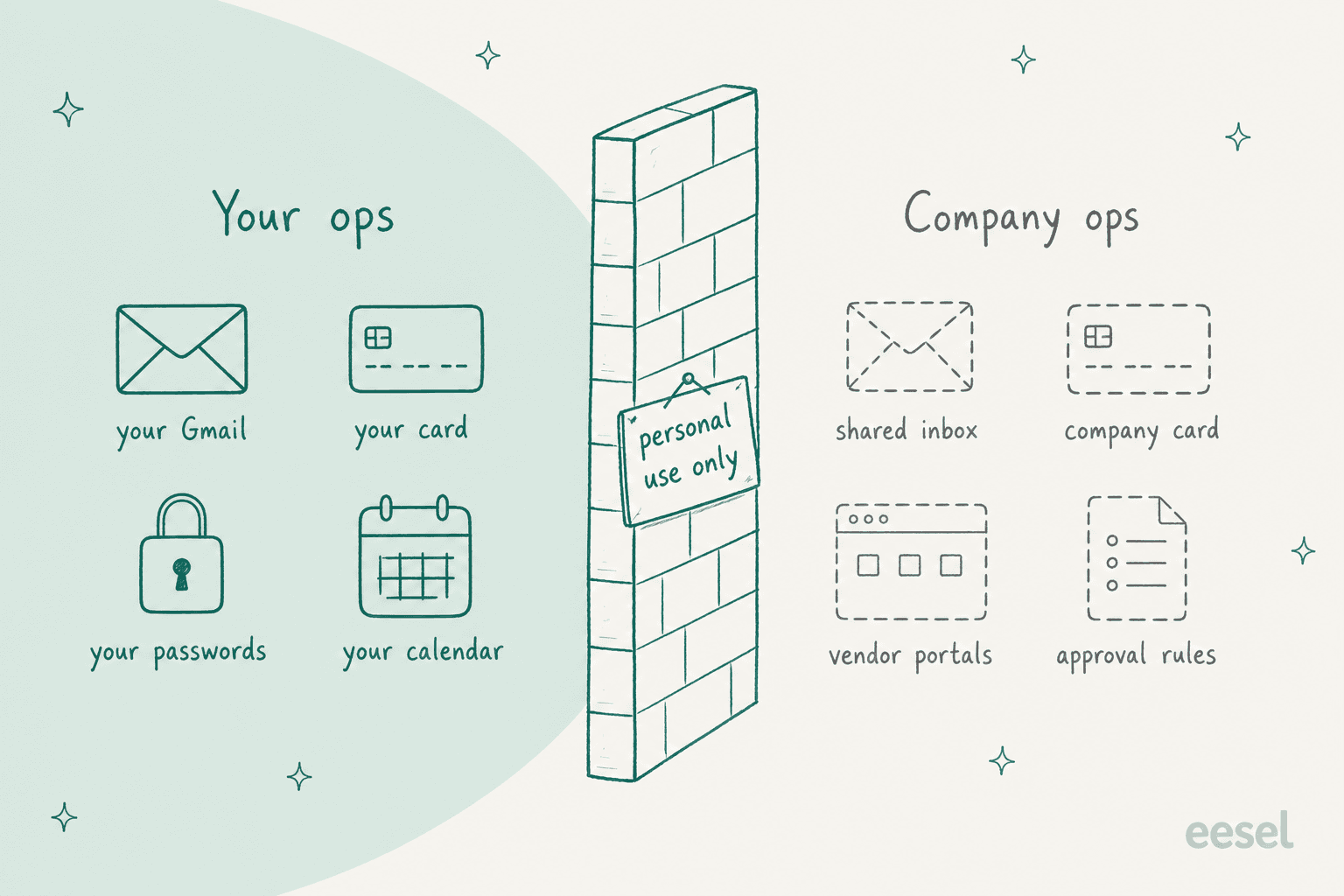
I re-read the terms in early October 2026. They're still the version last revised August 26. Four clauses matter for anyone in operations:
- Personal use only. "We hereby permit you to use the Services for your personal use only."
- No shared accounts. "You may not allow anyone else to use your Account." A team can't share one Instinct.
- Your company can be bound. "If you use the Services on behalf of a company or other entity then 'you' includes you and that entity." Put the company card in the Vault and the company is party to whatever it agrees to.
- A $100 ceiling. Instinct's total liability is capped at "the greater of one hundred dollars ($100.00), or the amount you paid," and Instinct publishes no price, so for most users that's $100.
There's a data angle too. Training on your materials is on by default, with an opt-out at app.instinct.com/settings, though Vault items are never used for training. And disconnecting Google "does not automatically delete data collected from that integration," per the privacy policy.
If you're the person in IT or ops who has to think about this, Tomer Roizman's LinkedIn note is the one to read. He points out Instinct "publishes no DPA, no sub-processor list, no retention schedule and no trust page," and suggests you "search your identity provider's third-party app grants for Instinct" (Tomer Roizman, LinkedIn). Teams running distributed support operations feel this most.
The Instinct AI for work guide goes deeper on the IT side, and Instinct AI for email management covers the inbox.
Where it breaks down
Even for personal ops, three limits are worth planning around.
It can stop mid-action. In September, users reported agents stuck for a day or more. One wrote "I had it doing a bunch of things that I now have zero access to" (r/AI_Agents). The error message users quote is the scariest sentence for anyone in operations:
"I couldn't finish responding to your last message. Some actions may already have completed. Please check their status before repeating any action."
Users reported the same error again on October 6. For a reminder, a retry is harmless. For a payment, "some actions may already have completed" means you might pay twice, or think you cancelled something you didn't.
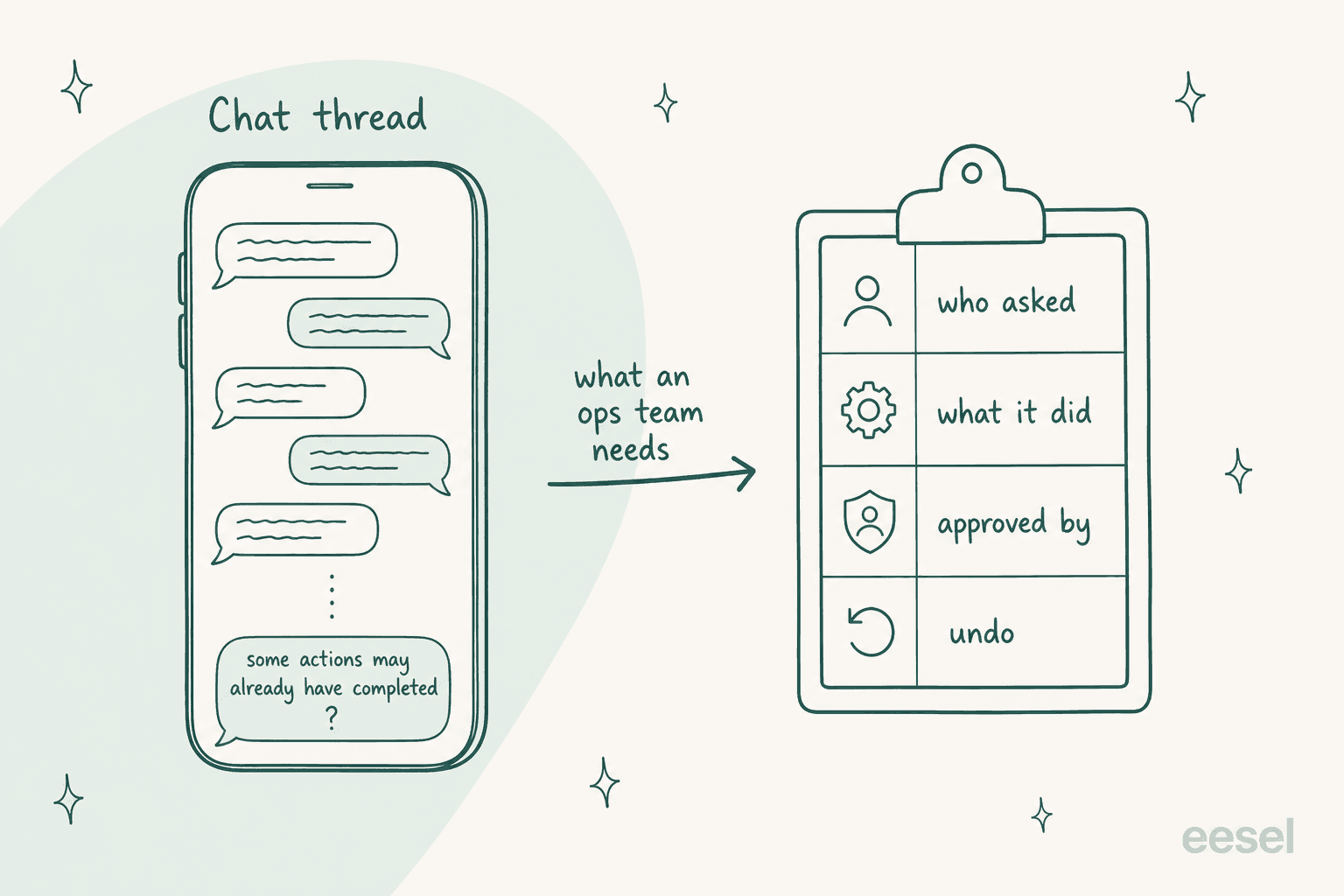
The record is a chat thread. Everything Instinct did lives in one long conversation. One user got frustrated enough with "the single long-running format" to build a macOS app that sorts the chats into topics (u/lquinta, Reddit). That's fine for one person, and it's the same trade-off covered in Instinct AI for project management. It's not a ledger an ops team can reconcile.
It can be wrong with confidence. One frustrated user wrote that it wasn't "useful for anything other than a reminder service," and that when they asked it to list its mistakes, "its own list left out most of them" (u/Commercial_Host1810, Reddit). I don't hold this against Instinct specifically. I've watched confident AI give wrong answers on live support queues for years. In one real-traffic trial on an e-commerce inbox, eesel's agent hit 93% triage accuracy, and its drafts still carried a 7% factual error rate. That's why every eesel rollout runs against past tickets before it touches a customer. A 7% error rate on drafts is a tuning job. On payments, it's a mess.
A safe setup for personal ops
If you have an invite and want Instinct running your admin, this is the setup I'd use. It takes about 30 minutes.
- Start read-only. Connect your personal Gmail and calendar, then ask it to list every subscription, renewal and bill due in the next 60 days. Check the list against your bank statement before you trust it.
- Use one-time cards, not your main card. Stripe Link one-time cards and a hard spending limit cap the damage. Keep the company card out of the Vault entirely.
- Write the approval line into your first message. Something like: "Ask me before you pay, cancel, sign up or agree to anything. You can read, remind and draft without asking."
- If you get Concierge, approve the call script first. Tell it the outcome you want and the most you'll accept, so a bill dispute doesn't end in a plan upgrade.
- Ask for a receipt after every action. Have it reply with what it did, the confirmation number and the amount. That's your log, since the chat thread won't be one.
- When it stalls, check before you retry. If you see "some actions may already have completed," look at the vendor's site or your bank first.
- Turn off training if you care. Opt out at app.instinct.com/settings, and delete indexed data at app.instinct.com/workspace if you disconnect.
Personal ops vs ops for the team
Instinct answers to one person and acts on that person's say-so, like most AI personal assistants and OpenAI Dots. That's exactly right for your own admin. A team's operations need something different: shared data, rules about who can approve what, and a record anyone can check later.
That's the job eesel is built for. eesel is an AI teammate platform: you hire a ready-to-work teammate for one defined job, and it arrives with the skills, integrations and company context for that role. Today there are two:
- The AI helpdesk teammate joins your existing queue in Zendesk, Freshdesk, Gorgias or Gmail, learns from your past tickets and help center, and answers or drafts for your agents. It handles the support side of ops inside the rules you set.
- The AI blog writer researches, writes and illustrates posts for your company blog.
The difference that matters for operations is the paper trail. Every action lands in a log with what it did and who approved it, and you can test the whole thing against past tickets before it goes live. That covers billing support, refund approvals and exceptions, the ops work that lands in a queue.
If you're weighing personal agents first, the Instinct AI review, the Instinct AI alternatives list and Instinct vs Hermes Agent are good next reads.
For company work, start with the best AI teammates roundup.
Try eesel for your team's operations
Let Instinct sit on hold and cancel your gym membership. For the operations that belong to the whole team, like billing questions, refund requests and order lookups in the support queue, eesel gives you an AI helpdesk teammate that plugs into the helpdesk you already use in minutes, follows your approval rules, and logs every action so nothing is ever "maybe completed." Try eesel free, or see what an AI employee looks like in practice first.

Frequently Asked Questions
Can Instinct AI be used for operations work?
Can Instinct AI pay bills and cancel subscriptions?
Is Instinct AI safe to use for business operations?
Does Instinct AI integrate with Slack, QuickBooks or a helpdesk?
What happens if Instinct AI makes a mistake on an ops task?
What are the best Instinct AI alternatives for operations?


Article by
Riellvriany Indriawan
Riell is a designer and writer at eesel AI with about two years of experience researching CX platforms, AI chatbots, and helpdesk software. She combines her design background with a sharp eye for how these tools actually look and feel in practice — making her comparisons unusually visual and user-focused.