8 best Landbot alternatives in 2026, picked by why you're leaving

Kurnia Kharisma

Katelin Teen
Last edited October 1, 2026
Why teams look for Landbot alternatives
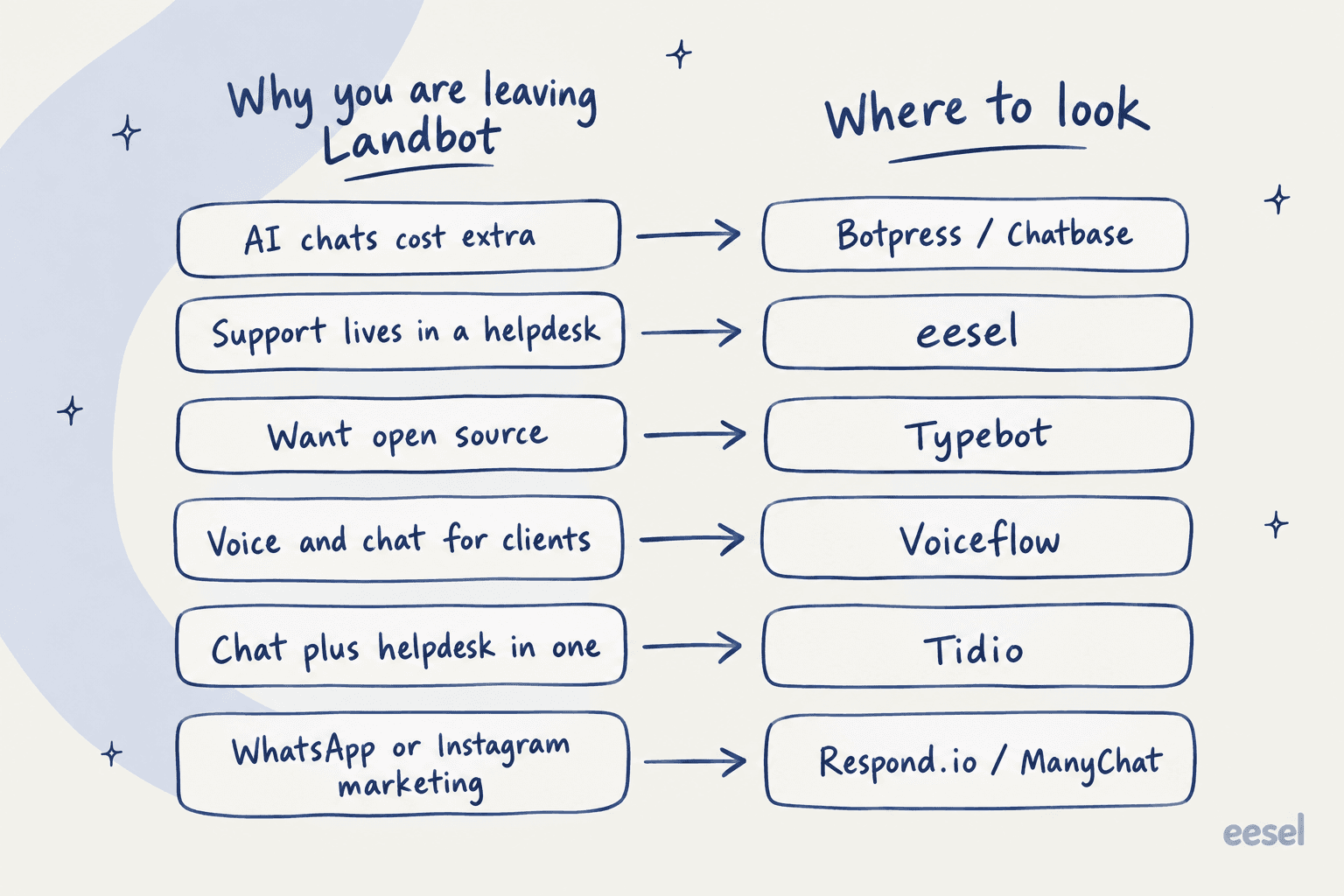
Landbot earns its reputation. It holds a 4.7 on G2 across 334 reviews, the visual builder is easy to pick up, and its WhatsApp onboarding is better handled than most. My Landbot overview covers what it does well, and the full Landbot review tests each part. The reasons people leave are narrower than "it's bad", and they show up in the same four places.
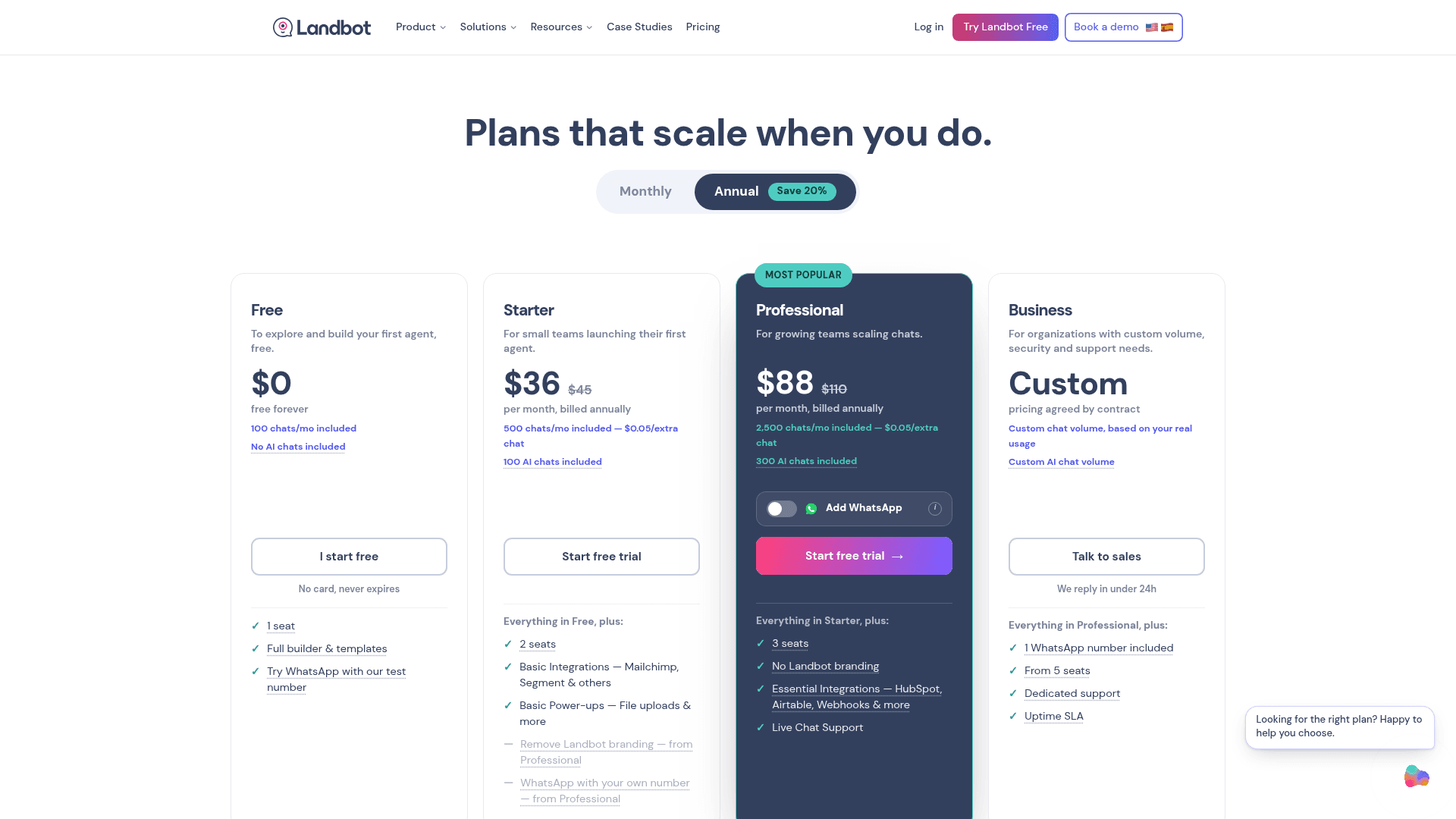
The AI meter. Landbot bills chats and AI chats separately. Professional ($88 a month on annual billing) includes 2,500 chats but only 300 AI chats, and every AI chat past that costs $0.10, per the pricing page. If the AI answers most conversations, you buy overage from day one. A Hacker News commenter called out the gap back under older pricing:
"For $100 per month you can have 2,500 flow chats, or 30 "AI" chats. That's nearly a 100x difference in cost."

The ratio is better today, but the second meter is still there. My Landbot pricing breakdown runs the numbers plan by plan.
The helpdesk handoff. Landbot has no native Zendesk, Freshdesk or Gorgias app. Its Zendesk route is a webhook guide where you build the POST request yourself, and webhooks need Professional or higher. For a sales team routing leads to HubSpot that's fine. For a support team, a developer now owns the chatbot escalation path.
Seats and price resistance. Extra seats cost $25 a month each. Consultants who build bots for clients feel this most:
"I would review the price of subscriptions, which are often a reason for resistance and rejection of the platform by customers for whom I do the various projects."

Complexity at scale. The easy start gets harder once a bot branches a lot. "Things can get quite tricky if you want to develop an advanced or complex bot," as one Capterra reviewer put it. That's not unique to Landbot (it comes up for every flow builder on this list), but it's where people start comparing.
Here's how those reasons map to the alternatives below.
How I picked these Landbot alternatives
I'm the person at eesel who spends most of the day on what buyers actually search for, and "Landbot alternatives" is a keyword where the searcher's real question is usually hiding one layer down. People don't want "another chatbot builder". They want the one that fixes their specific Landbot problem. So every tool here earned its slot by solving at least one of the four reasons above better than Landbot does.
For each one I went through the live pricing page (checked on October 2, 2026), the help docs on AI, knowledge sources and human handoff, and reviews on G2, Capterra, Reddit and Hacker News. Screenshots come from each vendor's own pricing pages, product pages or help centers. I left out tools I've covered as weaker fits for this reader, and I'm upfront that eesel is the company I work for. I've tried to hold it to the same bar, including where it costs more.
The test I care most about comes from eesel's own rollouts. A CX lead at a supplements brand told the eesel team exactly what they needed from an AI on their queue:
"The AI will never be able to answer 100% of the questions... I need an AI who is only handling the tickets that it's confident to handle and all the other ones, leave them alone."
That's the bar. Where does a conversation go when the bot shouldn't answer it? I checked that for every tool.
Landbot alternatives at a glance
| Tool | Best for | Starting price | Billing unit | Free plan | AI included | Human handoff | Self-host | Security | |
|---|---|---|---|---|---|---|---|---|---|
| eesel | Support teams on a helpdesk | $299/mo (500 credits) | Credits (1 ticket or chat = 1) | 100 credits, no card | Yes, every plan | Yes | Ticket in Zendesk, Freshdesk, Gorgias, or email | No | SOC 2 Type II underway, EU/US residency add-on |
| Botpress | Developers wanting AI control | $150/mo (annual) | Conversations | 25 conversations | $25 AI usage on Plus | Yes | Botpress Desk or helpdesk overlay | Legacy v12 only | SOC 2, GDPR |
| Voiceflow | Voice and chat agents, agencies | Quote / in-app | Credits ($0.005 each) | Trial credit grant | Yes | Not listed on pricing | Handoff step to Zendesk, Genesys, Kustomer, Dixa, Ujet | No | SSO on Enterprise |
| Typebot | Open-source flow building | $39/mo | Chats | 200 chats | Bring your own key | Pro only | Chatwoot or Zendesk widget | Yes (FSL license) | ISO 27001 on Enterprise |
| Tidio | Chat plus helpdesk in one | $24.17/mo (annual) | Billable conversations + Lyro conversations | 50 conversations | Lyro add-on from $32.50 | Yes | Built-in Tidio inbox | No | SSO on top tiers |
| Chatbase | Website agent from your docs | $40/mo | Message credits | 50 credits | Yes | Yes | Helpdesk on Standard, Zendesk/Salesforce | No | SSO, HIPAA-eligible on Enterprise |
| Respond.io | WhatsApp-first inbox | $79/mo | Monthly active contacts | 7-day trial | AI Agents on Growth+ | Yes, core channel | Built-in team inbox | No | ISO 27001, SSO on Advanced+ |
| ManyChat | Instagram and Messenger marketing | $14/mo (annual) | Active contacts | 25 contacts | AI on Pro+ | Pro and up | Built-in live chat inbox | No | n/a on pricing page |
| Landbot (for reference) | Lead capture flows | $36/mo (annual) | Chats + AI chats | 100 chats, no AI | 100 to 500 AI chats | Pro WA plan | Landbot inbox, Zendesk via webhook | No | GDPR, SOC 2 |
The column most people skip is the billing unit, and it's the one that decides your bill. These eight tools meter seven different things.
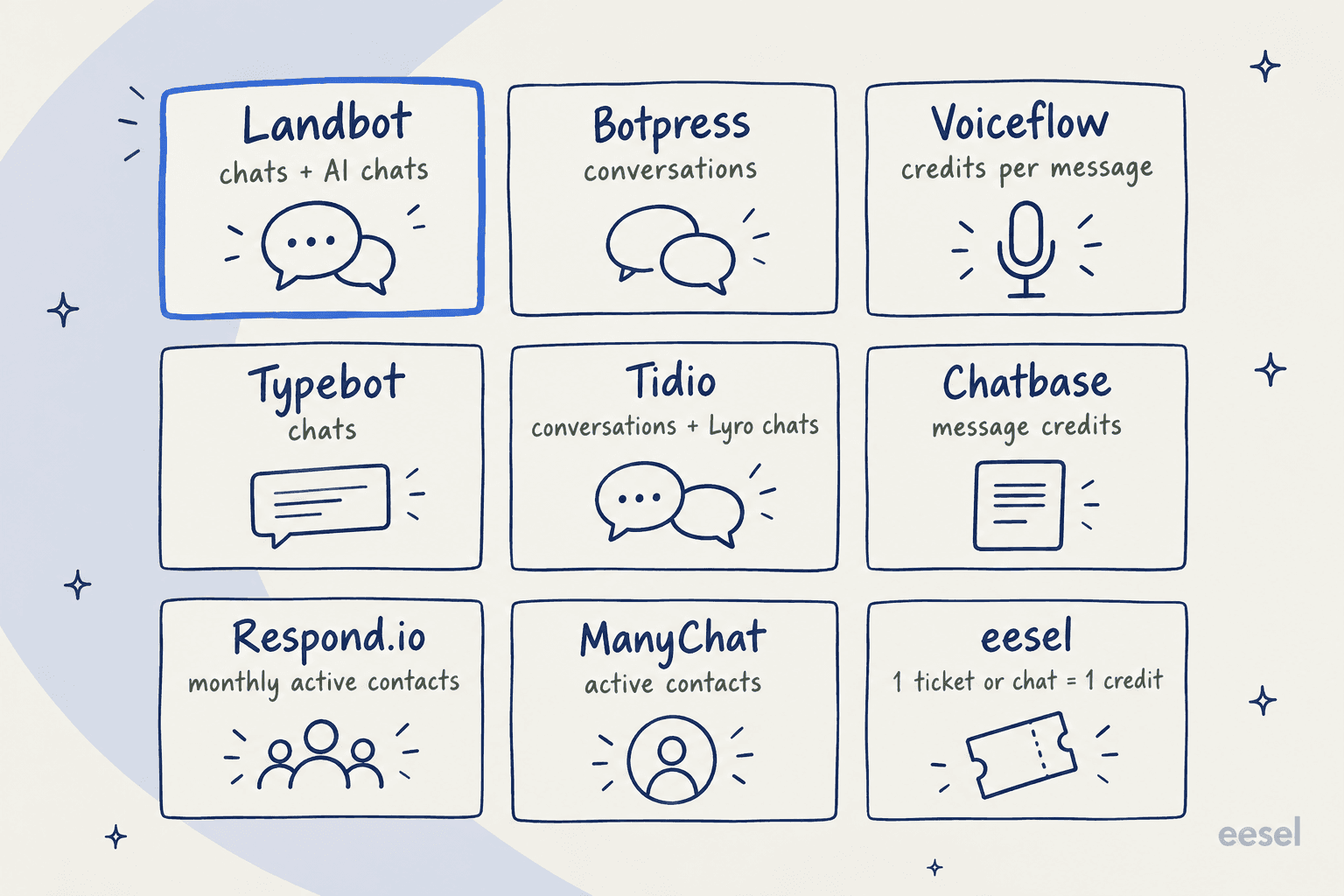
A contact-based tool (Respond.io, ManyChat) charges for a person once a month however much they talk. A conversation-based tool (Botpress, Typebot, eesel) charges per session. A credit-based tool (Chatbase, Voiceflow) charges by message or model, so long chats cost more. Pick the unit that matches how your traffic behaves before you compare sticker prices. My chatbot cost guide explains each model.
1. eesel
Best for: support teams whose queue already lives in Zendesk, Freshdesk, Gorgias or another helpdesk, and who want the AI to work inside it rather than in front of it.

eesel is an AI teammate platform, and the teammate that fits a Landbot switcher is the AI helpdesk teammate. There's no flow to draw. You connect your helpdesk, it learns from your past tickets, help center and docs, and it answers on your website through a chat bubble you add with one script tag, or directly in the ticket queue. When a chat needs a person, it escalates "via email, Zendesk, Freshdesk, or another connected helpdesk", so your agents pick it up in the tool they already use. It also connects to WhatsApp and Instagram.
This is the opposite design to Landbot. Landbot asks you to anticipate every exit and wire a trigger for it. eesel lets you set escalation rules by topic, confidence or a visitor asking for a human, and the handoff lands as a real ticket with context.
Pros
- Native Zendesk, Freshdesk and Gorgias integrations, so handoff is a ticket, not a webhook.
- Learns from past tickets, not only documents and URLs.
- Runs a simulation over hundreds of your past tickets before launch and scores answers against what your team actually sent.
- Every feature, integration and channel on every plan, with unlimited seats.
Cons
- More expensive per conversation than Landbot for simple lead capture. 1,000 conversations sits on the $499 plan.
- Not a visual flow builder. If you want to draw every step of a quiz or a booking funnel, Landbot or Typebot fits better.
- SOC 2 Type II is still underway, per the pricing page, which matters for some security reviews.
Pricing
| Plan | Price | Credits a month |
|---|---|---|
| Free | $0 | 100 credits, no card |
| Teammate | $299/mo | 500 |
| Teammate | $499/mo | 1,000 |
| Teammate | $699/mo | 1,500 |
| Teammate | $999/mo | 2,500 |
| Teammate | $1,349/mo | 3,500 |
| Teammate | $1,899/mo | 5,000 |
"A ticket or chat is 1 credit, however long," per eesel's pricing. Credits don't roll over. When you run out, agents pause unless you turn on overage at $0.80 per credit with a cap you set. Annual billing gets two months free. Add-ons cover priority support (from $299), SSO and MFA (from $199) and data residency ($500).
Verdict
Pick eesel if Landbot's missing helpdesk app is the reason you're here. It's the only pick on this list that treats your existing helpdesk as home base rather than something to integrate with later. Skip it if you're a marketing team building lead-capture funnels, where Landbot is cheaper and more flexible. The deciding factor: do you want to design the conversation, or have the AI learn it from your tickets?
2. Botpress
Best for: technical teams who outgrew Landbot's AI Agent block and want code-level control over agents, tools and knowledge.
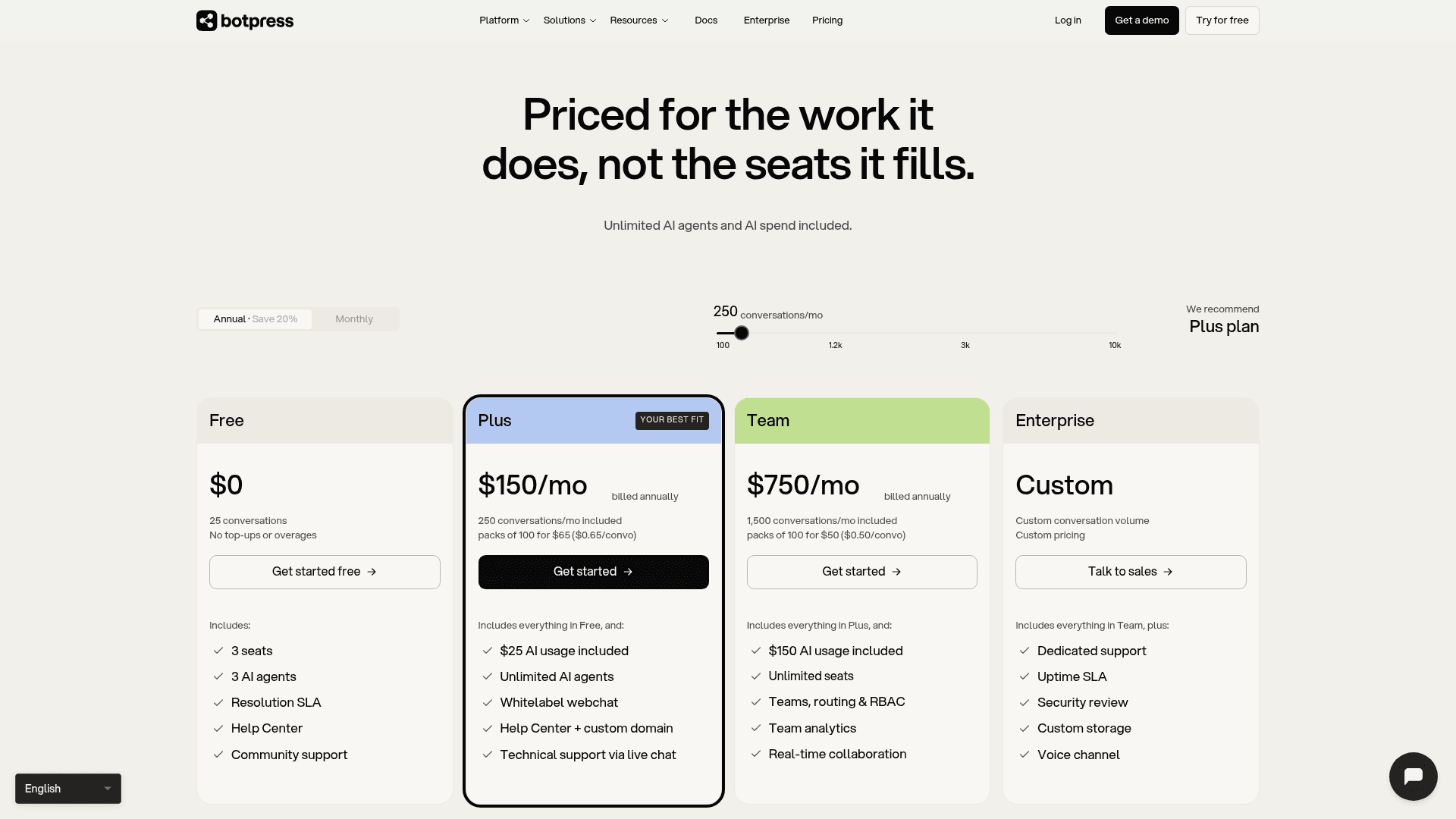
Botpress is the developer's chatbot builder. The Studio has a visual flow canvas like Landbot's, but production bots usually lean on JavaScript, APIs and autonomous nodes. Knowledge bases take files, websites and past conversations. It also has Botpress Desk, a helpdesk layer that can run standalone or as an overlay on Zendesk or Freshdesk, and native OAuth to sit on top of Zendesk without migrating.
Pros
- One billing unit: a conversation is a conversation, whether the AI or a human handles it.
- Unlimited AI agents on paid plans, and $0.10 of AI usage built into every conversation.
- Deeper integrations than Landbot, including Zendesk and HubSpot.
- White-label webchat and custom domain from Plus.
Cons
- Steep learning curve once you go past the basics, a theme in the Botpress G2 reviews.
- The free plan dropped to 25 conversations, down from 100 a month earlier.
- Auto-recharge for AI overflow can't be turned off, per the pricing FAQ, and the AI spend cap is still "coming soon".
- No current self-hosted edition on the pricing page; the open-source v12 repo is frozen.
A recent reviewer flagged the gating directly:
"I don't like that Botpress requires an upgrade to the Plus plan to access features like insights and create more workspaces, even though I'm already paying on a pay-as-you-go basis."

Pricing
| Plan | Price | Conversations | Extra conversations | AI usage | Seats |
|---|---|---|---|---|---|
| Free | $0 | 25 | None | Included | 3 |
| Plus | $150/mo (annual) | 250 | $65 per 100 | $25 included | 3 |
| Team | $750/mo (annual) | 1,500 | $50 per 100 | $150 included | Unlimited |
| Enterprise | Custom | Custom | Custom | Included | Unlimited |
The $150 and $750 figures are annual-billed rates from the Botpress pricing page, with a 20% saving over monthly. My Botpress pricing guide covers the AI overflow mechanics.
Verdict
Pick Botpress if you have a developer and Landbot's hybrid AI block feels too boxed in. Skip it if price per conversation was your reason to leave: at 1,000 conversations a month, Plus comes to $670, about four times Landbot Professional. My Botpress review goes further. If Botpress itself is on your shortlist to leave, see Botpress alternatives.
3. Voiceflow
Best for: agencies and product teams building AI agents across chat and phone, with real handoff into a contact center.
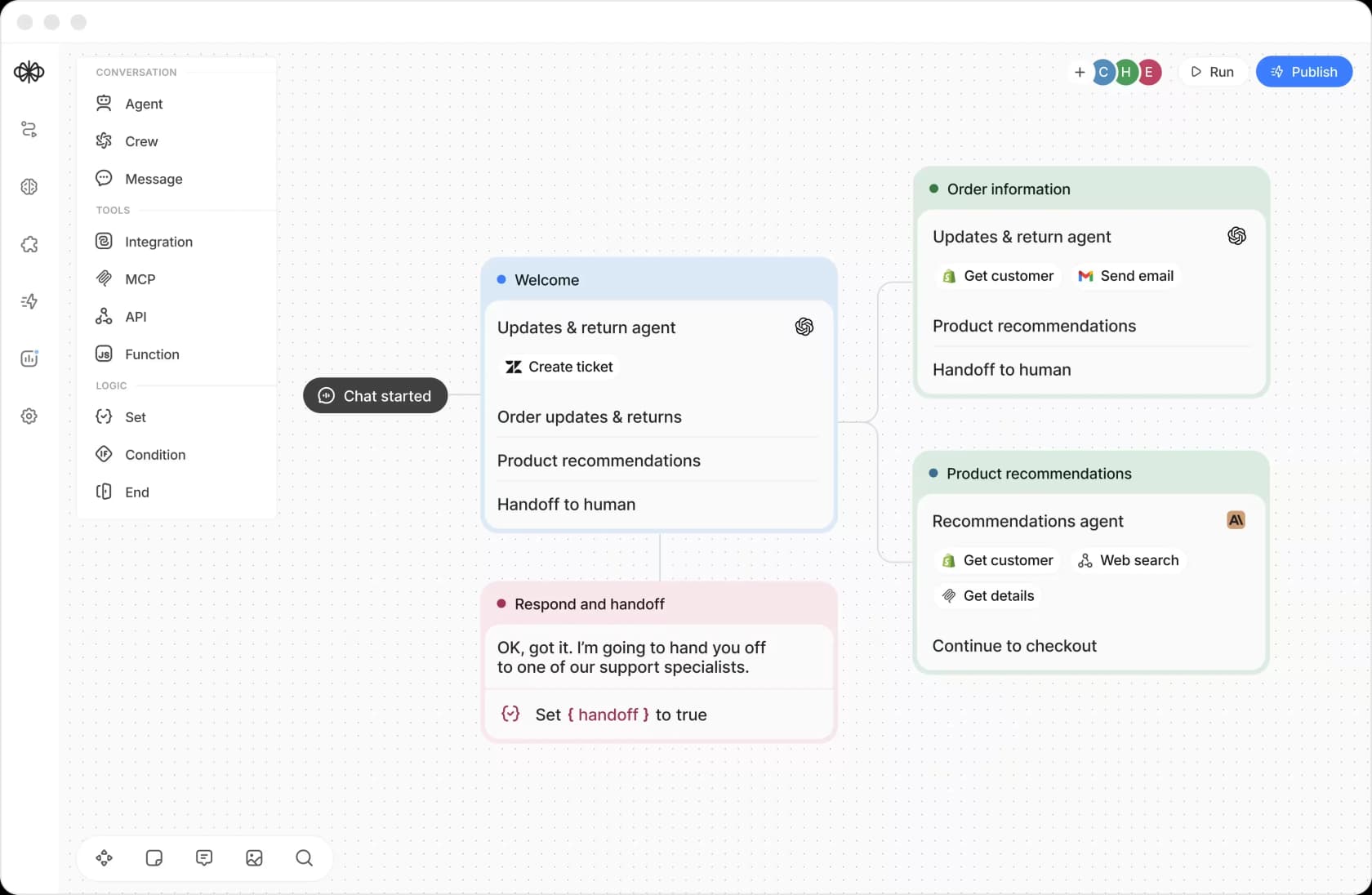
Voiceflow builds agents on a canvas of agent, tool and logic steps, with integrations, MCP, API and function blocks, and a choice of model providers. Its edge over Landbot is the handoff: a documented live agent handoff step supports Genesys, Ujet, Kustomer, Dixa and Zendesk. Zendesk handoffs run over Zendesk messaging and open a messaging ticket in the Agent Workspace. Phone projects can forward calls too.
Pros
- Voice and chat in one builder, which Landbot doesn't do.
- Native handoff into five contact-center and helpdesk systems.
- Zendesk tool covers ticket create, update, comment and search, and can sync the Zendesk Help Center as knowledge.
- Built for agencies: multi-client workspaces, white-labeling, client handoff tools.
Cons
- No public dollar price on the pricing page. The Business track is "Request pricing" and self-serve prices sit inside the app.
- Credit billing means long chats and phone minutes cost more.
- Reviews are mostly strong, but production reliability complaints exist:
"Ran into lots of issues when we pushed our Voiceflow chat to production and it impacted a live session we had which caused a lot of frustration with our users and impacted our session NPS."
Pricing
| Item | What the docs say |
|---|---|
| Agency track | Free trial, no card, usage-based billing |
| Business track | Book a demo, request pricing |
| Free plan | One-time credit grant that doesn't renew |
| Credit value | 1 credit = $0.005 |
| Chat message | 1 credit |
| Phone minute | 10 credits ($0.05) |
| Add-ons | Editor seats, phone numbers, concurrent calls |
Voiceflow's April 2025 credits post listed Pro at $60 and Teams at $150 a month, but current pages no longer show those prices, so treat them as history. My Voiceflow pricing guide tracks the changes.
Verdict
Pick Voiceflow if you build agents for clients or need voice. It's the most complete builder here for a handoff into Zendesk or a contact center. Skip it if you want to see the price before you talk to anyone.
4. Typebot
Best for: builders who like Landbot's canvas but want a cheaper, source-available tool they can self-host.
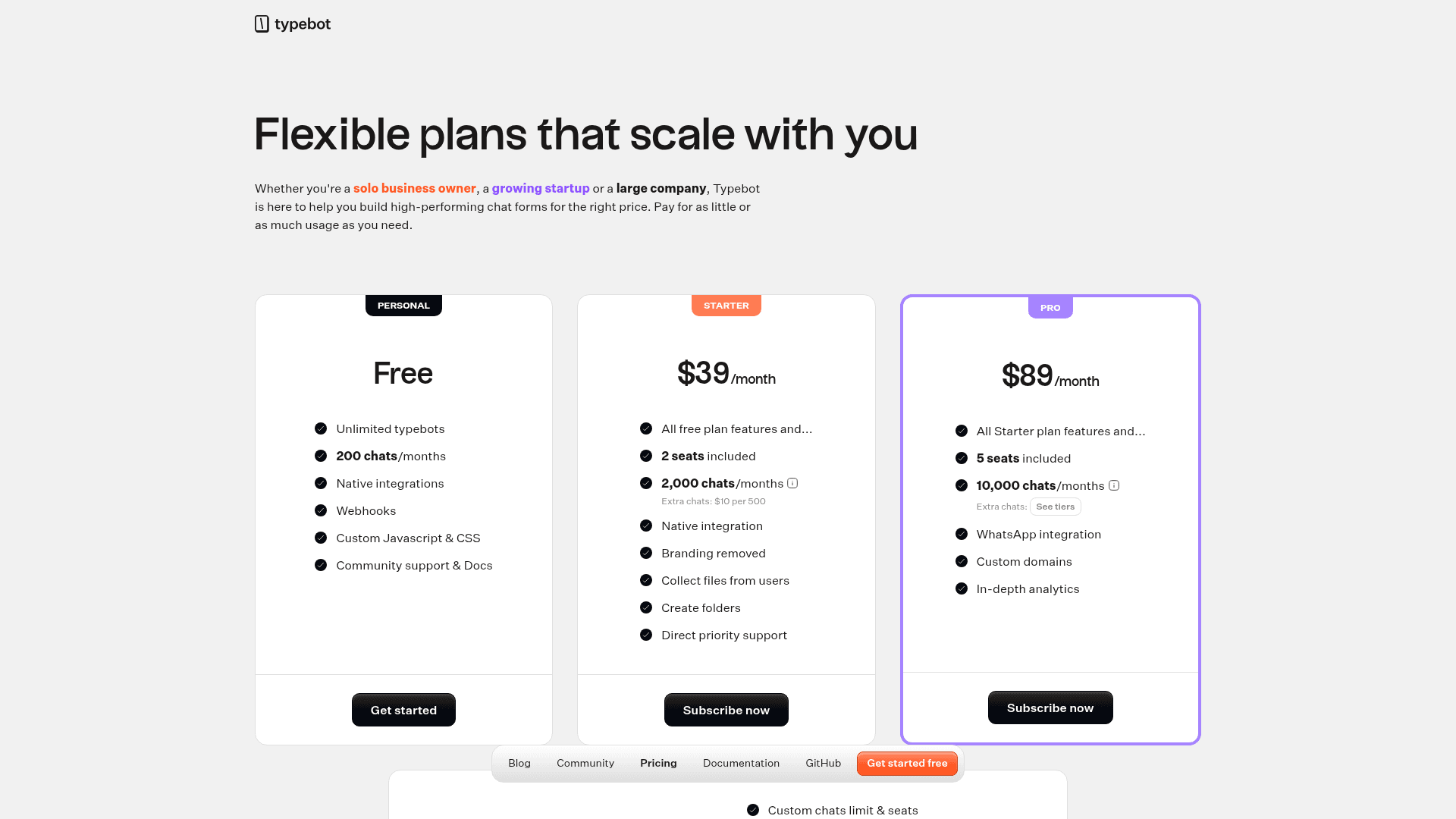
Typebot is the closest thing to a Landbot lookalike on this list: a drag-and-drop conversational builder with 20+ blocks, webhooks, custom JavaScript and CSS, and AI blocks for OpenAI, Anthropic, Mistral, ElevenLabs and Dify.AI, all on your own API key. The GitHub repo has 10.4k stars and shipped v3.19.0 on September 14, 2026.
One correction to how it's often described: Typebot isn't "open source" in the strict sense anymore. Since September 2024 the LICENSE file is the Functional Source License (FSL-1.1, Apache 2.0 future license). Each version becomes Apache 2.0 after two years, and self-hosting for your own use is free with every feature, but you can't resell hosting. If you need a strict open-source license, see my roundup of open-source chatbot platforms.
Pros
- Much cheaper than Landbot at volume: $39 for 2,000 chats, $89 for 10,000.
- No separate AI meter. AI costs go to your own model provider.
- Free self-hosting with every feature (two Next.js apps plus Postgres and S3).
- Monthly billing with no lock-in.
Cons
- No live chat inbox. Handoff opens a Chatwoot widget or a Zendesk Messaging window, and the Zendesk route only works on web.
- No built-in knowledge base trainer. You wire retrieval through the OpenAI block.
- WhatsApp and custom domains are Pro only.
- Self-hosting needs real skills, and Typebot doesn't support self-host problems.
Reviewers on G2 (4.6 from 43 reviews) describe the same ceiling Landbot users hit with big support bots:
"when we were working on building a multi-step customer support bot for a client, we've had issues with deeply nested logic and conditionals, as it was difficult to keep it all clear."
Pricing
| Plan | Price | Chats/month | Extra chats | Seats | Key gates |
|---|---|---|---|---|---|
| Free | $0 | 200 | None | 1 | Branding, webhooks, custom code |
| Starter | $39/mo | 2,000 | $10 per 500 | 2 | Branding removed, file uploads |
| Pro | $89/mo | 10,000 | Tiered | 5 | WhatsApp, custom domains, analytics |
| Enterprise | Quote | Custom | Custom | Custom | SSO, SLA, ISO 27001 |
A chat is one session however many messages it has, per Typebot's pricing FAQ. Annual billing isn't offered.
Verdict
Pick Typebot if Landbot's price is the problem and your bot is mostly forms, quizzes and lead capture. It's the cheapest real Landbot alternative here. Skip it for support, where the missing inbox and missing knowledge base mean you're building the hard parts yourself.
Where does a hard conversation go?
Before the next four, it's worth pausing on the question I asked of every tool. When a customer asks for a person, the answer splits three ways.
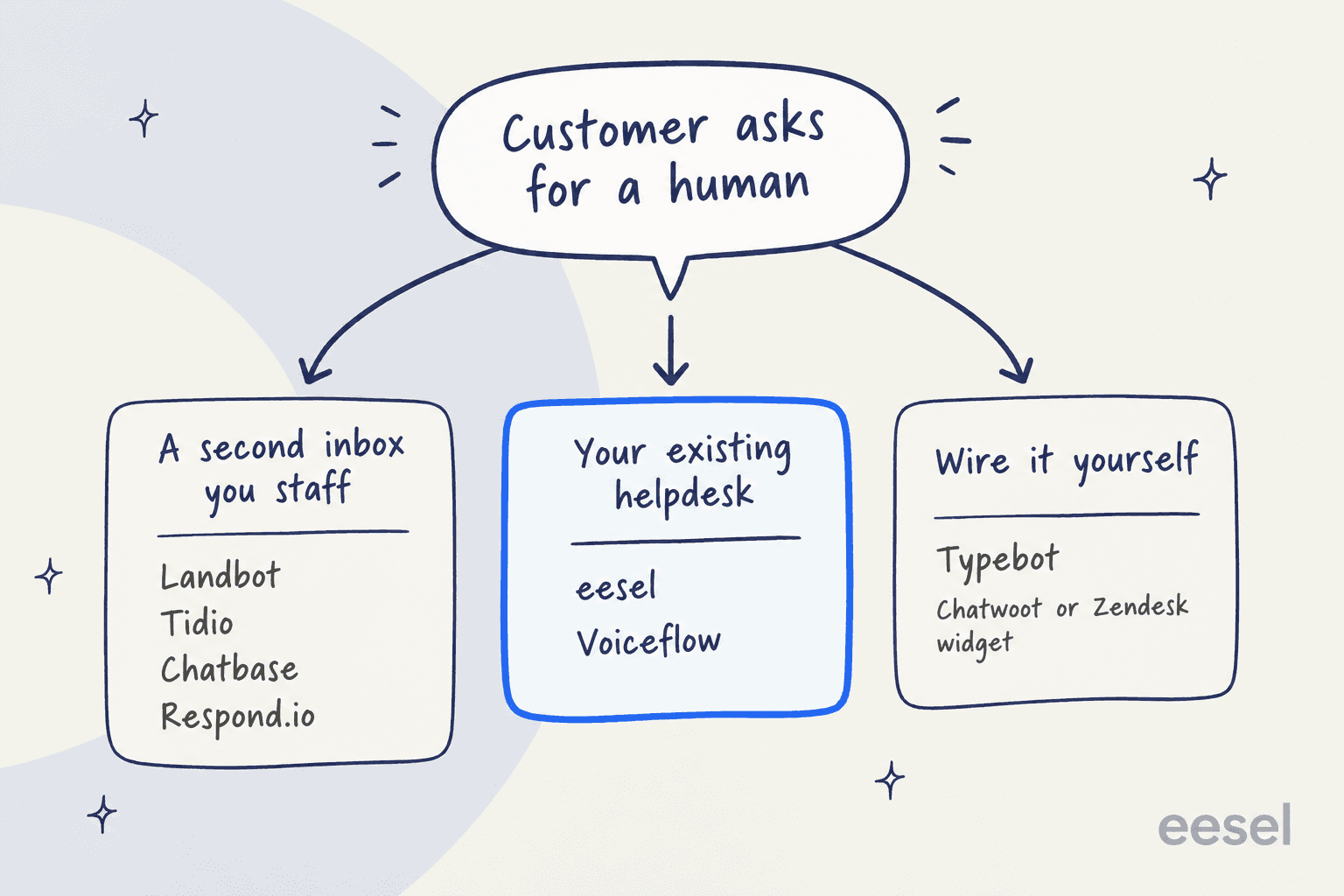
A second inbox is fine if you don't have a helpdesk yet. If you do, it means agents watch two queues and lose context between them, one of the most common AI chatbot problems I see. My guide to handoff best practices covers what good looks like.
5. Tidio
Best for: small ecommerce and SMB teams that want live chat, a helpdesk and an AI agent in one tool, without a separate helpdesk.
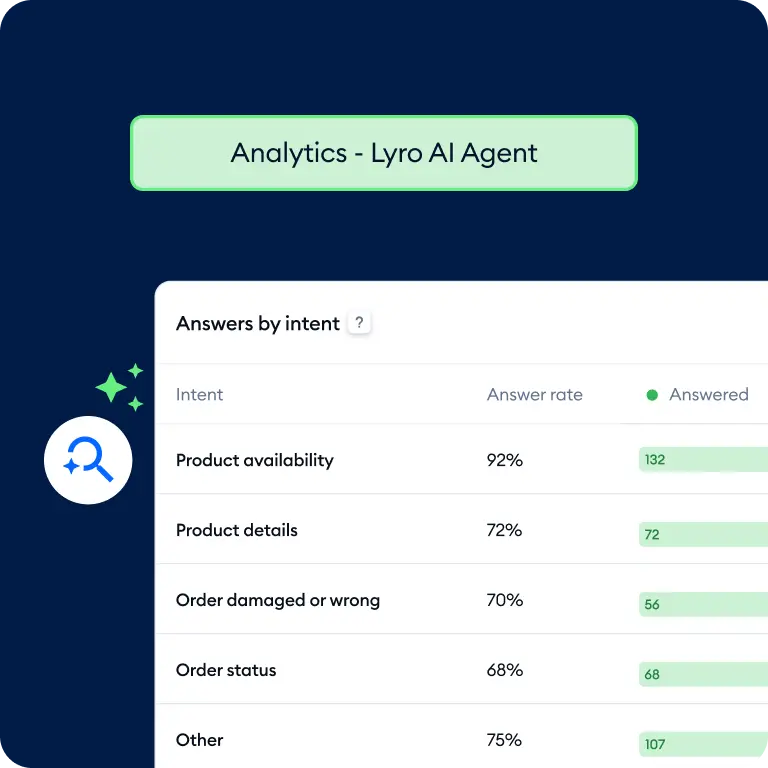
Tidio bundles live chat, ticketing, Flows (its no-code automations) and the Lyro AI agent, which Tidio says is powered by Claude plus its own models. Lyro answers from website URLs, Q&A, CSV, PDF, a Zendesk help center and your product catalog, and it can extract Q&A pairs from solved live chats. You can also buy Lyro alone and attach it to Zendesk or Salesforce.
Pros
- Chat, helpdesk and AI in one place, with a real human inbox.
- Lyro and Flows replies don't count as billable conversations; only conversations with a human agent message do.
- First 50 Lyro conversations are free for life.
- Strong fit for Shopify stores, with product recommendations from the catalog.
Cons
- Three separately billed products (Customer Service, Lyro, Flows) make the real bill harder to predict.
- Lyro Connect, custom naming and the 50% resolution guarantee sit on Plus and Premium.
- Some reviewers find the scripted side rigid:
"Compared with newer AI-powered customer service tools, its chatbot capabilities are limited, the automations feel too rigid, and the conversations are not as natural or intelligent as expected."
Pricing
| Plan | Price (annual billing) | Billable conversations |
|---|---|---|
| Free | $0 | 50 |
| Starter | $24.17/mo | 100 |
| Growth | From $49.17/mo | From 250 |
| Plus | From $300/mo + usage | Custom |
| Premium | Contact | Custom |
| Lyro AI add-on | From $32.50/mo | From 50 Lyro conversations |
| Flows add-on | From $24.17/mo | From 2,000 visitors |
Prices from Tidio's pricing page, shown on annual billing with a 7-day trial. My Tidio pricing guide breaks down the add-ons, and Tidio alternatives covers the other direction.
Verdict
Pick Tidio if you don't have a helpdesk and want one tool for chat, tickets and AI. It's the most complete all-in-one swap for a small store. Skip it if you already run Zendesk or Gorgias, since you'd be adding a second inbox.
6. Chatbase
Best for: teams that want a website AI agent trained on their docs and live in an afternoon, without building flows.
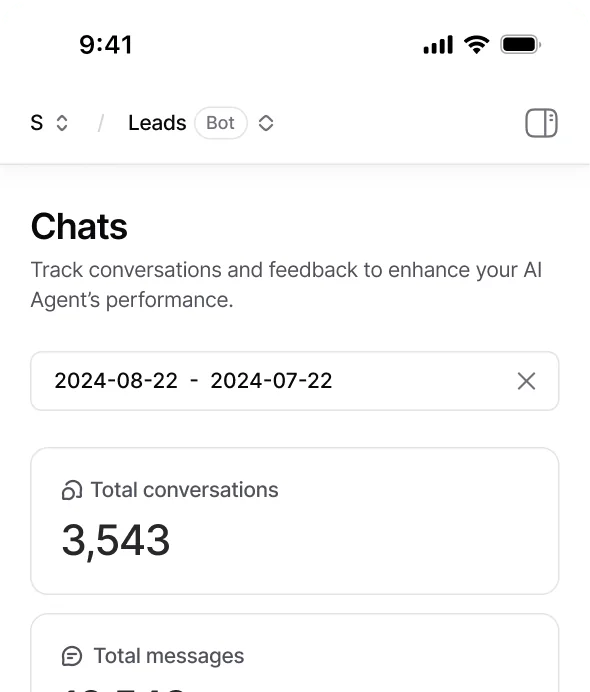
Chatbase is the opposite of Landbot: no canvas, just an AI agent you train on files, website crawls, text, Q&A and Notion. Standard adds a Helpdesk, voice, telephony and API access, and Pro adds tickets as a knowledge source through a Zendesk or Salesforce connection. It has a Playground and a shareable preview for testing.
Pros
- Fastest path from "here's our website" to a working AI agent.
- 20 integrations including Zendesk, Salesforce, HubSpot, Freshdesk, Gorgias, Shopify and WhatsApp.
- Choice of models from several providers.
- Voice and telephony from Standard.
Cons
- Every plan up to Pro includes one agent; extra agents are $25 a month.
- Credits per reply depend on the model, so costs are harder to forecast than a per-chat price.
- Removing the "Powered by Chatbase" badge is $99 a month.
- Bigger workflows need upkeep, as one CX lead noted:
"The more detailed the workflow becomes, the more maintenance it needs."
Pricing
| Plan | Monthly | Annual (20% off) | Message credits/mo | Agents | Seats |
|---|---|---|---|---|---|
| Free | $0 | $0 | 50 | 1 | 1 |
| Hobby | $40 | $32/mo | 700 | 1 | 2 |
| Standard | $150 | $120/mo | 4,000 | 1 | 3 |
| Pro | $500 | $400/mo | 15,000 | 1 | 5 |
| Enterprise | Custom | Custom | Custom | Custom | Custom |
From the Chatbase pricing page. Extra credits are $40 per 1,000 on auto-recharge. My Chatbase pricing guide goes deeper, and there's a separate list of Chatbase alternatives if it doesn't fit.
Verdict
Pick Chatbase if Landbot's flow-building is the thing you're tired of and you want an AI chatbot for your website quickly. Skip it if you need structured data capture with validation, which Landbot's fixed steps still do better.
7. Respond.io
Best for: sales and support teams where WhatsApp is the main channel and many agents share one inbox.
Respond.io is an omnichannel messaging inbox built around WhatsApp, with workflows, AI Agents, broadcasts and calling. Where Landbot is a builder with an inbox attached, Respond.io is an inbox with automation attached. It holds a 4.8 on G2 from 544 reviews, the highest rating on this list.
Pros
- Built for team messaging at scale: 5 users on Starter, 10 on Growth and Advanced.
- Billing per contact, so a chatty customer costs the same as a quiet one.
- Strong WhatsApp tooling, plus Instagram, Messenger, email and more in one inbox.
- AI credits included on every plan (5,000 on Starter, 10,000+ on Growth).
Cons
- AI Agents need Growth ($159) or higher; Starter only gets AI Prompt and AI Assist.
- Meta's WhatsApp fees are charged on top.
- Extra contacts cost $12 per 100 on Growth and $15 per 100 on Advanced.
Pricing
| Plan | Price (1,000 MACs) | Users | Extra users | Extra MACs | AI Agents |
|---|---|---|---|---|---|
| Starter | $79/mo | 5 | $12/mo | n/a | No |
| Growth | $159/mo | 10 | $20/mo | $12 per 100 | Yes |
| Advanced | $279/mo | 10 | $24/mo | $15 per 100 | Yes |
| Enterprise | Custom | Unlimited | n/a | Custom | Yes |
Prices from the Respond.io pricing page, with yearly billing saving up to 20%. My Respond.io pricing guide covers the MAC math, and there's a separate list of Respond.io alternatives too.
Verdict
Pick Respond.io if WhatsApp is where your customers are and you need a shared inbox for a real team. Skip it if you mainly want a website bot, where you'd be paying for inbox features you won't use.
8. ManyChat
Best for: creators and marketing teams automating Instagram, TikTok and Messenger DMs, with WhatsApp as a second channel.
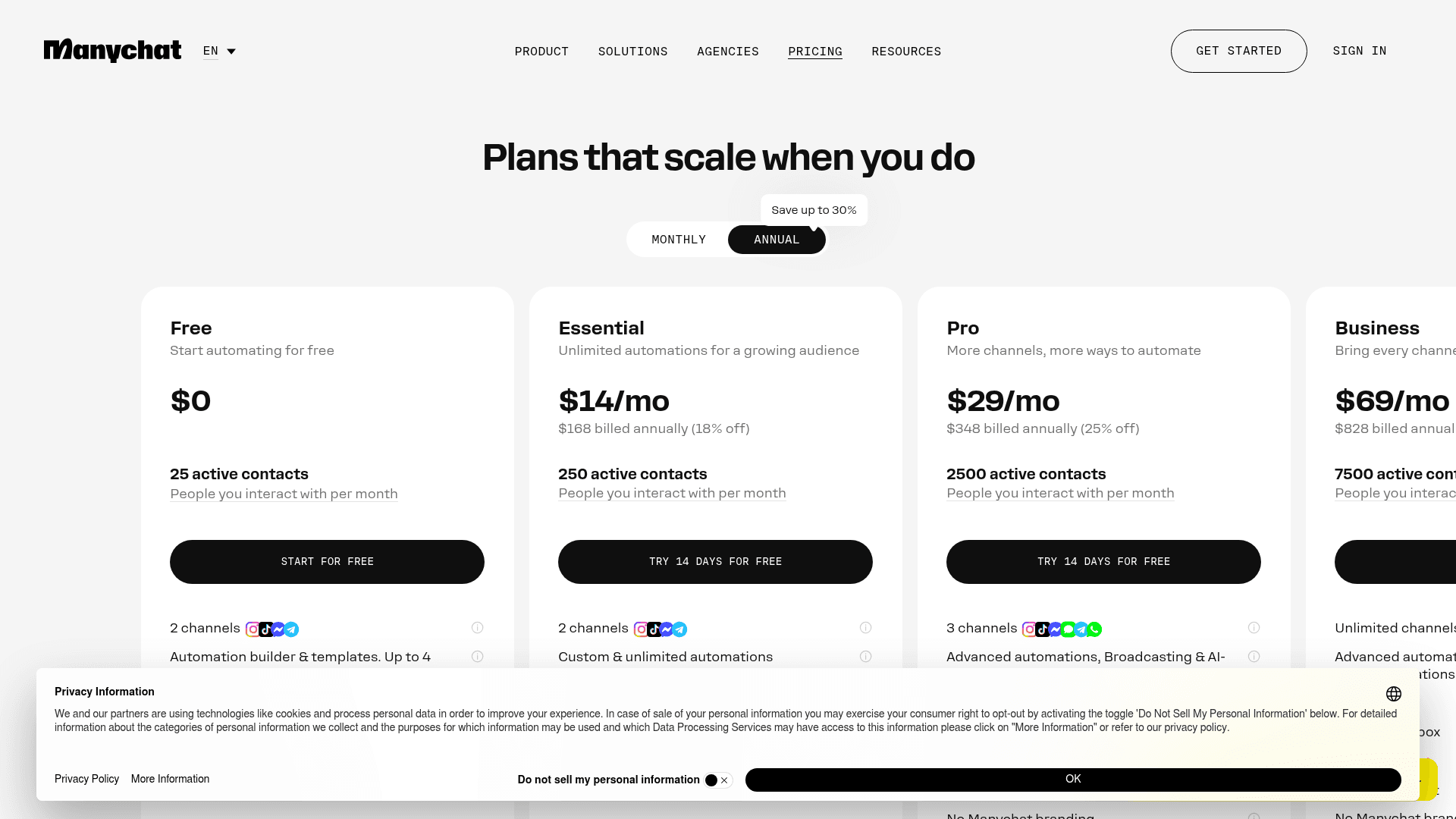
ManyChat is a DM marketing tool: comment-to-DM automations, story replies, broadcasts and growth tools for social channels. If you used Landbot for marketing on Messenger or WhatsApp, ManyChat covers the social side far better. It is not a support tool, and it doesn't pretend to be.
Pros
- Best-in-class Instagram and TikTok DM automation.
- Low entry price ($14 a month on annual billing).
- 60+ ready-made templates.
Cons
- Billed per active contact, so a viral post can push you up a tier overnight.
- AI features and WhatsApp start on Pro.
- Ratings split sharply: 4.5 on G2 from 165 reviews against 2.1 on Trustpilot, mostly billing complaints.
Pricing
| Plan | Price (annual) | Active contacts/mo | Channels |
|---|---|---|---|
| Free | $0 | 25 | 2 (no WhatsApp) |
| Essential | $14/mo | 250 | 2 |
| Pro | $29/mo | 2,500 | 3, incl. WhatsApp |
| Business | $69/mo | 7,500 | Unlimited |
| Advanced | $139/mo | Higher | Unlimited |
Annual-commitment rates from ManyChat's pricing page. My ManyChat pricing guide has the full picture, and the ManyChat alternatives list covers other DM tools.
Verdict
Pick ManyChat if your Landbot bot was really a social marketing funnel. Skip it for website lead capture or support, where the active-contact meter and DM focus work against you.
What 1,000 AI conversations a month costs
Prices only make sense against your own traffic. Here's a worked example for a team with 1,000 AI-handled conversations a month and 3 seats, using the cheapest plan that fits on each tool:
| Tool | Plan | Monthly cost | How it adds up |
|---|---|---|---|
| Typebot | Starter | $39 + your model bill | 2,000 chats included, AI on your own API key |
| Landbot | Professional (annual) | $158 | $88 + 700 extra AI chats at $0.10 |
| eesel | Teammate 1,000 | $499 | 1,000 credits, every feature included |
| Botpress | Plus (annual) | $670 | $150 + 8 packs of 100 at $65 |
I left Chatbase, Tidio, Voiceflow, Respond.io and ManyChat out of this table on purpose. Their units (credits per reply, Lyro conversations, contacts) don't convert to a per-conversation price without guessing.
The honest read: if you only switch to save money, Typebot is the one that wins, and only if you're fine paying a model provider and wiring handoff yourself. Everything else on this list costs more than Landbot for the same volume. You'd switch for what you get, not for the bill.
Plug in your own numbers here:
How to choose the right Landbot alternative
Start from the reason you're leaving, not the feature list. Four questions settle it:
- Is your support queue already in a helpdesk? If yes, pick a tool that hands off into it (eesel or Voiceflow) rather than one that adds a second inbox. My guide to the Zendesk AI chatbot options compares them, and the Freshdesk AI chatbot guide does the same for Freshdesk teams.
- Do you need to see every step of the conversation? If you're capturing leads with validated fields, stay with a flow builder (Typebot, Botpress, or Landbot itself). My explainer on AI agents vs rule-based chatbots goes into that trade-off.
- Which channel matters most? Website, WhatsApp and Instagram favour different tools. For WhatsApp, read up on the latest WhatsApp Business API pricing, since Meta's fees sit on top of every vendor here.
- How does your traffic behave? Many short chats from many people favours per-conversation pricing. A few long chats from repeat customers favours per-contact pricing.
The mistake I'd avoid: testing the bot only by typing at it yourself. A confident bot that gives a wrong refund answer looks great in a hand-typed demo. Testing against real past conversations is the step most tools skip, and my chatbot analytics guide explains what to measure once it's live.
For a wider list beyond Landbot alternatives, my roundup of best no-code bot builders covers more ground. The no-code AI chatbot tools list leans toward AI-first options, and best chatbots for lead generation is the right list if Landbot was a sales tool for you.
Moving support off Landbot with eesel
If you're leaving Landbot because the bot needs to live with your support team, that's the job eesel's AI helpdesk teammate was built for. You don't redraw your flows. You connect Zendesk, Freshdesk or Gorgias, eesel reads your past tickets and help center, and it starts answering on your site through the chat bubble, handing anything it isn't sure about to your team as a ticket with a summary.
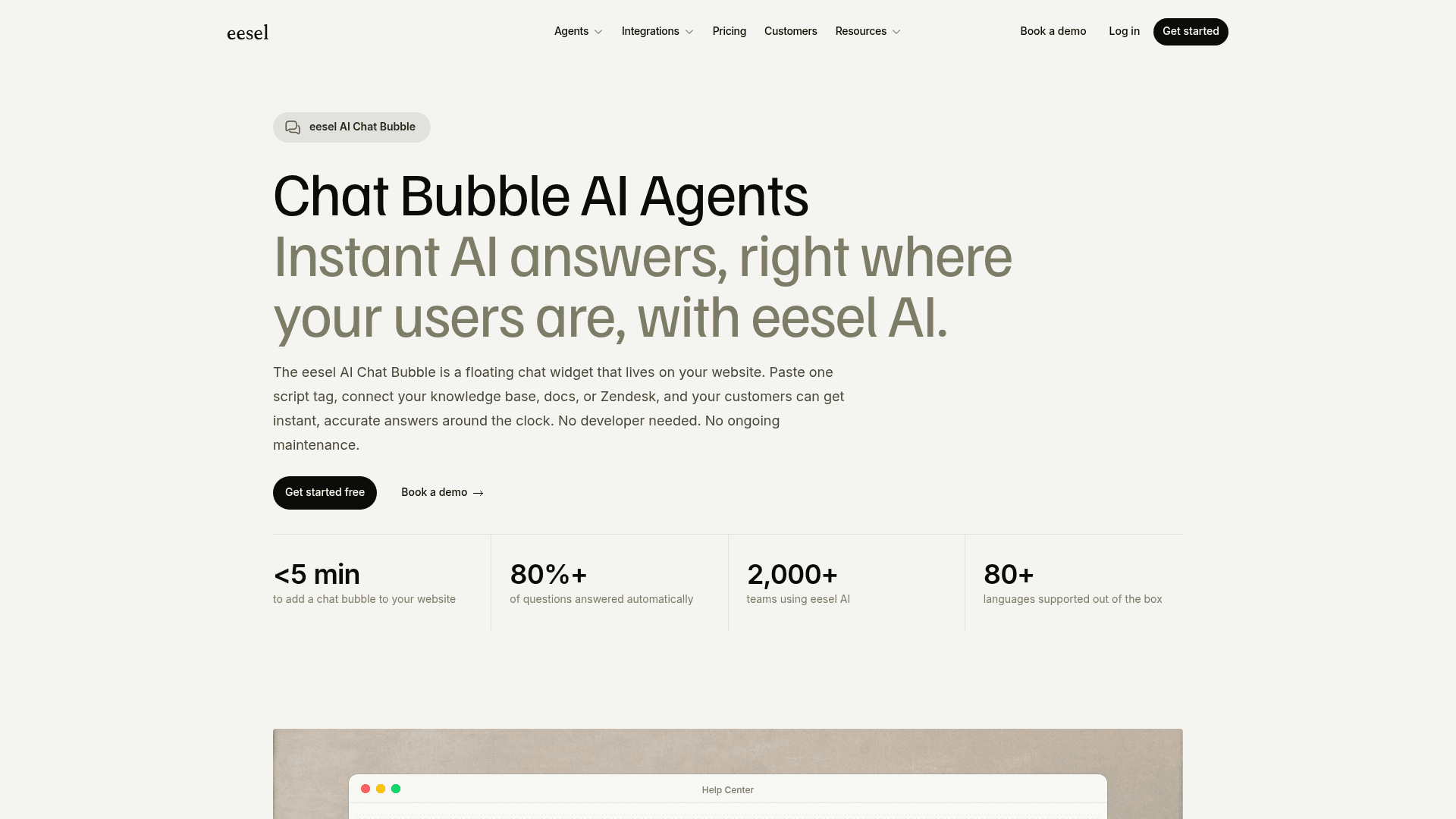
Before a single customer sees it, eesel replays hundreds of your past tickets and scores each answer against what your team actually sent, so you know where it's strong and where it should stay quiet. It costs more per conversation than Landbot, and it's worth being clear-eyed about that. What you get is no flows to maintain, no webhooks, unlimited seats, and an AI tested on your own history. Try eesel free with 100 credits, no card needed.
Frequently Asked Questions
What is the best Landbot alternative in 2026?
It depends on why you're leaving. For a support queue in Zendesk or Freshdesk, eesel is the closest fit because it hands off inside your helpdesk. For developers who want more AI control, Botpress. For an open-source builder you can self-host, Typebot. My AI chatbot builder roundup covers more Landbot alternatives.
Is there a free alternative to Landbot?
Yes. Typebot's free plan includes 200 chats a month and you can self-host it at no cost, Botpress has a free plan with 25 conversations, and Chatbase and Tidio both have free tiers. eesel's free plan gives you 100 credits with no card. See my list of open-source chatbot platforms for more free Landbot alternatives.
Why do people switch from Landbot?
The common reasons are cost and fit. Landbot meters AI chats separately from regular chats ($0.10 each past the allowance), has no native Zendesk, Freshdesk or Gorgias app, and charges $25 per extra seat. My Landbot review walks through each of these in detail.
Is Typebot a good Landbot alternative?
For building flows, yes. Typebot has a similar visual builder, starts at $39 a month for 2,000 chats, and can be self-hosted. It has no live chat inbox of its own, though, so human handoff goes through a Chatwoot or Zendesk Messaging widget you set up.
Which Landbot alternative works best with Zendesk?
eesel connects to Zendesk natively, answers on your website through a chat bubble, and creates a Zendesk ticket on handoff. Voiceflow also has a Zendesk handoff step over Zendesk messaging. For the full picture, see my guide to the Zendesk AI chatbot options.
How much does Landbot cost compared with its alternatives?
Landbot Professional is $88 a month billed annually with 2,500 chats and 300 AI chats. Botpress Plus is $150 a month (annual) with 250 conversations, Typebot Starter is $39 a month, Chatbase Standard is $150, and eesel starts at $299 for 500 credits. My Landbot pricing guide and chatbot cost breakdown go deeper.
What is the best Landbot alternative for WhatsApp?
Respond.io is the strongest WhatsApp-first inbox, billed per monthly active contact from $79. ManyChat is better for Instagram and Messenger marketing, with WhatsApp on Pro. If WhatsApp is a support channel, eesel has a WhatsApp integration too. My WhatsApp chatbot roundup compares more options.


Article by
Kurnia Kharisma
Kurnia is a software engineer and writer at eesel AI with two years of SEO experience, writing about AI tools, helpdesk software, and customer support. He pairs a developer's understanding of how these products are built with search-driven research into what actually ranks and resonates with the people searching for them.