The 8 best Macha AI alternatives in 2026, priced and tested

Rama Adi

Katelin Teen
Last edited August 16, 2026
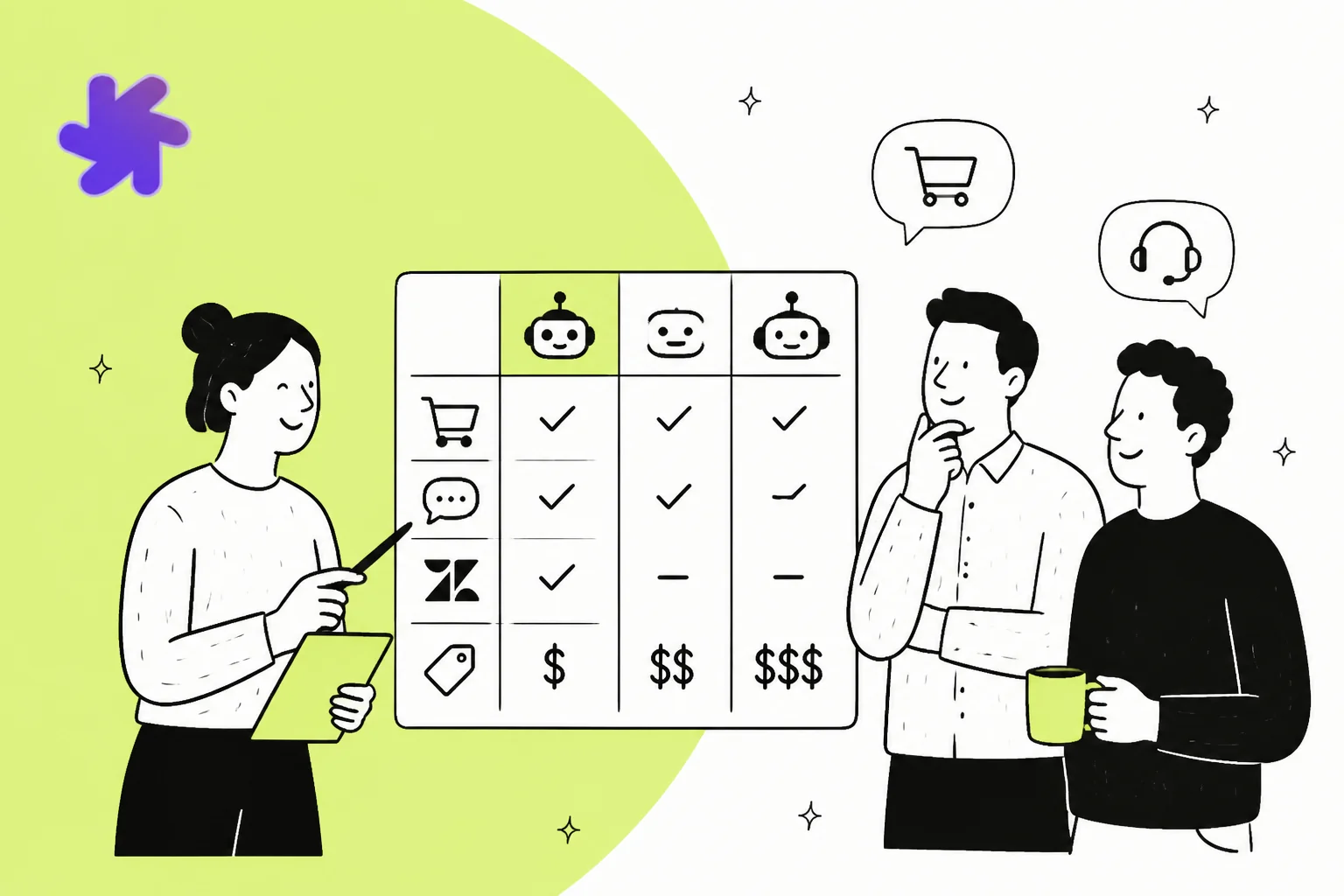
Why teams start looking past Macha AI
I build integrations at eesel, which mostly means I spend my week inside other people's helpdesk APIs. So when I look at a tool like Macha, I skip the homepage and go straight to the connector docs, because that's where a "works with four helpdesks" claim either holds up or quietly falls apart.
Before the criticism, credit where it's due. Macha has built something with real engineering behind it. Agents run on seven-plus models including GPT-5, Claude and Groq. There's sub-agent delegation, agent versioning and rollback, scheduled triggers, and a custom API tool builder that will hit any REST endpoint you point it at. Its Zendesk Marketplace copilot has 71 reviews and 100+ installs, which is more real user feedback than most tools in this category have earned. That's a serious product, not a wrapper.
One thing to know before you go looking for second opinions: every public review of Macha lives on the Zendesk Marketplace. I found 86 reviews across its six Zendesk apps and zero on G2, Capterra or Trustpilot, plus no independent threads on Reddit, X or Hacker News. That isn't a knock on the product, and 86 first-party reviews beats the handful most tools in this category have. It just means the only place you can triangulate is the one platform Macha is closest to.
The most useful of those reviews is a four-star one that names what works and what doesn't in the same breath:
"We first tried out the AI Copilot from Zendesk, and we were really disappointed. We then installed Macha and my agents just love it! It saves them so much time. We mainly use it for English and German replies. When you input a prompt, the replies are fantastic, especially when supplemented with a help article. However, if you don't provide a prompt and let the AI generate a reply on its own, the responses tend to be very general and not tailored to the ticket."
That last sentence is the honest version of what you're buying: excellent with a good prompt and a good article behind it, generic without one.
The problems are structural, and there are three of them.
Problem one: it is a Zendesk product wearing a four-helpdesk badge
Macha's Agent Simulations replay past tickets with write tools stubbed out, so the agent reasons for real but nothing lands. That's a proper dry run and it's the best thing in the product. The AI Knowledge Builder reads your solved tickets from the last 90 days and turns them into knowledge base articles. Also excellent.
Both are Zendesk-only. So is image vision, so is Help Center sync, so is the native sidebar. A Gorgias or Front team gets the action tools and nothing else.
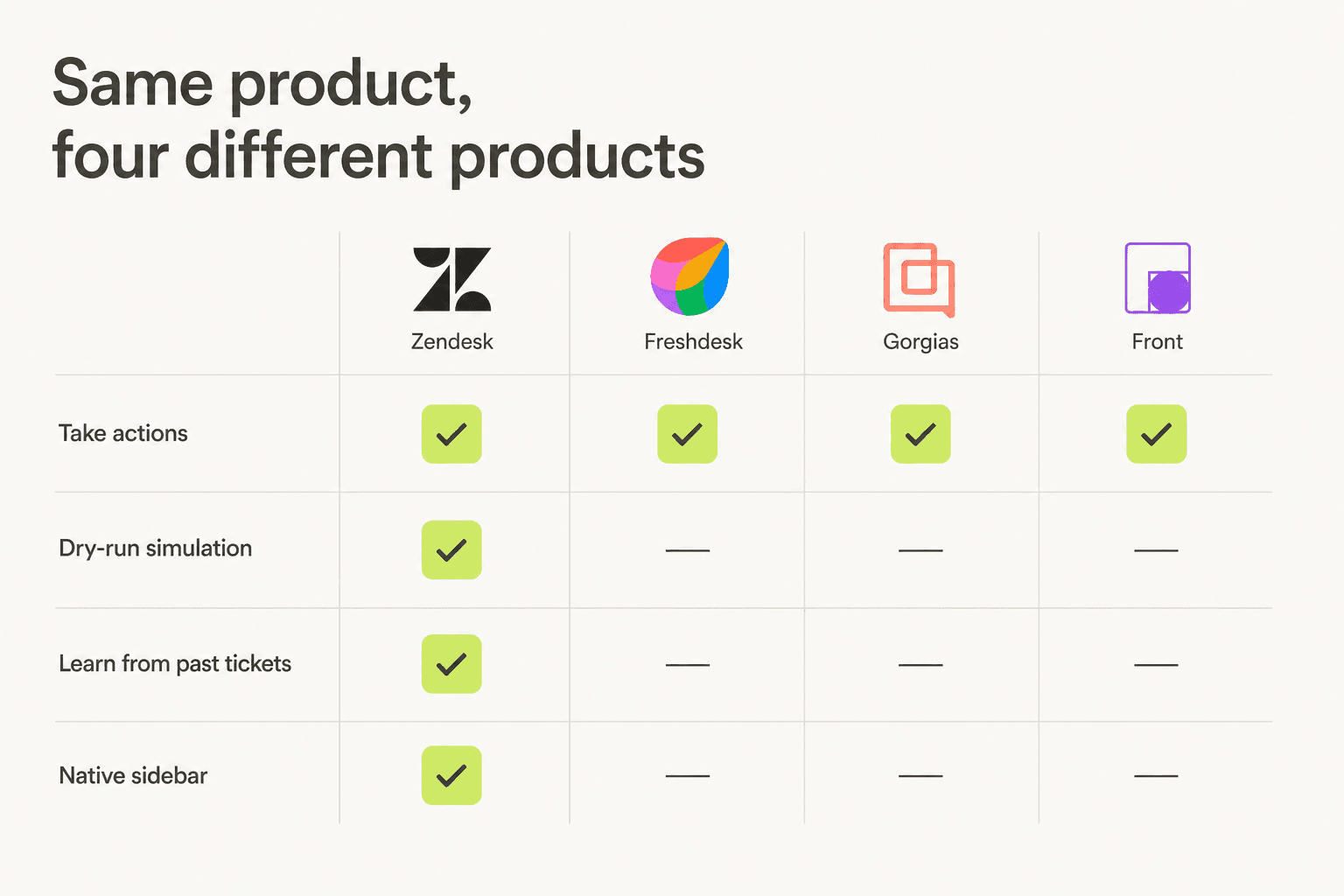
You can check this from the outside, too. Macha has six apps on the Zendesk Marketplace and zero listings on the Shopify App Store, the Freshworks Marketplace, the Gorgias app directory or Front's integrations directory. Its own Zendesk partner page still describes Macha as building apps exclusively for Zendesk. The connectors for the other three are real and they work; the ecosystem around them isn't there yet.
This is the single most useful thing to know before you evaluate. It doesn't make Macha bad. It makes Macha a Zendesk AI tool, and you should price it as one.
Problem two: the headline price is a configuration, not a default
Macha bills in credits, not tickets. One ticket costs 1 credit on GPT-5.4 Mini, 2 on GPT-5, and 3 on GPT-5.4, which is the default. Starter includes 3,000 credits a month, Professional includes 10,000.
Run that out. Professional billed annually is $559 a month; at 2 credits per ticket that's 5,000 tickets, which is $0.11 each. Perfectly real. Now take Starter billed monthly at $299 on the default GPT-5.4: 3,000 credits at 3 credits per ticket is 1,000 tickets, or $0.30 per ticket, nearly three times the advertised rate. Both numbers are on the same page. The card just happens to render the annual toggle with GPT-5 pre-selected.
There's a second wrinkle. Macha lets you pick from GPT-5.6, Claude Sonnet and three Groq models, but publishes credit rates for only three models. The card badges GPT-5.6 Terra as "Best" and I couldn't find what it costs per ticket anywhere in the docs or on the pricing page. If you run the model the product recommends, you can't compute your bill in advance.
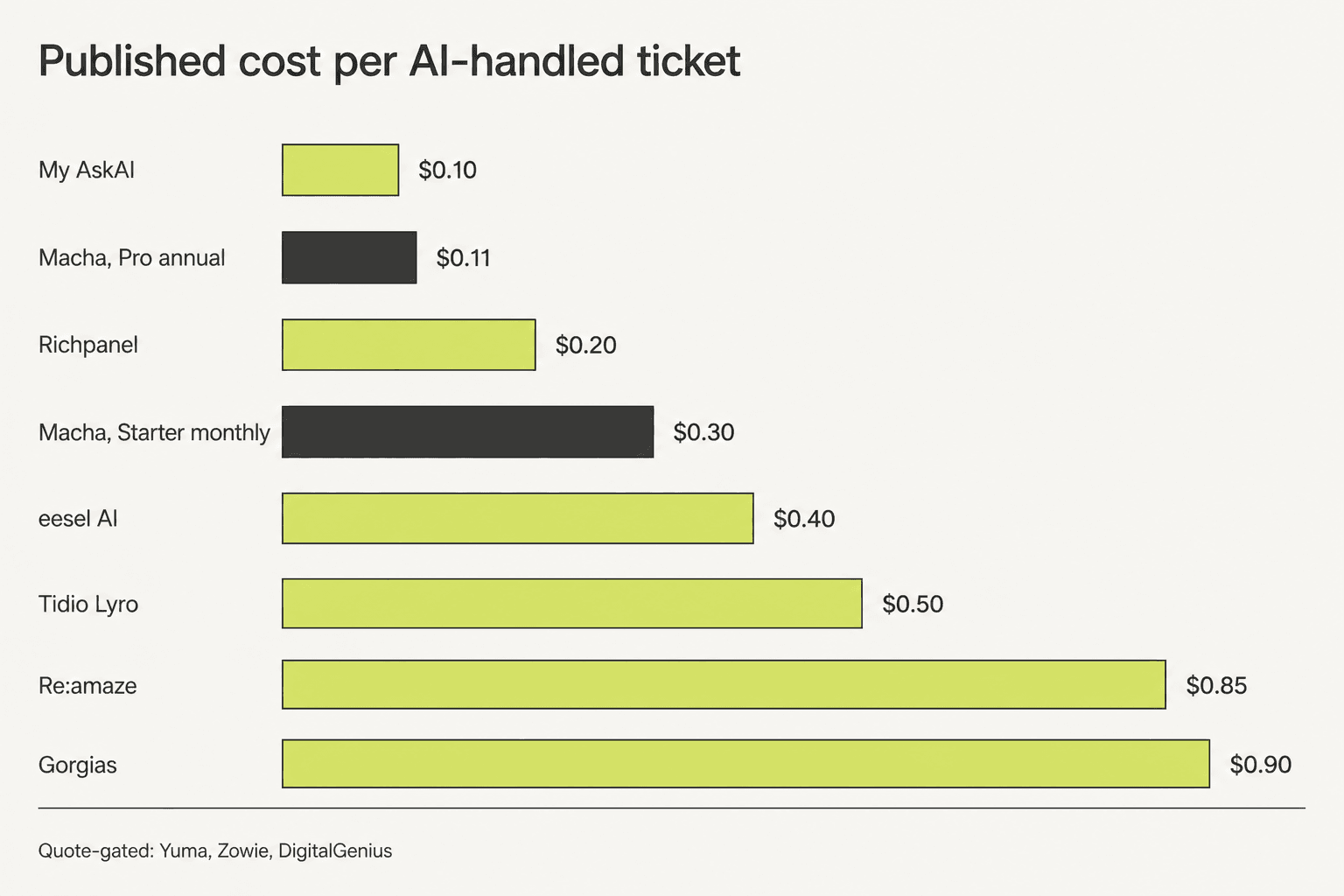
To be fair to Macha, its billing has one property I wish more vendors copied: there are no overages, ever. Hit zero credits and your agents pause until reset, or you buy a top-up pack (1,000 credits for $99, 10,000 for $799, never expiring). Nobody wakes up to a surprise invoice. The flip side is that "the AI stopped working on the 22nd" is its own kind of incident, and it's the failure mode you're choosing.
Problem three: there's no confidence threshold
This is the one I care about most, and it's personal.
Last March eesel lost a deal to a competitor. A DTC brand on Gorgias doing about 7,000 tickets a month, exactly the profile you want, and they went elsewhere because nobody on our side could demonstrate confidence-based routing in the demo. Not because our answers were worse. Because we couldn't show them the switch that says only reply when you're sure, otherwise leave it for a human. I've thought about that loss a lot, and it's why I now read every AI support tool's docs looking for that one control before I look at anything else.
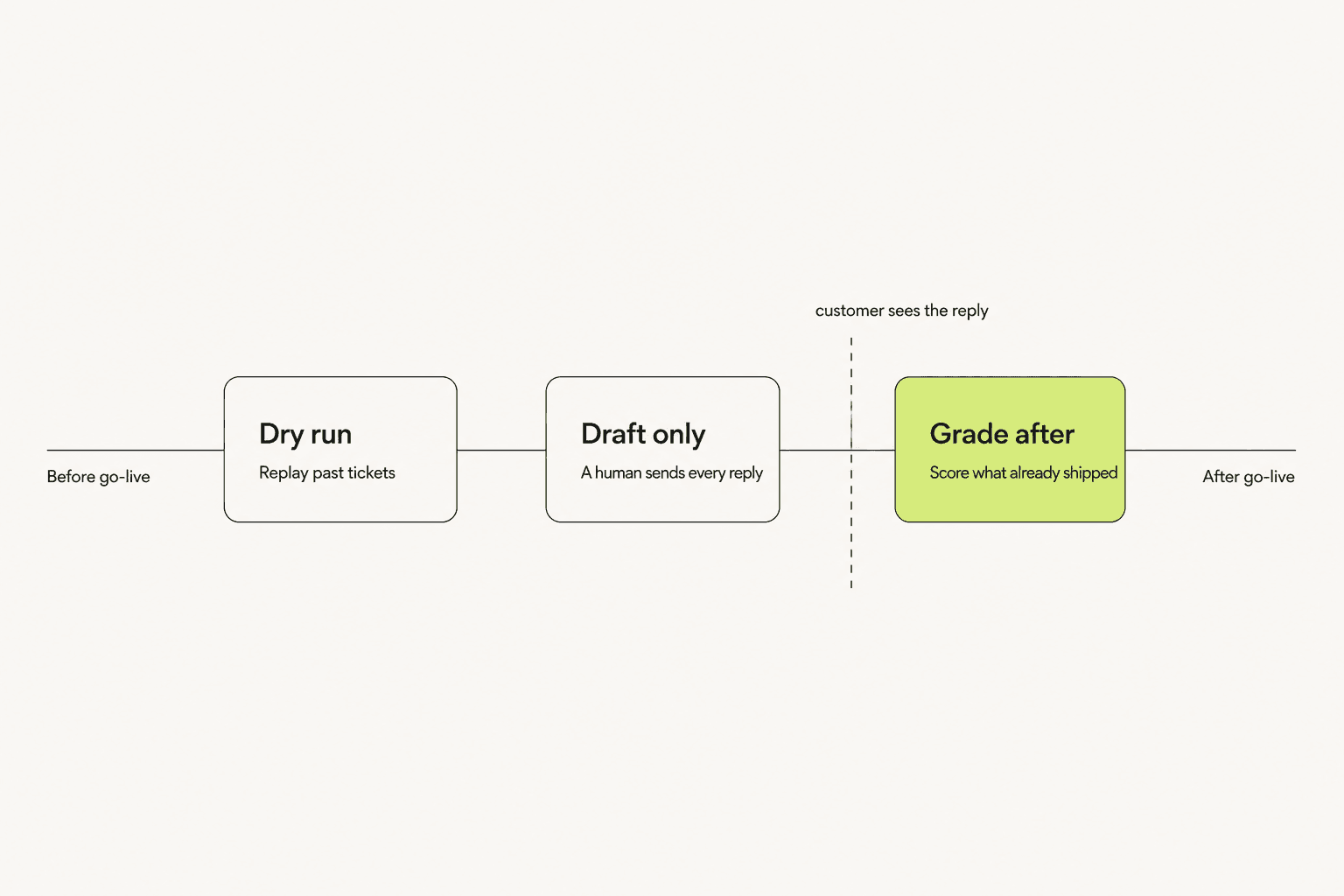
Macha doesn't have it. Its documentation is explicit: in autonomous mode, write actions execute immediately with no confirmation step. The gate is binary by mode, not graded by confidence. What Macha offers instead is a manual rollout playbook, and it's a sensible one: swap the public-reply tool for the internal-note tool by hand, run that for a week or two, and graduate the agent once its approval rate clears 85% over two consecutive weeks.
That works. It's also a process you have to remember to run, rather than a setting that holds the line for you on ticket 40,000 when nobody is watching.
Macha's Continuous Agent Evaluation is a clever feature that grades every conversation against the agent's own instructions and quotes the rules it followed or missed. But the docs are honest about what it isn't: the grade runs after the conversation completes, and evaluation is not a live moderator.
Support people know exactly why this matters, and they say so without much diplomacy:
"AI fans will respond to stories like this "oh, that bot just needed to be tuned more", but folks, experiences like these are the DEFAULT. Your customers are hitting them regularly."

One more thing worth knowing before you evaluate
Macha runs two sets of documentation. The help center still describes an older per-agent Zendesk copilot at $15 per agent per month with a three-agent minimum, one that explicitly cannot perform actions on your behalf and does not store full ticket content. The platform docs on the main site describe the autonomous, per-ticket, action-taking product covered in this post. Macha's own copilot page now says there's no per-seat fee for the copilot and that it's the same account as the dashboard, so the newer model has clearly superseded the older one.
Read the platform docs, not the help center, when you're evaluating. Two people on the same buying committee reading two different sites will reach two different conclusions about what they're buying.
How I picked these eight
I graded every tool on three questions, in this order, because they're the ones that actually decide whether a rollout survives month two.
- Does it work at full capability where your tickets already live? Not "has a connector." Full feature parity. This is where Macha loses points and it's where most tools quietly lose them too.
- Can you see what it will do before a customer does? Simulation over your history, confidence-based routing, or draft-only mode. Anything is better than nothing.
- Can you compute the bill before you sign? A published rate, a unit you understand, and no meter you can't forecast.
A support lead in r/Zendesk put the first point better than I can:
"Escalation quality. Try the live agent handoff yourself as a customer... What "integration" actually means. Ask how the Zendesk handoff works technically. A lot of tools claim compatibility but it ends up being a webhook that breaks."

Everything below is priced from the vendor's own page as of August 2026, with the quote-gated ones marked as such rather than guessed at. I've left Siena off the numbered list because it doesn't publish a rate you can check. The same goes for Zowie. Both are reasonable calls if you're already in a sales cycle with them.
The 8 best Macha AI alternatives at a glance
| Tool | Best for | AI billing unit | Published AI rate | Native helpdesks | Dry run on your tickets | Confidence routing | Trains on past tickets | Free tier | Security floor |
|---|---|---|---|---|---|---|---|---|---|
| eesel AI | Any helpdesk, same features everywhere | Per ticket handled | $0.40 | Zendesk, Freshdesk, Gorgias, Front, HubSpot, Help Scout, Kustomer, JSM, Salesforce | Yes, all helpdesks | Yes | Yes | $50 usage, no card | SOC 2, HIPAA on Enterprise |
| Gorgias | One vendor for helpdesk and AI | Per resolved conversation | $0.90 annual, $1.00 monthly | Native platform | No | No | Help center first | 7-day trial | SOC 2, GDPR |
| Richpanel | A written resolution guarantee | Per AI handled conversation | ~$0.20 average, token-metered | Native platform | Setup on real data first | Not published | Yes, policies and past tickets | Demo only | GDPR |
| Yuma AI | Only paying for resolutions | Per fully resolved ticket | Quote-gated | Gorgias, Zendesk and others | 30-day live trial | Yes | Yes | 30-day trial | Enterprise-grade, unspecified |
| My AskAI | The lowest published rate | Per ticket | $0.10 to $0.20 | Zendesk, Freshdesk, Gorgias, HubSpot | No | No | Yes | 30-day trial, no card | SOC 2 Type II on Scale |
| Re:amaze | Small teams wanting one cheap box | Per AI resolution | $0.85 overage | Native platform | No | No | Help center first | 14-day trial | GDPR |
| Tidio Lyro | Storefront chat on a tiny budget | Per Lyro conversation | $0.50 | Standalone, plus Zendesk and Salesforce | No | No | Limited | Free, 50 conversations | GDPR, SOC 2 |
| DigitalGenius | Deep retail operations automation | Not published | Quote-gated | Zendesk, Gorgias, Kustomer, Freshdesk, Gladly, Dixa | Not published | Not published | Yes | Demo only | Enterprise, unspecified |
Two columns in that table do more work than the rest. "Native helpdesks" tells you whether the tool survives your next stack change, and "Dry run on your tickets" tells you whether month one is a rollout or an experiment on live customers.
What Macha actually costs at your volume
Before the individual writeups, plug your own number in. This is the same arithmetic from the pricing page, just without the pre-selected toggles.
The thing worth noticing as you drag that slider: Macha is cheapest in a specific band, roughly 2,000 to 5,000 AI tickets a month on Professional. Below about 1,000 you're paying for allowance you don't use, and above 5,000 you're in a sales conversation. That band is the product.
1. eesel AI
Best for: teams who want Macha's rollout discipline but aren't on Zendesk, or won't stay on Zendesk forever.
What it does
eesel is an AI helpdesk agent that installs into the helpdesk you already run and learns from your solved tickets, help center and connected tools on day one. It drafts, triages, escalates and takes actions across 100+ integrations in 80+ languages. Full disclosure, I work here and I write the integration code, so read the next two sections with that in mind.

Where it beats Macha
Two places, and they're the two from my grading list.
Simulation isn't gated to one helpdesk or one plan. You point eesel at your ticket history, it replays them, and you get coverage broken down by theme before anything goes live. That holds on Gorgias, Front, Freshdesk, Help Scout, Kustomer and Jira Service Management, not just Zendesk. The full list is on the integrations page.
And there's an actual confidence threshold. Low-confidence tickets become drafts instead of replies. That's the control I described losing a deal over, and it's the reason the control is a real setting rather than a mode toggle.
The commercial shape is different too. No plan to pick, no credit currency to convert, no allowance to overshoot. It's $0.40 per ticket handled, no platform fee, no per-seat fee, no monthly minimum, and you only pay for the tickets you route to the AI. Route 200 out of 1,000 and you pay for 200.
Where it falls short
It is more expensive per ticket than Macha at Macha's best configuration, and I'm not going to pretend otherwise. At 5,000 tickets a month, Macha Professional annual on GPT-5 costs $559 and eesel costs $2,000. If your volume sits neatly in Macha's sweet spot, you're on Zendesk, and you don't need confidence routing, Macha is the cheaper buy and you should take it.
eesel also bills per ticket handled regardless of outcome, not per successful resolution. Some teams strongly prefer paying only for wins; Yuma is built for those teams and eesel isn't.
Pricing
| Item | Cost |
|---|---|
| Regular task (one ticket or chat session) | $0.40 |
| Light task (lookups, dashboard questions) | Free |
| Heavy task (blog draft) | $4.00 |
| Free allowance | $50 usage, no credit card |
| Annual commit | 25% off a prepaid commitment |
| Enterprise | $1,000/mo platform fee plus usage, adds SSO, HIPAA and a BAA |
My take
Pick eesel if you're on a helpdesk Macha treats as a second-class citizen, or if a human needs to approve anything the AI isn't sure about. Skip it if you're a Zendesk shop running 3,000 to 5,000 clean tier-one tickets and the per-ticket delta matters more than the controls. Gridwise got to 73% of tier-one requests resolved in the first month, with results showing inside a 7-day trial, which is the honest benchmark to hold eesel to.
2. Gorgias
Best for: Shopify teams who want the helpdesk and the AI from one vendor, on one invoice.
What it does
Gorgias is the ecommerce helpdesk Macha connects to, so choosing it means replacing the stack rather than layering onto it. Its AI Agent handles order status, returns and refunds natively, with Shopify data wired in rather than bolted on.
Where it beats Macha
It owns the whole surface. Macha's Gorgias connector can write replies and set tags; Gorgias itself owns the routing rules, the macros, the customer sidebar and the Shopify order object. If your automation ambitions run deep into ecommerce workflows, being the platform beats being a guest on it.
It's also the safer bet on longevity. Gorgias has thousands of Shopify merchants and a real app ecosystem behind it.
Where it falls short
Price, and it isn't close. The AI Agent is $0.90 per resolved conversation annually, $1.00 monthly, and each AI interaction also counts against your billable ticket allowance on the helpdesk plan underneath. That's roughly eight times Macha's best rate before you've paid for the helpdesk.
There's no dry run over your ticket history and no confidence threshold, and merchants notice:
"Then, I find that most of the responses have an error that I have to apologize for after the handoff. It's probably fine for basic questions like order status... The AI agent does more harm than good in almost all tickets that involve complexity above like a fifth grade education level."
Another merchant in r/shopify reported asking to keep the AI in preview mode so agents could copy and paste its drafts, and being told no. That's exactly the graded-control gap, showing up in a different product.
Pricing
| Plan | From | Tickets/mo |
|---|---|---|
| Starter | $10/mo | 50 |
| Basic | $50/mo | 300 |
| Pro | $300/mo | 2,000 |
| Advanced | $750/mo | 5,000 |
| Enterprise | Custom | 5,000+ |
| AI Agent add-on | $0.90 resolved (annual), $1.00 (monthly) | Also consumes a billable ticket |
My take
Take Gorgias if you're already on it and consolidating vendors is worth real money to you. Skip it if you're shopping on cost per resolution, because at $0.90 a resolution the maths only works at low AI volumes. The cost per resolution guide has the full comparison.
3. Richpanel
Best for: teams who want a written guarantee attached to the resolution rate.
What it does
Richpanel is an AI-first ecommerce helpdesk that bundles the inbox and the agent into a single bill. Every channel is included: email, chat, social, SMS, WhatsApp and voice.
Where it beats Macha
The guarantee. Richpanel's pricing page commits to 50% of tickets resolved by AI in 30 days or your money back, with no proration even on an annual contract, and it sets the AI up on your real policies, tools and past tickets before the clock starts. Macha gives you a trial and a $799 white-glove onboarding add-on; Richpanel puts its own revenue on the outcome.
It also solves Macha's currency problem in the other direction. Richpanel bills per AI handled conversation on actual token use, averaging $0.20 across its customer base and last audited June 2026. That's variable, but it's variable in a way you can reason about.
Where it falls short
There's a seat fee. $99 per helpdesk seat per month on top of the AI usage, where Macha gives you unlimited seats at every tier. A six-person support team is $594 a month before a single AI conversation.
There's also no self-serve checkout any more. The pricing page is a calculator plus a "Book a demo" button, so you can't just sign up on a Tuesday afternoon the way you can with Macha's 500 free credits.
Pricing
| Component | Cost |
|---|---|
| AI handled conversations | ~$0.20 each, token-metered, from $200 per 1,000 |
| Helpdesk seat | $99/seat/mo |
| Example bill (1,000 AI conversations, 1 seat) | $299/mo |
| Annual billing | 17% off |
| Guarantee | 50% AI resolution in 30 days or money back |
My take
Richpanel is the right call if your CFO wants downside protection more than a low sticker price, and if your team is small enough that $99 a seat doesn't dominate the bill. Skip it if you have a large human team, because the seat fee scales against you exactly when the AI should be saving you money. Full numbers in the Richpanel pricing breakdown.
4. Yuma AI
Best for: teams who refuse to pay for anything except a completed resolution.
What it does
Yuma is a purpose-built ecommerce AI agent that layers onto Gorgias, Zendesk and other helpdesks, much as Macha does. It's the closest structural comparison in this list.
Where it beats Macha
The billing model is a different shape, not just cheaper or dearer. You pay only for tickets the AI fully resolves, backed by a 100% ROI guarantee on the contract and a 30-day free trial running on your live site. Macha bills the ticket whatever the outcome, and says so openly, calling itself an automation platform rather than a deflection bot. Both positions are defensible; they suit different buyers.
Yuma also has the control Macha lacks. This is the tool that beat eesel on confidence-based routing with that DTC brand on Gorgias, and I've had a year to be annoyed about it. The customer called Yuma "really well built" and I couldn't argue.
Where it falls short
You can't price it without a call. The pricing page is a demo-request form, so every number in your business case comes from a salesperson. After Macha's published rate card, that's a real step backwards in evaluation speed.
G2 reviewers also flag that performance-based pricing needs meaningful volume to pencil out, which makes it a poor fit for low-volume or early-stage stores.
Pricing
| Item | Detail |
|---|---|
| Model | Pay per fully resolved ticket |
| Published rate | None, quote-gated |
| Trial | 30 days, live on your site |
| Guarantee | 100% ROI on the contract |
| Onboarding | Human onboarding included |
My take
Yuma is the strongest pick in this list if your ticket volume is high, your tickets are ecommerce-shaped, and outcome-based billing is a hard requirement. Skip it if you're under a couple of thousand tickets a month or you need a number today. The full Yuma AI review goes deeper on the resolution definition.
5. My AskAI
Best for: buyers for whom the published per-ticket rate is the whole decision.
What it does
My AskAI bolts an AI agent onto your existing helpdesk and is loudly, deliberately transparent about price. Its own pricing page leads with a line about not hiding pricing behind a sales call, which after a week of researching Zowie, Yuma and DigitalGenius I appreciated more than I expected to.
Where it beats Macha
It's cheaper, and the cheapness has no configuration attached. Pro is $199 a month for 1,000 tickets, Scale is $499 for 2,000 with $0.10 overage, and its pricing page carries a 60% resolution guarantee or your money back. No credits, no model multipliers, no annual toggle you have to notice.
It also clears the security bar Macha doesn't. Scale and Enterprise carry SOC 2 Type II; Macha publishes GDPR compliance and nothing else, with its own storage layer listed as SOC 2 pending. If you sell to enterprises, that difference ends conversations.
Where it falls short
No simulation, no confidence threshold. On my three questions it scores well on one and poorly on two, which is why it isn't first on this list despite the price.
The review base is also thin. My AskAI self-reports 4.9 out of 5 across 19 reviews on G2 and helpdesk app stores, and 19 is a small sample to bet a support queue on.
Pricing
| Plan | Price | Tickets included | Overage |
|---|---|---|---|
| Pro | $199/mo | 1,000 | ~$0.12 up to 5,000/mo |
| Scale | $499/mo | 2,000 | $0.10 |
| Enterprise | From $999/mo | Custom | Volume discount |
Annual billing takes 33% off, and there's a 30-day trial with no card. Branding removal and API/Slack access are $49/mo each on Pro, both included on Scale.
My take
Take My AskAI if you've already decided AI support is worth doing, your tickets are simple, and you want the lowest defensible number in the business case. Skip it if anyone on your team has to sign off on what the AI will say before it says it. See the My AskAI pricing notes for the add-on maths.
6. Re:amaze
Best for: small teams who want one inexpensive box with AI included rather than a separate agent layer.
What it does
Re:amaze is a long-running multichannel helpdesk with AI layered in, priced per seat with a small pool of included AI resolutions.
Where it beats Macha
The floor is much lower. The Starter plan is a flat $59 a month for unlimited team members on Basic features, which is a very good deal for a five-person team doing 500 conversations. Macha's cheapest real entry point is $239 a month on an annual commitment.
It's also a complete helpdesk. Macha assumes you already pay for one; Re:amaze replaces it, so the honest comparison for a greenfield team is $59 against $239 plus whatever your helpdesk costs.
Where it falls short
The AI economics invert fast. Included resolutions are metered per user per month, 5 on Basic, 10 on Pro, 20 on Plus, and everything past that is $0.85 per resolution. A team doing 1,000 AI resolutions a month is well into four figures on overage alone.
There's no simulation, no confidence routing, and Re:amaze automation leans on help center content rather than your solved ticket history. That last point is the one I'd push hardest on: help-center-trained answers are only as good as your help center, and most teams' help centers are worse than their ticket archive.
Pricing
| Plan | Price | AI resolutions included |
|---|---|---|
| Starter | $59 flat/mo, all seats | 500 conversations/mo |
| Basic | $29/seat/mo | 5 per user/mo |
| Pro | $49/seat/mo | 10 per user/mo |
| Plus | $69/seat/mo | 20 per user/mo |
| Overage | $0.85 per AI resolution | All plans |
My take
Re:amaze is the right call for a small team consolidating onto one cheap tool where AI is a bonus rather than the point. Skip it the moment AI resolutions become your main volume, because $0.85 each is the second-priciest rate in this roundup. Re:amaze pricing has the seat maths.
7. Tidio Lyro
Best for: storefront chat deflection on the smallest possible budget.
What it does
Lyro is Tidio's AI agent. It ships inside Tidio's live chat but is also sold standalone, so you can bolt it onto Zendesk, Salesforce or another helpdesk the way you'd bolt on Macha.
Where it beats Macha
There's a real free tier. Fifty Lyro conversations, no card, which is enough to find out whether the thing understands your products before you spend anything. Macha's 500 free credits with no time limit is generous by industry standards, but Tidio's free plan never expires into a paywall.
Lyro's conversation unit is also refreshingly simple: one customer interaction with at least one AI reply counts as one conversation, no matter how many replies follow or whether the customer leaves and comes back. No credits, no model multiplier.
Where it falls short
At $0.50 per Lyro conversation it's more than four times Macha's best rate and above eesel's flat $0.40. The guaranteed 50% resolution rate and pay-per-resolution billing are locked to the Premium plan, which has no published price at all.
It's also chat-first by design. If your volume is email tickets rather than storefront chat, you're using the wrong shape of tool, and Tidio on Shopify is where it makes the most sense.
Pricing
| Plan | Price (annual equivalent) | Notes |
|---|---|---|
| Free | $0 | 50 Lyro conversations, one-time |
| Starter | $24.17/mo | 100 billable conversations |
| Growth | From $49.17/mo | From 250 conversations |
| Plus | From $749/mo | Custom limits, contact sales |
| Premium | Quote-gated | Pay-per-resolution, 50% guarantee |
| Lyro add-on | From $32.50/mo, $0.50 per conversation | Sold standalone |
My take
Lyro is a good first AI agent for a store doing a few hundred chats a month, and the free tier makes trying it a no-brainer. Skip it above roughly 1,000 conversations a month, where the 50 cent unit stops competing. Lyro pricing and the Tidio AI pricing post have the tier detail.
8. DigitalGenius
Best for: larger retailers whose tickets are really operations problems in disguise.
What it does
DigitalGenius is an ecommerce-only AI platform aimed at retail stacks where the helpdesk is one system among many: an OMS, a WMS, carriers, returns. It connects to Zendesk, Gorgias, Kustomer, Freshdesk, Gladly and Dixa.
Where it beats Macha
Depth in the retail operations layer. Macha's Shopify connector is five read actions with no triggers, which is fine for looking up an order and useless for reasoning about a warehouse exception. DigitalGenius is built for the second thing, and its integrations page says it will build custom integrations free of charge, which matters when your stack includes something nobody has heard of.
Its helpdesk list is also broader than Macha's four, and it includes Kustomer, Gladly and Dixa, which the layer-on-top tools mostly ignore.
Where it falls short
There's no pricing at all. The pricing URL redirects to a demo booking page, so you cannot build a business case without entering a sales cycle. For a mid-market team comparing against Macha's published rate card, that's a hard stop.
It's also not for you if you're small. This is enterprise retail software, with the implementation timeline that implies.
Pricing
| Item | Detail |
|---|---|
| Published pricing | None, /pricing redirects to a demo form |
| Model | Custom quote |
| Custom integrations | Built free of charge |
| Helpdesks | Zendesk, Gorgias, Kustomer, Freshdesk, Gladly, Dixa |
| Not supported | Help Scout has no native integration |
My take
DigitalGenius earns its slot if your hardest tickets need an OMS lookup rather than a knowledge base article, and if you have the procurement patience for a quote-gated vendor. Skip it if you're comparing per-ticket rates, because you'll never get one to compare. For the ecommerce field generally, the best AI helpdesk for ecommerce roundup is broader.
So which one should you actually pick?
Work down the three questions in order and the field narrows quickly.
If you're on Zendesk, doing 2,000 to 5,000 AI tickets a month, and you can live with a manual graduation process instead of a confidence setting, stay on Macha. It's the cheapest credible option in that exact box and nothing here beats it on price at that volume. I'd recommend it without hedging.
If you're on Gorgias, Front, Help Scout, HubSpot or Kustomer, or you think you might move helpdesks in the next two years, take eesel AI. Same simulation, same confidence routing, same feature set everywhere, and a flat rate you don't have to configure your way into.
If price is the entire decision and your tickets are simple, take My AskAI at $0.10.
If your finance team wants outcome-based billing, take Yuma and accept the sales call.
And whichever you pick, do the boring thing first: run it against your own ticket history before it emails a customer. Every tool in this list that lets you do that is better than its price suggests, and every tool that doesn't is riskier than its price suggests. That's most of the decision, and it has almost nothing to do with cost per ticket.
Try eesel for your helpdesk
If you got here because Macha's simulations and past-ticket learning looked great and then you noticed they're Zendesk-only, that's the exact gap eesel was built to close. It plugs into Zendesk, Gorgias, Front, Freshdesk, Help Scout and more, learns from the tickets your team has already solved, and lets you replay it against your own history so you can see the resolution rate before anyone outside your company sees a reply. Low-confidence tickets stay as drafts until you say otherwise.

It's $0.40 per ticket handled with no platform fee, no seat fee and no minimum, and you start with $50 of usage and no credit card. Try eesel on last month's tickets and see what it would have resolved.
Frequently Asked Questions
What are the best Macha AI alternatives in 2026?
How much does Macha AI actually cost per ticket?
Is there a free Macha AI alternative for a small Shopify store?
Does Macha AI work with Gorgias and Front, or only Zendesk?
How do I test an AI support agent before it replies to real customers?



Article by
Rama Adi
Rama is a software engineer at eesel AI with two years of experience writing about B2B SaaS, AI tools, and customer support technology. Based in Bali, Indonesia, he brings a developer's perspective to product comparisons — cutting through marketing copy to what the integrations and APIs actually do.