8 best JivoChat alternatives for live chat and AI in 2026

Rama Adi

Katelin Teen
Last edited November 17, 2026

The best JivoChat alternative depends on why you're leaving. For the closest swap, pick Crisp: one flat $95 a month covers 10 seats, WhatsApp, Instagram and SMS in one inbox, plus AI credits. If price is the problem, tawk.to's chat is free for unlimited agents. If the AI is the problem, look at how each tool bills for it, because JivoChat's AI Agent is a $69 monthly add-on, more than a seat. If you want AI answers on your website without changing the human inbox, eesel's chat bubble answers from your site and help center, and hands off by ticket or email.
If you'd rather let an AI coding agent do the setup, the eesel CLI lets it add the chat bubble to your site, upload approved knowledge like your exported FAQ answers, and ask it test questions before visitors see it. Connecting a helpdesk for handoffs still needs someone with admin access to approve it.
Why do people leave JivoChat?
I build integrations at eesel, which means I spend a lot of time inside other companies' chat widgets, webhooks and admin panels, working out what they actually do under the marketing page. JivoChat is one of the easier ones to like. It's cheap at the entry level, it's quick to install, and it puts website chat, WhatsApp, Instagram, Facebook, Telegram, Viber, email and phone callbacks into one inbox. Its own site says 200,000+ businesses use it, and a G2 reviewer put the appeal well:
"It's great to have one channel for all our Facebook messages, Instagram messages, website chats, etc. Instead of monitoring multiple websites, it's all in one place and that's a great time saver!"

So JivoChat isn't a bad tool. It's rated 4.6/5 on G2 (51 reviews) and 4.6/5 on Capterra (105 reviews). But its Trustpilot page sits at 2.2/5, and the recent reviews there explain most of the searches for alternatives. Four reasons come up again and again.
1. The price went up on renewal. Several long-time users describe big jumps when their plan renewed:
"I was a customer for 5 years as of today's date... each year the price would increase $20-$30. Now as of today without any headsup, wiithout any warning, they increased their prices over 250%... I went from paying $140 a year to now they are trying to charge me $450 a year."

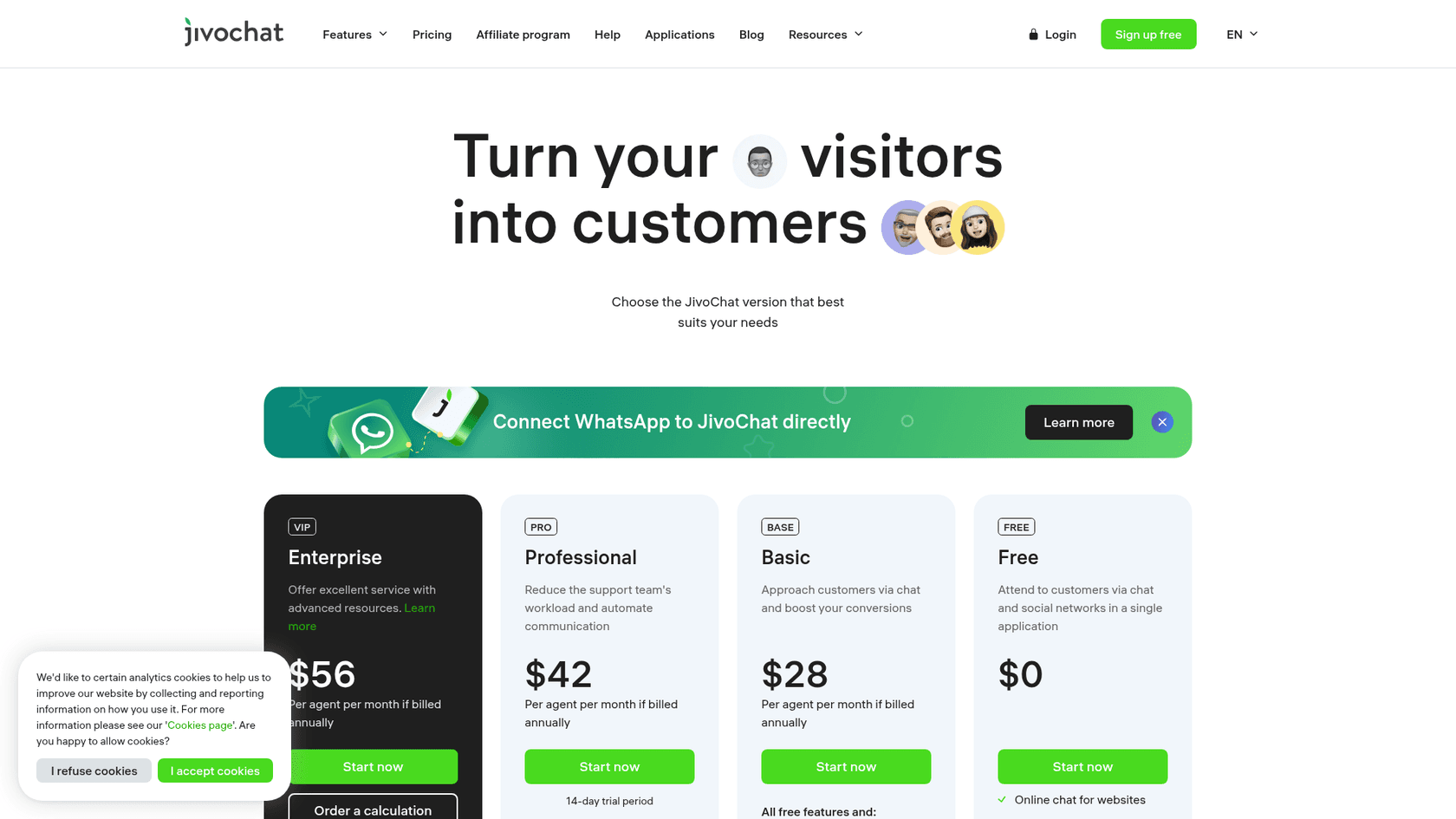
2. The extras add up. JivoChat's headline prices are per agent, billed annually, and the features many teams switched for are modules on top. Here's the full list from the JivoChat pricing page, checked today:
| Plan | Price (per agent/month, billed annually) | Agents | Chat history | What it adds |
|---|---|---|---|---|
| Free | $0 | "up to 2" in the comparison table | 2 months | Website chat, Telegram, Facebook, Instagram, Viber, callback |
| Basic | $28 | up to 100 | Unlimited | Proactive invitations, visitor monitoring, canned answers, CRM |
| Professional | $42 | up to 100 | Unlimited | Telephony Plus, WhatsApp integration, chatbot integrations |
| Enterprise | $56 | Unlimited | Unlimited | Mobile SDK, chat routing, video calls, Chat API |
| Add-on module | Price (billed annually) |
|---|---|
| AI Agent | $69 "per agent, per month" |
| AI assistant (reply drafting) | $13/month |
| $27/month, plus Meta's fees on business-started conversations | |
| Telephony Plus | $4/month (included in Professional and Enterprise) |
| Video calls | $23 per agent/month |
Check two details before you compare. The page only prints annual prices; it lists a 30% discount for yearly billing, so paying month to month costs more than the table shows. And the Free plan card says it "includes 5 agents" while the comparison table on the same page says "up to 2", so check your account before you plan around it.
3. Support and reliability. This is the complaint I'd weigh most, because it costs you chats, not just money:
"One of the worst customer support solutions you can have. Mobile SDK is broken on iOS, and their support is very slow in finding solutions. Most of our complaints about their bugs just get ignored. Web chat UI is constantly loading and refreshing. Webhooks for Slack are not working properly."
One more thing I noticed: JivoChat's features page links a web app and an Android app, but no iOS app. If your team answers chats from iPhones, check that before anything else.
4. Teams outgrow it. A Capterra reviewer summed up the trade-off: "Great for a small team, not as scalable as other solutions" (Capterra). JivoChat lists no native helpdesk integration (no Zendesk, Freshdesk or Gorgias), and its AI Agent learns from your website, up to 5 files of 30 MB, FAQ pairs and web search, per its help docs. Past chats aren't one of the listed sources, and there's no way to test it against old conversations before it goes live.
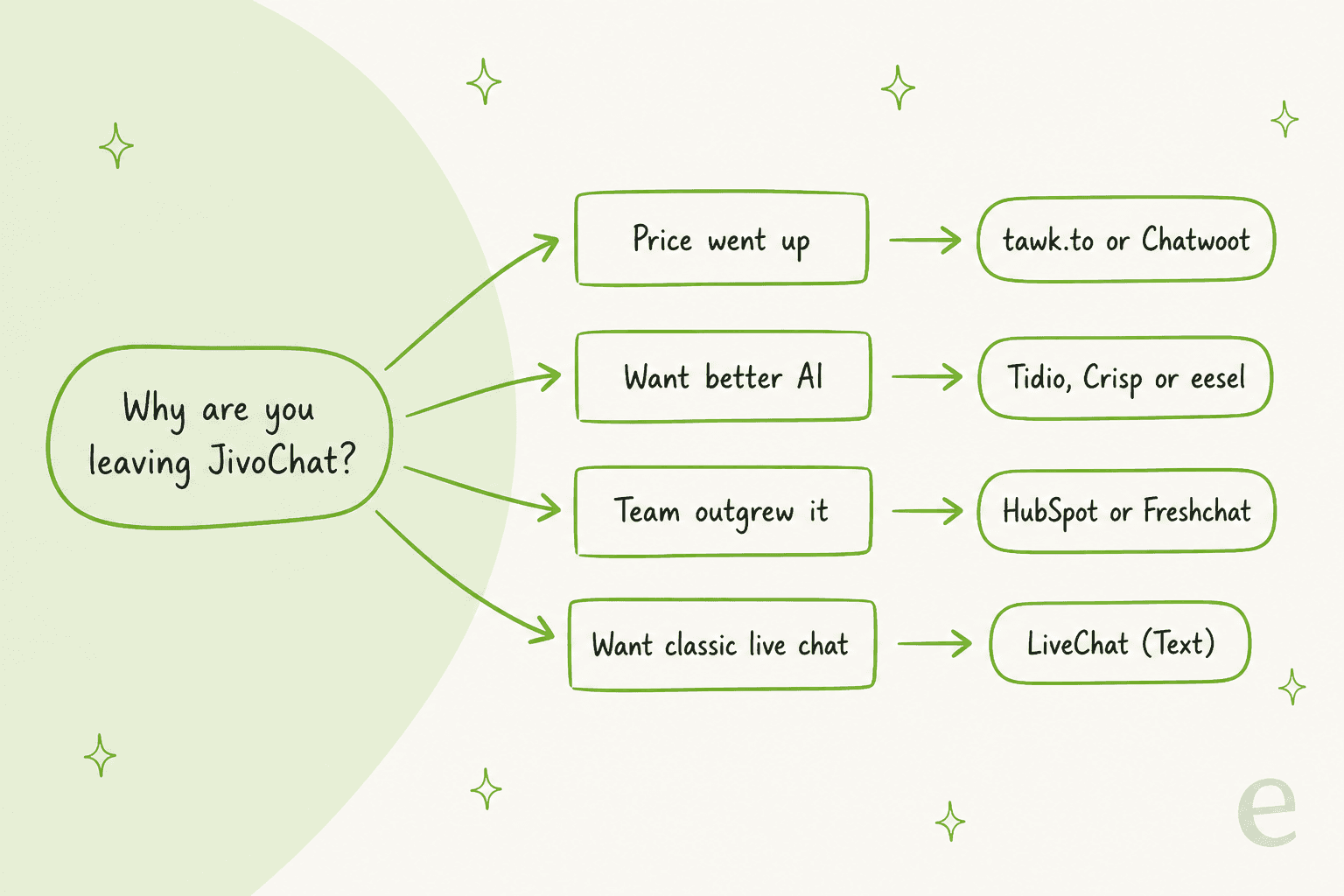
Which of these four is yours matters more than any feature list, because each one points to a different tool.
How I picked these JivoChat alternatives
I started from what JivoChat users actually ask for when they leave, then checked every price on the vendor's own pricing page today. Every tool on this list had to:
- Cover website chat plus at least one messaging channel, because JivoChat's real strength is the omnichannel inbox, not just the widget.
- Publish its prices, so I could price the same small team on each one.
- Offer an AI option with a stated price and limit, because "AI included" means nothing until you know the unit.
- Have a free plan or a free trial, so you can test it on real chats before you cancel JivoChat.
I left out enterprise suites that start with a sales call, and I kept the list to eight. If you want the wider field, my guides to live chat software and AI live chat tools go broader.
JivoChat alternatives compared
| Tool | Free plan | Paid from | Billing unit | AI option and price | Agent apps | Security (vendor's own site) | Best for | |
|---|---|---|---|---|---|---|---|---|
| JivoChat (today) | Yes, 2 months history | $28/agent/mo (annual) | Per agent | AI Agent $69/mo add-on | $27/mo module | Web, Android, desktop | NDA, GDPR, backup (Enterprise) | Cheap omnichannel for small teams |
| Crisp | Yes, 2 seats | $45/mo per workspace | Per workspace | AI credits included from Mini | Essentials ($95) and up | Mobile, Windows, Mac | EU-hosted, DPA, 2FA | The closest like-for-like swap |
| Tidio | Yes, 50 conversations | $29/mo ($24.17 annual) | Per human-replied conversation | Lyro from $39/mo for 50 AI conversations | All plans | Mobile, desktop | SOC 2 report, GDPR, CCPA | Small teams that want AI plus sales flows |
| tawk.to | Yes, unlimited agents | Free core | Free, add-ons per website | AI Assist free for 100 credits, then $29/mo | Yes | iOS, Android, macOS, Windows | GDPR | The lowest bill |
| Freshchat | Yes, up to 10 agents | $23/agent/mo ($19 annual) | Per agent | Freddy AI Agent $49 per 100 sessions | Growth and up | Not stated on pricing page | Trust Center (no certs named on page) | Growing teams that want routing and SLAs |
| LiveChat (now Text) | No, 14-day trial | $25/user/mo ($19 annual) | Per user | 10 AI resolutions included, $49.50 per extra 50 | Yes | Web, desktop | SOC 2 Type 2, GDPR, CCPA, PCI DSS | A polished classic live chat |
| HubSpot Service Hub | Yes, 2 users | $7/seat promo (list $20) | Per seat plus credits | Customer Agent on Pro, about $0.50 per resolution | Pro and up, 1,000 msgs/mo | Not checked | SOC 2 Type 2, SOC 3, GDPR | Teams that live in a CRM |
| Chatwoot | Yes, 2 agents, live chat only | $19/agent/mo | Per agent | Captain: 300 credits included, $20 per 1,000 more | Paid plans ("all" channels) | iOS, Android | None claimed | Open source and self-hosting |
| eesel | 100 credits for 7 days | $299/mo for 500 credits | Per chat or ticket handled | The AI teammate is the product | Yes | Dashboard, Slack | DPA for all; BAA and EU residency on Enterprise | AI answers on top of your inbox |
What would each JivoChat alternative cost a small team?
Plan prices don't compare well on their own, because every tool counts something different: agents, workspaces, human-replied conversations, AI sessions, resolutions or credits. So I priced one team on all of them: 3 agents, website chat plus WhatsApp, and about 300 chats a month answered by AI. That's a typical JivoChat Professional customer who wants the AI to take some of the load.
| Tool | Plan for this team | Seats or base | AI cost | Monthly total |
|---|---|---|---|---|
| Chatwoot | Startups | 3 × $19 = $57 | 300 credits included; about 900 replies needs 1,000 more for $20 | $77 |
| Crisp | Essentials | $95 flat (10 seats) | $25 of credits included, "around 450" AI conversations | $95 |
| tawk.to | Free core + AI Assist Business | $0 | $99 for 5,000 credits (3 credits per reply) | $99 |
| Freshchat | Growth, monthly | 3 × $23 = $69 | 3 × $49 per 100 sessions = $147 | $216 |
| JivoChat | Professional, annual | 3 × $42 = $126 + $27 WhatsApp | $69 AI Agent | $222 |
| Tidio | Growth (250 human-replied), monthly | $59 | Lyro 300 conversations = $210 | $269 |
| LiveChat (Text) | Essential, monthly | 3 × $25 = $75 | 10 included + 6 × $49.50 packs = $297 | $372 |
| HubSpot | Service Hub Professional | 3 × $90 = $270 | 15,000 credits needed, 3,000 included, 12,000 × $0.01 = $120 | $390 + $1,500 onboarding |
A few caveats on that maths. JivoChat's numbers are its annual rates, because that's all its page prints. If its $69 "per agent" means per human seat rather than per AI agent, the AI line becomes $207 and the total $360. LiveChat only charges for chats its AI actually resolves, so if 300 chats produce 200 resolutions, the bill drops. Chatwoot and tawk.to charge per AI reply, so long conversations cost more than short ones. And Freshchat gives you 500 free AI sessions once, which covers the first month or so.
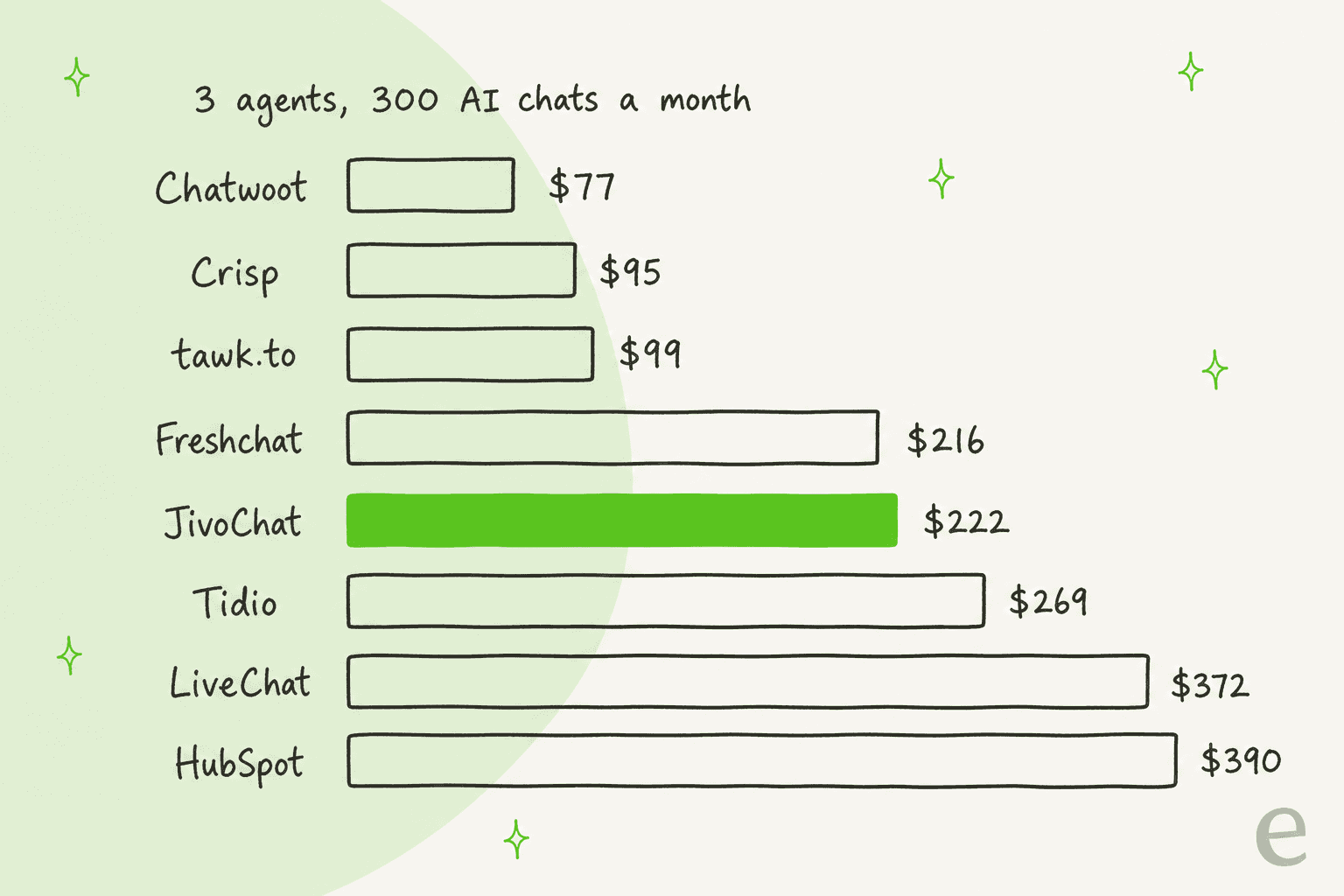
JivoChat lands in the middle of the pack. It isn't the expensive option people tend to assume after a renewal shock: three tools come in at under half the price, and three cost more. What changes the answer is the AI unit. If your AI volume will grow, a per-conversation meter like Tidio's or a per-resolution one like LiveChat's grows with it, while JivoChat's flat module doesn't. My guides to chatbot cost and deflection vs resolution explain why those units aren't equal.
1. Crisp
Best for: small teams that want JivoChat's shape (one inbox for chat, email and messengers) with a flat bill and AI included.
What it does better than JivoChat
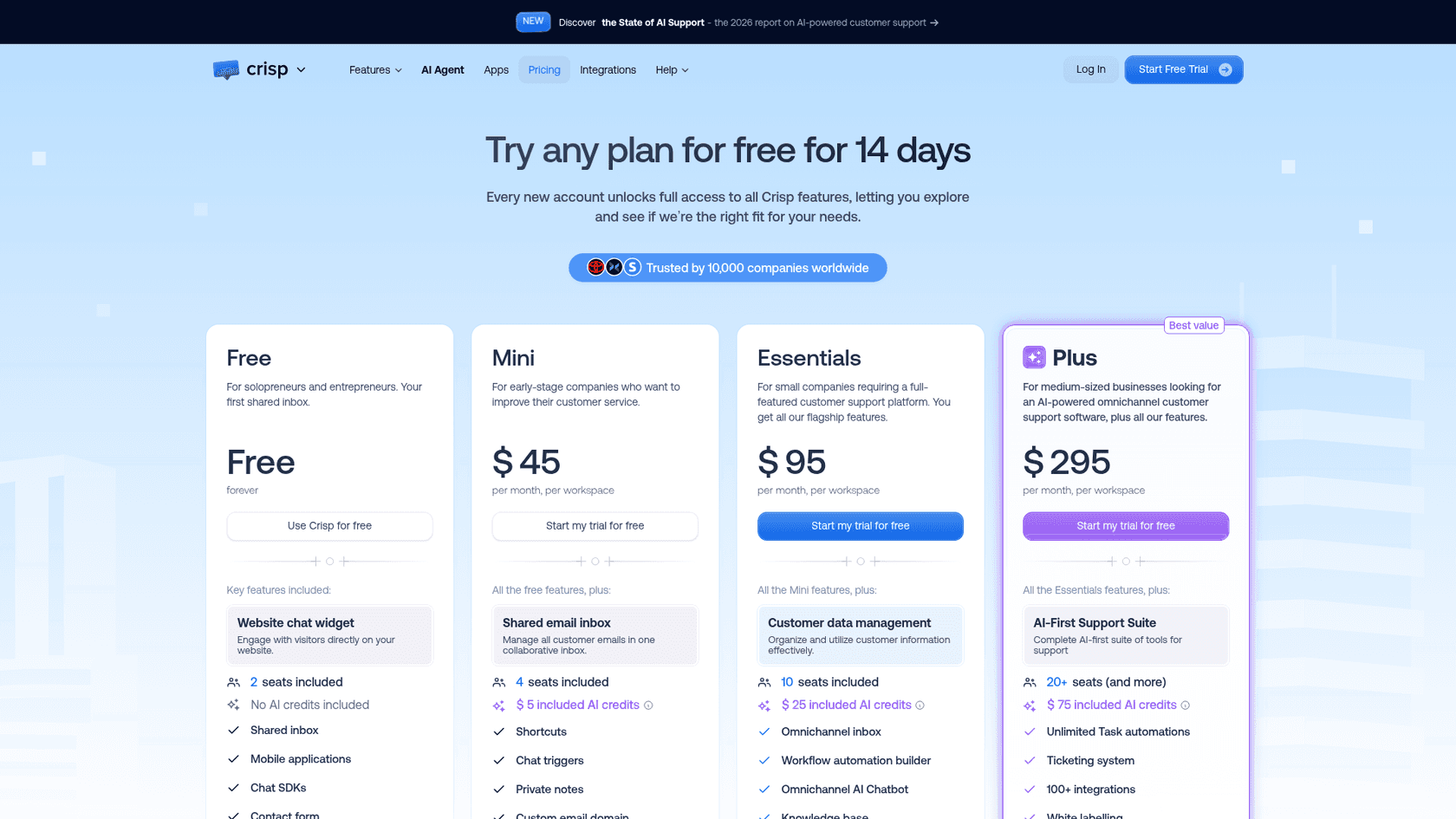
Crisp prices per workspace, not per agent. Essentials is $95 a month for 10 seats, so adding your fourth or fifth agent costs nothing, which is the opposite of JivoChat's per-agent model. Essentials also unlocks the omnichannel inbox ("WhatsApp Business, Instagram DMs, SMS, Line, Viber, and more"), a workflow builder, a knowledge base and routing rules, per the pricing page. The channel list in its comparison table names Telegram and Viber too, which matters if you came to JivoChat for those.
The AI runs on credits bundled into each paid plan: $5 (around 90 automated conversations) on Mini, $25 (around 450) on Essentials and $75 (around 1,350) on Plus. Its AI page describes Hugo, the AI agent, plus MagicReply, which says so when it can't find an answer instead of guessing.
Where it falls short
Crisp doesn't show an annual price on its pricing page, and I couldn't find the top-up price for AI credits there either. Each workspace connects one account per messaging channel (one WhatsApp number, one Instagram), with more on higher limits. I also didn't find a SOC 2 or ISO 27001 claim on its site; it lists EU hosting, a data processing agreement and 2FA.
Pricing
| Plan | Price | Seats | AI credits included |
|---|---|---|---|
| Free | $0 | 2 | None |
| Mini | $45/month per workspace | 4 | $5 (around 90 AI conversations) |
| Essentials | $95/month per workspace | 10 | $25 (around 450) |
| Plus | $295/month per workspace | 20+ ($10 per extra agent) | $75 (around 1,350) |
| Enterprise | Custom | Custom | Custom |
Every plan has a 14-day free trial. Full breakdown in my Crisp pricing guide.
What users say
"The pricing is fair - especially for their new AI, "Hugo", where each conversation doesn't cost too much: this is a great pricing model for companies like ours where most chats may be with low-to-non-paying-users, whom it wouldn't be economical to spend, say, $1 USD per conversation on."
"Their new Hugo AI agent isn't good. When escalating to a human agent, it just says "You have been transferred to our customer support team. Thank you for your patience." When I asked customer service how to customize this message, they said "not possible yet"."
My take: Pick Crisp if you have 3 to 10 people on chat, you use WhatsApp or Telegram, and you want one predictable bill. It's the closest thing to "JivoChat, but with AI that doesn't cost more than a seat." Skip it if you need a formal SOC 2 report. My list of Crisp alternatives has its nearest rivals.
2. Tidio
Best for: small teams and online stores that want live chat, an AI agent and sales flows in one app, with WhatsApp on every plan.
What it does better than JivoChat
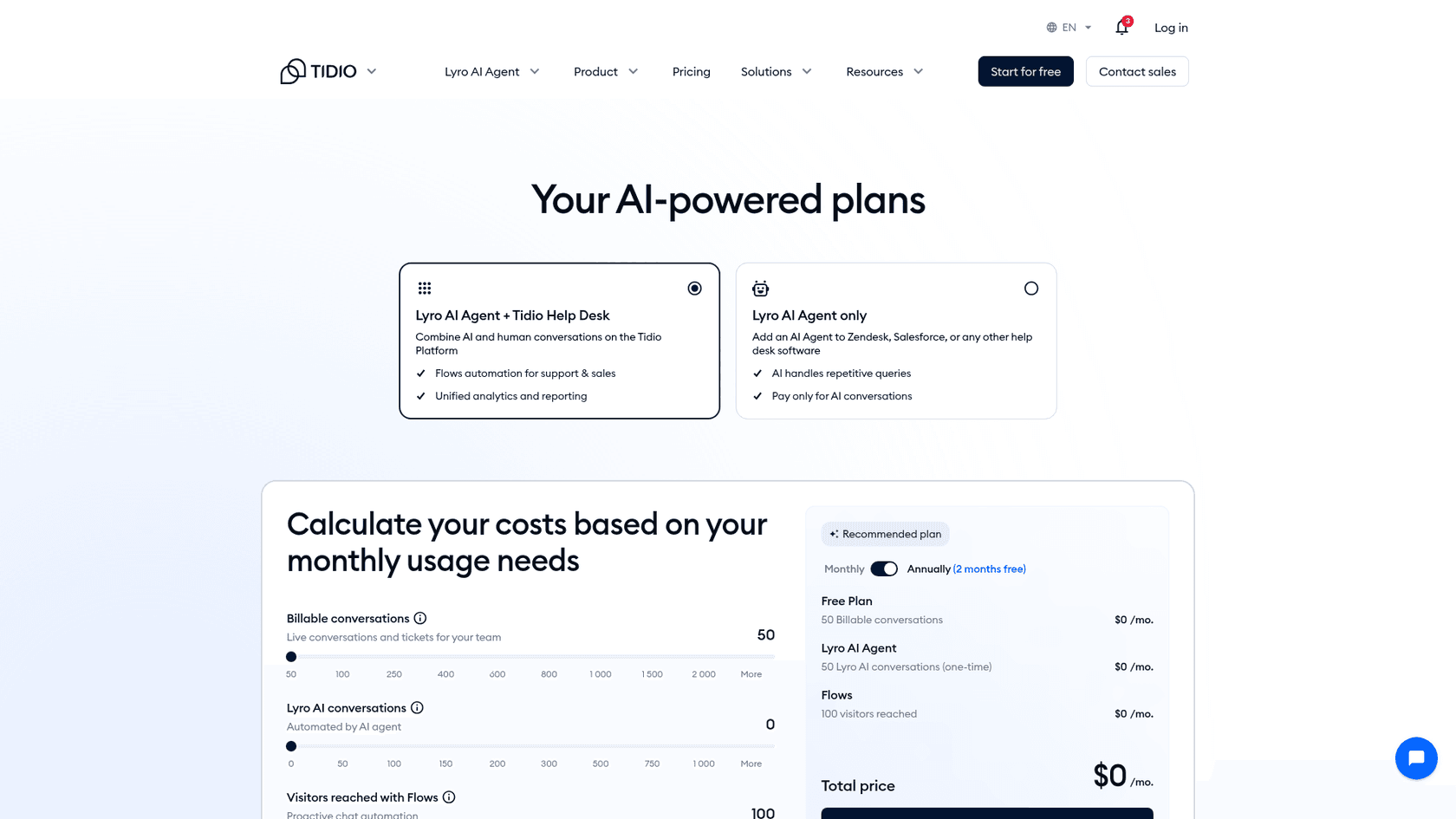
Tidio puts live chat, ticketing, email, video calls and the Messenger, Instagram, WhatsApp and email integrations on all five plans, including Free, per its pricing page. That alone removes JivoChat's $27 WhatsApp module from the bill.
Its AI agent, Lyro, is the bigger reason to switch. Tidio says it runs on "Claude (Anthropic AI) and our in-house models" on its Lyro page, it can take Actions (the first one is free), and Tidio claims customers "average a 75% resolution rate." Lyro bills per conversation with at least one AI reply, counted once however long the chat runs. You get 50 free Lyro conversations once, for the life of the account. Flows, Tidio's rule-based automations, handle the sales side: cart recovery messages, lead capture and so on.
Where it falls short
Tidio's base plans are priced by "billable conversations," which means chats a human replies to, and self-serve plans cap at 10 seats. That's two meters (human chats plus Lyro chats) where JivoChat has one. Lyro also gets expensive at volume: $210 a month for 300 conversations and $700 for 1,000 on monthly billing, which is part of why Tidio lands mid-pack in my cost table.
Pricing
| Plan | Monthly billing | Annual billing (per month) | Billable conversations |
|---|---|---|---|
| Free | $0 | $0 | 50/month |
| Starter | $29 | $24.17 | 100/month |
| Growth | from $59 to $349 | from $49.17 | 250 to 2,000/month |
| Plus | from $300 + usage | same | Custom |
| Premium | Contact sales | same | Custom |
Lyro AI is separate: $39 a month for 50 conversations on monthly billing ($32.50 annual), up to $700 for 1,000. There's a 7-day free trial of everything. More in my Tidio pricing breakdown.
What users say
"My main concern with Tidio is the pricing. As a small business owner, I would prefer a more affordable option, especially since I don't receive a high volume of customer inquiries. Otherwise, my experience has been positive, and I haven't encountered any major issues."
It's also where some JivoChat users already went. One G2 reviewer wrote that JivoChat "has not been helpful for us, which is why we decided to switch to Tidio" (G2).
My take: Pick Tidio if you run a store, your AI volume is in the low hundreds, and you want sales automation next to support. Skip it if you expect thousands of AI chats a month, where Lyro's per-conversation price adds up fast. My Tidio review and Tidio alternatives list go deeper.
3. tawk.to
Best for: teams leaving JivoChat over price, who want free live chat for unlimited agents and are fine paying only for the AI.
What it does better than JivoChat
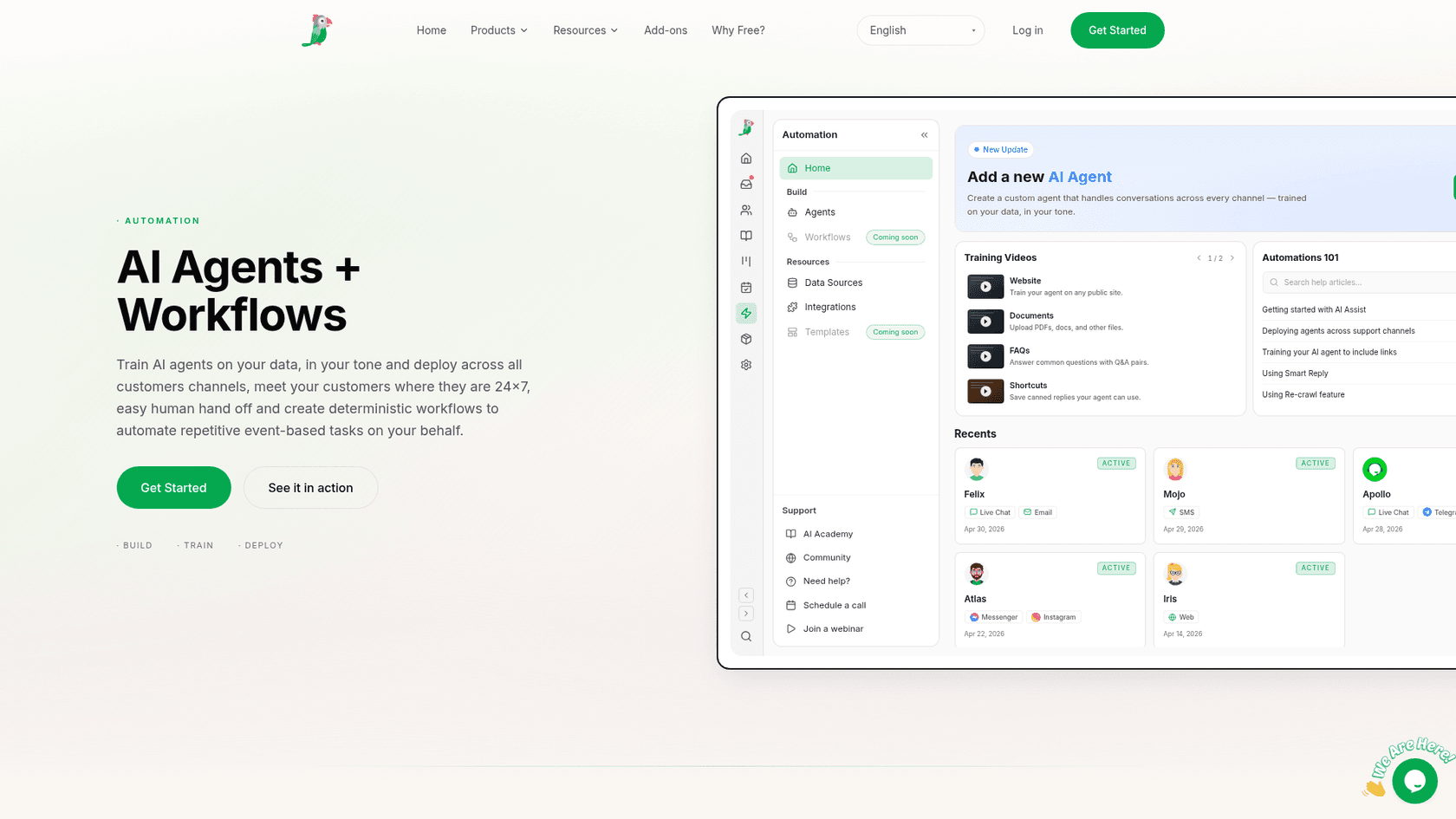
tawk.to gives away the core product: live chat, chat pages, a knowledge base, ticketing and a contacts CRM, with "unlimited team members," per its features page. Its pitch is blunt: "Four things we charge for. Everything else is free." It has native iOS, Android, macOS and Windows apps, which covers the iPhone gap some JivoChat teams run into.
The AI is AI Assist, billed in credits per website ("per property, not per seat"). The Hobby tier is free with 100 credits a month; Growth is $29 a month for 1,000 credits and Business $99 for 5,000, per tawk.to's billing article. Unused top-up credits roll over, which is rarer than it should be.
Where it falls short
The default AI model costs 3 credits per reply, so Growth's 1,000 credits is about 333 AI replies, not 1,000 chats. When credits run out, AI Assist stops joining new conversations until you buy more. Removing the "Powered by tawk.to" branding is $29 a month. And on security, its site lists GDPR compliance and a DPA, with no SOC 2 or ISO claim.
Pricing
| Item | Price |
|---|---|
| Live chat, inbox, ticketing, knowledge base | Free, unlimited agents |
| AI Assist Hobby | Free, 100 credits/month |
| AI Assist Growth | $29/month ($290/year), 1,000 credits |
| AI Assist Business | $99/month ($990/year), 5,000 credits |
| AI Assist Enterprise | $399/month ($3,990/year), 20,000 credits |
| Extra credits | $30 per 1,000 |
| Remove branding | $29/month per website |
| Hired human chat agents | $1/hour |
What users say
"It would be helpful to see the exact entry page or link a visitor used to land on the website. Also, the AI agent could be more powerful if it could learn from external documentation or knowledge bases."
My take: Pick tawk.to if your main reason for leaving is the bill and your chat volume is modest. You'll pay nothing for the chat and only for the AI you use. Skip it if you need deep reporting or a security certification for procurement. My tawk.to alternatives post covers what else sits in the free tier.
4. Freshchat
Best for: support teams that are growing past 5 agents and want routing, SLAs and a free plan to start on.
What it does better than JivoChat
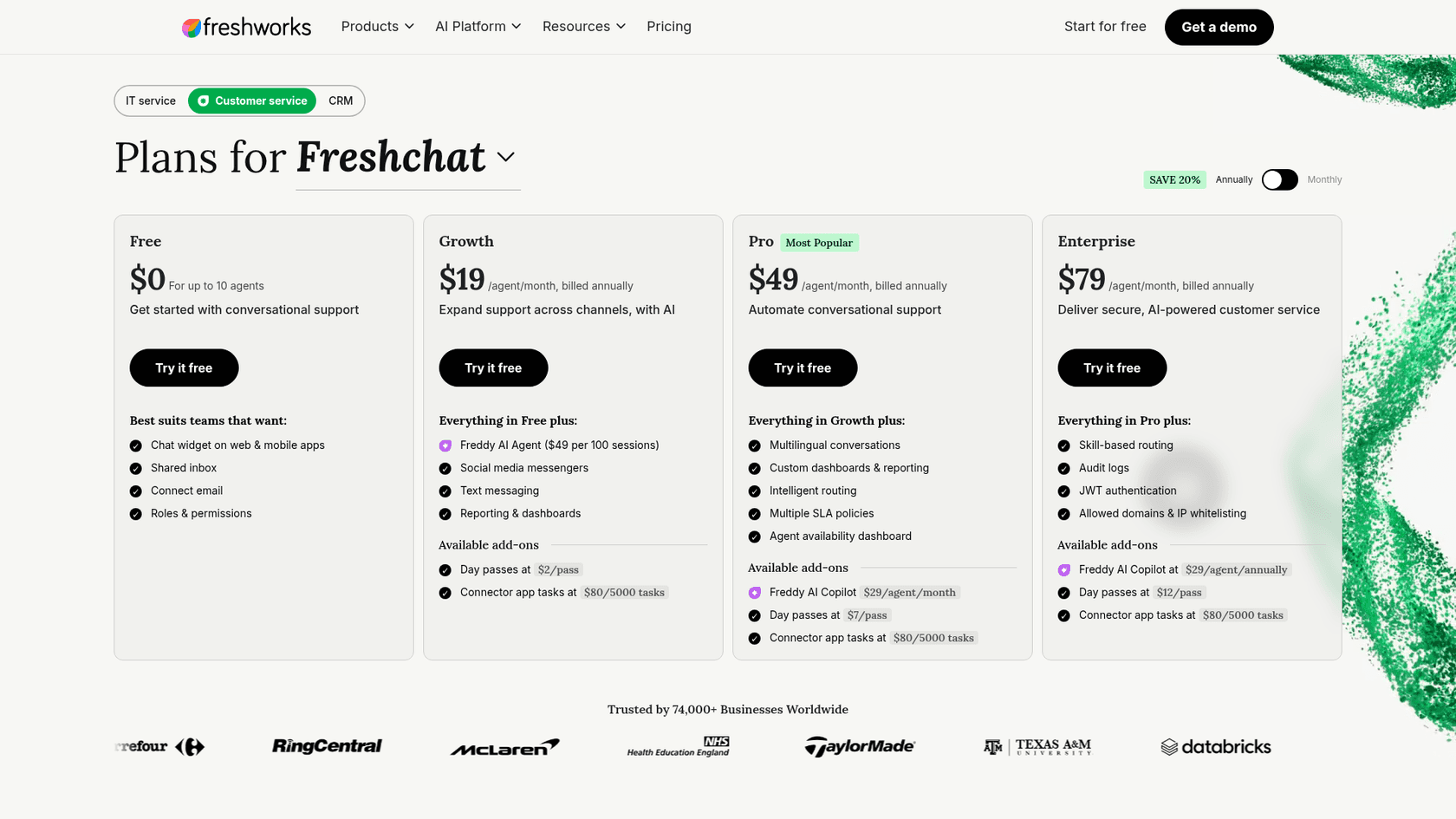
Freshchat has a free plan for up to 10 agents with the chat widget, shared inbox and email. Paid plans add the things a bigger team needs: intelligent routing and multiple SLA policies on Pro, skill-based routing and audit logs on Enterprise, per the pricing page. WhatsApp, SMS, Facebook, Instagram, Line and Google Business Messages arrive on Growth.
Freddy AI Agent bills per session: $49 per 100, where a session is everything one customer says to the AI within 24 hours. Every paid account gets 500 free sessions once. And if you also use Freshdesk, the two share an ecosystem, which is where Freshchat makes the most sense. My guide on adding AI to Freshchat covers the options.
Where it falls short
It's per agent again, so the bill grows with every hire, and the AI is a second meter on top. Freddy AI Copilot, the reply-drafting assistant, is another $35 per agent a month on monthly billing. The Freshworks security page I read describes encryption and links a Trust Center but doesn't name certifications in its text.
Pricing
| Plan | Monthly billing | Annual billing | Key additions |
|---|---|---|---|
| Free | $0 (up to 10 agents) | $0 | Widget, shared inbox, email |
| Growth | $23/agent | $19/agent | Freddy AI Agent ($49 per 100 sessions), messengers, SMS, WhatsApp |
| Pro | $59/agent | $49/agent | Multilingual, routing, SLA policies |
| Enterprise | $95/agent | $79/agent | Skill-based routing, audit logs, IP whitelisting |
Details in my Freshchat pricing guide.
What users say
"Pricing scales quickly as the number of agent seats grows, which becomes a bigger consideration as our support team expands. Some of the automation and bot configuration features have a learning curve to set up effectively for more nuanced, platform-specific queries."
My take: Pick Freshchat if you've outgrown JivoChat's simple setup and want routing and SLAs without a big jump in price. Start on the free plan to test it. Skip it if you're a team of two who just want cheaper chat. My Freshchat alternatives list has other options in this tier.
5. LiveChat (now sold as Text)
Best for: teams that mostly handle live conversations with website visitors and want a polished agent app with AI resolutions included.
What it does better than JivoChat
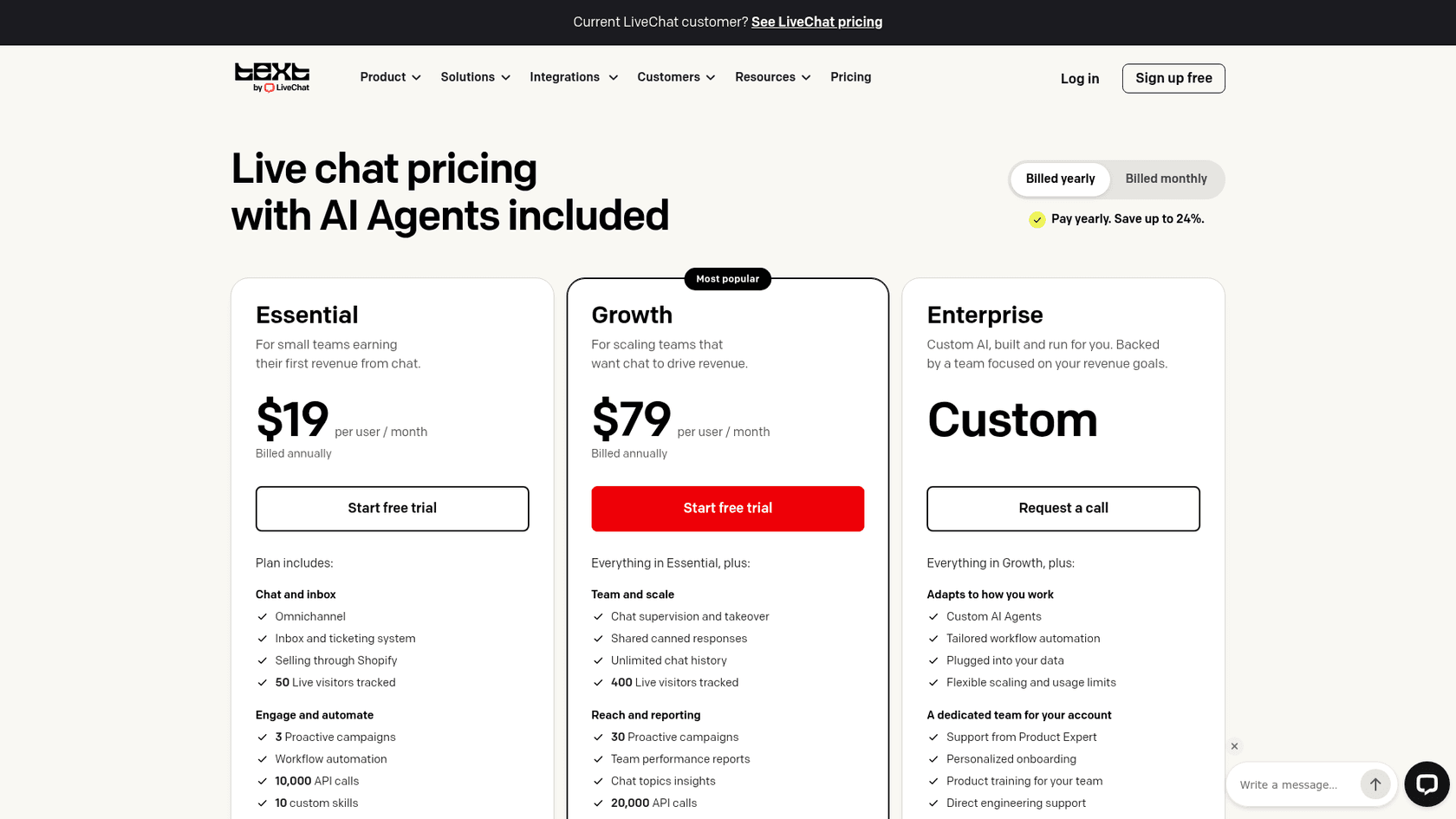
First, a naming note: livechat.com's pricing page now sells "Text," which it calls live chat software "from the team behind LiveChat.com, HelpDesk.com, and ChatBot.com." Same company, new product name. Every plan includes an AI agent with a monthly allowance: 10 resolutions on Essential and 200 on Growth, per the pricing page. Extra resolutions are $49.50 per 50.
The billing unit is what sets it apart. A resolution means "the AI directly solved a customer question," and chats handed to a person without an answer don't count, per its AI page. That's closer to paying for outcomes than JivoChat's flat module. It also lists SOC 2 Type 2, GDPR, CCPA and PCI DSS on its own site, with HIPAA "coming soon."
Where it falls short
There's no free plan, only a 14-day trial, and the jump from Essential ($25 per user, monthly) to Growth ($99 per user) is steep. Chat supervision and takeover, shared canned responses and unlimited chat history all sit on Growth. A mobile app isn't listed in the pricing table, which shows web and desktop apps.
Pricing
| Plan | Monthly billing | Annual billing | AI resolutions included |
|---|---|---|---|
| Essential | $25/user | $19/user | 10/month |
| Growth | $99/user | $79/user | 200/month |
| Enterprise | Custom (annual only) | Custom | Custom |
Extra AI resolutions are $49.50 per 50 on both self-serve plans. More in my LiveChat pricing guide.
What users say
"Getting LiveChat up and running was probably one of the easiest implementations I've done with this kind of tool. We had the widget live pretty quickly, and the documentation for customizing events, styling, and integrations was well organized, so I never felt like I was fighting the setup."
"Small businesses may find that the more expensive tiers can be so costly that it's difficult to justify them over the other platforms available."
My take: Pick LiveChat if your team lives in the chat window all day and you need a SOC 2 report. Skip it if you're price-sensitive with more than a couple of agents, since it came out second-most expensive in my cost table. My Tidio vs LiveChat comparison helps if you're choosing between the two.
6. HubSpot Service Hub
Best for: teams whose chats are really sales conversations, and who want every chat tied to a CRM record.
What it does better than JivoChat
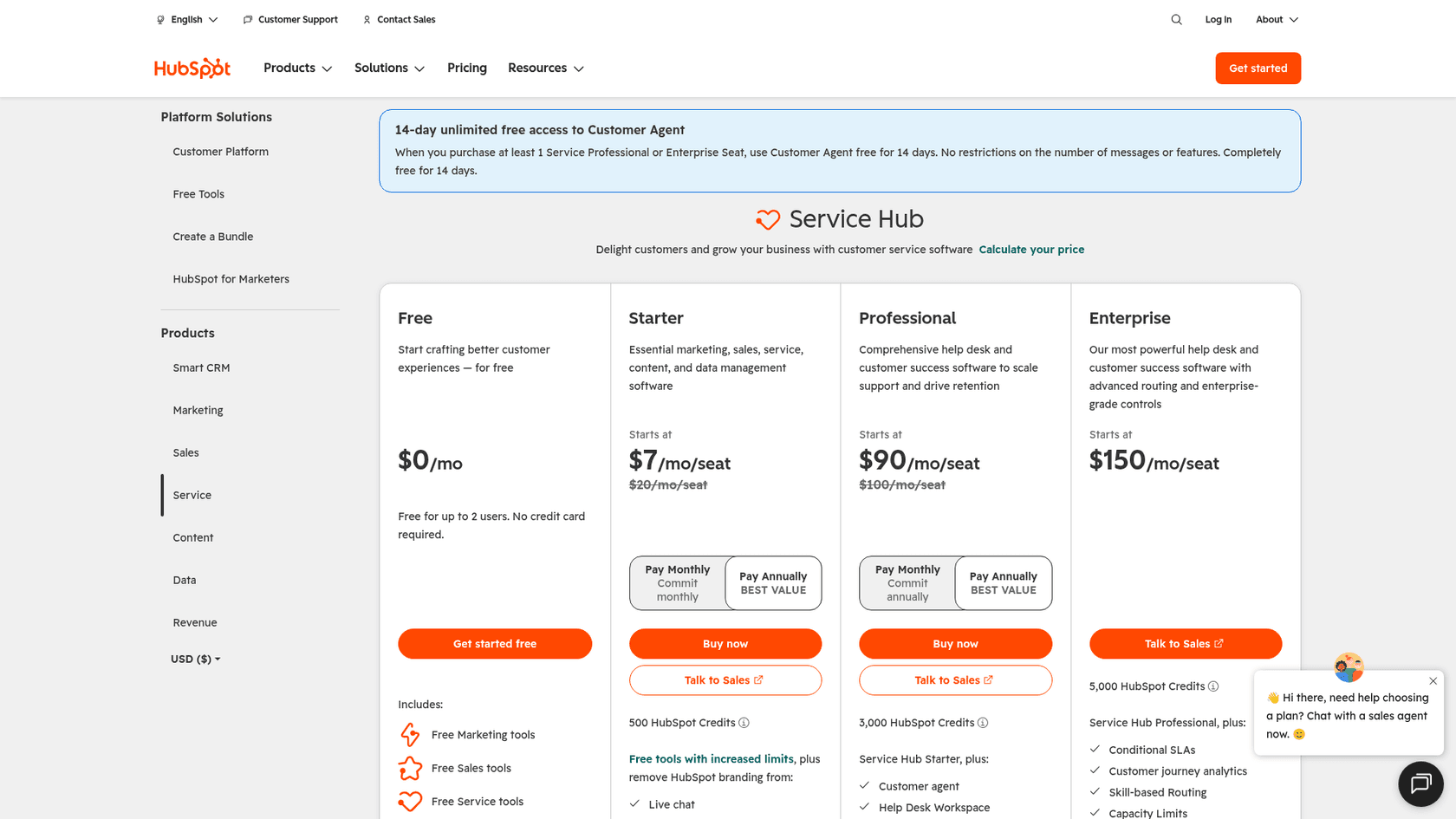
JivoChat has a built-in CRM, but HubSpot is a CRM, with "2,000+ integrations" per its pricing page. Live chat is free for up to 2 users. Professional adds Customer Agent, HubSpot's AI agent, which works across "chat, email, forms, and calling," plus a help desk workspace, a knowledge base and a customer portal.
Customer Agent bills in HubSpot Credits: 50 credits per resolved messaging conversation at $0.01 a credit, so about $0.50 per resolution, per the credits page. Professional includes 3,000 credits a month. HubSpot also has the strongest security paperwork on this list alongside LiveChat: a SOC 2 Type 2 report, SOC 3 and GDPR. My Customer Agent guide covers setup.
Where it falls short
The AI agent starts on Professional, which is $90 per seat (list $100) plus a one-time $1,500 onboarding fee. The $7 Starter price is a new-customer discount on a $20 list price. WhatsApp on Professional is capped at "up to 1,000 messages per month." For a three-person chat team, it's the most expensive option in my table.
Pricing
| Plan | Price shown | List price | Credits/month | One-time fee |
|---|---|---|---|---|
| Free | $0, up to 2 users | - | - | - |
| Starter | $7/seat | $20/seat | 500 | - |
| Professional | $90/seat | $100/seat | 3,000 | $1,500 onboarding |
| Enterprise | $150/seat | - | 5,000 | $3,500 onboarding |
Full breakdown in my HubSpot pricing guide.
What users say
"One thing I dislike about HubSpot Service Hub is that some of the more advanced features, like custom reporting or advanced automation, are locked behind higher-tier plans. This can limit small or growing teams from fully leveraging the platform's potential without increasing costs."
My take: Pick HubSpot if your marketing and sales team already runs on it, or if chat is mostly lead qualification. Skip it if you just want to replace a chat widget; you'd be buying a CRM to do it. My HubSpot alternatives list covers lighter options.
7. Chatwoot
Best for: technical teams that want open source, the option to self-host, and the lowest per-agent price with AI.
What it does better than JivoChat
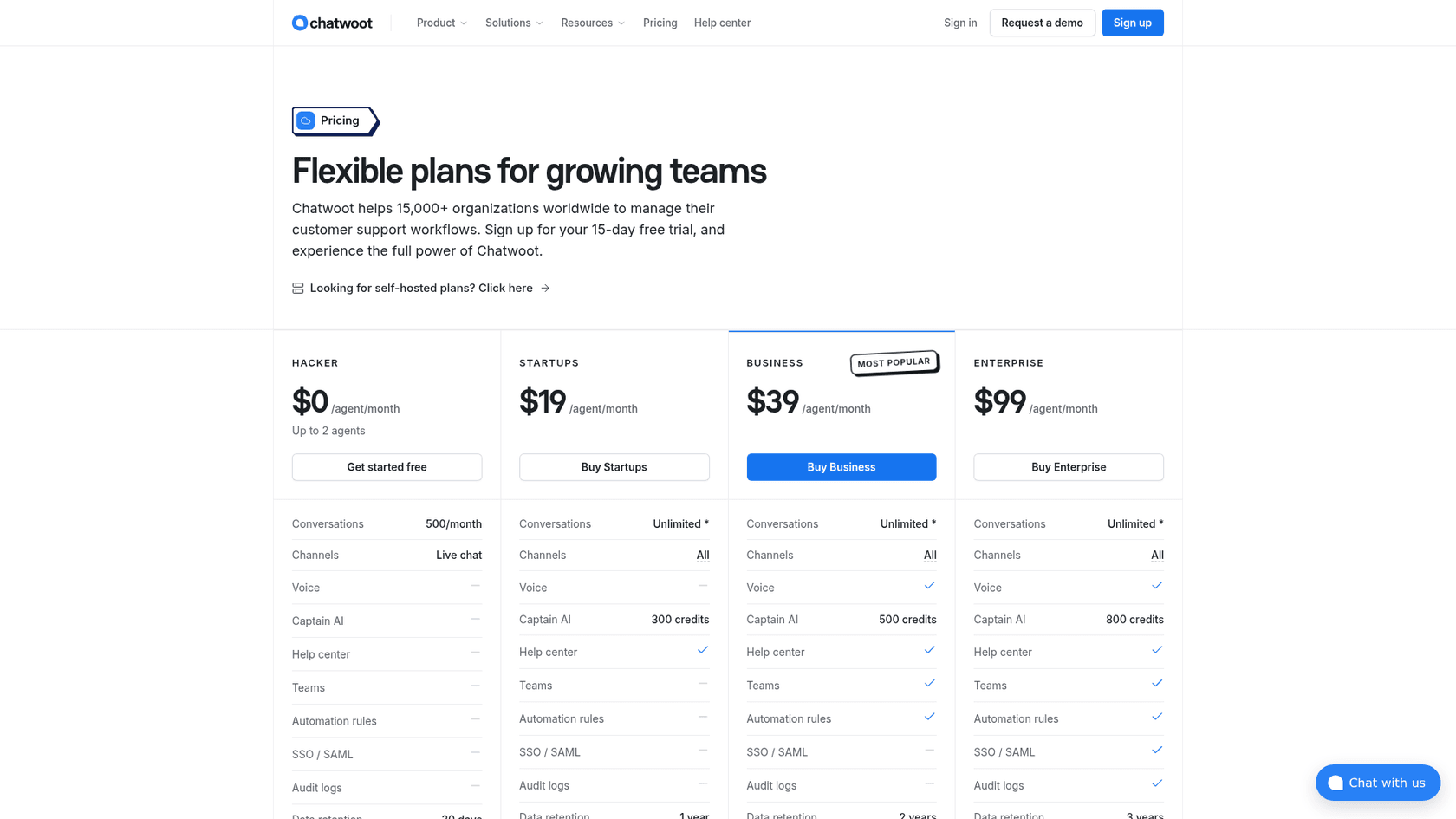
Chatwoot is open source. You can run the Community Edition on your own servers for free, or pay $19 per agent for the cloud Startups plan, per the pricing page. It has iOS and Android apps.
Its AI, Captain, costs one credit per AI reply, which works out to 2 cents a reply at the top-up rate: 300 to 800 credits included depending on plan, and $20 per 1,000 more. Captain learns from your help center, FAQs and past conversations, per its Captain page. That last source is the one JivoChat's AI Agent doesn't list.
Where it falls short
The free cloud plan is live chat only, 2 agents and 500 conversations, with 30 days of data retention. Self-hosting needs someone to run and update it. Bought credits expire after 6 months, and when credits run out, new conversations go straight to your team with no AI reply. Chatwoot doesn't claim any certification; its FAQ says to "reach out" about GDPR or SOC 2.
Pricing
| Plan | Price | Agents | AI credits/month | Data retention |
|---|---|---|---|---|
| Hacker | $0 | up to 2 | Not included | 30 days |
| Startups | $19/agent | - | 300 | 1 year |
| Business | $39/agent | - | 500 | 2 years |
| Enterprise | $99/agent | - | 800 | 3 years |
| Self-hosted Community | $0 | - | No Captain | Yours |
Extra Captain credits are $20 per 1,000. More in my Chatwoot pricing guide.
What users say
"Chatwoot just works and does everything that a small/startup team would want from an on-site chat support component. Implementation is quick and easy, integration is even easier. We use it with Slack and emails. Compared to other bloated products without transparent pricing it's a no-brainer."
My take: Pick Chatwoot if you have a developer on hand and want full control of your data at the lowest price. Skip it if nobody on the team wants to own a server or debug a WhatsApp connection. My Chatwoot alternatives list has hosted options.
8. eesel
Best for: teams that want AI answering the website chat from their own content, without moving their people to a new inbox.
What it does better than JivoChat
I'll be upfront about what eesel is, since I help build it. eesel is an AI teammate you hire for a job; here, that's the AI helpdesk teammate and its chat bubble. It's not a live chat inbox for your agents, so it doesn't replace the human half of JivoChat. What it replaces is the AI Agent module, and it does that job differently.
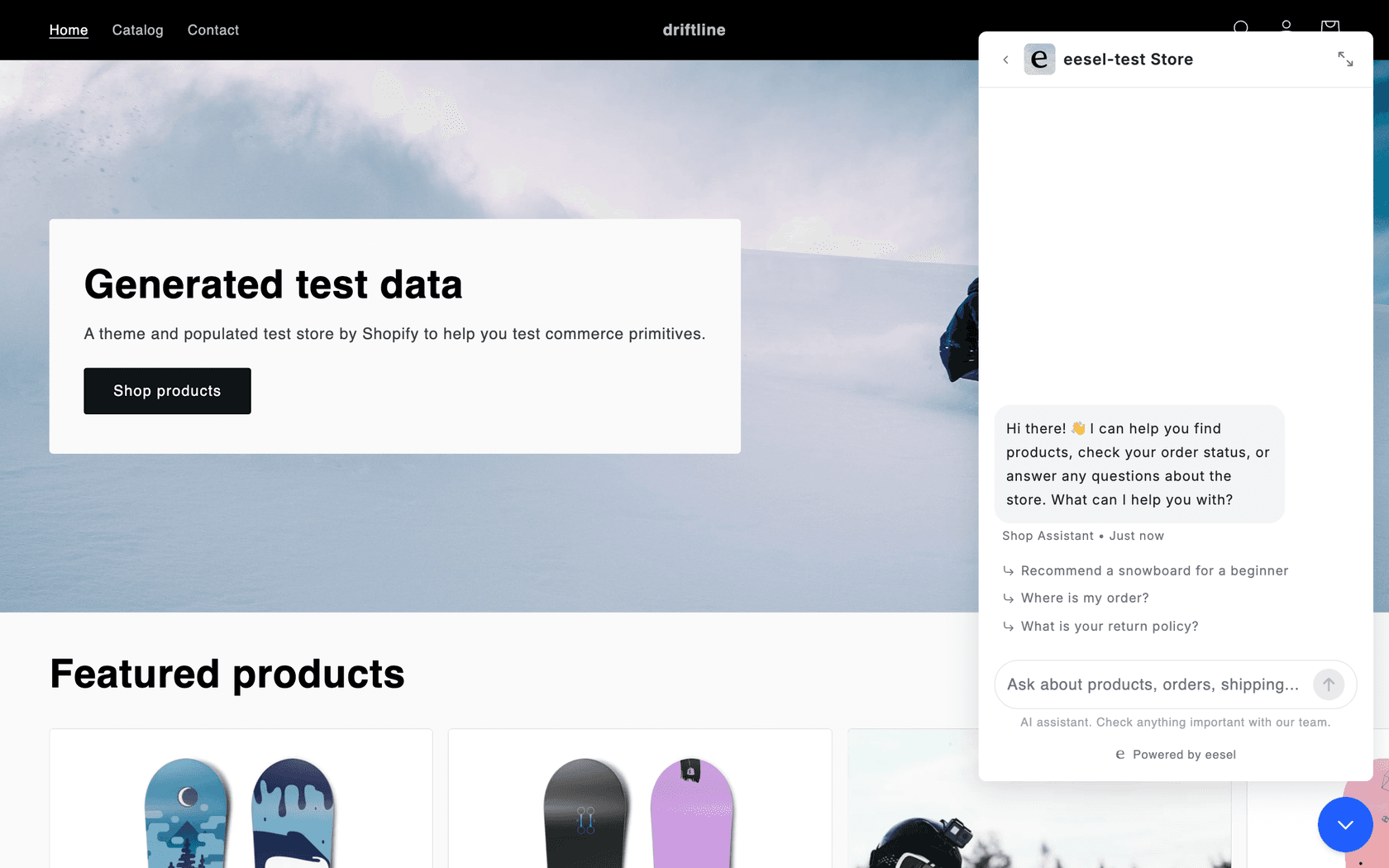
The bubble is one script tag that works on WordPress, Shopify, Wix and other sites. It answers from your website, help center and any other source you connect, links the page it used, and on a Shopify, WooCommerce, BigCommerce or Magento store it recommends products, checks stock and looks up orders, per the chat bubble docs. When a visitor needs a person, it either opens Zendesk Messenger or Freshchat (once connected), or creates a helpdesk ticket or sends an email with a summary. There's also a WhatsApp channel.
Here's what that looks like on a real store. IC Intracom runs one eesel agent per brand on its Intellinet and Manhattan web stores. Each bubble answers product, stock and compatibility questions from about 2,100 Shopify product records, and passes sales and technical questions to the sales or technical support inbox with the transcript attached. SamCart runs one agent on its website chat bubble and another on Freshdesk tickets, both answering from its 280 help center articles.
Where it falls short
There's no JivoChat integration, so eesel can't sit inside the JivoChat inbox. If your team likes chatting live with visitors, you'd keep a live chat tool for that, or hand off to Freshchat or Zendesk Messenger. One lesson from eesel's own sales calls: a buyer ran a 67-test evaluation of the bubble, rated the answers solid, and still walked because the widget felt slow and got stuck in their testing. Test speed on your own site, not just answer quality.
Pricing
| Plan | Price | What you get |
|---|---|---|
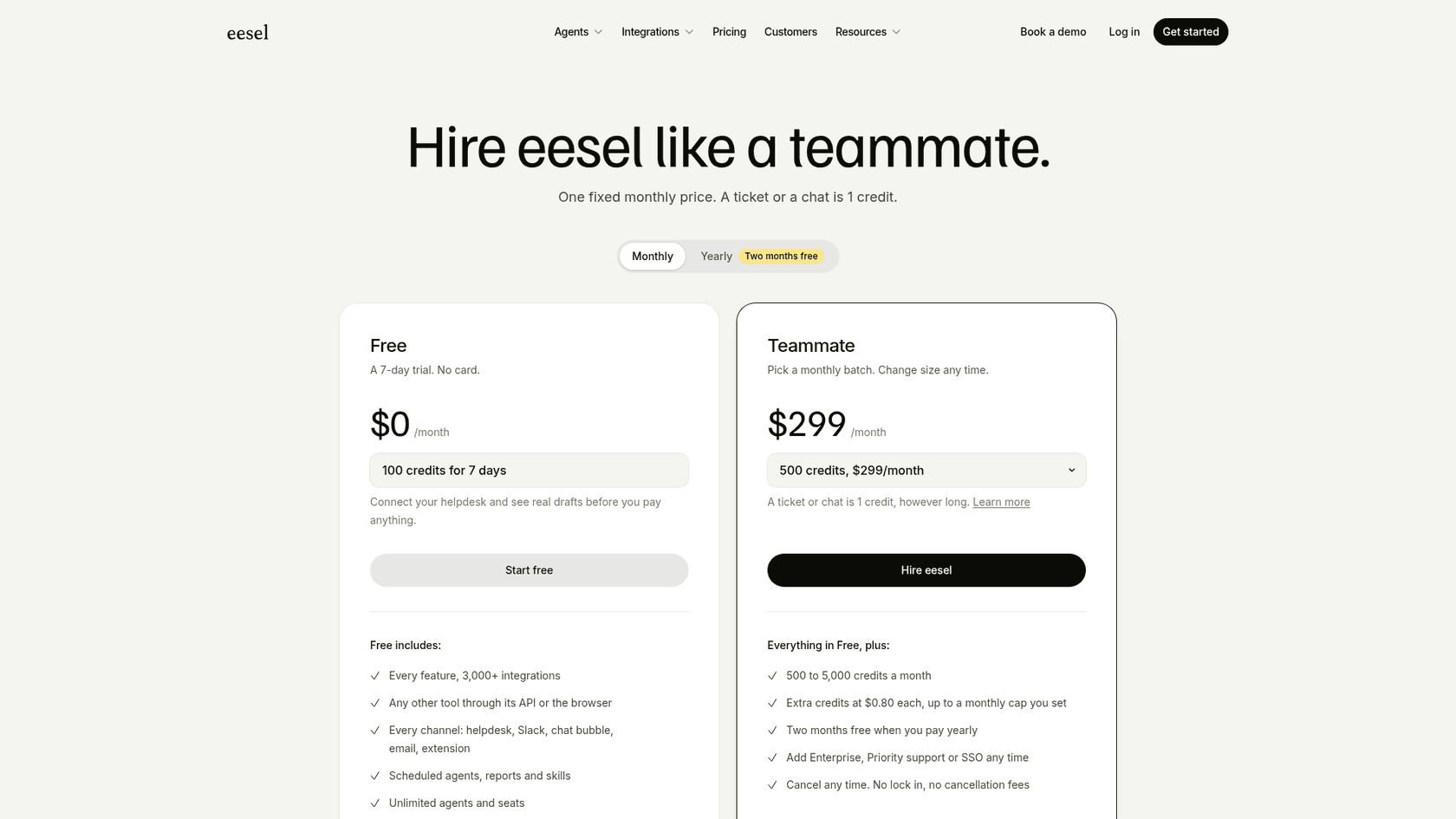
| Free | $0 | 100 credits to use in 7 days, every feature |
| Teammate | $299/month for 500 credits, up to $1,749 for 5,000 | A chat or ticket is 1 credit, however long; unlimited agents and seats |
| Enterprise | from $1,299/month | Adds SSO, EU data residency, HIPAA with a BAA |
Extra credits are $0.80 each, up to a cap you set, per the eesel pricing page. A credit counts a chat handled, not a chat resolved.
My take: Pick eesel if the AI is what you're unhappy with and you'd rather keep (or simplify) the human side. It fits stores best, where order and product lookups matter. Skip it if you need one app with a live agent inbox, telephony and AI together; that's Crisp, Tidio or Freshchat.
How do you switch from JivoChat without losing chats?
The switch is mostly about not breaking the channels customers already use. Here's the order I'd do it in:
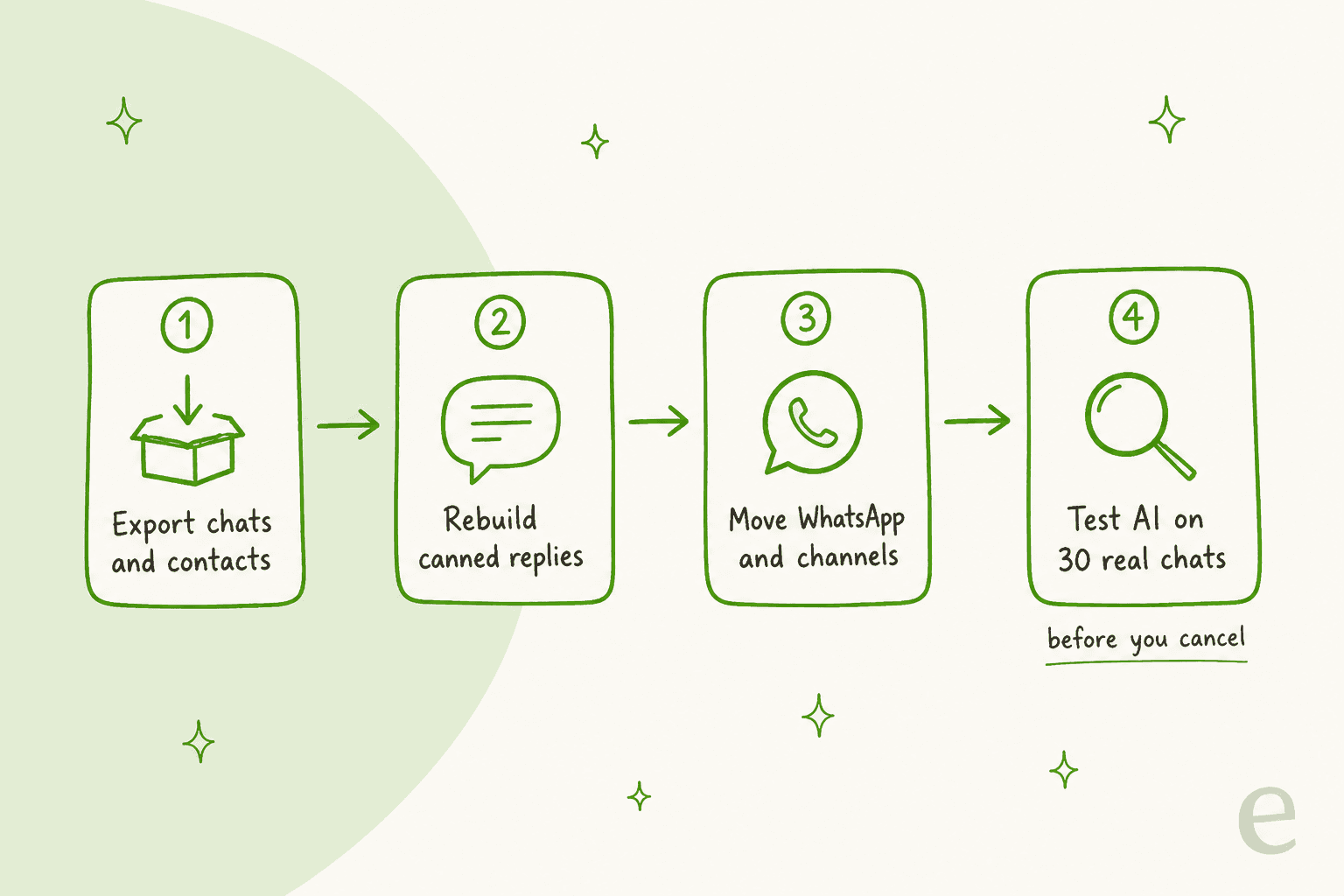
- Export what you need first. JivoChat's Basic plan and up includes Excel export. On Free, history only goes back 2 months, so export before you downgrade.
- Rebuild your canned replies. Copy JivoChat's ready answers into the new tool's shortcuts. It's a good moment to rewrite the stale ones; my live chat scripts guide has templates.
- Move WhatsApp and the other channels one at a time. Check how the new tool connects your existing WhatsApp Business number before you disconnect it from JivoChat, and do it in a quiet hour. My guide to WhatsApp Business API pricing covers Meta's side of the bill.
- Test the AI on real chats before you cancel. Pull 30 real chats from JivoChat and run them through your two finalists: an order question, a pricing question, an angry customer and a request for a person. Score whether the AI answered correctly and handed off cleanly. My guide to testing an AI agent has the checklist.
Run the new widget alongside JivoChat for a week if you can; my guide to adding live chat covers where the script goes. Removing the old JivoChat script is the last step, not the first.
Which JivoChat alternative should you pick?
Go back to why you're leaving:
- The renewal price went up: tawk.to (free chat, pay only for AI) or Chatwoot (
$19per agent with AI credits included). - The AI isn't good enough: Crisp if you want AI bundled into a flat plan, Tidio if you also want sales flows, eesel if you want the AI answering from your site and store data without moving your team.
- Your team outgrew it: Freshchat for routing and SLAs, HubSpot if chat feeds your sales pipeline.
- You just want great live chat: LiveChat, now sold as Text.
If you only test two, test Crisp and whichever tool matches your reason. For more side-by-side picks, see my lists of live chat alternatives and Smartsupp alternatives.
Try eesel on your website chat
If your JivoChat AI Agent keeps missing questions your website already answers, try eesel's chat bubble. It reads your site and help center, answers in the visitor's language, looks up products and orders on Shopify, and hands the chat to a person by ticket or email when it should. Setup is one script tag, and the free plan gives you 100 credits to test it on real visitors first.
Frequently Asked Questions
What are the best JivoChat alternatives?
For the closest swap, Crisp: one flat plan for chat, email and messengers with AI credits included. tawk.to is the cheapest, Tidio suits stores that want AI plus sales flows, Freshchat and HubSpot suit growing teams, LiveChat suits classic live chat, Chatwoot suits self-hosting, and eesel adds AI answers to your website chat. My live chat software guide covers the wider field.
Is there a free alternative to JivoChat?
Yes. tawk.to's live chat is free for unlimited agents, with AI Assist free for 100 credits a month. Freshchat is free for up to 10 agents, and Crisp, HubSpot and Chatwoot have free plans for 2 users. My list of tawk.to alternatives compares the free tiers.
How much does JivoChat cost compared to its alternatives?
JivoChat's paid plans are $28, $42 and $56 per agent a month on annual billing, with the AI Agent at $69 a month and WhatsApp at $27. For 3 agents and 300 AI chats a month, I priced JivoChat at $222, against $77 for Chatwoot, $95 for Crisp and $390 for HubSpot. My guide to chatbot cost explains the different AI meters.
Which JivoChat alternative has the best AI chatbot?
It depends on how you want to pay. Tidio's Lyro bills per AI conversation, LiveChat bills per resolution, Crisp bundles AI credits into flat plans, and eesel's chat bubble bills per chat handled and answers from your site, help center and store data. Test two on 30 real chats before choosing.
Which JivoChat alternative supports WhatsApp?
All eight do in some form. Tidio includes WhatsApp on every plan, Crisp from Essentials, Freshchat from Growth and HubSpot from Professional (up to 1,000 messages a month). JivoChat charges $27 a month for its WhatsApp module. My roundup of AI for WhatsApp support goes deeper.
Does eesel integrate with JivoChat?
No. eesel doesn't connect to the JivoChat inbox. Instead, its chat bubble replaces the AI part on your website and hands visitors to a person by helpdesk ticket, email, Freshchat or Zendesk Messenger. IC Intracom runs it on two Shopify stores this way.
How do I migrate from JivoChat to another live chat tool?
Export your chats and contacts first, rebuild your canned replies, move WhatsApp and other channels one at a time, then test the new AI on 30 real chats before you cancel JivoChat. My guide to testing an AI agent has the checklist.