What is Landbot?
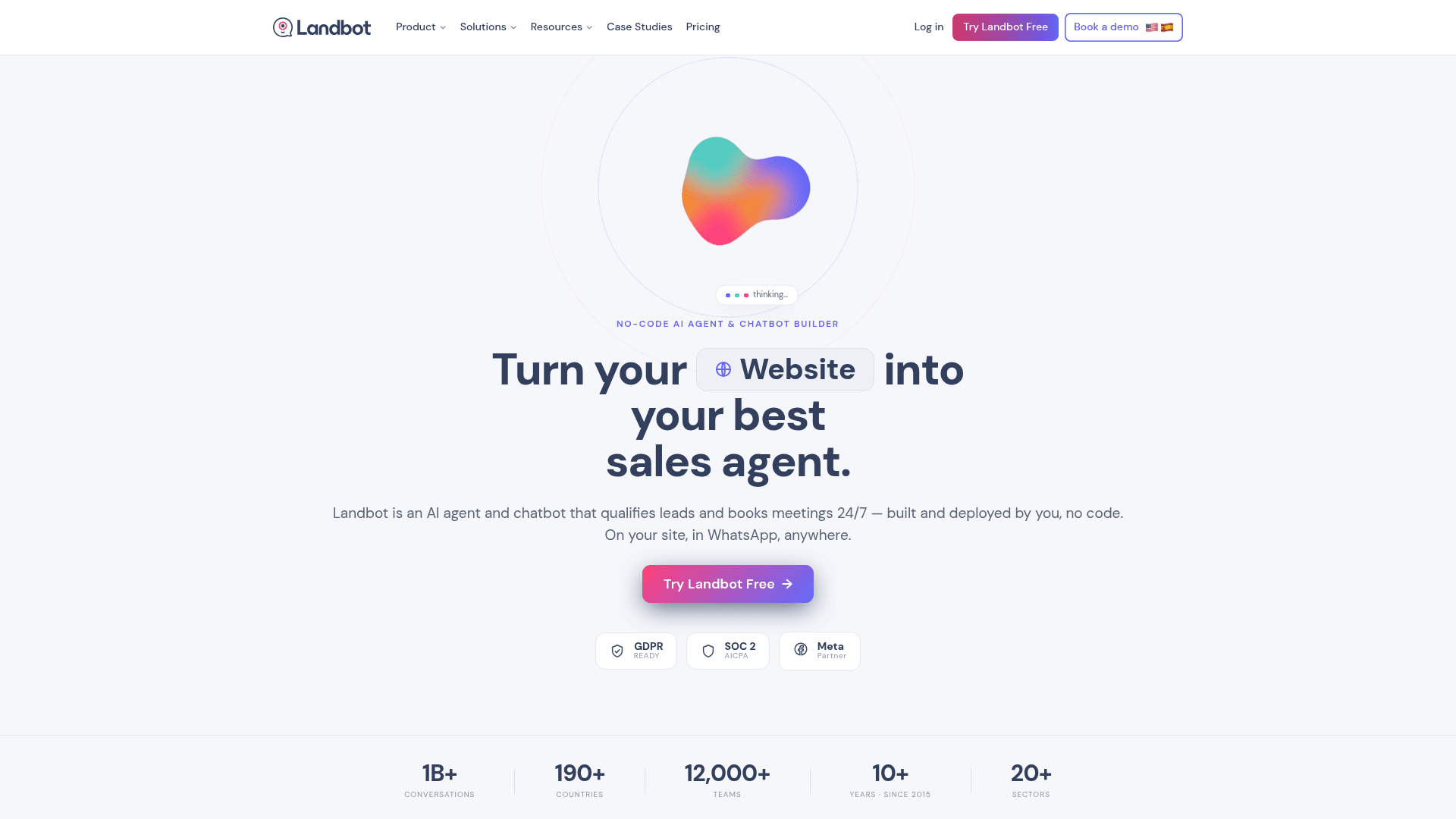
Landbot describes itself as a "no-code AI agent & chatbot builder" for websites and WhatsApp, aimed at sales, support and bookings. The homepage claims 12,000+ teams, 190+ countries and more than 1B conversations, plus GDPR, SOC 2 and Meta Partner status. (Its own AI agent page says 600M+ conversations, so treat the volume number as marketing.)
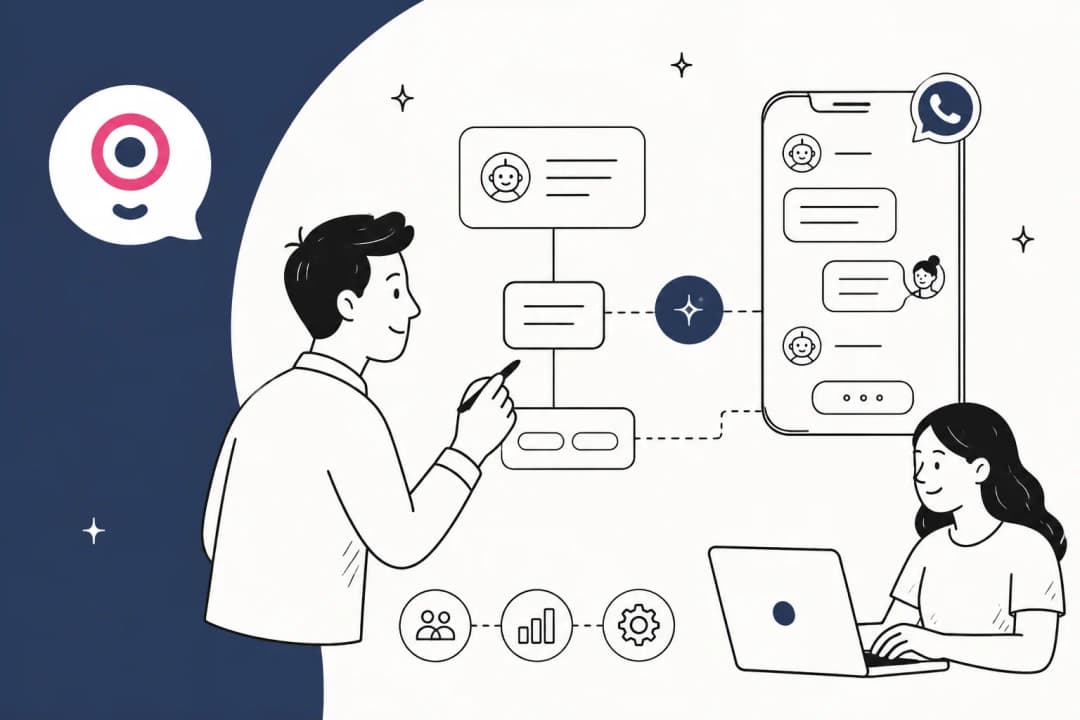
The product grew up as a drag-and-drop flow builder: you draw a conversation as connected blocks of buttons, questions and integrations. That is still the core. What changed is Landbot 4, announced on December 11, 2025, which added the AI Agent block, AI Copilot, "Hybrid AI" components, an OpenAI block (now called AI Task) and a two-way n8n integration. The older AI FAQ and Lead Gen assistants are being retired in favour of the new block.
If you are newer to this category, my overview of the best AI chatbot builders covers where Landbot sits among the alternatives, and my Landbot overview explains the product from the top.
How I reviewed Landbot
I build the helpdesk integrations at eesel, so I read chatbot builders from the plumbing outward. The first thing I check is where a conversation goes when the bot gives up, because that is where most rollouts quietly fail. In eesel's own deployments, the cleanest pattern I have seen is a visitor getting two self-serve answers from a website chat bubble and then an instant handover the moment they type "Can I talk to a human?". That moment is the bar I held Landbot to.
For this review I went through Landbot's pricing page, its AI agent page, the Landbot 4 announcement and about a dozen help center articles on the AI Agent block, knowledge base, Human Takeover, inbox, analytics and integrations. I captured the live site, and I read user reviews on G2, Capterra, Trustpilot, Reddit and Hacker News. Screenshots of the builder below come from Landbot's own help center and announcement.
What Landbot does well
Landbot's strength is control. You decide exactly which steps are scripted, which are AI, and where every conversation ends up. Here is what that looks like in practice.
A visual builder that reviewers like
The builder is what most happy reviewers talk about. G2's pros tags are led by "Ease of Use" (47 mentions), "Simple" (29) and "Intuitive" (27), and the rating sits at 4.7 out of 5 across 334 reviews on G2. One mid-market founder put the appeal well:
"It was very easy and visually appealing for our team to work with while building the chatbot, mainly because we could clearly see the entire branching flow and test it as we went."

AI Copilot drafts the first version
Copilot is an assistant inside the builder that takes a goal in plain language and adds the blocks for you: steps, logic, input validation and integrations, per the Landbot 4 announcement. In Landbot's own example below, a one-line request for a real estate lead-generation agent comes back as a starting flow you can then edit.
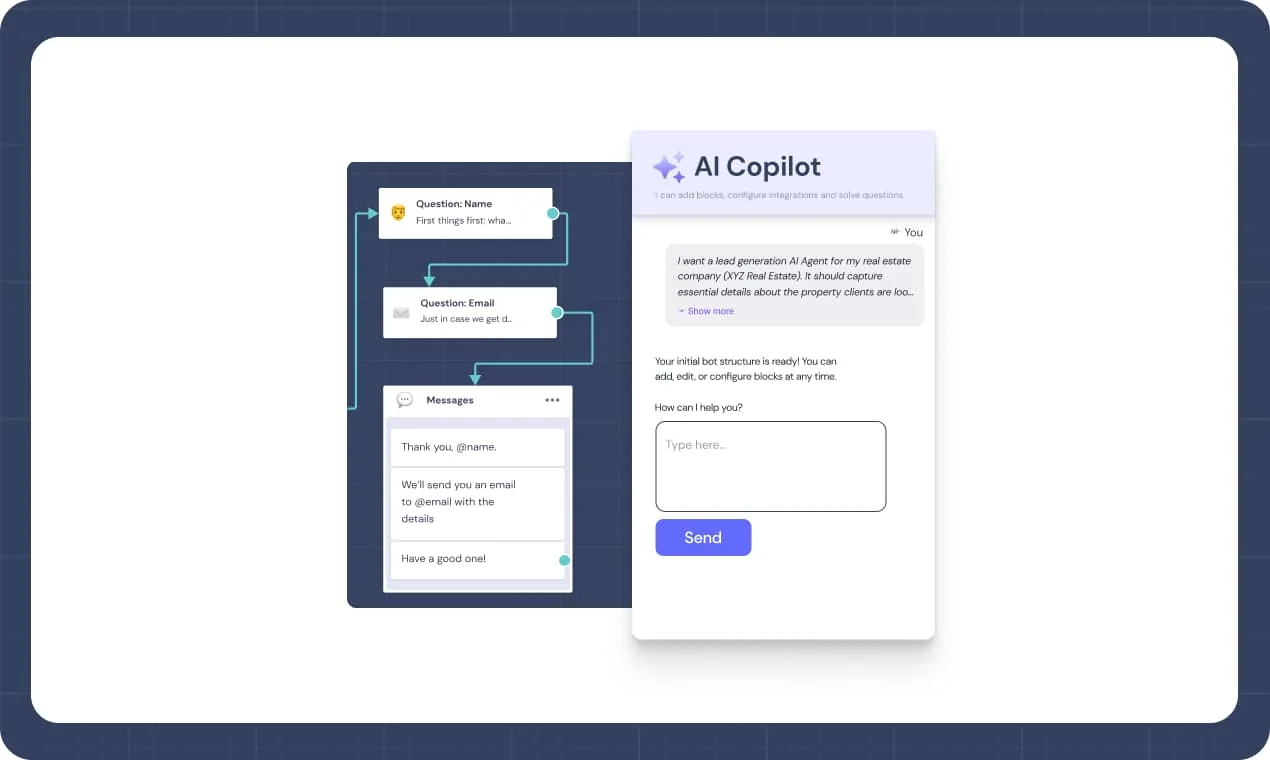
There is also a per-agent "Build it with AI" option that takes up to 1,000 characters and writes the whole agent setup. One warning from the AI Agent docs: it overwrites the entire setup, so run it before you hand-tune instructions, not after.
The AI Agent block
The AI Agent block is the new centre of gravity. It drops an AI conversation into an otherwise scripted flow: the agent follows your instructions, answers from a knowledge base, saves data into up to 20 Fields, and exits through "Outputs" you define. It is on every paid plan, not on Free, and works on web, WhatsApp and Facebook Messenger, per the AI Agent docs.
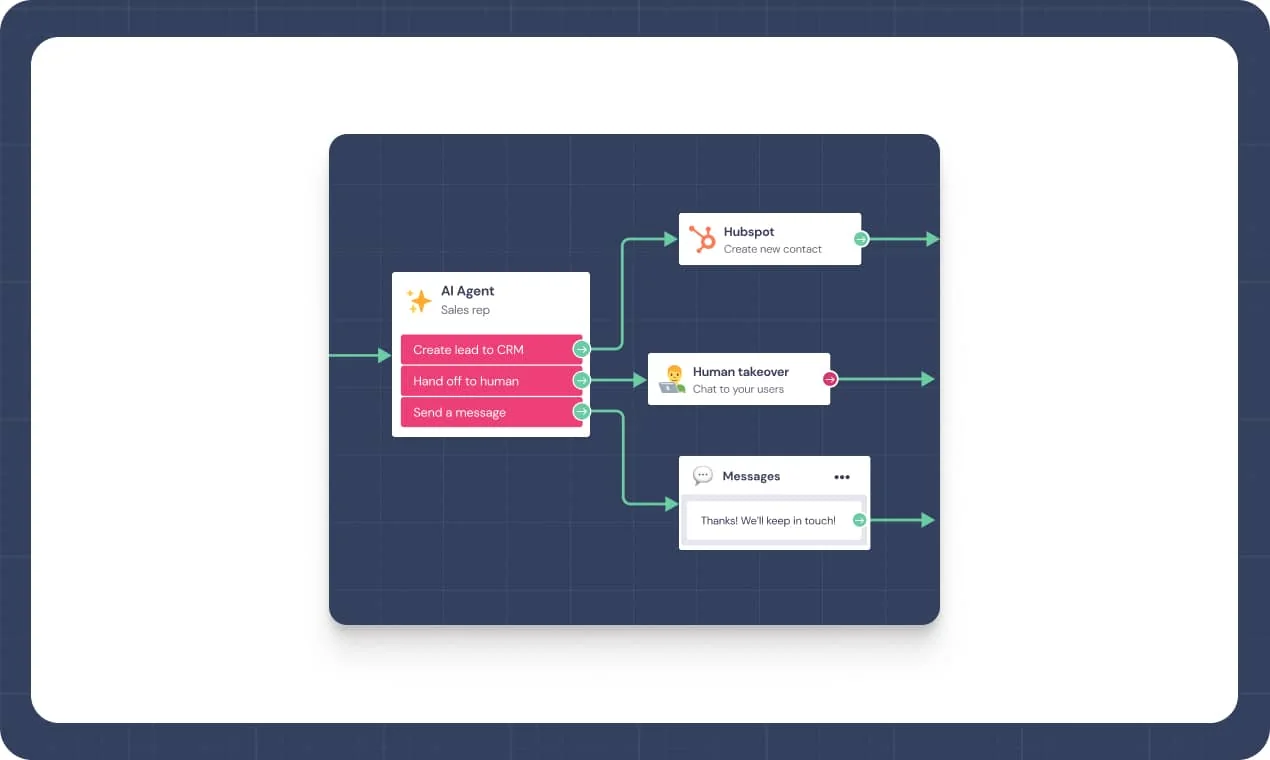
The "Hybrid AI" part means the agent can render buttons, multi-select options, validated text fields and phone inputs mid-chat instead of only typing. On WhatsApp that is capped at 3 buttons and no dropdowns, per the interactive components doc.
Under the hood, the help center says agents are "powered by GPT models", and the block has a model selector, though no page I read names the exact model versions (best practices guide).
Knowledge base: documents, text and websites
The knowledge base takes three source types: a document (PDF, DOCX, TXT, MD or RTF), pasted text, or a website URL. Each source is capped at 200,000 characters, scraped URLs can refresh daily, weekly, every two weeks or monthly, and the agent reads text only, so anything inside an image or screenshot is invisible to it (AI Agent docs).
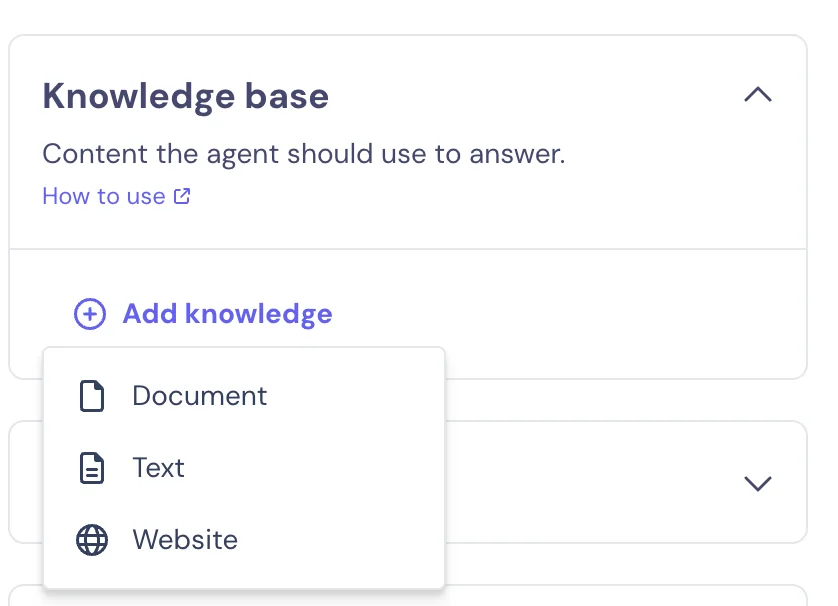
That is fine for an AI chatbot for your website that answers from a marketing site and an FAQ page. For support, notice what is missing: there is no connector for past helpdesk tickets, Confluence, Notion or Google Drive on any page I checked. If most of your real answers live in old replies rather than a tidy knowledge base, you will be copying them into documents by hand. Landbot's own writing guide also warns that tables are hard for the AI to read and that contradictions in your content can cause wrong answers.
WhatsApp is a first-class channel
WhatsApp is where Landbot feels most at home. It runs on the official WhatsApp Business API as a Meta Partner, its onboarding team files the API application for you (the WhatsApp page says it "usually lasts around 1-2 weeks"), and a free test environment lets you try the bot on your own phone before approval comes through. You also get opt-in widgets, campaign scheduling and a team inbox, which covers most of what my guide on automating WhatsApp support asks for.
If WhatsApp support is your main use case, read up on Meta's policy changes for third-party AI chatbots and the latest WhatsApp Business API pricing before you commit, since Meta's per-message fees sit on top of Landbot's.
How the hybrid design actually works
This is the part most coverage skips, and it changes how you should think about Landbot. The AI is not running the whole conversation. It is a block inside a flow you draw, and the conversation only leaves the AI when an exit you built fires.
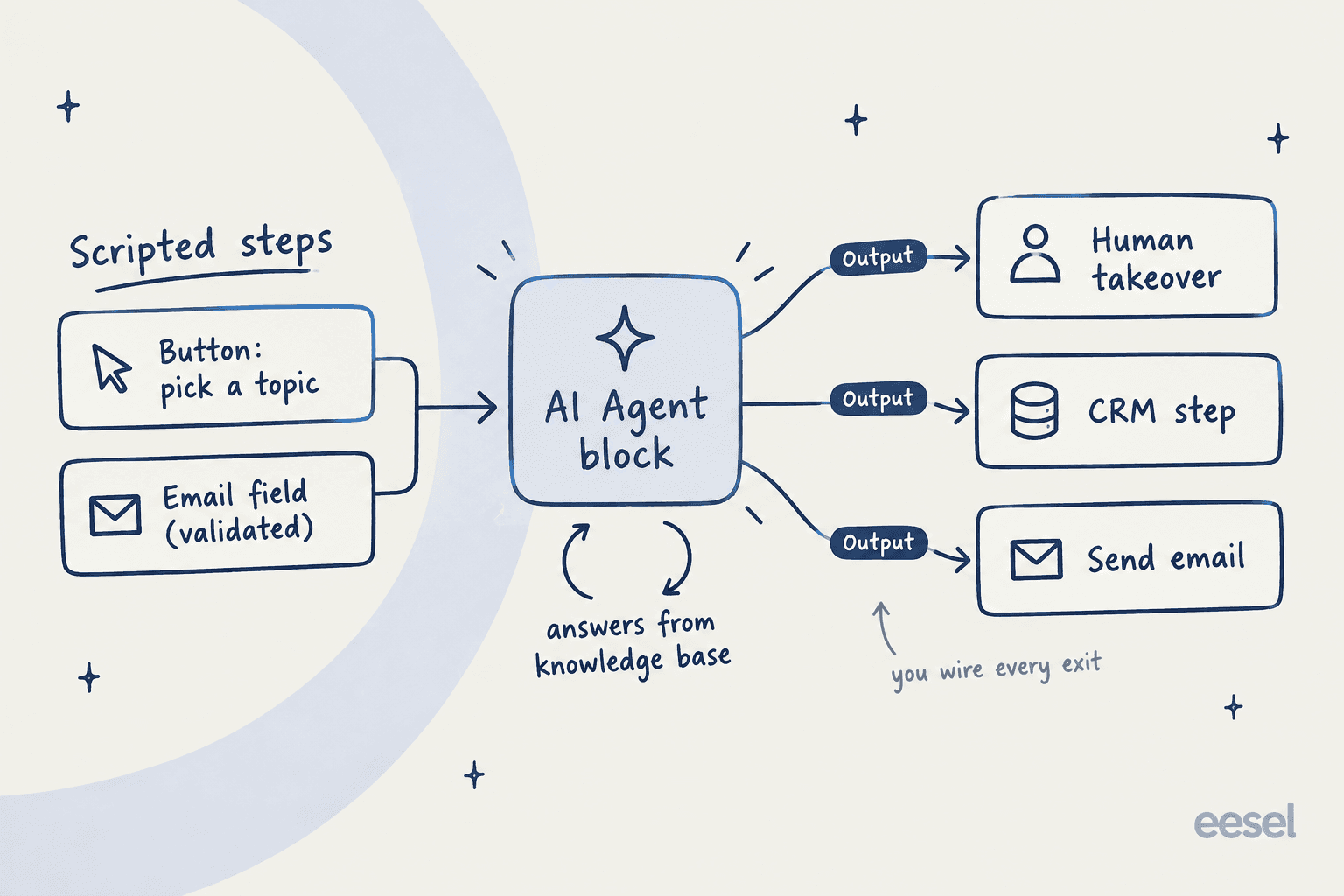
Landbot's AI agent page is clear about the split: the model handles open questions, while data capture runs on fixed steps with field validation, "never model-generated". That is a sensible design for lead capture, where you want a valid email address and phone number every time, not an AI paraphrase of one. The same page is refreshingly honest that a classic scripted bot is "the honest winner" for regulated, fully scripted journeys.
The trade-off shows up in the docs. A user stays inside the AI conversation until an Output condition triggers, such as "user asks to talk to a human", and the agent has no idea what the next block does. The migration guide adds that, unlike the old assistants, exits are not automatic and there are no automatic email notifications, so you wire Send Email or Slack blocks yourself.
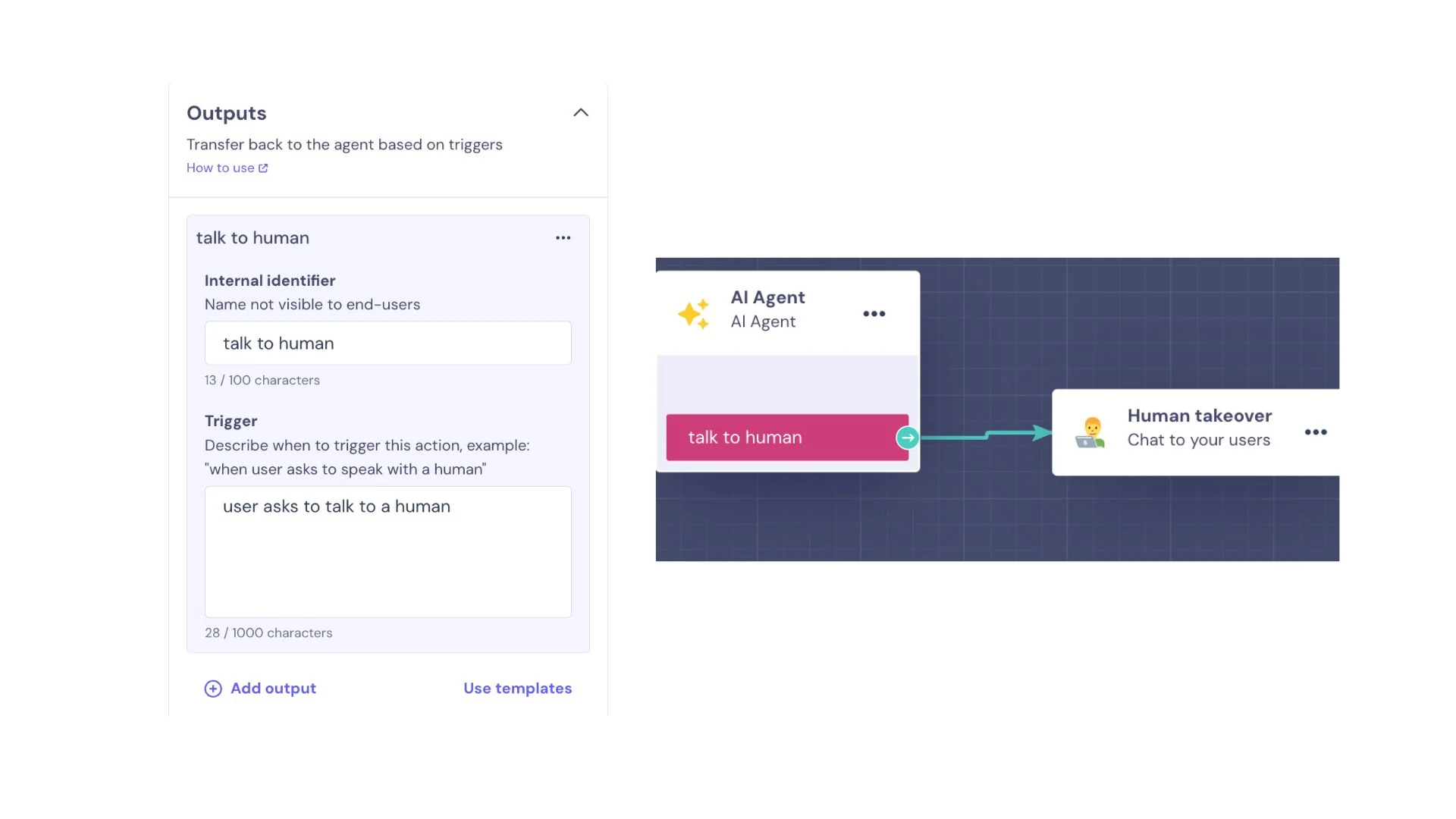
In practice that means you need to anticipate every reason a customer might want out, and write a trigger for each. Miss one and the customer loops with the AI. My guide to chatbot escalation and these handoff best practices cover the triggers worth writing first.
Where human handoff lands
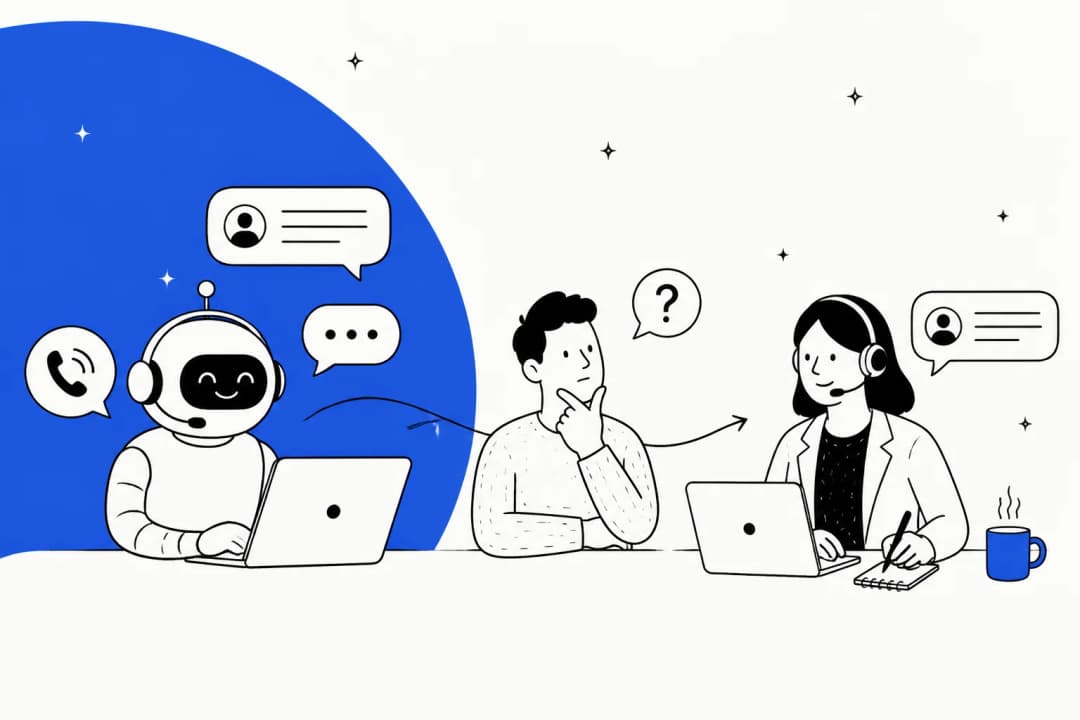
When a Human Takeover block fires, the chat goes to Landbot's own inbox. It assigns to the agents you pick, or to a random online agent if you pick none, and if nobody is online the flow can continue down an alternative path, such as booking a callback (Human Takeover doc). The inbox guide lists assigned and unassigned views, status filters, saved replies, private notes with @mentions and a button to hand the chat back to a bot.
What the inbox docs don't describe is a helpdesk, or even full live chat software: no ticket IDs or priorities, no response-time SLAs, no skills-based routing, no email channel, and conversations only show the last 50 messages. Each agent also uses a paid seat, at $25 a month per extra seat (pricing).
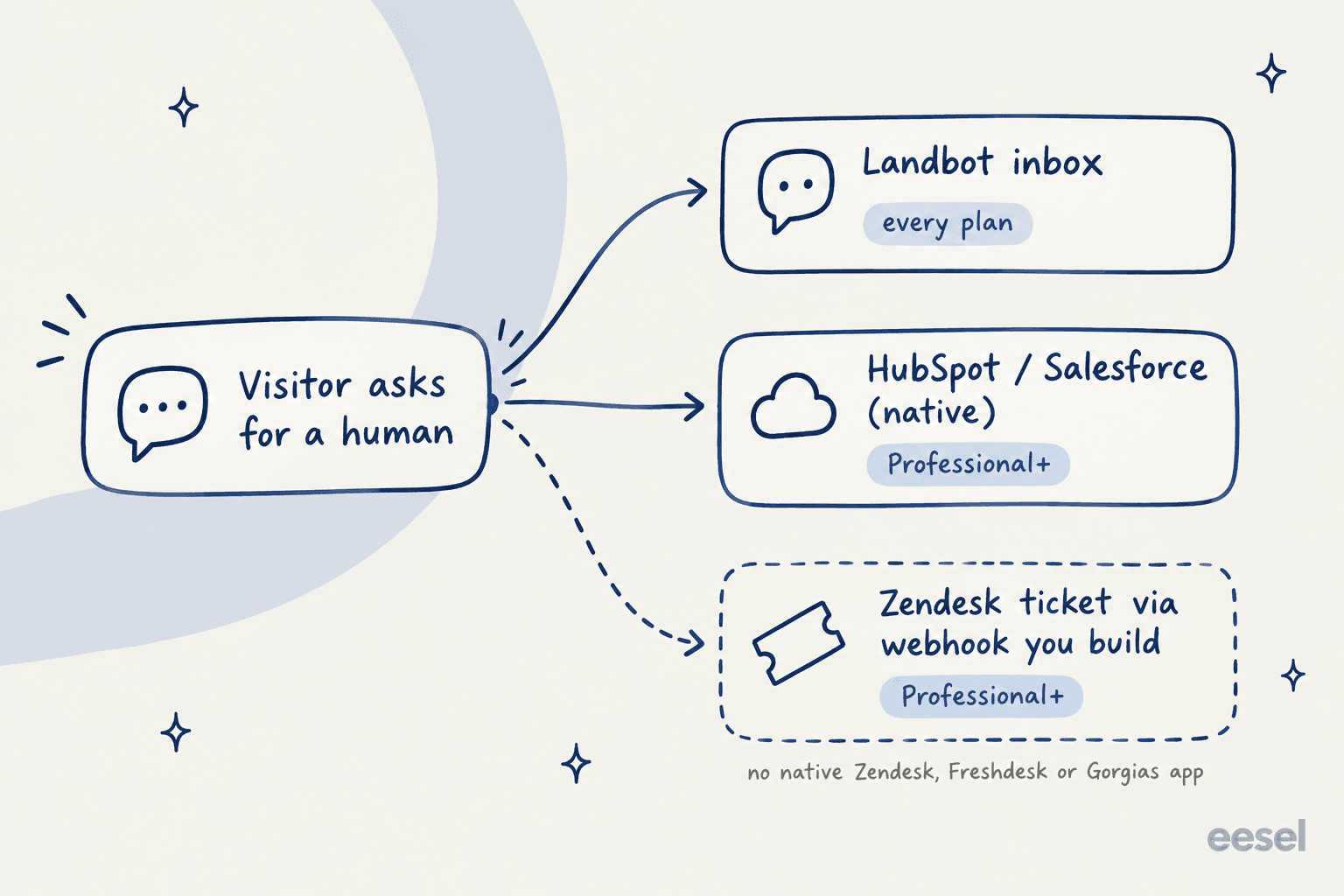
If your team already lives in a helpdesk, this is the deciding section. Landbot's native integrations are Airtable, Calendly, Dialogflow, Google Sheets, HubSpot, Mailchimp, Salesforce, Segment, SendGrid, Slack, Stripe and Zapier. Zendesk sits under custom integrations: the Zendesk ticket guide walks you through building a POST request to Zendesk's tickets API with Basic auth and mapping the JSON yourself. Webhooks and the API need Professional, so a Starter team can only hand off inside Landbot. I found no Freshdesk or Gorgias integration in the help center.
None of that is a dealbreaker for a sales team routing qualified leads into HubSpot or Salesforce, which is what Landbot is built around. For a support team on Zendesk, it means a developer owns the handoff.
How you test it (and what's missing)
Landbot gives you a share link and WhatsApp test options to chat with a published bot, then you review saved Fields and transcripts in the Analyze section (AI Agent docs). The AI Task block has its own test panel, but those tests use up AI chats (AI Task doc).
Analytics are built for the bot, not the human team. The Analyze section has four tabs: Conversations' Data with CSV export, Metrics (Chats and Finished, plus custom goals), Flow Analytics with per-step drop-off, and AI Agent Conversations.
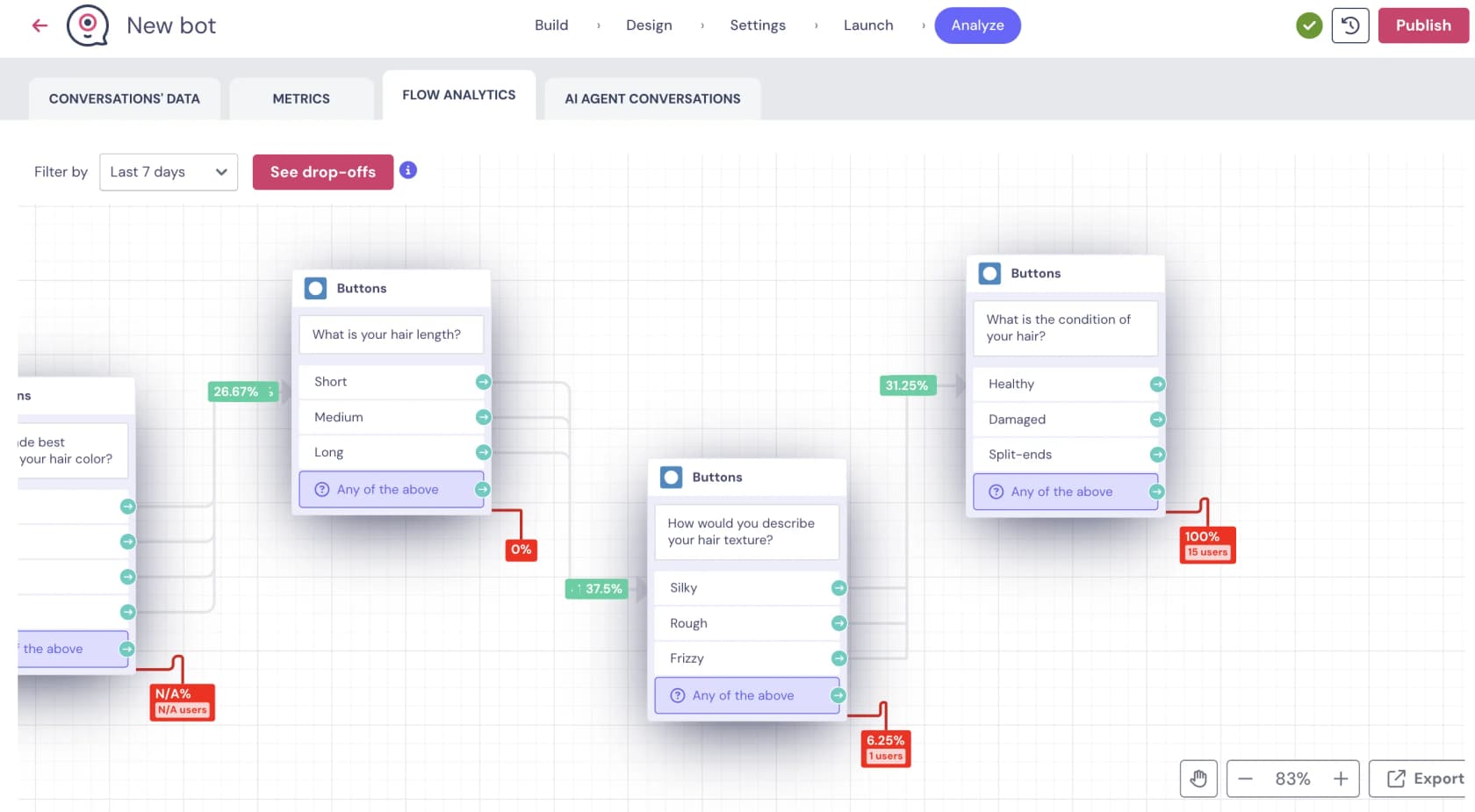
Flow Analytics is a lovely tool for finding where a lead-capture funnel leaks. What I couldn't find is any way to dry-run the AI against your real past conversations before launch, which is the step I care most about for support. A confident-sounding bot that gives a wrong refund answer looks fine in a hand-typed test and only shows up once real customers hit it, one of the classic AI chatbot problems. Testing before going live is one of the points in my chatbot analytics guide, and it's why eesel runs every rollout against historical tickets first.
What users say about Landbot
Sentiment splits cleanly by platform. Landbot scores 4.7 on G2 (334 reviews) and 4.4 on Capterra (70 reviews), with Capterra ease of use at 4.5 and customer service at 4.2. Trustpilot sits at 2.1 out of 5, but from only 10 reviews, mostly billing and support complaints. Many Capterra reviews date from 2019 to 2022 and are marked as incentivized, so weight recent comments more.
The most consistent theme: easy to start, harder once the bot gets complex.
"Landbot may seem quite easy to use at first but things can get quite tricky if you want to develop an advanced or complex bot."

A first-time builder on Reddit described the same curve from the beginner side, two weeks into building a demo:
"the chatbot building experience itself was a bit crazy, and unforeseen problems where a bit energy and time consuming, especially harder after a 9-5 day"

Price comes up a lot, usually around seats and the AI meter. A Hacker News commenter put the AI-versus-flow gap bluntly in March 2024, under Landbot's older pricing:
"For $100 per month you can have 2,500 flow chats, or 30 "AI" chats. That's nearly a 100x difference in cost."

The current plans are more generous (Professional now includes 300 AI chats), but the ratio still matters, as the pricing section shows. On the positive side, one Reddit user picked Landbot specifically for its AI flexibility:
"I use landbot.io. I chose it over others because of how we could ask more complex questions and how easy it was to connect to ChatGPT via api key."
Support experiences are mixed. G2 reviewers often praise a fast support team, while a 2024 Capterra reviewer at a 51-200 person company wrote that "once you sign up, you're pretty much left to your own devices" (Capterra). WhatsApp gets both praise for working well and complaints about setup effort and cost, which matches what I'd expect from the Meta approval process.
Landbot pricing
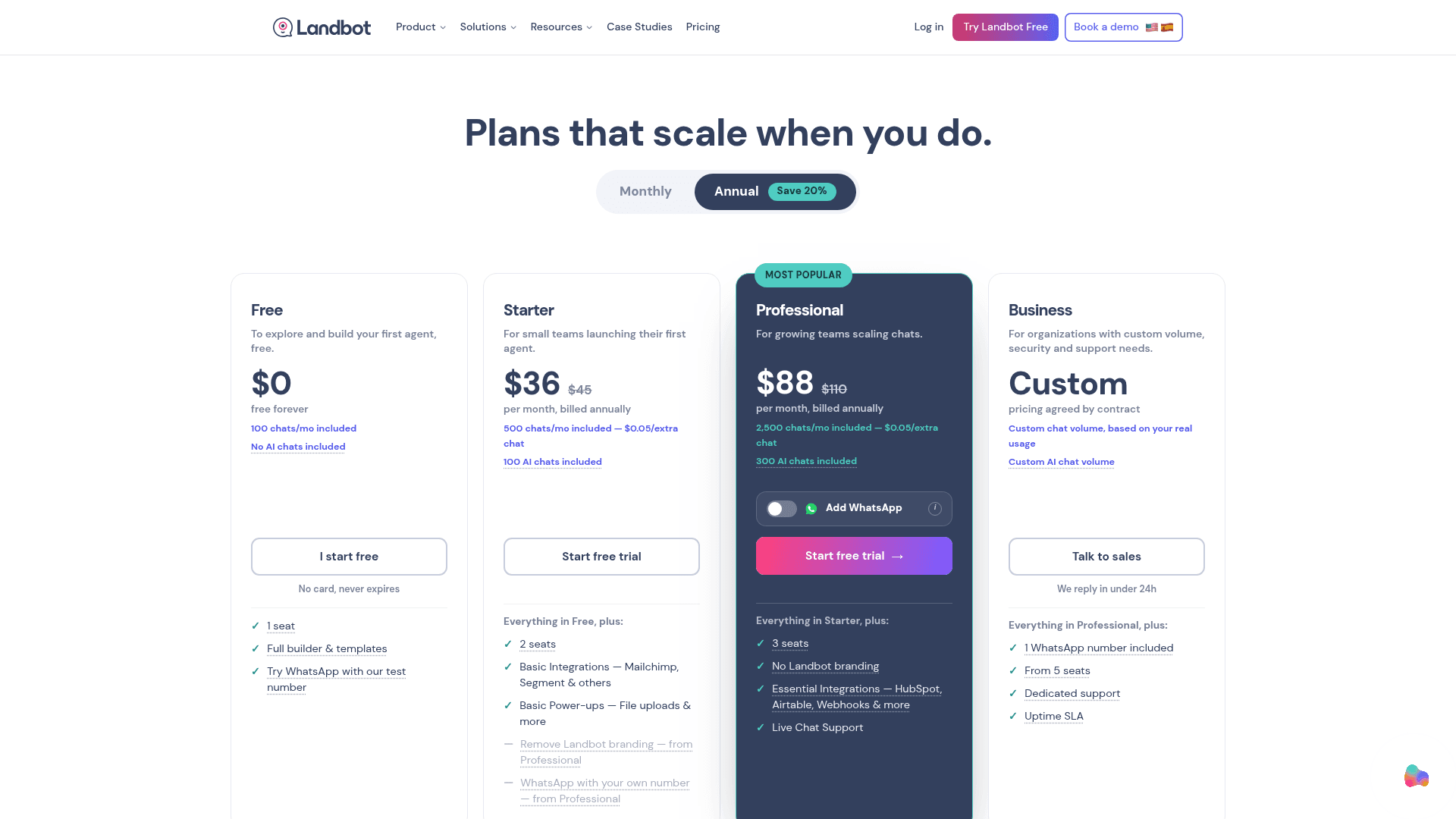
Landbot bills in two separate units. A chat is a structured session (tracked over a 24-hour window), and an AI chat is any conversation handled "fully or partially" by AI, billed on top. WhatsApp messages are a third meter on the WhatsApp plan. Here is the full table from the pricing page, in USD:
| Plan | Annual billing | Monthly billing | Chats/mo | AI chats/mo | Seats | Key gates |
|---|---|---|---|---|---|---|
| Free | $0 | $0 | 100 | None | 1 | Web only, no AI Agents, test WhatsApp number |
| Starter | $36/mo | $45/mo | 500 | 100 | 2 | Basic integrations, human takeover, Landbot branding |
| Professional | $88/mo | $110/mo | 2,500 | 300 | 3 | No branding, webhooks and API, HubSpot, Salesforce, Pipedrive, Zoho |
| Professional WA | $176/mo | n/a | 2,500 | 500 | 3 | 1 WhatsApp number, 10,000 service messages/mo |
| Business | Custom | Custom | Custom | Custom | From 5 | Dedicated support, uptime SLA |
Extras: $0.05 per chat (sold in packs of 500 for $25), $0.10 per AI chat, $25 per extra seat, and $100 a month for each extra WhatsApp number. WhatsApp messages beyond the allowance cost Meta's rate plus €0.003 per service message, or €0.05 per marketing, utility or auth message. Annual billing saves 20% and is a 12-month commitment. Every paid plan has a 14-day trial with no card.
The number to stare at is the AI share of each plan.
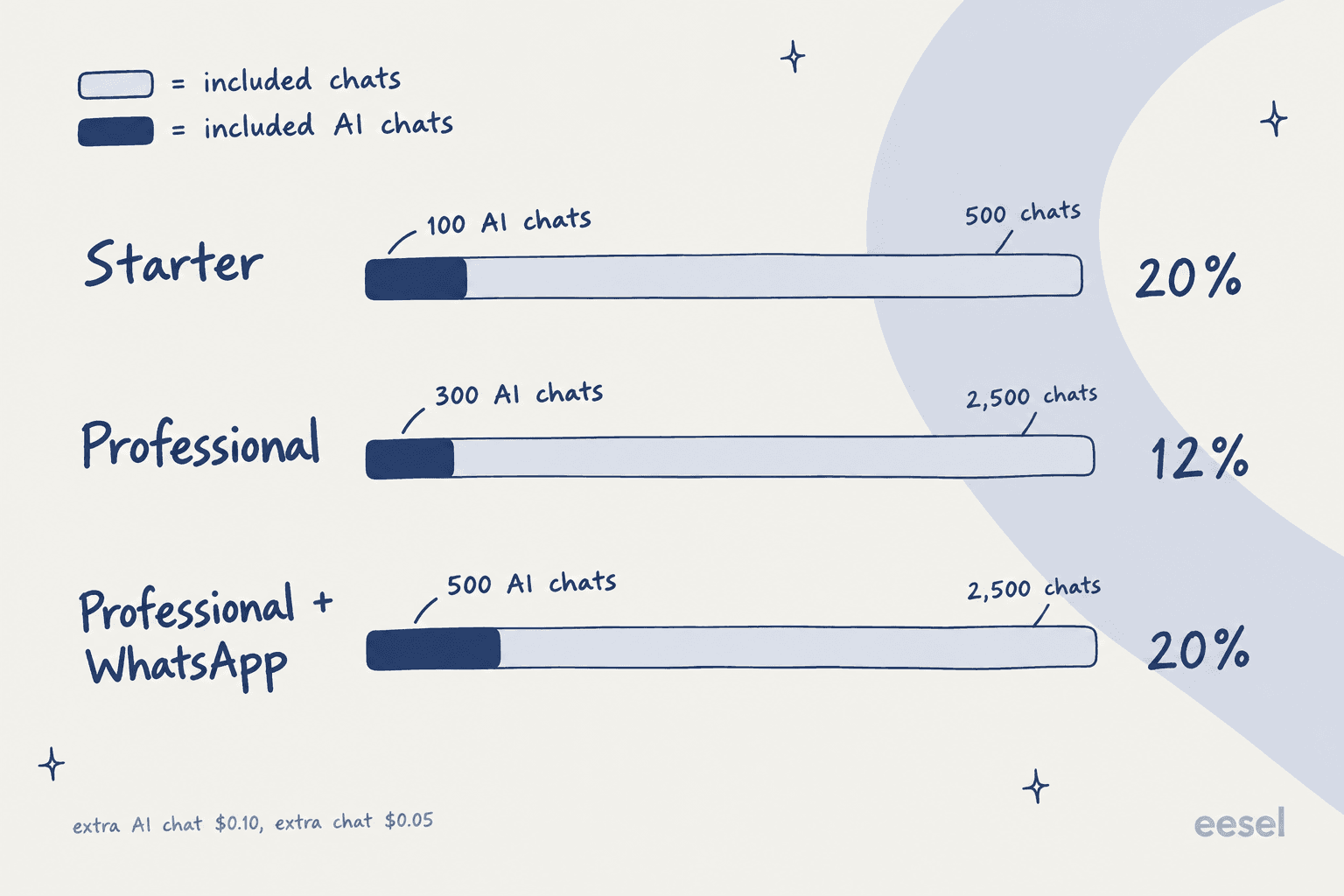
If your bot is mostly buttons with an AI step for the odd open question, that 12% to 20% is plenty. If you want the AI to answer most conversations, which is the whole point for support, you will be buying overage from day one. A worked example: a team with 3,000 chats a month, 1,500 of them AI, and 4 agents on Professional (annual) pays $88, plus $25 for one 500-chat pack, plus $120 for 1,200 extra AI chats, plus $25 for the fourth seat. That is $258 a month, with the base plan less than half of it. I'm assuming AI chats are counted on their own meter as the pricing page describes; confirm with Landbot whether they also draw down your regular chat allowance.
Plug in your own numbers here:
For the full plan-by-plan breakdown against similar tools, my posts on Botpress pricing and Voiceflow pricing use the same per-conversation lens, and Tidio pricing is the closest match to Landbot's. If your bot leans on Instagram or Messenger more than WhatsApp, ManyChat pricing is the closer comparison.
Landbot pros and cons
| Pros | Cons |
|---|---|
| Visual builder that reviewers rate highly for ease of use | AI chats are a separate meter, 12% to 20% of included chats |
| Hybrid design: AI answers, validated steps capture data | Every AI exit is a trigger you write and wire yourself |
| Copilot drafts a working first flow from a prompt | Knowledge base is documents, text and URLs only, no ticket history |
| Strong WhatsApp support with Meta approval handled for you | No native Zendesk, Freshdesk or Gorgias app; webhooks need Professional |
| Native HubSpot and Salesforce sync for lead routing | Inbox is a shared chat inbox, not a ticketing system |
| GDPR, SOC 2, EU-based, chats not used to train models | No dry run against past conversations before launch |
Who should use Landbot?
Pick Landbot if you are a marketing or revenue team that wants a bot to qualify leads, book meetings or run WhatsApp campaigns, and you like the idea of drawing the conversation yourself. The structured steps keep lead data clean (a big deal for lead qualification tools), HubSpot and Salesforce sync is native, and WhatsApp onboarding is better handled than most. For that job, compare it with my picks for lead generation chatbots and WhatsApp chatbots for business.
Skip Landbot if the main job is answering a support queue that already lives in Zendesk, Freshdesk or Gorgias. You will pay overage on AI chats, build the ticket handoff with a developer, and rebuild your answers as documents because past tickets are not a source. Builders aimed at developers, like the one in my Botpress review, or website-first tools like those in my Chatbase review and Tidio review, make different trade-offs worth comparing.
The deciding question is simple: do you want to design the conversation, or do you want the AI to learn it from how your team already answers? Landbot is built for the first. My explainer on AI agents vs traditional chatbots goes deeper on that split.
eesel for teams that want the bot inside the helpdesk
If you landed on this Landbot review because you want AI on a support queue, eesel's AI helpdesk teammate takes the other route. There is no flow to draw: it connects to Zendesk or Freshdesk in minutes, learns from your past tickets, help center and docs, and answers on your site through a chat bubble or directly in the ticket queue. When it hands off, it creates a helpdesk ticket with a summary and tags, so your agents pick it up in the tool they already use.

Before it goes live, eesel's simulation skill runs the agent against hundreds of your past tickets and scores each answer against what your team actually sent. A web-hosting customer running both a chatbot and an assistant on Zendesk summed up the setup in their Zendesk app review: "Connecting eesel to zendesk helcenter and messaging is ridiculously simple and we managed to get a chatbot and AI assistant that does some pretty complex actions with relative ease."
To be straight about cost: per conversation, Landbot is cheaper. My 3,000-chat example above came to $258 a month on Landbot, while 1,500 AI-handled conversations on eesel would sit on the 1,500-credit plan at $699 (eesel pricing). What that buys is no per-seat fees, every integration on every plan, and an agent tested on your real tickets before a customer sees it. Try eesel free with 100 credits, no card needed.
Frequently Asked Questions
Is Landbot worth it in 2026?
For marketing and sales teams that want a visual no-code bot builder for lead capture on a website or WhatsApp, yes. In this Landbot review the builder and WhatsApp setup were the strongest parts. For high-volume support, the metered AI chats and the lack of a native helpdesk app are the things to test first.
How much does Landbot cost?
Landbot has a free plan with 100 chats a month and no AI. Starter is $36 a month billed annually ($45 monthly), Professional is $88 ($110 monthly), Professional with WhatsApp is $176, and Business is custom. Extra chats cost $0.05 (sold in packs of 500 for $25) and extra AI chats cost $0.10 each. My chatbot cost guide compares this with other tools.
What is an AI chat in Landbot?
Landbot counts any conversation handled "fully or partially" by an AI Agent or AI Task block as one AI chat, billed separately from regular chats. Starter includes 100, Professional 300 and Professional WA 500 a month. It is a different unit from a message credit, so compare per conversation, not per reply.
Does Landbot integrate with Zendesk or Freshdesk?
Not natively. Landbot's native integrations include HubSpot, Salesforce, Slack and Zapier, but Zendesk tickets are created through a custom webhook you configure yourself, on the Professional plan or higher. If you want the AI inside the queue, see my guides to the Zendesk AI chatbot and Freshdesk AI chatbot options.
Is Landbot good for WhatsApp chatbots?
It is one of the more complete options. Landbot is a Meta Partner on the official WhatsApp Business API, its team handles the API application (usually 1 to 2 weeks), and there is a free test number. Your own number needs Professional plus an $88 a month add-on. My WhatsApp chatbot roundup has alternatives.
What AI model does Landbot use?
Landbot's help center says its AI Agents are "powered by GPT models under the hood" and the block has a model selector, but no help page names exact model versions. The separate AI Task block, from Professional up, can also run on your own API key. For the wider trade-off, see AI agents vs rule-based chatbots.
Is there a free Landbot plan or trial?
Yes to both. The free plan is permanent, includes 100 chats a month, one seat and the full builder, but no AI Agents. Paid plans start with a 14-day trial and no card, after which you drop to the free plan. For more no-cost options, see my list of no-code AI chatbot tools.


Article by
Rama Adi
Rama is a software engineer at eesel AI with two years of experience writing about B2B SaaS, AI tools, and customer support technology. Based in Bali, Indonesia, he brings a developer's perspective to product comparisons — cutting through marketing copy to what the integrations and APIs actually do.