


Quriobot is a low-cost, EU-based chatbot builder that is best at scripted conversations: lead capture, quizzes, bookings and web forms turned into chats. I'd score it 3.5 out of 5. The pricing is €0 for 500 chats, then €13 to €143 a month on Business, and a paid bot simply disappears from your site when it hits its chat limit.
The thing most reviews miss is where the AI comes from. Quriobot's AI answers run through your own OpenAI account and API key, which you set up, feed with files and pay for separately. That's flexible, but it means "AI chatbot" is a project, not a switch.
If what you need is an AI that answers support questions from your help center and past tickets, and hands off inside Freshdesk or Zendesk, eesel does that without a flow to build. Dutch lighting brand Innr uses it to draft every Freshdesk reply in the customer's language.
What is Quriobot?
Quriobot is a no-code tool for building chatbots out of steps: a question, a button choice, a date picker, a slider, an IBAN check. You drag the steps into a conversation, set jump logic between them, and put the bot on your site with one line of code or on its own landing page. It's run by Hugo B.V., a company registered in Amsterdam, and the site footer dates the product back to 2017.
I build AI agents at eesel, so I read chatbot docs from the inside: where does each answer come from, and what happens when the bot doesn't know? That's the lens for this review. I went through Quriobot's pricing page, its product page, the Quriobot Academy docs, its WordPress listing and every public review I could find. I haven't run it on a live site for months, so where I describe behaviour, it comes from Quriobot's own docs and screens.
The short version of what I found: Quriobot is a mature no-code bot builder that added AI on top, rather than an AI agent that added flows. That order matters for who should buy it.
Where is Quriobot listed?
The brief I started from called Quriobot a helpdesk marketplace app, so I checked where it actually shows up. Here's what I could confirm:
- WordPress plugin directory. The Quriobot plugin installs the embed script for you. It's on version 2.9.3, tested against WordPress 7.1, and has no reviews yet.
- LiveAgent's integrations directory. LiveAgent lists Quriobot as a bot that runs first and opens LiveAgent's chat when a visitor wants a person.
- G2 and Capterra. Quriobot has an unclaimed G2 profile and a Capterra listing. More on those scores below.
What it doesn't have is a native app inside the big helpdesk marketplaces. Its Freshdesk, Zendesk and HubSpot connections are described in Quriobot's own docs as scripts and an import tool, not apps you install from those vendors' stores. On Shopify, the Academy guide has you paste the embed code into your theme's theme.liquid file.
How does Quriobot work?
You start in the Control Room, pick a template or a blank bot, and build the conversation step by step. The pricing page says every plan, Free included, gets all 20+ step types, conditional jump logic, custom CSS and JavaScript, webhooks, reporting and multilingual bots.
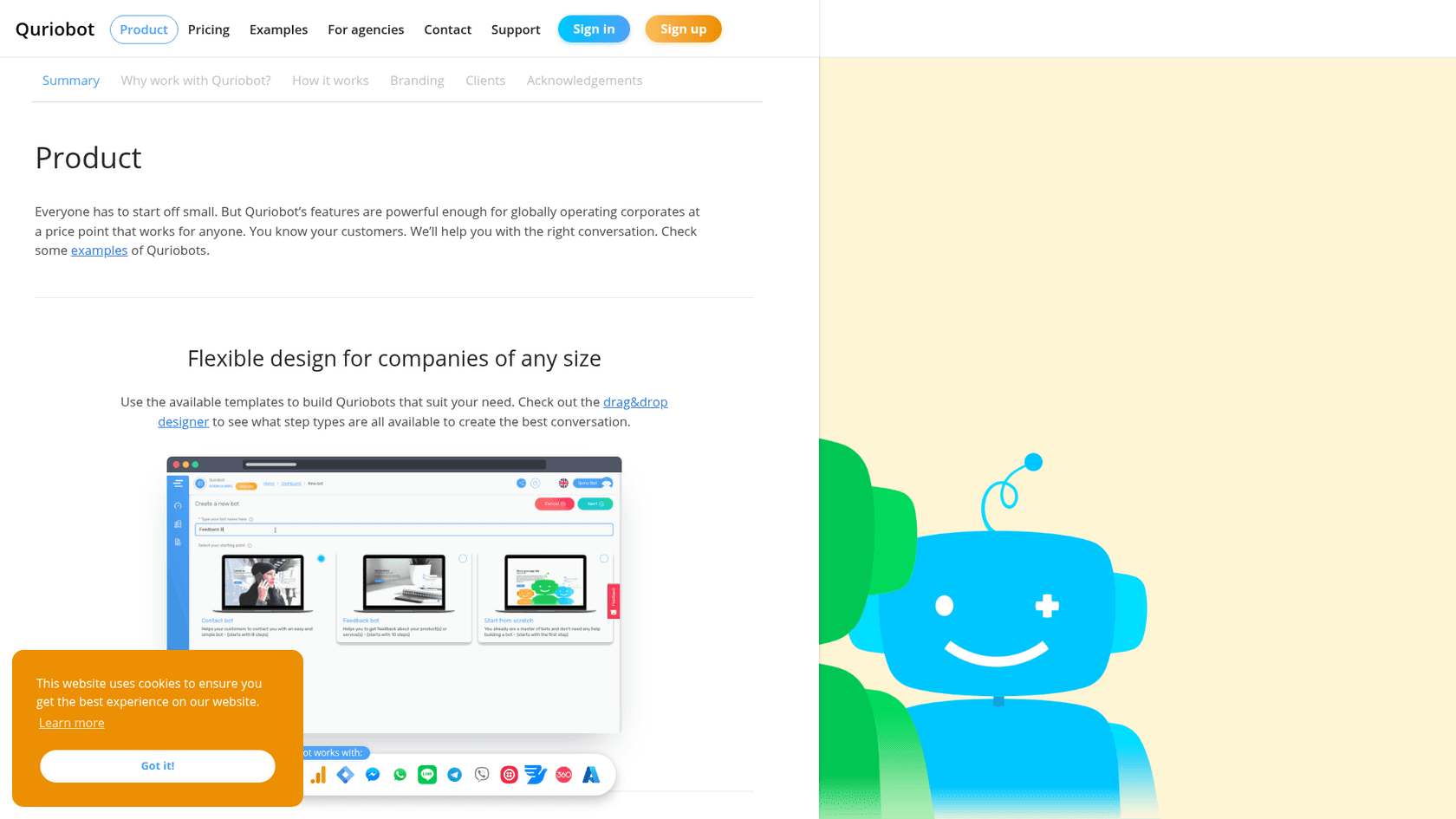
The step types are the best part. The product page calls out an IBAN step that checks the number is real, a Location step tied to Google Maps, and an External Chat step that moves the visitor to WhatsApp, Slack, Facebook Messenger or Skype. You can also run calculations inside a bot, which is why one Capterra reviewer said it was "great for budgets". If your current site has a long contact or quote form, this is the kind of tool that turns it into something people finish, and it's a natural fit for a lead generation chatbot.
Channels beyond your website
The same bot can answer on Facebook (including replies to comments on your page), WhatsApp through Twilio or 360Dialog, Telegram, Viber, LINE and MessageBird. All of these are on the Free plan, per the pricing table. That's generous next to tools that hold WhatsApp behind a paid tier. One gap a Capterra reviewer flagged back in 2022: no Instagram.
The AI Copilot for building bots
The newest piece is the AI Copilot, a chat panel inside the Control Room. You describe what you want, for example "a lead-capture bot for my plumbing business with a GDPR consent step", and it builds the flow, edits steps, sets up channels, configures integrations and pulls reports. By default it asks you to confirm each change, and you can switch on auto-execute to let it run a whole sequence.
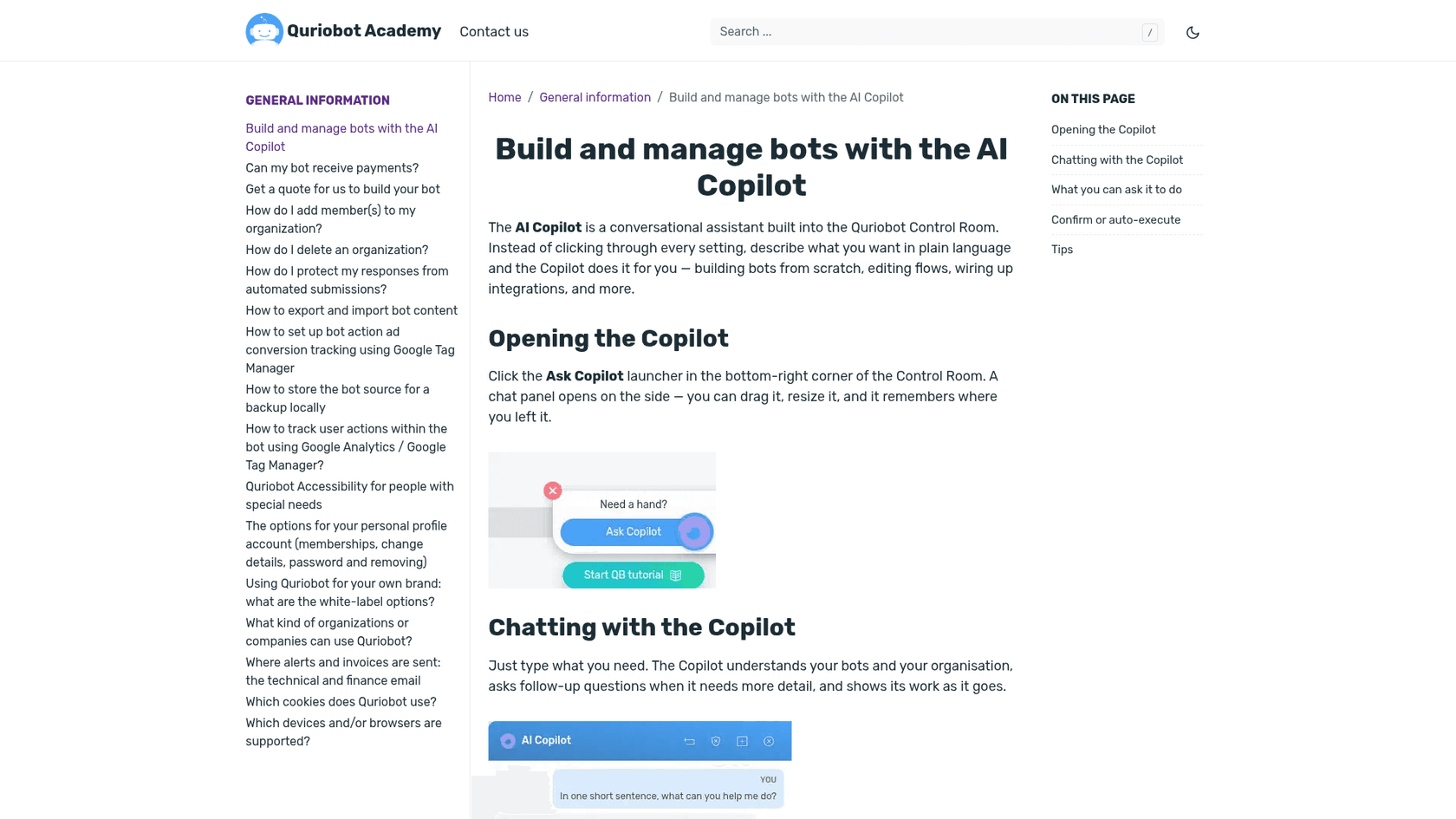
This is a smart addition, because the main complaint about Quriobot has always been the learning curve. Note what it is, though: an assistant that helps you build the flow faster. The bot your visitors talk to is still the flow you approved.
How does Quriobot's AI answer questions?
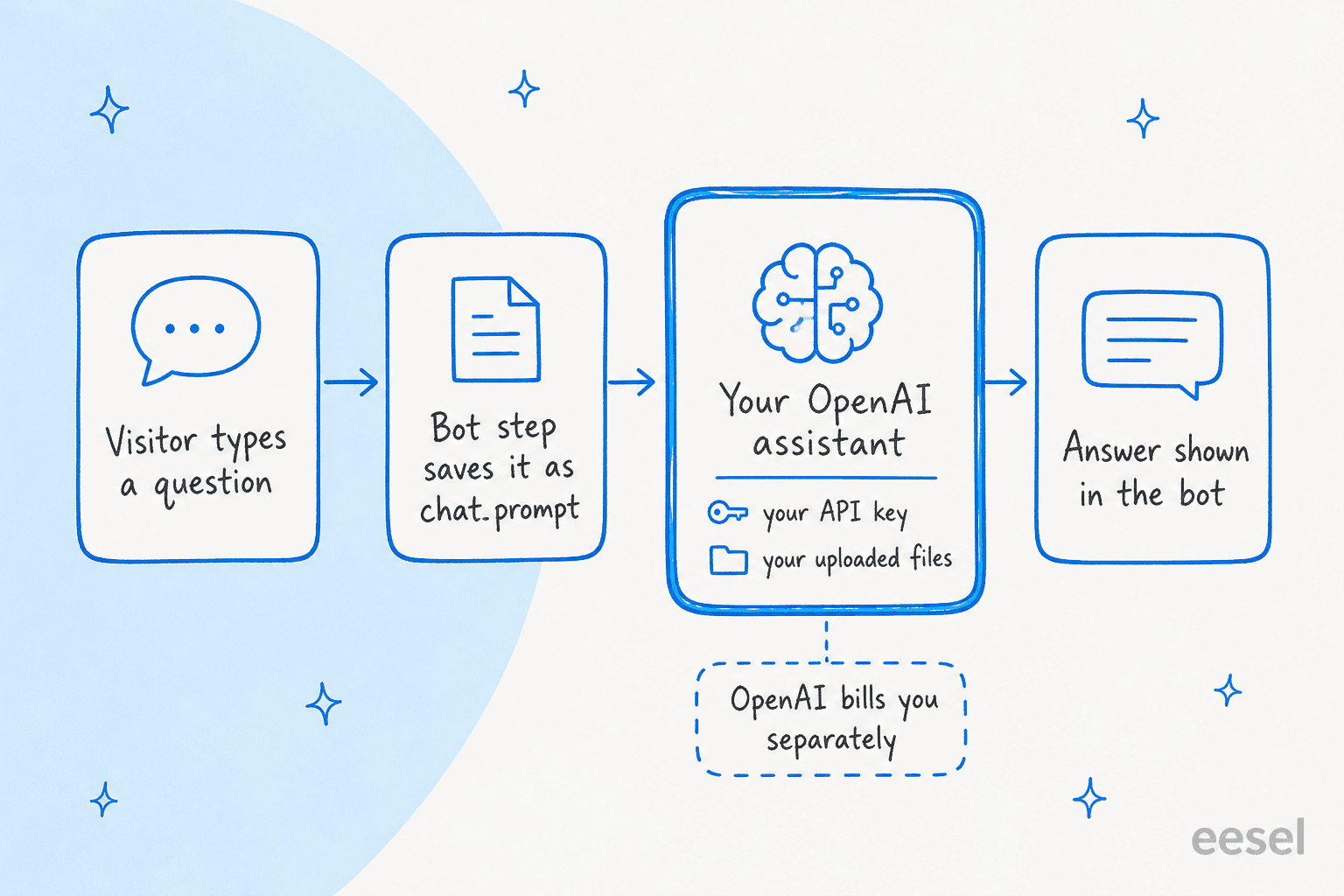
Through OpenAI, on your account. The OpenAI integration docs walk you through it: add your OpenAI API key under Integrations, create an assistant inside the Control Room, attach a vector store of documents, then add a chat completion variable to a bot step so the visitor's question goes to that assistant and the answer comes back into the chat.
There's more depth here than I expected. An automation rule can scrape your website and upload the result to the assistant on a schedule. Two more rule types, Crawl Bot Responses and Crawl Live Chats, feed past bot answers and live chats into the assistant's knowledge. And the docs suggest a feedback loop where bad answers go into a Google Sheet, a person writes the expected answer, and the sheet is uploaded back to the assistant.
The docs are also current. They mention OpenAI retiring its Assistants API in August 2026 and say assistants now live inside the Control Room, with bots written before then still working. That's the sign of a team that maintains its product.
Here's my take as someone who builds these systems. Every one of those pieces is something you assemble: the key, the assistant, the instructions, the vector store, the scrape rule, the bot variable, the step. It's closer to a toolkit than a finished AI customer service chatbot, and the AI part of the bill comes from OpenAI, not Quriobot. If you have someone technical who enjoys that control, it's a strength. If you were hoping to connect a help center and go live by Friday, it's the main reason to look elsewhere. My guide on how to train a chatbot covers what a done-for-you setup looks like.
What happens when the bot can't help?
Quriobot's human takeover docs open with an honest line: the product was built to work 24/7 without a human, but you'll still want a fallback. There are three ways to set one up.
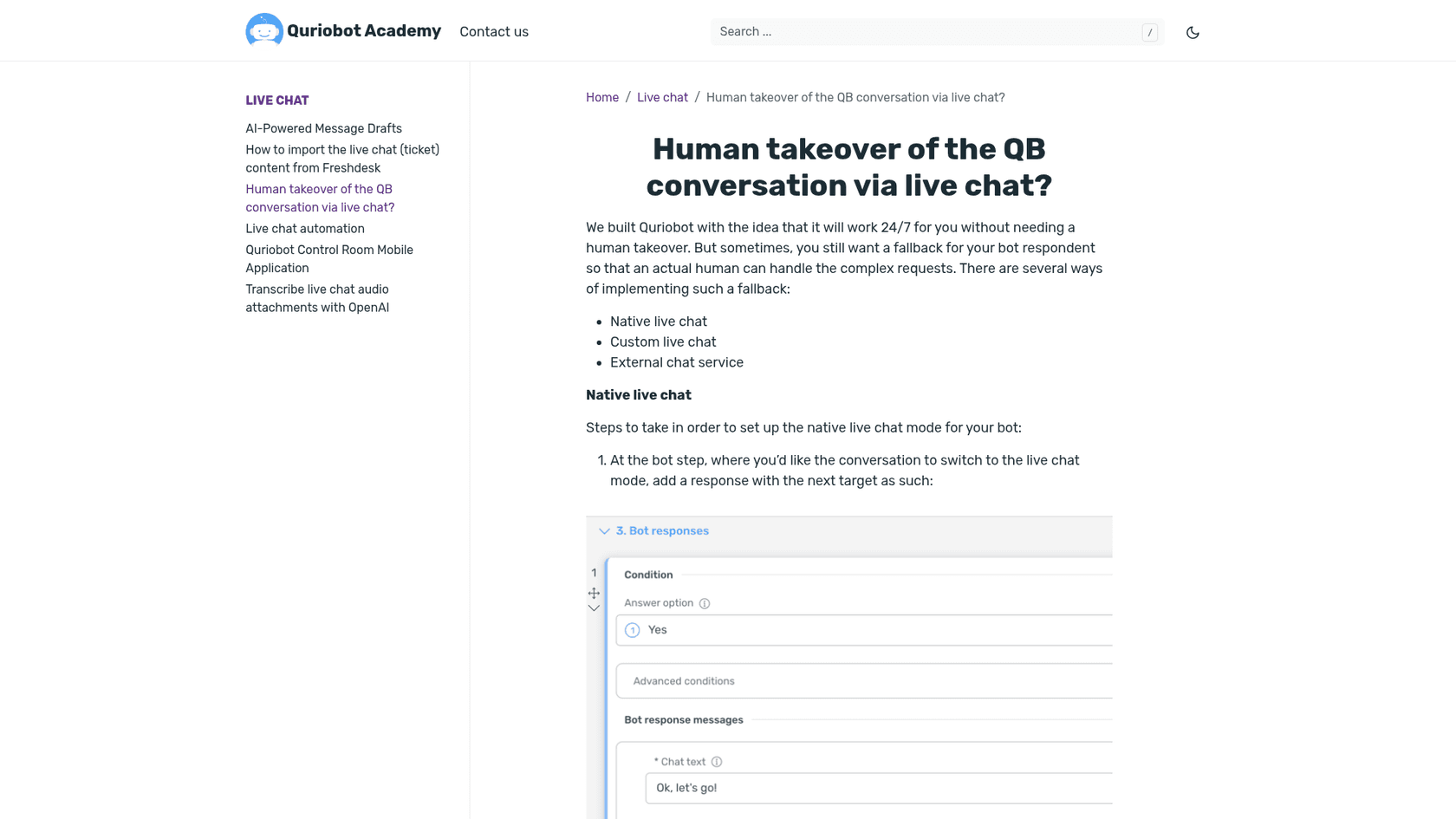
- Native live chat. A bot step switches the visitor into live chat, and your team answers from the Control Room or the mobile app. Emails to your support address can create chats too, and automation rules can assign, close, forward or send chats to Slack, Zapier or a webhook. The bot can check how many agents are online before it offers a person.
- Custom live chat. A script hides Quriobot and opens another vendor's widget, then brings Quriobot back when that chat closes. The Academy has guides for LiveAgent, the Zendesk widget, HubSpot live chat, Help Scout, Drift and tawk.to.
- External chat service. Send the visitor to a channel like WhatsApp or Messenger and continue there.
There's also AI-powered message drafts for agents in native live chat: click the magic wand and your OpenAI assistant writes a draft from the conversation for you to edit and send. It needs the same OpenAI setup, and the docs say it needs "a subscription plan that supports this feature" without naming the plan.
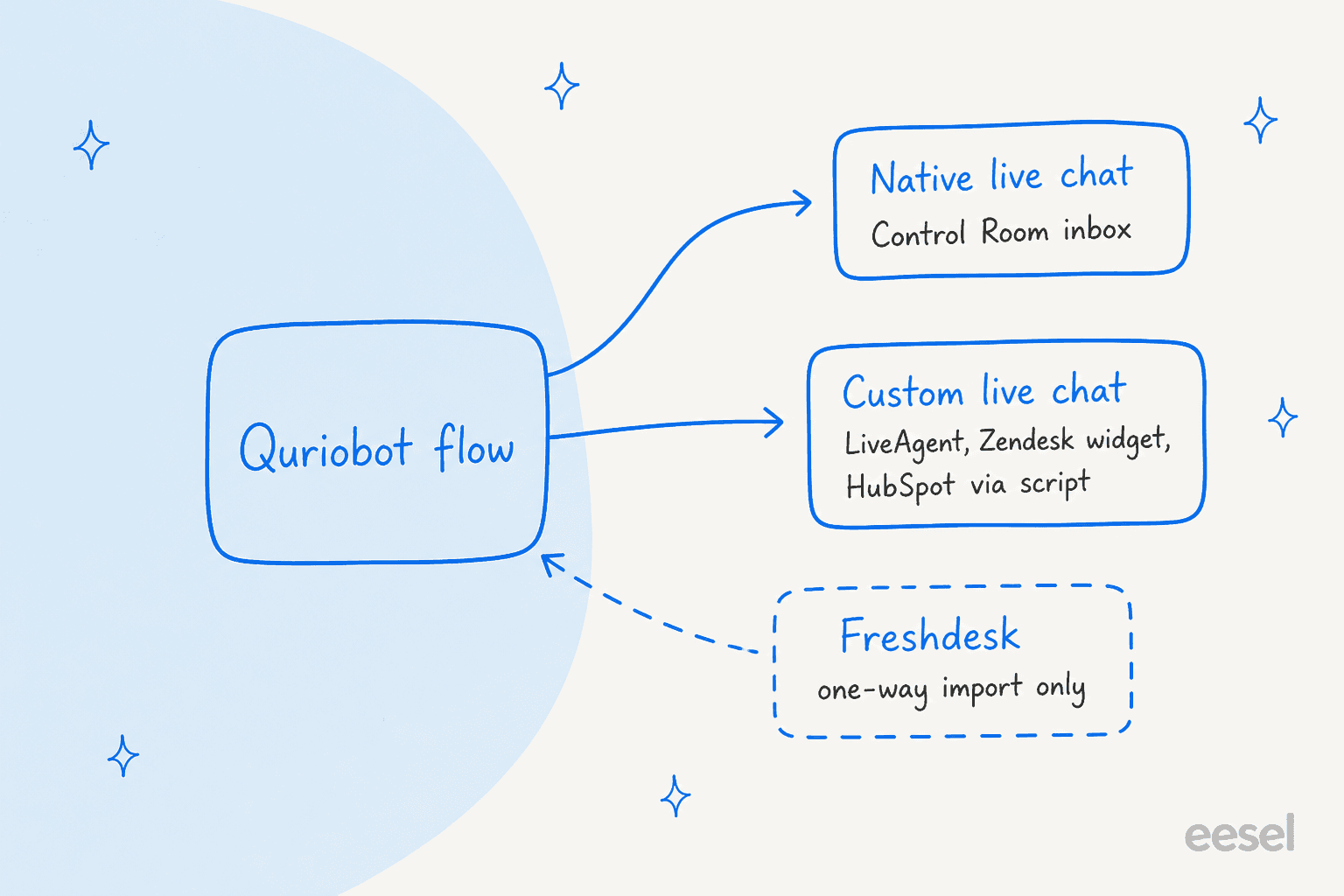
The Freshdesk link is the detail I'd flag for helpdesk teams. Quriobot's Freshdesk integration imports your Freshdesk chats and knowledge base articles into Quriobot. Both guides open with "If you'd like to switch to our implementation", so the intent is moving off Freshdesk, not working inside it. If your team lives in the Freshdesk ticket queue and plans to stay, nothing in Quriobot answers or drafts there. My notes on chatbot escalation explain why the gap between a website bot and the queue is where customers get lost.
How much does Quriobot cost?
Quriobot bills by chats per month, and the pricing page lists every tier in euros, excluding tax.
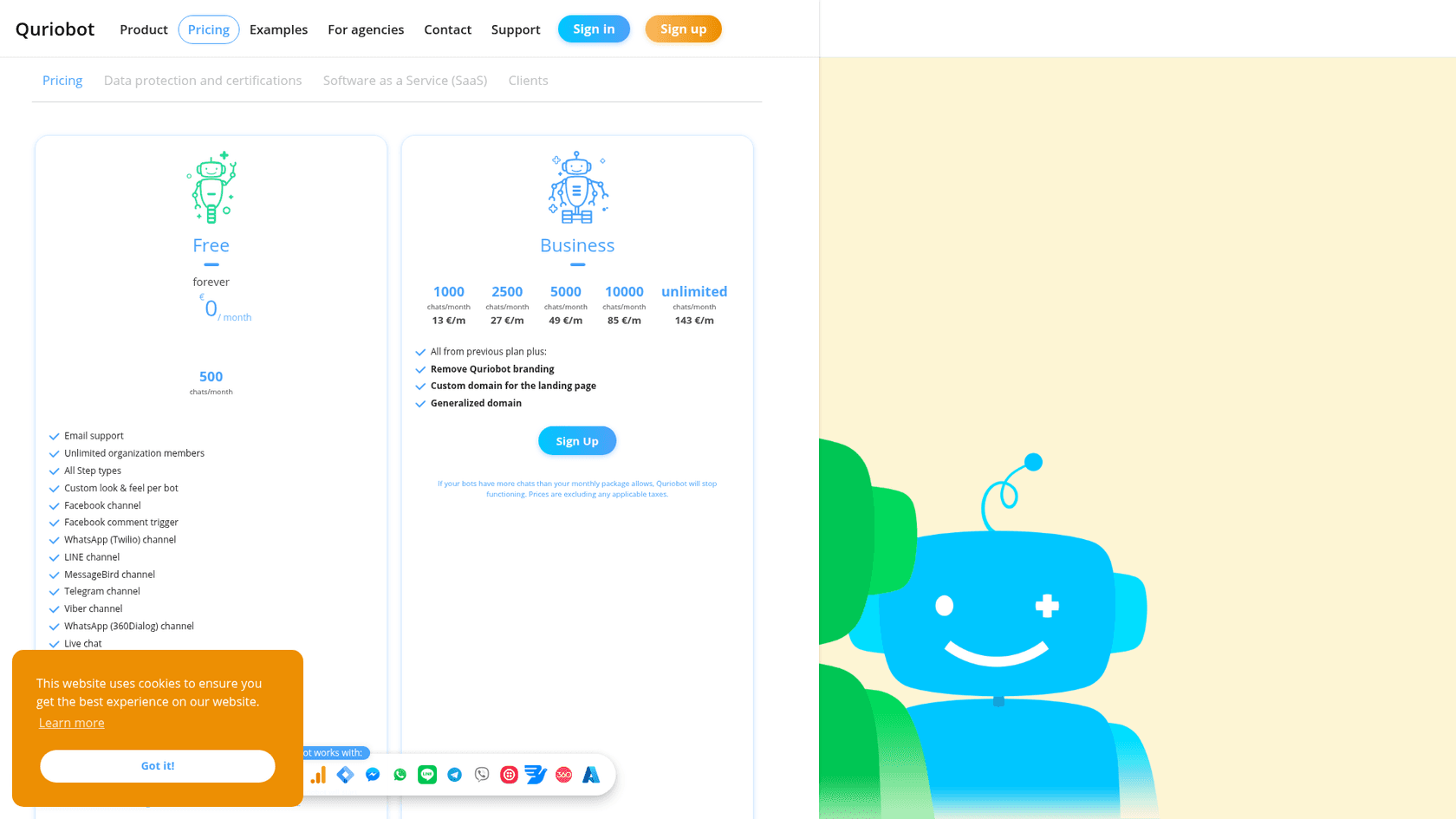
| Plan | Price per month | Chats per month | What it adds |
|---|---|---|---|
| Free | €0 | 500 | All step types, live chat, every channel, OpenAI and Azure Speech integrations, campaigns, knowledge base, unlimited members |
| Business | €13 | 1,000 | Remove Quriobot branding, custom domain for the landing page, generalized domain |
| Business | €27 | 2,500 | Same as above |
| Business | €49 | 5,000 | Same as above |
| Business | €85 | 10,000 | Same as above |
| Business | €143 | Unlimited | Same as above |
| Agency | From €499 | Unlimited | Sub-organization discount, custom deployment domain for full white label |
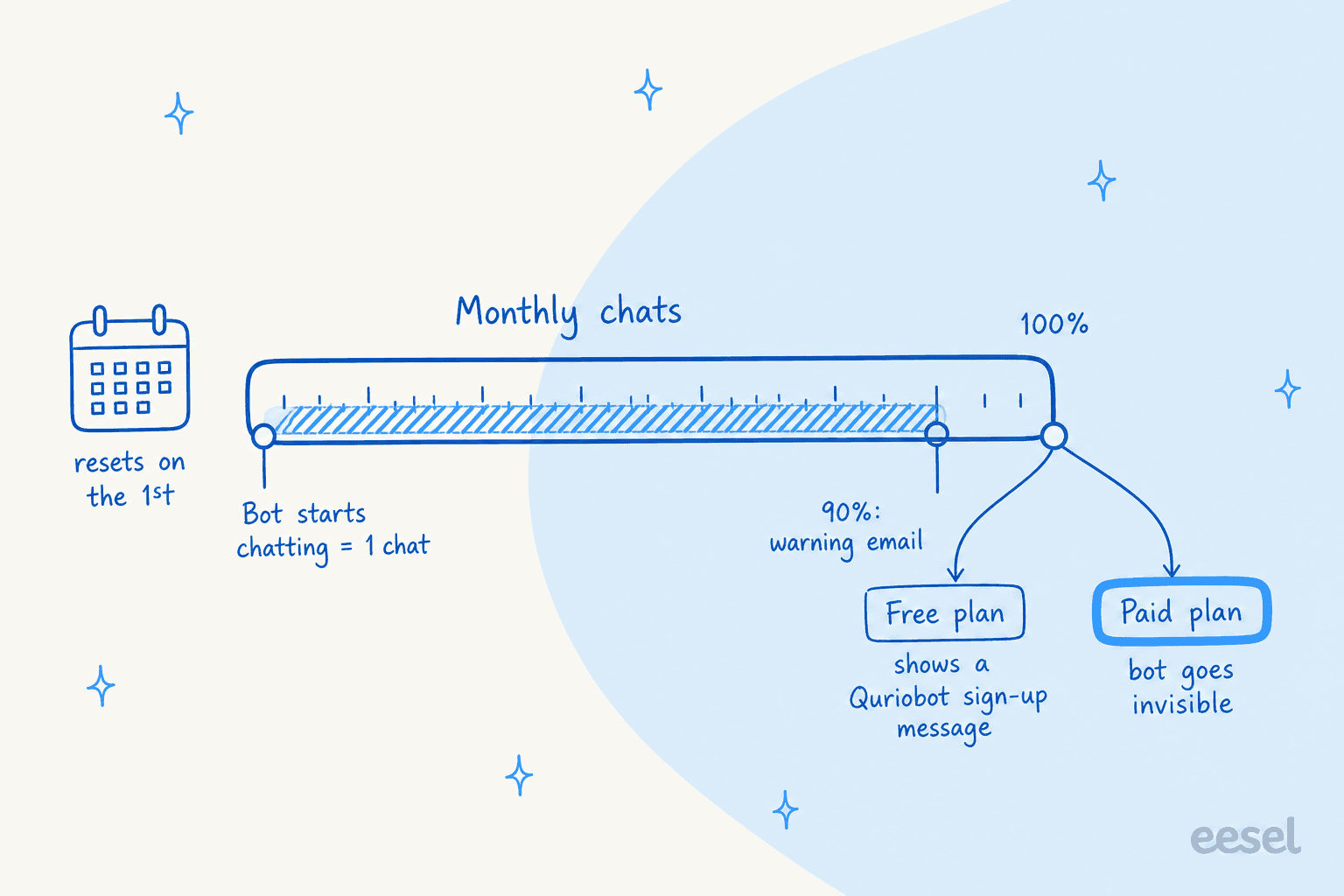
Two things to understand before you pick a tier. First, the chat counting rules: a chat counts as soon as the bot starts chatting, even if the visitor closes it straight away, unless you use soft-start so the bot waits for a click. A bot that pops open on every page view can burn through 1,000 chats fast. Chats from every bot on every site are pooled.
Second, what happens at the limit. You get an email at 90%. At 100%, a free bot starts showing a Quriobot sign-up message, and on a paid plan the bot stops working and goes invisible until the quota resets on the 1st of the month or you upgrade.
On price alone, Quriobot is cheap. €143 a month for unlimited chats is hard to beat, and €13 for 1,000 chats is about 1.3 cents a chat. Just add your OpenAI usage on top if the bot uses AI, since that's billed by OpenAI to your own account. For the bigger picture on billing units, my chatbot cost guide compares per-chat, per-seat and per-resolution models. For a direct sibling, Landbot's pricing is the comparison most Quriobot shoppers make.
What do Quriobot users say?
There isn't much public feedback, and most of it is old. Quriobot scores 4.1 out of 5 from 11 reviews on G2, where the profile is unclaimed, and 3.8 out of 5 from 8 reviews on Capterra, with ease of use at 2.9. The Capterra reviews I could read date from 2021 and 2022, before the AI Copilot and the current OpenAI setup existed.
The happy reviews are about flexibility and support:
"I use Quriobot for a couple of projects and it works great, I use it only for website widgets and the whole experience has good. Quick support and constant updates."

The learning curve comes up again and again, even from people who like it:
"This a bit hard to master. It can take quite a bit of time on the learning curve but it is well worth it in the end."
The two 1-star reviews on Capterra, both from January 2022, come from buyers of an AppSumo lifetime deal whose accounts were moved to the Free plan. One reviewer wrote that they bought five codes and "Now the account shows as a free account." G2's review summary picks up the same account restriction theme. That's four years old and specific to lifetime deal codes, so I wouldn't read it as a current risk for a monthly plan. I'd still pay monthly for the first few months rather than annually.
Who should use Quriobot?
Quriobot fits a specific buyer well. I'd pick it if:
- You want to replace web forms with a guided chat: quotes, bookings, sign-ups, surveys, quizzes.
- You run an agency and want to white-label bots for clients. The Agency plan and the white-label options are built for that.
- You need EU data storage and a low monthly bill, and you're happy to build.
- You have someone technical who wants full control over the OpenAI setup.
I'd skip it if:
- You want an AI that answers support questions from your help center on day one. Quriobot can get there, but you build it.
- Your support runs in a helpdesk like Freshdesk or Zendesk and you want AI inside that queue, not a separate inbox.
- Your team won't spend time learning a builder. Capterra's 2.9 ease-of-use score is the warning.
This is the split eesel's sales calls keep showing. In one trial, a delivery company on Freshdesk asked our bot a shipping-cost question in Dutch, got an answer pulled from its tariff documents, and then asked why its past Freshdesk tickets weren't being used for learning too. That's the expectation buyers now bring: the bot should learn from what the team already answered, without anyone scripting it. A flow builder answers a different question.
Quriobot vs an AI agent for support
The difference comes down to who writes the answers. In Quriobot, you design every step, and AI is an optional step that calls your OpenAI assistant. In an AI agent, the knowledge is the starting point: it reads your help center, macros and past tickets, and the flow is mostly the guardrails you set.
| Quriobot | eesel AI helpdesk teammate | |
|---|---|---|
| How answers are made | Scripted steps, optional OpenAI step | AI reads help center, docs and past tickets |
| AI setup | Your OpenAI key, assistant and vector store | Connect sources, set instructions |
| Works inside Freshdesk or Zendesk | No, Freshdesk is an import; Zendesk is a widget script | Yes, drafts or replies on tickets |
| Website chat | Yes | Yes, AI chat bubble |
| Test before launch | Preview mode | Simulation on past tickets |
| Starting price | €0, 500 chats | Free, 100 credits (pricing) |
Neither is better across the board. If your job is lead capture with a few FAQ answers, Quriobot's step types will do more for less money. If your job is clearing the support queue, the agent model wins, because nobody has to anticipate every question in a flow. My roundup of AI chatbot builders covers more tools on both sides of that line, including Botpress and Chatbase.
My verdict on Quriobot
Quriobot gets 3.5 out of 5 from me. It's a capable, low-cost flow builder from a Dutch team that still ships: the AI Copilot, the OpenAI assistant changes for August 2026 and a WordPress plugin update tested on version 7.1 all show active work. The free plan is one of the most generous I've seen for channels.
What holds it back is that the AI layer is a kit you assemble and pay OpenAI for, the builder takes time to learn, and the public reviews are few and dated. Its helpdesk links are scripts and imports, not AI working in your queue. For a marketer replacing forms, it's a solid pick. For a support lead who wants tickets answered, it's the wrong shape of tool.
Try eesel for Freshdesk or website chat
If you came to Quriobot looking for an AI that answers customers, eesel is the shorter path. It's an AI teammate for your helpdesk that learns from your help center, docs and past tickets, then drafts or sends replies inside Freshdesk or Zendesk, and answers on your website through the chat bubble. You can simulate it on past tickets before it talks to a single customer.
Innr, a smart lighting brand in Hilversum, runs it on Freshdesk: in one month it prepared 190 tickets and wrote 180 draft replies in Dutch, German, English or French, answering from 1,500 help center articles and past tickets. SamCart runs one agent on Freshdesk tickets and another on its website chat, and Beautek answered 77 website chats in German in a month and turned 20 of them into Zendesk tickets for its team.
Try eesel free with 100 credits.
Frequently Asked Questions
Is Quriobot worth it? What does an honest Quriobot review conclude?
For lead capture, quizzes and forms turned into chats, yes. My Quriobot review scores it 3.5 out of 5: a generous free plan, low paid prices and 20+ step types. I take points off for the learning curve, a small and dated set of public reviews, and AI answers that need your own OpenAI account. If you want an AI that answers support questions from day one, compare it with the best AI chatbots first.
How much does Quriobot cost?
Per Quriobot's pricing page: Free is €0 for 500 chats a month. Business is €13 for 1,000 chats, €27 for 2,500, €49 for 5,000, €85 for 10,000 and €143 for unlimited. Agency starts from €499 a month. Prices exclude tax, and OpenAI usage is billed separately by OpenAI. My chatbot cost guide compares that with other billing models.
Is Quriobot free?
Yes. The Free plan is €0 forever with 500 chats a month, unlimited team members, all step types, live chat and every channel on the pricing page. The catch is branding: you can only remove the Quriobot branding on Business. When a free bot hits 500 chats, it shows a Quriobot sign-up message instead of your bot. For other free options, see my no-code bot builder roundup.
What counts as a chat in Quriobot?
A chat counts the moment the bot starts chatting, and a full conversation counts once. If the bot opens automatically and the visitor closes it, that still counts. With soft-start on, a chat only counts when the visitor clicks to begin. Paid bots stop working and disappear from your site at 100% of the plan. Track it with the reports covered in my chatbot analytics guide.
Does Quriobot use AI like ChatGPT?
It can, through an OpenAI integration you set up with your own API key. You create an assistant, attach your files or a website scrape, and add a chat completion variable to a bot step. OpenAI bills you for that usage. The default bot is a scripted flow. My guide to an AI knowledge base chatbot explains the difference.
Does Quriobot integrate with Freshdesk, Zendesk or HubSpot?
Partly. The Freshdesk integration imports live chats and knowledge base articles into Quriobot, for teams moving away from Freshdesk. Zendesk, HubSpot and LiveAgent connect as a script that opens their chat widget when a visitor asks for a person. If you want AI working inside the ticket queue, look at eesel for Freshdesk or eesel for Zendesk.
Who makes Quriobot, and is it GDPR compliant?
Quriobot is run by Hugo B.V., a company registered in Amsterdam, the Netherlands. Its pricing page says all data is stored on servers inside the EU, and that the data storage is ISO 27001, ISO 9001 and PCI DSS certified. If GDPR drives your shortlist, my Freshdesk GDPR guide lists what to ask any support vendor.
What are the best Quriobot alternatives?
For flow-based bots, read my Landbot review and Tidio review. If you want the AI to answer from your help center and past tickets without building flows, eesel runs a website chat and works the ticket queue in Freshdesk or Zendesk, with a free plan of 100 credits.