


SeedGrow's WhatsApp Chat Widget is a solid, cheap WhatsApp button for Shopify, and I give it 4 out of 5. The free plan covers the floating widget, several agents and a button under Add to cart, and Pro is $6.90 a month for working hours, click tracking and custom styling. It is rated 4.9 from 130 reviews on the Shopify App Store and carries the Built for Shopify badge.
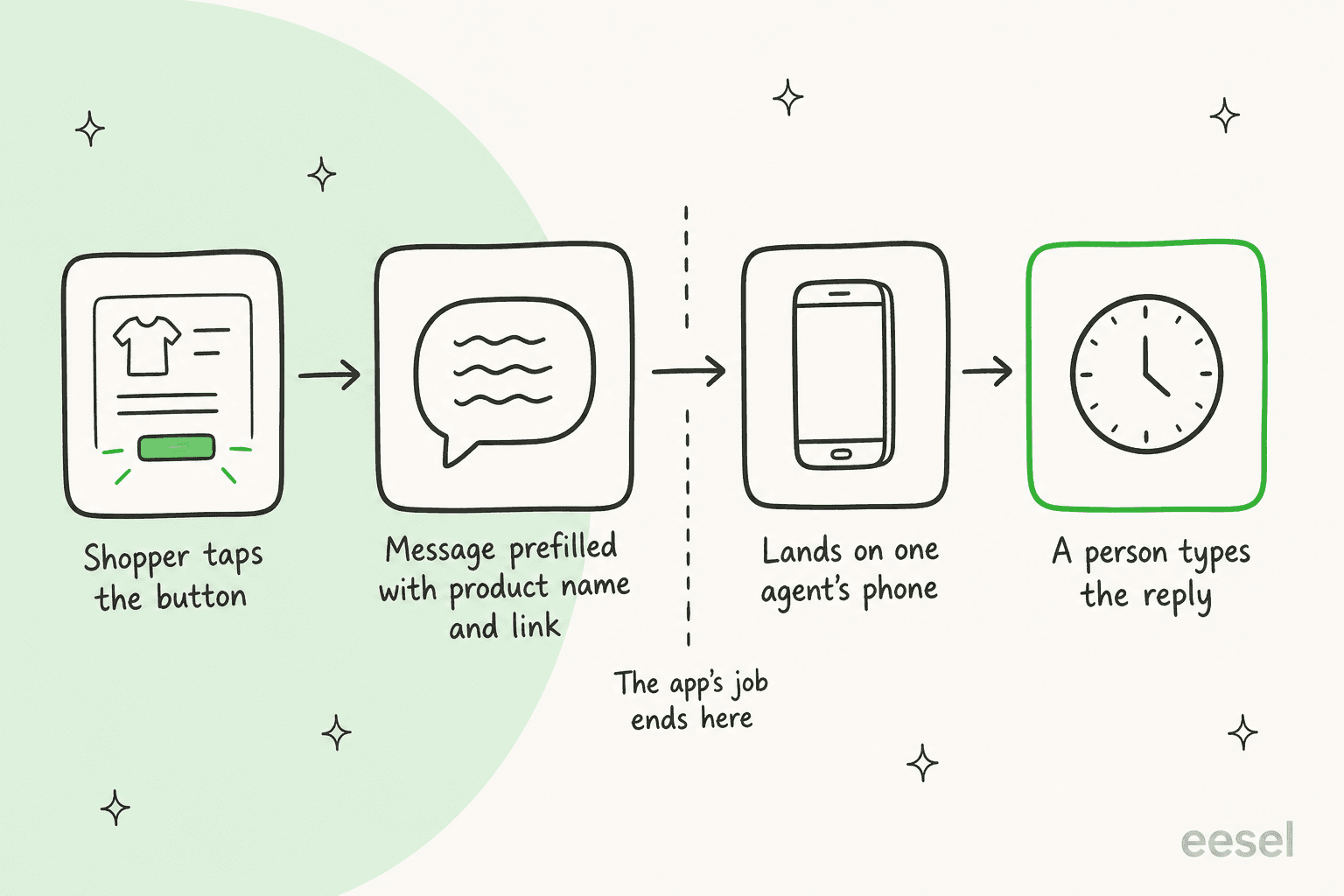
Its best trick is the prefilled message: the shopper's first WhatsApp line arrives with the product name and page link already in it. But it opens the conversation, it does not answer it. Each chat lands on one agent's phone, with no shared inbox and no automatic replies.
Once those chats become a queue, the gap is answering, which is the job of eesel's AI helpdesk teammate. Question Beauty, a Shopify cosmetics brand, shows the pattern: short "price?" messages get a product link back in the customer's own language, and refunds go to a person with a note.
What is the SeedGrow WhatsApp chat widget?
It is a Shopify app listed as SeedGrow WhatsApp Chat Widget, by SeedGrow Apps, a developer based in Nha Trang, Vietnam. The listing tagline promises a "WhatsApp chat button & click-to-chat widget on all product pages, collection pages, blog, and more". It launched on 18 November 2021, sits in Shopify's Chat category, and the developer's own gallery says it is trusted by 15,000+ Shopify stores.
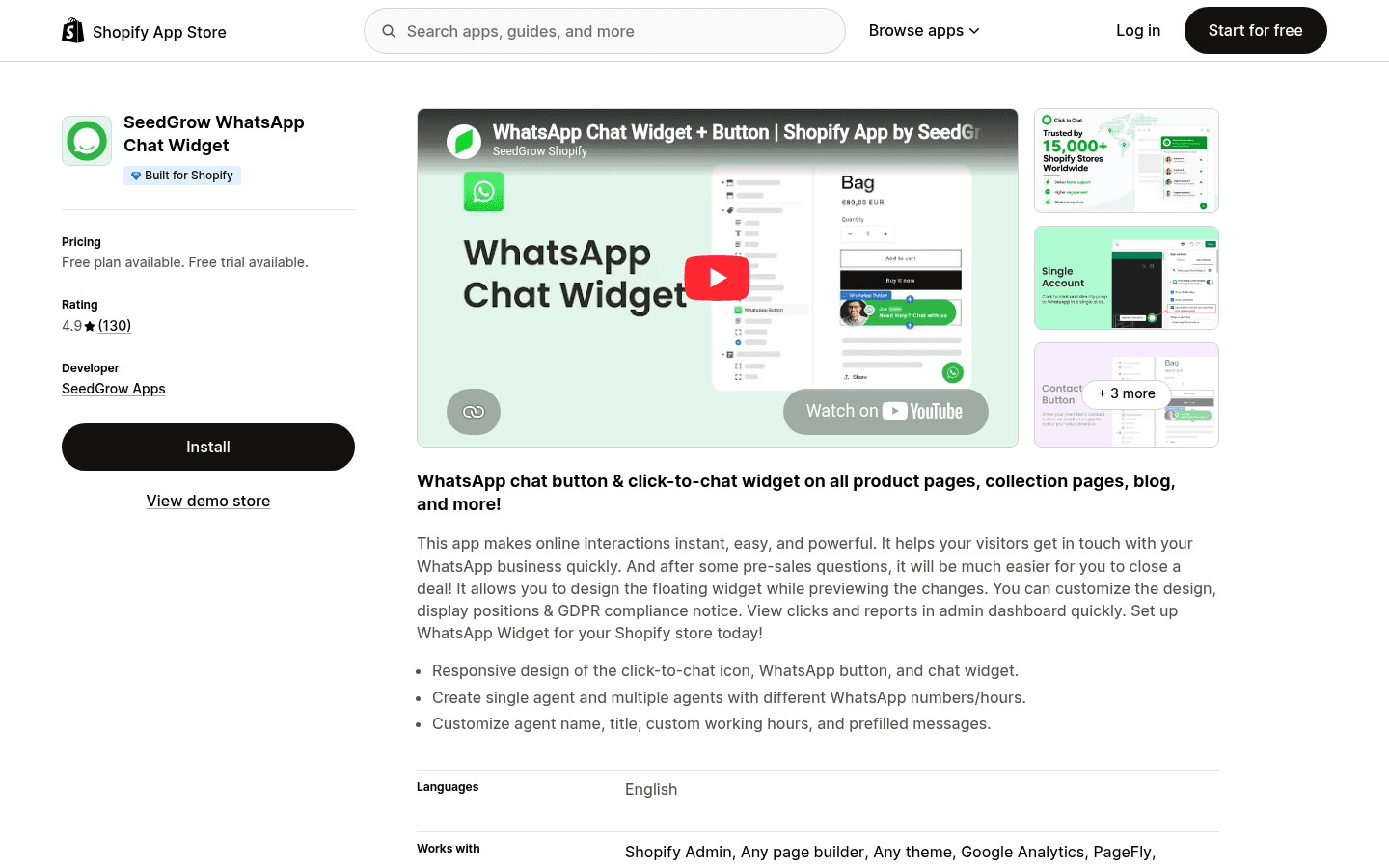
I have spent two years working on SEO at eesel, and "seedgrow whatsapp chat review" is a classic marketplace search: a store owner has the listing open and wants a second opinion before clicking Install. So that is the question this review answers. Not "is the button pretty", but what happens to the message once a shopper taps it.
Expect a few names for one app. The listing says SeedGrow WhatsApp Chat Widget, the URL says click-to-chat, the docs say WhatsApp Click to Chat Widget, and the admin screen says WhatsApp Chat Widget. SeedGrow also makes Vario variant swatches, EXPO product options and a Product Reviews & Rewards app, so WhatsApp is one product in a small Shopify suite.
How does the SeedGrow WhatsApp button work?
You add your agents, switch the widget on in your theme's app embeds, and publish. A shopper taps the floating button, picks a person from the list, and WhatsApp opens with a message already typed. They press send from their own phone or WhatsApp Web.
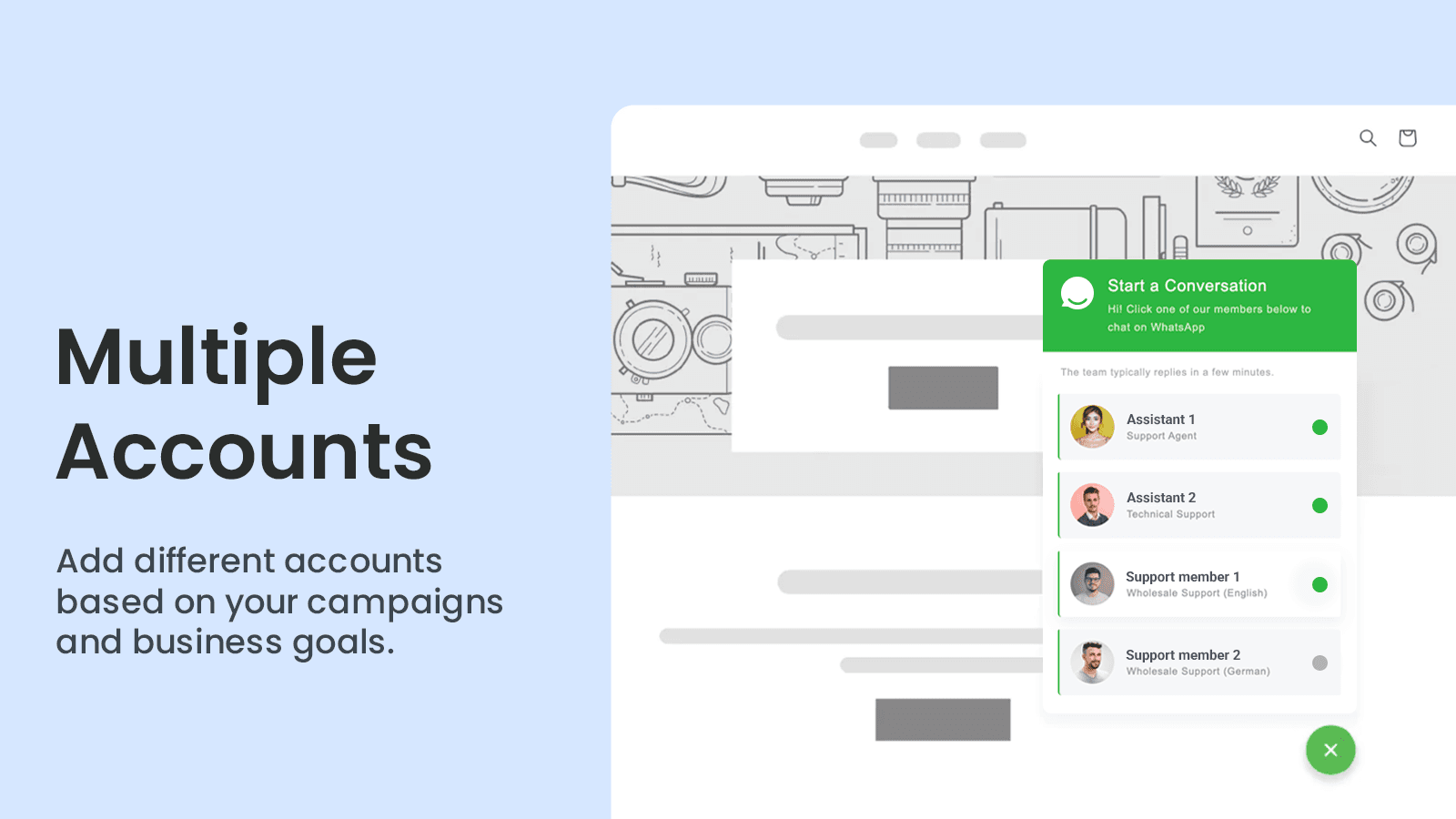
There are two placements, and they do different jobs:
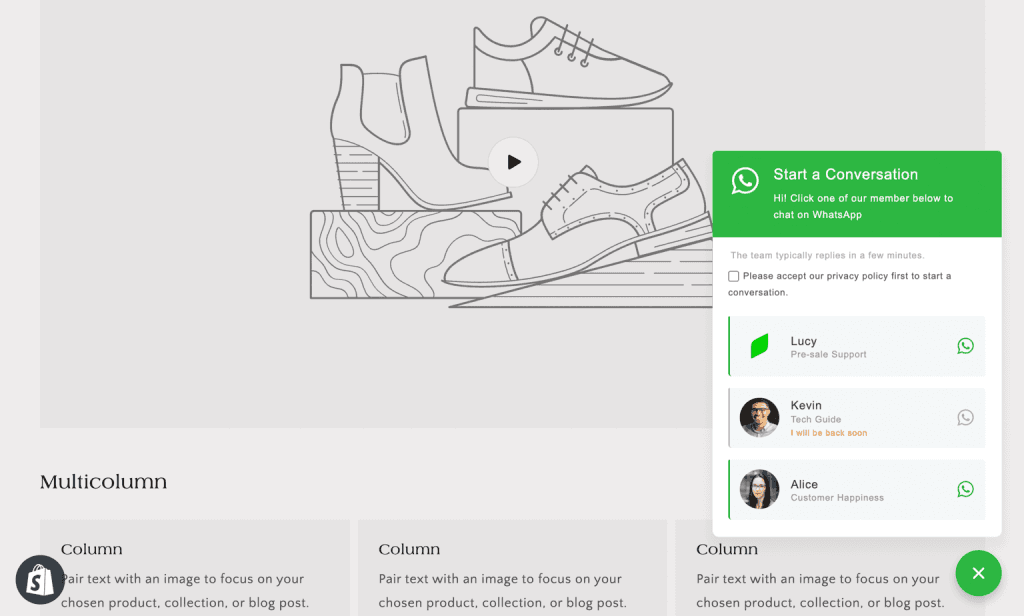
- Floating widget. A button in the corner of every page, or only the pages you pick. With one agent, a "click to chat" setting skips the list and jumps straight to WhatsApp.
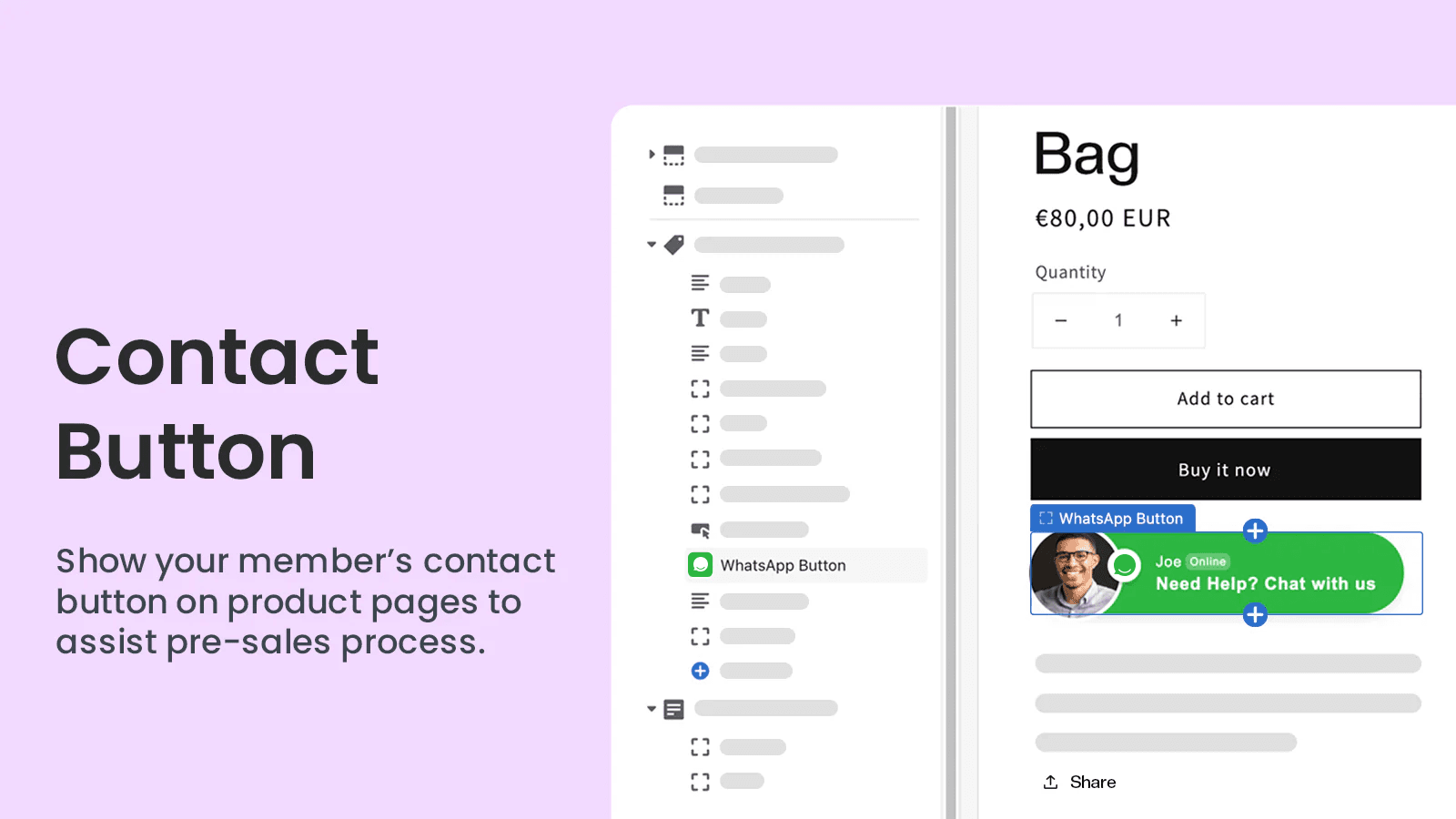
- Product page button. A WhatsApp button that sits under Add to cart. On Online Store 2.0 themes it is an app block you drag into place; on older themes you switch it on in the app.
Each agent can point at a phone number, a WhatsApp group invite link or a WhatsApp Business short link, per the setup docs. That is the whole system. There is no API account, no server holding conversations, and nothing between the shopper and your phone. It is the cheapest of the four Shopify WhatsApp setups, and also where the app's job stops.
What features does it have?
Everything below comes from the Shopify listing and SeedGrow's own docs. I flag which plan each one needs, because the line between free and Pro is the main buying decision here.
Agents and the product page button
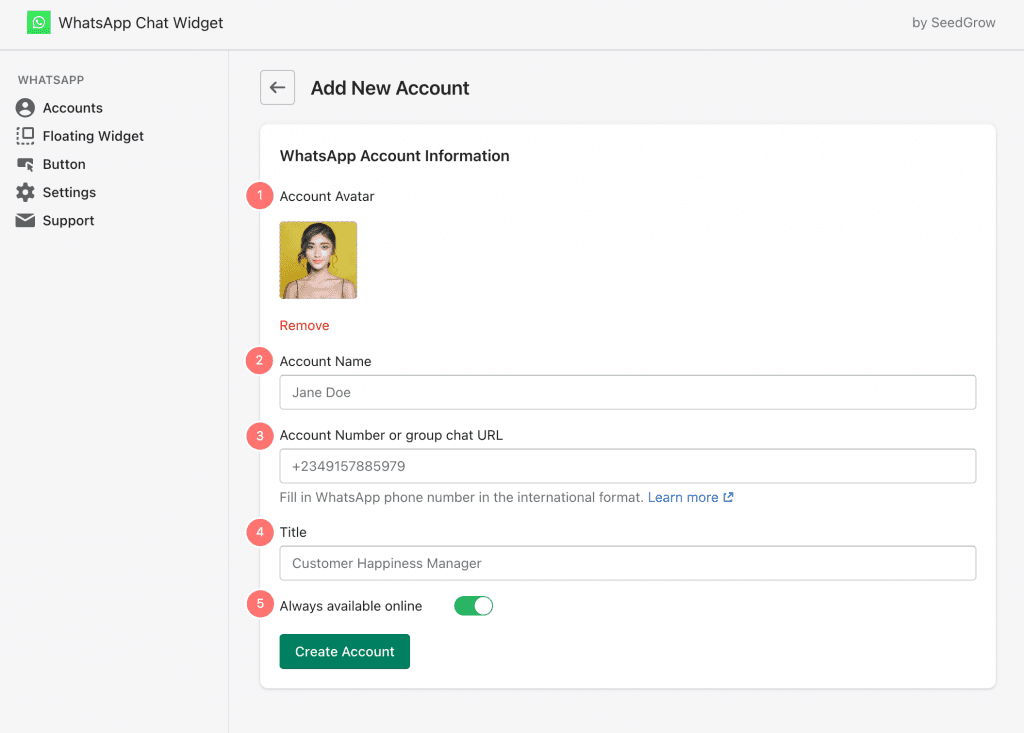
You add each agent with an avatar, name, title and number, and decide whether they always show as online. This is the free part, and you can add as many agents as you need, which works as basic ticket routing done by the shopper picking a name: sales, wholesale, technical support, one per language.
The product page button is the part I would install it for. A shopper with a question about a specific item sees a face and "Need help? Chat with us" right under Buy it now, which is where a pre-sales question gets asked.
Prefilled messages with the product link
This is SeedGrow's best feature, and it is free. Two shortcodes, [sgwa_page_title] and [sgwa_page_url], drop the current product name and URL into the shopper's first message, per the prefilled message docs. The agent knows which product the shopper means before reading a word, which saves the "which item?" back-and-forth on every chat.
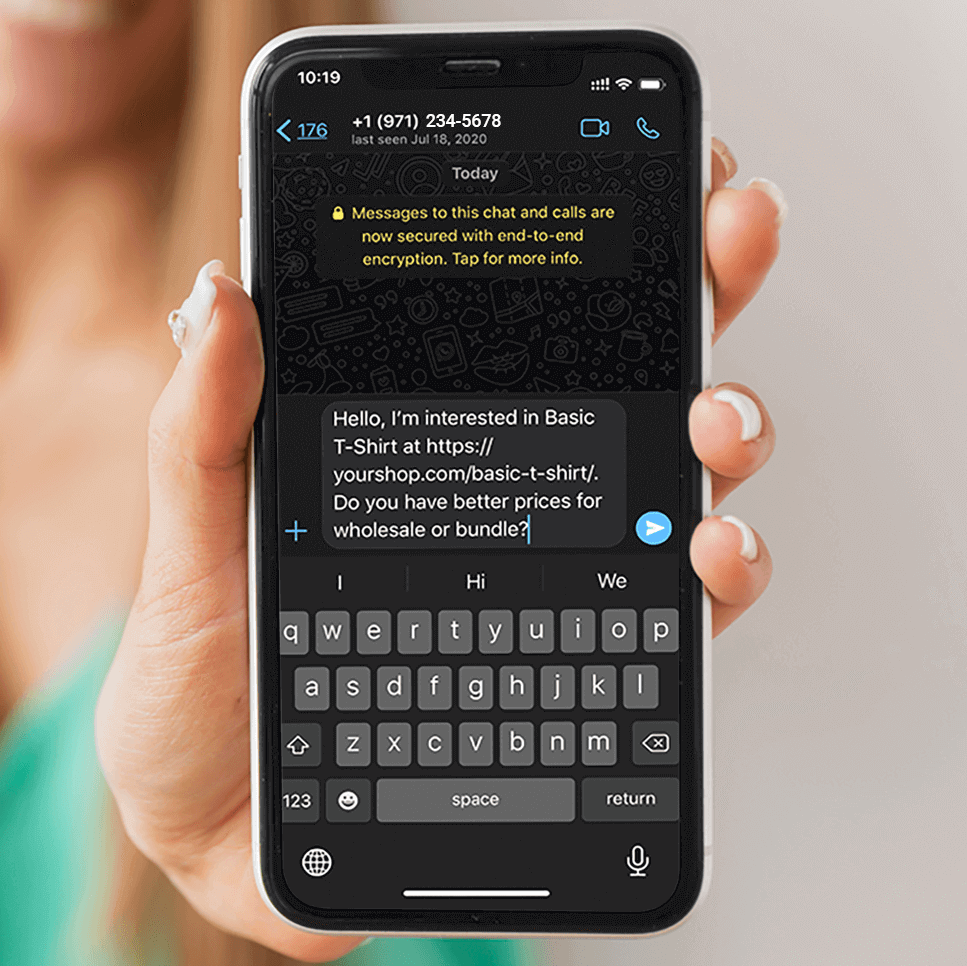
One reviewer went further and asked SeedGrow to tune it for their store, and got it within a day:
"Not only that, but we also requested them to help us write custom code or have insertions within the pre-filled message to include Product Title and Product Page URL which they managed to do right away (<24 hours from requesting it)."

Page rules, design and GDPR consent
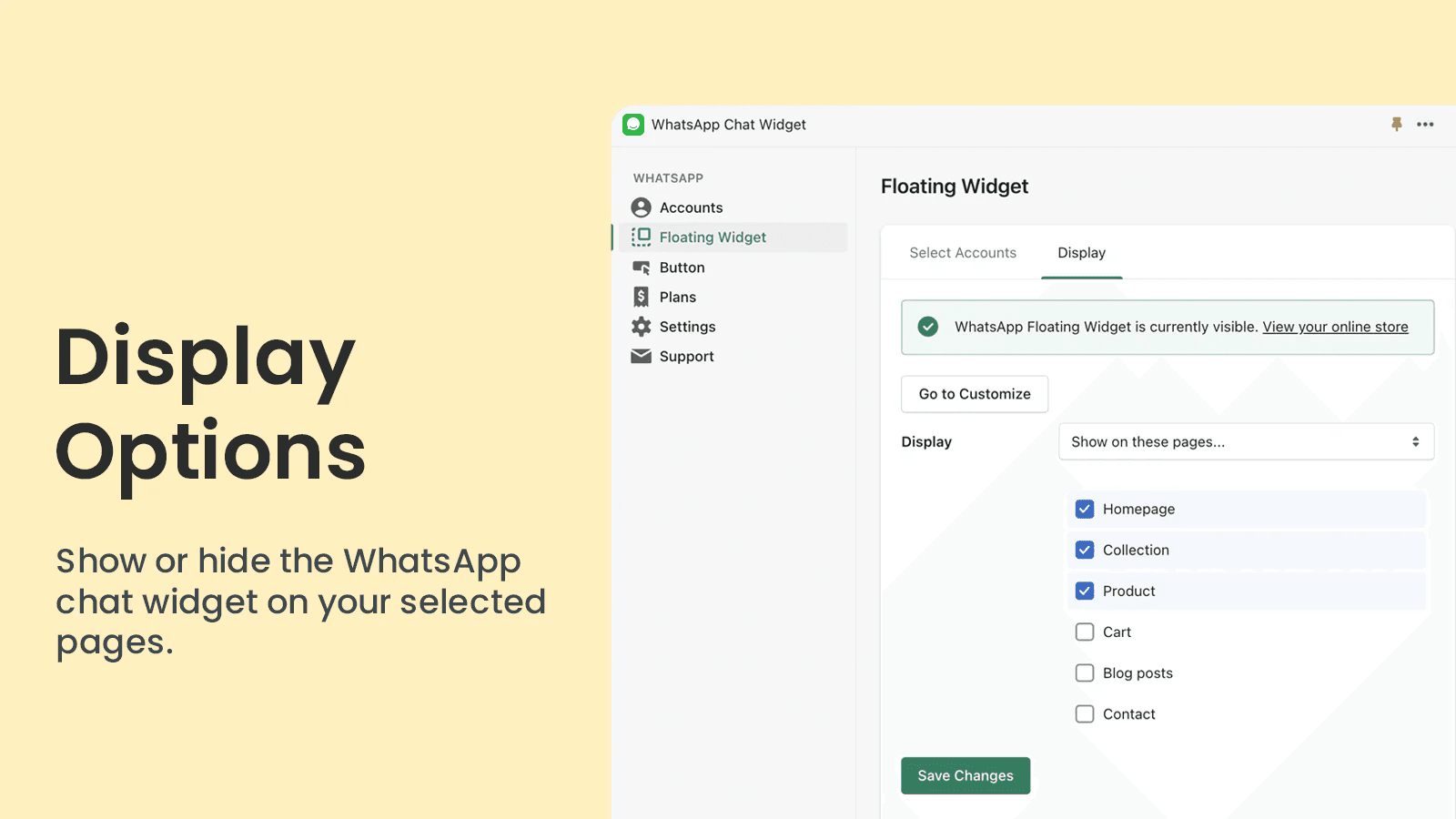
On the free plan you choose which page types show the widget: homepage, collection, product, cart, blog posts and contact. You can also show or hide it separately on desktop and mobile, add a GDPR notice, and set position, icon size and spacing.
The consent checkbox is worth a look if you sell into the EU. The widget can ask shoppers to accept your privacy policy before the agent list becomes clickable.
Translations
The app reads the languages you have published in Shopify and lets you translate every widget string under Settings > Multi Language, per the translation docs. It also lists Transcy as a compatible translation app. That matters here: the reviews come from 10 stores in Spain, 8 in Mexico and 5 in Portugal, and plenty are written in Spanish, Portuguese and Italian. The app's own settings are English only.
Working hours and click reports (Pro)
Working hours are where Pro starts. SeedGrow's availability docs call it a "premium-only feature": business days and shifts per agent, a notice for days off, and a [sgwa_time_work] shortcode that shows how long until someone is back. Pro can also hide offline agents automatically.
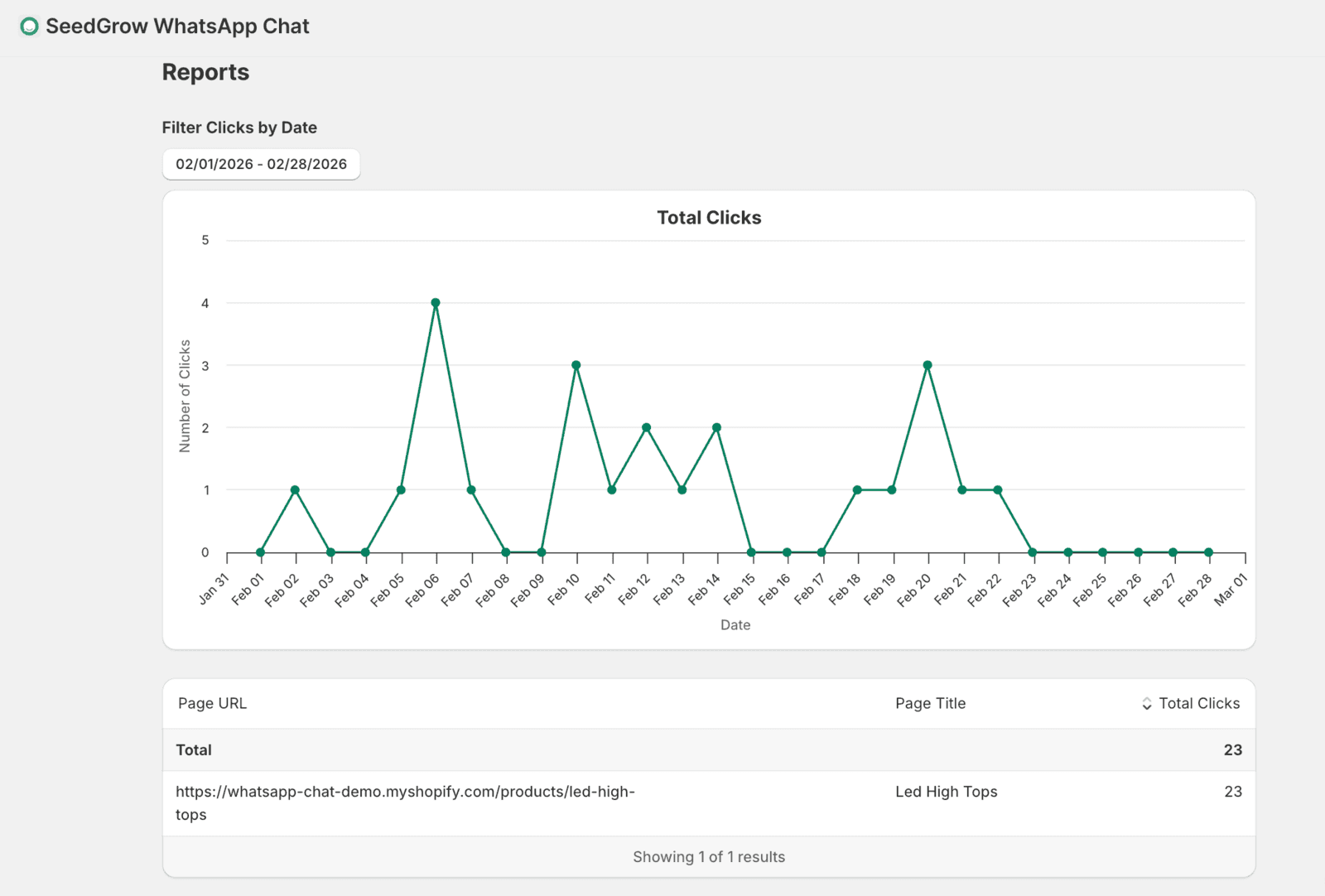
The click tracking guide shows the other Pro piece: a Reports page with WhatsApp clicks by day and by product page, plus Google Analytics events. That is how a store learns which products start conversations. It still says nothing about whether anyone replied, or how fast.
How much does SeedGrow WhatsApp chat cost?
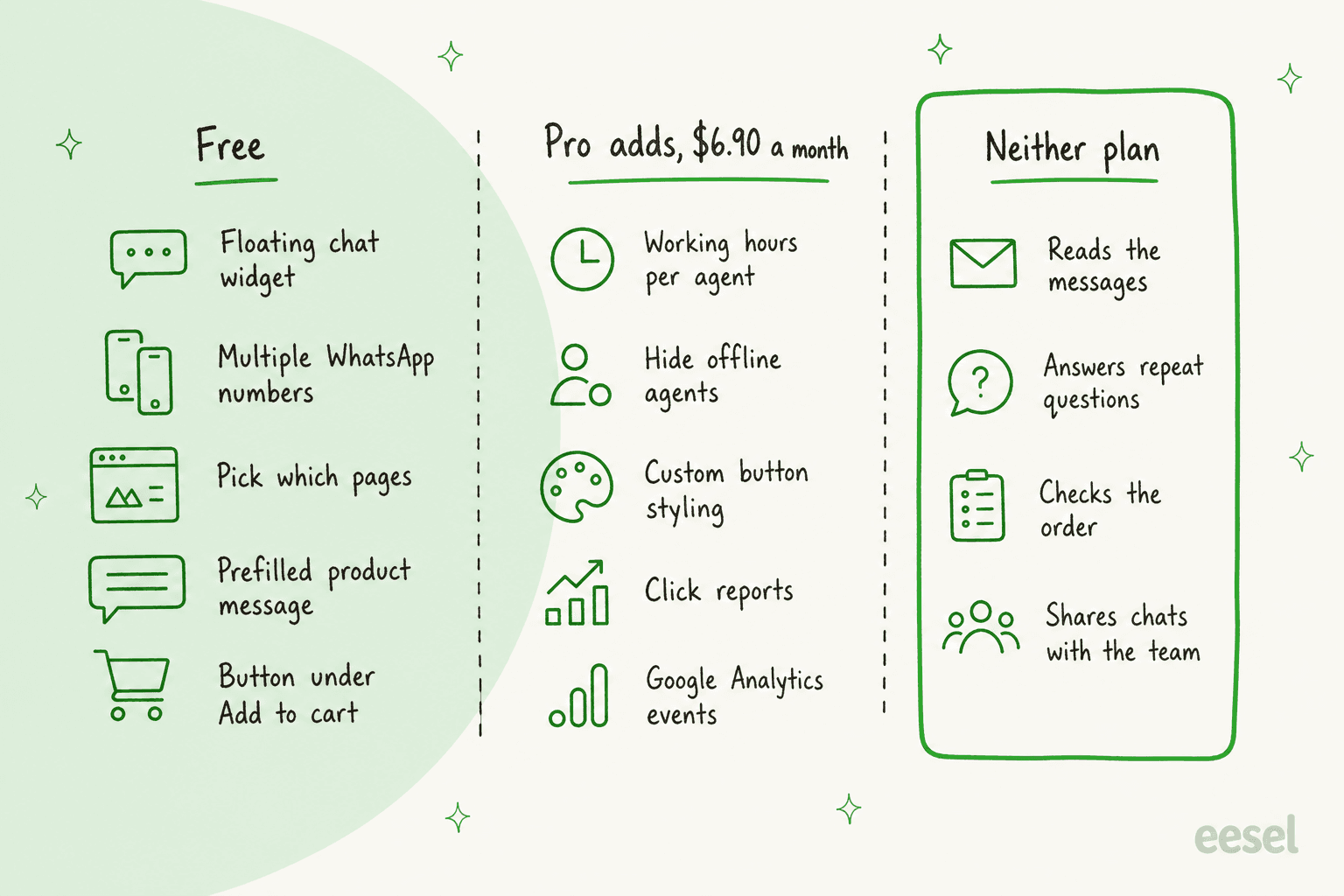
Free, or $6.90 a month for Pro, with a 14-day trial on Pro. Here is the full split from the Shopify listing and SeedGrow's plans page:
| Feature | Free | Pro, $6.90/month |
|---|---|---|
| Floating WhatsApp widget | Yes | Yes |
| Multiple agents and WhatsApp numbers | Yes | Yes |
| Show or hide on chosen pages | Yes | Yes |
| Prefilled message with product name and link | Yes | Yes |
| WhatsApp button on product pages | Yes | Yes |
| Custom working hours per agent | No | Yes |
| Auto-hide offline agents | No | Yes |
| Custom button styling | No | Yes |
| WhatsApp click tracking and reports | No | Yes |
| Google Analytics event reports | No | Yes |
| Priority VIP support | No | Yes |
Charges are billed in USD every 30 days through Shopify. Two details are worth knowing before you choose. SeedGrow's changelog notes that version 2.1, in August 2022, added the Pro plan and a "Powered-by SeedGrow" label on the free plan. And Google Analytics is now a Pro line, while a 2023 reviewer described getting GA4 click events on the free plan, so check the current split if conversion tracking is your reason to install.
Compared with the Wix buttons I have reviewed, SeedGrow sits in the middle. MarketPush gives working hours away free, while Certified Code charges $6 a month for team profiles. At $6.90, Pro costs about 21 minutes of a support agent's time at $20 an hour, so the plan is not the expensive part. The time spent answering is.
What does answering the chats cost?
Put in your own numbers. The calculator shows how many hours your team spends in WhatsApp each month, and how many chats are the repeat kind that software could take off their plate.
Switch between Free and Pro, then type your daily WhatsApp volume to see where the money actually goes.
At 15 chats a day and 4 minutes each, a store spends 30 hours a month in WhatsApp, about $600 at $20 an hour. Next to that, the $6.90 Pro plan is about 1% of the bill. If half those chats are "how much?" and "do you ship to me?", that is 225 repeat chats a month answered by hand.
What do users say about it?
The rating is strong and long-running. I pulled all 130 reviews from the listing: 120 are five stars, 5 are four stars, and only 5 are three stars or lower. They run from January 2022 to October 2026, with 17 in 2026 alone, so this is a mature app rather than a burst of launch-week praise.
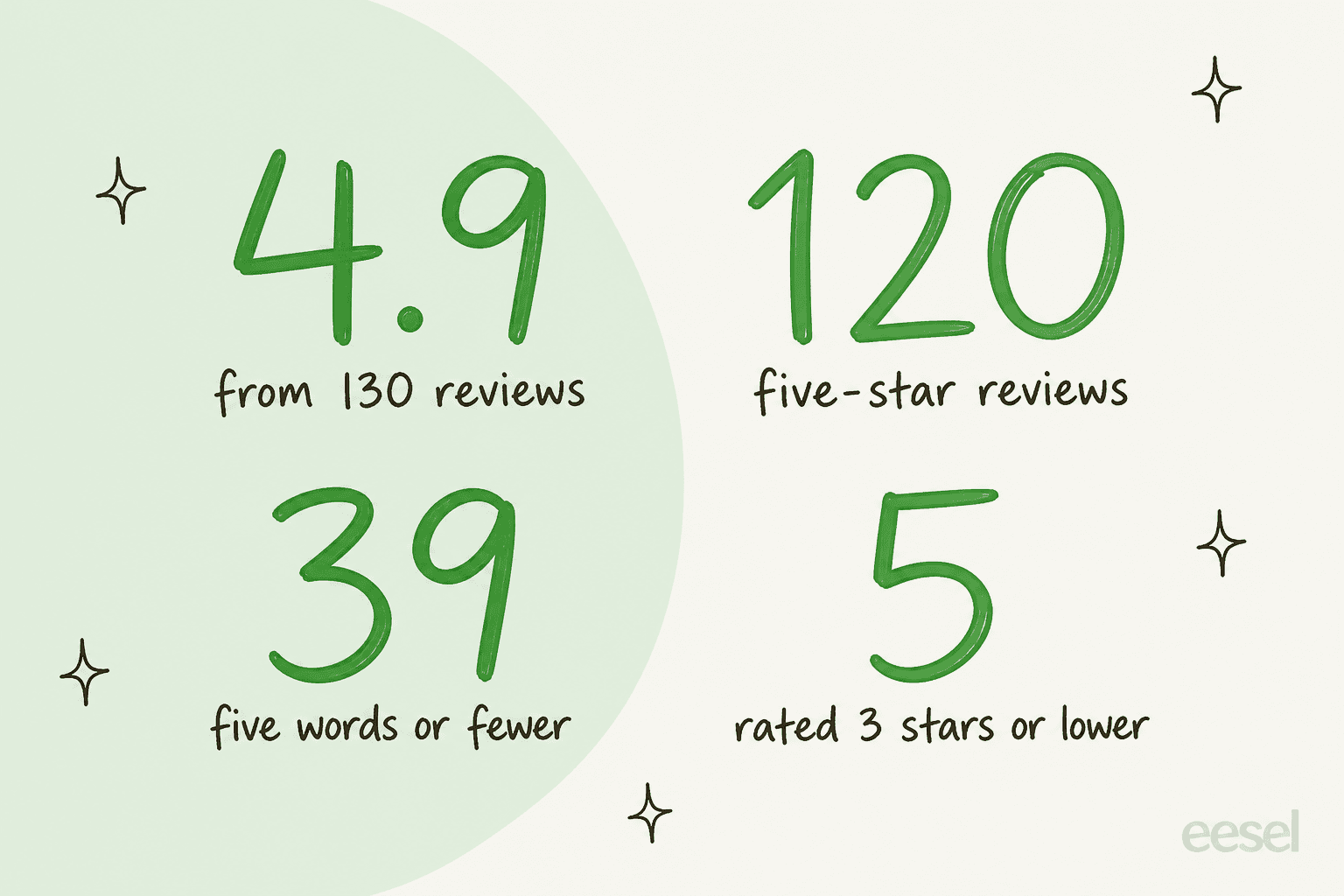
As always with marketplace reviews, some are thin: 39 of the 130 are five words or fewer ("Great app. Thank you", "Werkt perfect!"). The longer ones praise three things: setup speed, the product page button, and support. The best of them explains a use case most buttons miss:
"This app does it seamlessly anytime someone clicks to chat to us, we get our lead & that generates a Whatsapp event in GA4 which we mark as conversion & import into our Google Ads."
A two-year user from the UK summed up the quieter case for it:
"Never had a problem, works as you would expect, customers love it and it helps them make informed purchases, likely reducing returns and other issues."
The low ratings are worth reading too. Two stores in the UAE in 2022 said the button sent customers to the wrong number; SeedGrow replied that it was a setup mix-up and that it had offered help by email. An Argentinian store in 2024 wrote that it could not reach support for days. And the newest review, edited on 23 October 2026 by a store using the app for over three years, says it "ya no funciona tan bien" (no longer works as well) and that the button would not install properly, while noting support had improved. One review is not a trend, but test the button on your own theme after any theme change. SeedGrow's FAQ has a line for exactly that case.
I found no G2, Capterra or Trustpilot listing for this app, so the Shopify reviews are the public record.
Where does it fall short?
These are the edges of a click-to-chat button, not bugs.
- No inbox. Each chat lives on whichever phone owns that agent's number. Nobody else sees what was promised, and a chat cannot move to a colleague the way an escalation moves a ticket.
- No automatic answers. The prefilled message is the only automated piece, and it is written by the shopper's side. "Is this in stock?" still waits for a person, where an AI agent could check and reply.
- No helpdesk link. Nothing on the listing connects chats to Gorgias, Zendesk or any ticketing system, so WhatsApp sits outside your reporting.
- Working hours cost extra. On the free plan, an agent shows online until you switch them off by hand. That is fine for a solo owner, less so for a team on shifts.
- Clicks, not conversations. Pro reports count taps on the button. They cannot tell you how many chats got a reply, or how long shoppers waited.
Who should use it?
Ask one question: who answers, and how many chats a day?
| You are... | Verdict |
|---|---|
| A Shopify store where the owner answers WhatsApp from their phone | Install it, the free plan is enough |
| A store selling considered products where shoppers ask before buying | Good fit, the product button and prefilled link are the reason |
| A small team on shifts, or with agents per language | Pay for Pro, working hours and hiding offline agents matter here |
| A store running Google Ads that wants WhatsApp clicks as conversions | Pro, then check the GA events match your setup |
| A support team already working in Gorgias or Zendesk | Skip, you need WhatsApp inside the helpdesk |
| A store getting dozens of repeat questions a day | Skip the upgrade debate, the bottleneck is answering |
What are the alternatives?
Split them by what happens after the click.
- Another WhatsApp button on Shopify. Smartarget runs on Shopify, Wix and WordPress, and Chaty adds Messenger, Instagram and more to one button.
- A button with a WhatsApp inbox. Moose pairs a free Shopify button with a Business API inbox and cart reminders.
- Shopify's own chat. Shopify Inbox keeps chats in the Shopify admin, and Tidio adds a shared inbox and bots.
- A WhatsApp API inbox. Providers put WhatsApp in a team inbox with assignment; start with my API provider list.
- WhatsApp inside your helpdesk, with AI answering. See Gorgias WhatsApp and Zendesk WhatsApp, then put an AI teammate on top.
For the wider field, my best WhatsApp chatbot list compares tools that answer as well as open the chat, and the best Shopify chatbot apps roundup covers the Shopify side.
SeedGrow WhatsApp chat review verdict: is it worth it?
4 out of 5. For a Shopify store that wants a WhatsApp button, it does the job well and has done it for almost five years. The free plan is enough for most solo stores, the prefilled product link saves real back-and-forth, and $6.90 for working hours and click reports is a fair price.
I take a point off for two things. Working hours sit behind Pro, where some free buttons include them, and the most recent review reports an install problem. And like every button, it solves the smallest part of the problem. Getting shoppers to message you is easy; answering them all is the work.
Where does eesel fit next to a WhatsApp button?
The two do different jobs: SeedGrow gets the shopper into WhatsApp with the product link attached, and eesel answers them once they are there. eesel is an AI teammate platform, and for this job the relevant teammate is the AI helpdesk teammate.
It connects to a WhatsApp Business number, and the same teammate can run on Facebook Messenger and Instagram. It answers from your site, your help docs and past tickets, checks Shopify before any order answer, replies in the language the customer wrote in, and hands the chat to a person by topic or when it is unsure. You set those rules in plain words, the way you would brief a new hire.

Question Beauty, a vegan cosmetics brand on Shopify, is the closest match to what a SeedGrow button produces. Most of its volume is short messages from social and chat, often just a product name and "price?", arriving at all hours in many languages. eesel answers them in Gorgias with a product link, looks up the Shopify order before any delivery answer, and assigns refunds and complaints to a person with a note. In one month it handled about 990 tickets, sent about 960 replies and closed about 280 without a person.
Cape Coffee Beans shows the other end, for a store with more than a thousand products that change all the time. It runs eesel on Zendesk, Shopify and Google Drive, and every answer links the product page, past ticket or order it used. That is the same "which product?" context the SeedGrow prefilled link carries, used to answer instead of only to ask.
I hear the scale problem in sales conversations too. One DTC supplements store on Gorgias and Shopify came to eesel at around 7,000 tickets a month against 30,000 orders, wanting half of them answered without a person. My guides on automating WhatsApp support and AI WhatsApp support for ecommerce cover the steps in between.
FAQ
Is the SeedGrow WhatsApp chat widget free?
Yes. The free plan includes the floating widget, multiple agents and numbers, page rules, the prefilled product message and the button under Add to cart. It shows a "Powered-by SeedGrow" label. If you want WhatsApp to sit next to Shopify's own tools, my Shopify Inbox review covers the built-in option.
How much does SeedGrow WhatsApp chat Pro cost?
Pro is $6.90 a month, billed in USD every 30 days through Shopify, with a 14-day trial. It adds working hours per agent, hiding offline agents, button styling, click reports and Google Analytics events. Those working hours do a similar job to a WhatsApp auto-reply away message, but on your site rather than inside WhatsApp.
Does SeedGrow WhatsApp chat need the WhatsApp Business API?
No. It is a click-to-chat link, so each agent is a phone number, a group invite link or a WhatsApp Business short link. The WhatsApp Business API is what you need for a shared inbox or automated replies, and this app does not use it.
Can SeedGrow answer WhatsApp messages automatically?
No. The only automated part is the message the shopper sends first, with the product name and link already filled in. Answering stays with whoever holds the phone. Tools that reply on their own are covered in my WhatsApp AI chatbot guide.
What is the SeedGrow WhatsApp chat rating?
4.9 from 130 reviews on the Shopify App Store, with 120 five-star reviews and 5 at three stars or lower. My verdict in this SeedGrow WhatsApp chat review is 4 out of 5. For other apps in the same slot, see my Shopify chatbot apps roundup.
Does SeedGrow work with Gorgias or Zendesk?
Nothing on the listing connects it to a helpdesk, so chats stay on each agent's phone. Teams already in a helpdesk usually move WhatsApp inside it, as in Gorgias WhatsApp, and put an AI helpdesk teammate on top.
Is SeedGrow a good WhatsApp button for a Shopify store?
For a store where the owner answers WhatsApp, yes: setup is fast and the product page button is the strongest part. Once repeat questions pile up, look at the Shopify WhatsApp setups that add an inbox or AI answering.
Try eesel
If your SeedGrow button already sends more WhatsApp messages than your team can answer between orders, eesel's AI helpdesk teammate can take the repeat ones: stock and price questions from your catalogue, order status from Shopify, and a clean handoff for refunds and complaints. It starts free with 100 credits, and paid plans begin at $299 a month for 500 credits, where one chat is one credit (eesel pricing).
Frequently Asked Questions
What is the SeedGrow WhatsApp chat widget?
It is a Shopify app called SeedGrow WhatsApp Chat Widget, made by SeedGrow Apps in Nha Trang, Vietnam, and live since November 2021. It adds a floating WhatsApp widget and a WhatsApp button under Add to cart, and the conversation then moves into WhatsApp. It is a click-to-chat button, not a live chat inbox.
Is SeedGrow WhatsApp chat free?
Yes, for the basics. The free plan covers the floating widget, multiple WhatsApp numbers, page rules, prefilled messages and the product page button. Pro costs $6.90 a month with a 14-day trial and adds working hours, hiding offline agents, custom styling and click tracking, so most solo stores never need to upgrade. My Shopify WhatsApp guide compares it with paid setups.
Are working hours free in SeedGrow WhatsApp chat?
No. SeedGrow's docs call custom working hours a premium-only feature, so per-agent schedules, offline notices and the countdown to opening time need Pro. On the free plan you can still toggle an agent between online and offline by hand. My MarketPush review covers a Wix button that gives hours away free.
Does SeedGrow WhatsApp chat reply to customers automatically?
No. The prefilled message only fills in the shopper's first line with the product name and link. Every reply comes from a person in WhatsApp or WhatsApp Business. For automatic answers, look at a WhatsApp AI chatbot or eesel for WhatsApp.
Does SeedGrow WhatsApp chat work with WhatsApp Business?
Yes. SeedGrow's FAQ says business and personal numbers use the same format, so you enter either, and messages land in whichever app owns that number. It does not use the WhatsApp Business API, so there are no message templates or provider fees.
Can SeedGrow track WhatsApp clicks as conversions?
On Pro. The listing puts click tracking and Google Analytics event reports in the $6.90 plan, with a Reports page showing clicks by day and by product page. That tells you which products start chats, not your first response time.
What should a Shopify store add when WhatsApp questions pile up?
Keep the button and add something that answers. eesel's AI helpdesk teammate connects to WhatsApp and Shopify, replies from your catalogue and help docs, and hands refunds to a person. It starts free with 100 credits, and paid plans begin at $299 a month for 500 credits.