

MarketPush's WhatsApp app for Wix is one of the most generous free WhatsApp buttons I have looked at, and I give it 4 out of 5. Agent profiles with working hours, a welcome pop-up, page rules and separate desktop and mobile placement are all in the free app, and it is rated 5.0 from 154 reviews on the Wix App Market.
The catch is the same one every button has. It starts the conversation; it does not answer it. Each chat lands on one agent's phone, with no shared inbox, no automatic replies and no link to a helpdesk.
When those chats turn into a queue, the missing piece is answering, which is the job of eesel's AI helpdesk teammate. Question Beauty shows the pattern: short "price?" messages on social and chat get a product link back in the customer's own language, and refunds go to a person with a note attached.
What is the MarketPush WhatsApp chat app?
It is a Wix app listed simply as Whatsapp, by MarketPushApps, with the tagline "WhatsApp chat button, live chat & team support". It sits on the Wix App Market under Communication and Chat, carries the "Verified by Wix" badge, and is marked Free. The developer's replies to reviews call it WhatsApp Chat, and the listing URL calls it WhatsApp Chat Pro, so expect three names for one app.
I work the support queue at eesel every day, so I read these apps from the other end: not "does the button look nice" but "what happens to the message once someone taps it". That is the lens for this review.
Who makes it? MarketPushApps is a busy Wix developer. Its developer page lists 157 apps with a 4.7 average rating, from Google Reviews widgets and size charts to Cart Recovery and WhatsApp Notifications for order alerts. The listing names the company as Market Push Apps SRL. When I opened its own website on 28 October 2026, the page loaded blank, so the Wix listing is the main record.
How does the WhatsApp button work?
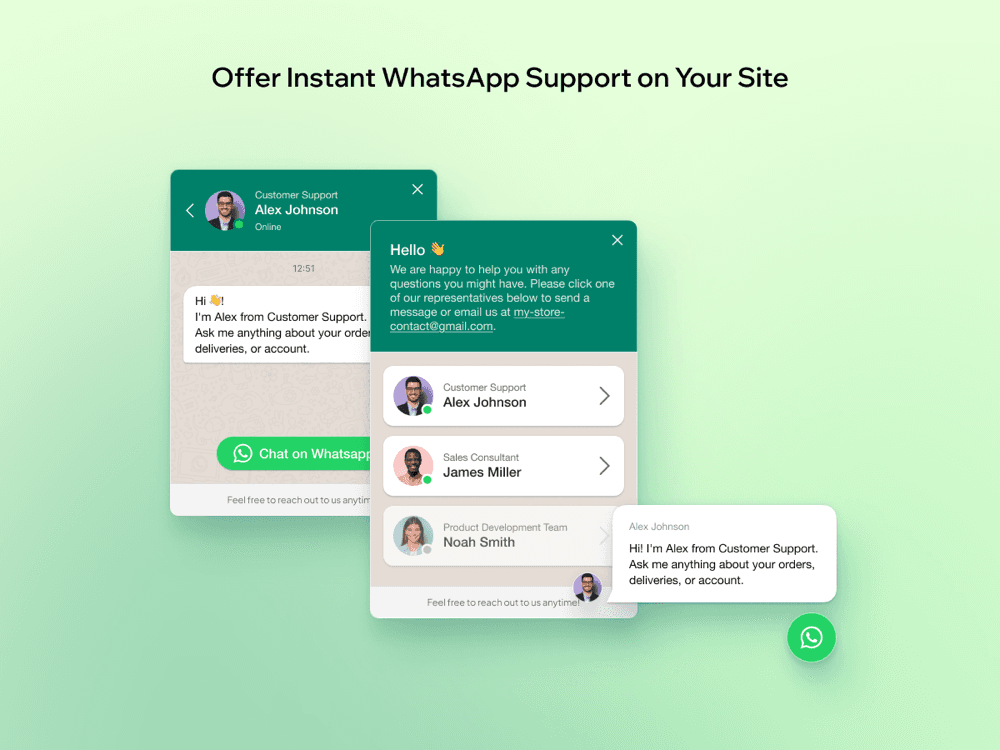
Per the listing, you "enter your WhatsApp number, adjust the look and publish the chat widget". A visitor taps the floating button, sees your greeting and, if you run a team, picks a person. WhatsApp then opens with a pre-filled message, and the visitor sends it from their own app.
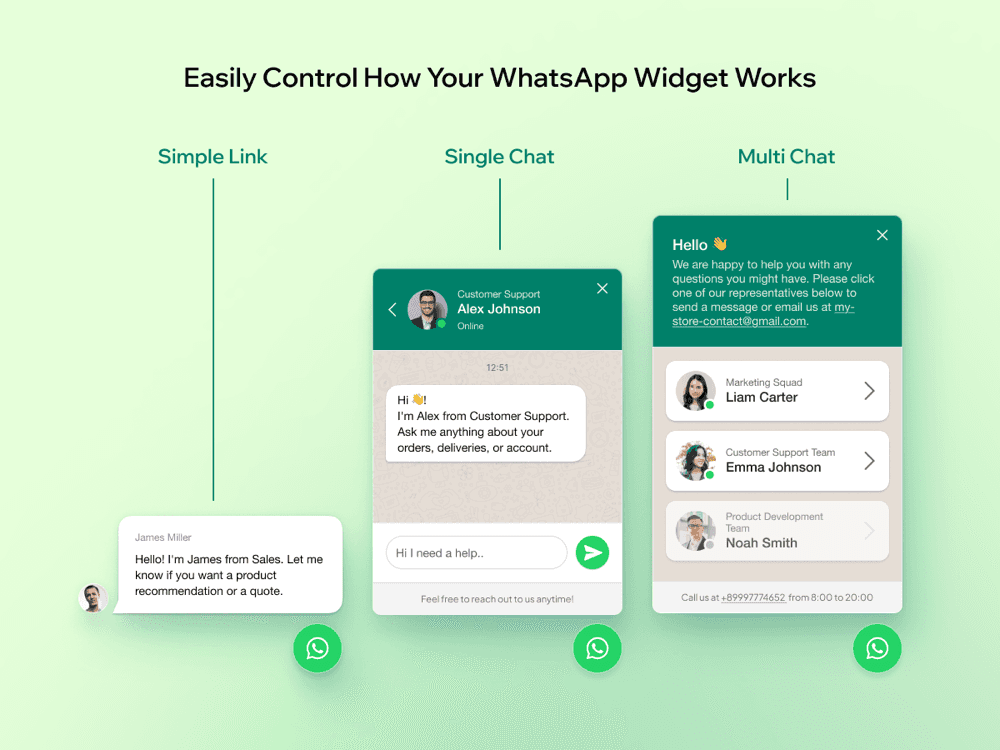
The listing gallery shows three modes, and they are a useful way to think about the app:
- Simple link. A speech bubble from one person, then straight to WhatsApp.
- Single chat. A WhatsApp-style window for one agent, with a message box.
- Multi chat. A list of agents with roles, photos and online status, plus a "call us" line with your hours.
There is no WhatsApp Business API account, no server holding conversations and no message templates. That is why it can be free, and it is also where the app's job ends. Once WhatsApp opens, the chat lives on whichever phone owns that agent's number. The listing calls this a "multi-agent live chat", but it is closer to a menu of phone numbers than to a shared inbox.
What features does it have?
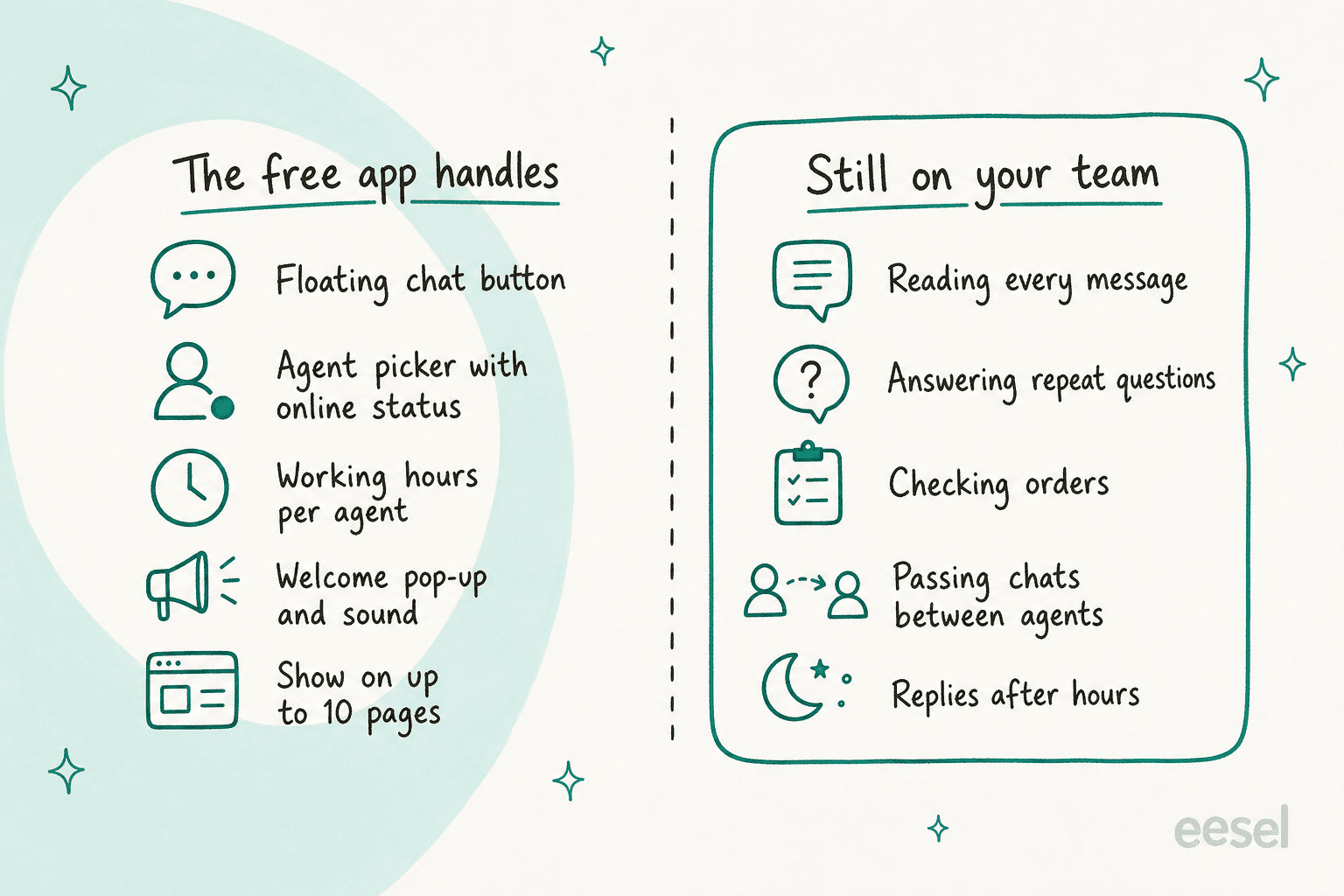
Everything below is from the Wix listing and its gallery, and all of it is in the free app.
Agents with working hours
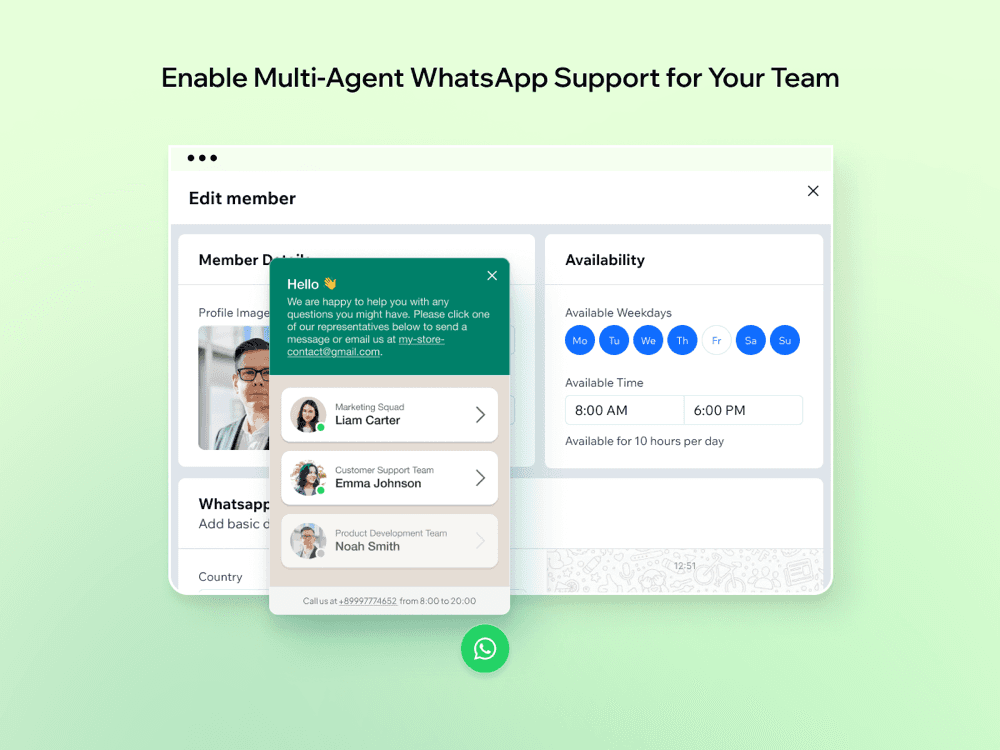
This is the strongest part. You add every agent with a name, role, photo and their own WhatsApp number, then set the weekdays and hours they are available. The widget shows who is online now, and offline agents can be hidden or shown as offline. It is basic ticket routing, done by the visitor choosing a name.
Working hours matter more than they look. A visitor who sees nobody online writes a different message, or leaves, which is a small version of the after-hours problem I cover in my WhatsApp auto reply guide.
Welcome pop-up and pre-filled messages
A welcome message can pop up after a delay you choose, with an optional sound, and each chat can open with a pre-filled message so the first line carries context. It is the same idea I cover in live chat triggers, set by a timer rather than by page behaviour.
Design themes and placement
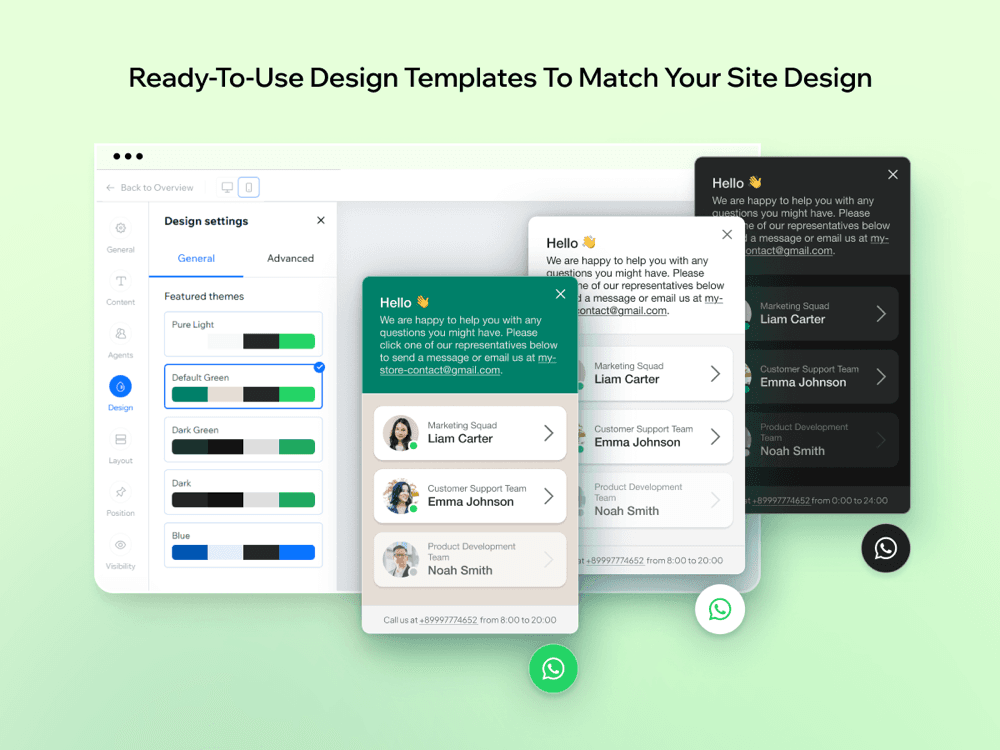
You can match the button to your brand with colors, fonts, icon and corner style, and place and size it separately on desktop and mobile. The design screen shows five ready themes: Pure Light, Default Green, Dark Green, Dark and Blue.
Page rules and a small dashboard
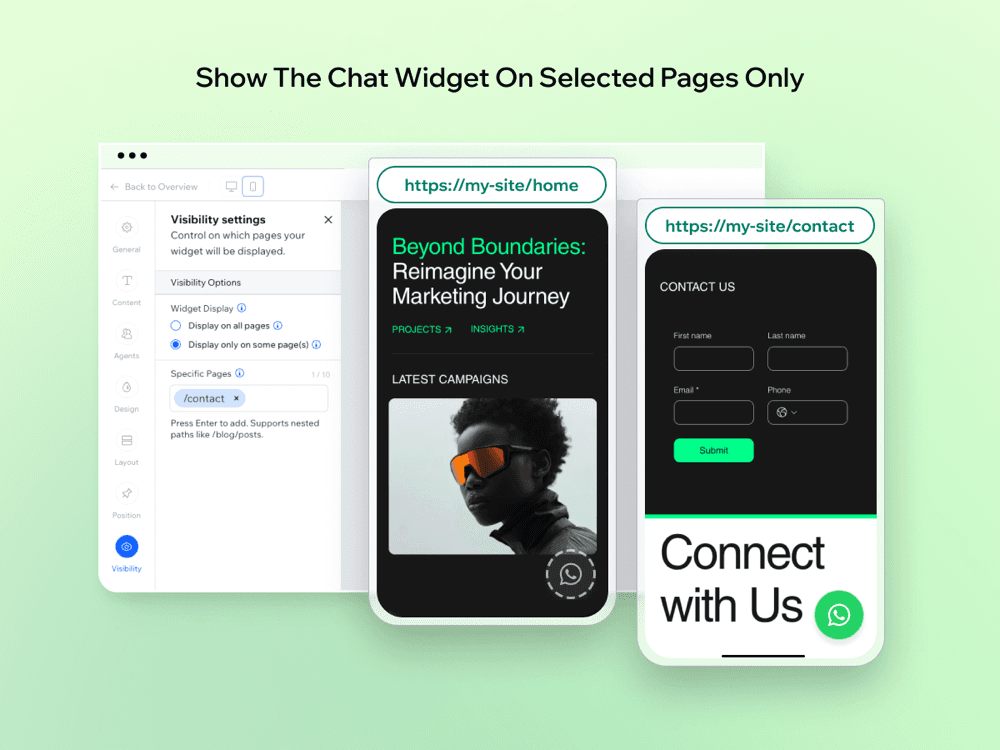
You choose which pages show the widget. The visibility screen shows "Display on all pages" or "Display only on some page(s)", with a counter that reads 1 / 10, so expect up to 10 page paths. The dashboard overview shows chat activity and your top agents. That tells you who got clicked, not your first response time or whether anyone replied at all.
How much does MarketPush WhatsApp chat cost?
Nothing. The Wix listing shows the app as Free, with no plan cards and no paid tier, and the developer page lists it as Free rather than "Free plan available", the label its paid apps use. Reviewers notice:
"After trying dozens of other apps for the same functionality, this one is the only one that's worth it. Without any unnecessary bloat and upsells."
For comparison, Certified Code's WhatsApp button keeps team profiles behind its Lite plan at $6 a month. MarketPush gives the agent picker, working hours and page rules away. Among the Wix WhatsApp buttons I have reviewed, this is the most you get for $0.
The one cost that does not go away is time. A free button still produces chats that someone has to read and answer, and that is the number worth putting on paper.
What does answering the chats cost?
Type in your own numbers. The calculator shows the time your team spends in WhatsApp each month, and how many of those chats are the repeat kind that software could take.
Type your daily WhatsApp chat volume and slide the repeat-question share to see where the time goes.
At 20 chats a day and 4 minutes each, a store spends 40 hours a month in WhatsApp. If half of those are "where is my order?" and "how much is this?", that is 300 repeat chats a month a person answers by hand.
What do users say about it?
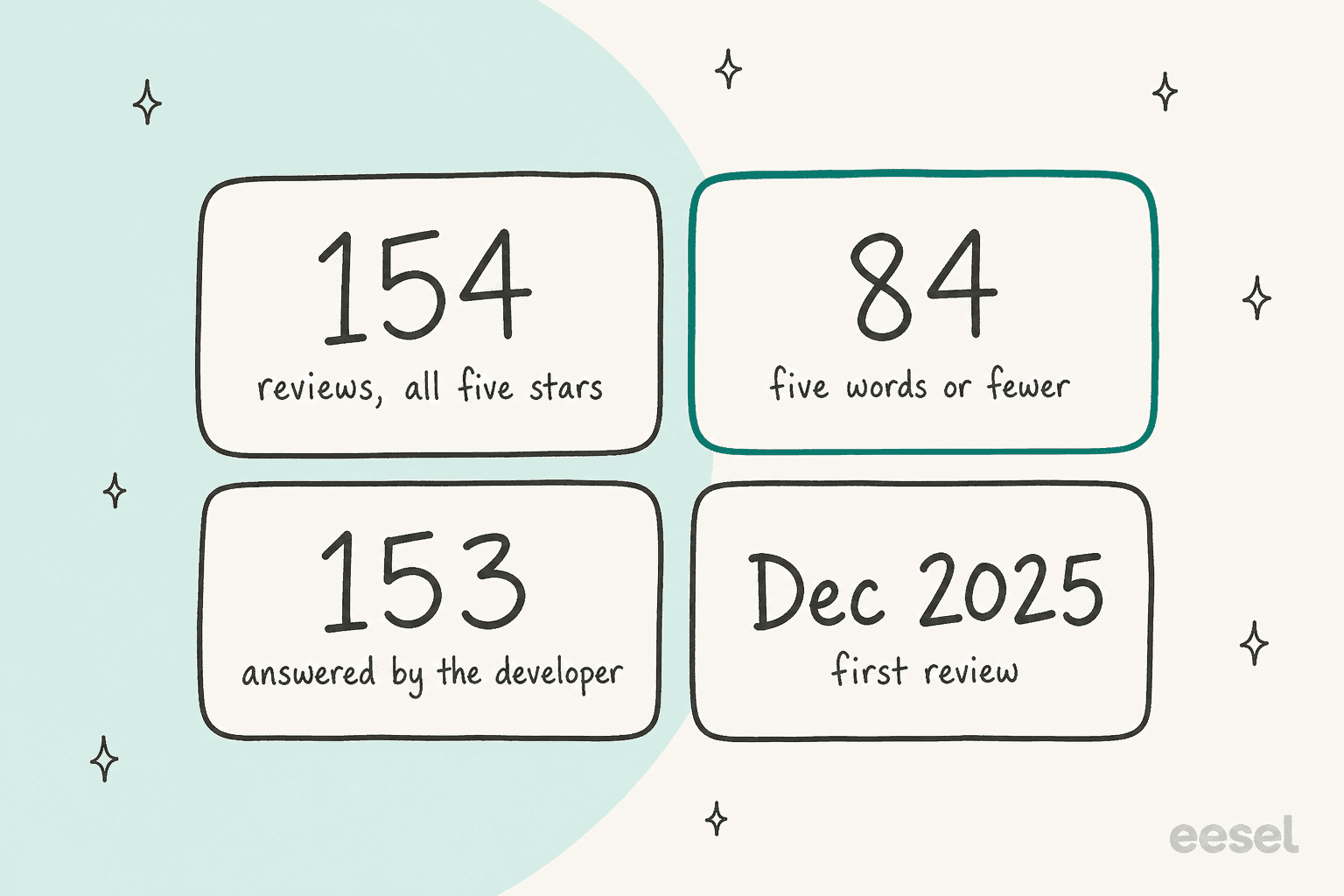
The rating is perfect: all 154 reviews are five stars, the first dated December 2025 and the newest 26 October 2026. That is useful, but it says less than it seems. I pulled every review from the listing, and 84 of the 154 are five words or fewer ("good", "Top!", "Works as intended!"). The developer replied to 153 of them.
The longer reviews praise two things, setup and support. One reviewer, describing herself as a "not really techy" grandmother, wrote:
"I was very pleasantly surprised to find installing and editing the WhatsApp Chat was so simple I'm sure a child could do it. Also, appreciated Jack reaching out to me as I was installing to ask if I needed any help."
Several other reviews praise fast, friendly support. It is good service, but most reviews were written right after setup, so the rating reflects the first ten minutes more than the tenth week.
The only review with a "but" is about ad blockers:
"I liked how easy to manage that app but with ad blockers, extension becomes unvisible."
The developer thanked the reviewer but did not address the ad-blocker point in its reply. Test the button with an ad blocker on before you rely on it.
Outside Wix, the wider question is whether a Wix site needs an app for this at all. In one r/WIX thread about a highly rated WhatsApp app, the poster chose a plain linked image instead:
"I dont trust these extra apps for speed and reliability."

Wix's own guide for adding a WhatsApp link is the free baseline every button app competes with. I found no G2, Capterra or Trustpilot listing for this app, so the Wix reviews are the public record.
Where does it fall short?
These are the edges of a button, not bugs.
- No inbox. Each chat lives on one agent's phone. Nobody else sees what was promised, and a chat cannot move to a colleague the way an escalation moves a ticket.
- No automatic answers. The welcome pop-up and pre-filled message are the only automated pieces. "Where is my order?" still needs a person, where an AI agent could check and reply.
- No helpdesk link. Nothing in the listing connects chats to Zendesk, Gorgias or any ticketing system, so WhatsApp sits outside your reports.
- English-only app interface. The listing names English as the only app language. Your greeting text is yours to write, but the settings screens are in English.
- A young app. The first review is from December 2025, and the developer's website loaded blank when I checked, so the listing is the only source of truth.
Who should use it?
Ask one question: who answers, and from where?
| You are... | Verdict |
|---|---|
| A Wix site where the owner answers from their phone | Install it, it is free |
| A small Wix business with 2-5 people, each with their own WhatsApp | Good fit, the agent picker and hours are the reason to choose it |
| A business that wants WhatsApp, Messenger and Instagram in one button | Look at Chaty instead |
| A non-English team who wants the settings in their language | Look at Certified Code, listed in 49 languages |
| A support team already running a helpdesk | Skip, you need WhatsApp inside the helpdesk |
| A store getting dozens of repeat questions a day | Skip, the bottleneck is answering, not the button |
What are the alternatives?
Split them by what happens after the click.
- Another WhatsApp button on Wix. Certified Code, PurpleBear and Rabbit SEO do the same job with paid tiers.
- A multi-site or multi-channel button. Smartarget and Chaty run on more than one platform; on WordPress, see Joinchat.
- A live chat with an inbox. My Wix Smart Chat review covers Wix's own option, and Tidio keeps chats in a shared inbox.
- A WhatsApp API inbox. Providers put WhatsApp in a team inbox with assignment; start with my API provider list.
- WhatsApp inside your helpdesk, with AI answering. See Zendesk WhatsApp and Gorgias WhatsApp, then put an AI teammate on top.
For the wider field, my best WhatsApp chatbot list compares tools that answer as well as open the chat.
MarketPush WhatsApp chat review verdict: is it worth it?
4 out of 5. For a Wix site that wants a WhatsApp button, it is hard to beat. It is free with no upsell, the agent picker with working hours is better than what several paid buttons offer, and the developer is quick to help.
I take a point off for three things. The app interface is English only. The 5.0 rating rests mostly on very short reviews from people who had just installed it, and one reports the button hiding behind ad blockers. And like every button, it solves the smallest part of the problem. Getting customers to message you is easy; answering them all is the work.
Where does eesel fit next to a WhatsApp button?
The two do different jobs: the button gets the visitor into WhatsApp, and eesel answers them once they are there. eesel is an AI teammate platform, and for this job the relevant teammate is the AI helpdesk teammate.
It connects to a WhatsApp Business number, and the same teammate can run on Facebook Messenger, Instagram and SMS. It answers from your site, your help docs and past tickets, replies in the language the customer wrote in, and hands the chat to a person by topic or when it is unsure. You set those rules by telling it in plain words, the same way you would brief a new hire.

Question Beauty, a vegan cosmetics brand selling through Shopify, is the closest match to what a WhatsApp button produces. Most of its volume is short messages from social and chat ("price?", "do you ship to my country?"), arriving at all hours in many languages. eesel answers them in Gorgias with a product link, checks Shopify before any order answer, and assigns refunds and complaints to a person with a note. In one month it handled about 990 tickets, sent about 960 replies and closed about 280 without a person.
STIL Classics, a Vancouver stationery brand, runs it more cautiously: about 320 tickets a month arrive with the Shopify order already checked and a draft reply waiting for a person to send. Both setups do what a team-picker button only hints at, putting the right answer in front of the customer without waiting for the right phone to be free.
I see the same path in sales calls. One German multi-shop Shopify and Zendesk store came to eesel with WhatsApp on its list of needs, right next to Shopify order automation and a German-language chat bubble. My guides on automating WhatsApp support and AI WhatsApp support for ecommerce cover the steps in between.
Try eesel
If your MarketPush button already sends more WhatsApp messages than your agents can answer between other work, eesel's AI helpdesk teammate can take the repeat ones: order status from your store, product questions from your site, and a clean handoff for refunds and complaints. It starts free with 100 credits, and paid plans begin at $299 a month for 500 credits, where one chat is one credit (eesel pricing).
Frequently Asked Questions
What is the MarketPush WhatsApp chat app?
It is a Wix App Market app listed as Whatsapp, by MarketPushApps, with the tagline "WhatsApp chat button, live chat & team support". It adds a floating button and a small widget to your Wix site, and the conversation then moves into WhatsApp. It is a button and agent picker, not a live chat inbox or a chatbot.
Does MarketPush WhatsApp chat answer customers automatically?
No. A welcome message can pop up on your site, but every WhatsApp reply comes from a person on their phone or WhatsApp Web. To answer messages automatically, look at a WhatsApp AI chatbot or eesel for WhatsApp.
What should a Wix store use when WhatsApp questions pile up?
Keep the button for the click and add something that answers. eesel's AI helpdesk teammate connects to WhatsApp, replies from your site and help docs, and hands refunds and complaints to a person. It starts free with 100 credits, and paid plans begin at $299 a month for 500 credits.