


Joinchat is the best free WhatsApp button I have tested on WordPress, and I give it 4 out of 5. It runs on 700,000+ WordPress sites with a 4.7 rating from 189 reviews, the free plugin already includes WooCommerce buttons and analytics events, and paid add-ons start at €96 a year.
The interesting part is Joinchat's own pitch. Its homepage opens by asking whether your WhatsApp button "was supposed to generate more sales" but mostly causes stress. Its answer is Joinchat AI, which answers visitors on your website before they reach WhatsApp, from €39 a month for 2,000 responses. Once a customer is inside WhatsApp, a person still replies; an AI for WhatsApp itself is a custom project on Joinchat's pricing page.
If WhatsApp is where your customers already write, eesel's AI helpdesk teammate answers inside WhatsApp, from your help center and store. Question Beauty, a cosmetics brand, has eesel reply to short Messenger and chat messages in the customer's own language: about 960 replies in one month.
What is Joinchat?
Joinchat is a WordPress plugin from Creame that puts a floating WhatsApp button on your site. A visitor clicks it, a small chat window can greet them first, and then WhatsApp opens on their phone, in WhatsApp Desktop or in WhatsApp Web, with the first message already written.
I come at this from the search side. People who type "Joinchat review" are rarely asking whether the button works; it clearly does. They are asking whether to pay for Premium, and whether the AI add-on means they can stop answering WhatsApp by hand. That second question is the one this review spends the most time on.
A few facts from the WordPress.org listing:
- The plugin slug is
creame-whatsapp-me, and it has been on WordPress.org since February 2018. - Version 6.4.2 is current, tested up to WordPress 7.1.3, and it needs PHP 7.0 or newer.
- It has 700,000+ active installations, and 168 of its 189 ratings are five stars.
- Joinchat is run by Slurp & Cream SL, a company registered in Spain, per its Premium FAQ.
It is a WordPress plugin only. I found no Joinchat app in the Shopify App Store, so Shopify and Wix stores need a different button.
How does the Joinchat button work?
The button is a WhatsApp "click to chat" link with a well-built window in front of it. On mobile it opens the WhatsApp app; on desktop it launches WhatsApp Desktop or WhatsApp Web and shows a QR code the visitor can scan with their phone.
That design keeps it fast. The listing says the script uses plain JavaScript with no dependencies and lazy-loaded styles, and Joinchat "can be used without any cookies". There is no server storing your chats, so there is nothing to host and no WhatsApp Business API account to set up.
The listing also makes a point about bans: because the visitor writes first, every conversation starts with the customer's consent, which keeps your business number on the right side of WhatsApp's rules. Meta's rules for businesses have been tightening; my post on Meta's WhatsApp policy covers the AI side of that.
The trade-off is the same as with any click-to-chat button. Every message lands on a phone, and someone has to pick that phone up. There is no shared inbox, no assignment and no history a teammate can see.
What features does Joinchat have?
For a free plugin, a lot. I have split the list into what is free, what needs Premium and what needs the AI add-on, because the pricing page mixes them.
The free plugin
The free version includes:
- A call-to-action window. Since version 6.0, "Rich Chat" lets you stack several chat bubbles with links, buttons, images or random text before the visitor opens WhatsApp.
- Dynamic variables.
{TITLE},{URL},{PRODUCT},{SKU},{PRICE}and{DISCOUNT}fill in the page or product the visitor came from, so the first message names it. - WooCommerce support. A WhatsApp button next to "Add to cart", plus separate messages for the shop page, product pages and products on sale.
- Triggers. Any link to
#whatsappopens WhatsApp, and ajoinchat_openclass opens the window, which is handy for "Chat with us" links in menus. My guide to live chat triggers covers the timing side. - Analytics. Events for Google Analytics 4, Google Tag Manager and the Facebook Pixel, Google Ads conversions and a clicks counter in the WordPress dashboard.
- Opt-in text, dark mode and translations through WPML, Polylang and TranslatePress, with RTL support.
The variables are the detail I would point a WooCommerce store to first. A first message that already names the product removes the "which one?" reply that slows down every WhatsApp sales chat.
Premium and Premium Plus
Joinchat Premium adds the team and channel features:
- Support agents. Each agent gets a WhatsApp number, a name, a department, a photo and a weekly schedule with several time slots. Visitors see who is online and how long until someone is back.
- Random phone. Chats are spread across several numbers so one person does not get them all.
- OmniChannel. Telegram, Facebook Messenger, SMS, phone, Instagram, X, Line, Skype, FaceTime, TikTok, Snapchat, Viber, WeChat and KakaoTalk, all in the same widget.
- Chat Funnels. Scripted conversation flows that qualify a lead and then hand off to WhatsApp, built from YAML and Markdown.
- Show or hide by country.
Premium Plus adds lead capture, saving leads in WordPress, webhooks to Zapier, Make, n8n and Google Sheets, and faster ticket support (24 hours instead of 72).
Agents are basic ticket routing done by the visitor: they pick "Sales" or "Support" and land on that person's phone. It works well for a team of three, and it is where the setup starts to strain at ten.
Joinchat AI
Joinchat AI is the newest piece and the one most worth understanding before you buy. It adds an AI assistant inside the Joinchat window on your site. Per the setup docs, you configure:
- Instructions and a name for the assistant, with a sample prompt Joinchat provides.
- A greeting and quick questions, where each button sends a prompt to the AI, opens a link or returns a fixed answer.
- A knowledge base built from the WordPress post types you tick, with page exclusions and an optional "Unsafe Mode" that lets it answer even when it finds no related content.
- Response language (the visitor's, the browser's or the site's) and an option to show source links.
- A conversations report in WordPress, listing every chat with its messages.
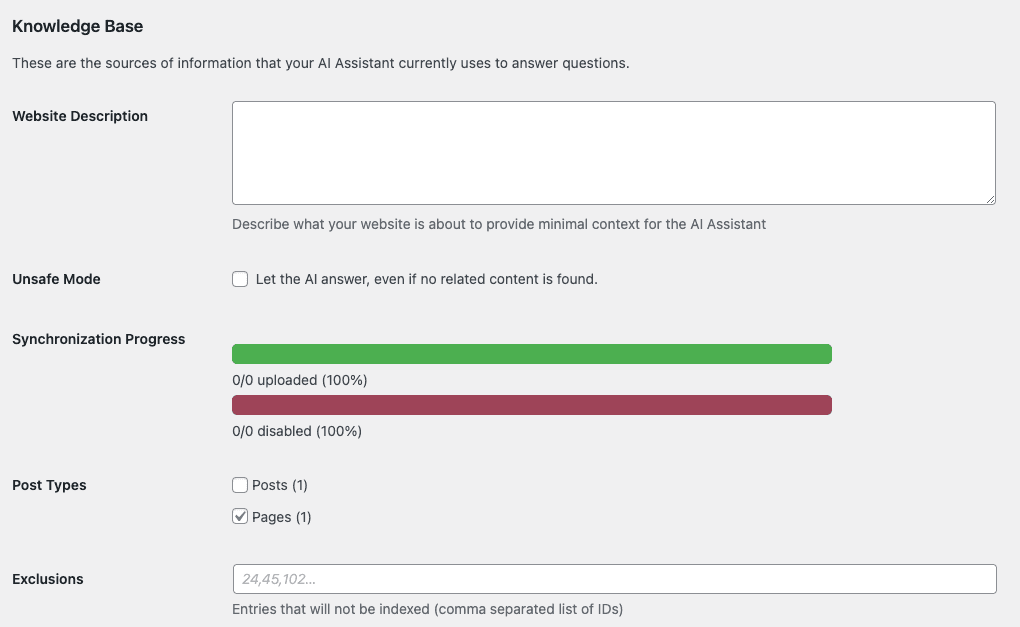
The setup is clean and sensible for a WordPress-native tool. The scope is the part to read closely. Joinchat's AI page says that with the assistant, "only important queries will be routed to a channel such as WhatsApp". In other words, the AI works in the window on your site and filters what reaches WhatsApp. It does not reply inside WhatsApp, and the docs describe it learning from your site's content, with no mention of order lookups or past conversations.
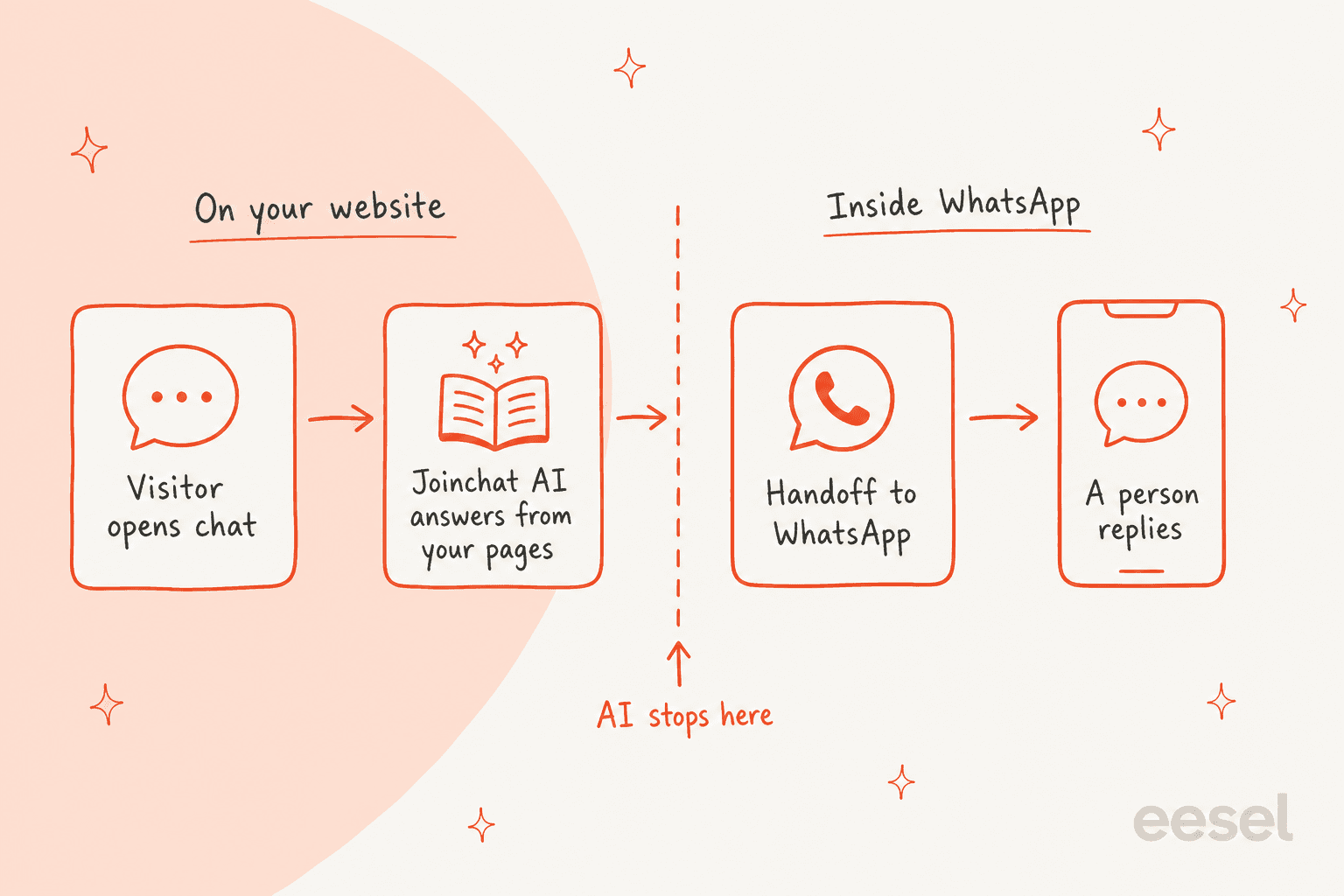
Joinchat's pricing page lists "AI for WhatsApp" under custom development, quoted separately from the plans, next to a shared support inbox. So an AI that answers inside WhatsApp is a custom build, not an add-on you switch on. That is a fair design choice, and it is the line that decides whether Joinchat AI fits your problem.
How much does Joinchat cost?
Three price tags, billed two ways. Premium and Premium Plus are yearly licenses; the AI Assistant is a monthly subscription. All prices on join.chat's pricing page are in euros and exclude tax.
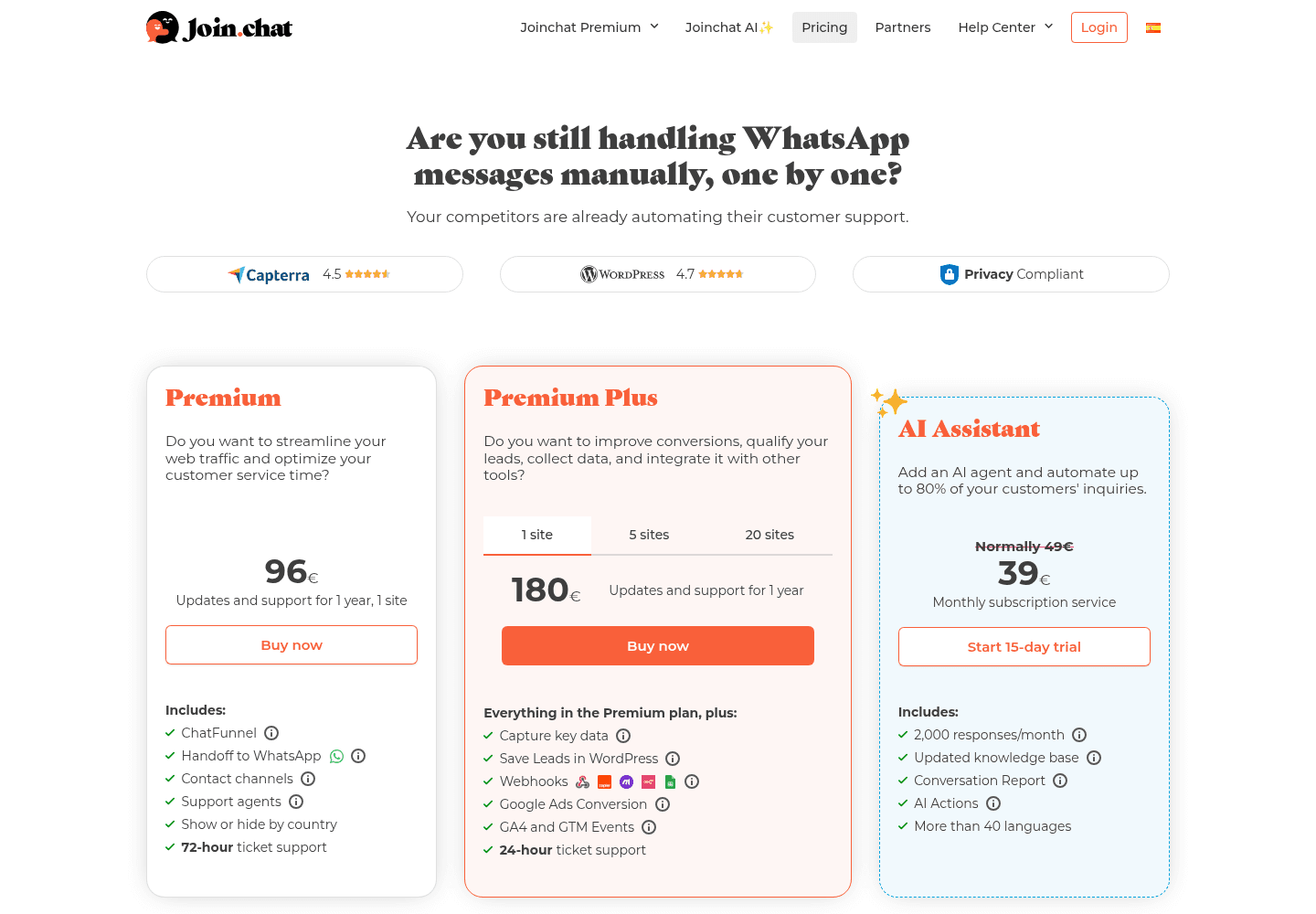
| Plan | Price | Sites | What you get |
|---|---|---|---|
| Free | €0 | Any | Button, chat window, WooCommerce buttons, variables, analytics events |
| Premium | €96 a year | 1 | ChatFunnel, handoff to WhatsApp, extra channels, support agents, show or hide by country, 72-hour ticket support |
| Premium Plus | €180 a year | 1 | Everything in Premium, plus lead capture, saved leads, webhooks, Google Ads conversion, GA4 and GTM events, 24-hour support |
| Premium Plus | €240 a year | 5 | Same as above |
| Premium Plus | €480 a year | 20 | Same as above |
| AI Assistant | €39 a month shown, "normally 49€" | Per subscription | 2,000 responses a month, knowledge base, conversation report, AI Actions, 40+ languages |
A few things that are easy to miss:
- Premium keeps working if you stop paying. Per the Premium FAQ, the plugin and its settings keep running; you lose updates, security fixes, support and downloads.
- The AI needs the free plugin. Joinchat AI is a separate paid plugin that runs on top of the free one, per the install docs.
- Refunds and trials. Purchases carry a 14-day money-back guarantee, and the AI has a 15-day trial.
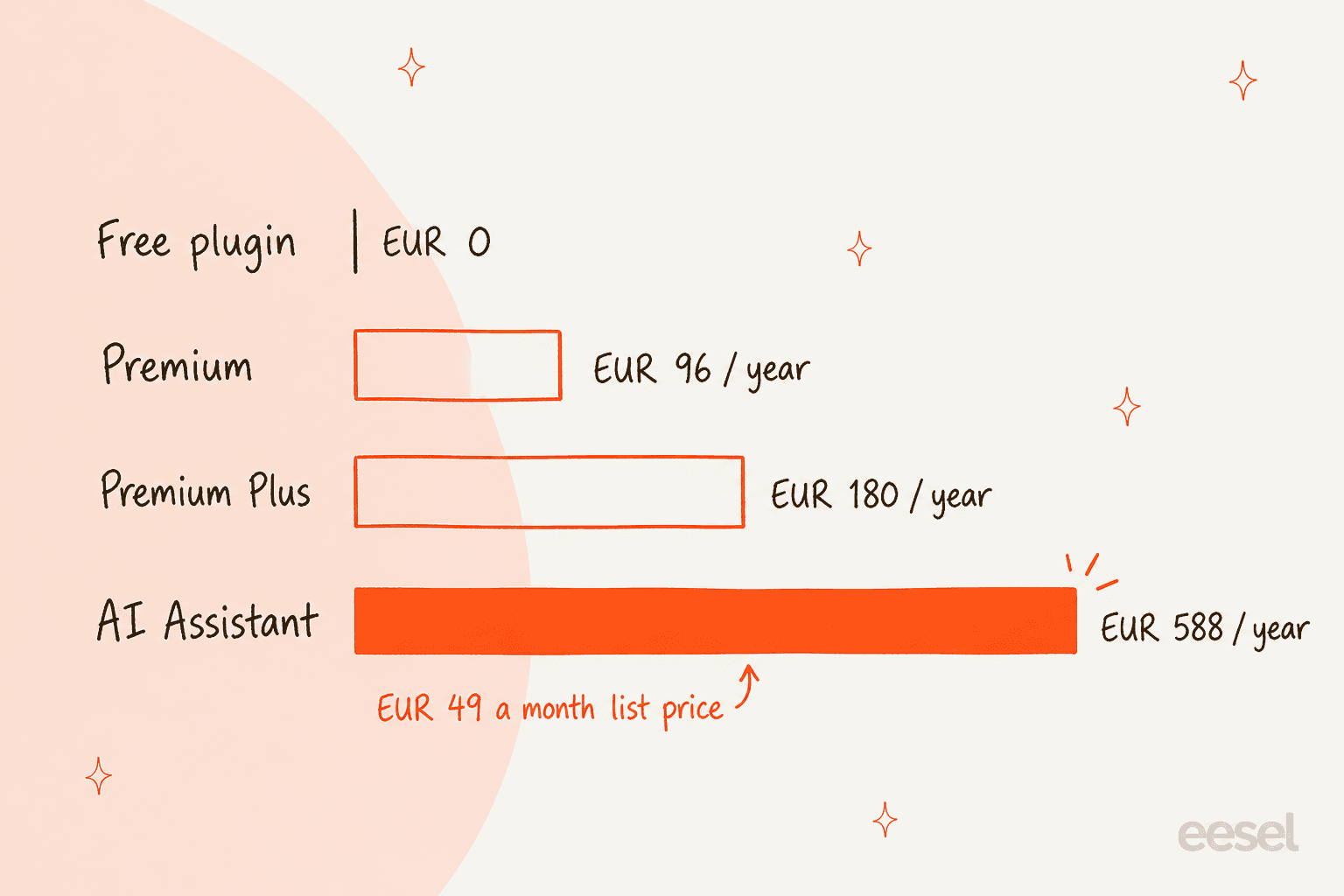
What does a year of Joinchat cost one store?
Take one WooCommerce store that wants agents, lead capture and the AI. Premium Plus for one site is €180 a year. The AI at its €49 list price is €588 a year, or €468 at the €39 shown on the page. That is €648 to €768 for the first year, and the AI is 72% to 77% of it, before tax.
The checkout link for the AI trial carries a coupon named 10-3MONTHS, which suggests the €39 price is a €10 discount for the first three months rather than a permanent rate. The page does not say so outright, so I would budget for €49.
What happens when the AI runs out of responses?
The AI plan includes 2,000 responses a month. If a typical chat takes four AI replies, that is about 500 conversations. When you hit the cap, the docs say the Joinchat bubble shows a replacement call to action you write, and if you leave that text blank, the button is hidden until the quota resets.
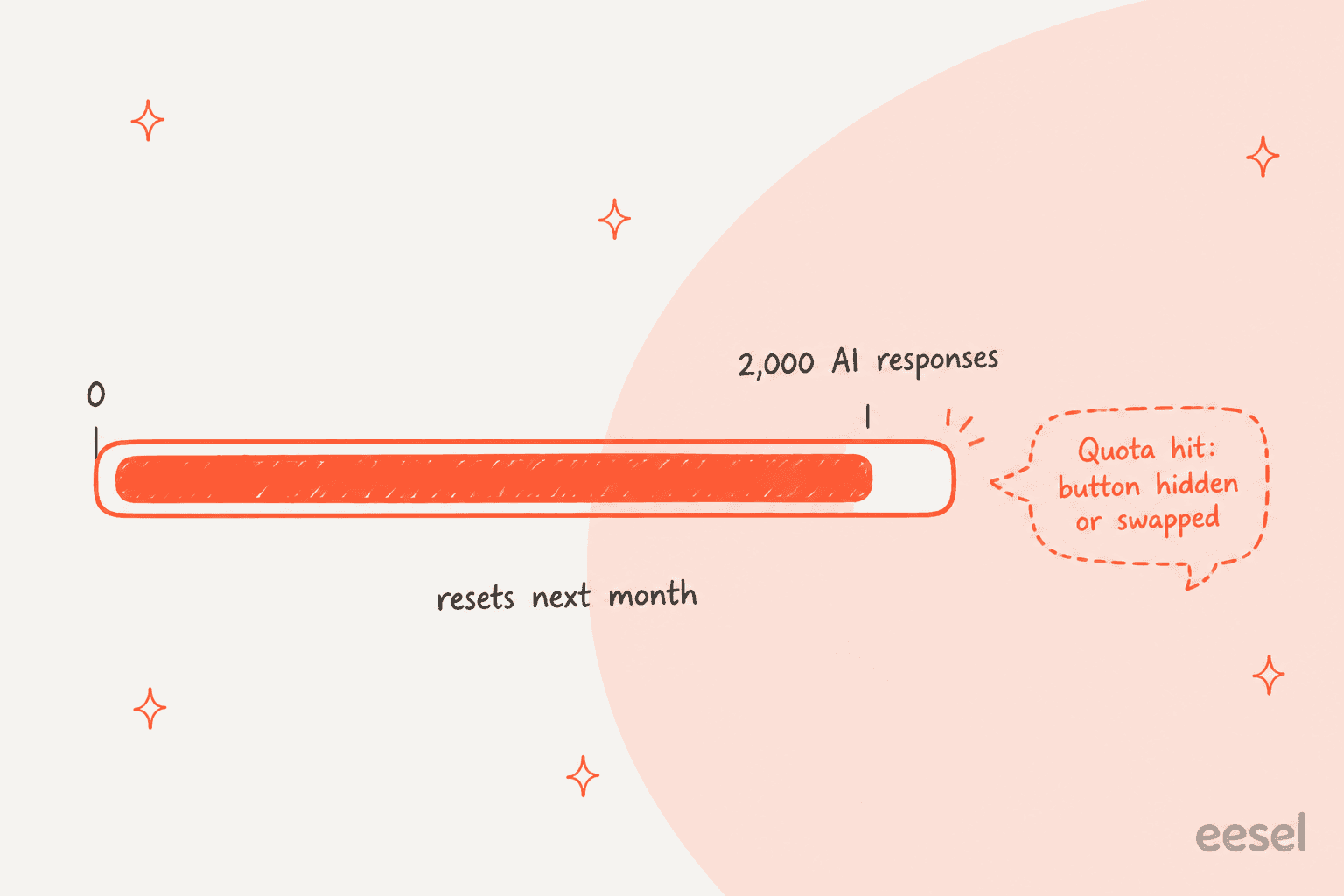
That is a sensible guardrail on cost. It also means a busy month can take your WhatsApp button off the page at the exact moment demand is highest, so write that fallback text before you need it.
Where the pages disagree
I checked every page I quote here and found a few gaps:
- Install count. WordPress.org shows 700,000+ active installs. The join.chat pricing page says 740,613 businesses in 176 countries, citing BuiltWith. Join.chat's Capterra listing still says "more than 200,000 businesses".
- AI price. €39 a month is shown next to "Normally 49€", with no end date on the page.
- AI requirements. The AI install docs list PHP 5.6 and WordPress 4.5, while the free plugin it depends on now needs PHP 7.0 and WordPress 4.9.6.
- Where the AI answers. The AI page says it responds "across all your communication channels", while the setup docs and the same page describe it answering on your site and routing the rest to WhatsApp.
What do Joinchat users say?
On WordPress.org the plugin averages 4.7 from 189 ratings: 168 five-star, 8 four-star, 1 three-star, 4 two-star and 8 one-star. Most of the one-star reviews I opened on the reviews page date from 2021 and 2022 and cover display bugs or upsells, and the Joinchat team has replied on most of them.
On Capterra, Join.chat has 4.5 from two reviews. The 2022 review from a hospitality manager is the most useful thing I read about the product, because it names both sides of a click-to-chat button in two lines:
"Significantly more clients contacted me, as everyone uses WhatsApp and this requieres less effort."

The same reviewer's only con was that the "automatic response seems a bit limited". The newer review, from August 2025, praises support for fixing a Chat Funnel issue quickly and notes that the setup takes some initial configuration.
One recurring confusion is channels. A 2024 WordPress.org thread asked why Joinchat is advertised for Messenger, and the developer replied that the free version is WhatsApp only, with other channels in the paid add-ons. If you want Messenger or Instagram buttons for free, Chaty includes them.
Where does Joinchat fall short?
None of these are bugs. They are the edges of a click-to-chat button plus a website AI, and they matter once WhatsApp is a support channel rather than a contact link.
- WordPress only. No Shopify or Wix app, so a store on another platform needs a different tool.
- No inbox. Messages land on phones. There is no assignment, no shared history and no way to see what a teammate already promised.
- The AI answers on the site, not in WhatsApp. Once a customer is in WhatsApp, every reply is human, unless you commission the custom "AI for WhatsApp" work.
- The AI reads your pages, not your operations. The docs describe a knowledge base of WordPress posts and pages. Order status, refunds and account questions still need a person.
- A response cap. 2,000 AI responses a month, with the button hidden or swapped when you run out.
- Prices in euros, before tax. Buyers outside the eurozone pay conversion and local tax on top.
The quiet one is time. Support agents with schedules stop customers writing into silence, but they also show "back in 10 hours" to the shopper browsing at 11pm, which is when a lot of WhatsApp sales questions arrive.
Who should use Joinchat?
Ask one question first: is your problem getting chats, or answering them?
| You are... | Verdict |
|---|---|
| A WordPress site where the owner answers from their phone | The free plugin is enough |
| A WooCommerce store selling through WhatsApp | Free plugin first; Premium when you need agents or Messenger |
| A marketing team tracking leads from ads | Premium Plus, for webhooks, saved leads and Google Ads conversions |
| An agency running client sites | Premium Plus at €240 for 5 sites or €480 for 20 |
| A site with a lot of repeat pre-sales questions | Try Joinchat AI's 15-day trial and watch the conversations report |
| A support team whose WhatsApp chats are piling up | Skip the AI add-on; the work is inside WhatsApp, not before it |
| A Shopify or Wix store | Not available; pick another button |
What are the alternatives to Joinchat?
Split them by what happens after the click.
- Another WordPress button. QuadLayers Social Chat has strong WooCommerce checkout features, and Chaty covers more channels in its free plugin.
- A button on Shopify or Wix. Smartarget works on both, and Certified Code and PurpleBear are Wix-only.
- A live chat on your site. Tools like Tidio keep the whole conversation on the page; my website live chat roundup compares the field.
- A WhatsApp API inbox. Providers put WhatsApp in a team inbox; start with my API provider list or the Wati alternatives.
- WhatsApp inside your helpdesk. See Gorgias WhatsApp and Zendesk WhatsApp, then put an AI teammate on top.
For WooCommerce stores, my AI for WooCommerce support picks go deeper on answering order questions.
Joinchat review verdict: is it worth it?
4 out of 5. As a WhatsApp button, Joinchat is about as good as free gets on WordPress: fast, cookie-free if you want it, with WooCommerce variables and analytics events that other plugins charge for. Premium is fairly priced, keeps working if you stop paying, and the team ships updates often (6.4.2 landed on October 13, 2026).
I take a point off for the AI story. Joinchat AI is a tidy website assistant, but it is easy to buy it thinking it will answer your WhatsApp, and it won't; it answers before WhatsApp. Add the 2,000-response cap and euro pricing before tax, and the add-on is a narrower fit than its "automate 80% of inquiries" headline suggests. Joinchat gets customers into WhatsApp very well; answering them there is a different job.
Where does eesel fit next to Joinchat?
The two do different jobs, and they work fine together. Joinchat puts the button on your WordPress site; eesel answers the conversation once it is in WhatsApp. eesel is an AI teammate platform, and for this job the relevant teammate is the AI helpdesk teammate.
It connects to your WhatsApp Business number, learns from your knowledge base, docs and past tickets, and answers in 80+ languages. You tell it what to handle and when to hand over in plain words, like "send anything about a refund to the team". Point Joinchat's button at that same number and every click lands in a conversation that gets an answer, at 11pm too.
The difference from Joinchat AI is where the answers happen and what they can see. eesel replies inside WhatsApp, can check orders in WooCommerce or Shopify, and works the same way on your website chat bubble, Messenger and Instagram. It costs more than Joinchat AI, so it is worth it when the queue is inside WhatsApp, not when you only want fewer chats reaching it.
Two customers show what that looks like:
- Question Beauty sells vegan cosmetics on Shopify, and most of its volume is short messages like a product name and "price?" from Messenger and chat. In one month eesel handled about 990 tickets in Gorgias, sent about 960 replies, looked up about 290 Shopify orders and closed about 280 tickets without a person. Refunds, complaints and wholesale go to the team with a note.
- IC Intracom runs one eesel agent per brand on two Shopify stores' website chats, answering from about 2,100 product records. A reseller asking about a part number at 9pm gets the spec sheet answer without waiting for the office to open.
I have watched this pattern on a lot of eesel rollouts over the years: a WhatsApp button comes first, then the volume, then the question of who answers at 2am. My guides on automating WhatsApp support and WhatsApp auto replies cover the steps in between.
Try eesel
If Joinchat is already sending more WhatsApp messages than your phone can keep up with, eesel's AI helpdesk teammate can take the repeat ones inside WhatsApp: order status from your WooCommerce or Shopify store, product questions from your help center, and a clean handoff for refunds. It starts free with 100 credits, and paid plans begin at $299 a month for 500 credits, where one chat is one credit (eesel pricing).
Frequently Asked Questions
What is Joinchat?
Joinchat is a free WordPress plugin by Creame that adds a floating WhatsApp button and a small chat window to your site. A click opens WhatsApp with a pre-filled message to your number. The button itself does not answer messages; for that you need a person or an AI agent.
Is Joinchat free?
Yes. The free plugin on WordPress.org covers the WhatsApp button, the call-to-action window, WooCommerce product buttons, dynamic variables and analytics events. Paid add-ons cover agents, extra channels, chat funnels and AI. My Chaty review covers a free option with more channels built in.
Does Joinchat have an AI chatbot?
Yes, Joinchat AI is a paid add-on that answers visitors in the chat window on your WordPress site, using the posts and pages you choose as its knowledge base. Questions it routes onward go to WhatsApp or another channel, where a person replies. My WhatsApp AI chatbot guide covers tools that answer inside WhatsApp itself.
Does Joinchat work with WooCommerce?
Yes. The free plugin adds a WhatsApp button next to Add to cart, separate messages for shop, product and sale pages, and variables for product name, SKU, price and discount. For answering order questions automatically once the chat starts, see eesel for WooCommerce.
Is there a Joinchat app for Shopify or Wix?
No. Joinchat is a WordPress plugin, and I found no Joinchat app in the Shopify App Store. On Shopify or Wix, look at Smartarget or one of the Wix-only WhatsApp buttons.
What is a good Joinchat alternative for support teams?
If you only need a button, Joinchat is one of the best free picks on WordPress. If WhatsApp messages are piling up, you need something that answers inside WhatsApp, like eesel's AI on WhatsApp. Plans start at $299 a month for 500 credits, where one chat is one credit. My WhatsApp chatbot list covers the rest.