What is Landbot?
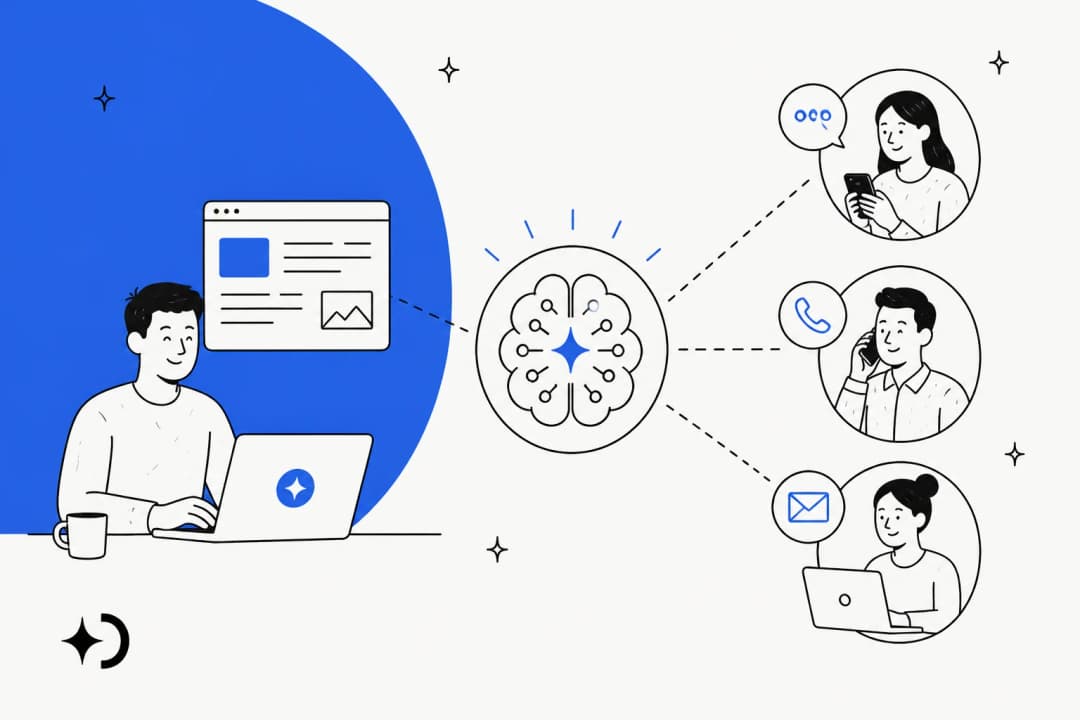
Landbot is a no-code platform for building chatbots and AI agents that run on your website, on WhatsApp and on Facebook Messenger. Its own one-liner is that it's "an AI agent and chatbot that qualifies leads and books meetings 24/7." The company behind it, HELLO UMI S.L., is based in Barcelona and lists 51-100 employees on Crunchbase. Jiaqi Pan is the CEO and one of five founders.
Landbot has been around since 2015 and reports 12,000+ teams in 190+ countries and over 1 billion conversations on its homepage. It carries GDPR, SOC 2 and Meta Partner badges, which matters if you plan to run it on WhatsApp.
I build AI agents at eesel, and the first thing I look for in any chatbot builder is where the script ends and the AI begins. That line explains almost everything about Landbot. It started as a visual flow builder, the kind where you drag "question" and "button" blocks onto a canvas, and AI arrived later as blocks you add to that flow. Landbot's pitch is "Structured like a chatbot. Smart like an AI agent," and the structure really does come first.
If you're new to the distinction, my explainer on AI agents vs rule-based chatbots covers it in a few minutes.
How Landbot works
A Landbot bot is a flow. You build it on a canvas from blocks: a question that saves the visitor's email, a set of buttons, a condition that checks company size, a webhook that sends the lead to your CRM. Every visitor walks the same paths you drew, which is why Landbot bots are predictable and easy to test.
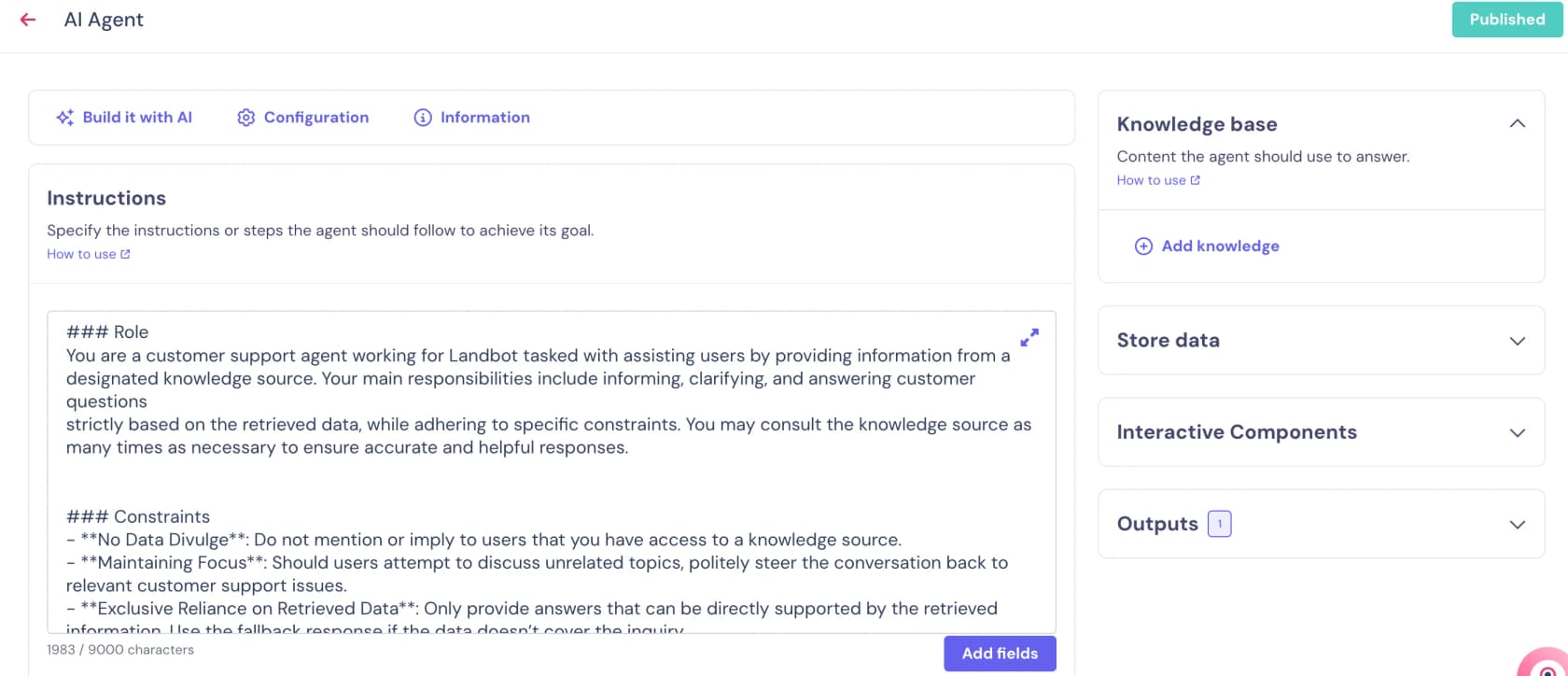
The AI lives inside that flow as one block. The AI Agent block "follows the instructions you write, answers questions using a Knowledge Base you provide, collects information into Fields, and hands the conversation back to your rule-based flow when one of your Outputs is triggered." It works on web, WhatsApp and Messenger, on any paid plan.
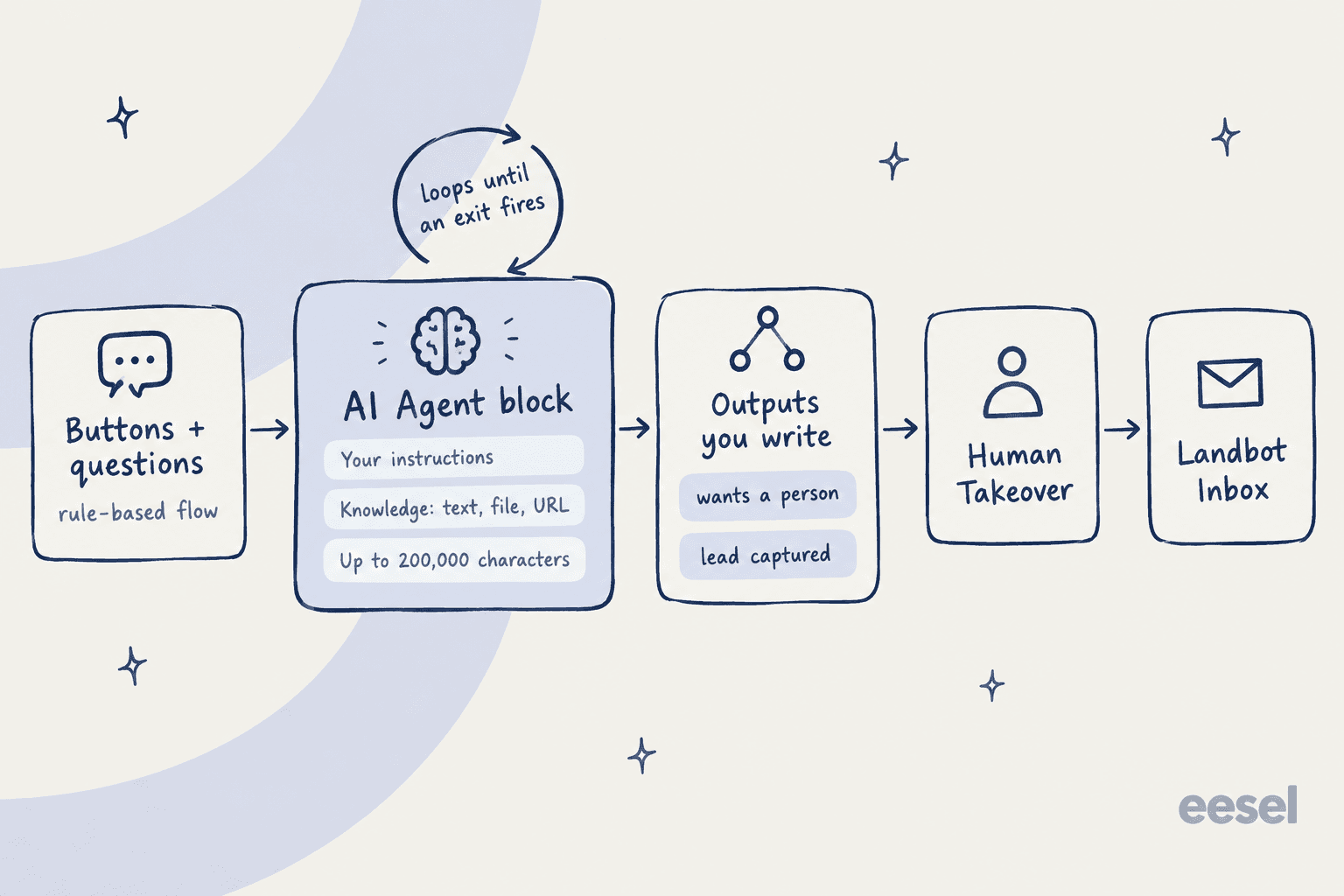
Here's what you set up inside the block:
- Instructions. A prompt that defines the agent's role, tone and edge cases. Landbot's own example starts "Act as a lead generation agent for Brighton English Academy."
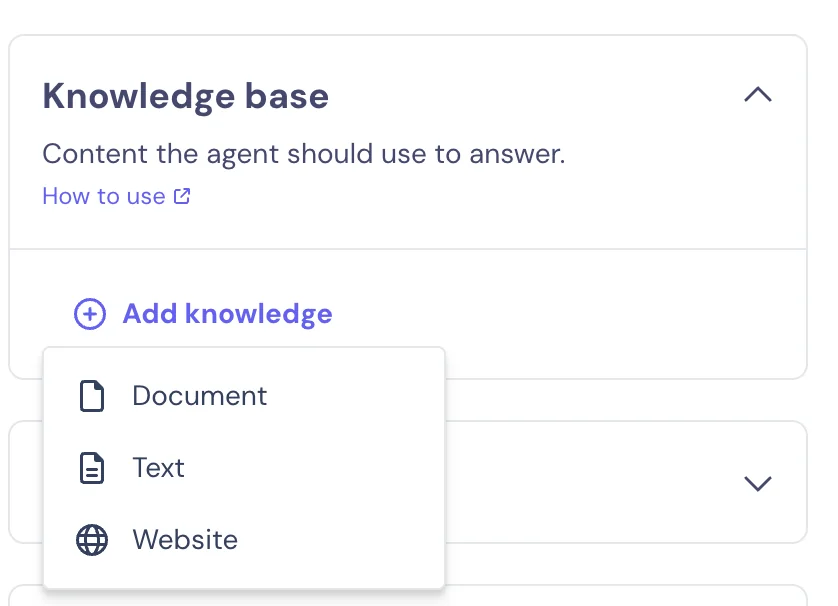
- Knowledge base. Text, a file or a website URL. The limits are 200,000 characters of text or documents and 200,000 characters of a scraped site's HTML, in PDF, DOCX, TXT, MD or RTF. URL sources can refresh daily, weekly, biweekly or monthly.
- Store data. Up to 20 Fields the agent collects, such as name or budget. The docs are blunt that "An agent with Fields configured but no instruction to collect them will not collect them."
- Configuration. You pick the AI model, an error message, time zone context, and whether the agent sees the last 5 messages.
- Outputs. The exit conditions, covered below.
The part people miss: you write every exit
An AI Agent block "runs in a conversational loop, and the user stays in that loop until one of your Outputs is triggered," per the setup guide. Each Output is a plain-language trigger, like "user asks to talk to a human," wired to the next block in your flow.
That sounds small, but it shapes the whole build. Landbot's migration guide notes that the old Lead Gen Assistant exited once it had all the data, while "In the AI Agent, this isn't automatic." It also doesn't send email alerts when a conversation finishes, so you add a Send Email or Slack block after the Output yourself.
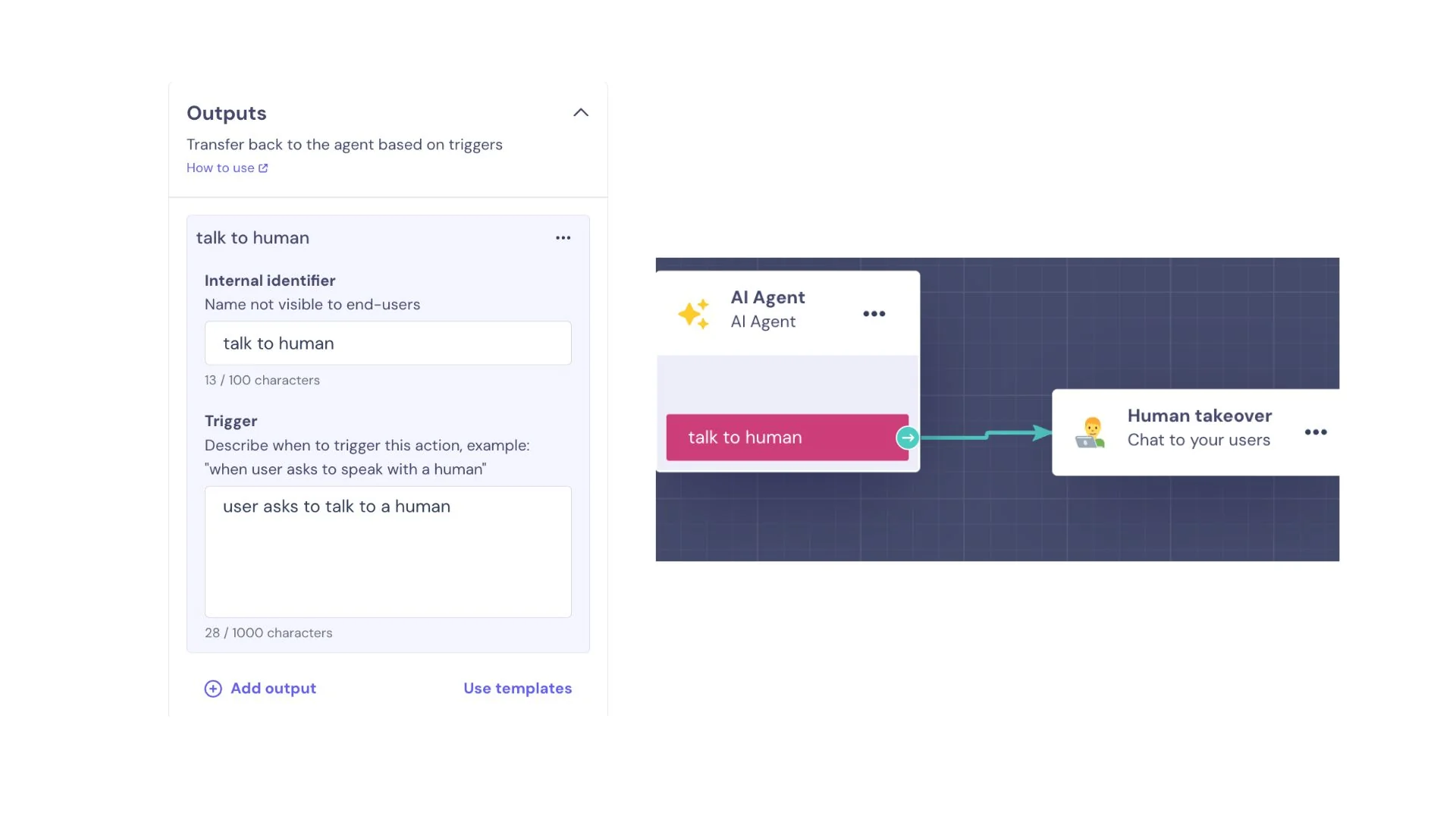
I like this design for lead capture. "Hard exits, so the AI never improvises the qualification," is how Landbot puts it on its AI Skills page, and for a sales team that wants every lead scored the same way, that's the right call. For support it's more work: every reason a customer might need a person is an Output you have to think of in advance. My guide to chatbot escalation covers the triggers most teams forget.
Where the knowledge comes from
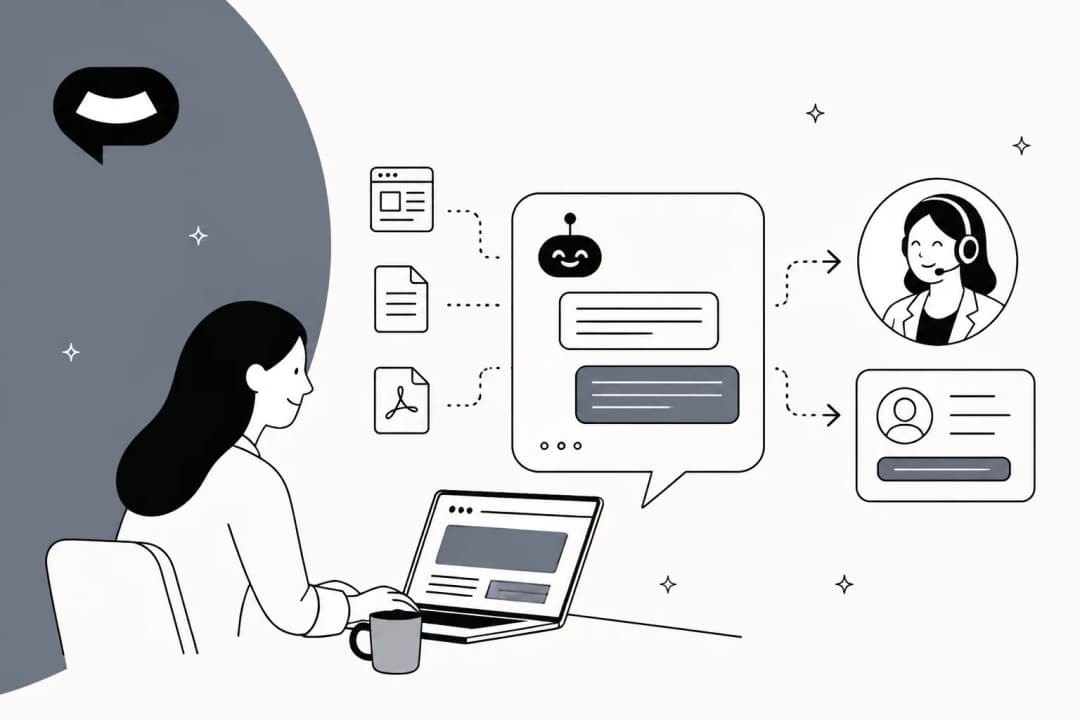
The knowledge base takes three things: a document, typed text or a website. There's no connector for a helpdesk, past tickets, Notion or Google Drive in the docs, and the agent "does not read information contained in images or graphics."
Landbot's guide to structuring the knowledge base gives 12 tips, including "Use lists, not tables" because "Tables are hard for AI to parse." Upkeep is manual: read the transcripts, find questions that got "I don't know," and paste those phrasings into the matching Q&A. That works for a 30-question FAQ. It gets heavy for a support team whose real answers live in years of ticket history.
Testing before launch
Testing means publishing the bot and chatting with it through a share link or a WhatsApp test number. Transcripts show up under Analyze > AI Analysis. There's no replay of past conversations, so the first real test is your first real visitor. That's the step I'd never skip, and my guide to AI hallucinations in support explains why.
Landbot features
Most of Landbot's AI features shipped in Landbot 4, which Jiaqi Pan announced on December 11, 2025. The flow builder underneath is the same one Landbot has refined since 2015.
AI Copilot and Build it with AI
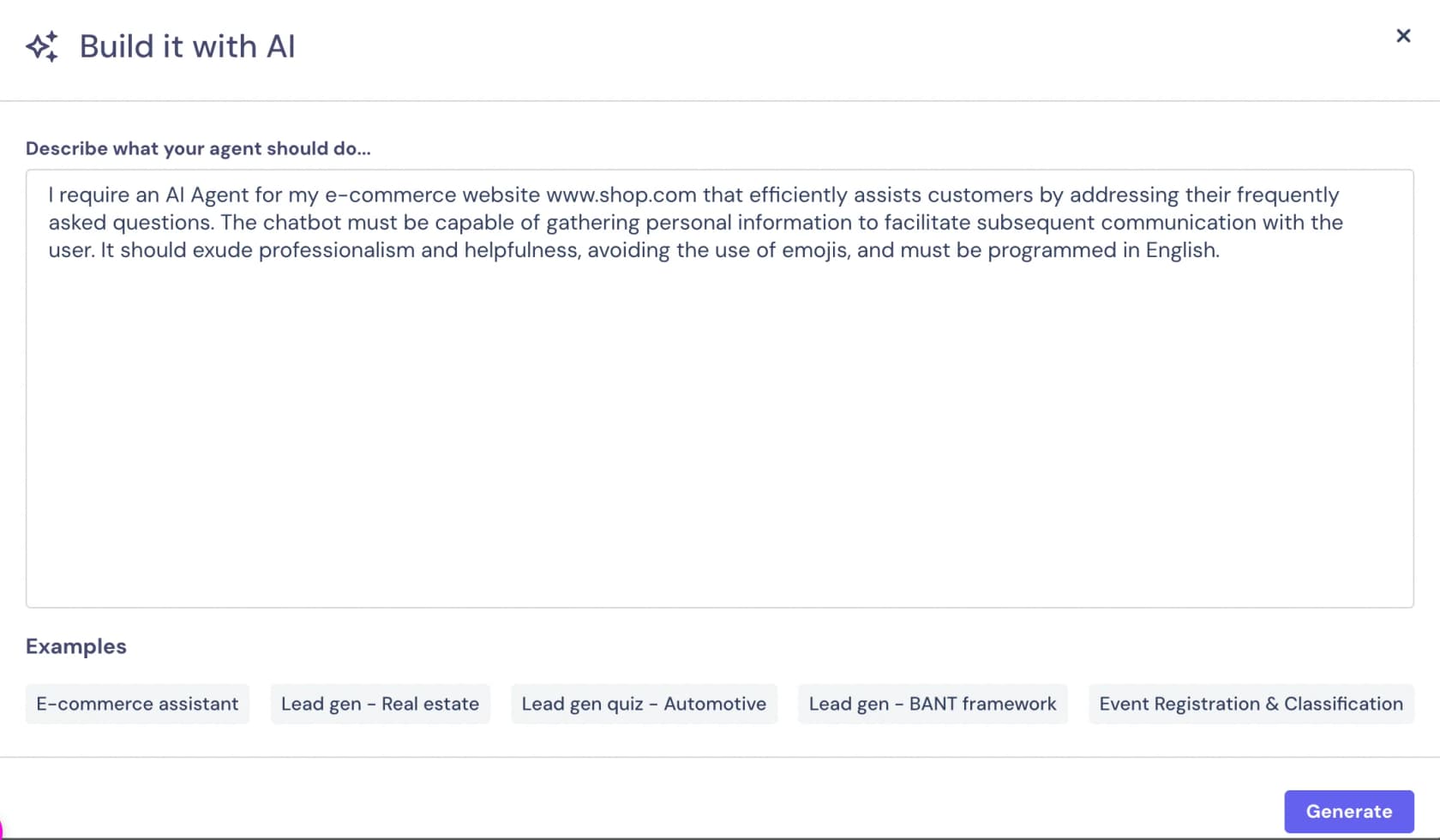
The AI Copilot is an assistant inside the builder. You describe a bot ("I want a lead generation AI Agent for my real estate company") and it "will add steps to the conversational flow, connect logic, validate inputs, and set up integrations." Landbot claims you can ship a first agent in 15 minutes this way.
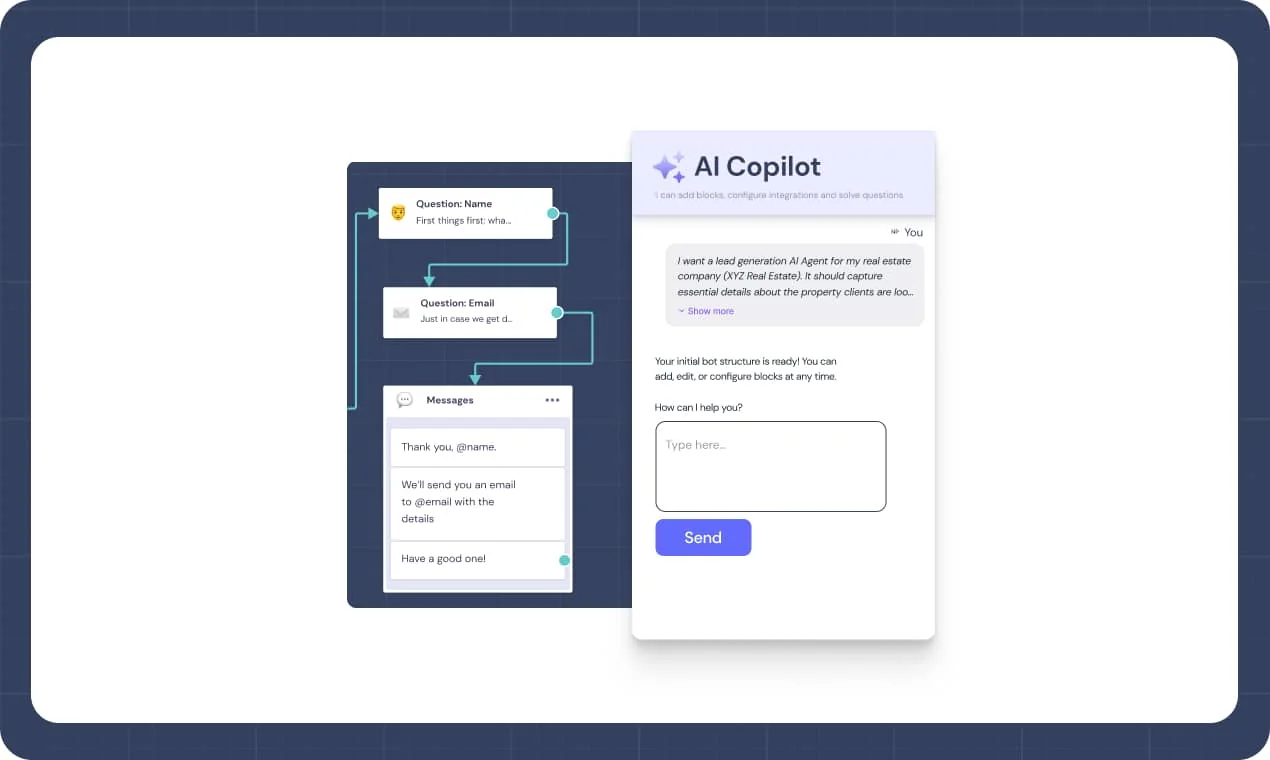
Inside an AI Agent block, "Build it with AI" writes the full setup from a description of up to 1,000 characters, with presets like E-commerce assistant and Lead gen BANT framework. One warning from the docs worth repeating: it "overwrites the entire Agent Setup." Use "Edit it with AI" once you've tuned anything by hand.
Hybrid AI
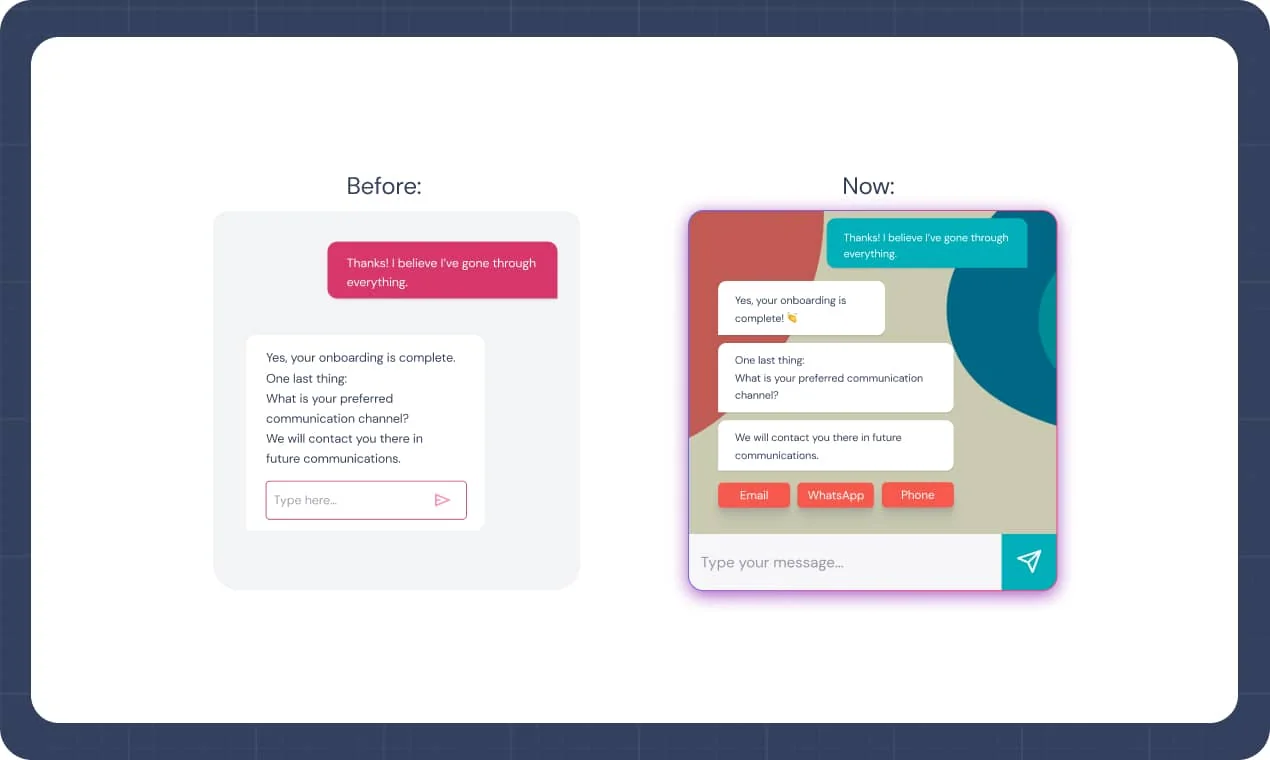
Hybrid AI lets the agent show buttons, selectors and autocomplete mid-conversation instead of only typing text. It's a nice touch on WhatsApp, where tapping "Email" beats typing it. Landbot shows the before and after in its launch post.
AI Task block (bring your own key)
The AI Task block is a one-shot model call rather than a conversation, on Professional and up. Landbot's own example is cleaning messy input, turning "barcalona" into Barcelona. You can use the Default model, which draws from your AI chat allowance, or paste your own API key and pick a model. Its output saves only to text fields for now.
WhatsApp is where Landbot is strongest. It runs on the official WhatsApp Business API, its onboarding team files your application (Landbot says this "usually lasts around 1-2 weeks"), and a free test environment lets you build before approval. You get campaign tools, an opt-in widget, notifications and a team inbox on the WhatsApp page. One limit to plan around: WhatsApp allows up to 3 reply buttons, so longer menus use a keyword list.
For the bigger picture on WhatsApp bots, start with my guide to WhatsApp chatbots for business. Before you budget, also read up on the latest WhatsApp API pricing.
Integrations
The integrations directory lists 16 native apps: Zapier, n8n, Webflow, WordPress, Shopify, Carrd, Stripe, Slack, Calendly, Segment, SendGrid, Dialogflow, Google Sheets, HubSpot, Mailchimp and Airtable. The pricing page adds Salesforce, Pipedrive and Zoho on Professional. Everything else goes through webhooks, Zapier or n8n.
What's missing is a helpdesk. The help center files Zendesk under custom integrations, with two webhook recipes to create or update a ticket, both last updated 4 years ago. There's nothing for Freshdesk or Gorgias. That's fine for a marketing team syncing leads to HubSpot, and a real gap for a support team.
Human takeover and the Inbox
The Human Takeover block passes a chat to a person, and the chat lands in Landbot's Inbox, which Landbot calls "the place where humans and chatbots meet." Each person replying uses a seat, and extra seats cost $25/month. If your team wants to reply from somewhere else, the documented path is a custom Node.js integration to answer WhatsApp users from Slack. My notes on human handoff in chat support cover what a good handover needs.
AI Skills for Claude Code, Codex and Cursor
The newest piece is Landbot AI Skills: a plugin that lets a coding agent like Claude Code, Codex or Cursor build Landbot flows for you. You describe a lead form or product configurator, the agent builds it as an editable flow, and Landbot hosts it. There are 55 templates. It's a smart move, and a sign Landbot sees its future in fast, branded lead-capture experiences.
How much does Landbot cost?
Landbot publishes its prices on its pricing page. Here's the full grid in US dollars, with the annual price first.
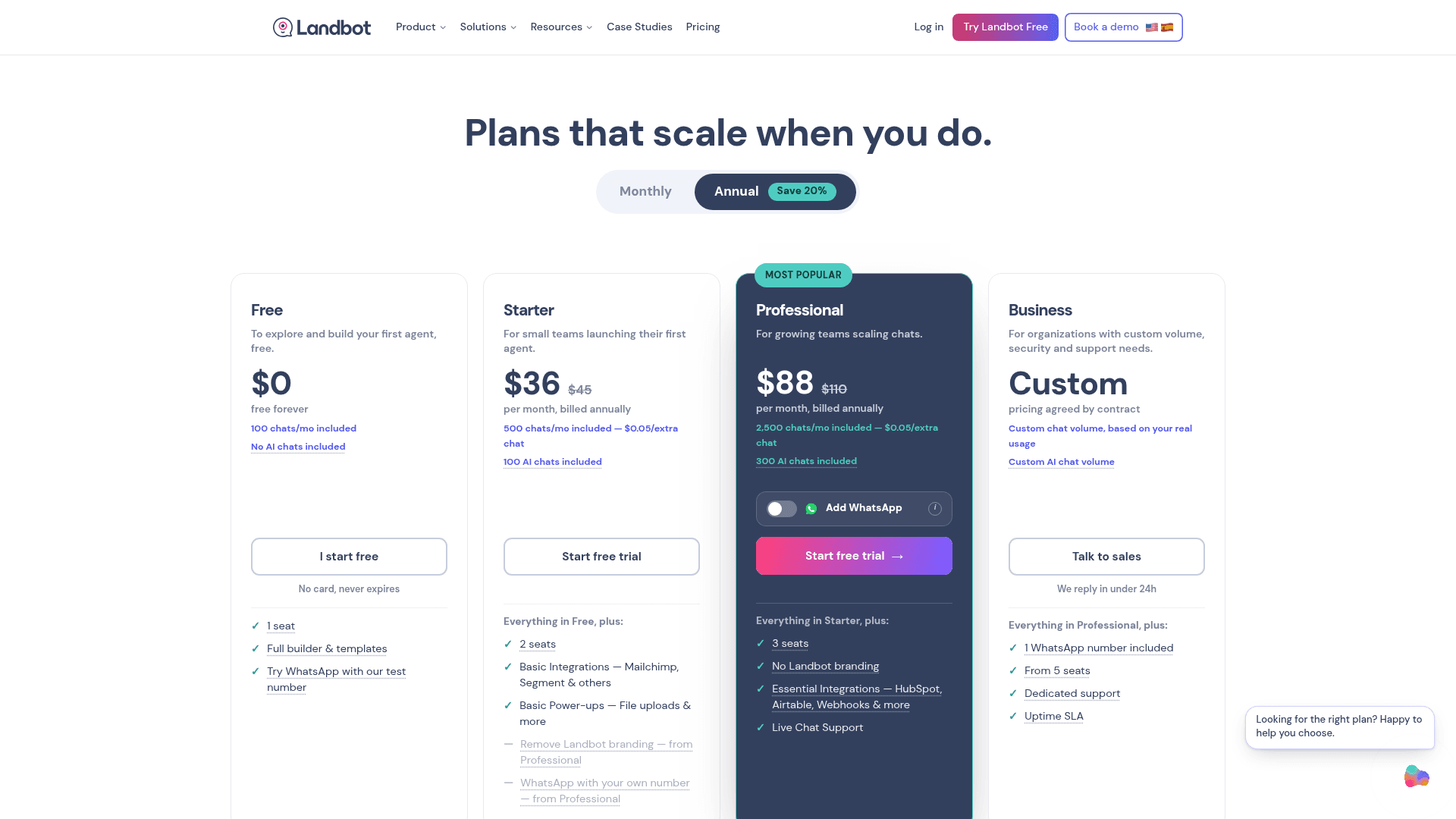
| Plan | Price (annual / monthly) | Chats included | AI chats included | Seats | Key limits |
|---|---|---|---|---|---|
| Free | $0 | 100/mo | None | 1 | Web only, Landbot branding |
| Starter | $36 / $45 | 500/mo | 100 | 2 | Web and Messenger, basic integrations, human takeover, branding stays |
| Professional | $88 / $110 | 2,500/mo | 300 | 3 | No branding, HubSpot, Salesforce, Pipedrive, Zoho, webhooks and API |
| Professional WA | $176 | 2,500/mo | 500 | 3 | 1 WhatsApp number, 10,000 service messages/mo |
| Business | Custom | Custom | Custom | From 5 | Dedicated support, uptime SLA |
Extra seats are $25/month, an extra WhatsApp number is $100/month, and Landbot's managed build service, Agent Studio, is sold on any plan. Prices are before tax, and EU customers are billed in euros (Starter is €32 and Professional €80 on annual).
The three meters on your bill
The billable unit is the "chat," a session tracked over a 24-hour window. But AI and WhatsApp are counted separately, so you're really watching three meters.
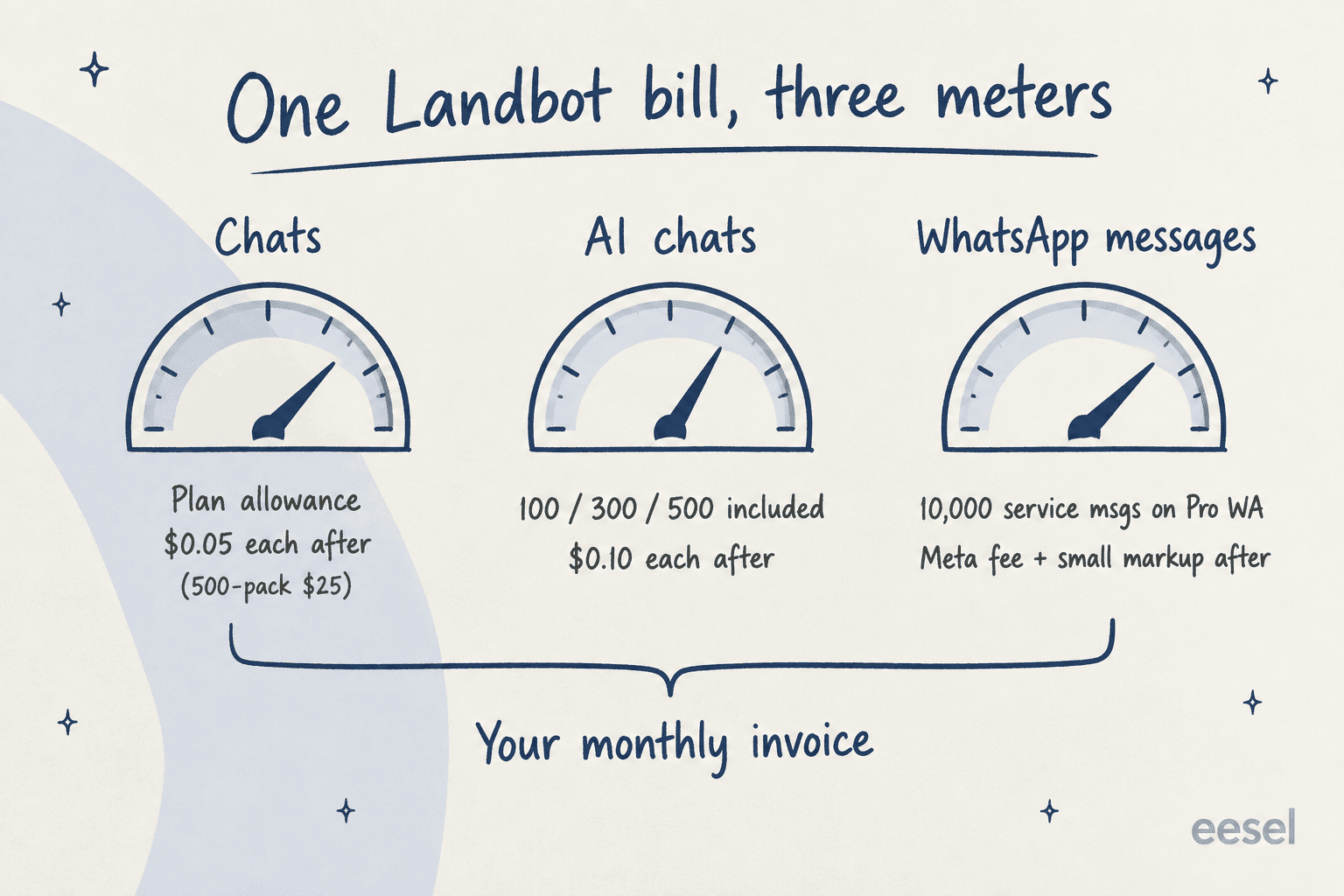
- Chats. Past your allowance, $0.05 per chat, sold in packs of 500 for $25.
- AI chats. Any conversation that uses the AI Agent or AI Task block "at some point in the flow," per the billing FAQ. Past the allowance, $0.10 per AI chat. Using both blocks in one conversation still counts once.
- WhatsApp messages. Pro WA includes 10,000 service messages. After that you pay Meta's rate plus €0.003 per service message, or €0.05 per marketing, utility or authentication message.
One timing note on that third meter. From October 1, 2026, Meta started charging per message for service replies, including ones written by a third-party AI, with 1,000 free per number per month, according to Meta's pricing docs. If you run a busy WhatsApp line, ask Landbot how its 10,000 included messages map onto that change before you budget.
The gap between AI and non-AI chats used to be much wider. In 2024, one Hacker News commenter worked out the old plan math:
"For $100 per month you can have 2,500 flow chats, or 30 "AI" chats. That's nearly a 100x difference in cost."

Today it's 2x ($0.05 vs $0.10), which is a real improvement. It still means a bot that sends every visitor through the AI block burns through the smaller of your two allowances first.
A worked example
Say you get 2,500 chats a month and 1,000 of them reach the AI Agent block. On annual billing:
- Starter: $36 + 2,000 extra chats ($100) + 900 extra AI chats ($90) = $226/month
- Professional: $88 + 700 extra AI chats ($70) = $158/month
- Professional WA: $176 + 500 extra AI chats ($50) = $226/month, plus Meta fees past 10,000 messages
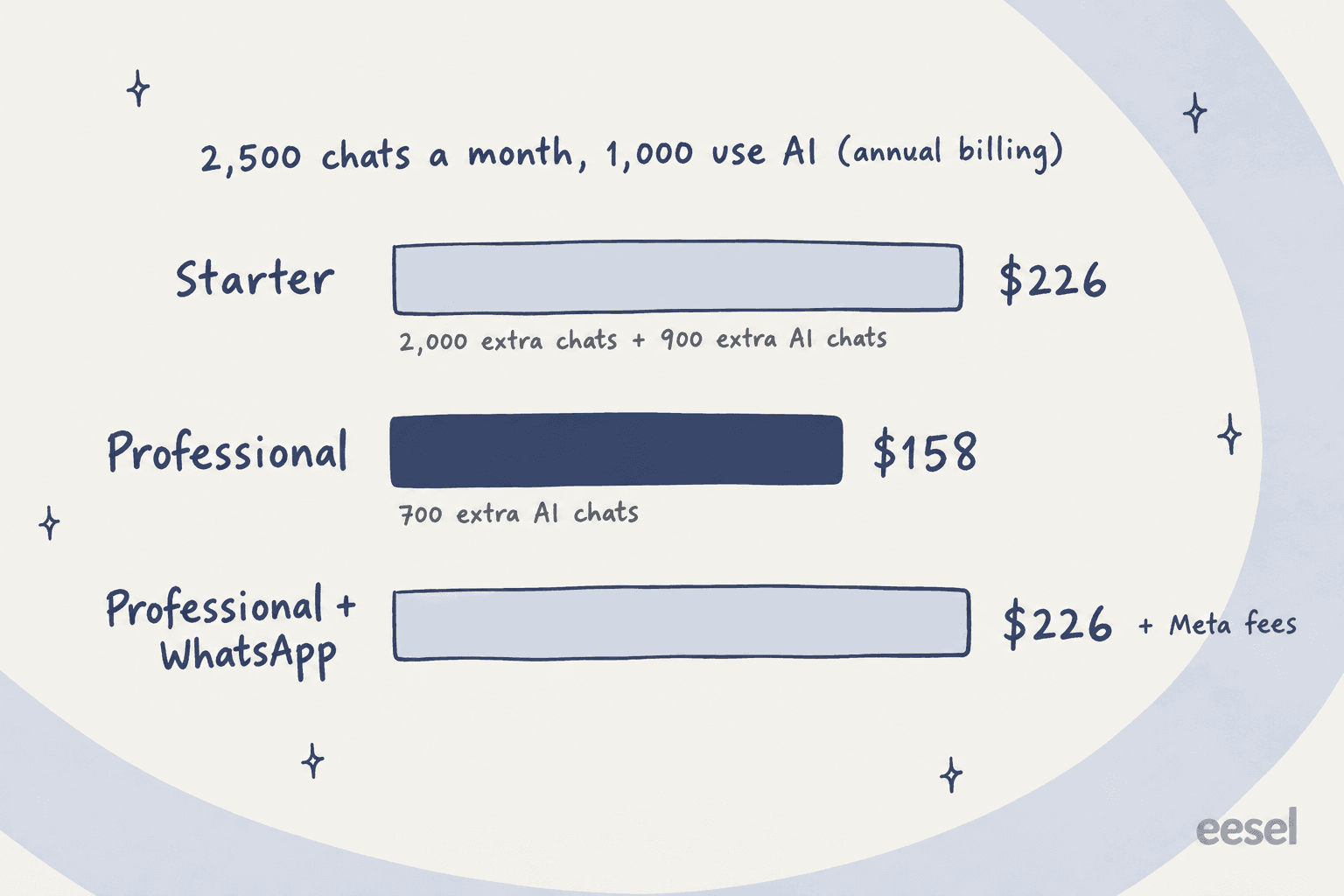
The takeaway: past roughly 1,500 chats a month, Starter costs more than Professional, because overage packs pile up fast. If your volume is anywhere near that, start on Professional. For more on how AI billing units compare across tools, see my breakdown of AI customer service cost.
Landbot's billing terms are friendly: a 14-day trial with no card that drops you to the free plan, a 7-day money-back window on upgrades, and at least 2 months' notice before price changes for existing customers.
What Landbot users say
The review scores split sharply by platform. Landbot holds 4.7/5 from 334 reviews on G2 and 4.4/5 from 70 on Capterra, but 2.1/5 from 10 on Trustpilot. Trustpilot's sample is tiny and complaint-led, so I weight G2 and Capterra for what the product is like and treat Trustpilot as a read on billing and support friction.
The praise is consistent: the builder is easy, and you can see the whole flow as you build it.
"It was very easy and visually appealing for our team to work with while building the chatbot, mainly because we could clearly see the entire branching flow and test it as we went... Landbot feels better suited for beginners who are learning how to build chatbots."

Builders also like how quickly content turns into a working FAQ bot. Maja Voje, the author of Go-to-Market Strategist, wrote this about a support bot for her own site (her post ends with a trial link, so read it as a builder example):
"I used Landbot AI Chatbot Generator, fed it ten pages of text, and voilà- answers to these and more questions are generated in seconds"

The most common criticism is cost once a team grows, especially per-seat pricing for live takeover:
"The sore spot with Landbot in my opinion is the price, especially if we work in teams and the chatbot has multiple operators, for which we pay additional fees."

The other theme is complexity. Landbot is comfortable for simple and mid-size bots, and a few users hit a wall when conversations get open-ended:
"I have played around with ManyChats and Landbot but these platforms can't accommodate the back and forth that we need."

That Reddit post is from 2022, before the AI Agent block existed, so it's partly answered now. Agencies running bots for many clients also note Landbot is "more visual, but harder to scale," per one r/AgencyGrowthHacks reply.
Landbot vs the alternatives
Landbot sits between marketing DM tools and website AI chatbots. Here's how it lines up with the tools buyers usually compare it to.
| Tool | Best for | Billing unit | Starting paid price | Helpdesk handoff |
|---|---|---|---|---|
| Landbot | Lead flows on web and WhatsApp | Chats + AI chats + WhatsApp messages | $36/mo (annual) | Own Inbox, Zendesk via webhook |
| ManyChat | Instagram and Messenger marketing | Active contacts | $14/mo (annual) | Own inbox |
| Tidio | Small store live chat plus AI | Seats + AI conversations | $24.17/mo (annual) | Own helpdesk |
| Chatbase | Website AI trained on docs | Message credits | $40/mo | Integrations vary by plan |
| Dante AI | Small business chat, voice and WhatsApp | Credits | $40/mo | Own Inbox |
| eesel | Support teams in a helpdesk | Credits per ticket or chat | $299/mo | Inside Zendesk, Freshdesk, Gorgias and more |
If you're still weighing the field, my roundup of no-code bot builders goes wider, my picks for lead generation chatbots cover the sales side, and my ManyChat alternatives list puts Landbot head to head with WhatsApp-first tools.
Who Landbot is for, and who should skip it
Pick Landbot if you're a marketing or revenue team that wants lead qualification and booking on your site and WhatsApp, with every lead scored the same way. The flow builder is one of the friendliest around, WhatsApp setup is well supported, and the AI Agent block adds flexibility without giving up control. A team doing under about 2,500 chats a month on Professional gets a lot for $88.
Think twice if your bot is mainly a support desk. Answers come from documents, typed text and websites only, every exit is something you write, and handoffs go to Landbot's own Inbox rather than the Zendesk, Freshdesk or Gorgias queue your agents already live in. You'd be running two inboxes.
Skip it if you want an AI that learns from your past tickets, or a bot that handles open-ended back-and-forth with no script behind it. Landbot is deliberately not that.
eesel for support teams that already run a helpdesk
If Landbot fits everything except the "second inbox" part, that's the gap eesel fills. eesel is an AI teammate platform, and its helpdesk teammate works inside helpdesks like Zendesk (plus Freshdesk, Gorgias and Help Scout), answering from your help center, your docs and your past tickets.
It answers customers where Landbot does, too. The eesel Chat Bubble goes on your site with one script tag, and eesel also connects to WhatsApp. When it can't help, it escalates into your connected helpdesk, so agents pick it up in the queue they already work, with no flow of exits to draw by hand.
Docs are rarely in one tidy file, which is exactly why Ecosa's CTO picked eesel:
"We chose eesel AI because it offers multi-channel data input options... By linking our CSVs, Zendesk, and Google Docs as sources, we can make the most of our vast documentation, even if it's scattered."
Wesley Wang, CTO, Ecosa
Where Landbot's test is publishing the bot and chatting with it, eesel runs a simulation over your past tickets before launch and shows how it would have answered each one. If you'd rather work from a terminal, the eesel CLI runs the same teammate, and every command returns JSON so coding agents like Claude Code can drive it.
On price, eesel starts higher: a free plan with 100 credits, then $299/month for 500 credits on eesel pricing. For a marketing team capturing leads, Landbot is the cheaper, better-fitting tool. For a support team that wants web chat, WhatsApp and the ticket queue handled by one teammate that already knows your history, try eesel and run the simulation on your own tickets first.
Frequently Asked Questions
What is Landbot?
How much does Landbot cost?
Is Landbot free?
Is Landbot an AI agent or a chatbot?
Does Landbot integrate with Zendesk?
Does Landbot work on WhatsApp?
What are the best Landbot alternatives?


Article by
Kira
Kira is a writer at eesel AI with a Computer Science background and over a year of hands-on experience evaluating AI-powered customer service tools. She focuses on breaking down how helpdesk platforms and AI agents actually work so that support teams can make better buying decisions.