


Heymarket is a solid business texting inbox, and I give it 4 out of 5. It puts SMS, MMS, RCS and email in shared inboxes, handles 10DLC registration and opt-outs for you, and now sells three AI agents (Q&A, Scheduling, Lead Enrichment) that answer from your own documents. It is available in the US and Canada only.
The price is $20, $41 or $62 per user a month on annual billing, with a two-user minimum, plus message credits at $0.03 each and $10 a month per 10DLC campaign. The plan that matters for support teams is Plus, because Zendesk, Help Scout, automations and the AI agents all start there. One catch worth knowing: an AI agent text costs 3 credits, three times what a human-typed text costs.
If your team lives in Zendesk, Heymarket is the texting pipe that turns each text into a ticket. eesel is the AI teammate that works the ticket queue itself. Swiftreg runs eesel on about 2,100 Zendesk tickets a month and has it tag tickets so an SMS goes out, which is the split I'd copy.
What is Heymarket?
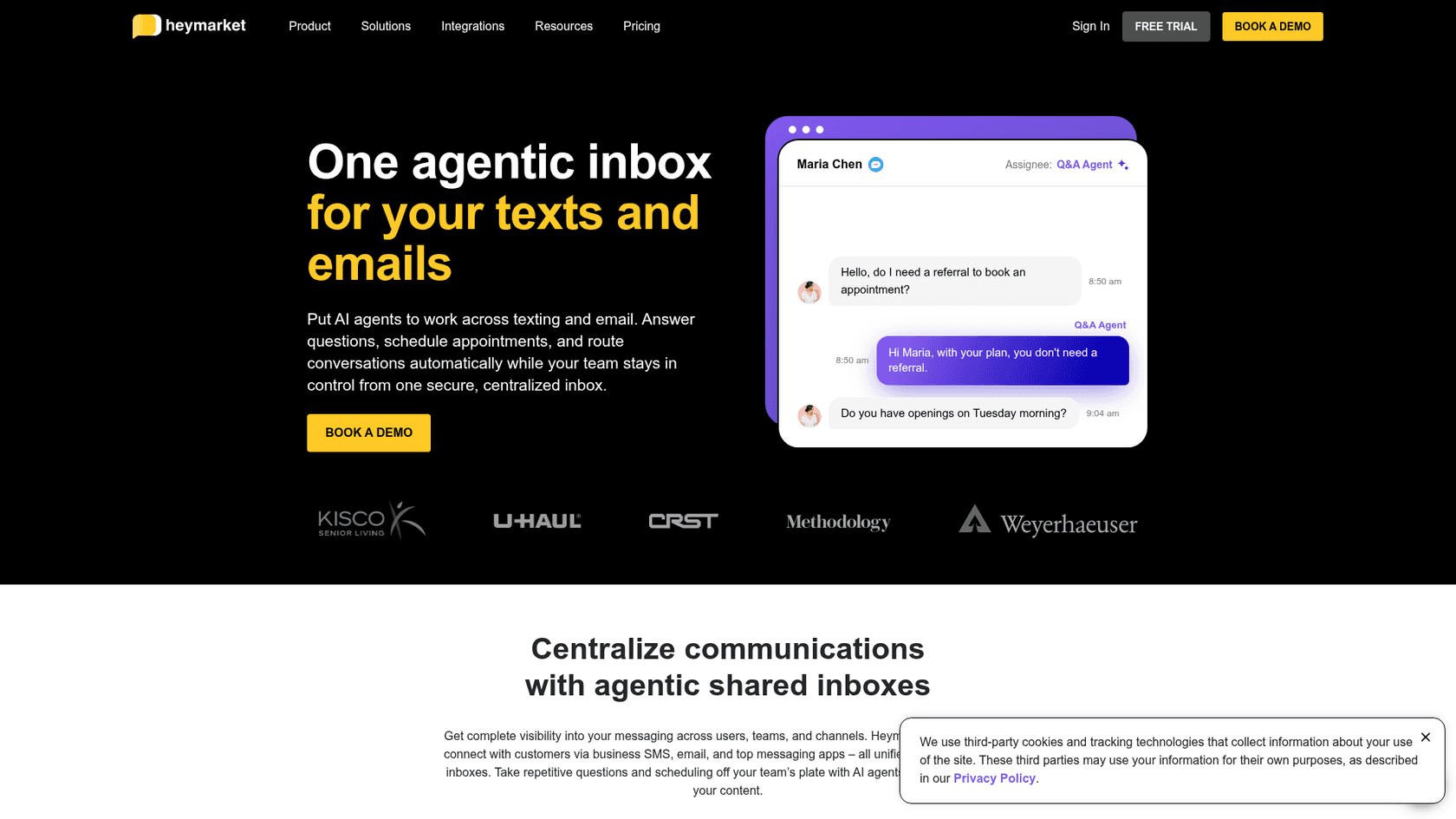
Heymarket is a business text messaging platform. Your team gets shared inboxes with company phone numbers, and everyone reads and replies to customer texts and emails from one place instead of from personal phones. It was started by the team behind the project management app Manymoon, per its about page, and the homepage says it has secured 500 million+ business texts.
I write a lot of these reviews from the search side, and the search for "heymarket review" is rarely idle curiosity. It is usually a support or ops lead who already decided texting is the channel and now wants to know two things: will it play nicely with the helpdesk or CRM they already pay for, and what will the bill look like in month three. That's how this post is organized.
How I put it together: I read Heymarket's pricing page and the pricing data behind it, the AI agent and integration pages, its help center articles on message credits, and the Zendesk Marketplace and HubSpot listings. Then I read through the G2 and Capterra reviews. I didn't run Heymarket on a live queue, so the hands-on parts of this review are the docs, the product pages and what verified users say.
What does Heymarket do well?
Heymarket's strength is that it treats business texting as team work, not as one person's phone. Assignments, private comments, templates, scheduled messages and a shared inbox per department are on every plan. That's the same reason teams move email out of personal mailboxes, and the shared inbox vs ticketing trade-off applies here too.
Texting channels and compliance
Every plan covers SMS and MMS, text-enabling your existing business number, and porting a number in, which covers most of what SMS support for ecommerce needs. Plus adds email, a website chat widget, Facebook Messenger, Instagram and Apple Messages for Business, and RCS rich media on annual plans. WhatsApp is Enterprise-only in the plan comparison, which matters if you were hoping to run a WhatsApp customer service inbox on a mid-tier plan.
The compliance tooling is where Heymarket earns its keep. 10DLC registration is handled for a flat $10 a month per campaign, opt-outs like STOP and UNSUBSCRIBE are honored automatically, and quiet hours stop texts going out at 2am. If you've ever had a carrier filter your texts because a registration was half-done, you know why this is worth paying for.
AI agents
The newest part of Heymarket is its AI agents, and they're on Plus and above. There are three on the product page:
- Q&A Agent answers questions from a knowledge base you build out of PDFs and web pages, and links each answer back to its source.
- Scheduling Agent works like an AI scheduling assistant: it spots booking intent, offers open slots, and books, reschedules or cancels appointments with a calendar confirmation.
- Lead Enrichment Agent pulls name, company, intent, budget and timeline out of the conversation and pushes it to your CRM, a lighter take on dedicated lead qualification tools.
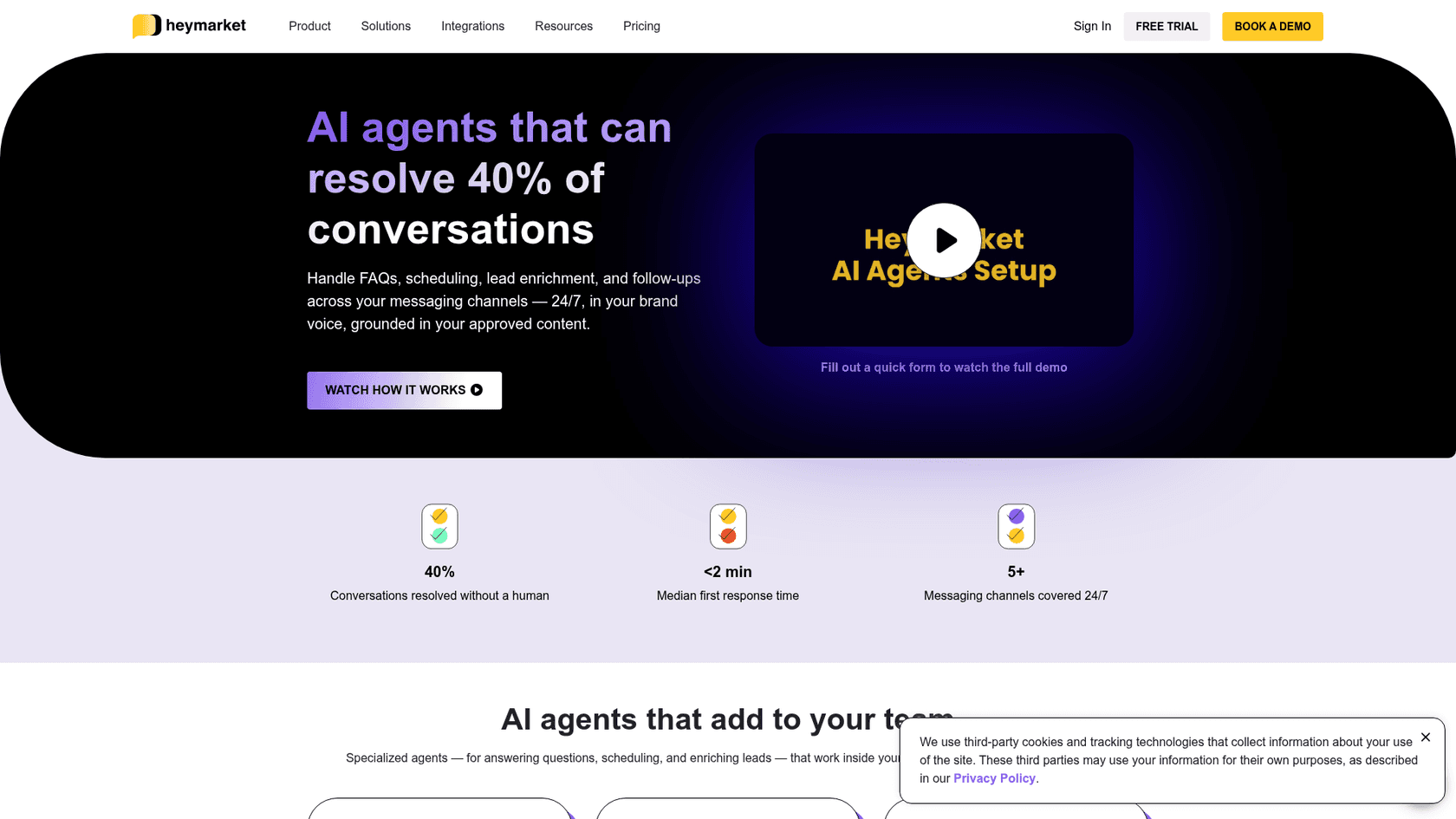
The part I like is the control model. Each inbox runs in autonomous mode, where the agent sends replies itself, or supervised mode, a human-in-the-loop setup where it drafts and a teammate approves. You can add routing rules so a complaint goes to a person with the whole thread attached. That's the right default for regulated industries, and it lines up with what I'd recommend in any AI handoff setup.
The headline numbers are Heymarket's own: "AI agents that can resolve 40% of conversations" and a median first response time under 2 minutes. Treat the 40% as a vendor ceiling, not a forecast for your inbox, because the share an agent can close depends on how much of your volume is repeat questions. Measure both numbers on your own inbox in week one.
Below the agents sit smaller AI helpers: suggested replies on Pro, plus translation, conversation summaries and sentiment analysis on Plus, all listed on the AI texting page. Translation covers French, Chinese and Spanish to and from English.
Zendesk, HubSpot and Salesforce integrations
The integrations decide whether Heymarket becomes part of your stack or a second inbox your team forgets to check. HubSpot is the deepest: the HubSpot Marketplace listing shows 4.7 stars from 29 reviews and 500+ installs, with texts logged to the contact timeline and SMS steps inside HubSpot Workflows. It works on every plan, and it pairs well with AI for HubSpot on the ticket side. If HubSpot is your helpdesk too, my HubSpot review covers what Service Hub adds.
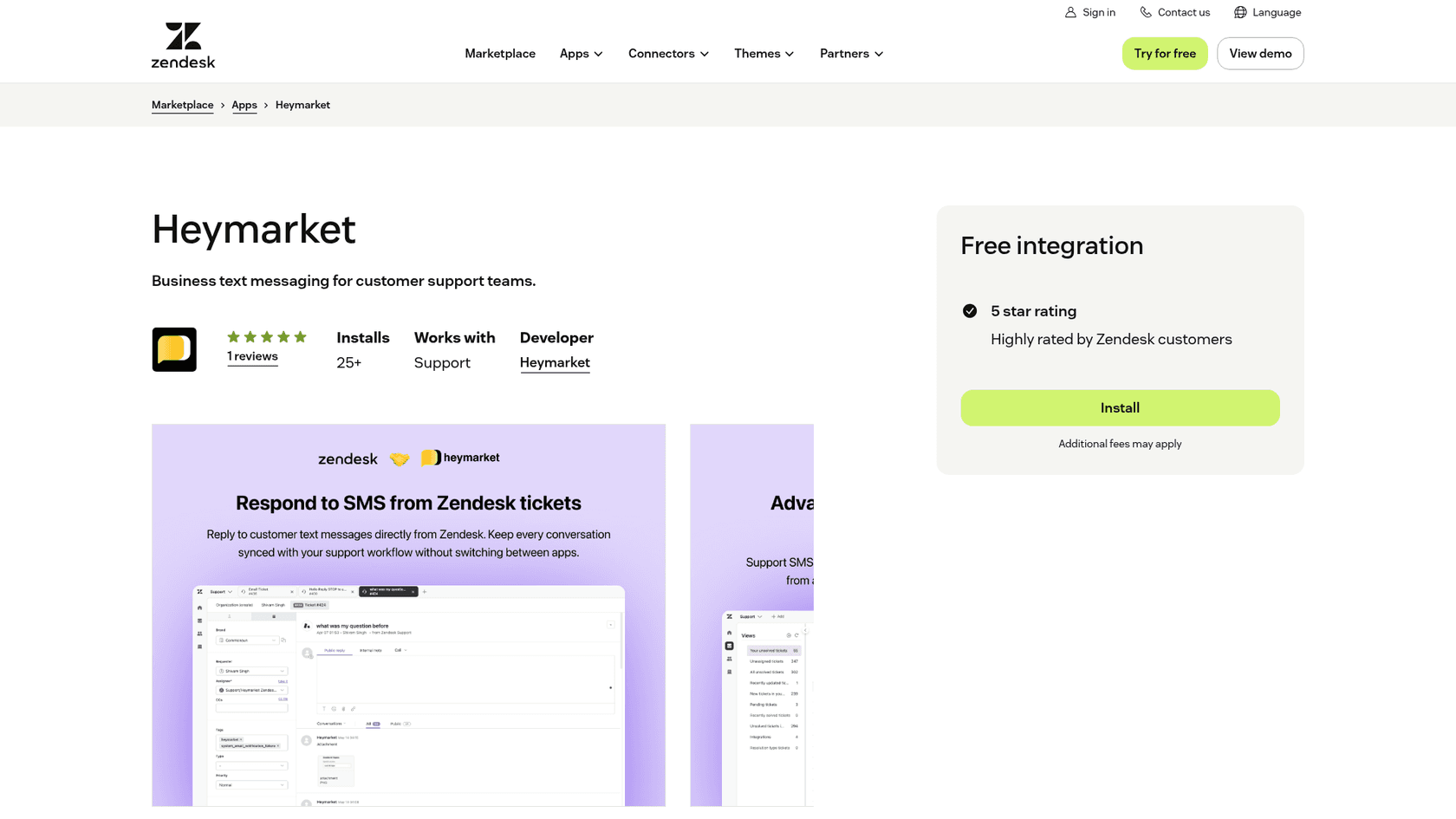
For Zendesk, incoming texts create tickets automatically, agents read and reply from a Heymarket widget inside Zendesk, and Zendesk groups and brands can map to separate inboxes. It needs Plus, and it's a lighter route than Zendesk's own omnichannel setup if texting is your only extra channel. The app is listed as a free integration on the Zendesk Marketplace, where it shows 25+ installs and one review, version 1.4, last updated August 12, 2026.
Salesforce is the odd one out. It's only available on Pro, and as an add-on at $7.50 per user a month on annual billing ($9 monthly). For a 10-person Salesforce team that's another $75 a month on top of Pro seats, worth weighing against what Salesforce Service Cloud already costs you. Plus also unlocks Help Scout, Shopify, Slack, Microsoft Teams, Aircall, Clio and Zapier.
An MCP server for AI assistants
This one surprised me. Heymarket builds its own MCP server (a Model Context Protocol endpoint), so Claude, ChatGPT or Cursor can work inside your Heymarket team with your permissions. You can ask "what's unanswered across all my inboxes, grouped by assignee?", search message history, build a contact list (up to 500 contacts at a time) or stage a broadcast. It's included on Plus and Pro, and the page lists 34 tools.
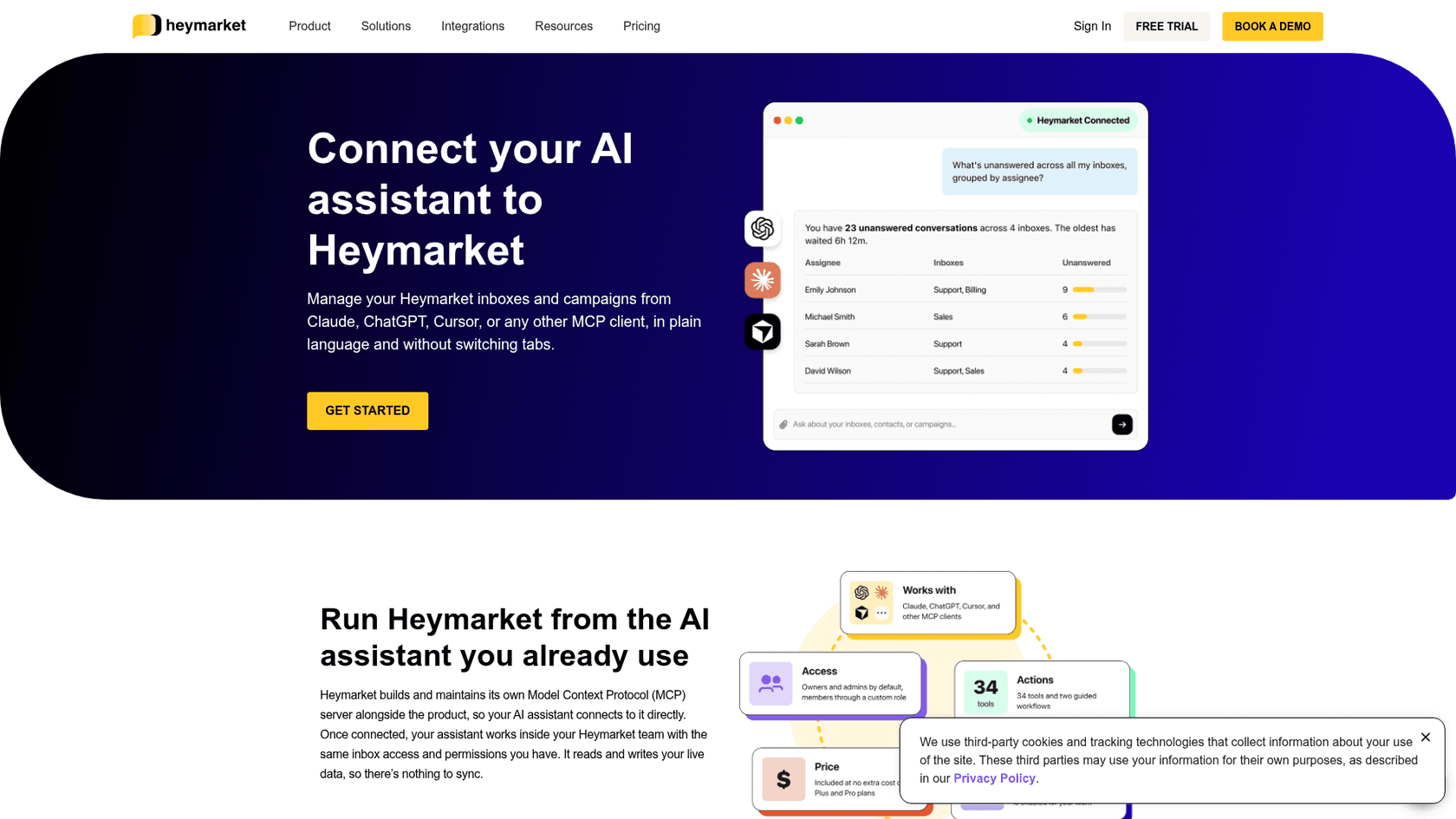
The guardrails are thoughtful. Broadcasts need an admin to approve them on Heymarket's own server, and the assistant can't create tokens, change roles or switch off compliance controls. One line on the page is worth reading twice, though: "One-to-one replies skip admin approval". If someone points an assistant at the inbox and tells it to reply, it can text a customer directly, so keep your client's confirmation prompt on. More on what an MCP server does if the idea is new.
This is also where the comparison with eesel gets concrete. The eesel CLI puts the same eesel teammate you'd use in the dashboard into a terminal. You install it with npx @eesel/cli, connect a helpdesk with eesel integrations connect zendesk, chat with the agent through eesel chat, and handle held actions with eesel approvals. Every command prints JSON, so Claude Code, Codex or Cursor can drive the whole setup, and the workspace also works as an MCP server. The difference in scope: Heymarket's MCP lets an assistant operate a texting inbox, while the eesel CLI lets you or a coding agent set up and run the AI teammate that works your helpdesk queue. I wrote up the CLI for AI agents idea separately.
How much does Heymarket cost?
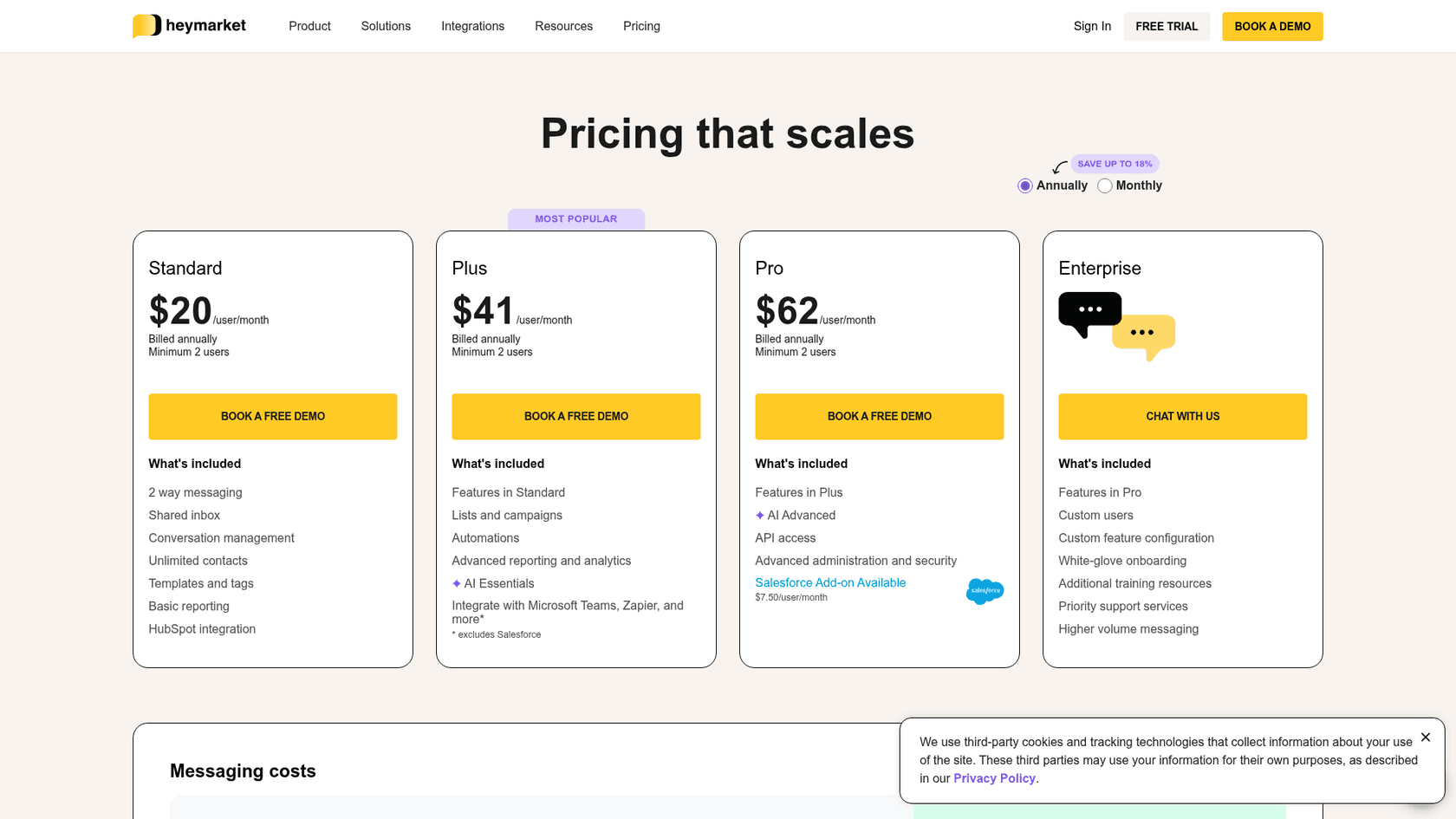
Heymarket bills two things: seats and message credits. Seats are per user per month, and every plan needs at least two users. The prices below are the ones on the Heymarket pricing page; the monthly column is what the page shows when you flip the toggle to monthly.
| Plan | Annual billing | Monthly billing | What it adds |
|---|---|---|---|
| Standard | $20/user/month | $24/user/month | Two-way texting, shared inbox, templates, unlimited contacts, basic reporting, HubSpot and Google Drive |
| Plus | $41/user/month | $49/user/month | Lists and campaigns, automations, AI agents and AI helpers, email and social channels, Zendesk, Help Scout, Shopify, Slack, Teams, Zapier, MCP server |
| Pro | $62/user/month | $75/user/month | Suggested replies, API, CSAT surveys, HIPAA, custom roles, contact export, inbox transfer, 7-day support, Salesforce add-on |
| Enterprise | Custom | Custom | WhatsApp, white-glove onboarding, message import, priority support, higher volumes |
The toggle says annual billing saves "up to 18%", and the FAQ describes it as two months free. Salesforce is $7.50 per user a month on annual billing and $9 on monthly, and Pro only. SAML SSO and directory sync are separate add-ons on Pro, without a published price.
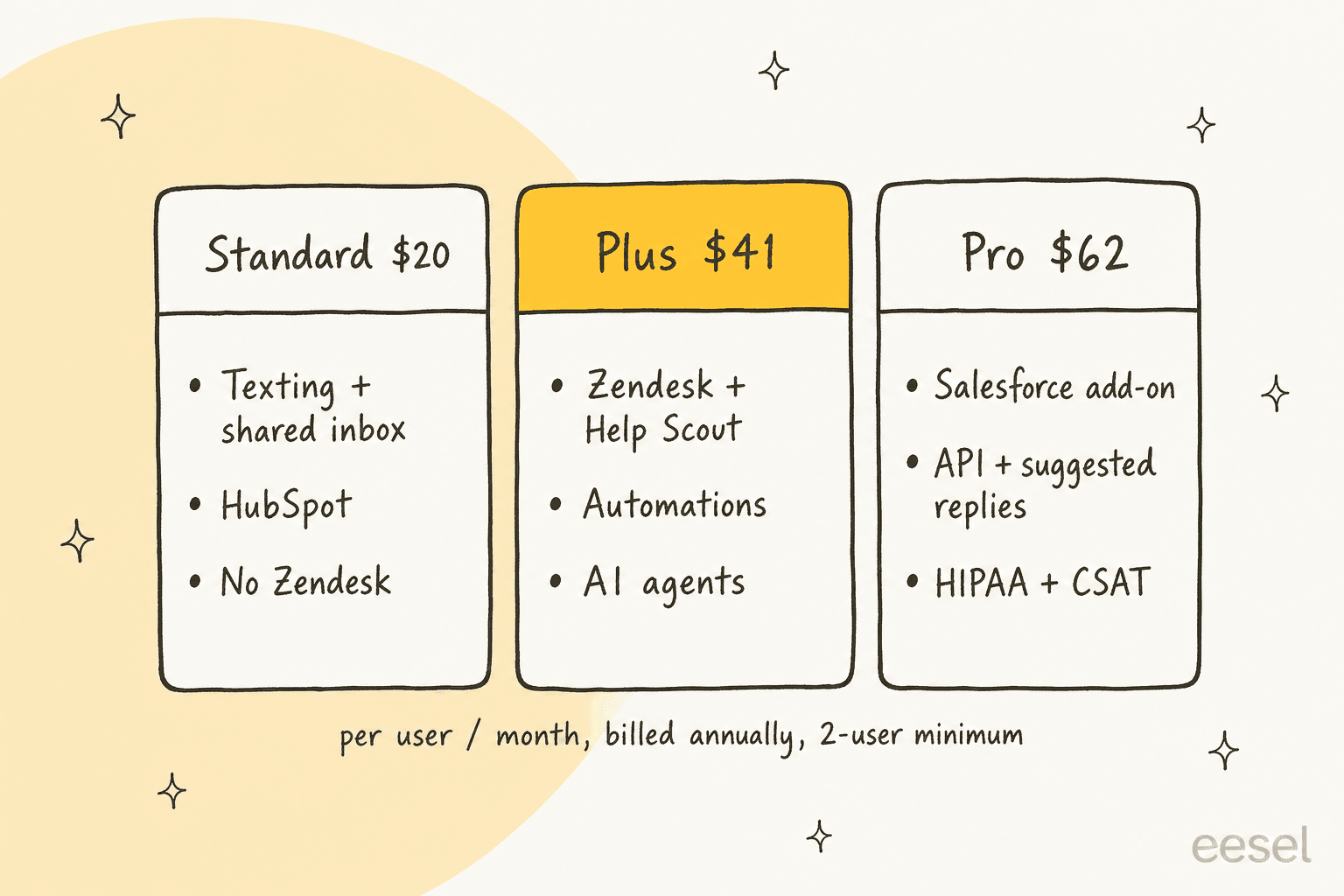
For a support team, the real entry price is Plus at $41 a seat, not Standard at $20. Standard has no Zendesk, no automations and no AI agents. If you need HIPAA or the API, the floor moves to Pro. And for a Zendesk team, all of this sits on top of your Zendesk plan.
How do Heymarket message credits work?
Every message burns credits from a monthly bundle. The page shows 1,000 credits a month at $0.03 each by default, and the message bundles help article lists the volume tiers:
| Credits committed per month | Price per credit |
|---|---|
| 500 to 9,999 | $0.03 |
| 10,000 to 24,999 | $0.025 |
| 25,000 to 49,999 | $0.02 |
| 50,000 and above | $0.015 |
On monthly billing the pricing page tops out at $0.025, so the two cheapest tiers are for annual commitments. Credits map to channels like this: one SMS or RCS text segment (160 characters) is 1 credit, 10 emails are 1 credit, an MMS is 2, an RCS rich media message is 3, a WhatsApp message is 1, and an AI agent message is 3 per segment. Inbound and outbound both count.
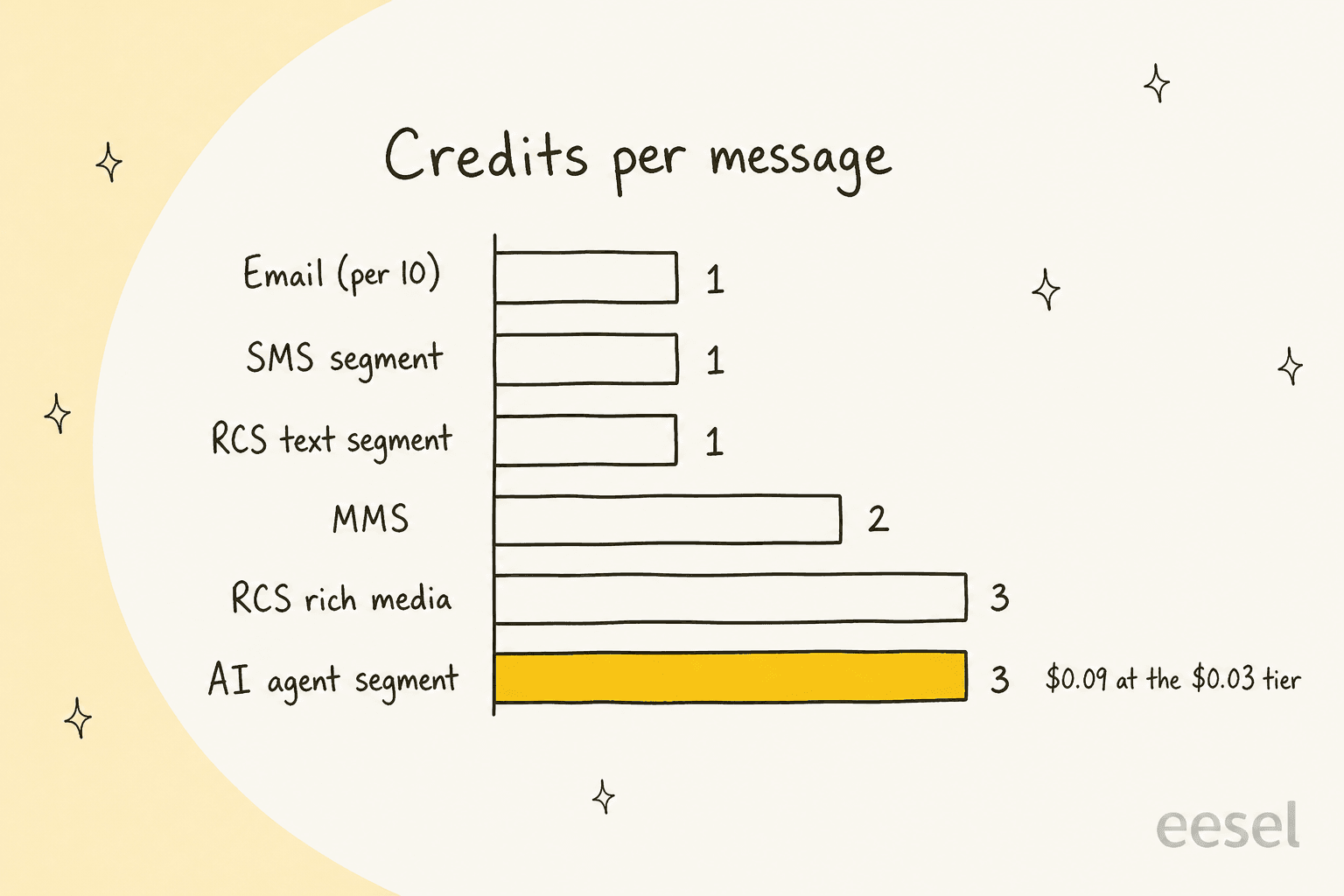
That last line is the one to plan around. The help article spells it out: an AI agent credit is 1x for the message plus 2x for the agent, so each AI agent segment costs $0.09 at the $0.03 tier. A long answer that runs to two segments is $0.18. The more you lean on the agents, the faster the bundle drains.
Two more costs sit outside the seat price. 10DLC registration is $10 a month per campaign. And if you go over your bundle, Heymarket adds a credit bundle automatically, and the bigger bundle stays on your subscription at renewal until you ask to reduce it. The two sources disagree on the size of that top-up: the pricing page example adds exactly the 500 credits you went over, while the help article example adds a full 1,000-credit bundle and renews at 2,000. Ask sales which one applies to your contract.
What would a support team actually pay?
Take one buyer: a 5-person support team on Plus, billed annually, sending 3,000 SMS segments a month and letting the Q&A agent send another 1,000 segments, with one 10DLC campaign.
- Seats: 5 x $41 = $205
- Credits: 3,000 + (1,000 x 3) = 6,000 credits x $0.03 = $180
- 10DLC: $10
- Total: $395 a month, or $435 on monthly billing (5 x $49 seats)
Without the AI agent, the same team pays $305 a month annually. The agent's 1,000 segments add $90, which is worth it if those are 1,000 texts nobody on the team had to type. Divide your total by the conversations you handle to get a cost per ticket, then plug in your own numbers below.
What do Heymarket users say?
Heymarket scores 4.6 out of 5 from 442 reviews on G2, with 74% five-star and 21% four-star, and 4.5 from 47 reviews on Capterra. G2's own summary of the Heymarket reviews puts ease of use (11 mentions) and responsive support (10 mentions) on top.
The praise is about replacing phones with a team inbox. Operations teams with drivers, shoppers or shift staff come up again and again:
"Previously we used actual cell phones to message our team, this left us segmented and unable to respond when the staff on shift didn't have the physical phone to respond."

"We run a shopping app, and HeyMarket allows for easy communication between shoppers, drivers, and the fulfillment team."
Setup speed comes up too. One reviewer who texts staff groups by role wrote "I was able to get up and running with this product in under 5 minutes" in their G2 review.
The complaints cluster around plan gating, sync lag and fit. G2's summary lists slow support (4 mentions), no multi-recipient texting in one go (4 mentions) and clunky search (3 mentions). Two Capterra reviews say it more directly:
"What I didn't like about Heymarket was that some of the more advanced automation and integration features were included in the higher-tier plans, plus the message sync between platforms sometimes had lag, especially during high-volume times."

"It is only a texting service and does not integrate with our PMS."
An older Capterra review from a Zendesk team (August 2022) reported that logging into Zendesk through the Heymarket app sometimes failed, so they had to send texts from the Heymarket web app instead. One review is not a pattern, and the app has been updated since, but with a single review on the Zendesk Marketplace there isn't much recent public data either way.
Where does Heymarket fall short?
Every point here is a real limit, not a deal-breaker for everyone.
- US and Canada only. The AI agents sign-up form states "Heymarket is currently available in the US and Canada", and the HubSpot listing says the same about that integration.
- Support teams start at Plus. Zendesk, Help Scout, automations and AI agents are not on Standard, so a two-person Zendesk team pays at least $82 a month in seats before a single credit.
- AI texts cost three times more. At 3 credits per segment, a busy Q&A agent can double a credit bill. Watch the usage reports for the first month.
- WhatsApp is Enterprise-only, and RCS rich media needs an annual plan and a carrier verification that takes 6 to 10 weeks with extra fees.
- Overage sticks. An overage bundle stays on your renewal unless you ask to drop it.
- Thin public signal on the Zendesk app. 25+ installs and one review, against 500+ installs and 29 reviews on HubSpot. HubSpot is clearly where most of the integration users are.
- Support hours vary by plan. Standard and Plus get 9AM to 8PM Eastern on weekdays, Pro and Enterprise get 7 days a week.
Is Heymarket worth it? My verdict
Heymarket review score: 4 out of 5. For a US or Canadian team that needs texting to be a shared, compliant, logged channel, it does the job well, and the HubSpot integration is the deepest of its integrations, with 500+ installs behind it. The AI agents are a reasonable first version with the right human review controls. They aren't the reason to buy it yet.
Pick Heymarket if texting is a core channel for you (appointments, deliveries, field staff, lead follow-up), you run HubSpot, and you want 10DLC and opt-outs handled for you. Skip it if you're outside North America (a WhatsApp Business API provider covers more countries), if texting is a small slice of your volume, or if what you really want is AI working through your whole helpdesk queue, which is a different job. If you're still comparing texting tools, my AI for SMS support roundup and shared inbox software list cover the field.
Where does eesel fit next to Heymarket?
Heymarket and eesel do different jobs, and the cleanest setups use each for its own. Heymarket is the texting layer: the numbers, the compliance, the inbox where texts arrive. eesel is an AI teammate platform where you hire ready-to-work teammates, and for support that's the AI helpdesk teammate, which works inside Zendesk, Freshdesk, Gorgias, HubSpot, Help Scout or Salesforce. It reads every ticket, sorts it, leaves notes and drafts or sends replies from your macros, help center and past tickets. My best AI for Zendesk roundup compares it with the other options.
To be straight about scope: eesel's channel docs list a website chat bubble, an inline embed, a public chat link, Zendesk Messenger, Freshchat and phone calls. Texting isn't one of eesel's own channels. If you need to send and receive SMS, you still need something like Heymarket. What eesel adds is the work on the tickets those texts become, which is what AI for Zendesk means in practice.
Swiftreg, a UK number plate seller, shows the split. Two eesel agents run on its Zendesk and handled about 2,100 tickets between August 8 and September 8, 2026, sending about 1,500 public replies and leaving about 1,050 internal notes for the team. When a private seller confirms a plate is still for sale, eesel replies to every waiting buyer and tags the ticket so an SMS goes out. The texting stays in the texting tool. The thinking happens on the ticket.
Scheduling is the other overlap. Heymarket's Scheduling agent books appointments by text. Lesson Pro, which runs GOSKATE and other lesson brands, uses eesel on two Zendesk accounts to work out which brand a ticket belongs to, draft about 560 replies a month for a person to send, and search past tickets for instructors near a lesson. That's booking support from the helpdesk side rather than the SMS side, and it scales to volumes like smava's 27,000 Zendesk tickets a month.
I've watched eesel go live on real support queues for years now, and the lesson that holds is the one Heymarket's supervised mode is built around: start with drafts, check them against what your team would have sent, then widen what the agent may send on its own. A support lead at an SMS and messaging platform who runs eesel on their own queue put it this way:
"It answers confidently but not too confidently, and training it has been super easy."
Try eesel
If Heymarket is already turning your texts into Zendesk tickets, eesel is the teammate that picks those tickets up. It sorts and tags each one, drafts the reply from your own macros and past answers, and hands anything sensitive to a person with a note, the way Swiftreg runs it on about 2,100 tickets a month. Pricing on eesel's pricing page is a fixed monthly batch where a ticket or a chat is one credit, starting at $299 for 500, with 100 free credits to try it on your own queue.

Try eesel on your Zendesk queue for free.
Frequently Asked Questions
What is Heymarket used for?
Heymarket is a business texting platform: SMS, MMS, RCS and email in a shared inbox, with AI agents that answer FAQs, book appointments and enrich leads. Support, sales and operations teams in the US and Canada use it to text customers from one company number instead of personal phones.
How much does Heymarket cost?
Heymarket costs $20, $41 or $62 per user a month billed annually ($24, $49 or $75 monthly), with a two-user minimum. Messaging is billed separately at $0.03 per credit below 10,000 credits, plus $10 a month per 10DLC campaign. Compare that with how Zendesk pricing works if texting would sit next to a helpdesk.
Is Heymarket any good for customer support?
In my Heymarket review I rate it 4 out of 5. It is a strong texting inbox with real compliance tooling and a Zendesk app that turns texts into tickets, but the Zendesk, Help Scout and AI agent features start on Plus, and the AI is newer than the texting core. For ticket-level AI inside the helpdesk, look at AI for Zendesk.
Does Heymarket have AI agents?
Yes. Heymarket sells a Q&A agent, a Scheduling agent and a Lead Enrichment agent on Plus and above, each running in autonomous or supervised mode per inbox. Every AI agent message costs 3 credits per segment, so check your resolution rate before you let it answer everything.
Does Heymarket integrate with Zendesk and HubSpot?
Yes. HubSpot works on every plan and logs texts to the contact timeline, while Zendesk needs Plus and creates a ticket for every incoming text. Teams that want AI on those tickets can add eesel for Zendesk or eesel for HubSpot.
Is Heymarket available outside the US?
No. Heymarket says it is currently available in the US and Canada, and its HubSpot integration is limited to the same two countries. Teams elsewhere usually text through a WhatsApp Business API provider instead.
Is Heymarket HIPAA compliant?
Heymarket is SOC 2 Type 2 on every plan, and HIPAA is enabled on Pro and Enterprise only. Healthcare teams should also check data retention and PII hiding, which are Pro features too, and read up on AI handoff rules before switching on autonomous replies.