What support playbook software actually does
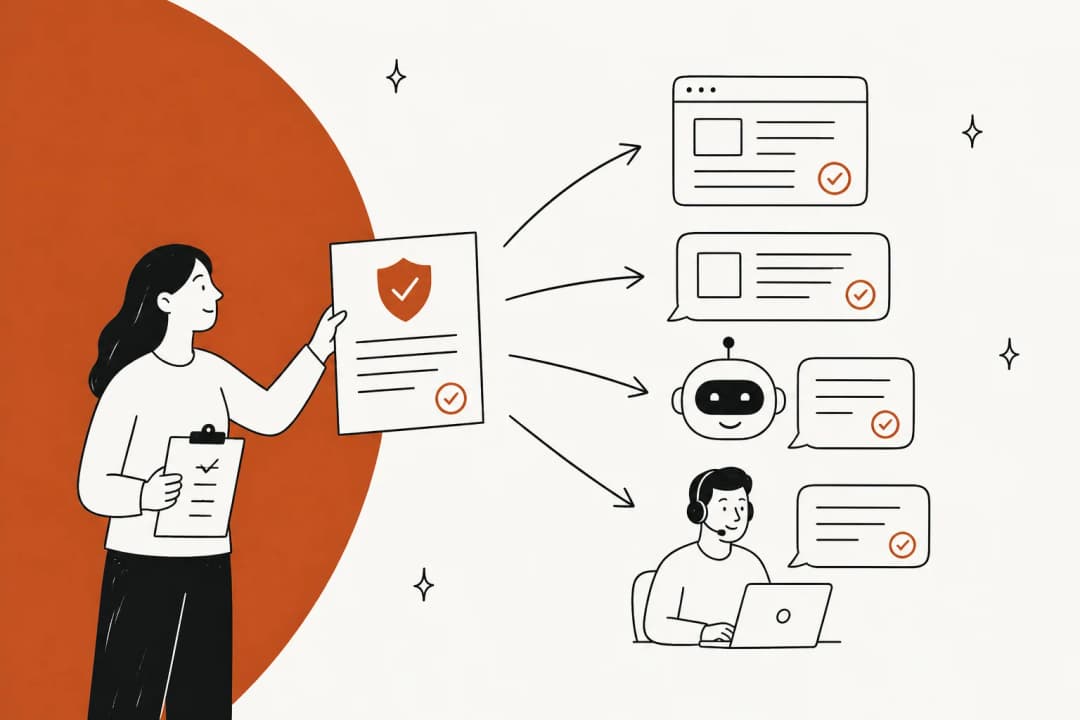
A support playbook is the set of steps, branches and escalation rules your team follows for a type of ticket: what to check, what to do in each case, when to hand off. The software's job is to put those steps in front of whoever is handling the ticket at the moment they need them.
I work eesel's support queue every day, and the honest truth is that most playbooks fail at that second part, not the first. Teams write good procedures. Then the procedure lives in a separate tab, the agent has four chats open, and the step that mattered gets skipped. One former eBay support agent described the job on Hacker News as "4 concurrent chats, offering pre-programmed macros often pointing to terribly written documentation" (Hacker News). Nobody reads a wiki page in that state.
So the useful way to compare these tools is by who does the work at ticket time:
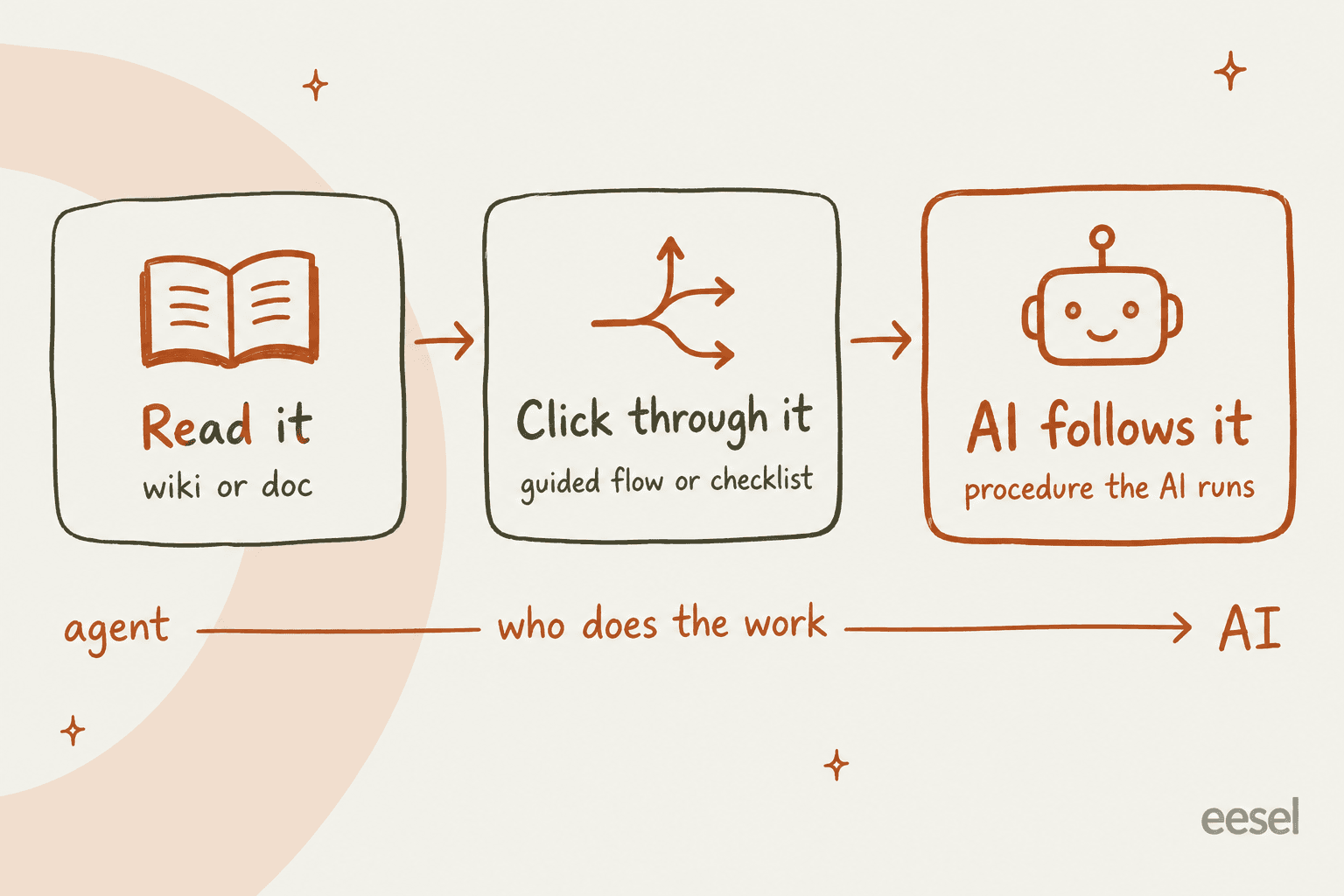
- Read it. A knowledge base or wiki the agent opens and reads. Cheapest, and the one most likely to be ignored mid-ticket.
- Click through it. A guided flow or checklist inside the ticket. The agent answers a question, the tool shows the next step. Great for compliance and new hires.
- AI follows it. The procedure becomes instructions an AI agent runs on the ticket, either answering customers directly or drafting replies for an agent to approve.
These aren't exclusive. Plenty of teams keep the source in a wiki and run it through an AI layer. But knowing which kind you're buying stops you from paying for guided flows when what you actually wanted was fewer tickets. If you're still writing the playbooks themselves, start with my customer support SOP template and come back.
How I picked these tools
I looked at each tool's own pricing page, help docs and product screenshots, and at what support teams say about them on Reddit, Hacker News and G2. I scored them on five things:
- Reachable from the ticket. Does the playbook show up next to the ticket, or does the agent have to go find it?
- Branching. Can it handle "if the order shipped, do this; if not, do that," or is it a flat page?
- Can AI use it. Can an AI agent follow the playbook, or only a human?
- Keeping it current. Owners, review dates, verification, version history.
- Real cost. Published prices, plan gates, onboarding fees.
I left out any tool where the playbook feature only exists in a sales deck, and I skipped general project tools that support teams rarely use for this job.
Support playbook software compared
| Tool | Type | Where agents see it | Branching | AI follows it | Keeping it current | Helpdesk fit | Starting price | Free option |
|---|---|---|---|---|---|---|---|---|
| eesel | AI playbook | Inside your helpdesk (replies or drafts) | If/then in plain-language instructions | Yes | Simulation on past tickets; corrections saved to instructions | Zendesk, Freshdesk, Gorgias, Front, Help Scout, HubSpot, Salesforce, Jira Service Management | $299/mo for 500 credits, unlimited seats | 100 free credits |
| Stonly | Guided flow + AI | Ticket sidebar (Enterprise) | Decision trees, branching on ticket data | Yes, Business Process Agents (Enterprise) | Versioning, review flows, Knowledge Agents | Zendesk, Salesforce, Freshworks, ServiceNow apps; trees in Front, Gorgias, Help Scout | Quote only | Basic: 400 guide views, 5 guides |
| Guru | Wiki (cards) | Browser extension or side panel | No | Answers questions; doesn't run steps | Mandatory card verification | Any browser-based helpdesk via extension | Quote only | No |
| HubSpot playbooks | Guided cards | Ticket record right panel | Questions with answer options | No | Version history, usage analytics | HubSpot only | Service Hub Pro $90/seat/mo + $1,500 onboarding | No |
| Ada Playbooks | AI playbook | Runs in Ada's AI agent | IF/ELSE and GO TO steps | Yes | Test Playbook, peer review guidance | Ada's own integrations | Quote only | No |
| Front Autopilot | AI playbook | Inside the Front conversation | Steps plus natural language | Yes | Not documented | Front only | Front seat + $0.05/conversation | No (waitlist) |
| Zendesk procedures | AI playbook | Zendesk AI agent | Procedure map with condition blocks | Yes | Version history per procedure | Zendesk only | Suite Team $55/agent/mo + $1.50-$2.00 per automated resolution | No |
| Process Street | Checklist | Run link in the Zendesk sidebar | Conditional logic, enforced order | No | Approvals, restore revisions | Zendesk via webhook or Zapier | Contact sales | 14-day Pro trial |
| Confluence | Wiki | Separate tab, Rovo search | No | Rovo answers questions | Page versioning on every plan | Jira Service Management natively | Standard $5.42/user/mo | Free for 10 users |
1. eesel
Best for: teams that want the playbook followed on every ticket, by AI, inside the helpdesk they already use.

I'll be upfront that I work at eesel, so weigh this one accordingly. I'm putting it first because it answers a different question than the rest of this list. Most playbook tools help a human remember the steps. eesel's AI helpdesk teammate does the steps.
What it does
eesel connects to Zendesk, Freshdesk, Gorgias, Front, Help Scout and others, plus the places your playbooks actually live: Confluence, Notion, Google Docs and your macros. It also reads your past tickets, which is where the unwritten parts of a playbook hide. Every team I've talked to has steps their best agents follow that never made it into a doc.
The playbook itself lives on an Instructions page: plain-language response guidelines and workflow steps, written the same way you'd brief a new hire. When a lead corrects an answer in chat, eesel writes that correction back into the instructions, so the fix shows up on the next ticket instead of in next month's training. Before anything goes live, you can run a simulation that replays hundreds of your past tickets and compares eesel's answers with what your team actually sent.
For teams that manage support like code, the eesel CLI exposes the same workspace from the terminal. eesel instructions reads and edits those standing rules, eesel approvals handles the replies waiting on a human, and coding agents like Claude Code can drive it too. A playbook change can go through the same review your team already uses for everything else.
Pros
- Follows the playbook on the ticket, not in a separate tab.
- Learns from past tickets, so it picks up the steps nobody wrote down.
- Simulation against your own history before it answers a real customer.
- One fix updates every future reply, no copies to keep in sync.
Cons
- It isn't a training or sign-off tool. If you need proof every agent read the refund playbook, you still want Trainual or similar.
- No visual decision-tree editor for human agents; the playbook is written instructions.
Pricing
Free plan with 100 credits, no card. Paid plans are fixed monthly credit bundles starting at $299 for 500 credits, where one ticket or chat handled is one credit, with every feature and unlimited seats included (eesel pricing).
My take: pick eesel if the reason you want playbook software is that playbooks aren't being followed consistently and the queue keeps growing. Skip it if what you need is a click-by-click guide for human agents on regulated processes, where Stonly is the better fit.
2. Stonly
Best for: support teams that need human agents to follow exact steps, especially new or outsourced agents.
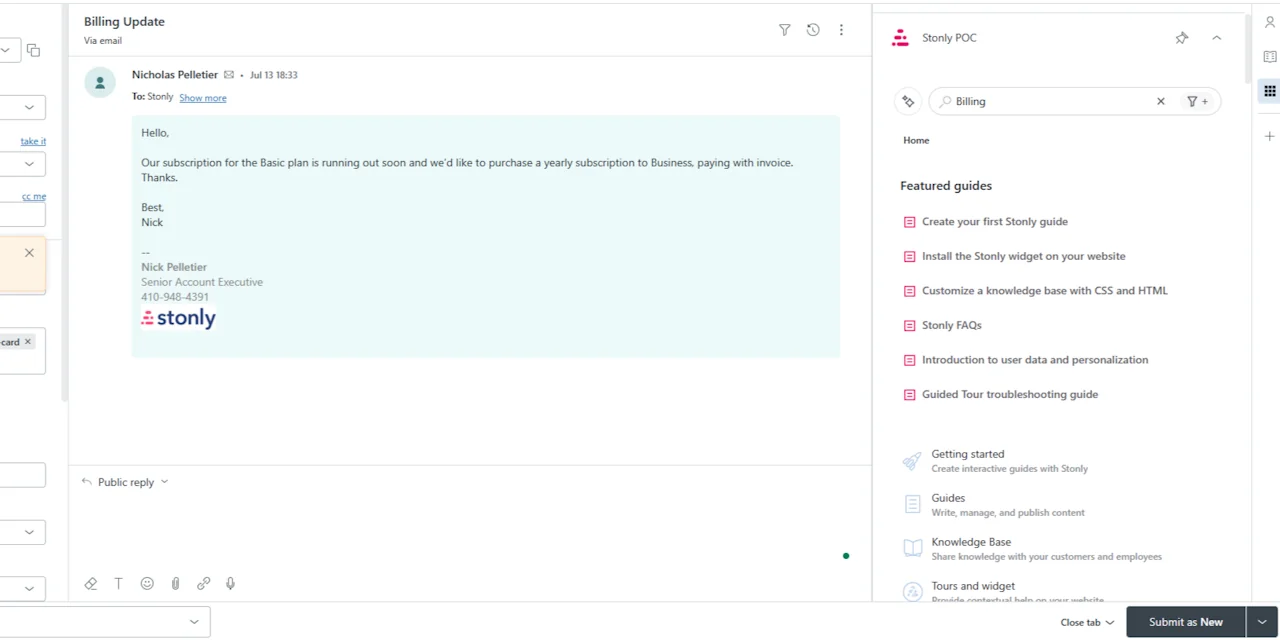
Stonly is the closest thing to "playbook software" in the literal sense. Its own use-case page is titled "Customer support scripts and playbooks," and the whole product is built around interactive guides with branches.
What it does
Inside Zendesk, Salesforce, Freshdesk and ServiceNow, Stonly puts step-by-step guides and decision trees in the ticket sidebar. The guide can read ticket data to pick a branch, fill ticket fields and trigger macros as the agent goes, and record every action each agent takes while following a process. One detail I like: it can save guide progress per ticket, so when a ticket changes hands, the next agent lands on the same step.
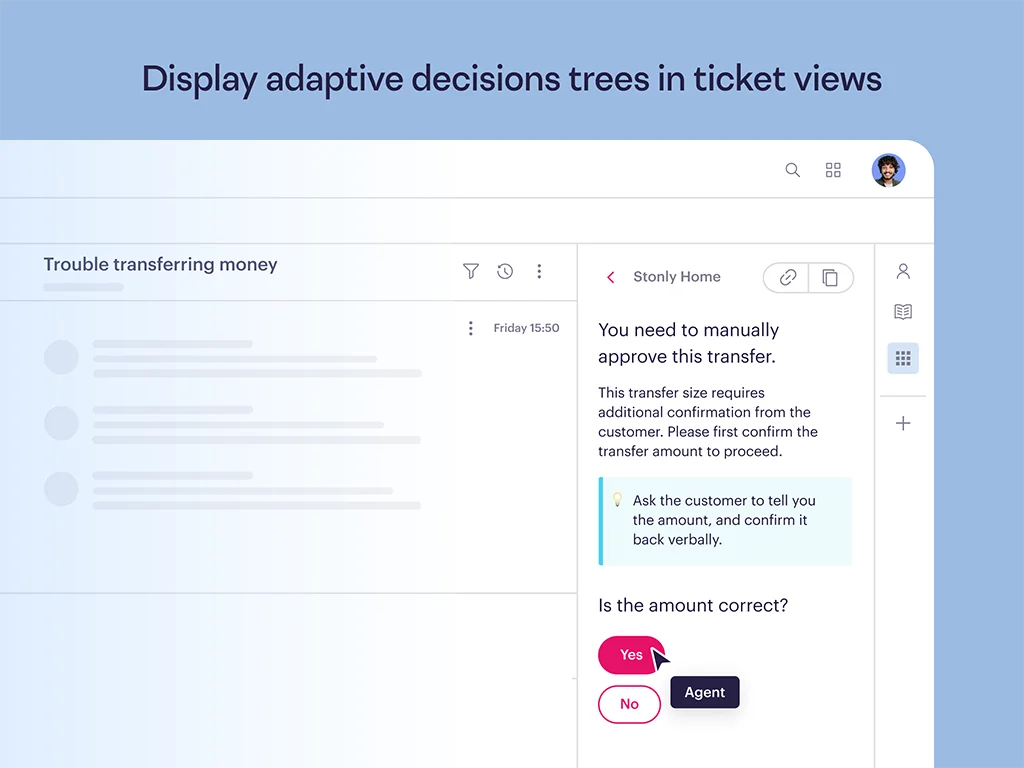
The newer part is AI. Agent Copilot summarizes tickets and suggests guides, and Business Process Agents run the same guides inside a chat with the customer, asking questions at each branch and calling automations. That's a neat idea: one guide serves both the human agent and the AI.
A G2 reviewer at a mid-market health and fitness company put the human side simply:
"Addressing knowledge/process gaps - with the help of the decision tree, Advocates are able to properly diagnose and select the next steps."

Pros
- Real decision trees in the ticket view, driven by ticket data.
- Guides fill fields and trigger macros, so following the playbook also does the admin.
- The same guide can power an AI agent (Enterprise).
- Per-agent tracking is useful for QA and compliance.
Cons
- The helpdesk integrations and AI Agents sit in the Enterprise column, so in-ticket guides mean a sales conversation.
- Building good trees takes real time; someone has to own them.
- One G2 reviewer noted the Zendesk integration "stops working" every few weeks until they log out and back in (G2).
Pricing
Two plans, neither with a public price. Small Business (under 100 employees) includes 1 knowledge base, 4,000 guide views and 5 team members. Enterprise adds helpdesk integrations, AI Agents and SSO. After a 14-day trial, accounts drop to a free Basic plan with 400 guide views a month and 5 published guides (Stonly pricing).
My take: pick Stonly if your playbooks are compliance-heavy or your tier 1 is outsourced, and you need every agent to take the same path. Skip it if you're a small team without someone who can own the guide library.
3. Guru
Best for: teams whose biggest playbook problem is stale content, across support and other departments.
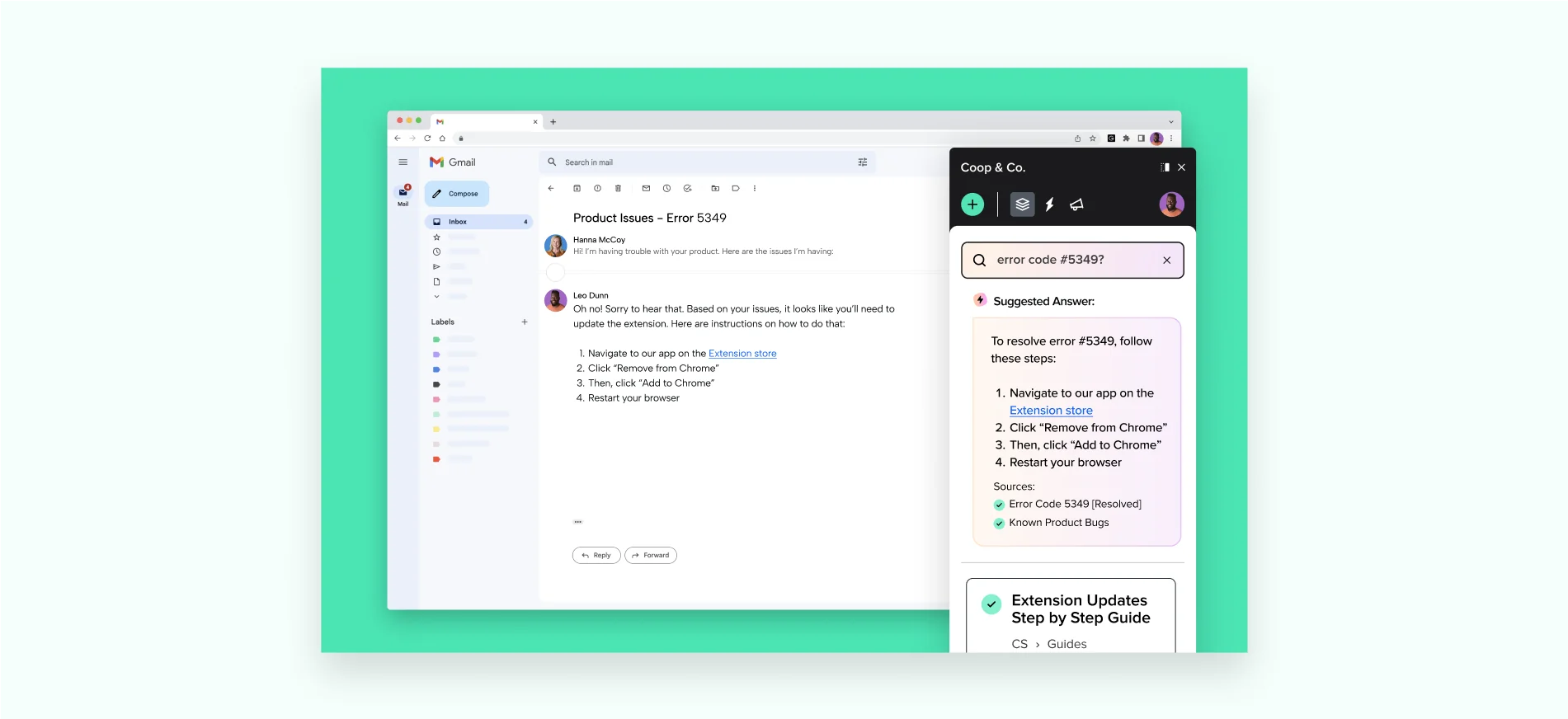
Guru stores knowledge as cards and makes someone responsible for each one. That ownership model is the reason support teams pick it.
What it does
Every Guru card has a verifier and an expiry date, and verification can't be switched off. When a card lapses, it's marked Unverified and lands in the verifier's task queue. For playbooks, that solves the "nobody owns this page" problem I see constantly. One Redditor on r/CustomerSuccess described their Zendesk setup exactly that way: "it's no one's specific job to do it, so it tends to be sidelined" (Reddit).
Inside the helpdesk, Guru works through its browser extension for Chrome, Edge and Opera, plus a newer chat side panel. Knowledge Triggers can surface a card when a page shows certain text. The catch for support: Guru says triggers may not fire on dynamically rendered content "like a customer message in a live chat feed" (Guru).
Pros
- Verification is built in and enforced.
- Works across any browser-based tool, not just one helpdesk.
- Knowledge Agents answer questions with cited sources.
Cons
- Cards are pages, not branching flows. Agents still read and decide.
- Triggers are unreliable on live chat, the place support needs them most.
- Quote-only pricing with a package model, not per seat.
Pricing
Quote only. Guru sells a package of platform, solution engineering and governance, which it describes as "not just a per-seat tool" (Guru pricing). My Guru pricing breakdown has more detail.
My take: pick Guru if your playbooks span support, sales and ops and the real pain is trust in the content. Skip it if you need agents to follow steps in order; it's a library, not a guide.
4. HubSpot playbooks
Best for: support teams already on HubSpot Service Hub Professional or Enterprise.
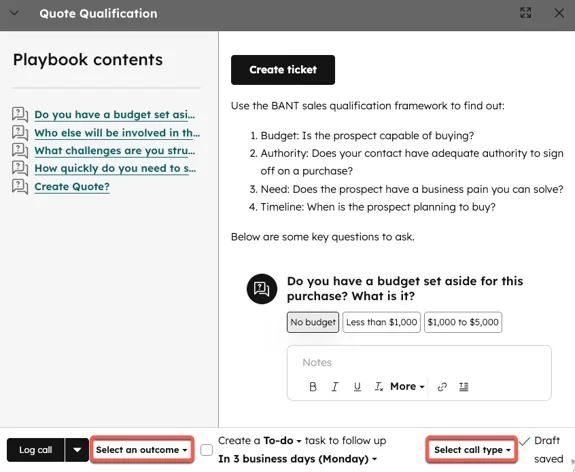
If you run support in HubSpot, you may already own playbook software and not use it. HubSpot's Playbooks tool puts interactive cards on contact, company, deal and ticket records.
What it does
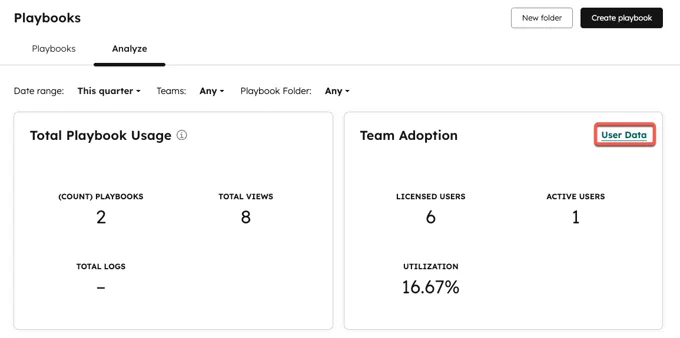
A playbook is a card with content, questions and actions. Agents open it from the ticket's right panel, answer the questions, take notes and log the result to the timeline. You can embed knowledge base articles and snippets, recommend specific playbooks based on ticket properties, and trigger a workflow when a playbook is logged. The Analyze tab shows views, logs and team adoption per playbook, which is a quick way to find the playbook nobody opens.
The plan details matter here. On Service Hub Professional you can create up to 5 playbooks and capture notes. Enterprise raises that to 5,000 and lets answers write straight into ticket properties.
Pros
- Native to the ticket record, no extra app.
- Recommendation rules surface the right playbook automatically.
- Adoption analytics show which playbooks are used.
Cons
- 5 playbooks on Professional is tight for a support team.
- Its heritage is sales calls; logging defaults to a Call engagement.
- I found no HubSpot page connecting Breeze AI to playbooks, so the AI agent doesn't follow them. Customer Agent is a separate product.
Pricing
Playbooks need Sales Hub or Service Hub Professional or Enterprise. Service Hub Professional starts at $90 per seat a month plus a one-time $1,500 onboarding fee; Enterprise starts at $150 per seat plus $3,500 onboarding (HubSpot pricing).
My take: pick HubSpot playbooks if you're already on Service Hub Enterprise; it's free value you're sitting on. On Professional, 5 playbooks won't cover a real support library, so pair it with a knowledge base or an AI layer like eesel for HubSpot.
5. Ada Playbooks
Best for: larger teams that have chosen Ada as their AI agent and want structured procedures for it.
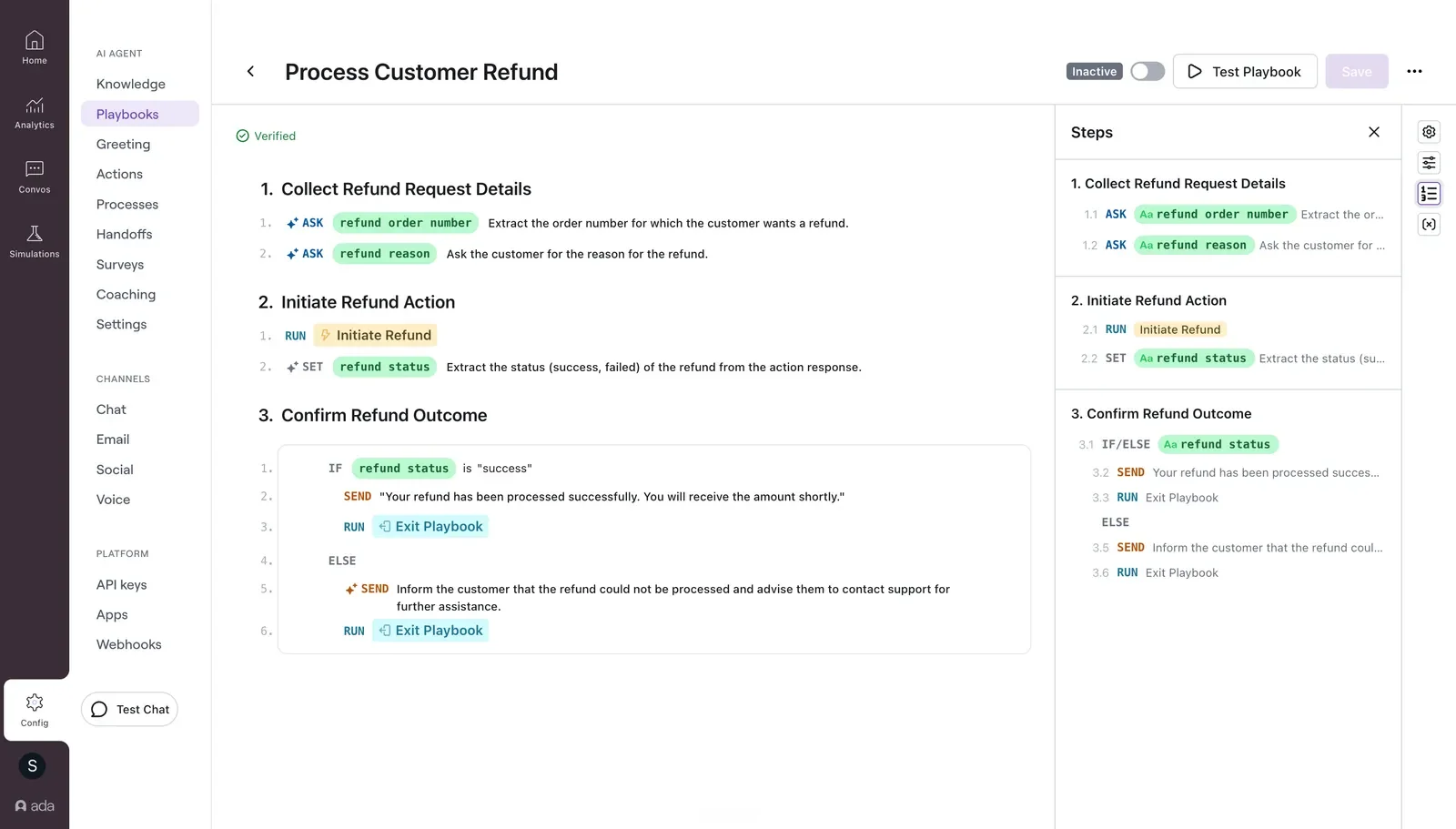
Ada calls its AI procedures Playbooks, and they're one of the more structured takes on the idea.
What it does
Each Playbook is built from six step types: SEND, SET, ASK, RUN, IF/ELSE and GO TO, grouped into sections like "Verify identity" or "Process refund," plus General Guidelines for tone and edge cases. Ada moved away from freeform text to these structured steps in 2026, and accounts onboarded after June 2026 only get the structured version. You can generate a Playbook from a prompt or an existing PDF, which helps if your playbooks already exist as documents.
Ada's best-practice advice is worth stealing for any tool: have someone "with limited context" peer review the playbook, always include an else branch, and give every flow an explicit exit.
Pros
- Very explicit structure, which makes AI behavior predictable.
- Can draft a playbook from an existing PDF.
- Built-in testing before you turn a playbook on.
Cons
- English is the only supported authoring language for Playbooks.
- Playbooks only run inside Ada's AI agent; they don't help human agents in your helpdesk.
- Moving from Classic to structured Playbooks is real rework for existing customers.
Pricing
Quote only. My Ada pricing guide covers what's known.
My take: pick Ada Playbooks if you've already committed to Ada and have the team to build structured flows. If you want AI that learns from the playbooks and tickets you already have, without rebuilding them in a new editor, look at the Ada alternatives first.
6. Front Autopilot Playbooks
Best for: teams on Front who want the AI to work the same conversations their agents do.
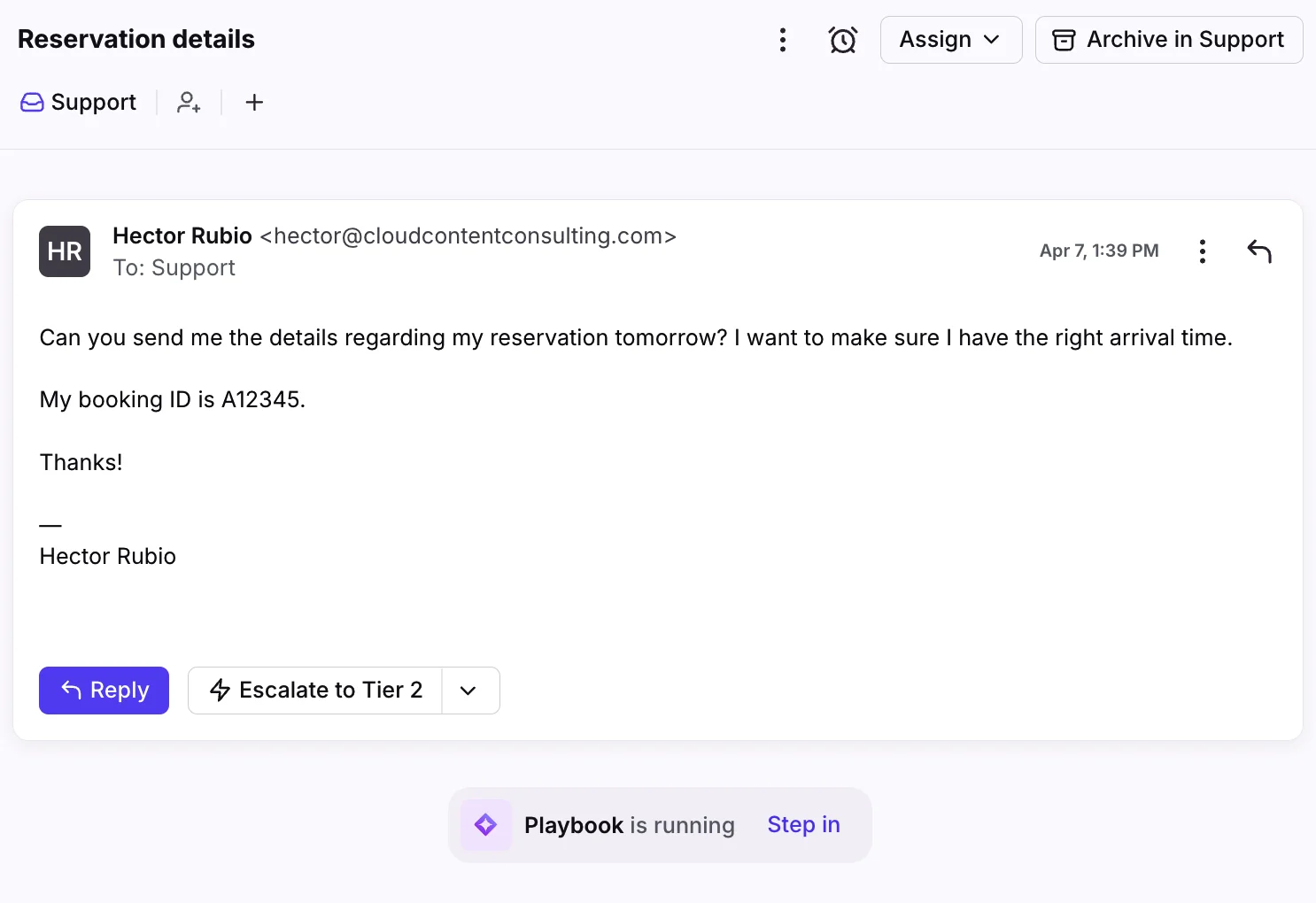
Front's Autopilot Playbooks let its AI handle a conversation by following steps you define.
What it does
Each playbook mixes defined steps with natural-language instructions, in four sections: Steps, Context, Inboxes and Escalation. While it runs, agents see a "Playbook is running" banner on the conversation with a "Step in" option, which is a nice touch for keeping humans close. Autopilot draws on public websites up to 3,000 pages and PDF uploads up to 25 MB each.
Pros
- Lives inside the conversation view agents already use.
- Clear escalation section built into every playbook.
- Low per-conversation price on top of your seats.
Cons
- Rollout is on a waitlist, so you may not get it right away.
- Front-only; if you move helpdesks, the playbooks don't come with you.
- I found no review-date or verification feature in Front's knowledge base docs.
Pricing
Autopilot is $0.05 per conversation, on top of Front seats at $25 (Starter), $65 (Professional) or $105 (Enterprise) per seat a month (Front pricing).
My take: pick Autopilot if you're on Front and can get off the waitlist. If you can't wait, or want the AI to learn from your past conversations too, eesel for Front plugs into the same inbox.
7. Zendesk generative procedures
Best for: Zendesk teams that want their AI agent to follow a written playbook without extra tools.
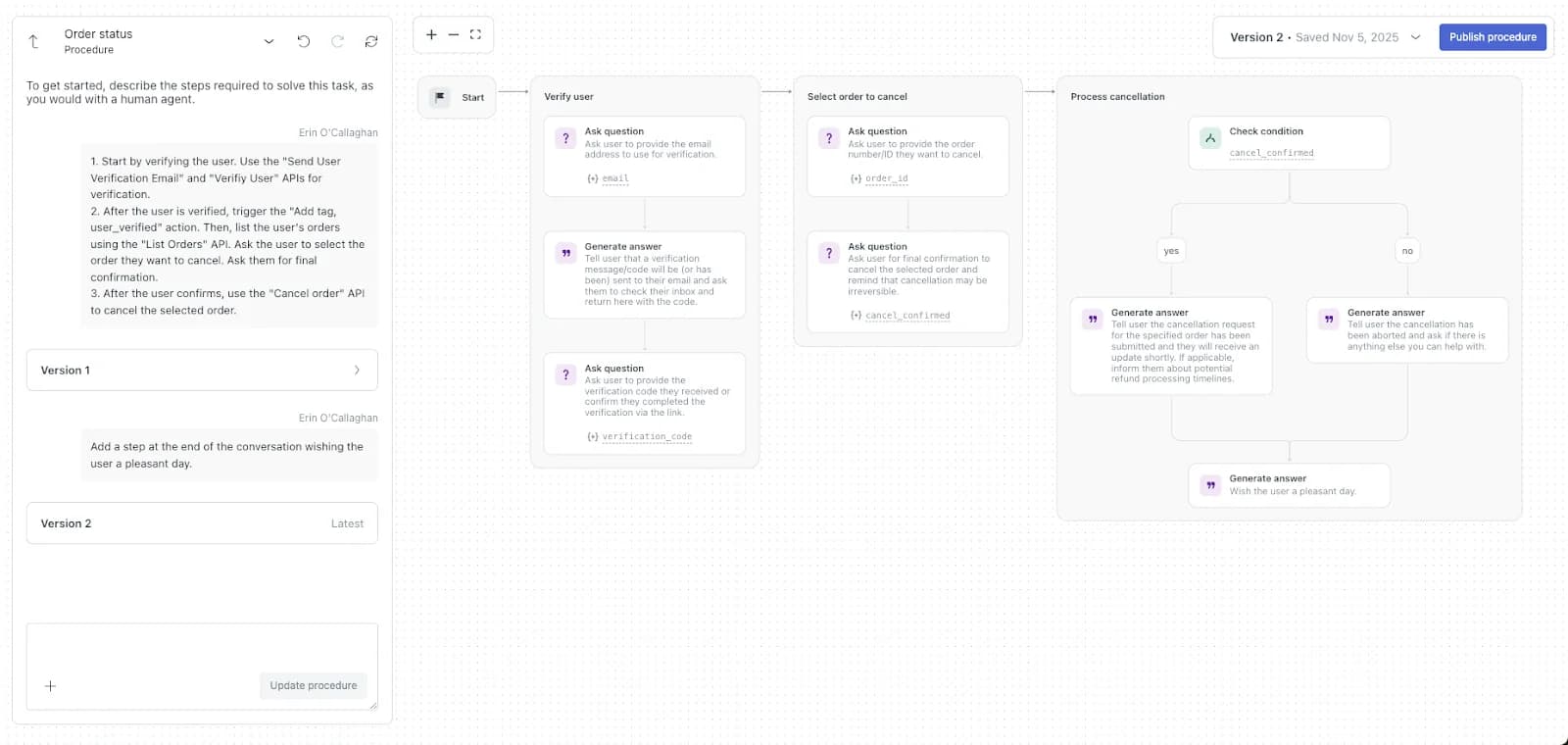
Zendesk turns playbooks into what it calls generative procedures: you describe the steps in plain language and it builds a procedure map the AI agent follows.
What it does
You write the steps "as you would with a human agent," and Zendesk compiles them into blocks like Ask question, Check condition, Run integration and Escalate to. Each procedure ties to one use case, can serve every language your AI agent supports, and keeps a version history. Since May 2026, multi-step procedures are included across Suite and Support plans.
For human agents, the picture is messier. A Zendesk admin on Reddit summed it up well:
"Zendesk does not have a single 'guided workflows' feature, we have constructed these through the combination of: Agent Workstation Macros (which provide the appropriate agents with both a step-by-step process and auto-fill for each step) Conditional Ticket Field Functionality (visibility of appropriate fields) Flow Builder (if you are using Messaging) Triggers/Automations (providing options for routing and next steps)"

Pros
- Native to Zendesk, no extra vendor.
- Plain-language authoring with a visible procedure map.
- Version history and segments to branch by customer type.
Cons
- Agent-only playbook articles need Suite Growth or higher.
- Agent-facing auto assist procedures need the Copilot add-on at $50 per agent a month.
- Every resolution beyond your included allowance is billed.
Pricing
Suite Team is $55 per agent a month on annual billing. AI agents bill per automated resolution: 5 included per agent a month on lower tiers, then $1.50 committed or $2.00 pay-as-you-go (Zendesk pricing). My Zendesk AI pricing post runs the math.
My take: pick generative procedures if you're all-in on Zendesk and fine with per-resolution billing. If per-resolution costs worry you at volume, compare it with a flat credit model before you commit.
8. Process Street
Best for: playbooks that need a checklist, approvals and an audit trail.
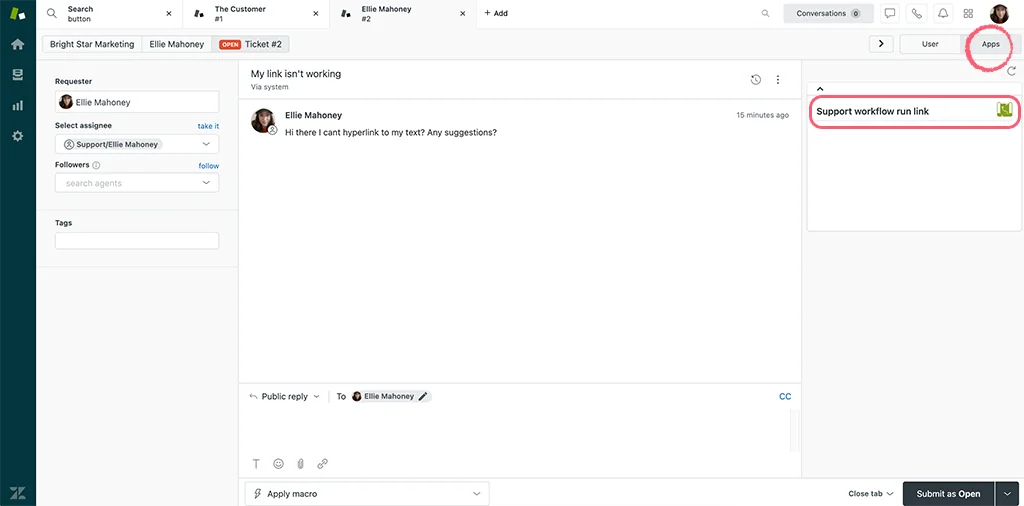
Process Street turns procedures into runnable checklists with enforced order, conditional logic and approvals.
What it does
You build a workflow template, then each ticket that needs it gets a "run" with tasks, assignees and due dates. Approvals can be single, multi-stage or sequential on all plans, and every run keeps time-stamped records. Process Street has 19 customer support templates, including a ticket triage checklist with 9 ticket types. There's no native Zendesk app; the official guide uses a webhook or Zapier, with a run-link button in the ticket sidebar.
Pros
- Enforced task order and approvals, good for refunds over a limit or account changes.
- Audit records for every run.
- Templates to start from.
Cons
- Zendesk connection is DIY through webhooks or Zapier.
- A G2 reviewer called the structure "very rigid," saying a unique requirement means you "must recreate everything" (G2).
- Built for back-office processes more than live conversations.
Pricing
Startup, Pro and Enterprise plans, all "Contact sales." Startup includes 5 users and 100 automation actions a month; Pro has a 14-day free trial (Process Street pricing).
My take: pick Process Street for multi-step back-office playbooks like account closures or chargebacks, where someone has to sign off. It's too heavy for everyday ticket replies.
9. Confluence
Best for: teams that already run on Atlassian and want playbooks next to engineering docs.
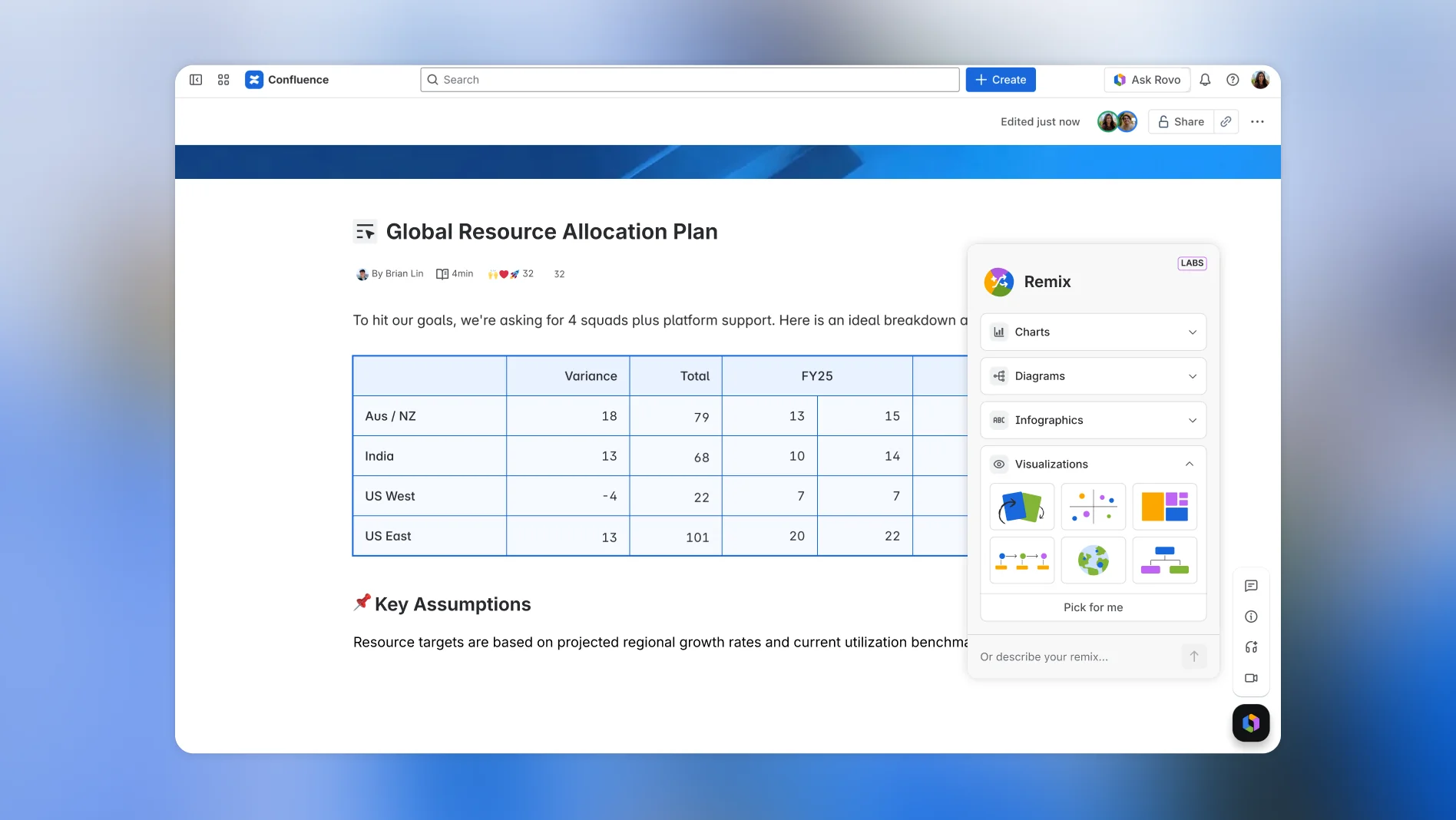
Confluence is where a lot of support playbooks already live, whether anyone planned it or not. One CSM on r/CustomerSuccess called their Confluence space "a CSM runbook of sorts" that comes in handy "when onboarding new team members" (Reddit).
What it does
It's a wiki: pages, templates, permissions and page versioning on every plan. Standard and higher include Rovo Search, Chat and Agents, so agents can ask questions instead of searching. For teams on Jira Service Management, it's the native knowledge base. Notion plays the same role for a lot of smaller teams, with verified pages on its Business plan at $20 per member a month (Notion pricing).
Pros
- Cheap, familiar, and probably already paid for.
- Page versioning on every plan, including Free.
- Rovo answers questions across your Atlassian content.
Cons
- No branching, no ticket context; agents read and decide.
- No built-in owner or review-date workflow for pages.
- Outside Jira Service Management, it's a separate tab from the helpdesk.
Pricing
Free for up to 10 users, Standard at $5.42 and Premium at $10.44 per user a month on monthly billing (Confluence pricing).
My take: keep Confluence as the source of truth if that's where your playbooks are, and stop expecting agents to open it mid-ticket. Connect it to something that brings the steps to the ticket, like eesel with Confluence.
Which support playbook software fits your team
Most teams overbuy here. Before you book four demos, walk this tree:
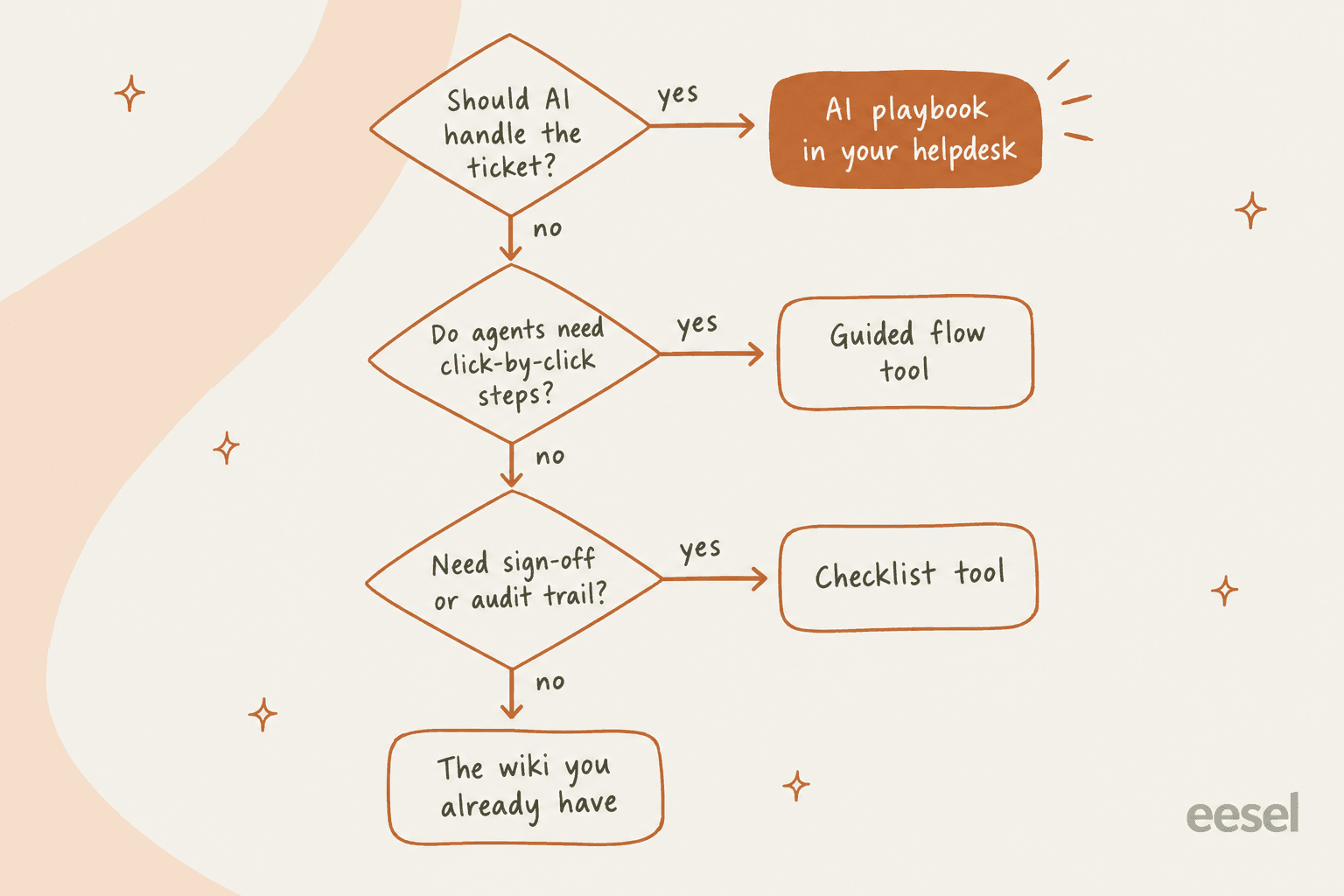
A few scenarios where I'd make a specific call:
- Small team, one helpdesk, growing queue. Skip guided flows. Write your top five playbooks as internal articles plus macros, then put an AI layer on top so they get followed on every ticket. Guided flows pay off when you have dozens of agents who need the same path; at eight agents they're mostly upkeep.
- Outsourced or seasonal tier 1. This is Stonly's sweet spot. A new agent following a decision tree in the sidebar will take the right path on day one. It also shortens ramp time, and RemoteLock told Stonly its onboarding went from six weeks to under three (Stonly).
- Regulated steps with sign-off. Process Street for the back-office part, your helpdesk for the conversation. Don't try to run a chargeback approval inside a chat reply.
- Already on HubSpot Enterprise or Zendesk. Use what you've paid for first. HubSpot playbooks and Zendesk procedures are included value, and switching costs are real.
Why playbooks go stale, and how the tool can help
Every playbook tool sells authoring. The harder problem is that policies change and the playbook doesn't. Here's what one policy change costs when your playbook has been copied into four places:
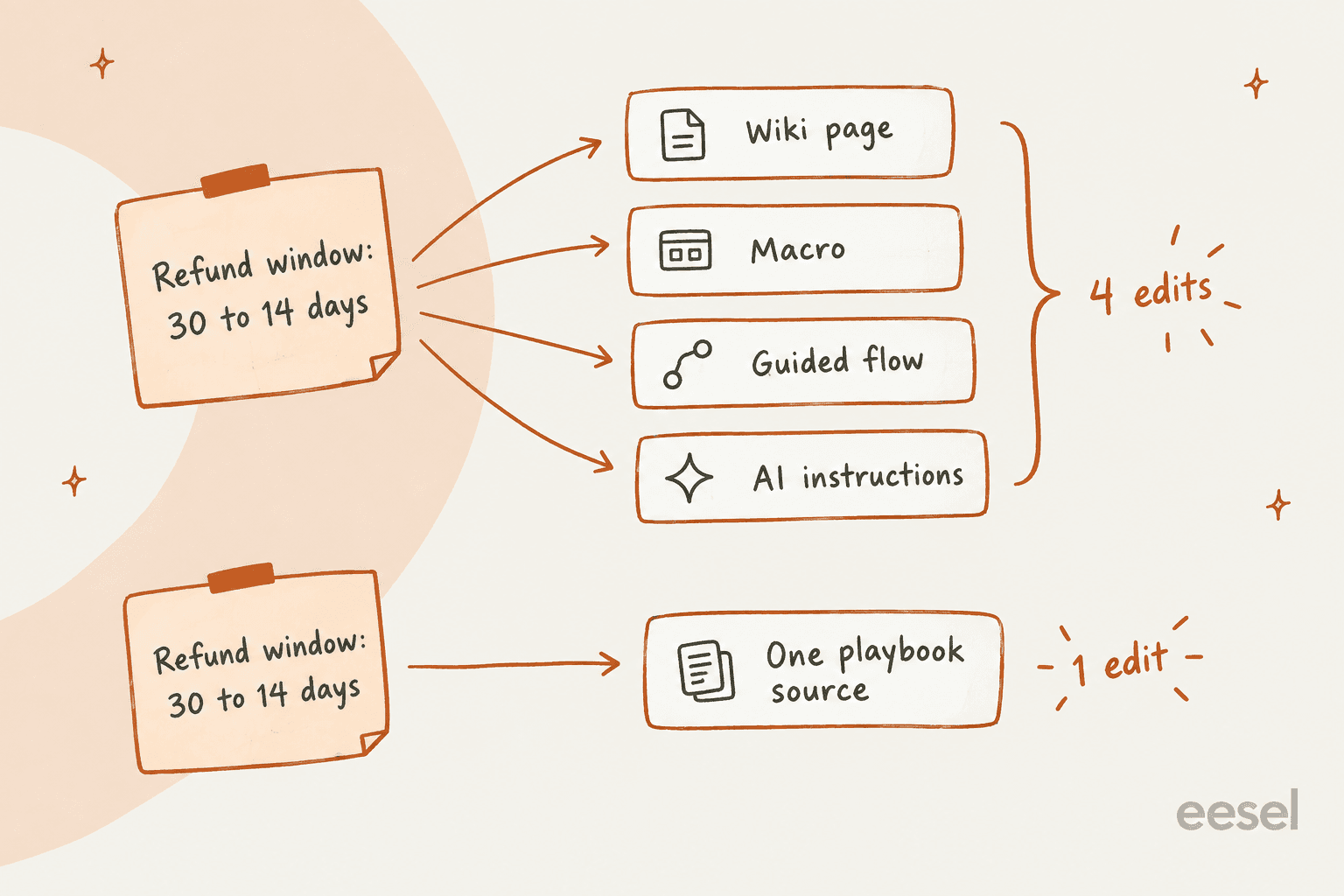
Miss one of those four and an agent quotes the old window, or worse, the AI does. On r/CustomerSuccess, one team audited a week of AI-handled tickets and found the bot had invented policies:
"So we audited a week's worth of auto tickets and found 3 separate cases where the bot made up a policy that doesn't exist. The scary part is the customers believed what it said and walked away feeling that WE were wrong."
That's the part of the job I think about most. eesel has spent years putting AI on live support queues, and the lesson I keep seeing on rollouts is that the AI is only as good as the playbook it reads. One DTC supplement brand on Gorgias and Shopify, at around 7,000 tickets a month, came to eesel wanting AI to handle half its order-status and subscription questions. Their knowledge was spread across SOPs in a project tool, Loom videos nobody had transcribed, and a pile of outdated macros. The AI wasn't the hard part. Finding the one current version of each playbook was.
Here's what actually keeps playbooks current, whichever tool you pick:
- One source per playbook. Link macros and AI instructions to it instead of copying it. This is the single biggest fix.
- A named owner and a review date. Guru enforces this; in other tools, put both at the top of the page. A Hacker News commenter put it bluntly: "The org must make it someone's job to grow, weed, and maintain these gardens" (Hacker News).
- Flag gaps from the ticket. A tag like
playbook-gapthat agents add when the steps don't fit. Review them monthly, or run a proper knowledge gap analysis. - Make policy changes a release step. If product or finance changes a rule, updating the playbook is on the launch checklist, not a follow-up.
- Test the AI after every change. Replay recent tickets against the new playbook before customers see it. It's the same reason you'd shadow a new hire.
Mistakes I see when teams buy playbook software
- Buying a tool to fix a writing problem. If the playbook says "use your judgment on large refunds," no software makes that clear. Put a number in it. My SOP guide covers the format.
- Scripting every step for experienced agents. One Hacker News commenter described tier 1 agents who "will be penalized if they skip the first two steps" even when step 3 always fixes the issue (Hacker News). Give limits and reasons, not just scripts.
- Forgetting the off-chart case. Every decision tree needs a "none of these" branch that goes to a human. A clean escalation path is part of the playbook, not an afterthought.
- Putting hard money rules only in prose. For AI, a refund cap belongs in the action or an approval step, backed by AI guardrails and a human in the loop. For humans, the same: a limit in the billing tool beats a sentence in a wiki.
- Building flows nobody measures. HubSpot and Stonly both show which playbooks get used. If one has zero views in a month, it's either unneeded or unfindable.
eesel for support playbooks
If your playbooks already exist, spread across a helpdesk, a wiki, some Loom videos and a few hundred macros, you don't need to rebuild them in a new editor before they're useful. eesel's AI helpdesk teammate reads them where they are, learns the unwritten steps from your past tickets, and works inside Zendesk, Freshdesk, Gorgias, Front, Help Scout and HubSpot. It can answer customers directly or draft replies for your agents to approve, so you choose how much rope it gets.
The playbook stays in one place, the Instructions page, and every correction your leads make in chat is saved back into it. Before it goes live, run a simulation on your own past tickets and see exactly where it follows the playbook and where it would miss.

To be clear about the lane: eesel won't give your human agents a click-through decision tree, and it isn't a sign-off tool. What it does is make sure the playbook gets followed on the next thousand tickets without anyone opening a doc. Try eesel free with 100 credits, no card needed, on your own tickets.
Frequently Asked Questions
What is support playbook software?
What is the best support playbook software for a small team?
What is the difference between a support playbook and an SOP?
How much does support playbook software cost?
Can an AI agent follow a support playbook?
Does Zendesk have support playbook software built in?
How do I keep support playbooks up to date?


Article by
Riellvriany Indriawan
Riell is a designer and writer at eesel AI with about two years of experience researching CX platforms, AI chatbots, and helpdesk software. She combines her design background with a sharp eye for how these tools actually look and feel in practice — making her comparisons unusually visual and user-focused.