"Meta Muse" is three different products
I work on the integrations and APIs behind eesel, so I spend a lot of time reading other companies' developer docs. Meta's naming this year has been the hardest to untangle. When someone searches for Meta Muse customer support, they usually mean one of these three:
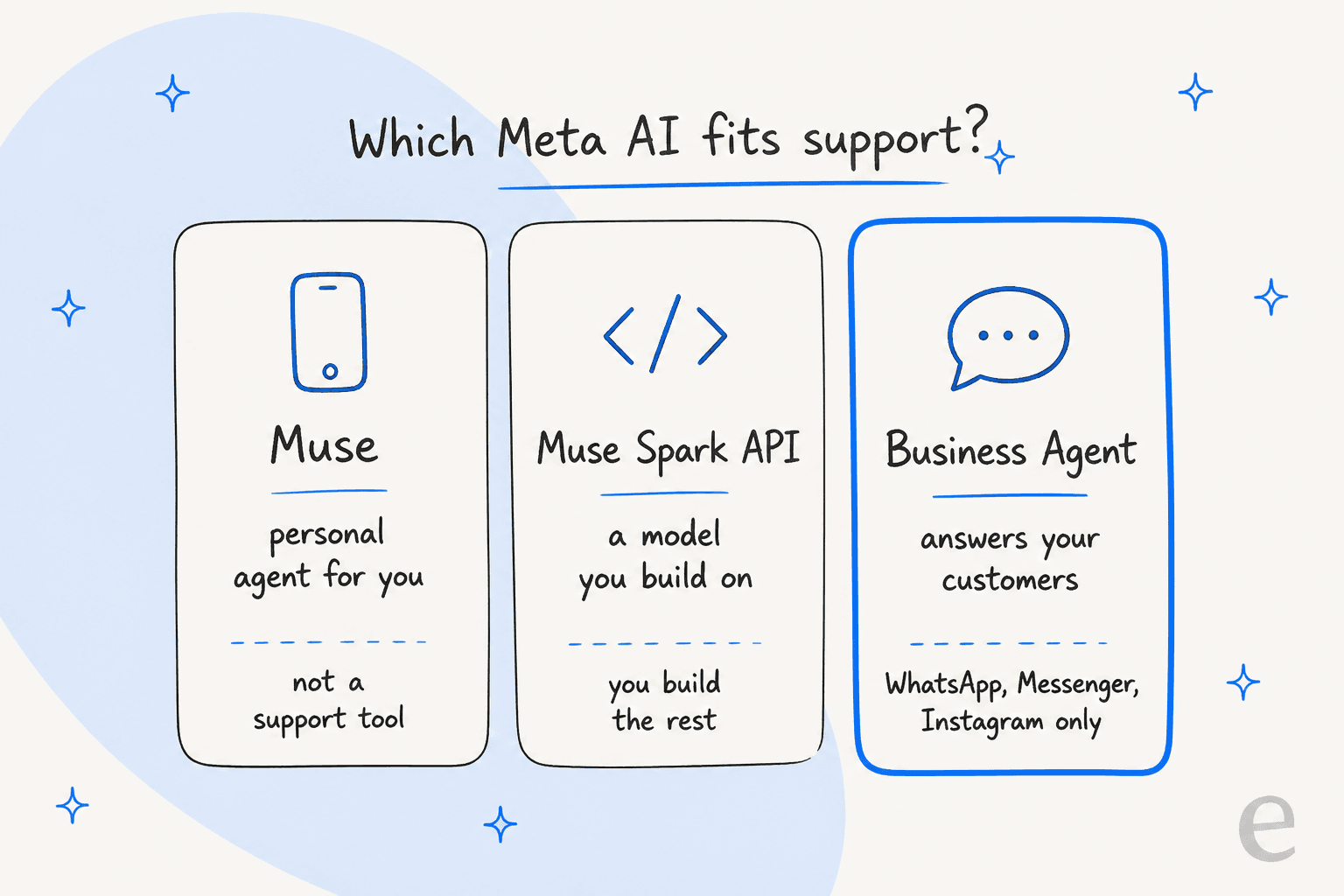
- Muse, the personal AI agent Meta launched on September 8, 2026. It shops, books travel and fills forms for one person, and it is US-only. I covered it in my Meta Muse agent breakdown. It is not built to answer a business's customers.
- Muse Spark 1.3, the model underneath. Meta says it is available on Muse Code and the Meta Model API, so a developer can build a support bot on it. More on that in the Muse Spark 1.3 overview and my Muse Spark 1.3 review.
- Meta Business Agent, which Meta launched on June 3, 2026 as the AI that "can represent your business in chats with customers". This is the actual support product.
Meta itself groups its business AI into three products in a recent Latin America announcement, and the support one is the middle card:
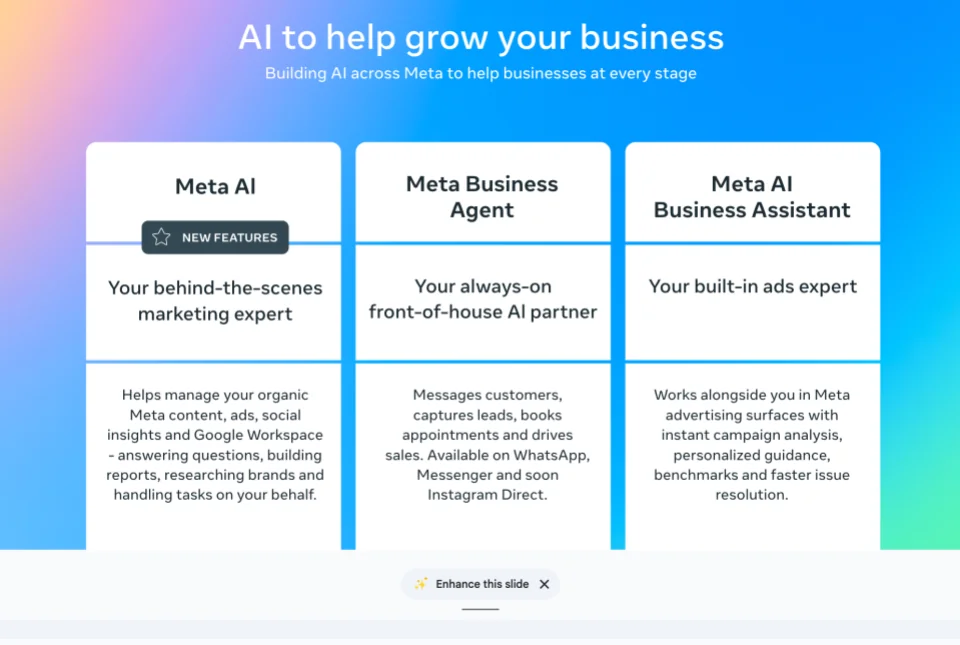
The Meta AI business assistant on the right is for ads and account help, not customers. My Meta AI for business guide covers the other two cards. So for the rest of this post, "Meta's support AI" means Business Agent, and "building on Muse" means the Muse Spark API.
Meta Business Agent: Meta's actual support agent
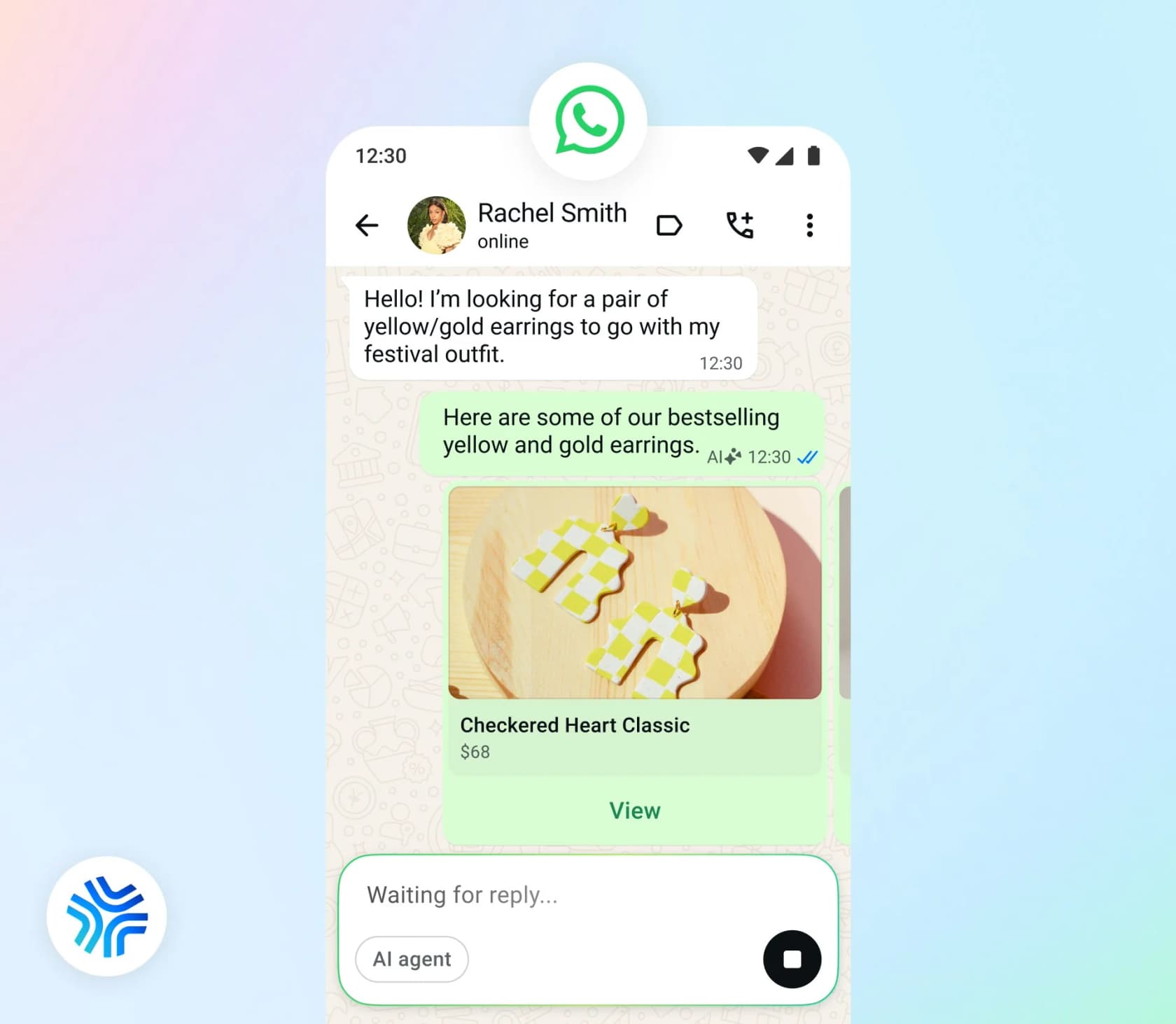
Meta says more than 1 million businesses already use a Business Agent on WhatsApp and Messenger, across more than a billion active business threads a day (Meta newsroom). That reach is the whole pitch. Your customers are already in WhatsApp, and the agent answers there without a new app or widget. If you are new to that channel, my WhatsApp chatbot for business primer covers the basics.
Two ways to set it up
There is a no-code version for small businesses and an API version for bigger teams. They behave differently enough that I would treat them as two products.
| Self-serve Business Agent | Business Agent Platform | |
|---|---|---|
| Where you set it up | Meta Business Suite (All tools, then Meta Business Agent) or the WhatsApp Business app (Tools) | WhatsApp Business Platform API, with a system user token |
| Channels | Messenger, WhatsApp, Instagram, website plugin | WhatsApp Business Platform numbers, Instagram business accounts |
| Knowledge | Facebook Page, past Meta chats, website, catalog, uploaded files | Business Info, FAQs, Files and Websites APIs |
| Actions | Answers, product recommendations, pricing, collecting details | Order lookup by phone number, returns, ticket creation via connectors you define |
| Handoff | You take over any chat manually | Automatic on low confidence or a request for a human; triggers not configurable |
| Price | Free up to a limit, then Meta One plans | $2.00 per 1M tokens on WhatsApp |
The Platform needs an enterprise WhatsApp Business Platform number, "not the consumer WhatsApp Business app", per Meta's Platform overview. If you are unsure which WhatsApp you run, my WhatsApp Business Platform guide explains the split.
What it learns from, and what it doesn't
The self-serve agent "learns automatically from your Facebook Page, past chats, and website", and you can upload catalogs and price lists (Meta for Business). The Platform takes four knowledge sources: business info, FAQs, files and crawled websites.
What is missing is the source I would reach for first: your helpdesk ticket history. Meta's customer support guide tells you to "export the top drivers from your helpdesk for the last quarter" and write FAQ entries by hand. That guide also carries two gotchas worth knowing before launch:
- Files have no update call. If you upload a new returns policy without deleting the old one, "the agent draws on both versions and can quote a term you have already withdrawn."
- Website knowledge "is a snapshot taken at crawl time", so every site change needs a re-crawl.
If your best answers live in years of solved tickets, that is the gap an AI helpdesk agent trained on those tickets closes. It is also why WhatsApp ticket deflection works best when the bot can see what your team already answered.
Handoff and testing
On the self-serve version, you or a customer can pull a human in at any time, and the AI stops once you reply (Meta help center). Customers see a notice that the business "uses AI from Meta to generate messages".
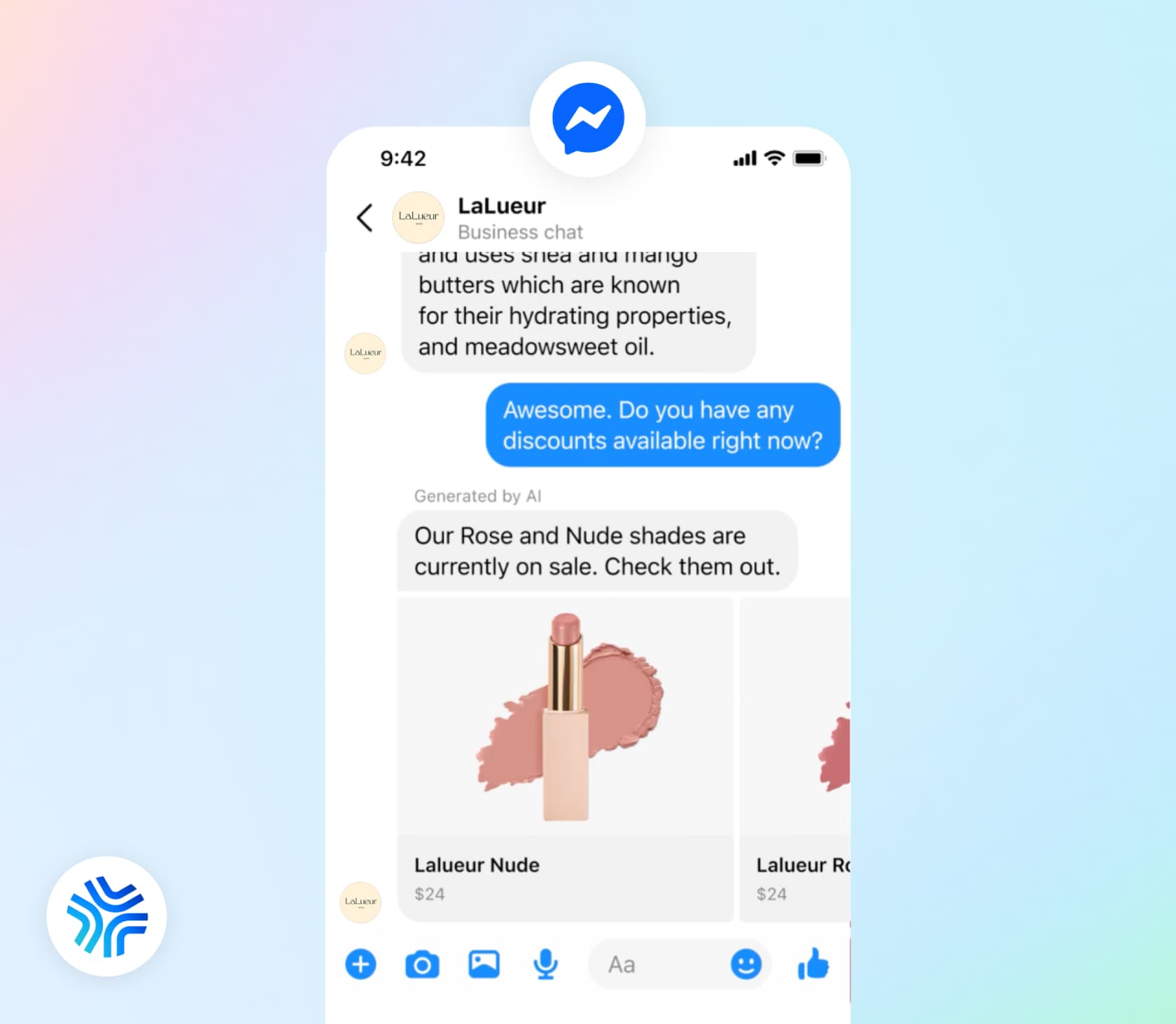
On the Platform, handoff starts automatically when the agent detects low confidence, an integrity issue or a customer asking for a person, and "You do not configure the triggers." (Capabilities). Testing runs through Agent Test and Agent Eval on scenarios you write.
That is the part I would push on in a buying conversation. The CX lead at a direct-to-consumer brand doing about 7,000 tickets a month put the requirement to the eesel team plainly:
"I need an AI who is only handling the tickets that it's confident to handle and all the other ones, leave them alone."
When the confidence line is Meta's and not yours, you cannot tune it to your risk. My AI agent handoff guide covers what good escalation looks like.
A BSP consultant who got early Platform access summed up the harness this way:
"The harness is very basic. You only get 4 controls - knowledge, personality, audience, handoff. Fine for a simple FAQ or catalog bot. But if you want real step-by-step logic, you hit the wall fast."

In the same post they add that they "still like it" because "the reach is huge", which matches my read. It is a fair fit for FAQ and catalog questions, and thin for multi-step support.
What Meta Business Agent costs on WhatsApp
Meta changed WhatsApp pricing twice this quarter, and both changes land on support teams.
August 1, 2026: Business Agent messages became token-billed. One global rate of $2.00 per 1M tokens, with "One message typically consumes 20,000–25,000 tokens", which Meta translates to about 4 to 5 cents a message (Meta pricing docs). Cached tokens are free. These messages are not free inside the free entry point window.
October 1, 2026: human and third-party AI replies start costing per message too. Service messages, meaning replies from "a person" or "a 3rd-party AI solution", get charged at utility and authentication rates by market, after a free tier of 1,000 service messages per phone number per month (WhatsApp pricing). Businesses with no payment method on file by September 30 stop delivering once the free tier runs out.
| Scenario (Meta's own examples) | Messages | Tokens | Cost |
|---|---|---|---|
| Simple question ("At what time do you open?") | 4 | ~80,000 | ~16 to 20 cents |
| Complex question (assembly help) | 10 | ~250,000 | ~40 to 50 cents |
| 1,000 Business Agent replies, Brazil | 1,000 | n/a | ~$40 to $50 |
| 1,000 third-party AI replies, Brazil, simple to complex | 1,000 | n/a | ~$27 to $97 |
Meta also published its own comparison of those last two rows:
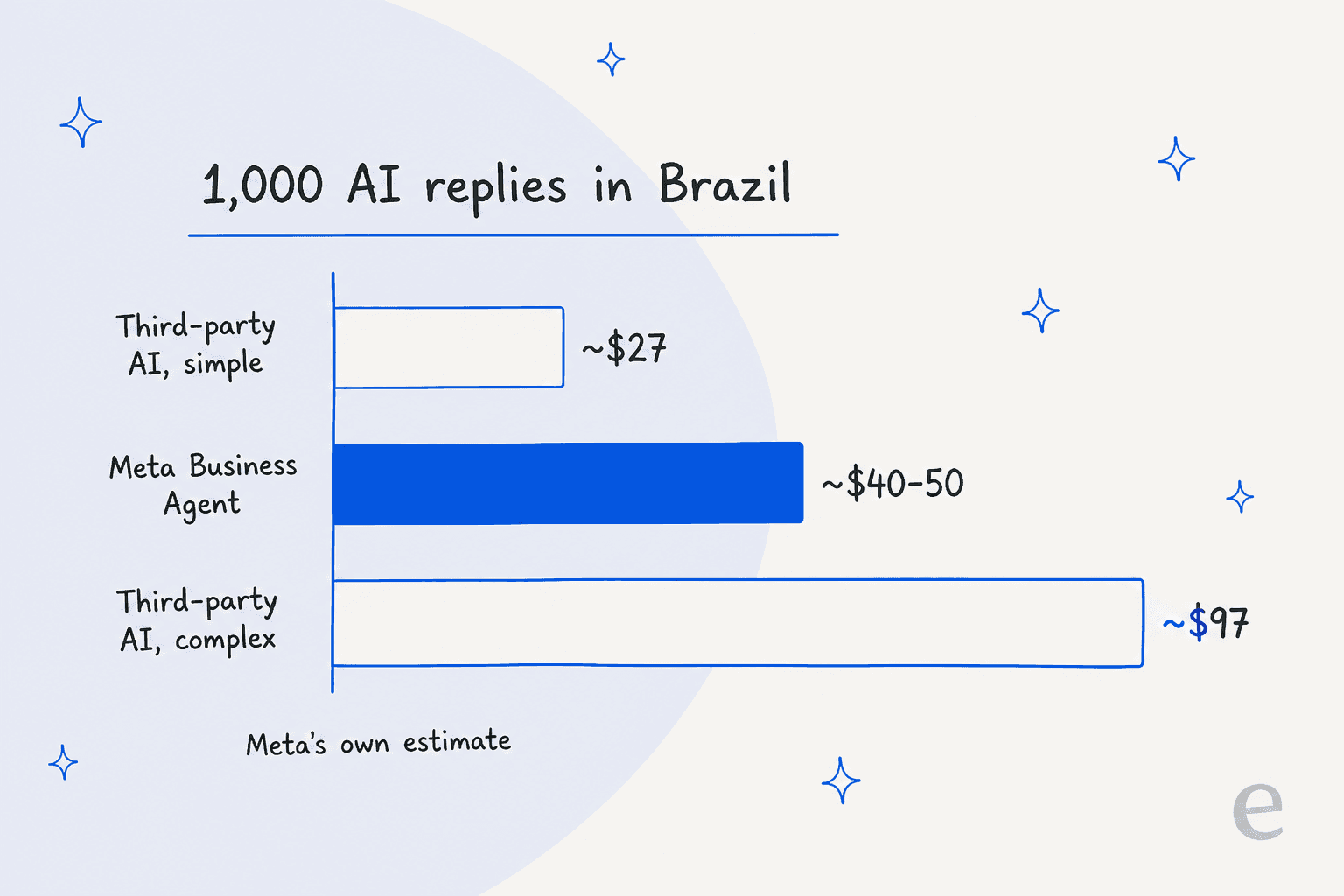
Two caveats. The third-party numbers are Meta's estimate "based on publicly available information and benchmarks", so it is a vendor grading its rivals. And a per-message price means a customer who asks three follow-ups costs three times as much, which early users noticed:
"My concern is that the per-message cost is insanely high at approximately 5 cents per message."
The self-serve version is a different deal. Meta's help center says access is limited, and past a free limit you subscribe to a Meta One plan (Essential, Advanced or Expert). Meta's pages list no dollar prices and no size for the free limit. For the wider history of these rules, see my WhatsApp API pricing explainer and the earlier Meta policy changes on third-party bots.
Building your own support bot on Muse Spark 1.3
The other route is to skip Business Agent and build on the model. This is where my day job overlaps most, so here is what the Meta Model API gives you, from Meta's developer docs.
| What you get | Detail |
|---|---|
| Model | muse-spark-1.3, 1,048,576-token context shared between input and output |
| Standard price | $1.25 input / $4.25 output per 1M tokens, cached input $0.15 (prompt caching) |
| Contributor price | about $0.10 / $0.20 per 1M, reported on Hacker News; Meta trains on this traffic |
| SDKs | Works with OpenAI and Anthropic SDKs at https://api.meta.ai/v1 |
| Tool calling | Supported, including parallel calls; tool_choice documented as "auto" only |
| Structured output | Held to your JSON Schema, even with strict: false |
| Status | Public preview under limited preview terms; no SOC 2, HIPAA or SLA found |
The contributor-tier catch
The contributor price is the headline number in every Muse Spark thread, and it is the one a support team cannot use. Meta's terms of service say "You must not submit sensitive, confidential, or personal information to the Discounted Services". A support ticket is personal information by default: a name, an email, an order number, sometimes an address. So your cost model starts at the standard $1.25 / $4.25 rate, which my AI customer service cost guide puts in context. The Muse Spark 1.3 pricing post walks through the full token math.
Meta does commit to not training on standard-tier content (data commitments). Zero data retention is available only through sales, and it turns off file uploads, web search and server-side conversation state.
How it does on a support benchmark
The only public benchmark that grades a model as a customer service agent is Sierra's τ-bench. The one Muse entry is Muse Spark 1.1, run by Sierra on the banking domain, where the agent has to find answers across hundreds of policy documents. Meta has no 1.2 or 1.3 submission yet, so treat this as a signal about the family, not the current model.
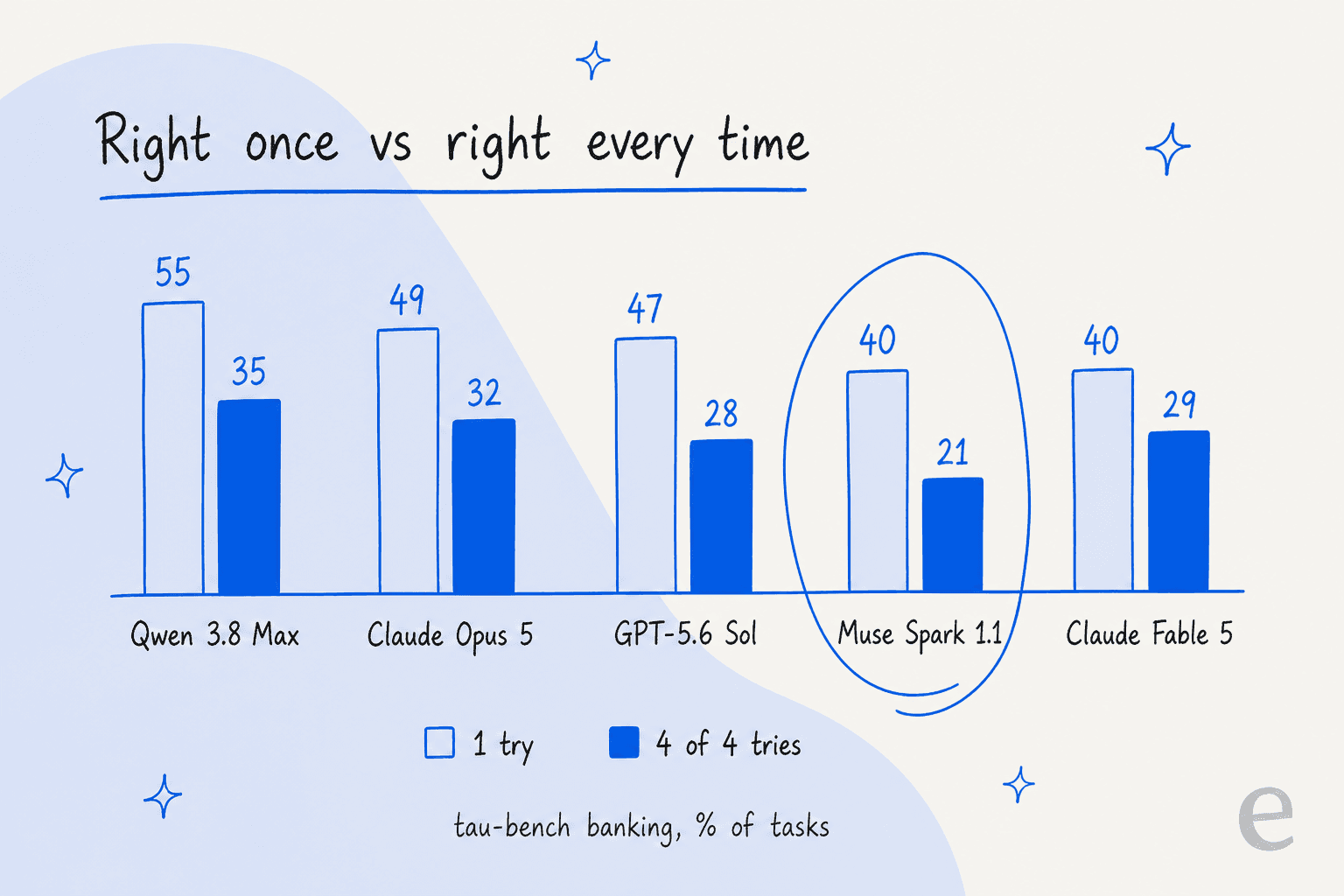
On a single attempt, Muse Spark 1.1 scores 40.46, sixth of 21 same-config entries and ahead of Claude Fable 5 at 39.69 (submission data). On getting the same task right four times out of four, it drops to 20.62, keeping 51% of its single-try score, the weakest consistency of the top nine. For support, the four-of-four number is the one to watch, because the same question arrives dozens of times a day. Claude Opus 5, by comparison, keeps 66%. My support model ranking post goes deeper on why retrieval, not the model, is where most points get lost.
What you still have to build
The model is the smallest part of a support agent. On top of it, you own:
- Retrieval over your help center, macros and past tickets, kept in sync.
- The helpdesk connection, so the bot can read a ticket, reply, tag and route.
- Escalation rules and a confidence threshold you control.
- A test harness that replays real tickets before anything goes live.
- The WhatsApp side: a Business Platform number, templates, and the October 1 service-message charges.
This is the "we'll build it ourselves on the API" path I see technical teams weigh every month. One engineering lead at a crypto-hardware company, with a 300-article Confluence knowledge base, told the eesel team why they went the other way:
"We could try to write our own LLM application but we didn't want to invest our time into that. We wanted something that we would not have to maintain."
If you are weighing the same call, my build vs buy guide and the AI customer service API explainer lay out the work in more detail.
Where Meta's support AI stops
These are the limits I would check before committing a support channel to Business Agent. None of them are hidden; they are all in Meta's own docs.
- It only answers inside Meta's apps. WhatsApp, Messenger, Instagram and a website plugin that only connects to Shopify for now (my Shopify helpdesk AI roundup covers the alternatives). No email, no helpdesk replies, no live chat elsewhere. One commenter building their own tool put it simply: "it can only do things inside Meta, but nothing outside it" (Reddit).
- One AI per number. A number "already running another AI agent" is blocked from Business Agent (Platform overview). Choosing Meta's agent means removing any other.
- Regulated verticals are out. Finance, government, health, alcohol, gambling, over-the-counter drugs and matrimony services are excluded from the Platform.
- English is strongest. It replies in any language the model supports, but Meta notes "English has the strongest response quality."
- Accuracy needs grounding. Meta's own help page warns "Some AI messages may be inaccurate or inappropriate", and an early tester saw "the same product come back at two different prices in two replies" (Reddit).
There is also a trust question that has nothing to do with the docs. In June, attackers talked Meta's own AI support assistant into sending Instagram account recovery links to the wrong email, which drew a 2,210-point Hacker News thread. One reply stuck with me:
"they didn't really evaluate whether tools intended for conscientious human use should be provided directly to the LLM that replaced the former support agents."

That was Meta's internal support bot, not Business Agent, but the lesson carries over: whatever AI answers your customers needs clear limits on what it can do, not just what it can say. My AI chatbot problems guide lists the usual failure points.
Which route fits your team
Here is how I would pick, based on where your customers write in and where your team works.
| Your situation | Best fit | Why |
|---|---|---|
| Solo shop or salon, customers only on WhatsApp or Instagram, simple questions | Self-serve Business Agent | Free to start, no code, lives where your customers are |
| Ecommerce brand on the WhatsApp Business Platform, order and return questions | Business Agent Platform, or a helpdesk-connected agent | Platform handles order lookups; check the per-message cost and fixed handoff triggers first |
| Team with a helpdesk and several channels (email, chat, WhatsApp) | An AI agent inside your helpdesk | One queue, one set of rules, trained on your ticket history |
| Engineering team that wants full control of the model | Muse Spark API, standard tier | Cheap per token, but you build retrieval, escalation and testing |
| Regulated industry (finance, health) | Not Business Agent | Excluded from the Platform |
For most support teams I talk to, the helpdesk row is the real one. A single customer might write on WhatsApp, follow up by email and chat on the website, and the team needs all of that in one helpdesk like Zendesk, not split across Meta's inbox. The same goes for a Freshdesk AI agent setup or a Gorgias one, where Gorgias AI pricing bills per automated interaction.
If you are already there, see how to connect Zendesk to WhatsApp or add WhatsApp to Freshdesk.
My best AI for WhatsApp support roundup compares the options side by side, and the best WhatsApp chatbot list covers the lighter tools.
Try eesel for WhatsApp and Messenger support
eesel is an AI helpdesk teammate. It plugs into WhatsApp in a few minutes, connects to Facebook Messenger the same way, learns from your help center, macros and past tickets, and uses the same knowledge and rules whether a customer writes on WhatsApp, email or your helpdesk. Before it answers a single customer, it runs a simulation against hundreds of your past tickets so you can see which ones it would get right, and you decide which ticket types it touches.

Pricing is a fixed monthly credit plan where a ticket or a chat is one credit, however many replies it takes, so a chatty customer doesn't triple the bill. If you'd rather script it, the eesel CLI lets you or a coding agent set up the same teammate from a terminal: connect apps, add knowledge and approve actions, with every command returning JSON.
Try eesel free with 100 credits and no card, and see how it handles your WhatsApp queue before Meta's October 1 pricing kicks in.
Frequently Asked Questions
Can I use Meta Muse for customer support?
How much does Meta Business Agent cost for customer support on WhatsApp?
Which model powers Meta Business Agent?
Can I build a customer support bot on Muse Spark 1.3?
Can I use the cheap Muse Spark contributor tier for support tickets?
Can I run Meta Business Agent and another AI on the same WhatsApp number?
What is the best Meta Muse customer support setup for a small business?


Article by
Rama Adi Nugraha
Rama is a software engineer at eesel AI with two years of experience writing about B2B SaaS, AI tools, and customer support technology. Based in Bali, Indonesia, he brings a developer's perspective to product comparisons — cutting through marketing copy to what the integrations and APIs actually do.