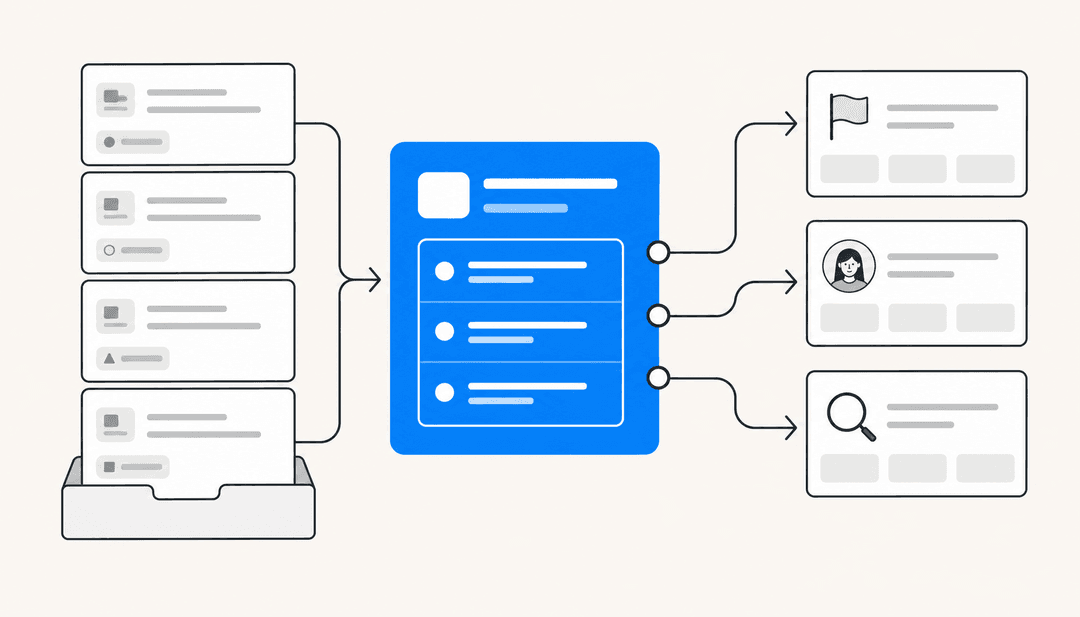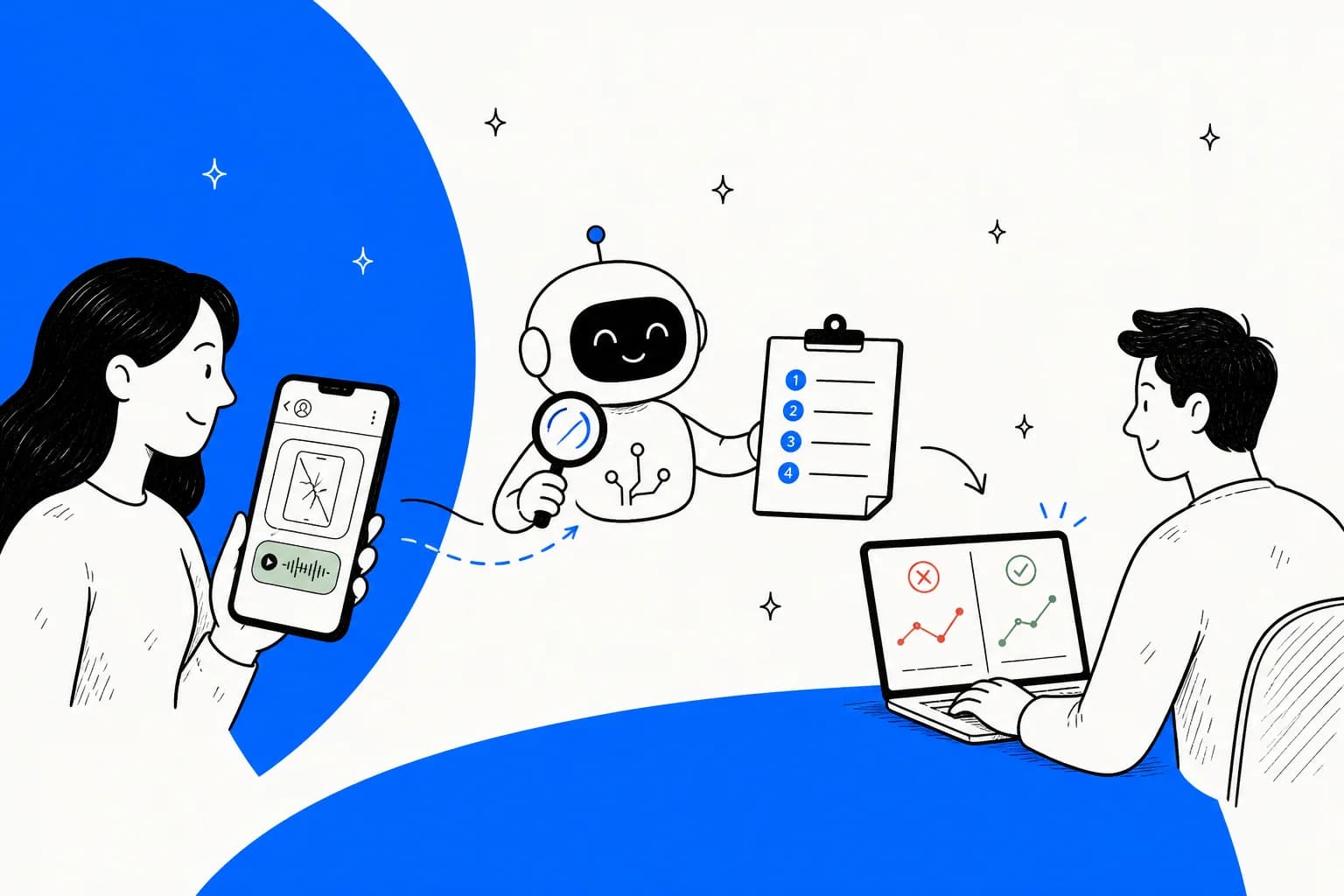
What "Meta Muse for bug reproduction" actually means
I build AI agents at eesel, and the part of that work nobody puts in a demo is debugging from someone else's description of a problem. A bug report is only as good as the evidence attached to it, so that's how I read Meta's docs for this post: following the customer's screenshot through each product to see where it survives.
The naming first. "Meta Muse" can mean four different products, and three of them have a role in bug report triage:
| Product | What it is | Role in bug reproduction |
|---|---|---|
| Muse | Meta's consumer personal agent, launched September 8, 2026 | None. It works for individuals, not your support team |
| Meta Business Agent | Meta's customer-facing business AI on WhatsApp, Messenger and Instagram | Takes the bug report and hands off to a person |
| Muse Spark API | Meta's model, which you call from your own code | Reads the screenshot or recording and writes repro steps |
| Muse Code | Meta's coding agent harness, running Muse Spark | Tries the repro in your codebase and writes a failing test |
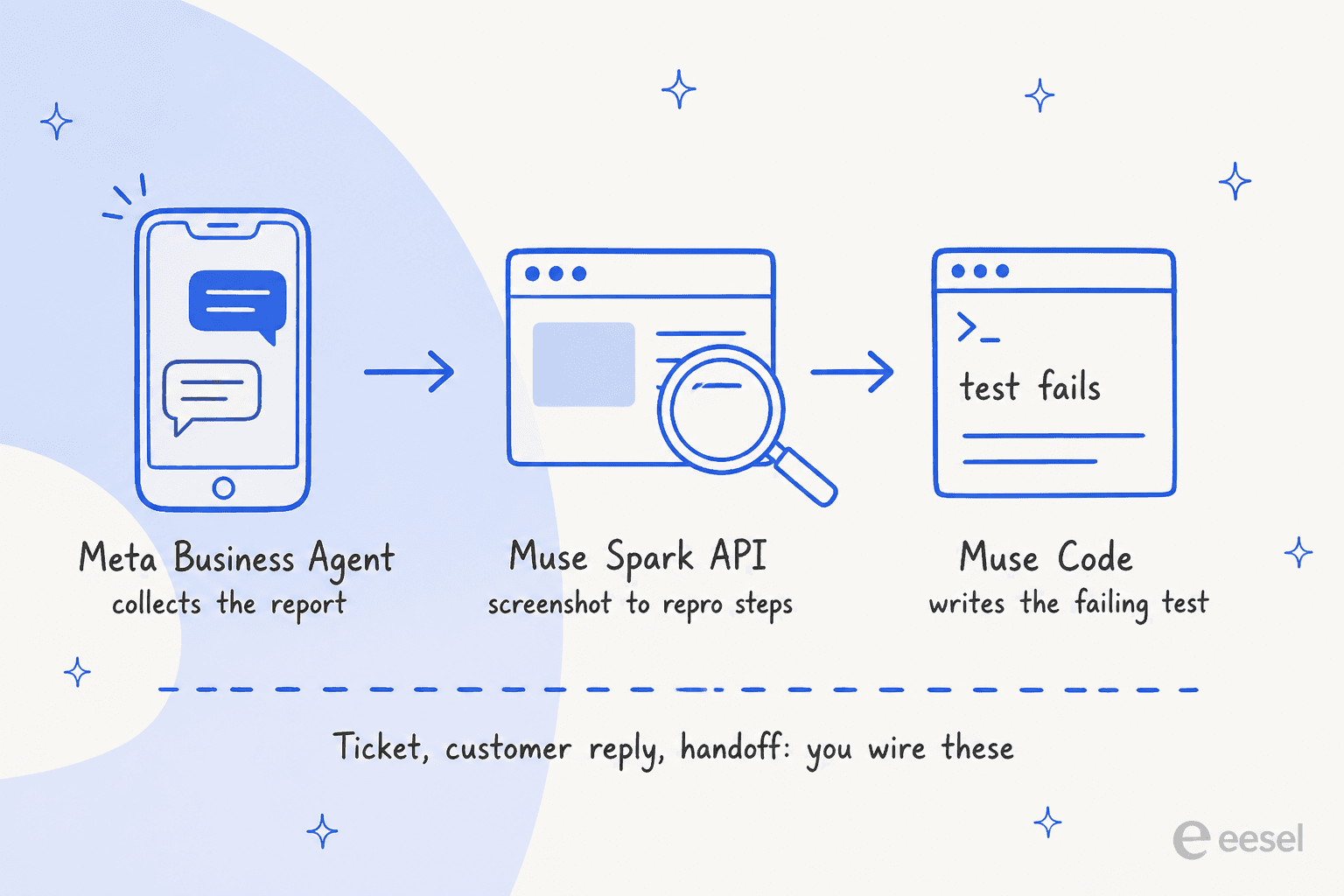
Each station works. What none of them has is a ticket: the thing that holds the report, the screenshot, the engineer's notes and the reply to the customer in one place. That part you wire yourself, and it's where bug reports tend to go missing.
What a reproducible bug report needs
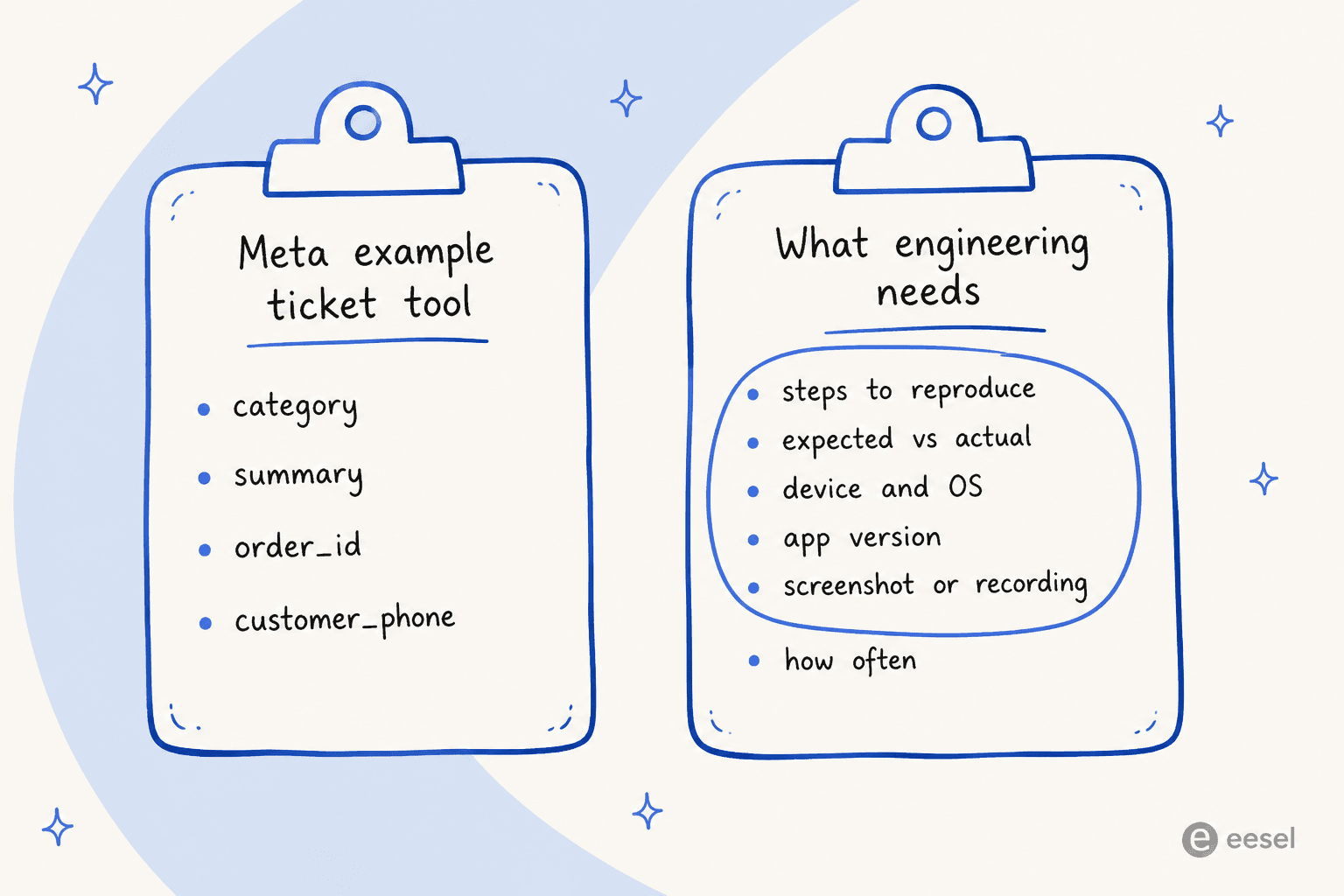
Before looking at Meta's tools, it helps to be specific about the goal. An engineer can only reproduce a bug if they get the steps, what the customer expected versus what happened, the device and OS, the app version, a screenshot or recording, and how often it happens. Miss one and the ticket bounces back to support with a question (the classic technical support loop), and support has to go back to a customer who has moved on.
Meta's own example ticket tool shows how far off the default is. The create_support_ticket tool in Meta's customer support agent guide carries four fields: category, summary, order_id and customer_phone. That's a good shape for "my parcel arrived damaged". For "the app crashes when I upload a photo", it's missing most of what an engineer needs. I made the same point about categories in my ticket triage write-up.
A Shopify developer put the cost of skipping this bluntly:
"You're not unlucky with the queue, tier one is macro-driven and a bug report that doesn't come with a clean reproduction gets closed with a help doc every time."

None of this is Meta's fault. The guide is written for retail support, and Meta hasn't published a technical-support or bug-triage guide for Business Agent. It does mean the fields are yours to add.
Stage 1: collecting the report with Meta Business Agent
Business Agent is the front door. It answers on WhatsApp, and it can take actions through connectors, which are HTTP tools you define against your own API. To collect a bug report, you'd write a tool (call it report_bug) with the fields above and describe each one well. Meta's connector tools reference says to "define the body schema with explicit field types, descriptions, and required fields", because "the agent uses this schema to extract the correct values from the conversation". Mark app_version and device as required and the agent has a reason to ask for them.
Two more lines from Meta's guide are worth copying. First: "Enumerate the escalation triggers rather than describing them." The guide's own examples already include "Technical faults" as a case to escalate. Second, from the post-purchase guide: "Telling the agent to escalate does nothing on its own. Configure the handoff policy in agent settings and implement thread control." That's standard AI escalation hygiene, and it applies doubly here, because a suspected bug is a case where the agent shouldn't guess.
The screenshot problem
This is where it gets interesting. A customer reporting a bug on WhatsApp almost always sends a screenshot, sometimes a screen recording, often a voice note explaining what they tapped. So I went looking for what Business Agent does with them.
Meta doesn't say. Across roughly 20 Business Agent developer pages, none documents whether the agent reads, describes, ignores or hands off on customer images, videos, voice notes or documents. The closest signals all point to text. The Agent test endpoint's user_msg is "The text content of the test message", with no field for media, so you can't even test a screenshot scenario through the API. The agent can send images, through a UI skill, and it accepts images as knowledge files you upload. Neither tells you what happens to an image a customer sends.
Getting the file to your ticket system is also harder than it looks:
- Connector tools can't carry files. The request body "currently only supports
application/json", parameter types are string, integer, number and boolean, and none of the runtime macros (USER_MESSAGE,WHATSAPP_CONVERSATION_ID,WHATSAPP_MESSAGE_IDand the rest) is a media ID or URL (Connector tools). Yourreport_bugtool can send the steps, not the screenshot. - The handoff summary is text only. When a thread passes to your helpdesk,
conversation_contextcarries "an AI-generated summary of the conversation so far" with no media IDs, and Meta says to "Treatsummary.textas human-readable prose, not structured data" (Conversation context). Whether the summary even mentions a screenshot isn't documented, which makes it a weaker ticket summary than it sounds. - Standby webhooks do carry the media. While Business Agent owns the thread, your app can receive every customer message on the
standbyfield. Meta says image, document, audio and video messages "are delivered in standby using the same schema as standard incoming message webhooks" (Standby webhooks). Standby is "off by default" and the business has to grant it (Standby partners). I walked through what standby does to a helpdesk in my Meta Muse for Zendesk post.
The catch is in that last pair. The summary is sent only when "The receiving responder is not receiving standby events", and "for a given conversation you receive exactly one" of the two. If you turn on standby to keep the screenshots, you give up the AI summary. If you rely on the summary, you have no documented way to get attachments sent before the handoff.
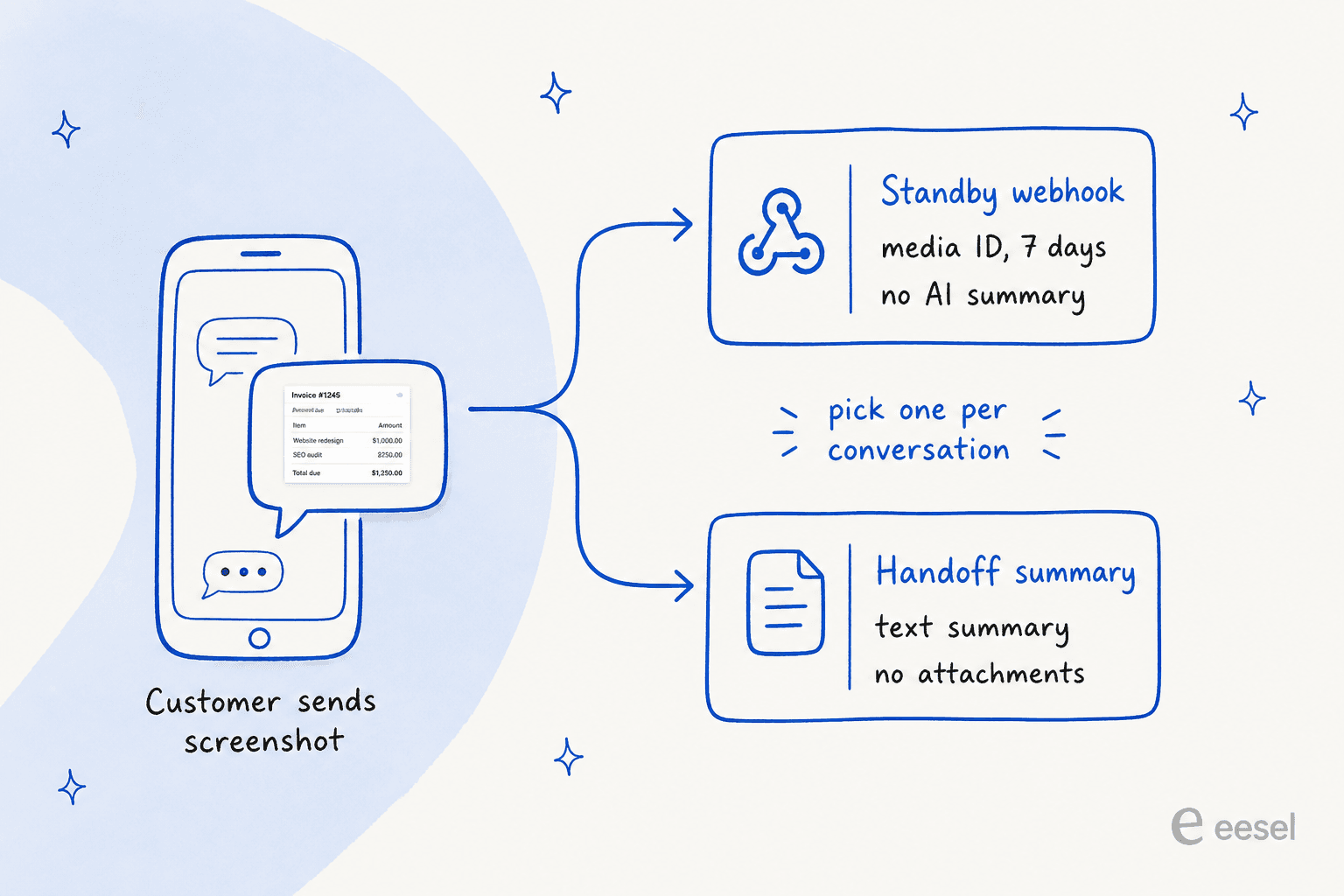
For bug reports I'd pick standby every time. A summary can be rebuilt from the messages you stored. A screenshot you didn't save can't be rebuilt at all.
The clock on WhatsApp media
Once you have a media ID, it doesn't last. These are the limits from Meta's WhatsApp Cloud API media docs:
| Limit | Value |
|---|---|
Download URL from GET /MEDIA_ID | Expires after 5 minutes |
| Media ID received in a webhook | Downloadable for 7 days |
| Image size | 5 MB (JPEG, PNG) |
| Video size | 16 MB (MP4, 3GPP, H.264 only) |
| Audio size | 16 MB (AAC, AMR, MP3, M4A, OGG/Opus) |
| Customer file over 100 MB | Rejected with error 131052 |
Voice notes are easy to spot: the audio webhook has a voice flag that's true for "a recording made with the WhatsApp client voice recording feature". Screen recordings have no type of their own and arrive as plain video.
The 7-day window is the one that bites. A bug reported on a Friday and triaged the following week can lose its only screenshot. Download each file when the webhook arrives and attach it to the ticket, keyed by the conversation ID. That's the unglamorous step every WhatsApp support automation needs and most skip.
Stage 2: turning the screenshot into repro steps with the Muse Spark API
This is the stage where Meta has the most to offer. The Muse Spark API takes images, video and audio, and Meta has published a recipe that's very close to this exact job.
The recipe is Meta's Error screenshot fix cookbook, which runs muse-spark-1.3 inside the OpenCode coding agent. Step 2 is "Give it the bug report plus a screenshot, and get repro steps". The worked example is a real layout bug on cal.com: a footer overlapping a text field on the onboarding screen.
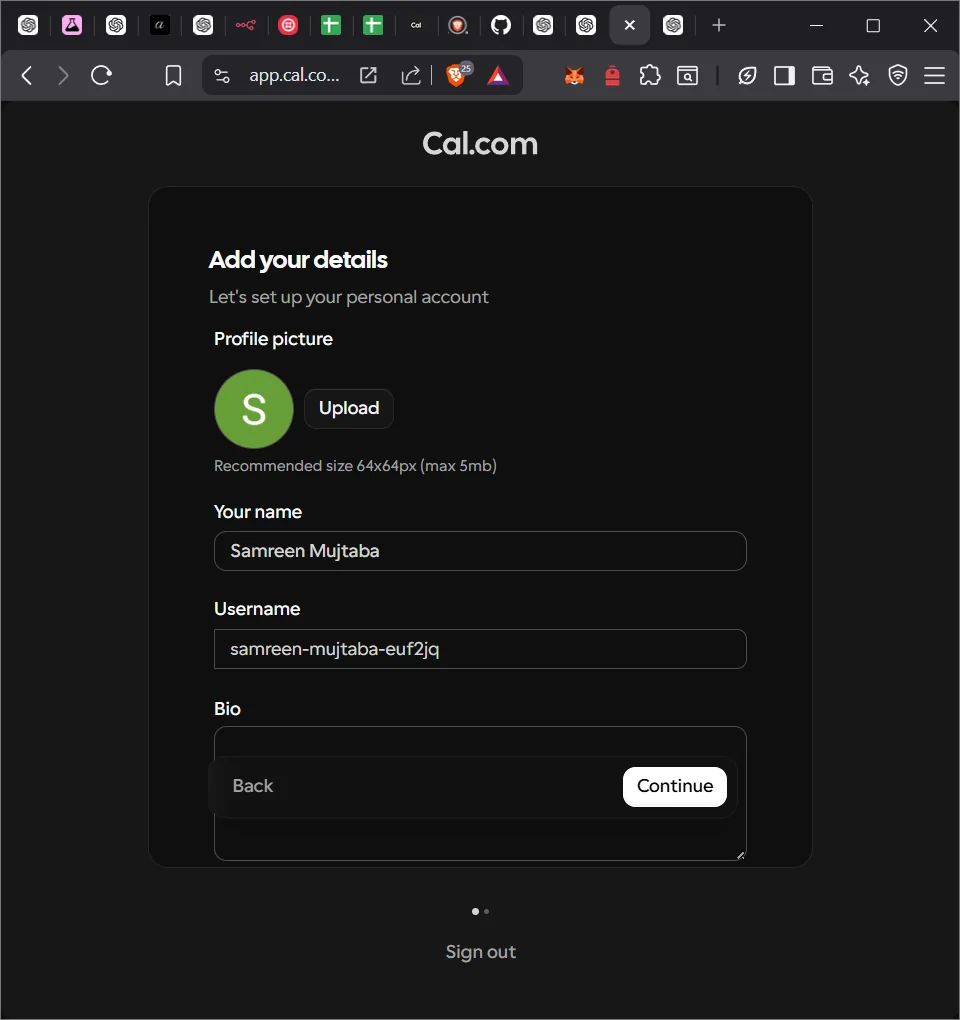
From that screenshot and the codebase, the model returned five numbered steps, including resizing the window to a narrow width and a short height, and pointed at the component file and line.
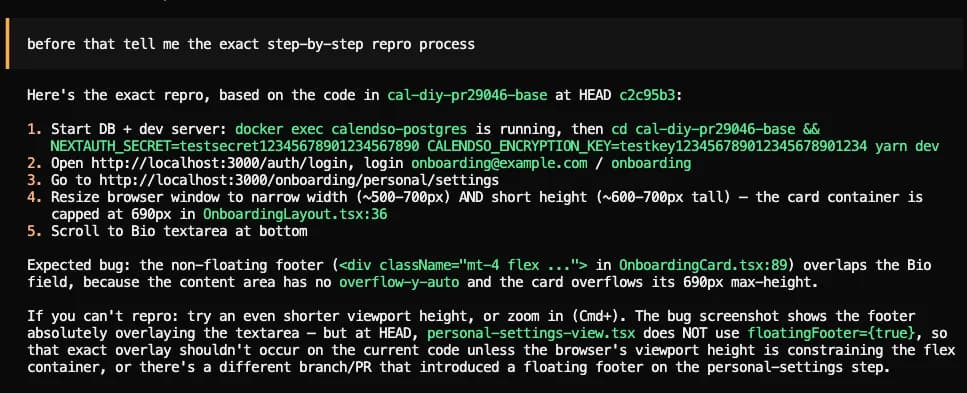
Meta notes that "The mention of both narrow width and short height is the part most readers miss". That's exactly the detail a customer never writes down, and exactly why screenshots matter. The cookbook also documents two failure modes worth pinning up. "The Screenshot Names The Wrong Component" when the shot lacks browser chrome, fixed by including the URL. And "The Model Fixes The Symptom, Not The Root Cause" when there's only one screenshot, fixed by attaching a second one of a related screen. Both are an argument for asking the customer for one more screenshot before escalating.
Here's what the API accepts for the three kinds of evidence a WhatsApp bug report carries:
| Evidence | Muse Spark API support | Limits worth knowing |
|---|---|---|
| Screenshot | JPEG, PNG, GIF, WebP, ICO (Image understanding) | Up to 50 per request, 50 MB inline; a ~1280px image is about 1,300 to 1,500 tokens |
| Screen recording | MP4 only, silent recordings allowed (Video and audio understanding) | No published max length, frame rate or video token cost |
| Voice note | Audio on 1.3 "is currently not fully supported"; use 1.2 or Muse Voice Transcribe | Transcribe takes mono WAV only, 10 minutes and 32 MB per file |
Two gaps for WhatsApp specifically. Voice notes arrive as OGG/Opus, and neither the model's audio input (MP3 or WAV) nor Muse Voice Transcribe (mono 16-bit WAV) takes that format, so you convert first; Meta's docs give an ffmpeg command. And for video, Meta publishes no limits at all beyond the format, so test on your own recordings before trusting it.
To get steps back in a shape your ticket system can use, set response_format to a JSON schema. Meta says "decoding itself is constrained, so the output is guaranteed to conform" (Structured output), and a flat steps[] array of {action, expected, observed} (the same idea as JSON mode elsewhere) fits well inside its 10-level nesting limit. Meta's own caveat from the chart cookbook applies here too: it "guarantees the shape, not that the model read the chart correctly". A clean JSON repro can still be wrong.
One rule you can't skip: use the standard tier. Meta's Terms of Service say "You must not submit sensitive, confidential, or personal information to the Discounted Services", and add that code you need to keep confidential can't go there either. Customer screenshots are full of names, emails and account numbers, and they are some of the most sensitive support data you hold. So bug reports go to standard muse-spark-1.3 at $1.25 input and $4.25 output per 1M tokens, where "your prompts and completions are not used to train Meta models" (Pricing and rate limits).
Stage 3: reproducing it in code with Muse Code
The last stage is proof: a test that fails because of the bug. That's what coding agents are good at, and Meta's own Muse Code cookbook ships a sample for it. The sample game, Bastion Breaker, comes with "one planted rule bug", and its test suite shows it up front: test_enemy_shot_does_not_destroy_bricks FAILED. The fix runs in a subagent inside its own git worktree, so the parent branch stays untouched until you review it. I covered the harness in my Muse Code review.
The pattern to borrow: hand Muse Code the JSON repro from Stage 2 and ask for a failing test first, a fix second. A failing test is something an engineer can check in a minute. A fix without one is a guess with a diff attached, which is the same advice I'd give for debugging with Claude Code or any other agent.
Developers who already work this way report the same thing:
"In many cases it will have figured out the bug. In many cases it will have produced a small, clean, deterministic reproducer. In my daily work I see these cases. It does help that the bugs that are filed contain a test case and some analysis by the agent."

Two cautions from the Muse Code docs. Its sandbox is on from the first run and fails closed, which is what you want when the agent is running code based on a stranger's bug report. And Muse Code has no spend cap: it bills the same Muse Spark tokens, three background observer agents run by default, and the only documented brake, --max-model-steps, is headless only. The Muse Code pricing breakdown has the details.
What bug reproduction on Meta's stack costs
Every station has its own meter:
| Piece | What it does | Cost |
|---|---|---|
| Meta Business Agent | Takes the report, hands off | $2.00 per 1M tokens, about 4 to 5 cents a message (WhatsApp pricing) |
| Human replies after handoff | Your team follows up with the customer | 1,000 service messages free per number a month, then per message from Oct 1, 2026 |
| Muse Spark API | Screenshot or recording to repro steps | $1.25 input / $4.25 output per 1M tokens, $0.15 cached input |
| Muse Voice Transcribe | Voice note to text | $0.18 per hour of audio, billed to the second |
| Muse Code | Failing test and fix | Same Muse Spark token rates, no spend cap |
| Your glue code | Standby webhook, media download, ticket creation | Your own hosting |
The screenshot itself is cheap, about a fifth of a cent of input at standard rates. The expensive row is the second one. Bug reports are the tickets with the most back-and-forth ("which version?", "can you send another screenshot?"), and from October 1 each of those human replies is billable once you pass the free 1,000. My WhatsApp Business API pricing post has the full rate history.
Where Meta's stack falls short for bug reproduction
In fairness, the individual pieces are good. The Error screenshot fix cookbook is one of the better bug-repro walkthroughs I've read from any model vendor, and a failing test in a sandboxed worktree is the right output for the last stage. The limits sit in the joins between the pieces:
- Business Agent's handling of customer media isn't documented. Plan as if it can't see the screenshot.
- No file path into your ticket. Connector tools send JSON only, so screenshots go through standby webhooks and your own download code.
- Standby or summary, not both. You choose between keeping the evidence and getting Meta's summary.
- A 7-day media window. Slow triage loses attachments.
- One AI per number. "An active authorized-agent integration blocks Meta Business Agent" (overview), so you can't run Business Agent and another support AI on the same number. Meta's wider stance is in its third-party AI policy.
- Three products, three bills, three sets of logs. Nothing ties the WhatsApp conversation, the repro JSON and the test run to one ticket unless you build it.
The part Meta doesn't touch: the ticket
The lesson I'd take from this comes from eesel's own support queue more than from Meta's docs. One of the most technical reports eesel's helpdesk teammate has handled was a field engineer's hardware fault, a stage problem throwing error codes 6001, 3174 and 5169 on an EtherCAT network. The agent ran six searches across the customer's PDF manuals, read two in full, and drafted a reply with step-by-step isolation tests. Nothing about that is magic. It worked because the report, the manuals and the reply all lived in the same ticket.
That's the real gap in a Meta-first setup. Every stage above can work, and the report still arrives in your helpdesk as a prose summary with no screenshot, while the repro JSON lives in one log and the failing test in another. Support teams on eesel's sales calls describe the same want in different words: an AI that knows "when to pull a real person in", and that stays quiet rather than guessing when it isn't sure. A suspected bug is exactly that case. It needs the evidence kept, the right handoff to a human, and an engineering ticket someone can act on. That's the core of handling escalations with AI, and it's the part Meta leaves to you.
Here's what that looks like from the customer's chair:
"support responded me by asking build version, my os version, device type - me screenshot all the requested details + manually wrote down in response email so someone can also copy-paste somewhere directly from my email - support responds by asking me to clear my iphone cache(sending me a guide for Android's App data cleaning process)"
That's the customer's side of a ticket where the evidence and the conversation got separated. Nobody in that loop was careless. The details just weren't where the next person looked.
Try eesel for bug reports from support
eesel starts from the ticket end of the relay. It's an AI helpdesk teammate that works inside Zendesk, Freshdesk and Jira Service Management. It can also answer on WhatsApp, and it has a dedicated Jira Service Management integration.
For a bug report, the chain looks like this, and every step is in the docs:
- It reads the evidence. On Zendesk and Freshdesk it "reads up to five images or PDFs per turn" (Zendesk docs), so the screenshot is part of what it reasons over. To be straight about the limit: "Videos, zip files and other formats are ignored", so a screen recording still needs a human look.
- It asks for what's missing. You write the rule in plain English ("ask for the app version, device and steps before escalating a bug") and it applies from the next ticket.
- It checks for a duplicate. In Jira Service Management it can run Search Issues with JQL "so your agent can find related or duplicate issues" (JSM docs), which saves engineering from reproducing the same bug twice. If Jira is your hub, my Jira AI agent guide and the Meta Muse for JSM post cover the wiring.
- It files the issue for approval. Create Issue sets the project, summary, description, assignee and labels, and you can set it to needs-approval so a person signs off on every engineering ticket (Actions and approvals).
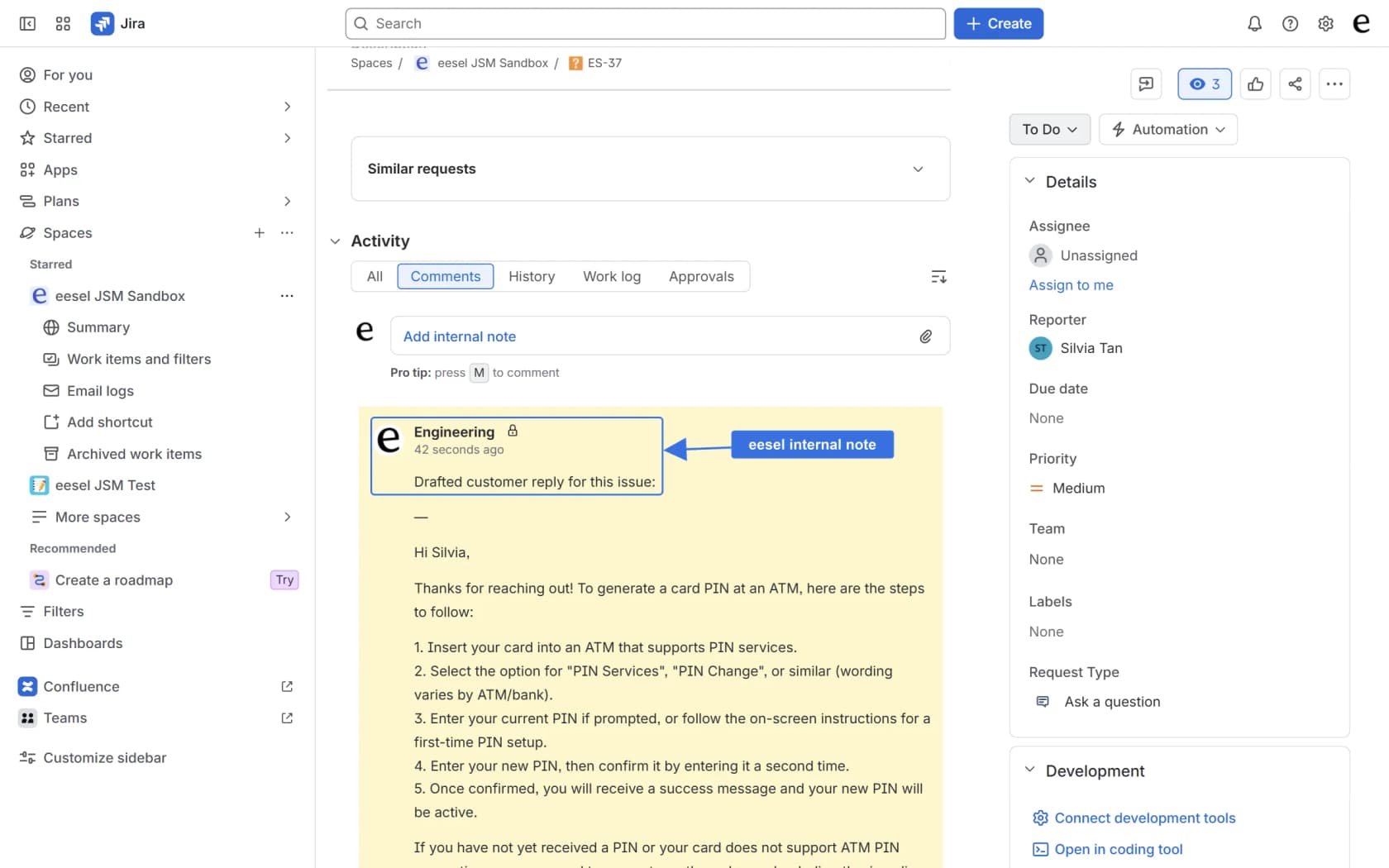
One more honest limit: eesel can't attach files to a Jira issue, so the screenshot stays on the helpdesk ticket and the Jira issue links back to it. It also has no prebuilt Linear or GitHub Issues integration; if that's where your engineers live, the route is Network Access, which lets the teammate call a REST API you allow.
If your engineers would rather not open another dashboard, the eesel CLI runs the same teammate from a terminal. Every command prints JSON, so an engineer, or a coding agent like Claude Code or Codex, can check eesel activity to see which bug reports the teammate escalated and why, approve pending Jira issues with eesel approvals approve, and adjust the escalation rules with eesel automations enable without leaving the repo. That's the same terminal the failing test runs in, which is a nice place for the two halves of a bug report to meet. There's also a customer support agent API if you want to wire it into your own tooling.

Because of Meta's one-AI-per-number rule, you'd run eesel or Business Agent as the AI on a given WhatsApp number, not both. For a wider field of options, see my list of the best AI for WhatsApp support. If you're a small team where one developer reads every WhatsApp bug report, Business Agent plus a standby webhook and the Error screenshot fix recipe is a reasonable build. If reports come in from WhatsApp and email and need to reach Jira with the evidence attached, running it where the ticket lives is less to maintain. Pricing is a fixed monthly credit plan, starting at $299 for 500 credits, where a ticket or chat is one credit however many replies it takes. You can run it on your past tickets first to see how it would have handled last month's bug reports.
Try eesel free on 100 credits, no card needed.
Frequently Asked Questions
Can I use Meta Muse for bug reproduction?
Can Meta Business Agent read a customer's screenshot?
Can Meta Business Agent send a bug report to Jira?
How long do WhatsApp bug report screenshots stay available?
Can the Muse Spark API turn a screen recording into repro steps?
How much does Meta Muse for bug reproduction cost?
Can I use the cheap Muse Spark contributor tier for bug reports?
What's a good alternative to Meta for bug reports from support?


Article by
Kira
Kira is a writer at eesel AI with a Computer Science background and over a year of hands-on experience evaluating AI-powered customer service tools. She focuses on breaking down how helpdesk platforms and AI agents actually work so that support teams can make better buying decisions.