AI customer service API: the real build-vs-buy guide for 2026

Rama Adi

Katelin Teen
Last edited October 14, 2026
What people actually mean by an AI customer service API
When someone searches "AI customer service API," they are usually standing in one of three places. Naming which one you are in saves a lot of wasted reading.
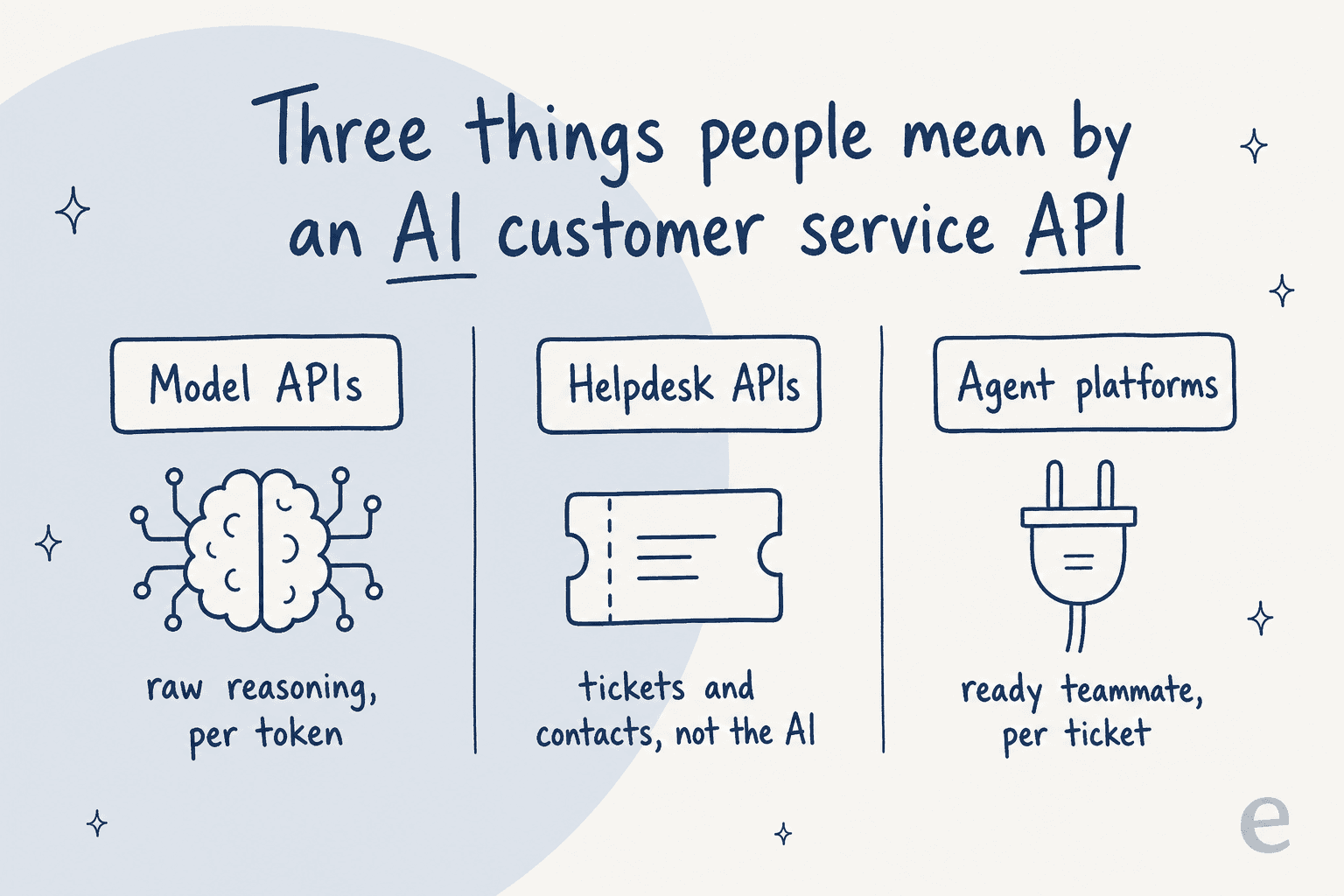
- The model API. You want to build the agent yourself on OpenAI or Claude. The API is the raw reasoning engine, billed per token. Everything a support product does around the model is on you.
- The helpdesk API. You already run Zendesk or Freshdesk and want to automate ticket workflows programmatically. This gets you tickets, contacts, and conversations over REST, but not the AI answer itself.
- The agent platform. You want a working AI agent without building it, so you are shopping for something that already connects to your stack. This is where an AI helpdesk agent lives.
These are not competing answers to the same question. They are three different amounts of work. Here is what each one actually asks of you.
Route 1: build on a raw model API
This is the route the "we'll just build our own" instinct points at, and it is a real step up from a rule-based chatbot. The flip side is that a model API sells you the reasoning engine, not a support product.
Current API token pricing brackets pretty tightly across the two big vendors:
| Model | Input / 1M tokens | Output / 1M tokens | Best for |
|---|---|---|---|
| GPT-6 Astra (OpenAI flagship) | $10.00 | $50.00 | Hard reasoning |
| GPT-5.6 Luna (OpenAI mini) | $0.20 | $1.20 | High-volume triage |
| Claude Opus 5 (Anthropic flagship) | $5.00 | $25.00 | Complex resolutions |
| Claude Haiku 4.5 (Anthropic cheapest) | $1.00 | $5.00 | Fast, cheap replies |
On paper the mini models are cheap enough that token cost is rarely the thing that sinks a build. The thing that sinks a build is everything the token price does not cover.
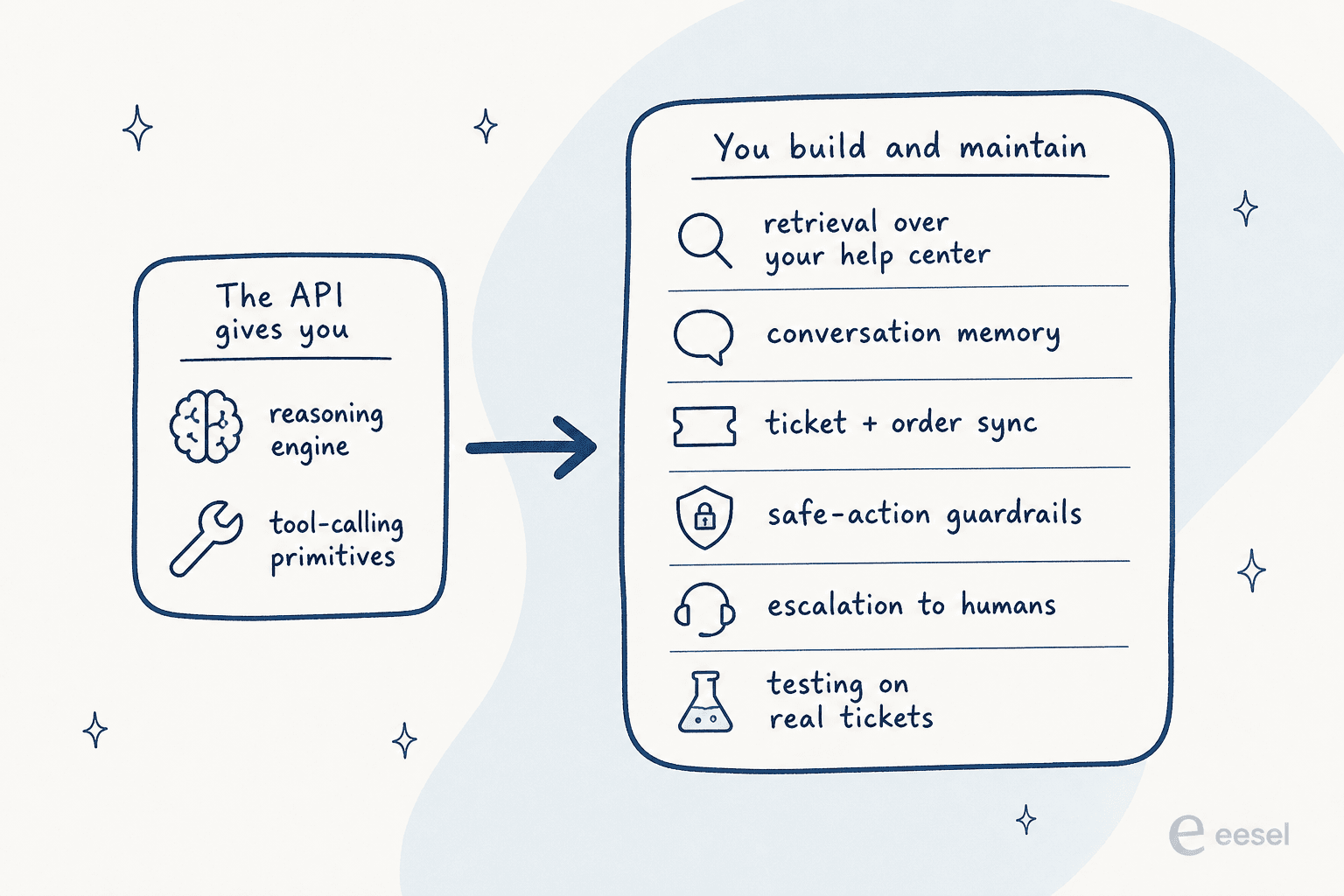
Walk through what a real support agent needs, and how much the API actually hands you:
- Retrieval over your knowledge. OpenAI gives you a hosted File search tool with a managed vector store, so you do not run the retrieval infrastructure. You still own keeping the help center current and chunking every doc into it. On Claude, retrieval over your own content is wired up through tools or MCP that you provide, so the RAG pipeline is yours.
- Tool calling and safe actions. Both platforms let the model decide to call
lookup_orderorissue_refund. Anthropic's tool use returns atool_useblock, your code runs the operation and passes atool_resultback. The code that actually hits your helpdesk and the auth around a refund is entirely yours on both. - Conversation memory. The Claude Messages API is stateless per call; you rebuild multi-turn context by resending the history. State persistence across turns and sessions is your problem.
- Guardrails. OpenAI ships a real guardrails and human-review framework with input, output, and tool checks plus human-in-the-loop approvals before side effects. It is a framework you configure, though, not a support policy. There is no drop-in "never promise a refund over $200" rule; you author every one.
None of this is a knock on the APIs. They are excellent primitives. The point is that "build our own" means building and then maintaining the retrieval, the memory, the safe-action layer, the escalation logic, and the test harness. That is a product, not a weekend.
MCP is the new glue, but it is still glue
The one new thing since the last time you priced this out is MCP, the Model Context Protocol. Both vendors now treat it as the standard way an agent reaches an external system. OpenAI exposes connectors and remote MCP servers through an mcp tool type, and Anthropic offers an MCP connector straight from the Messages API.
MCP means you do not hand-write every integration from scratch anymore. But an MCP server still has to exist for each system you want to reach, and you still own the approval policy around the sensitive actions. It is a much better glue than a pile of bespoke webhooks. It is still glue you assemble.
Route 2: your helpdesk's own AI API
If you already run a helpdesk, the second instinct is to reach for its API and its built-in AI. Here the surprising finding, after reading all three developer docs back to back, is consistent: the public REST API is a tickets-and-contacts data plane, and the AI answering is a separate in-product feature the API does not expose as an "ask the AI" endpoint.
Zendesk has the broadest API by far: Support, Conversations, Help Center, Chat, Voice, and Custom Objects, plus a dedicated AI Agents API that lets you manage AI conversations and escalations programmatically. Two catches the docs state directly: it "does not follow the general mechanisms and conventions of most Zendesk APIs," and every AI call still bills against the automated-resolution meter. Rate limits run 200 to 2,500 requests per minute by plan.
Freshdesk exposes a clean v2 REST API for tickets, conversations, contacts, and automation rules, but there is no Freddy or "generate an answer" endpoint in the resource list. The AI agent for Freshdesk is built and deployed inside the in-product AI Agent Studio. Rate limits are account-wide and low: 100 calls/min on Growth, 400 on Pro, 700 on Enterprise.
Gorgias is the same story. Its REST API covers tickets, messages, customers, and rules, and the AI Agent touches the API only through system-managed AI Agent Outcome and AI Intent fields you can read but not write. The rate cap is 40 requests per 20 seconds on an API key, 80 on OAuth.
So the shape is the same everywhere: you can move data in and out over REST, but the actual answering model is configured in the product's own UI, and you meter it on the vendor's terms. If you want to see how that plays out in a real setup, my Zendesk AI agents guide walks the whole flow.
The part nobody puts on the pricing page: four different meters
Once you accept that the AI is metered on the vendor's terms, the next surprise is that no two vendors meter the same unit. This is the single biggest reason "how much does an AI customer service API cost" has no clean answer.
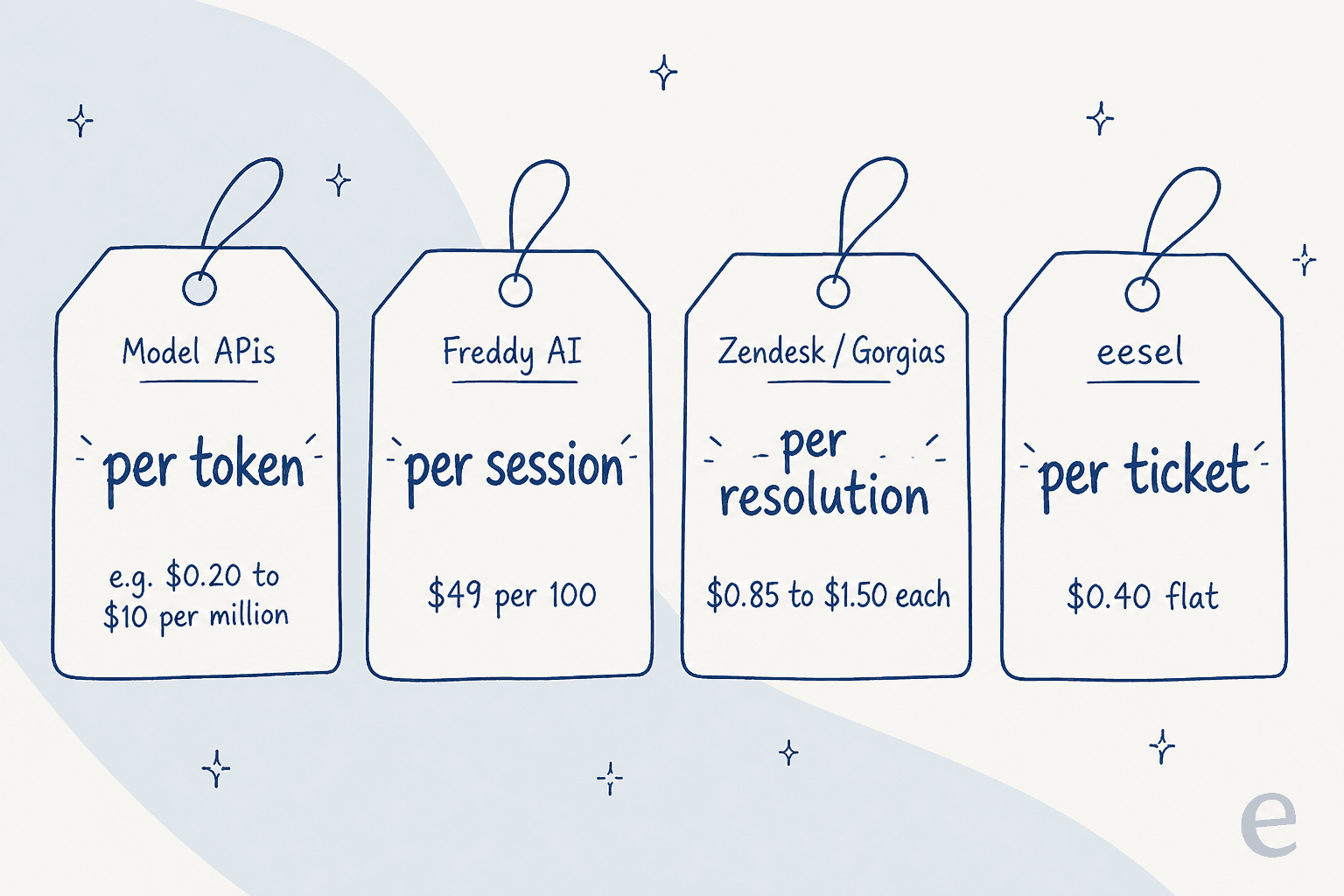
- Model APIs bill per token. Cheap per unit, but your bill is a function of prompt size and traffic you have to forecast.
- Freshdesk bills Freddy per session. 500 sessions free, then $49 per 100 sessions, on top of per-agent seats ($19 to $89/agent/mo).
- Zendesk and Gorgias bill per resolution. Zendesk grants a plan allowance (5 to 15 resolutions per agent per month) then charges quote-based overage. Gorgias lists $0.85 to $1.00 per automated interaction, depending on the plan, on top of ticket-based plans.
- eesel uses credits. A fixed monthly price, from $299/month for 500 credits, where 1 credit is one ticket or chat however long it runs. No per-seat fee, no platform fee.
A word on "resolution," because it is doing a lot of quiet work. Zendesk only counts a verified resolution (one that passed LLM verification) against your allowance, and an email conversation does not "end" for billing until 72 hours after the last message. Per-resolution pricing is defensible, but it means your bill moves with how the vendor defines a successful outcome, which is not a number you control.
Here is a quick way to see how the per-resolution and fixed monthly plan models diverge at your own volume:
The comparison is not perfectly apples-to-apples (per-resolution vendors only bill resolved conversations, while a credit plan counts everything the AI works on), which is exactly the point: you cannot compare these tools on price without first normalising the unit. That normalisation work is what makes "AI customer service API" pricing so slippery.
When building it yourself is the right call
I want to be fair to the build route, because sometimes it wins. Build on a model API when you have engineers who want the agent to do something non-standard, when you need the model reasoning embedded in your own product rather than in a helpdesk, or when your data governance rules mean the retrieval layer has to live entirely inside your own infrastructure. In those cases the control is worth the maintenance, and MCP has made the integration side dramatically less painful than it was even a year ago.
But notice how narrow that is. Most teams searching "AI customer service API" are not trying to build a novel product. They want the AI to read their help center and past tickets, answer the routine questions, look up an order, and hand the hard ones to a human. That is a solved problem, and rebuilding it in-house mostly buys you a backlog. The churned customer I quoted at the top left over a broken integration and slow support, then said they would build their own. The irony is that a broken integration is precisely the kind of maintenance you are signing up for when you build the whole pipeline yourself.
Try eesel: the API glue, already done
If you land in the "I just want a working agent" camp, this is the pitch, and I will keep it honest. eesel is an AI support agent that plugs into the helpdesk you already run rather than replacing it. It reads your Zendesk, Freshdesk, Gorgias, and Help Scout over their own APIs, trains on your past tickets and help center, and joins the queue as a teammate, so you are not the one writing the retrieval layer, the ticket sync, or the escalation logic.

Two things it does that the raw-API route makes you build from scratch. First, simulation against your historical tickets before go-live, so you see the resolution rate on your own data instead of flipping a switch and hoping. I built that habit the hard way, after watching confident bots give wrong answers on live queues. Second, a billing model you do not have to forecast: one fixed monthly price with no per-seat or platform fee, so the cost steps with ticket volume rather with a token count or a vendor's private definition of "resolution."
It is not the right tool if you truly need the model embedded in your own product with custom governance; that is the build route, and the model APIs above are where you start. But if the goal is an AI agent live on your real tickets this week, one German loan-comparison portal I work with now runs its Zendesk fully automated through webhooks at roughly 27,000 conversations a month, and a driver-analytics app resolved 73% of its tier-1 tickets in the first month. You can start free with 100 credits, no credit card, and see your own numbers before you commit.