


Let's be honest, nobody really wants to send a support email and wait around for a reply anymore. Your customers are already on WhatsApp, so that's where they expect to find you. For support teams, this is a great opportunity to connect where people are already active.
This is exactly why the WhatsApp Business integration for Freshdesk is such a valuable tool. In this guide, we'll walk you through how the native connection works and how you can get the most value out of it. Getting your WhatsApp chats into Freshdesk is a solid move, and you can make the experience even better by layering in some AI to handle repetitive questions, sort tickets, and give your agents more time to focus on complex issues.
What is the WhatsApp Business integration for Freshdesk?
Think of the integration as a professional bridge connecting your WhatsApp Business account to your Freshdesk helpdesk. It lets your team see, manage, and reply to every customer message from WhatsApp without ever leaving the Freshdesk interface they already know.
The biggest win here is that everything is in one place. No more juggling a separate phone or web app. Every WhatsApp chat becomes a ticket that you can track, assign, and handle with the same professional tools you use for email. It turns WhatsApp into a proper, organized support channel. It also handles rich media, so when a customer sends a screenshot, it shows up right in the ticket for your team to see.
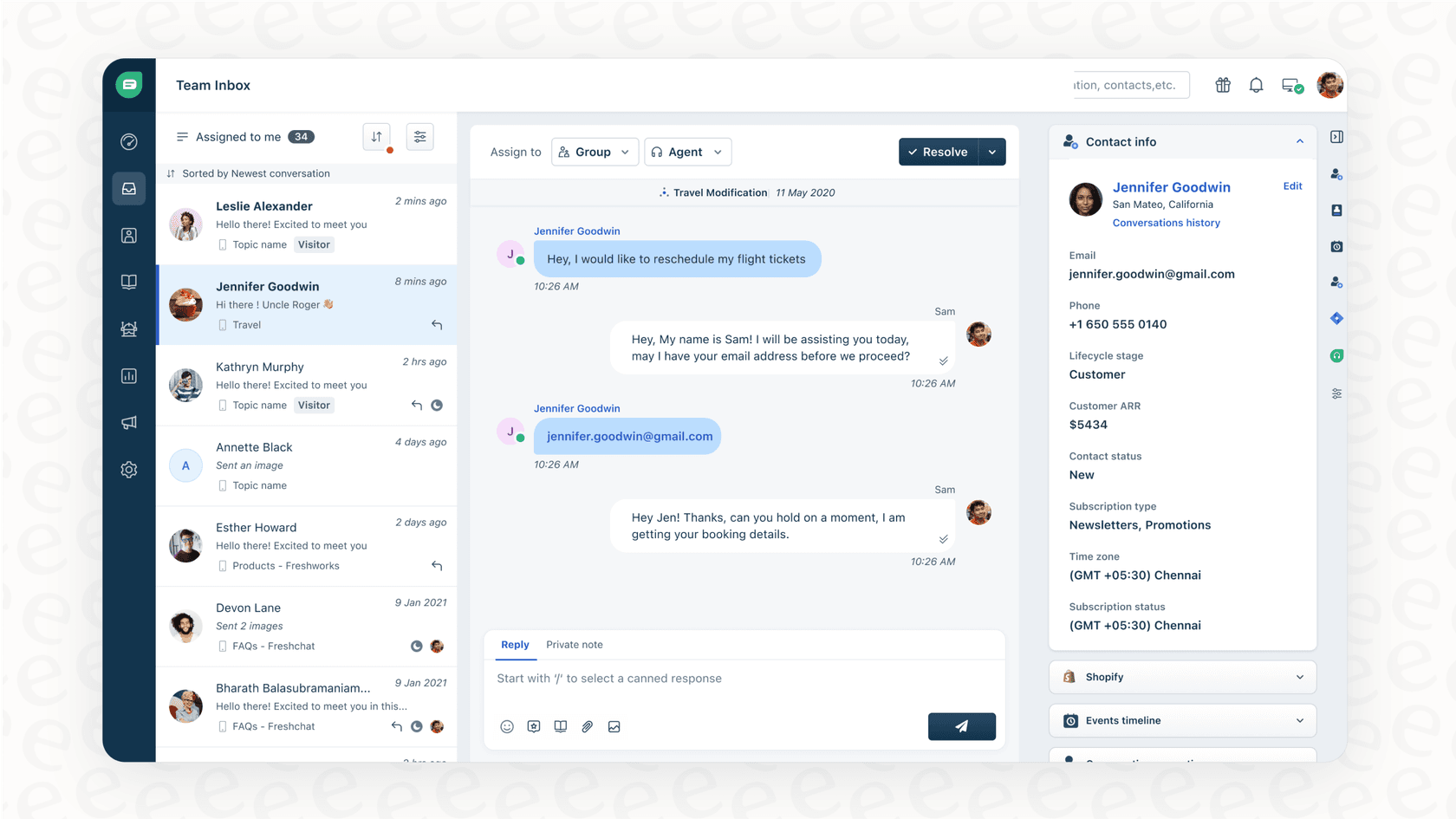
How the native WhatsApp Business integration for Freshdesk works and how to scale it
Getting started means connecting your WhatsApp Business Account (WABA) through your Meta Business Manager. Once that's done, you'll have a streamlined system that pulls WhatsApp into your daily support routine.
So, what can you actually do with it out of the box? When a message comes in, it automatically creates a new ticket in Freshdesk. Your agents can then reply directly from that ticket, and the customer gets the message on their WhatsApp like a normal chat. The system is smart about contacts, matching the phone number to an existing customer or creating a new one if it's a first-timer. You can also use Freshdesk's automation features, like setting a rule to assign all WhatsApp tickets to a specific team.
The evolution of your standard WhatsApp Business integration for Freshdesk
While having everything in one place is a fantastic foundation, as you grow, you might look for ways to handle even higher volumes of messages.
Initially, your agents will handle every message. This is great for building personal connections, but as you scale, you can introduce AI to assist them. For instance, while Freshdesk's built-in rules are excellent for routing, adding AI can help the system understand the specific intent behind a message - like distinguishing between a refund request and a simple "thank you."
Furthermore, you can enhance the native tool by connecting it to your team's historical knowledge. While the native integration handles new tickets brilliantly, tools like eesel AI can look back at resolved tickets to help maintain your brand's voice. You can even use simulation modes to test new workflows on your past tickets to see exactly how they would perform before going live.
Supercharging your WhatsApp Business integration for Freshdesk: Advanced use cases
A professional connection is a great starting point. The real aim is to use that connection to create an even more efficient support experience. Adding an AI layer to Freshdesk can help you achieve this.
Instantly resolve common queries
Think about a customer messaging you on WhatsApp to ask, "What's your return policy?" Freshdesk manages the ticket perfectly, and you can use AI to provide an instant answer.
With AI on top of the integration, the question can be addressed immediately. The AI understands the query, pulls the correct answer from your knowledge base, and provides the information the customer needs. This works best when the AI learns from all your company knowledge, which is something platforms like eesel AI are designed to support.
Automate ticket triage and routing
For more complex questions, AI can handle the initial sorting within Freshdesk. It can read an incoming WhatsApp message and determine what the customer needs, the tone of the message, and how urgent it is.
From there, it can automatically tag the ticket, set the priority, and ensure it gets to the right specialist. This helps your team stay organized and ensures customers get the right help faster.
Empower agents with an AI copilot
Even for complicated issues, AI acts as a helpful sidekick for your agents within the Freshdesk interface. An AI copilot can look at the customer's question and draft a suggested reply in just a few seconds, using info from similar past tickets and internal guides.
The agent can then review, refine, and send the message. This speeds up response times and helps keep your answers consistent across the board. This is exactly what eesel AI's Copilot does, and it even helps maintain your brand's unique voice by studying your past successful conversations.

Key features of a powerful WhatsApp Business integration for Freshdesk
If you're ready to enhance your ticketing, here are a few features to look for in an AI-powered integration. The goal is a seamless flow: a customer sends a message, AI provides initial support or triage, and your agents handle the rest with the help of smart suggestions.
Ability to learn from your unique knowledge
Look for a tool that learns from your company's specific knowledge to ensure accuracy. It should be able to connect to your help center, your past Freshdesk tickets, your internal wikis in Confluence, and even your documents in Google Docs. This ensures the AI's support is always relevant to your business.
A fully customizable workflow engine
Control is important. You should be able to decide exactly which tickets the AI assists with and which ones go directly to a human. A flexible platform like eesel AI lets you use a prompt editor to adjust the AI's tone and set up custom actions. For example, it can even help look up order information from Shopify via an API call.
A simple, self-serve setup
Getting your tools working together should be easy. The best solutions offer a simple, one-click integration that you can set up yourself in minutes. You should be able to connect your helpdesk and start configuring your preferences on your own schedule.
Understanding pricing for the WhatsApp Business integration for Freshdesk
When you use WhatsApp with Freshdesk, you'll generally manage two elements: your Freshdesk plan and Meta's standard fees for WhatsApp conversations.
Freshdesk pricing
The native WhatsApp integration is part of Freshdesk's versatile plans, starting with the Growth plan. Here's a look at the annual pricing for the tiers where it's included.
| Plan | Price (Billed Annually) | Key Features for WhatsApp |
|---|---|---|
| Growth | $19/agent/month | Ticketing, customer portal, basic reporting |
| Pro | $55/agent/month | Custom portals, advanced ticketing, custom reports |
| Enterprise | $89/agent/month | Audit logs, skill-based assignment, advanced security |
WhatsApp conversation pricing
Meta's pricing is based on 24-hour "conversation sessions." A session starts when you reply to a customer or send a message. The rates vary depending on who starts the chat. As a benefit to businesses, Meta currently provides the first 1,000 of these conversations free every month.
Move beyond connection to automation with your WhatsApp Business integration for Freshdesk
Integrating your WhatsApp account with Freshdesk is a smart move that modernizes your support. It allows you to meet customers where they are and keeps your communication organized within a world-class platform.
The standard integration provides a fantastic foundation. By adding an AI layer, you can take this further to sort incoming tickets automatically and allow your team to focus on meaningful customer interactions.
Don't just manage your WhatsApp tickets: optimize them. With a setup that takes just a few minutes, eesel AI can add an intelligent layer to your existing Freshdesk integration. You can even run a simulation on your past tickets to see how much more efficient your team can become.
Frequently asked questions
What exactly does the WhatsApp Business integration for Freshdesk do for customer support teams?
It connects your WhatsApp Business account to Freshdesk, allowing your support team to manage, track, and reply to all customer messages from WhatsApp directly within the Freshdesk interface. This centralizes communication and turns each WhatsApp chat into a trackable ticket.
How does the native WhatsApp Business integration for Freshdesk handle incoming messages and agent replies?
When a customer sends a message, it automatically creates a new ticket in Freshdesk. Agents can then reply from that ticket, and the customer receives the message on WhatsApp, making it function like any other support channel within Freshdesk.
What are the main areas for enhancement with the standard WhatsApp Business integration for Freshdesk?
While it organizes chats efficiently, the standard integration provides the essential foundation for support. To further reduce manual workload, teams can add advanced automation capabilities to triage tickets or learn from past conversations, allowing agents to focus on high-value tasks.
How can integrating AI enhance the capabilities of the WhatsApp Business integration for Freshdesk?
AI can instantly resolve common queries, automate ticket triage by understanding customer intent and urgency, and empower agents with an AI copilot that drafts replies based on your company's knowledge. This significantly helps agents respond faster and more accurately.
What kind of company knowledge can an AI-powered WhatsApp Business integration for Freshdesk learn from to provide accurate answers?
A powerful AI integration can learn from your company's unique knowledge base, including your help center, past Freshdesk tickets, internal wikis like Confluence, and even documents in Google Docs, ensuring its answers are accurate and brand-specific.
What are the typical costs associated with using the WhatsApp Business integration for Freshdesk?
Costs include your Freshdesk subscription plan (starting from Growth tier) and Meta's WhatsApp conversation fees. Meta provides the first 1,000 conversations free monthly, with subsequent charges based on who initiates the 24-hour conversation session.