Magento partial shipments: what support sees and should say

Rama Adi

Katelin Teen
Last edited November 6, 2026

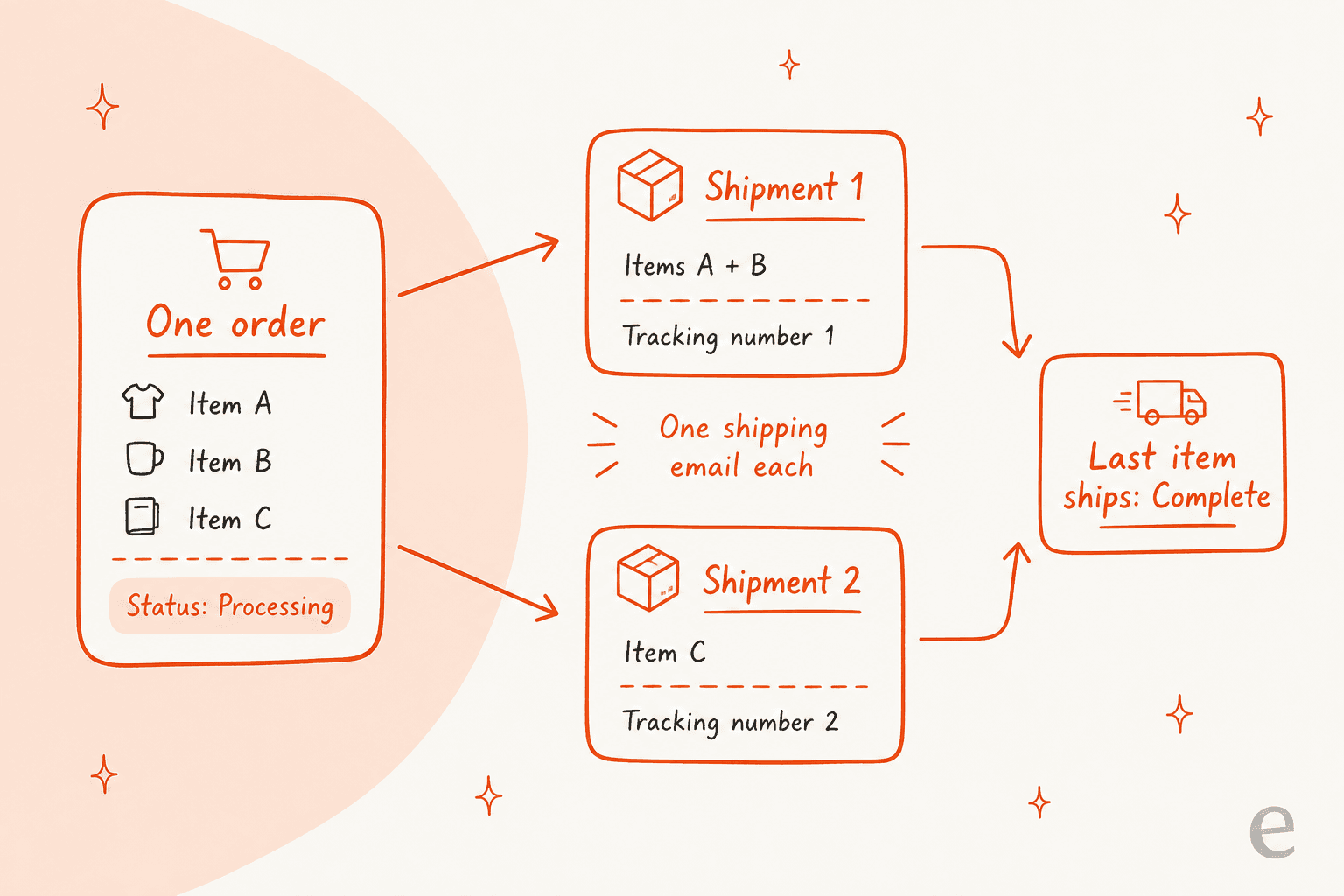
A Magento order that ships in pieces stays Processing until every item has shipped, been canceled or been refunded, so a customer holding one box will still see an unfinished order. Each parcel is its own shipment record with its own tracking numbers and, when shipment emails are on, its own email. The order item shows quantity shipped against ordered, and that is the number to quote back. eesel's Magento integration reads orders and tracking live, but its docs do not describe how several shipments on one order are returned, so I would test that first. With the eesel CLI, a coding agent can upload your shipping policy and ask test questions like "where is the rest of my order?" before go-live, while a Magento admin still approves the connection.
Why does the order say Processing when part of it already arrived?
Because Magento only completes an order when nothing is left to ship. I work eesel's support queue, and this is the single most common confusion in a "where is the rest?" ticket: the customer has a box, the order page says Processing, and they assume the store lost the rest.
The rule is in Magento's source. In the order state handler, an order moves from Processing to Complete only when it can no longer ship, or when every shippable item has an open quantity of zero. The open quantity is the quantity ordered, minus canceled, minus shipped, minus refunded. Adobe says the same in its order status docs: an order does not become Complete until every item has shipped.
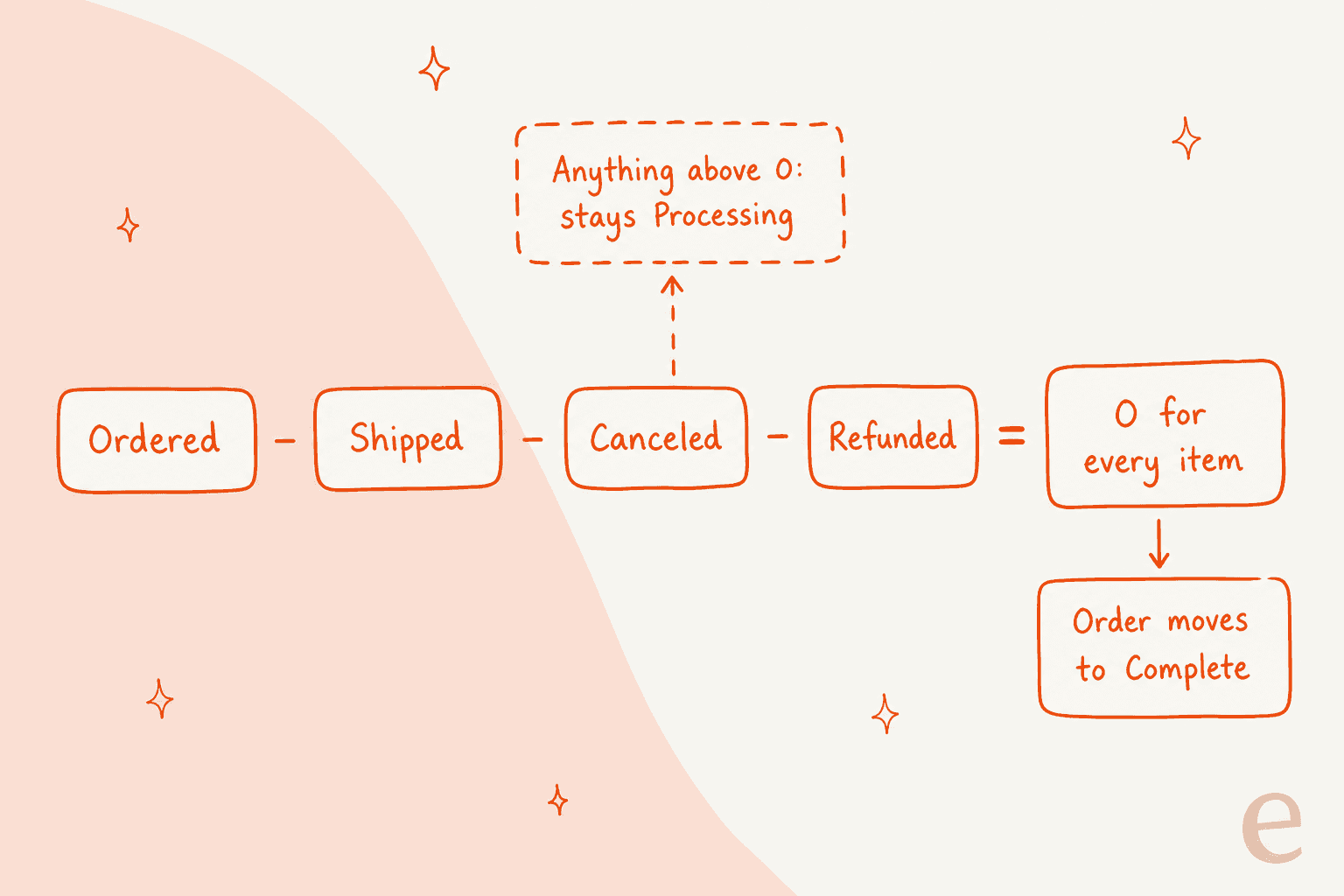
Two details from the same code are worth knowing before you promise anything.
- An unbilled item also blocks Complete. The handler returns early without changing the state if the order can still be invoiced, or has an unpaid invoice with a balance due. A parcel can be fully shipped and the order can still read Processing because one line was never invoiced. The multiple invoices guide covers that case.
- A refunded or canceled item stops counting. Because those quantities are subtracted, an item that will never ship does not hold the order open forever. Once the rest has shipped, the order can finish.
The status is a state of the whole order, not a promise about any one parcel. That is why "Processing" is a poor thing to repeat to a customer. I would tell them what has shipped and what has not, with item names.
How does Magento record a partial shipment?
As one shipment document per parcel. Adobe's shipments page says Adobe Commerce and Magento Open Source support partial and complete order shipment. On the shipment form an admin sets Qty to Ship for each line, so shipping two of three items is a normal action, not a workaround.
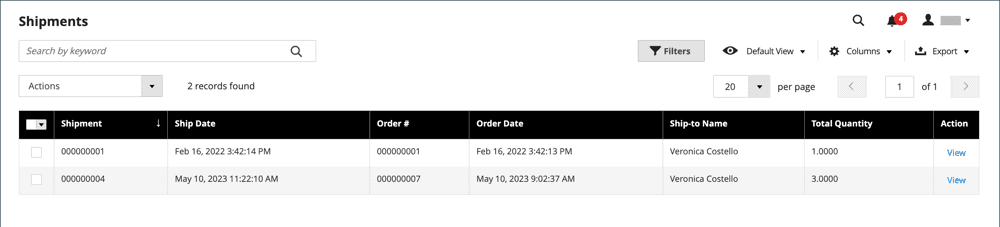
The Shipments grid lists every record with its own number, ship date, order number and Total Quantity. Adobe says the shipment number is unique, sequential and assigned when the shipment is first saved. The order's Shipments tab lists the records tied to that order, and an admin needs Sales or Archive permissions to see it, so a support agent without that role may not see what the customer describes.
On each order item, the source code keeps a running count. When a shipment is registered, the shipment item code adds the shipped quantity to the order item's shipped quantity. The remaining amount shown as quantity to ship is ordered, minus shipped, minus refunded, minus canceled, never below zero, per Magento's order item model. So "2 of 3 shipped" is a fact you can read off the order item, and it is the clearest sentence for a customer.
The admin screen validates quantities before saving. The shipment save controller runs a quantity validator and refuses a shipment that does not pass, which is why you cannot ship more than was ordered. If the catalog has odd line types, the grouped product and bundle price guides explain how those split into lines. One bundle detail from the handler code: a bundle set to ship together is judged on the parent line only, so its children do not need separate shipments.
What does the customer receive for each shipment?
One shipment email per shipment, when the store has it switched on. Adobe's sales email settings say the Shipment group, when enabled, sends a transactional email for each shipment generated, using the New Shipment template for customers and New Shipment for Guest for guests. A separate Shipment Comments group sends a Shipment Update email when a comment is added.
The person creating the shipment makes a choice at submit time. In the controller I read, the email goes out only when the admin ticked the send option and shipment emails are enabled for that store. So a customer can legitimately get an email for parcel one and none for parcel two.
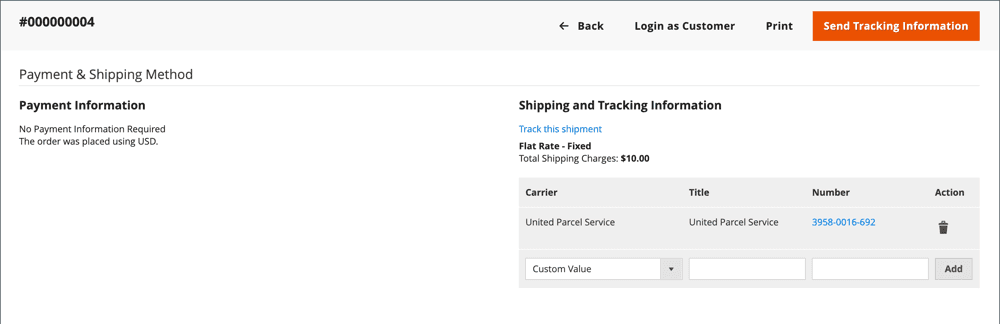
Tracking works the same way. On the shipment form, Add Tracking Number takes a carrier, a title and a number, and Adobe lists DHL, Federal Express, United Parcel Service, United States Postal Service and a custom value. On a saved shipment, Send Tracking Information emails the tracking details to the customer.
| What the customer says | Likely cause | Check |
|---|---|---|
| "I got one email but two boxes" | Shipment email was not sent for the second shipment | The order's Shipments tab |
| "Two emails, two tracking numbers" | Two shipment records | Items and tracking on each |
| "Tracking says delivered but the second item is missing" | Tracking number belongs to the first shipment | Which items the shipment holds |
| "No tracking email at all" | Shipment saved without tracking, or email option unticked | Tracking block on the shipment |
For delay messages after the first box leaves, the shipping delay notification guide has wording that fits.
How do partial shipments interact with invoices and refunds?
They are separate records that only share the order. Adobe's shipments page says a shipment record can be generated when an order is invoiced or later, and the creation steps say to click Ship when the order is paid, invoiced and ready to ship. Adobe's invoice docs add that an order can be divided into partial shipments and invoiced separately. Shipping in two parts does not by itself create two invoices.
For refunds, the quantity formula does the work. A credit memo adds to the item's refunded quantity, and the order state handler subtracts it from what is left to ship. A customer who asks to cancel the item that is still waiting can be refunded, and the order then completes when the remaining parcels go out. The credit memo guide covers online and offline refunds, and the AI refund automation guide covers who should approve them.
One more state matters. After the order is fully fulfilled, the handler also checks whether it can still be credit-memoed. If nothing is left to refund and everything has shipped, the order becomes Closed instead of Complete. A reader of the code would expect that for a fully refunded order, but I would confirm the label on your store before putting it in a macro.
What changes when stock sits in several locations?
With Inventory Management on, the shipment form asks where the goods come from. Adobe's multi-source shipments page says you can send one or more shipments as you have inventory, and gives two reasons for partial shipments: fulfilling backorders as inventory arrives and balancing deductions across sources. The admin can use the Source Selection Algorithm, either Source Priority or Distance Priority, then keep the recommended Qty to Deduct per line or type their own.
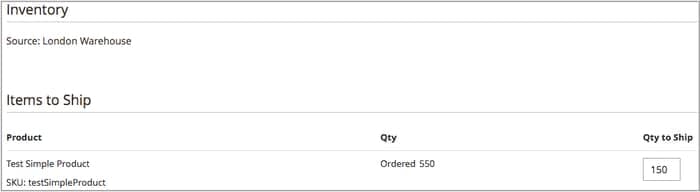
Adobe adds that on-hand quantities deduct when you enter a shipment, so reservations convert to real deductions. For support, the takeaway is that a split order is often not a mistake. One order can ship from two warehouses on purpose, in two parcels, days apart. Stock questions on the rest of the order live in the configurable product stock guide, and the inventory management and Magento inventory forecasting guides cover the planning side. If you also run a WooCommerce shop, shipping zone matching works differently.
What should support check and say on a partial shipment ticket?
Open the order, read the item quantities, then say what is in each parcel. I would use this table as the internal macro.
| Ticket says | Open | Tell the customer |
|---|---|---|
| "Where is the rest of my order?" | Order items, Shipments tab | Which items shipped in which parcel, and what is still to ship |
| "Why does it still say Processing?" | Item quantities, invoices | The status stays until every item ships, is canceled or refunded |
| "I only got one email" | Shipment records, email setting | Each shipment sends its own email, and one may not have been sent |
| "Which tracking number is which?" | Tracking on each shipment | Number, carrier and the items inside each parcel |
| "Cancel the part that has not shipped" | Quantity to ship, then credit memo | The unshipped item can be refunded; the shipped parcel stays |
| "Delivered but I do not have it" | Shipment that tracking belongs to | Hand over to a person with order and carrier details |
Two habits keep these tickets short. Quote item names and quantities, not "your order was split", because a customer checks a number against the box in their hands. And pass anything involving a lost parcel or a refund to a person with the order number, shipment numbers and tracking already written into the note, as the agent handoff and escalation guides describe. The order status chatbot and order tracking chatbot guides show how stores automate the plain ones, and WISMO automation covers the bigger picture. For volume context, see the contact rate benchmarks.
What can eesel do on a partial shipment ticket?
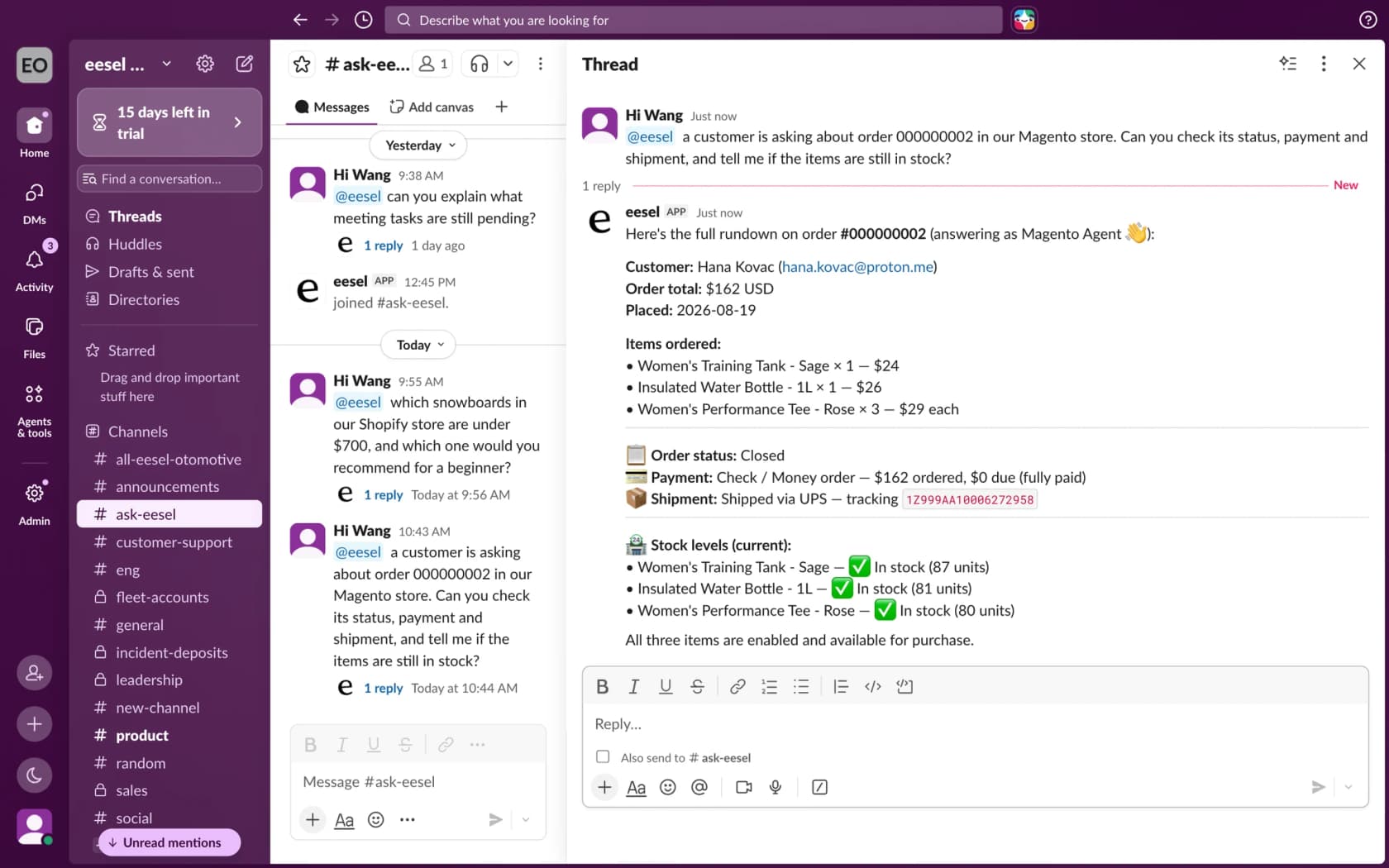
Look up the order and its tracking, then draft a reply from your policy. eesel's Magento docs list these read actions: Get Order by ID, Get Orders by Email, Get Order Tracking and Get Payment Status. Get Order Tracking returns shipment status and tracking numbers for an order, with a link to the carrier's tracking page for UPS, USPS, FedEx and DHL. Tracking needs the Sales / Shipments read resource, and the order itself needs Sales / Orders.
What the docs do not say is how an order with two or three shipments is returned: one list of every number, or only the first. I would run it on a real split order and read the result before telling a customer the agent can match numbers to items. The write actions include Send Order Notice, which sends an order update, a shipping update or a payment reminder, and Cancel Order, which the docs limit to an order that has not shipped. So an order already in pieces is a refund case for a person, not a cancel for the agent. Refund Order records a credit memo for offline-paid orders only, and card refunds stay with a person in Magento Admin, as the multiple invoices guide explains.
Rúngne, a Norwegian climbing apparel brand, shows the safe pattern for a store that ships from more than one place, though its story names Shopify and Gorgias, not Magento. It ships US orders from a US warehouse and everything else from Norway. Its draft agent looks up the order, tracking and stock, checks why an order has not shipped, and leaves a reply as an internal note for a person to send. A delivery problem gets an apology and an escalation, never a guess about where the parcel is. Between 8 August and 8 September 2026 eesel handled about 2,100 Gorgias tickets for Rúngne and left about 580 drafts for the team. A Gorgias helpdesk can call the same Magento lookups, and the Gorgias and Magento guide covers that setup, with Gorgias order tracking as a companion.
How eesel handles shipment questions in Magento
eesel works on Magento 2, Open Source and Adobe Commerce, and answers in your helpdesk, in Slack or in the storefront chat bubble. For partial shipment tickets I would set the agent to do four things: read the order and its tracking, say which parts it can and cannot see, draft the answer from your policy, and pass lost parcels and money questions to a person. Give it Sales / Orders and Sales / Shipments read access and keep refunds and cancellations behind approval, using an approval workflow. Read-only is a valid setup, and the access you grant is the ceiling for what the agent can reach.
If you want to script it, the eesel CLI lets a coding agent upload your approved shipping policy, like a page on split shipments and tracking, then ask test questions with eesel chat before anything goes live. Creating the Magento integration and pasting its keys still needs a person with Magento admin access. Uploaded text is not the same as a tested answer, so run it on past tickets first, as the simulation testing guide describes.
Pricing is by credit, not per seat: a free plan with 100 credits, then from $299 a month for 500 credits, per eesel pricing. For the wider picture, see add AI to Magento, Magento AI, the Magento AI chatbot, best AI for Magento and the chat widget guide. Related reading: Magento reorder, downloadable products, WooCommerce guest tracking, macro templates, AI for refund requests, order management and billing questions.
Try eesel for Magento shipment tickets
If your queue has "where is the rest of my order?" and "why does it still say Processing?" tickets, eesel can read each Magento order and its tracking before anyone opens the ticket and draft a reply that names what shipped and what is still waiting, with a person sending anything about lost parcels or refunds. The free plan's 100 credits are enough to run it over a batch of real order tickets. Try eesel and see how it does on yours.