Magento configurable product stock: why a size shows out of stock

Riellvriany Indriawan

Katelin Teen
Last edited November 5, 2026

A Magento configurable product has no stock of its own: each size or color is a separate simple product with its own SKU and stock, and the parent only follows them. When a customer sees "out of stock" for a size the admin grid shows with units, check three things in order: the child's Salable Quantity (not Quantity), whether the parent's Stock Status was set to Out of Stock by hand, and the Display Out of Stock Products setting. eesel's Magento integration reads each size's stock live, and with the eesel CLI a coding agent can upload your stock policy and test its answers before go-live.
Pick what the customer sees to get the first three checks and where to look in Magento Admin. Each one comes from Adobe's inventory and configurable product docs, covered below.
How does stock work for a Magento configurable product?
I'm Riell, and I work eesel's support queue. The tickets that cost the most time are the ones where the agent and the customer are looking at two different numbers, and a configurable product is a machine for producing them. A customer sees one product page with a size picker. Your admin sees one parent product and a pile of child products. The stock lives on the children.
Adobe says it plainly: a configurable product "appears to be a single product with lists of options for each variation", but each option is a separate simple product with its own SKU, which is what makes it possible to track inventory per variation, per its product types guide. When you create the parent, you leave Quantity blank, because the quantity is determined by the variations, per the configurable product guide. The parent has no price of its own either: the price shown comes from its in-stock children.
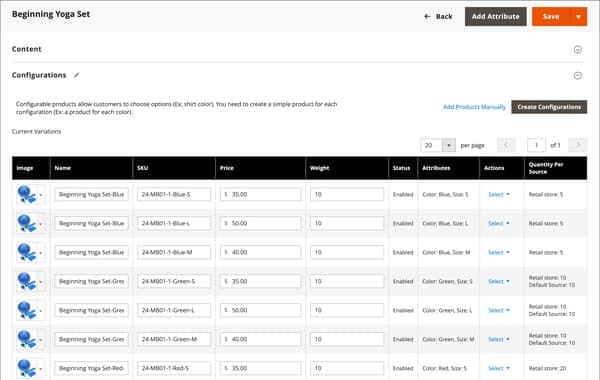
That screenshot is the page I would open first on any size ticket. Each row is one size and color, with its own SKU and its own Quantity Per Source. Notice that the same product can hold Retail store: 10 and Default Source: 10 on one row: stock is per source, and a customer's website only sees the sources assigned to its stock. Adobe's stocks and sources page says a sales channel can have only one stock, and that a stock aggregates the quantities of the sources assigned to it.
| Where it lives | What it holds | Who reads it |
|---|---|---|
| Child SKU, per source | On-hand quantity and source item status | Admin, warehouse |
| Child SKU, per stock | Salable quantity | The storefront, checkout |
| Parent product | Stock Status, no quantity, no price | Category pages, search |
| Global configuration | Display Out of Stock, thresholds, backorders | Everyone, all products |
If the store has the single default source, Adobe's guide shows a plain Quantity column instead. Multi-source stores see Quantity per Source. Either way, the number in that column is not the number a customer can buy.
Why does the admin show stock when the customer sees out of stock?
Because the admin grid shows on-hand Quantity, and the storefront runs on Salable Quantity. Adobe defines salable quantity as the virtual inventory of a product for a sales channel: for each stock, Commerce aggregates the quantities of all assigned sources, then subtracts reservations and the configured thresholds, per its stocks and sources page. Adobe's own pages describe the thresholds slightly differently (one names the Out-of-Stock Threshold, another Notify for Quantity Below), so on a real store I read what is actually set rather than assume.
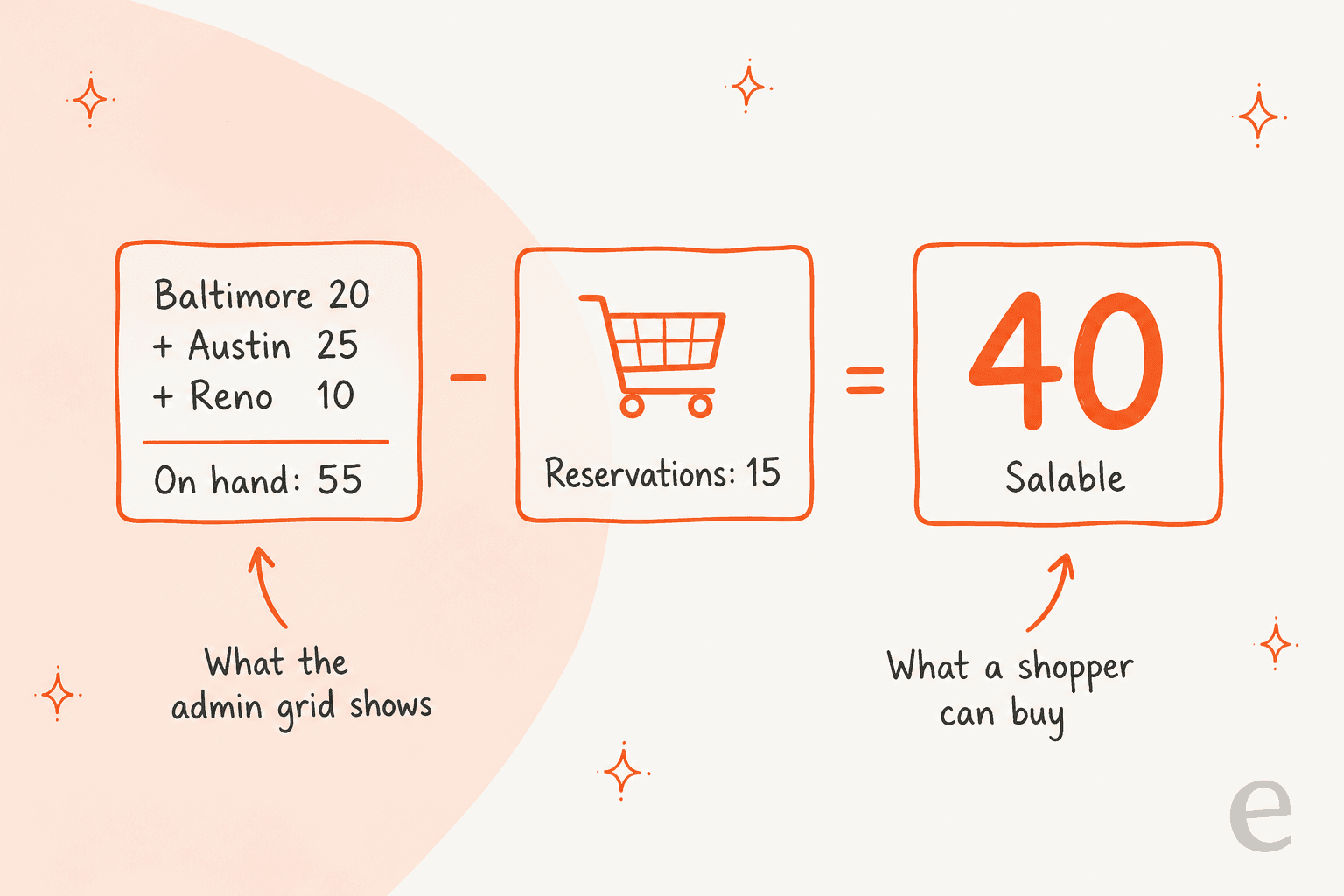
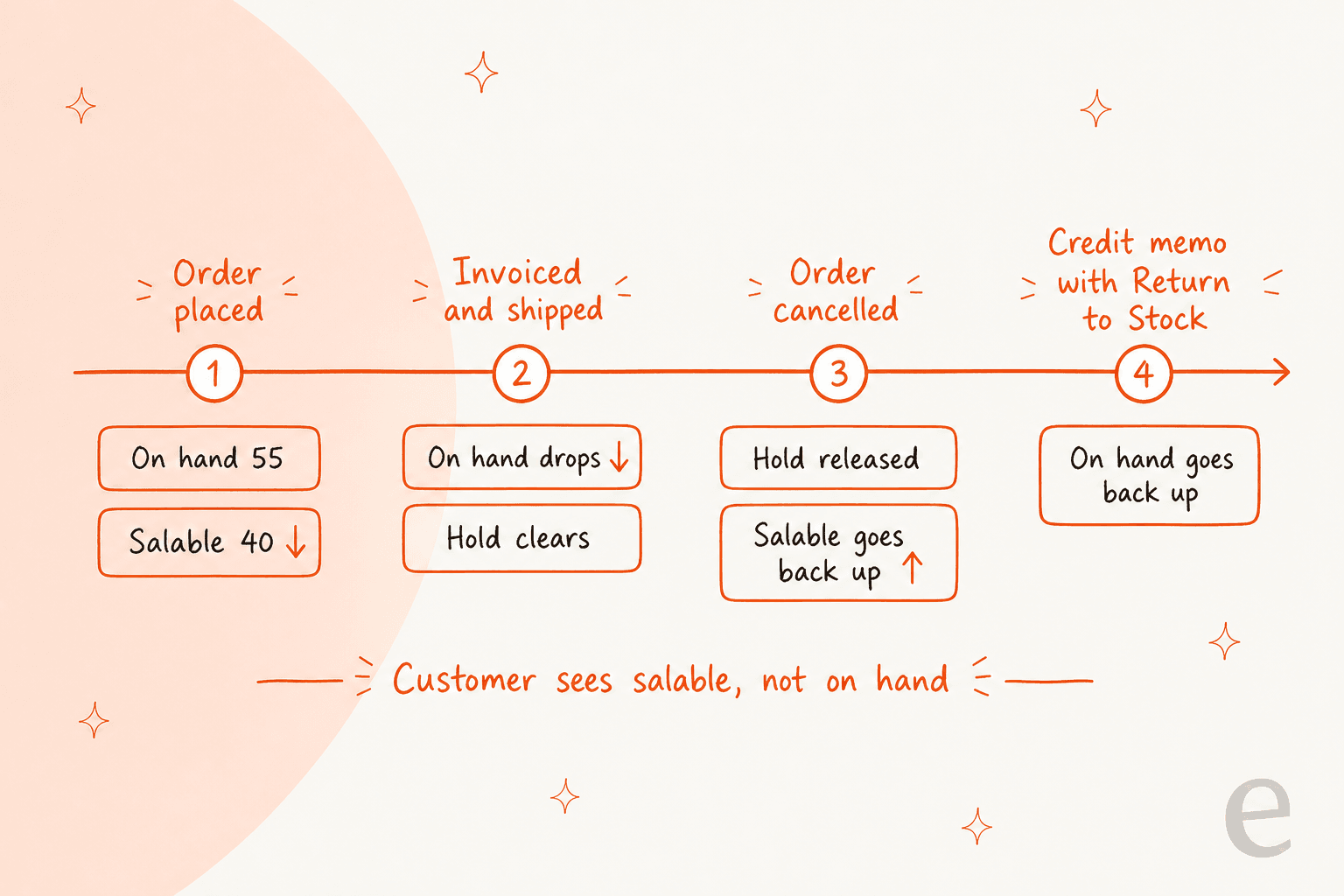
The numbers in that diagram are Adobe's own worked example from its reservations page: three sources holding 20, 25 and 10 units, and outstanding reservations of 15, so a customer can order fewer than 40. The gap between 55 and 40 is a ticket waiting to happen. A size with 3 on hand and 3 held by open orders has a salable quantity of 0, and the storefront is right to call it out of stock.
Three causes sit behind most of these tickets:
- Reservations. Orders that are Open, Pending, Processing, Pending Payment or in Payment Review keep their reservation in place, per Adobe's order status and reservations table. Units are held long before anything ships.
- Thresholds. A positive Out-of-Stock Threshold is subtracted from salable quantity, and Notify for Quantity Below is deducted from salable quantity, not from the inventory quantity, per the Catalog > Inventory settings.
- The wrong stock. If the units sit in a source that is not assigned to the stock behind that website, that website cannot sell them. Multi-website stores trip on this when a new warehouse is added.
There is one more cause worth a mention for stores on Adobe Commerce Cloud. Adobe notes that the reservation capability needs the inventory.reservations.updateSalabilityStatus message queue consumer to run continuously on PaaS. If a size looks stuck, ask whoever hosts the store whether that consumer is running.
How does a configurable parent decide it is in stock?
This is the part that surprised me most when I read Adobe's configurable product guide. The parent's Stock Status is "semi-manually" controlled and part of a multi-criteria calculation. It is not simply "in stock if any child is".
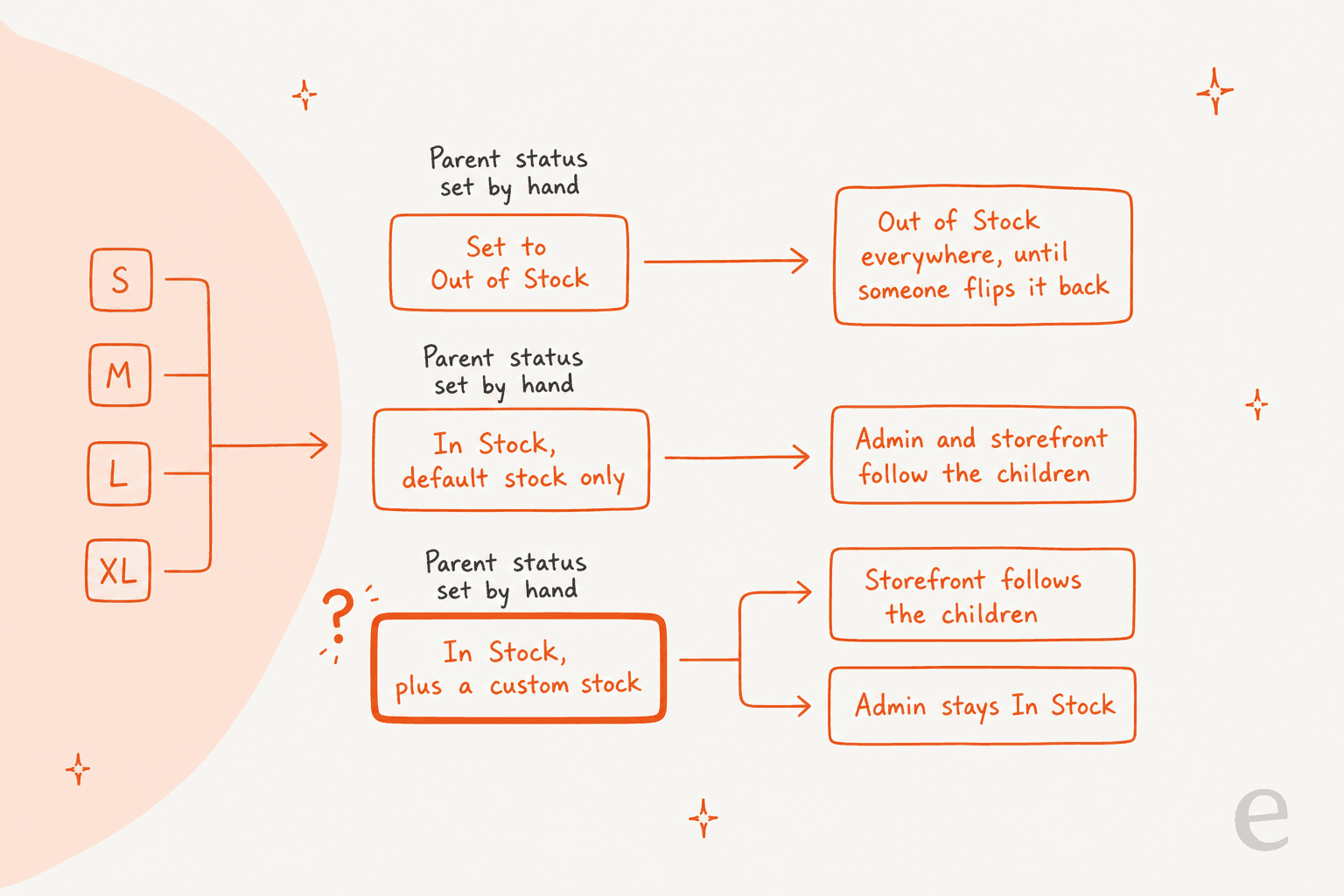
The rules, as Adobe's configure stock status section states them:
- Manually set to Out of Stock (by an admin, a file import or an API call): it shows Out of Stock in the admin and on the storefront until someone manually changes it back. Child stock does not affect it.
- Set to In Stock, default source and stock only: the status follows the children in both the admin and the storefront.
- Set to In Stock, with at least one custom source or stock: the storefront follows the children, but the admin stays
In Stockuntil someone changes it.
That last row is the "admin says in stock, storefront says out" ticket. If your agents look at the parent in the admin on a store with custom stocks, they can read a status that the storefront is not using. Adobe's open inventory tracker has a report of exactly this: issue 2635, opened in 2019, describes a configurable product with a custom stock still showing In Stock in the admin after the child sold out and shipped. For a ticket, the rule is simple: answer from the storefront and the child SKU, never from the parent's admin status.
Also remember that a manual Out of Stock is sticky. A product someone flipped to Out of Stock during a stock count last spring will stay out of stock after the warehouse restocks every child, and no number on any child will say why.
What does the customer actually see on the product page?
It depends on the store's settings, and three of them decide most of it. Here are the Stock Options as they look in Adobe's configuration guide:
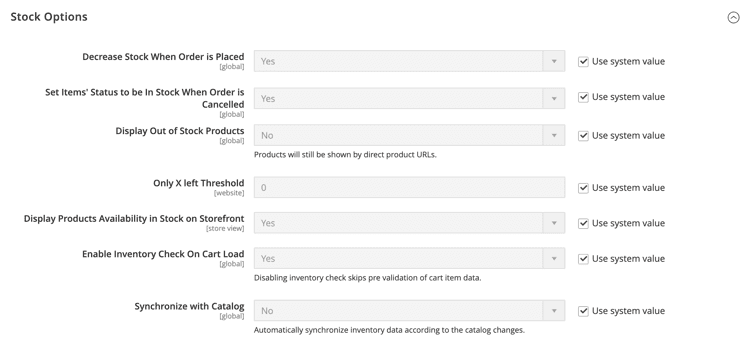
- Display Out of Stock Products (global). If
Yes, out-of-stock products are displayed, and with product alerts on, customers can sign up to be notified when they return. IfNo, they are not listed, though the screenshot's own note says they are "still shown by direct product URLs". That is why "I found it in Google but it is not in your Women category" is not a bug. - Only X left Threshold (per website). If set to 3, the "Only x left" message appears at three or fewer. At
0the message never appears, so customers on many stores never get a number at all. - Display Products Availability in Stock on Storefront (store view). Shows an
In StockorOut of Stocklabel on the product page.
On the size picker, Adobe's swatches page says that when text swatches show sizes, "any size that is not available is crossed out".
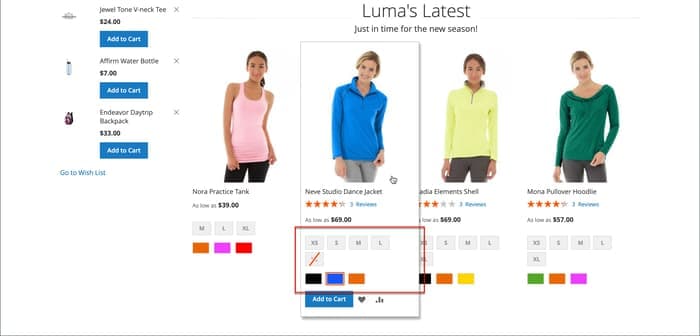
I could not find Adobe documentation saying the Display Out of Stock setting hides individual sizes, so whether an unavailable option is crossed out, greyed or missing depends on your theme. Open a live product with one sold-out size and look before you write a macro. The shopper's own complaint has not changed much in years. An r/Magento user asked this back in 2017:
"For configurable products after you select the configuration (size, colour etc.) it says "In stock" (or out of stock) instead of "X in stock"."

That is a 2017 thread on Magento 2.1, so treat the workaround talk in it as dated. The point holds: out of the box the shopper gets a status, not a count, so a support agent quoting "we have 5 left" is quoting something the store itself does not show.
What do reservations and backorders do to a single size?
A reservation is a hold, not a deduction. Adobe's order status page lists what happens at each status, and it is the cleanest way to explain why a size can go out of stock the moment an order is placed, long before it ships.
| Order event | Effect on that size |
|---|---|
| Order placed (Open, Pending, Processing) | Reservation saved, salable quantity drops, on-hand unchanged |
| Complete (shipped and invoiced) | Deducted from the source's quantity, reservation cleared |
| Canceled before payment | A compensating reservation returns the units to salable |
| Closed after refund | Compensation entered, and quantity added back per source if the credit memo used Return to Stock |
That last row connects to a refund ticket I covered in the Magento credit memo guide: a refunded size only goes back on sale if the admin ticked Return to Stock, or the store turned on Automatically Return Credit Memo Item to Stock.
Backorders work per the global settings and can also be set per product. Adobe's options are No Backorders, Allow Qty Below 0 and Allow Qty Below 0 and Notify Customer. Two support facts matter. First, a backorder does not change the order's processing status, and "funds are still authorized or captured immediately when the order is placed", per the inventory settings. So a customer who backorders a size is charged now and shipped later. Second, with backorders on, Adobe recommends a negative out-of-stock threshold, for example -50, as the cap on how many can be sold below zero. Stores on other platforms handle the same idea differently; the BigCommerce pre-order and WooCommerce backorder guides cover those.
How should support answer "is this size in stock?"
Answer from the child SKU's salable quantity on the storefront, in the customer's terms, and never promise a number or a date the store does not hold. These are the replies I would keep as macros:
- Size crossed out, units in the admin: "That size is currently held by open orders, so it shows as unavailable. If one is cancelled it goes back on sale. I can note your email for a back-in-stock alert." Only say the alert part if product alerts are on.
- Whole product out of stock: check the parent's Stock Status before replying. If every child has zero salable quantity, it is a real sell-out. If not, it is a data fix for whoever owns the catalog, not a customer answer.
- Product not in the category: "It is still available at its direct link." Only if Display Out of Stock is off and a child has stock.
- Cart error after a green page: "Someone else took the last one while you were checking out." Re-read salable quantity first.
Keep three rules for people and bots alike. Never quote the admin's on-hand Quantity as availability. Never give a restock date, because Magento does not store one. And hand over to a person when the store's data disagrees with itself, which the AI escalation and agent handoff guides cover. For the broader pattern of pre-sale questions, see AI for pre-purchase questions and AI order tracking.
What can a helpdesk or AI agent see about size stock?
Less than the admin, and it helps to know exactly how much before you let it answer. I read eesel's own Magento docs for this guide. Its Magento actions include Search Products (by name or SKU), Get Product (one product from its SKU), Check Stock Status ("stock quantity, in-stock flag and backorder policy for one SKU") and Get Product Variants ("the sizes and colours a product comes in, each with its own SKU, price and stock"). These read the store live when asked.
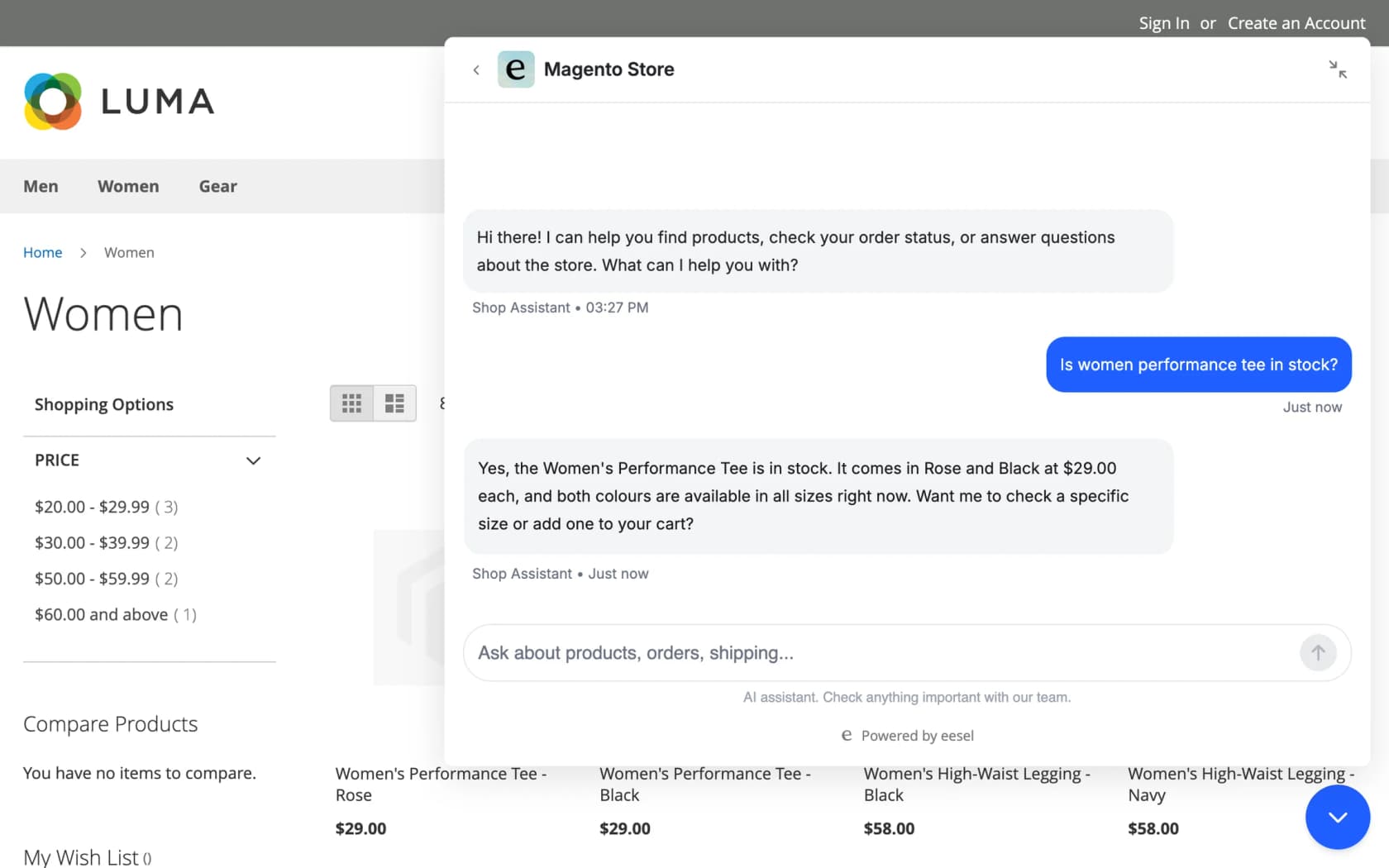
The limits are the useful part. A stock check reads one product at a time and needs the exact SKU, which the agent takes off an order or finds by searching the catalog, per eesel's Magento setup page. The docs say it returns a stock quantity and an in-stock flag. They do not say whether that quantity is Magento's salable quantity or a per-source on-hand number, and I would not assume. Before go-live, run a few SKUs you know have open reservations and compare the answer with the storefront. The docs also say that in the chat bubble a product with options to pick, such as a size, links to its product page rather than offering add to cart.
I would also be careful with the idea that more automation is always better here. Rúngne, a Norwegian climbing apparel brand on Shopify and Gorgias (not Magento), runs the same careful pattern. Its draft agent checks stock per size at the right warehouse, because US and Norway stock are separate, and leaves a reply as an internal note for a person to send. It never states a restock date. Only a topic list the team chose, including stock, reaches the agent that replies on its own. Of about 2,100 Gorgias tickets in a month, that agent answered around 280. The rule carries over to Magento: the agent reads the SKU, a person owns the promise.
How eesel handles size and color stock in Magento
eesel works on Magento 2, Open Source and Adobe Commerce, and answers in your helpdesk, in Slack or in the storefront chat bubble. For a size ticket, the read-only actions above are enough: look up the product, list its variants with stock, check the SKU the customer asked about, and draft the reply. Granting the Catalog / Products and Catalog / Inventory read resources is what lets it do that, and read-only access is a valid setup per the setup docs.
If you want to script it, the eesel CLI lets a coding agent such as Claude Code start the Magento connection, upload your approved stock and backorder policy, and then ask test questions like "is the medium blue in stock?" so you can check answers against the storefront before anything goes live. Creating the Magento integration and pasting its keys still needs someone with Magento admin access.
Pricing is by credit, not per seat: a free plan with 100 credits, then from $299 a month for 500 credits, per eesel pricing. Test it on real past tickets first, as the simulation testing guide describes. For setup and the wider Magento picture, see add AI to Magento, the Magento chat widget guide, best AI for Magento and, if you route tickets through it, Gorgias and Magento. Related reading on Magento pricing, the Magento review, AI for inventory management and ecommerce support contact rates fills in the rest.
Try eesel for Magento stock questions
If your queue is full of "is the medium in stock?", eesel can list each size's stock from your Magento store before anyone opens the ticket and draft the answer from your own stock and backorder policy, with a person still sending anything that makes a promise. It works inside your Gorgias queue, or Zendesk or Freshdesk, and the free plan's 100 credits are enough to try it on a batch of real stock tickets. Try eesel and see how it does on yours.