BigCommerce variant inventory: why a variant shows out of stock

Kira

Katelin Teen
Last edited November 5, 2026
A BigCommerce variant shows as unavailable for one of four reasons: its own stock is 0, safety stock is holding units back, its Purchasable box is unticked, or the product's availability is off. Which one applies depends on whether the product tracks stock on the product or on the variant, so check that setting first. eesel's BigCommerce integration reads every variant's SKU, price and stock live, so an AI agent for BigCommerce can answer the question from the store. Its docs list no stock-adjustment action, so restocks and inventory settings stay with your team.
I work on the AI agents at eesel, and "is the large in blue in stock?" is exactly the kind of question a store's agent gets all day. It sounds trivial. On BigCommerce it isn't, because the answer lives in three places that can disagree: a tracking setting on the product, a stock number on each variant, and a store-wide rule for what a shopper sees at zero. This guide walks through each one using BigCommerce's own documentation, the tickets they create, and what an agent can and can't look up. If you're earlier in the journey, the BigCommerce review covers the platform, and the AI setup guide covers adding an agent. For the wider picture of ecommerce support automation, that roundup is the place to start.
One more thing before the details. The eesel CLI lets an AI coding agent upload your approved stock policies, such as your backorder wording and low-stock rules, then ask the eesel agent test questions and check the answers before anything goes live. Connecting the BigCommerce store itself still needs a person to create the API account and paste two values.
How does BigCommerce track stock for variants?
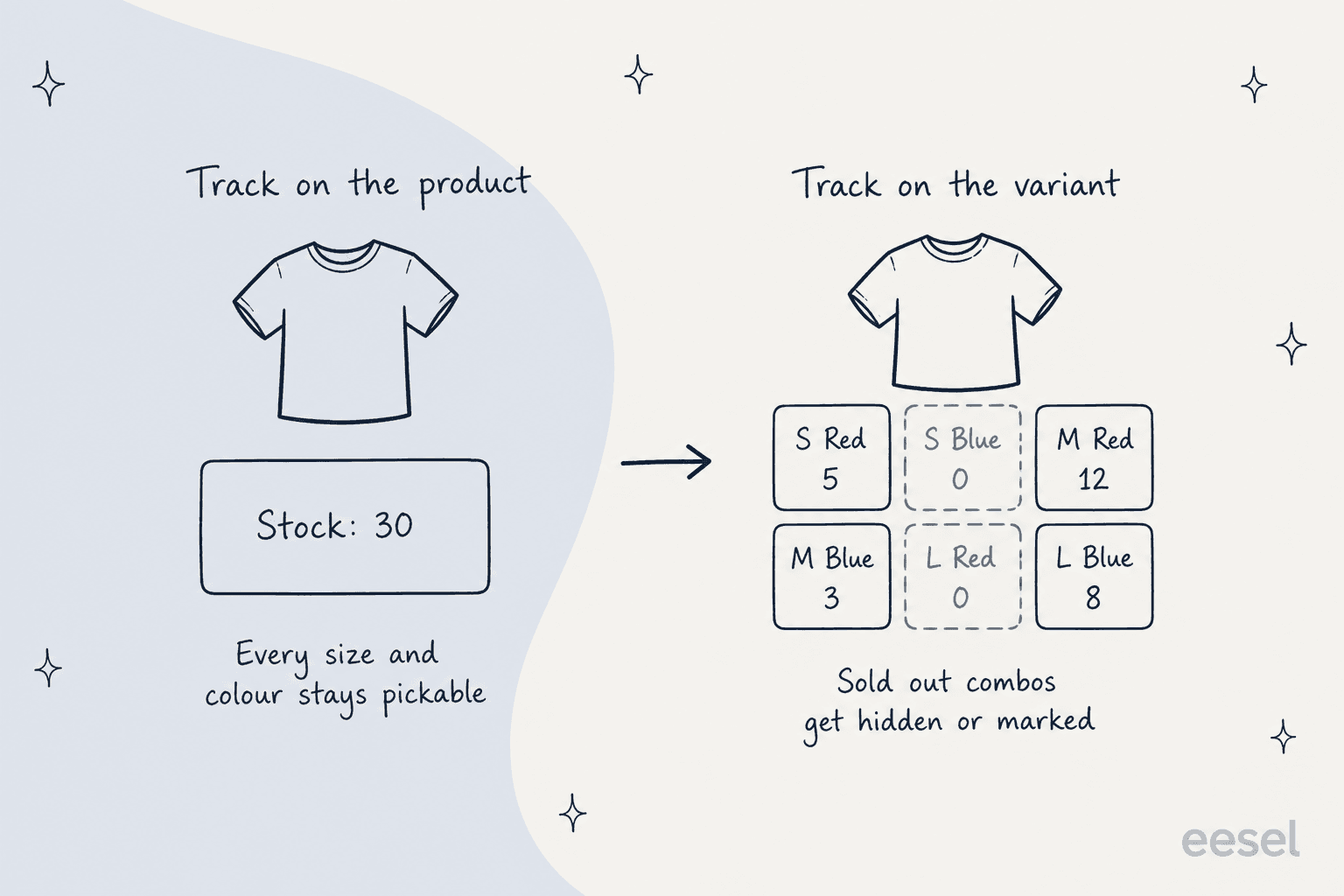
BigCommerce tracks stock either on the product or on each variant, and you choose per product. On the Inventory page of a product you tick Track Inventory, then pick "On the product level" or "On the variant level (per variant SKU)", per BigCommerce's inventory tracking guide. Everything else in this post follows from that one choice.
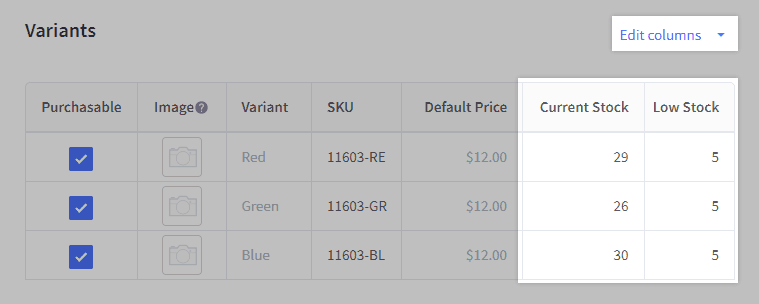
A variant is a version of a product with its own SKU. BigCommerce's developer docs describe it as the object that "maps to SKUs and tracks inventory". Variants inherit the base product's details by default, but they can have their own image, price and weight, and typically their own SKU and stock level. A few facts worth having to hand:
- SKUs are generated for you. When you add variant options, BigCommerce creates a SKU for every possible combination. You can overwrite them.
- 600 is the cap. "A single product can have a maximum of 600 SKUs/variants." Past that, BigCommerce suggests a modifier option.
- SKUs must be unique and case-insensitive.
ABC-123andabc-123count as the same, the limit is 255 characters, and BigCommerce "highly" recommends no commas because they can break imports and API requests. - Modifiers have no stock at all. A gift-wrap checkbox or an engraving text field has no SKU, so it can't be out of stock. That's a separate ticket family from variant stock.
If your store is old enough to remember "option sets", those are the v2 way of doing this. BigCommerce's Product Options (v3) article points legacy stores to a separate v2 guide, and everything here assumes the v3 experience.
Why does a variant show as out of stock or unavailable?
Because one of four things is true, and they're easy to check in order. This is the checklist I'd paste into any agent's instructions, and it works just as well for a human chasing first-contact resolution.
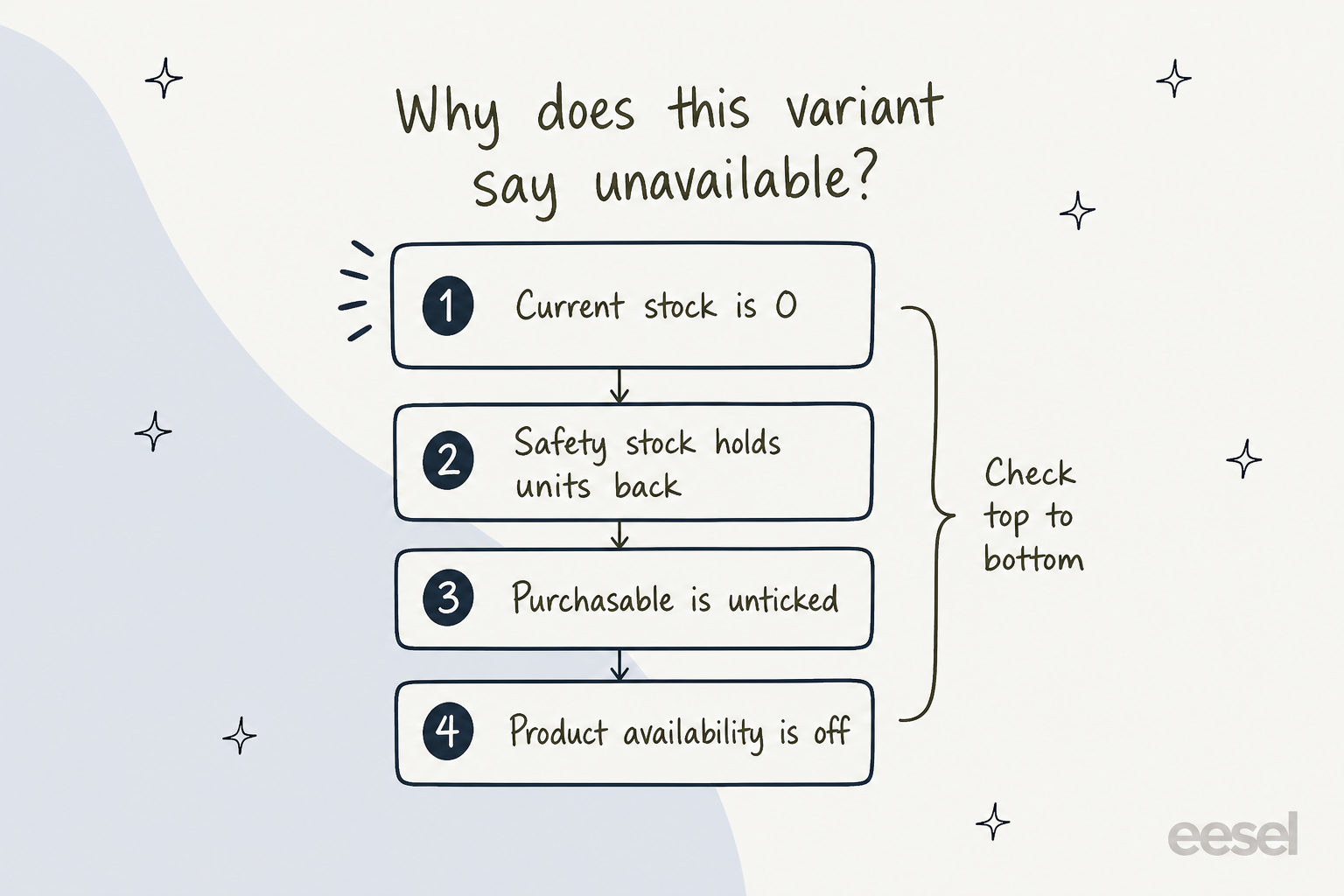
- Current stock is 0. The obvious one. BigCommerce says that when you update inventory for an out-of-stock product, "it is once again purchasable on your storefront."
- Safety stock is holding units back. Safety Stock is "a quantity of your Current Stock that cannot be purchased on your storefront". A variant with 3 in stock and 3 as safety stock is sold out to shoppers, while the control panel still shows 3.
- Purchasable is unticked. In the Variants table, unticking Purchasable stops the variant being added to the cart. BigCommerce notes this "does not hide the variant's option combination on the storefront", so shoppers see an option they can't buy.
- Availability is off for the product. Product Availability, when disabled, means the product "cannot be purchased, even if it has available stock". Purchasability settings also cover pre-order and "cannot be purchased" modes.
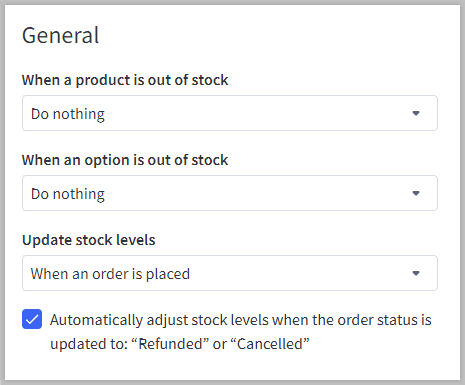
Then there's what the shopper actually sees. Under Settings > Inventory, BigCommerce lets you choose what happens "when an option is out of stock": hide the option, mark it as out of stock with a slash, or do nothing. With "mark" or "do nothing", a shopper who picks a dead combination gets the message "The selected product combination is currently unavailable."
Pick what the customer told you and you'll see the likely cause and who acts.
Variant ticket decoder
What did the shopper describe?
Pick one above to see the likely cause, the fix, and who acts.
Likely cause: that variant's stock is 0 and the store marks out-of-stock options with a slash.
Fix: tell the shopper it's sold out, and offer a restock notice or a nearby variant.
Who acts: AI can read the stock and reply. Restocking is your team's job.
Likely cause: the product tracks stock per variant and the store hides unavailable options. BigCommerce builds the available list only from combinations with stock above zero.
Fix: explain that the hidden sizes have no stock in that colour.
Who acts: AI explains. A person decides whether to change the option setting.
Likely cause: Purchasable is unticked on that variant, safety stock covers the remaining units, or the product is set as not purchasable.
Fix: compare current stock with safety stock, then the Purchasable box.
Who acts: AI reads stock. A person changes the box.
Likely cause: stock moved when an order was placed or completed, or a refund or cancellation returned units. A failed payment returns held stock after a short delay.
Fix: check the recent orders for that SKU before promising anything.
Who acts: AI reads orders and stock. A person confirms a disputed count.
Likely cause: backorders are on. On-hand stock can be 0 while Available to sell is above 0.
Fix: quote the backorder message and lead time your store shows.
Who acts: AI explains once the backorder wording is written down.
The one that looks like a bug
The second chip is the ticket that looks like a bug, and BigCommerce's developer docs explain it. Hiding combinations that don't exist only works when the product tracks stock per variant, and because the available list is built from combinations with stock above zero, the same setting "also hides or labels real variants once they sell out". A store owner on Reddit ran straight into it in August 2026, exactly the sort of thing self-service answers should explain before it becomes a ticket:
"The workaround is to make the variant stock trackable and set the stock to zero. That's great, it hides the out of stock variants to the customers, but now when a customer makes a selection, half the variants disappear and don't show back up until the page is refreshed."

They'd found the cause of their own problem. BigCommerce's option guide says you can't delete a single combination, only disable Purchasable or set up conditional options. Conditional options need three things: variant options, stock tracked "on the variant level", and the out-of-stock option setting on "Hide the option". The unavailable combination's stock stays at 0.
So the honest answer to that shopper is short. Those sizes aren't broken, they have no stock in that colour. If the store would rather show them crossed out, that's a settings call for a person. An AI agent can state the cause accurately and hand the decision over, which is better than guessing.
Which inventory settings change what shoppers and support see?
Six settings under Settings > Inventory shape most of the questions. I've listed them with the plain-language effect BigCommerce documents.
| Setting | What it does | Ticket it causes |
|---|---|---|
| When a product is out of stock | Hide it, hide it but keep the page, redirect to the category, or do nothing | "The product page 404s" (hidden pages go inaccessible) |
| When an option is out of stock | Hide, mark with a slash, or do nothing | "Why can't I pick a size?" |
| Update stock levels | Adjust on order placed, or when status becomes Completed or Shipped | "It sold out before it shipped" |
| Automatic stock adjustments | Restock when status becomes Refunded or Cancelled | "I refunded it but stock didn't go up" |
| Stock level display | Show levels, show only when low, or hide | "The site says 3 left" |
| Email notifications | Low stock and out of stock alerts to an address | "I got an alert at 12, my threshold is 5" |
Two of those deserve a closer look because they trip up both customers and agents.
Refunds and restocks. BigCommerce says processing a refund in the control panel sets the order to Refunded or Partially Refunded, and "orders updated to Partially Refunded do not trigger automatic stock level adjustments". There's a sting in the tail too: if a later partial refund covers the rest of the order, the move to Refunded triggers adjustments "for all items on the order, including those previously refunded". A refund request can quietly change your stock count, so count units before trusting the number. If the refund goes to credit instead of a card, the store credit guide covers that side.
Stock that moves on its own. BigCommerce's FAQ says "stock is temporarily removed from a product when a customer attempts to check out", and returns "after a short delay" if the payment fails. A shopper looking at a variant mid-checkout can see a lower number than your records show. It also explains the alert at 12 when your threshold is 5, and it's the pattern behind a flash-sale rush, when seasonal support spikes land on exactly these questions. The email fires the moment stock hits the level, and later refunds, cancellations or integration updates can move the number again.
How do backorders and pre-orders change the answer?
They make "out of stock" mean something different. With backorders on, a variant can sit at 0 on hand and still be sellable. BigCommerce's backorders guide defines Available to sell as "On hand + Backorder limit - Qty backordered - Safety stock", with the example of 100 on hand, a 100 backorder limit, 5 backordered and 5 safety stock giving 190.
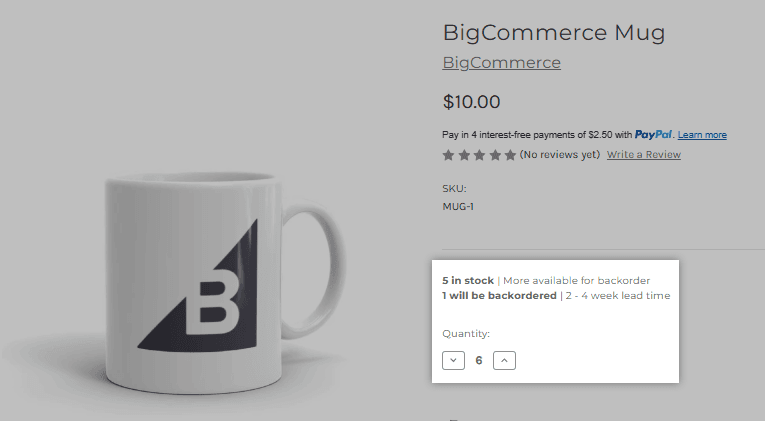
Backorders only work with a specific setup: both out-of-stock settings must be "Do nothing", stock must update "when an order is placed", the product must track inventory at product or variant level, and the storefront theme must be Cornerstone 6.21.0 or later to show the messaging. That last bit matters for support, because a store on an older theme can have backorders enabled and still show shoppers nothing. An earlier Reddit post from a store owner shows why people want this:
"I need to simultaneously show stock levels at the variant level to my customers and also be able to sell the product when it is technically out of stock."
Write these rules into your knowledge base as plain text. That post is from 2023, before backorders existed as a feature. Pre-orders are a separate path, set under Purchasability, and a pre-order product only sells if it has stock assigned or doesn't track inventory. When a customer asks "can I order it if it's sold out?", the answer is always a lookup of which of those modes the product is in. Wholesale buyers ask the same thing differently, as in B2B order support. That's a good job for pre-purchase question automation, as long as the modes are written down.
What variant tickets will your team actually get?
After going through BigCommerce's docs and what store owners post, nearly every variant inventory conversation falls into one of these types.
| Ticket | Where the answer lives | Who should act |
|---|---|---|
| "Is this size in stock?" | Variant's Current Stock minus Safety Stock | AI, live lookup |
| "Why can't I pick this colour?" | Option out-of-stock setting, variant stock | AI explains, person changes setting |
| "Add to cart won't work" | Purchasable box, availability, safety stock | AI checks, person fixes |
| "When is it back?" | Your restock plan, backorder message | AI quotes it if written down, person owns the date |
| "Can I order it anyway?" | Backorder or pre-order mode | AI answers from the mode |
| "My order went through but it's out of stock" | Order time vs stock update timing, refunds | Person confirms, AI gathers the facts |
Reading stock and explaining the rule is safe to hand off. Changing the number is not. Tagging each ticket by type helps too, which is what ticket tagging for ecommerce is for. I'd use the same split as order tracking and returns: the agent looks up, the person decides, with a clean handoff to a human when it's unsure. It's also why vague "when is it back?" answers do real damage. An agent that invents a restock date is worse than one that says it doesn't know, which is the reason I care so much about hallucination prevention.
What can a helpdesk or AI agent look up on BigCommerce variants?
It depends on the tool, so check the docs rather than the marketing page. Helpdesk apps on BigCommerce mostly focus on orders and customers, and the best AI for BigCommerce support roundup compares the options. Gorgias documents customer profiles, order data and order actions, with macro variables for the last order and its products, and its rules filters cover order fields. Its docs don't list variant stock in the sidebar or as a macro variable. The Freshdesk app, per its Freshworks marketplace listing, shows order information next to the ticket. Check either against your own ticket mix before assuming stock is visible to agents.
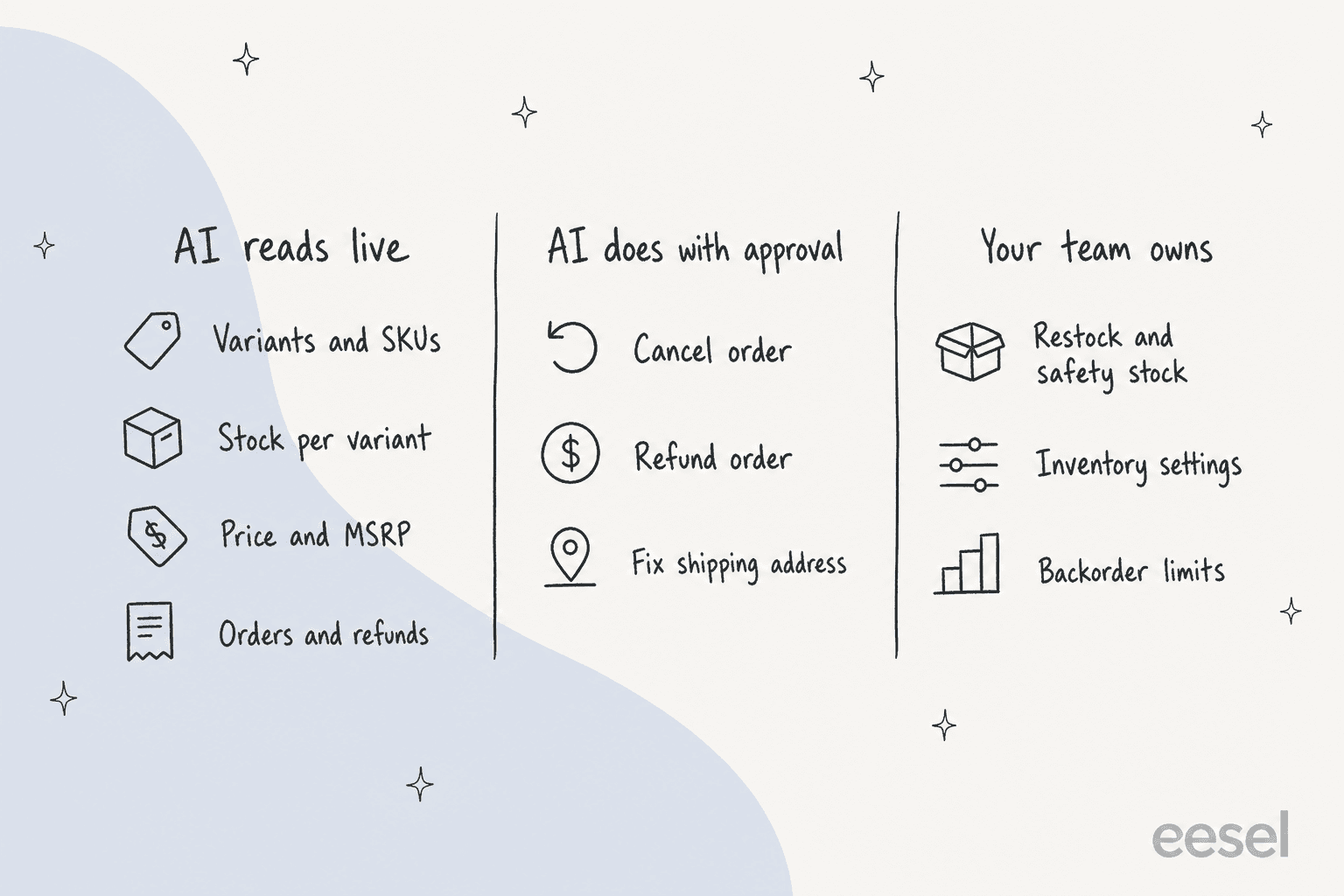
Here's what I verified for eesel in its BigCommerce docs, which is the part I know best.
| Question | What eesel can do on BigCommerce |
|---|---|
| What variants does a product have? | Yes. Get Product returns "every variant's SKU, price, MSRP and stock level" |
| Is this variant in stock? | Yes, read live. Search Products also returns variants and stock by name, description, SKU or brand |
| Is stock tracked for this product? | If the store doesn't track inventory, there's no number to read. The agent says it's "not tracked", not out of stock |
| What does the order contain? | Yes. Orders are read live by number, email or phone |
| Change a variant's stock level? | Not in the documented action list. Write actions are Cancel Order, Refund Order, fix shipping address, fix customer address, and product create, update, delete and image |
| Change inventory settings, safety stock, backorder limits? | No. Those are control panel settings |
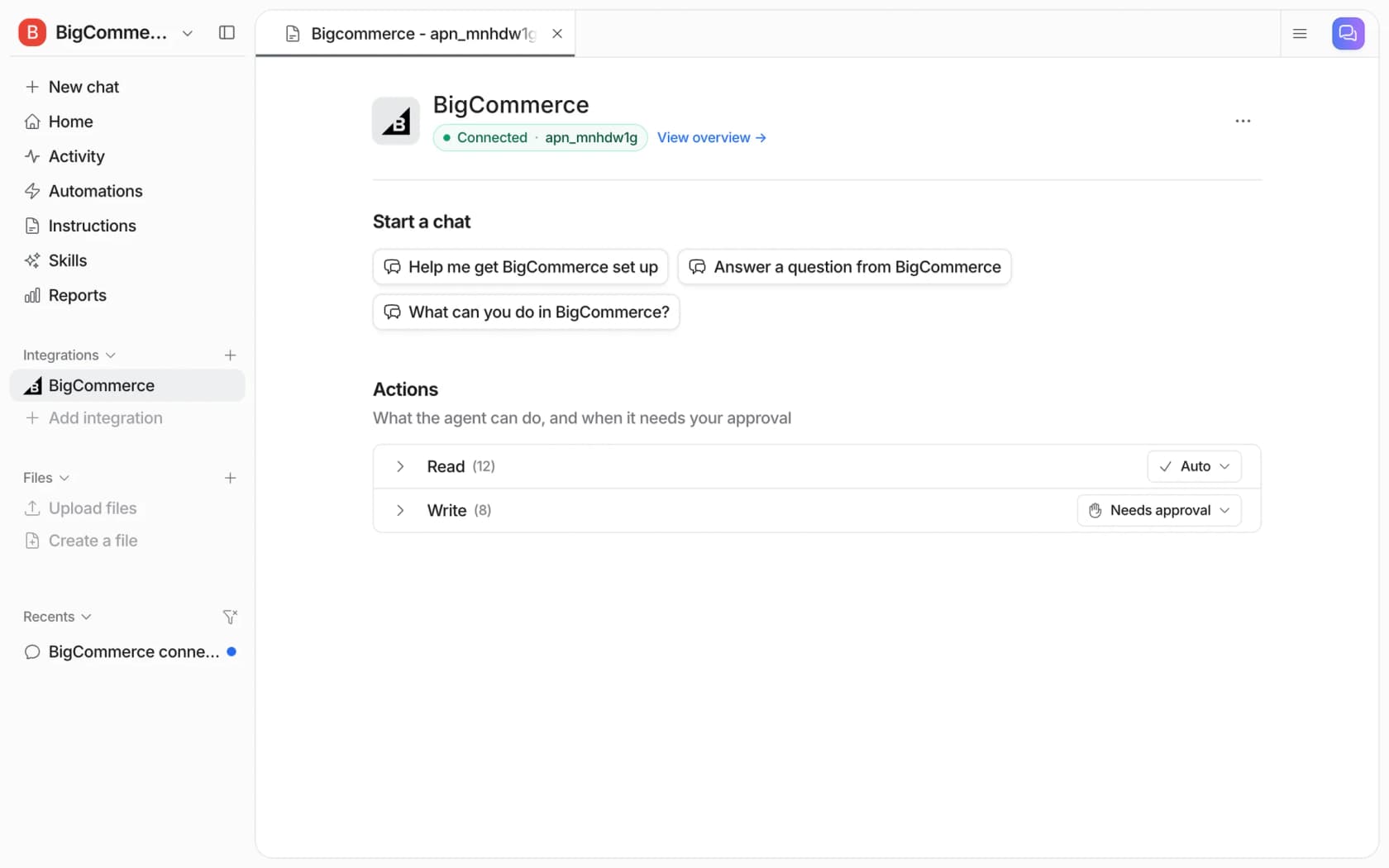
| Refund a stock-related order? | Yes, with your approval, shown as a Write action that "needs approval" by default |
A few limits from the docs that matter for stock questions:
- The Products source holds up to 5,000 products. eesel learns "up to your 5,000 most recently updated products", though Search Products "still reads the whole catalogue live".
- Stock is read at the moment it's asked. Orders and customers are "not copied", and every stock lookup reads the store live. That's the right design for a number that moves with every checkout, and it's different from inventory management tooling, which plans stock rather than answers shoppers.
- MSRP can mislead. A variant with no MSRP of its own shows the product's, and a product with none shows none.
- Access is set by the API account. The App Marketplace install gives read-only access to orders and products. Cancels and refunds need an API account with Orders and Customers set to modify.
Write actions are also where approvals earn their keep. eesel's actions and approvals page describes three settings per action, Auto, Needs approval and Disabled, and recommends keeping "refunds, cancellations and anything that costs money behind an approval". See approval workflows for how to split the work.
Does it work in practice? A customer's variant lookups
I can't point to a BigCommerce store here, since none of eesel's published customer stories runs on it, so I'll use the closest match. STIL Classics sells planners and binders through Shopify and runs eesel on Gorgias. Shoppers ask questions like "does this insert fit my binder, when is this back in stock", and the story says availability questions get "live inventory for the exact variant" before a draft is written.
Between 8 August and 8 September 2026, eesel prepared about 320 Gorgias tickets for them and looked up about 230 Shopify orders and about 20 products. Every draft goes on the ticket as an internal note and a person sends it. Two details stand out for a variant guide. The agent never states a fact it hasn't looked up, so no invented ship dates, and the restock timing comes from the team's own sheet. That's the same discipline I'd want on BigCommerce: stock from the store, dates from your plan.
This is a different platform, so treat it as the shape of the workflow and not a BigCommerce result. For a way to test a setup before it touches customers, simulation testing on past tickets is the step I'd never skip.
Try eesel for BigCommerce variant questions
eesel is an AI teammate platform, and the one that fits this post is the helpdesk teammate. On BigCommerce it reads variants, stock, orders and refunds live, answers in your storefront chat (see the AI chatbot for BigCommerce guide), Gorgias, Zendesk or Slack, and waits for approval before it cancels or refunds. Try eesel. A ticket or chat is one credit, with a free plan of 100 credits and paid plans from $299 a month for 500 credits, per the pricing page.