BigCommerce pre-order availability: how it works and what to tell shoppers

Riellvriany Indriawan

Katelin Teen
Last edited November 5, 2026

A BigCommerce pre-order is one Purchasability setting plus a release date and a message, and most pre-order tickets trace to three things: the product needs stock assigned, the pre-order status only clears itself if one box is ticked, and the setting lives on the whole product, not a variant. A pre-order is also not a backorder, which is a separate beta feature. eesel's BigCommerce integration reads products, variants, stock and orders live, so an AI agent for BigCommerce can answer the stock and order side. Its docs don't list the release date or message, so write that wording down and test it, which the eesel CLI lets a coding agent do before go-live.
What does BigCommerce pre-order availability control?
It controls whether a shopper can buy a product that isn't released yet. In BigCommerce's availability guide, the setting sits in the product's Purchasability section, and it offers three choices.
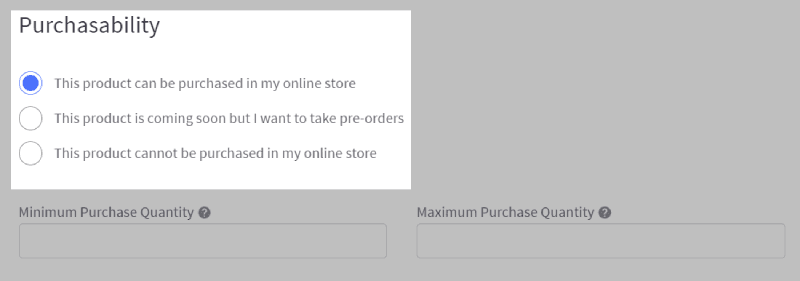
The pre-order option has three fields of its own. A Message shows on the product page, and adding the %%DATE%% placeholder drops the release date into it. A Release Date is when you expect the product in stock. Remove pre-order status on this date moves the product to normal purchasing automatically on that day.
Developers see the same thing under different names. The Catalog API calls the setting availability, with values available, disabled and preorder, and the three fields are preorder_message, preorder_release_date and is_preorder_only. If a store owner or a developer is describing a problem, this table lets you translate.
| In the control panel | In the API | What it does |
|---|---|---|
| This product is coming soon but I want to take pre-orders | availability: preorder | Lists the product for pre-orders |
| Message | preorder_message | Page text, falls back to the storewide message if undefined |
| Release Date | preorder_release_date | The date you expect stock |
| Remove pre-order status on this date | is_preorder_only | Clears pre-order status on the release date when true |
| Not purchasable | availability: disabled | Listed but can't be bought |
The mapping is where the biggest trap hides, and I'll get to it in a moment. First, what the shopper sees.
What do shoppers see on the page and at checkout?
BigCommerce says a pre-order product's page shows your message and swaps the Add to Cart button for Pre-Order Now. Checkout works as it does for normal orders, and the shopper's order confirmation email includes the release date.
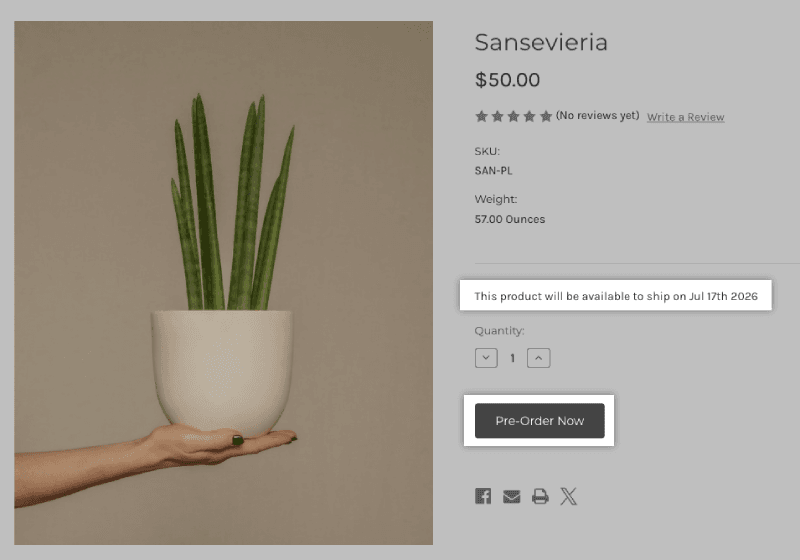
There's one condition that decides whether any of this works: a pre-order product is only purchasable if it has stock assigned or doesn't track inventory. BigCommerce tells merchants to enter the quantity they expect on release day. Forget that and the button never lets anyone add the product to the cart, and the ticket arrives as "your pre-order button doesn't work". The same article points those cases to its Add to Cart troubleshooting page.
Two smaller details save a lot of back-and-forth:
- The checkout line is separate. The API's
availability_descriptionfield is text shown on the checkout page under the product title, with the example "Usually ships in 24 hours". A store can carry a shipping promise there that differs from the pre-order message. - Stock numbers can be shown. In inventory settings, BigCommerce has a Show pre-order inventory checkbox for pre-order products that track inventory, so a shopper may see a count on a product that hasn't launched.
If your team gets a lot of these questions, they're a close cousin of the usual pre-purchase questions every ecommerce queue sees, just with a date attached.
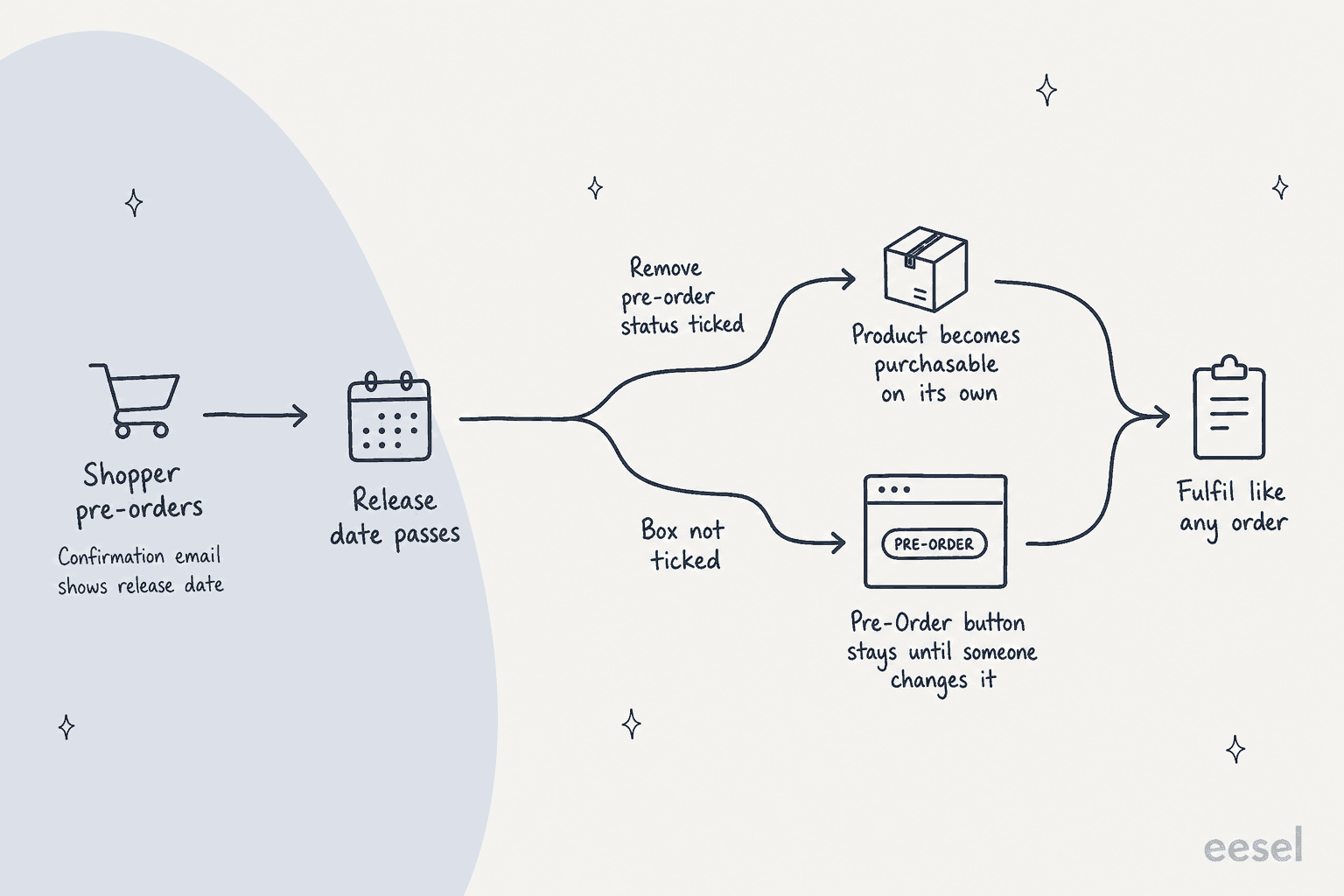
Why does the product still say pre-order after the release date?
Because the status only clears on its own when you tell it to. BigCommerce's FAQ says that if Remove pre-order status on this date wasn't enabled, the product keeps showing the pre-order button and message until someone changes its purchasability by hand.
The API makes this easy to misread. The field that does this is called is_preorder_only, and the product reference says that when it is true, pre-order status is removed automatically on the release date. When it is false, "the preorder status will not be removed", and you change it in the control panel or set availability to available through the API. The name sounds like "this product is only for pre-order" and it means nearly the opposite. A developer who set it to false to be safe has built a store that never leaves pre-order mode.
My advice for a support lead is short. When a shopper writes "it's past the date and I still can't buy it normally", the first thing to check is that box. The shopper's order is fine, and the fix is a product setting your team owns.
Is it a pre-order, a backorder or just sold out?
They look alike to a shopper and behave differently in the store, so name the mode before you answer. BigCommerce treats them as three separate things.
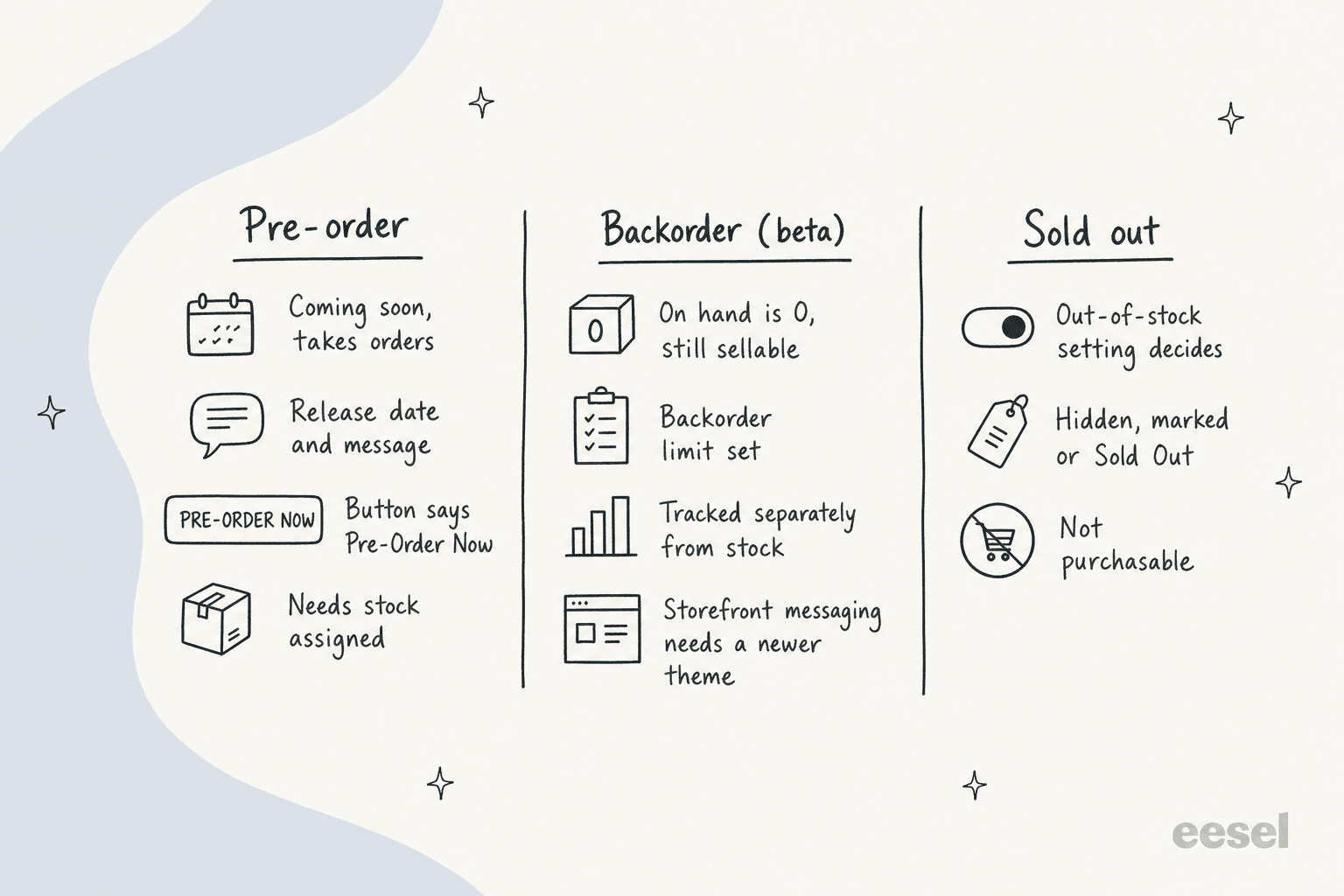
| Pre-order | Backorder | Sold out | |
|---|---|---|---|
| Set under | Purchasability on the product | Inventory, backorder limit and display settings | Inventory settings for out-of-stock products and options |
| Button | Pre-Order Now | Add to Cart, with backorder messaging if the theme supports it | Hidden, marked or "Sold Out", per setting |
| Date shown | Release date in message and email | Your own backorder message, if you wrote one | None |
| Status | Standard product setting | Beta, per BigCommerce's backorders guide | Standard |
Two details matter for support. First, backorder messaging on the storefront needs a theme based on Cornerstone 6.21.0 or later, per that same guide. On an older theme a store can have backorders switched on and show shoppers nothing, which reads as a bug. Second, BigCommerce itself suggests using the pre-order message field as a workaround for backorder wording, with an estimate of when stock returns. So a product that says "pre-order" on the page might really be a backorder in disguise, and you'd only know by asking the team or looking at the product.
I covered the stock side of this in the BigCommerce variant inventory guide, and the same logic runs through the WooCommerce backorder settings post for stores that live on both platforms.
Can shoppers pay when the pre-order ships?
Sometimes, and it depends on the payment gateway. BigCommerce says that if you offer payment methods that support authorize-only, you can accept orders with an authorized transaction and manually capture the funds when you're ready to ship. Its authorize-only guide explains that the gateway checks the card and holds the funds until captured, and it names pre-orders and backorders as cases where fulfilment can lag by days.
The catch is time. That guide says "authorizations expire after a certain amount of time based on the gateway used", and if one expires you need to re-authorize or create a new order. A store owner asked exactly this on Reddit in 2019:
"I know you can authorize only, but it may be more than 30 days, so this will not work."

That's the owner's own worry, and the 30-day figure is theirs, not BigCommerce's. BigCommerce gives no number, so the honest answer to a shopper is "it depends on the gateway, and I'll confirm". The status words are also worth knowing, because a "was I charged?" ticket turns on them. Per the guide, a requested capture sits in Pending Capture, a declined one reverts to Authorized, and a successful one shows Awaiting Fulfillment.
A long pre-order with a short authorization window is the kind of thing that turns into a billing dispute or a payment dispute. I'd keep capture in a person's hands, and let the AI explain the status and hand over.
Can you pre-order just one variant?
Not with the pre-order setting, as far as BigCommerce documents it. In the API, availability and the three pre-order fields are fields on the product. A store owner described the same limit in October 2024, planning a new colour of a bestselling sweatshirt for Black Friday:
"Right now, it seems like I can only enable pre-orders for the whole product, not specific variants."
That means the common workarounds live outside the setting: list the new colour as its own product, or use an app. Another owner asked in 2021 whether a dropdown option could read "Pre-order", which shows how stores try to work around it. If your answer depends on which workaround a store picked, record it in your knowledge base, because it isn't visible from the order.
For how stock behaves once variants exist, see my BigCommerce variant inventory guide, and for add-on choices that aren't variants at all, the product modifier questions post.
How do you find pre-orders in the control panel?
Go to Orders, All orders, then the Pre-orders tab. BigCommerce says it returns every order with at least one pre-ordered product.
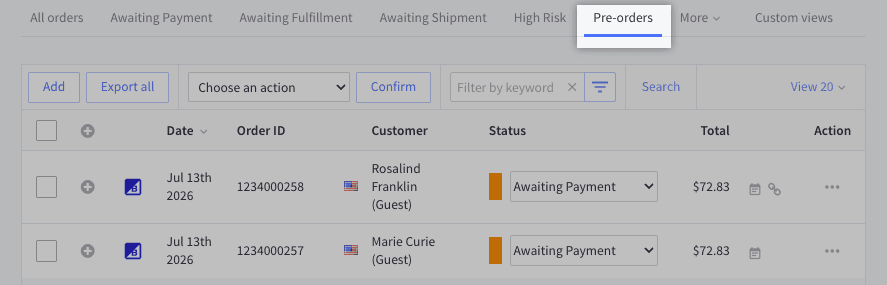
There's a gap here that matters for any team answering "when does mine ship?". The same article says the filter doesn't show the release date in the order details. To see the pre-order information for a line item, you edit the order and go to the Items step. Draft and manual orders show it too, once the product is added.
So an agent looking at an order summary won't necessarily see a date, whether that agent is a person or software. I'd train your team to check the product page and the edit view, not the order list. When it's ready, BigCommerce says you fulfil pre-orders like any other order.
Which pre-order tickets will your team get?
From the docs and the store-owner threads, nearly every pre-order conversation sorts into five types. This decoder shows the likely cause and who should act.
Pre-order ticket decoder
What did the shopper say?
Pick one above to see the likely cause, the fix, and who acts.
Likely cause: the page message and the confirmation email carry a release date, which is an expected date and not a shipping promise.
Fix: quote the store's own message and your written release plan, and say the date can move.
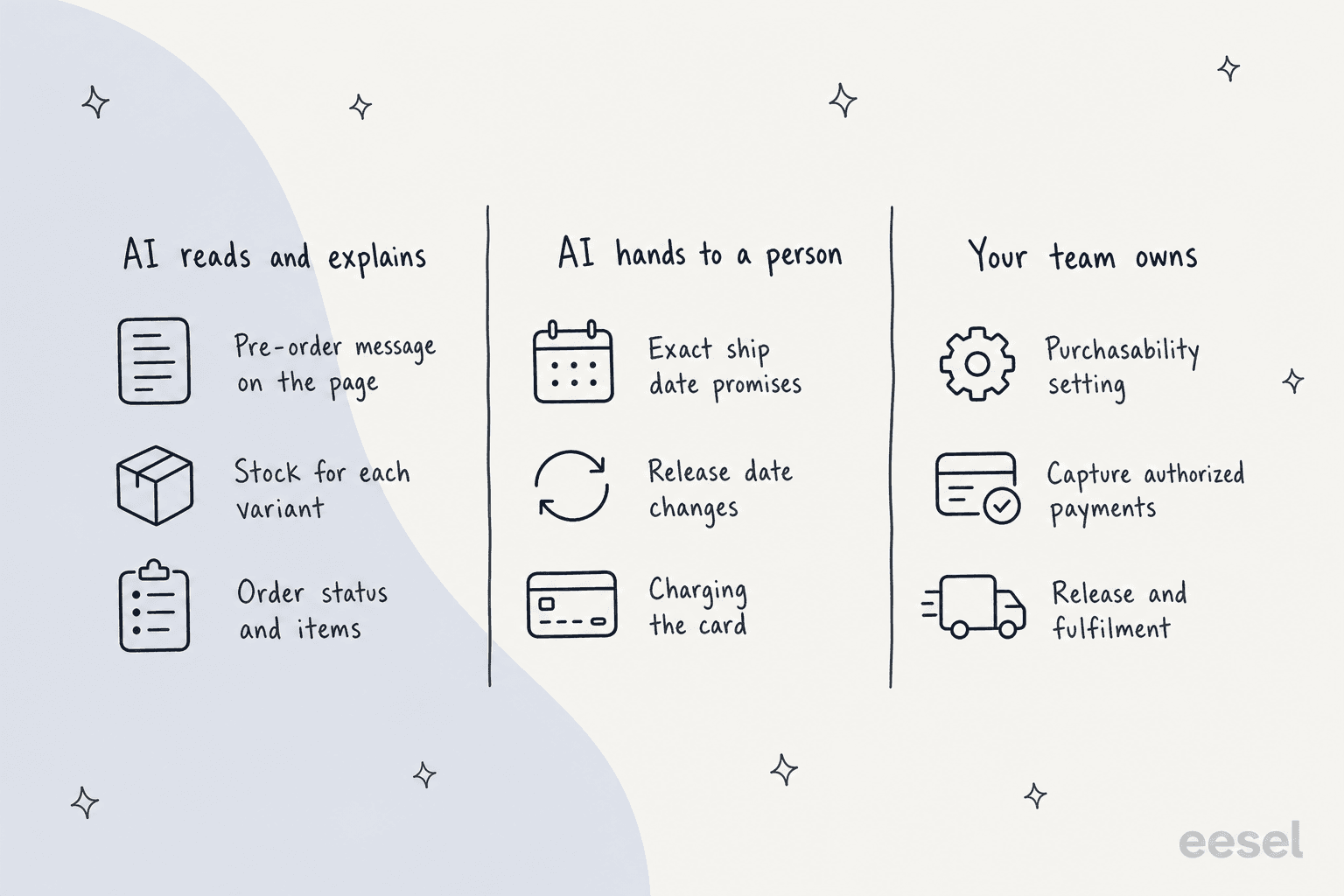
Who acts: AI quotes the wording. A person owns any new date.
Likely cause: "Remove pre-order status on this date" was not ticked, so the product keeps its Pre-Order button.
Fix: change the product's purchasability to purchasable.
Who acts: AI recognises it. A person changes the setting.
Likely cause: depends on whether the gateway supports authorize-only, and how long its authorization window lasts.
Fix: check the gateway's capture window before promising a charge date.
Who acts: AI explains. A person captures funds.
Likely cause: availability and pre-order fields sit on the product, so one variant can't be pre-order alone.
Fix: explain the limit and, if the store uses a separate product or an app, say which.
Who acts: AI explains once the workaround is written down.
Likely cause: an authorized-only order shows Authorized, then Pending Capture, then Awaiting Fulfillment once captured.
Fix: read the order's payment status and explain what each word means.
Who acts: AI reads the order. A person handles a failed capture.
The pattern is the one I use for order tracking and returns: reading the status and explaining the rule is safe to hand off, and changing a date or taking money is not. Pre-order tickets are a flavour of where is my order with an extra "when does it exist" question, and a launch spike can pile them up fast, much like the seasonal support spikes a store sees at peak. Tagging each one by type, as in ticket tagging for ecommerce, shows you which setting is causing the most noise.
What can an AI agent answer about BigCommerce pre-orders?
It depends on the tool, so read its docs and not its marketing. A helpdesk app on BigCommerce mostly centres on orders and customers, and the best AI for BigCommerce support roundup compares the options. Guides exist for Gorgias, Freshdesk and Zendesk on BigCommerce. I haven't verified whether any of them exposes the pre-order release date or message, so I won't say they do.
Here is what I verified for eesel in its BigCommerce docs, which I know best.
| Question | What eesel can do on BigCommerce |
|---|---|
| What is in stock for this product? | Yes. Get Product returns "every variant's SKU, price, MSRP and stock level", and Search Products finds products by name, SKU or brand |
| What does the order contain and what is its status? | Yes. Orders are read live by number, email or phone, with status, items, payment and tracking |
| What is the release date or pre-order message? | Not listed as a field in the docs. Write it into the knowledge base and test that the agent quotes it |
| Change a product's availability or release date? | The docs list Update Product as a write action that needs Products set to modify, but don't say which fields it covers. I'd keep it behind approval |
| Capture an authorized payment? | Not in the documented action list. Write actions are cancel, refund, address fixes and product changes |
| Refund or cancel an order? | Yes, with your approval. Write actions "need approval" by default |
A few limits from the docs matter here:
- Stock is read at the moment it's asked. Orders and customers aren't copied. Every lookup reads the store live, which suits a number that moves at launch.
- The Products source holds up to 5,000 products. Search Products still reads the whole catalogue live.
- The API account sets the ceiling. The App Marketplace install is read-only for orders and products. Cancels and refunds need an API account with Orders and Customers set to modify.
- BigCommerce can't start the agent. The docs say nothing in your store triggers a run, so a ticket, a Slack mention or the chat bubble does.
Because eesel's docs don't list the date or message, I'd treat pre-order wording as something you teach it. Paste the store's own pre-order message and your release plan into the knowledge base, then check the answers on past tickets with simulation testing before shoppers see them. It's the same discipline as hallucination prevention: an agent shouldn't state a date it hasn't looked up.
The eesel CLI helps with exactly that loop. An AI coding agent can upload your approved pre-order policy, such as the message template, the authorize-only rules and the "dates can move" wording, then ask the eesel agent test questions and check the answers. Connecting the BigCommerce store itself still needs a person to create the API account and paste two values.
Write actions are where approval workflows earn their place. eesel's actions and approvals page has three settings per action, Auto, Needs approval and Disabled, and recommends keeping refunds, cancellations and anything that costs money behind an approval. For anything the agent isn't sure of, a clean handoff to a human beats a guess.
Does it work in practice? A customer's availability lookups
I can't point to a BigCommerce store, since none of eesel's published customer stories runs on it, so I'll use the closest match. STIL Classics sells planners and binders through Shopify and runs eesel on Gorgias, where shoppers ask "when is this back in stock". The story says availability questions get live inventory for the exact variant, and the restock timing comes from a sheet the team keeps.
Between 8 August and 8 September 2026, eesel prepared about 320 Gorgias tickets for them and looked up about 230 Shopify orders and about 20 products. Every draft goes on the ticket as an internal note and a person sends it. The detail I'd borrow for pre-orders is that the agent never states a fact it hasn't looked up, so there are no invented ship dates. That is the same split I'd want on BigCommerce: stock and order status from the store, release dates from your own plan.
This is a different platform, so treat it as the shape of the workflow and not a BigCommerce result.
Try eesel for BigCommerce pre-order questions
eesel is an AI teammate platform, and the one that fits this post is the helpdesk teammate. On BigCommerce it reads products, variants, stock and orders live, answers in your storefront chat (see the AI chatbot for BigCommerce guide), Gorgias, Zendesk or Slack, and waits for approval before it cancels or refunds. Try eesel. A ticket or chat is one credit, with a free plan of 100 credits and paid plans from $299 a month for 500 credits, per the pricing page.