Magento grouped product orders: what the order really shows

Rama Adi

Katelin Teen
Last edited November 6, 2026

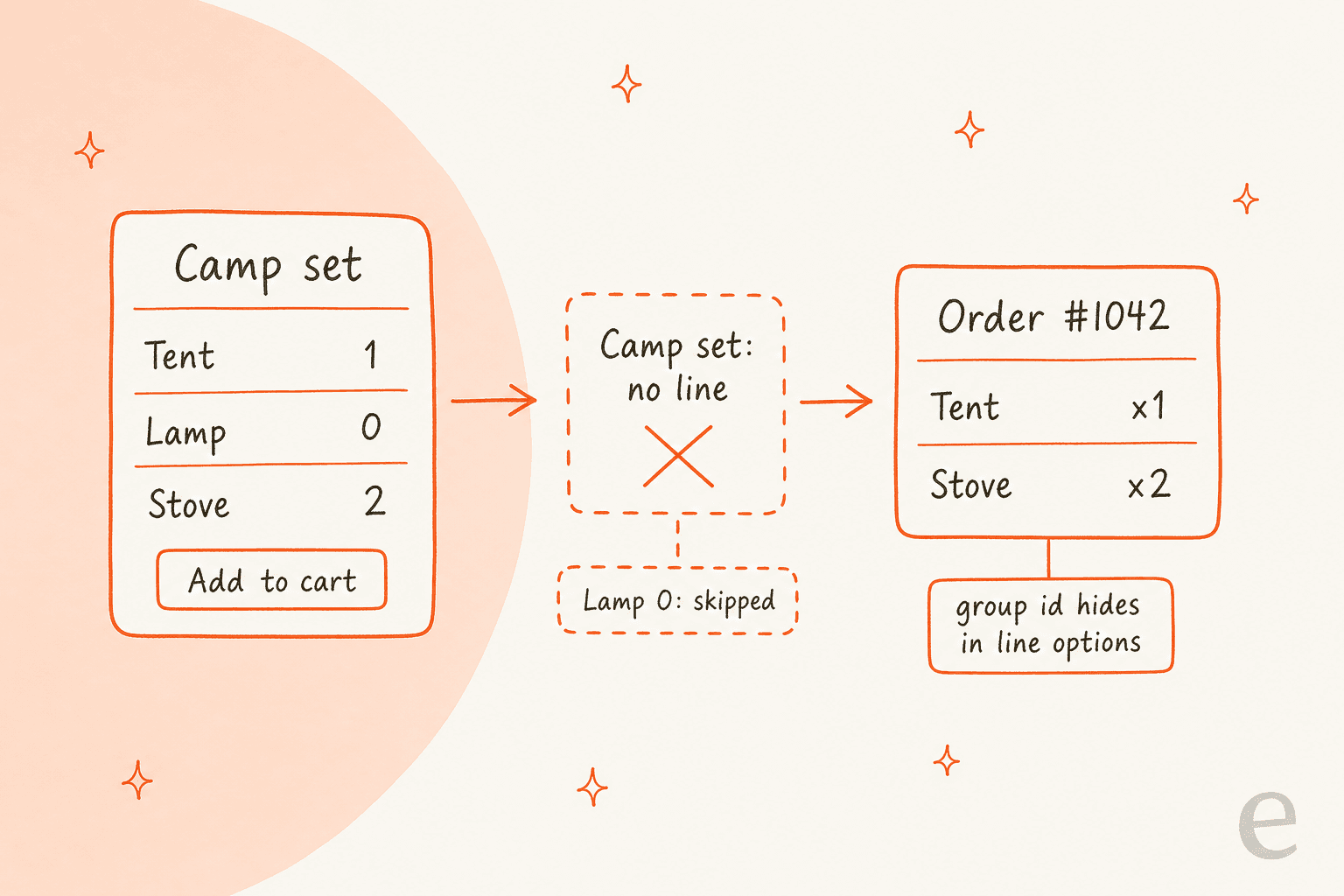
Magento never sells a grouped product. It sells the children: each simple product with a quantity above zero becomes its own order line, with its own SKU and price, and the group gets no line at all. The only trace of the group is its parent product ID, kept inside each line's options. So when a customer writes about "my set", ship, invoice, refund and reorder all work per child, and you answer from the lines. eesel's Magento integration reads those lines live by order number or email. With the eesel CLI, a coding agent can upload your approved set and refund policy, then test questions like "my set came without the lamp" before go-live. Connecting the store still needs a Magento admin.
Pick a ticket type to get the first three checks. They follow Adobe's docs and Magento's open source code, covered below.
What does a Magento order actually record for a grouped product?
I'm Rama, and I build eesel's integrations, which means I spend a lot of time reading what a store's API returns for an order. Grouped products are one of the places where the storefront and the order disagree most. The customer sees one product page called "Camp set". The order has no such thing on it.
Adobe's grouped product guide says it directly: although the products are presented as a group, "each product in the group is purchased as a separate item", and the cart shows each item and quantity as its own line. The group itself has no Quantity field, because the value comes from the children, and no price, because its price is derived from them.

The code shows how that happens. I read the Grouped product type class in the open source magento2 repository (the 2.4-develop branch, on 6 November 2026, so a given release may differ). When a shopper adds the group to the cart, the code loops over the children. For each one it skips any quantity that is empty or zero, prepares the rest as ordinary simple products, and in the normal add-to-cart path returns only those children. The parent is never added. If every box is zero, the shopper gets "Please specify the quantity of product(s)."
So an order never has a grouped line to ship, invoice or refund. That has a practical consequence for every ticket below: the thing the customer calls "the set" is not an object your team can act on.
If you run WooCommerce as well, the same shape applies there, and the WooCommerce grouped product orders guide covers it. Magento differs in one detail that matters for support.
What is left of the group once the order exists?
Only the parent's ID, and it is easy to miss. When the children go into the cart, each one is tagged with a super_product_config entry holding product_type: grouped and the parent's product_id. In Magento's base product type class, the getOrderOptions method then copies that entry into the order item's product options. So each line says, in effect, "I was bought as part of group number N".
Three things follow from reading the code that way, and I would check each on a test order before trusting it:
- The line itself is a simple product. Its SKU, name and price are the child's. There is no parent line for
parent_item_idto point to, which is the field Magento uses to nest configurable and bundle children under a parent. - The group lives in a blob.
OrderItemInterfacein the sales API hasproduct_type,parent_item_idand aproduct_optionfield. I could not confirm from the code alone whethersuper_product_configcomes through in REST responses, and Adobe's order view docs do not show a field that names the group. Treat "which set was this?" as something you verify per store. - The group can change after the order. Membership is read from today's catalog. If someone added or removed a child last month, the group page no longer matches what the customer bought, and the order lines are the truth.
A customer's "set" is therefore a reconstruction. The honest answer to "what did I order?" is the list of lines, with each SKU's quantity and price at the time.
What happens when a child is at zero or out of stock?
A child at zero never reaches the order, and that is the cause of one of the most common tickets: "I bought the set and the lamp is missing." Often the lamp was never in the cart, because the quantity box beside it was zero. Adobe's guide lets the admin set a Default Quantity per child, so a product page can open with some boxes pre-filled and others at zero.
Stock is per child as well. A group can mix simple, downloadable and virtual products as children, per Adobe's note that only simple, downloadable and virtual products with no configurable options can be grouped. Each child has its own stock, so a sold-out child is a problem for its own line, not for the others. For how a child's salable quantity, reservations and thresholds work, the configurable product stock guide applies unchanged, since both product types read stock from simple children.
One thing I could not verify from documentation is exactly what a shopper sees when they force a quantity on a sold-out child. I would open one live group with a sold-out member before writing a macro, the same advice I give for any storefront theme behaviour.
How do shipments, invoices and credit memos treat the children?
Per line, every time. Adobe's shipment guide says Adobe Commerce and Magento Open Source support partial and complete shipment, and you set Qty to Ship for each line item. The invoice guide says a single order can be divided into partial shipments that are invoiced separately. And the credit memo guide lists refunding "a portion of the quantity for one line item" as a normal case.
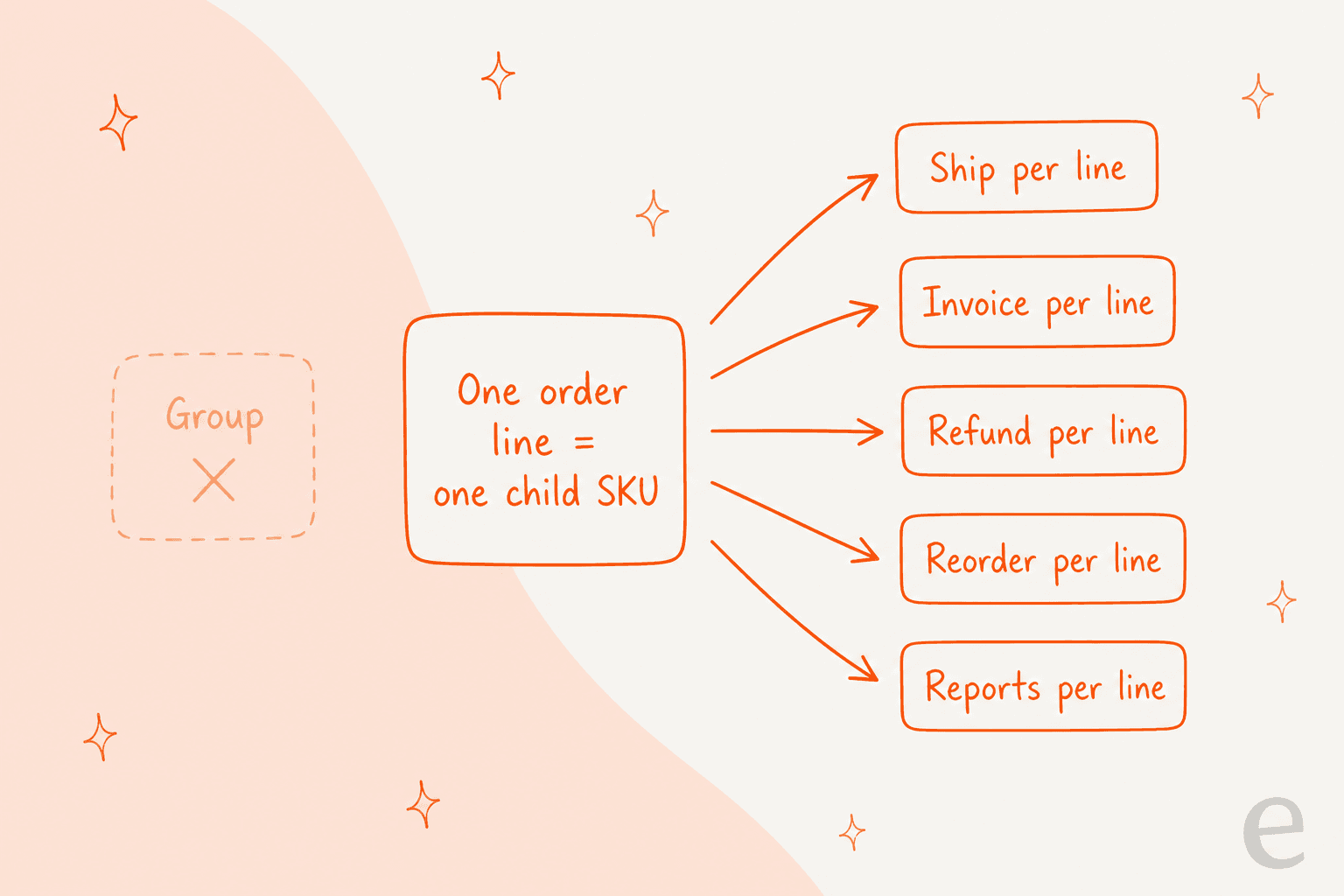
For a set, that means three practical rules:
- Partial shipments are normal, not an error. A warehouse can ship the tent today and the stove next week. Both are the same order, and the customer sees the order status of the lines, not of a set.
- There is no set-level refund. You refund each child line. Adobe's credit memo screen has a Return to Stock checkbox and a Qty to Refund box on every line, so you decide per child whether the item goes back on sale.
- Non-shipping children can distort an "incomplete" claim. A group that includes a virtual or downloadable child has a line with nothing to put in a box.

That table is one row per order line, and a set of three children is three rows. For the refund side beyond groups, including why a credit memo can say Refunded while the money has not moved, see the Magento credit memo guide.
Is there a known bug with grouped orders and emails?
Yes, and it is the reason I would check the Magento version before blaming the customer's inbox. Magento's own issue tracker carries a long-running bug where sending an invoice or credit memo email for an order with a grouped product threw a fatal error, so the email never went out. Issue 5105 was opened in 2016 for invoices and fixed in 2.2.2, but a commenter reported it again in November 2019 after the change appeared to have been reverted. Issue 26245 reported the credit memo version in January 2020, and issue 25617 the same crash when clicking Send Email. Adobe's engineers reproduced it on 2.3.5-p1, and the issue was closed in February 2021 with a pointer to a fix in 2.4-develop.
So if a customer says "I never got the refund email for my set" and the store is on an older 2.3.x release, check whether the credit memo exists and whether the send failed, before you promise a resend.
What does reorder do with a set?
It repeats the lines, not the group. Magento's admin reorder code, initFromOrderItem in the sales module's AdminOrder Create class, loads each order item's own product by its product ID and adds it to a new quote with the quantity the customer ordered. For a set, the product ID on each line is the child's, so the new order gets the same children, whatever the group looks like today.
Adobe's reorder guide adds the rules around it. A reorder is disabled if the order is on Hold or in Payment Review, and on the storefront the Reorder button does not appear if any item is unavailable, out of stock or disabled. An admin can reorder even when items are out of stock or disabled. So the "send me the same set again" ticket has two answers: the customer's button may be gone because one child is sold out, while an admin can still create the order.
I would not promise the full set from the admin. If the lamp is out of stock and the admin forces a reorder, the new order carries a line that cannot ship, and the next ticket is yours.
Why do reports show children, not sets?
Because the sales happened on the children. In the grouped product module's di.xml, the Bestsellers report is configured with ignoredProductTypes set to the grouped type. That only makes sense if sales are counted on the simple children, which fits what the order shows. For a merchandiser asking "how many Camp sets did we sell?", there is no direct number. You count the orders that contain the children together, and that is a catalog question, not a support one.
What should support say for each type of set ticket?
Answer from the lines, name the SKUs, and never promise a set-level action Magento does not have. These are the checks and replies I would keep in a macro file.
| Customer says | Look at first | Safe reply stance |
|---|---|---|
| "The lamp is missing from my set" | Order lines: was the lamp ever a line? Its ordered, shipped and invoiced quantity | If never ordered, say the lamp was not in the order and offer to help add it. If ordered and unshipped, give the partial shipment status |
| "Refund the whole set" | Each child line, payment method, Return to Stock per line | Refund line by line and say what each refund covers; do not quote a "set price" |
| "Send me the same set again" | Each child's stock, order status (Hold, Payment Review) | Offer the children that are in stock; name any that are not |
| "My set price changed" | Each child's price on the line versus today's | Quote line prices; the group's displayed price is derived from the children |
| "No refund email arrived" | Whether the credit memo exists, Magento version, send error | Confirm the refund from the credit memo, then resend; flag older 2.3.x stores |
| "Is the set still available?" | Each child's salable quantity | Answer child by child, as in the BigCommerce variant inventory guide |
Three rules cover people and bots alike. Quote SKUs and line prices, never a set. Never state that a "set" was shipped when only some lines were. And hand over to a person when the lines disagree with what the customer says they bought, which the AI escalation and agent handoff guides cover. The same order-line thinking helps with modifier questions on BigCommerce and with pre-order availability, and for the where-is-it side see order tracking and WISMO automation.
What can a helpdesk or AI agent see about a set order?
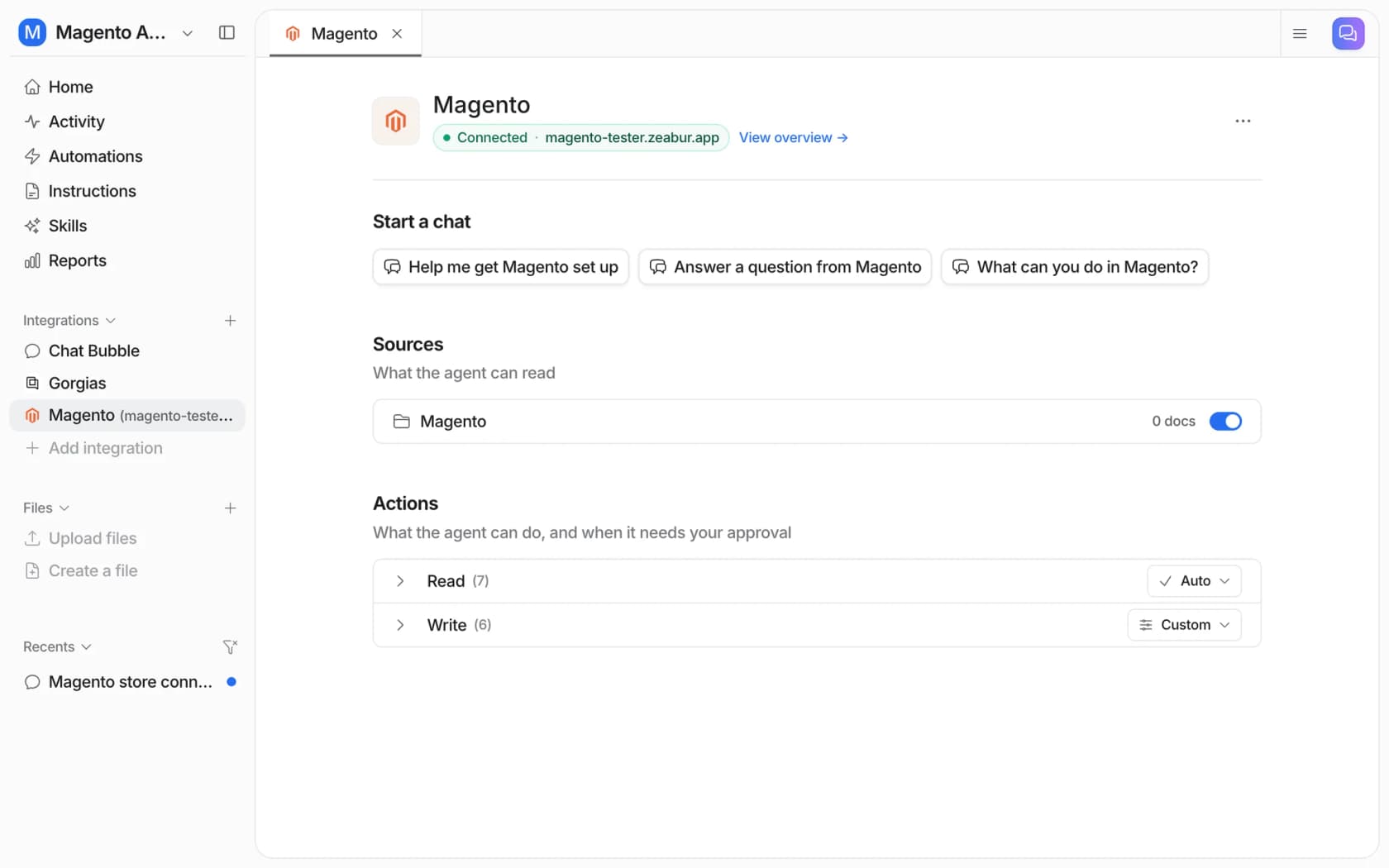
The lines, not the group, which is exactly what you want it to quote. eesel's Magento docs list the read actions that matter here: Get Order by ID (the full details of one order number), Get Orders by Email (every order under one address), Get Order Tracking, Get Payment Status, and for products, Search Products, Get Product and Check Stock Status. They read the store live when asked.
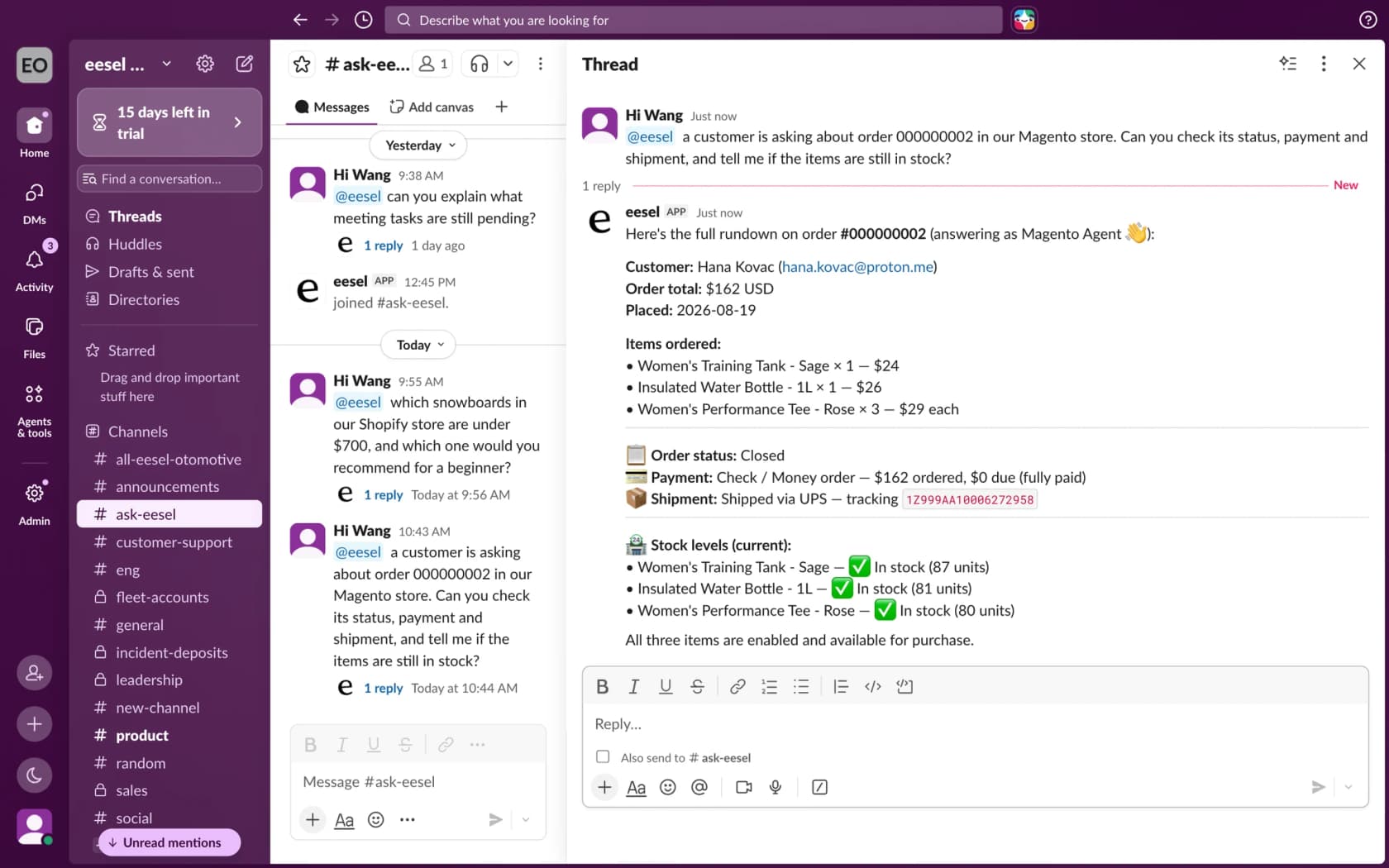
The docs describe the answer as customer, items, status, payment, shipment tracking and current stock for each item, which suits a set order well, since the useful reply is per child. The limits are worth knowing. On a customer's ticket, an order is found by exact order number or email, with no search by name or phone. A stock check reads one SKU at a time. And the docs do not say whether the agent can show a line's parent group ID, so I would test it on a real set order before relying on it. For refunds, the agent can refund specific items, but only on orders paid offline (check, bank transfer or cash on delivery). A card refund has to be issued by a person in the Magento admin.
I would not read this as "AI can handle set tickets" in general. STIL Classics is a good example of the careful pattern, although it runs on Shopify and Gorgias, not Magento. For a month of tickets, eesel pulled the order and its items from Shopify before drafting, left the reply as an internal note, and a person sent it, with about 320 tickets prepared and about 430 internal notes left between 8 August and 8 September 2026. The principle carries over: the agent looks up the lines, a person owns anything that moves money or makes a promise.
How eesel handles set orders in Magento
eesel works on Magento 2, Open Source and Adobe Commerce, and answers in your helpdesk, in Slack or in the storefront chat bubble. For a set ticket, the read-only actions are enough: look up the order, read its lines, check each child's stock, and draft a reply that names the SKUs. Granting the Sales / Orders, Sales / Shipments and Catalog / Inventory read resources is what lets it do that, and read-only access is a valid setup per the setup docs.
If you want to script the setup, the eesel CLI lets a coding agent start the Magento connection, upload your approved refund and reorder policy, and ask test questions such as "my set arrived without the lamp", so you can compare answers with the real order before anything goes live. Creating the Magento integration and pasting its keys still needs someone with Magento admin access.
Pricing is by credit, not per seat: a free plan with 100 credits, then from $299 a month for 500 credits, per eesel pricing. Test it on past tickets first, as the simulation testing guide describes. For setup and the wider picture, see add AI to Magento, the Magento chat widget guide, best AI for Magento and Gorgias and Magento. Related reading on Magento pricing, the Magento review, ecommerce support contact rates, ticket routing and refund macros fills in the rest.
Try eesel for Magento order questions
If your queue has "where is the rest of my set?" tickets, eesel can read each Magento order's lines and tracking before anyone opens the ticket, and draft the answer from your own refund and reorder policy, with a person still sending anything that makes a promise. It works inside your Gorgias queue, or Zendesk or Freshdesk, and the free plan's 100 credits are enough to try it on a batch of real order tickets. Try eesel and see how it does on yours.