Magento reorder unavailable: why the button is missing or fails

Kira

Katelin Teen
Last edited November 6, 2026

A Magento Reorder button is missing when the order fails one of four checks: Allow Reorder is off for that store view, the order is on Hold or in Payment Review, a product no longer exists in the store, or a product is disabled or out of stock. Adobe says admins can reorder past the stock and status checks, but an open bug report shows admin reorders silently dropping out-of-stock items, so test before you promise. In the code I read, the storefront does not list items it skipped. eesel's Magento integration reads the order, hold state and each SKU's stock live, though it has no action that places a reorder. With the eesel CLI, a coding agent can upload your approved reorder policy and test questions like "why is my Reorder button gone?" before go-live. A Magento admin still has to connect the store.
Pick a ticket type to get the first three checks. Each one comes from Adobe's docs or Magento's open source code, covered below.
Why is the Magento Reorder button missing?
Because the order failed one of four gates, and the storefront will not tell the customer which one. I'm Alicia, and I build the agents that read this kind of data for eesel, so I went through Adobe's reorder guide and the open source magento2 code (2.4-develop, checked on 6 November 2026, so your release may differ) to find them.
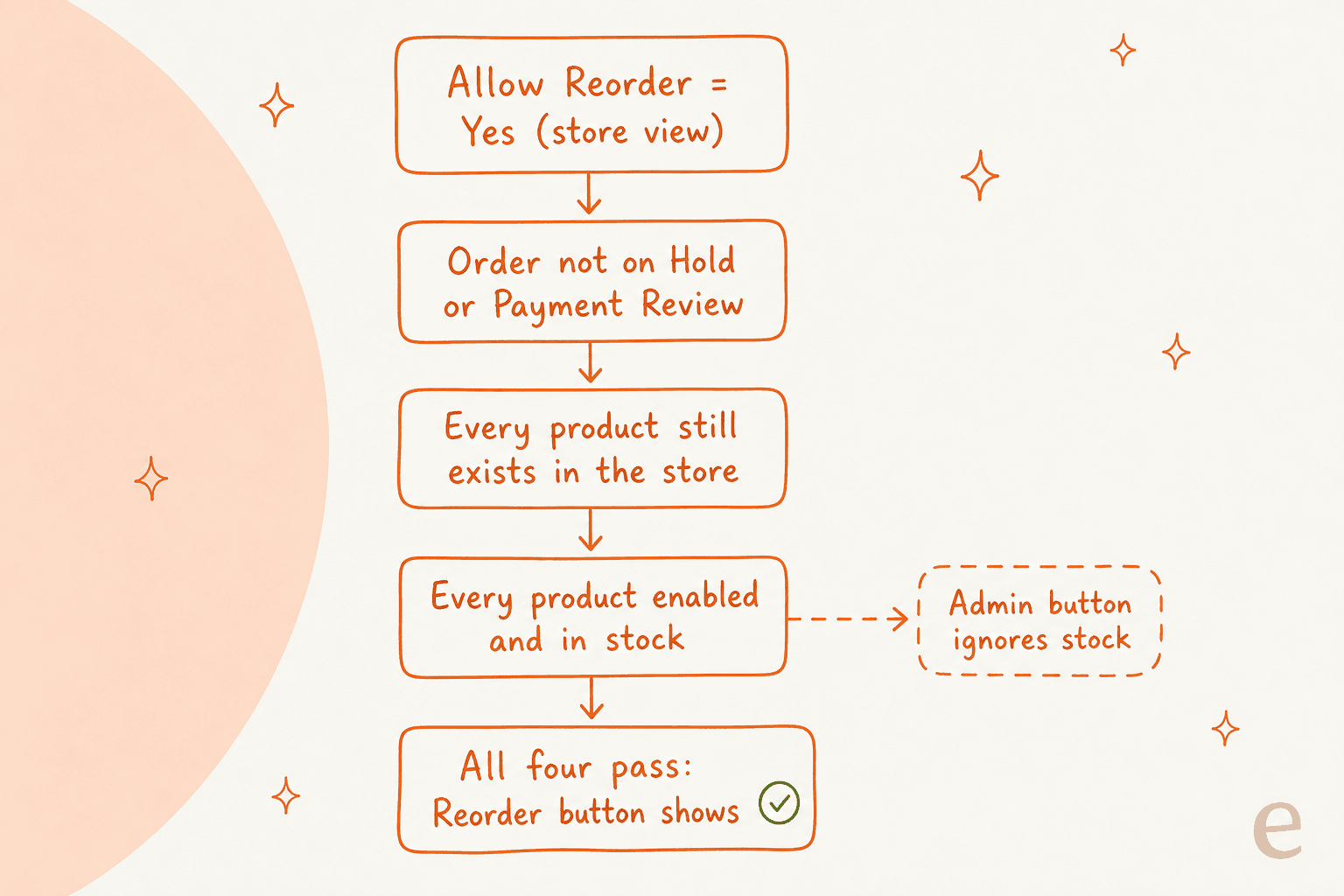
Adobe's criteria list says the same thing in prose. The Allow Reorder option must be on. If the order is in Hold or Payment Review, reorder is disabled. If any item is unavailable, out of stock or disabled, it is disabled on the storefront. And an admin can reorder even if items are out of stock or disabled. In the code, that is _canReorder() in the order model: it returns false for a held order or one in payment review, then loads every ordered product for the store, returns false if one is missing, and returns false if one is not salable.
The practical reading for a ticket: one sold-out or disabled item hides the button for the whole order, even if the customer wants the other five lines. The same logic is why the button vanishes on an order for a single product whose last unit that order bought. I covered how salable quantity and reservations work in the configurable product stock guide. A 2018 Magento pull request from the inventory team describes the timing: without multi-source inventory the button hides right after the order is placed, and with it, only after a shipment is created, because reservations lower salable quantity first.
Where is the setting, and what scope is it?
It is at Stores > Configuration > Sales > Sales > Reorder > Allow Reorder, and Adobe says reorders are enabled by default. The field is shown at default, website and store view scope in the module's system.xml, and Adobe's screenshot labels it [store view]. So a multi-store merchant can switch reorder off for one storefront and leave it on for another, which is the first thing I would check when only one brand's customers complain.

Where does Reorder show up, and for whom?
On three surfaces, with slightly different rules for each.
| Surface | Who sees it | What gates it |
|---|---|---|
| Storefront My Orders and Order View | Logged-in customers | Allow Reorder on, order not on Hold or Payment Review, every product exists and is salable |
| Guest order view on the storefront | Guests who look up an order | Same checks. Magento has a separate guest reorder route and builds a guest cart |
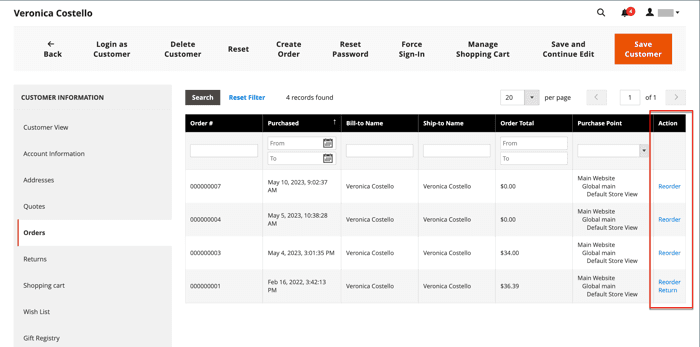
| Admin order view and the customer's Orders tab | Admin users | Allow Reorder on, the admin role's Reorder permission, and the stock-ignoring version of the check |
Adobe's page contradicts itself on one point, and it matters for tickets. It says the button "is always displayed in the list with Orders (even if all products from the order are not available)", then says in Case 2 that it "does not appear on the My Orders and View Order pages". The code sides with Case 2: the history.phtml and buttons.phtml templates only print the link when canReorder is true, and Adobe's own Case 2 screenshot shows one order without the link.
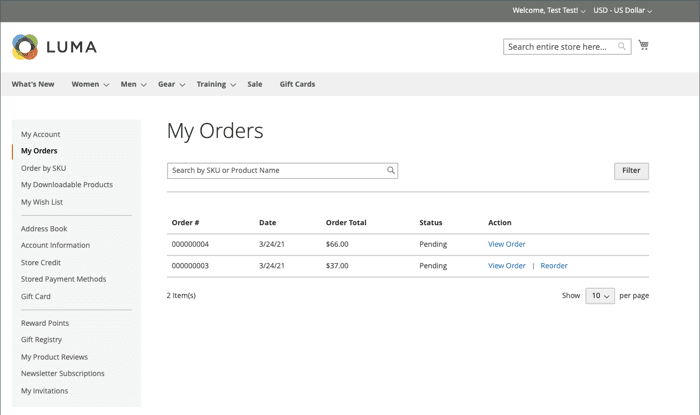
Two smaller facts help with the "I clicked it and nothing happened" ticket. If the customer's cart already holds items, Adobe says reordered products are added to them, so a cart can look bigger than expected. And the admin button needs a role permission, defined as Magento_Sales::reorder in the sales module's ACL file, so a support agent with an admin login may simply lack it.
What happens to each kind of product problem?
Each problem lands differently, and only some of them hide the button. Here is what I could trace in the reorder model and what Adobe documents.
| Problem with an ordered item | Button | What the reorder does |
|---|---|---|
| Out of stock or disabled | Hidden on the storefront | Adobe says admins can still reorder. In code, a disabled product fails to add with "Product that you are trying to add is not available" (NOT_SALABLE) |
| Product deleted | Hidden (the product lookup finds nothing) | PRODUCT_NOT_FOUND, "Could not find a product with ID" |
| Not assigned to the store's website | Not documented | The model loads products with a store filter, so it reads as PRODUCT_NOT_FOUND. I did not run this |
| Fewer units than the order had | Shown | Add to cart fails with an INSUFFICIENT_STOCK message, for example "The requested qty is not available" |
| Min or max purchase limit now exceeded | Shown | "The fewest you may purchase is" and "The most you may purchase is" also map to INSUFFICIENT_STOCK |
| Required custom option removed or changed | Shown | "The required options you selected are not available" maps to NOT_SALABLE |
| Product is Not Visible Individually | Shown | Adobe's guide notes these can be reordered |
| Price changed | Shown | See below |
On prices, Adobe's guide does not discuss them, so I would not quote a rule to a customer. What the code does show is that the reorder replays the order line's saved buy request (options and ordered quantity) and removes a custom_price property from it before adding the product. A price an admin hand-set on the original order is not carried over, which I would tell a B2B buyer before they assume the old quote repeats.
How do configurable and bundle items reorder?
As their top-level line. The model only collects order items with no parent, then re-adds the product with the saved buy request, so a configurable comes back as the parent with the same chosen options. If the chosen size is now sold out, the add fails for that line. There is also a real bug on this path: Magento issue 39568, reported against 2.4.7-p3 and since closed, found that reordering an order whose configurable parent had been deleted threw an uncaught exception, because the availability checker looked up the parent without a try and catch. If a customer on an older patch level reports a blank error page after a product deletion, that is the first suspect. For why these lines look the way they do, see the grouped product orders guide and the bundle price questions guide.
What error does the customer actually see?
On the storefront, usually none, which is the awkward part. The controller behind the Reorder button, AbstractController/Reorder.php, calls the reorder model and then redirects to the cart. It reads the model's output only to get the cart. The per-item errors the model collects are never read there. So when an item is skipped because of quantity limits or a changed option, the customer lands in a cart that is missing a line and is given no message. Only a thrown exception is shown as an error banner. I did not test this on a live store, so treat it as what the code says, not what every theme shows.
The model's errors do surface in two other places:
- The admin. Reorder from the order view with an unavailable child of a configurable product gives
Product "SKU" not found. This product is no longer available.per SKU, and you stay on the order page. - GraphQL. The
reorderItemsmutation returns each error with a code, a message and a path.
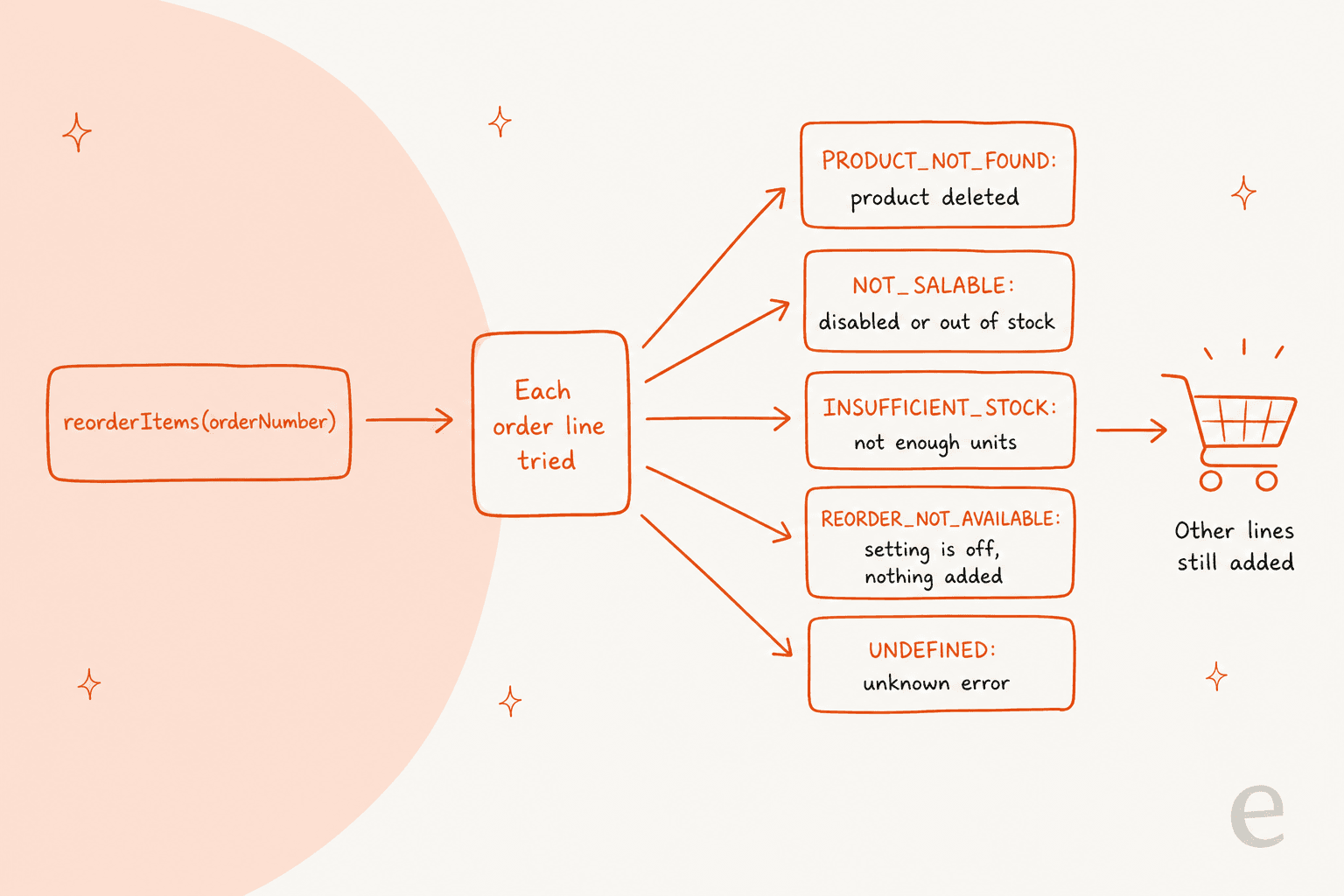
Adobe's reorderItems page and the schema.graphqls file in the sales GraphQL module agree on exactly five codes:
| Code | Adobe's meaning | Support translation |
|---|---|---|
INSUFFICIENT_STOCK | Requested quantity is greater than available stock | Offer a smaller quantity |
NOT_SALABLE | Out of stock, disabled, or otherwise prevented from being sold | Check status, stock and options |
REORDER_NOT_AVAILABLE | Reorders have been disabled | Check Allow Reorder for that store view |
PRODUCT_NOT_FOUND | The product has been deleted | Find a replacement SKU |
UNDEFINED | An unknown error occurred | Escalate with the order number |
Three behaviours are worth knowing. REORDER_NOT_AVAILABLE adds nothing to the cart; for any other code, Adobe says the mutation adds what it can and keeps going. The call needs a customer token, and the code rejects it with "The current customer isn't authorized" for non-customers. And the order must belong to that customer, or it fails with "Order number ... doesn't belong to the current customer". If two requests for one order overlap, the second can fail with "Sorry, there has been an error processing your request. Please try again later", because the resolver takes a 60-second lock per order number. A customer who double-taps the button on a headless storefront can trigger that.
Why does an admin reorder of out-of-stock items fail?
This is where documentation and behaviour part ways, and I would not promise a customer an admin reorder for a sold-out item. Adobe says plainly that an admin can reorder even if items are out of stock or disabled. In the code I read, the admin button is drawn using the check that ignores salability. But the admin controller then calls the helper's canReorder, which uses the version that does check it, and Magento issue 39958 reports the visible result. Opened in June 2025 for 2.4.7 without multi-source inventory, it describes reordering an item with a stock quantity of 1: the page shows "This product is out of stock" and the order details come up empty. Adobe's engineers confirmed it on 2.4-develop in June 2025, and later comments say it happens when backorders are disabled. It was still open when I checked on 6 November 2026.
I could not reproduce this myself, so I cannot say which releases are affected. The safe stance is to test one out-of-stock reorder on staging, and if the new order comes up empty, create the order manually instead of submitting it.
What is the diagnostic checklist for a reorder ticket?
Run these in order. Most tickets end by step four.
- Get the order number and the store view it was placed in. The setting is per store view, so the right view matters.
- Read the order status. Hold or Payment Review switches reorder off.
- Open every ordered SKU in the catalog. Look for deleted, disabled, out of stock, or not assigned to the website.
- Compare quantities. Ordered quantity against current salable stock, and against any min or max purchase rule.
- Check options. A custom option or a configurable attribute that no longer exists fails that line.
- Open the cart after the click. Skipped lines produce no message on the storefront, so count the lines.
- For admin tickets, check the agent's role for the Reorder permission, then test on staging.
- For API tickets, read the error code and the
path, and confirm the token and order belong together.
For what a refund, not a reorder, would need, the credit memo guide covers the other half of the "I can't get my items" conversation.
What should support tell the customer?
Say which item blocked the reorder, offer the nearest alternative, and never describe the Reorder button as broken when it is working as designed.
| Customer says | Check first | Safe reply stance |
|---|---|---|
| "There is no Reorder button" | Order status, then each SKU's status and stock | Name the blocking item and offer to place the rest by hand |
| "Reorder dropped one item" | That line's stock, limits and options | Say which line was skipped and why, with the quantity available |
| "It used my old price" | The product's current price, any custom price on the old order | Quote today's price, and say a hand-set price does not carry over |
| "The page crashed after I clicked" | Whether a product was deleted, Magento patch level | Escalate with the order number and SKU |
| "Reorder my subscription box" | Subscription tool, not core Magento | Check which extension owns the order, as in subscription box support |
The same stance helps on other platforms: see WooCommerce backorder settings, WooCommerce grouped orders, variation stock, BigCommerce variant inventory and BigCommerce pre-order availability. For handing over cases you cannot resolve, the AI escalation and agent handoff guides apply.
What can eesel do on a Magento reorder ticket?
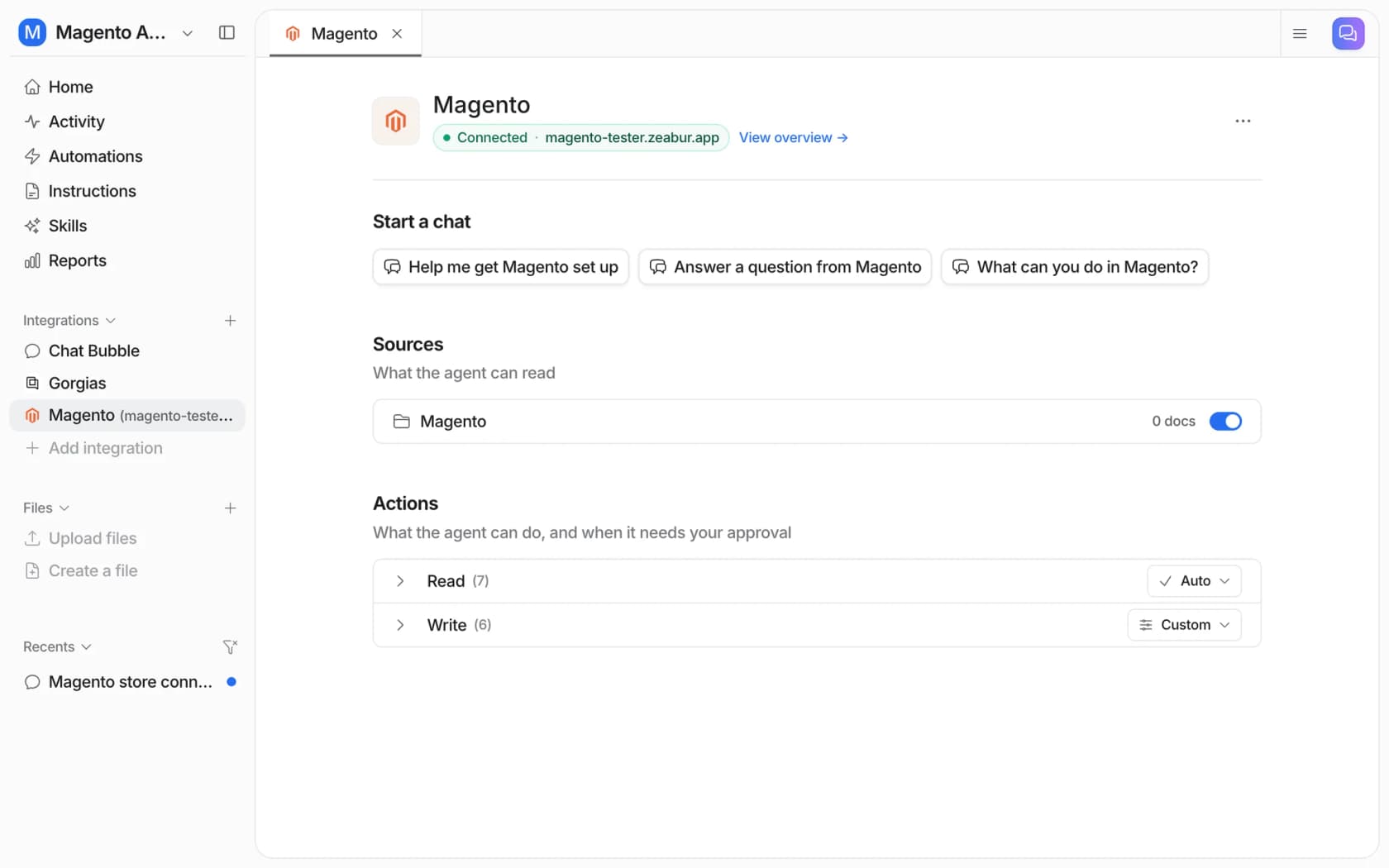
Look up the order and the stock, then draft a reply from your policy. It cannot place the reorder, and the docs do not claim it can. eesel's Magento docs list the read actions that matter here: Get Order by ID, Get Orders by Email, Get Product, Get Product Variants and Check Stock Status, which returns the stock quantity, the in-stock flag and the backorder policy for one SKU. The write actions are Refund Order, Cancel Order, Hold Order, Unhold Order, Send Order Notice, Update Customer Address and Create Return (Adobe Commerce only). None of them creates or reorders an order.
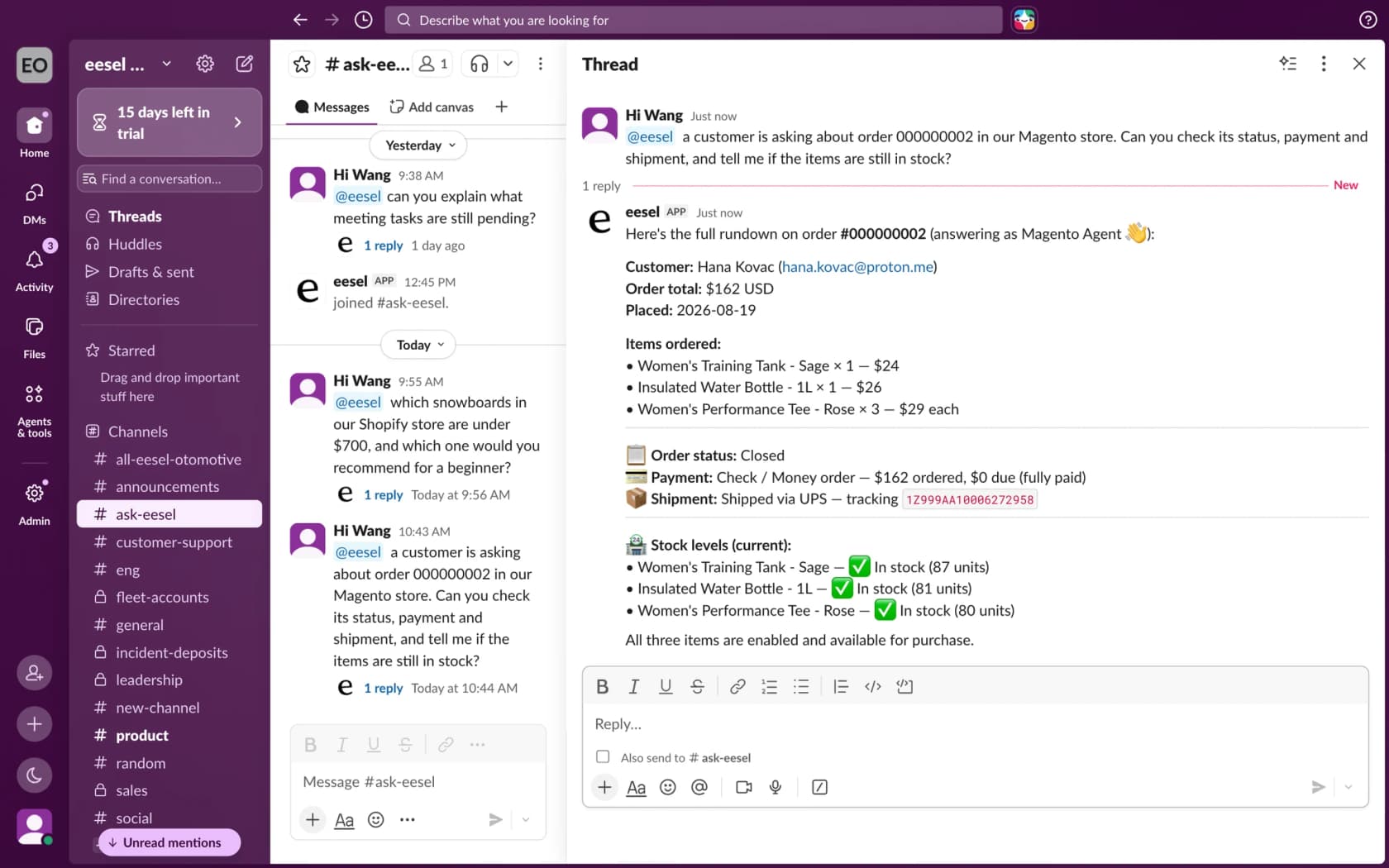
Two details connect the docs to the gates above. First, Hold Order pauses fulfilment, and a held order loses its Reorder button, per Adobe's criteria. A hold placed for a fraud check can therefore explain a "no Reorder button" ticket, and Unhold Order releases it. Second, the stock check reads one SKU at a time and the docs do not say whether the figure is salable quantity under multi-source inventory, so I would confirm that on your store before the agent quotes "in stock" to a customer.
On a Luma store, eesel's storefront chat can show products as cards a shopper can add to the cart, and a product with options links to its page instead. That gives a customer a manual route back to the same SKUs when the button is gone. For a connected helpdesk, Gorgias and Zendesk or Freshdesk tickets can call the same lookups. The agent's access is capped by the API resources you grant the Magento integration, and read-only is a valid setup.
Cape Coffee Beans shows the pattern, though on Shopify and Zendesk, not Magento. Its team writes @eesel in a Zendesk internal note, and eesel looks up the order by number or the product in the live catalogue and answers as an internal note with the order linked. Between 8 August and 8 September 2026 it looked up 19 products and 5 orders that way. The takeaway for a reorder queue is the same: the agent reads and links, a person decides and sends.
How eesel handles reorder questions in Magento
eesel works on Magento 2, Open Source and Adobe Commerce, and answers in your helpdesk, in Slack or in the storefront chat bubble. For reorder tickets I would set the agent to do four things: read the order and its hold state, check each SKU's stock, name the blocking item in a draft, and hand over anything about a deleted product or a crashed page. Give it the Sales / Orders and Catalog / Inventory read resources, and keep refunds and cancellations behind approval.
If you want to script the setup, the eesel CLI lets a coding agent start the Magento connection, upload your reorder policy and replacement-SKU rules, and ask test questions before anything goes live. Creating the Magento integration and pasting its keys still needs a person with Magento admin access.
Pricing is by credit, not per seat: a free plan with 100 credits, then from $299 a month for 500 credits, per eesel pricing. Test on past tickets first, as the simulation testing guide describes. For setup and the wider picture, see add AI to Magento, the Magento chat widget guide, best AI for Magento and Gorgias and Magento. Related reading: Magento pricing, the Magento review, ecommerce support contact rates, ticket routing, order management, returns automation and refund macros.
Try eesel for Magento reorder tickets
If your queue has "where did my Reorder button go?" tickets, eesel can read each Magento order's status and every item's stock before anyone opens the ticket, and draft the reply that names the blocking SKU, with a person still sending anything that makes a promise. The free plan's 100 credits are enough to run it over a batch of real order tickets. Try eesel and see how it does on yours.
Frequently Asked Questions
Where do I turn Magento reorder on or off?
Can an admin reorder an out-of-stock item in Magento?
What errors does the Magento reorderItems mutation return?
INSUFFICIENT_STOCK, NOT_SALABLE, REORDER_NOT_AVAILABLE, PRODUCT_NOT_FOUND and UNDEFINED. Only the third adds nothing to the cart. Pair them with AI escalation rules for the unknown ones.Why did Magento reorder add only some items to the cart?
Does reorder keep the old price in Magento?
custom_price, so a hand-set price is not carried over. For the bundle side, see bundle price questions.