Magento bundle product price questions: what to check first

Kira

Katelin Teen
Last edited November 6, 2026
A Magento bundle has no single price. Dynamic bundles add up the options the customer picks, fixed bundles charge one set price, and the listing only shows a minimum ("As low as") or a range ("From X To Y"). That is why the cart, the order and the product page can all disagree. Answer from three facts: the pricing type, the options and quantities chosen, and any special or tier price, which Magento treats as a percentage. The order then puts the price on the child lines (dynamic) or the parent line (fixed). eesel's Magento integration reads those lines live. With the eesel CLI, a coding agent can upload your approved pricing policy and test questions like "why is my bundle dearer in the cart?" before go-live. Connecting the store still needs a Magento admin.
Pick a ticket type to get the first three checks. They follow Adobe's docs and Magento's open source code, covered below.
Why does a Magento bundle show "From X To Y" or "As low as"?
Because a bundle can cost different amounts depending on what the customer picks, so the listing has to show something. I'm Alicia, and I work on eesel's product and its AI agents, which means I read a lot of what store APIs and open source code actually do behind a help article. Bundle pricing is a good example of a screen that looks simple and is not.
Adobe's bundle product guide describes the Price View field with two options: Price Range, which shows the product price "from the least expensive to the most expensive", and As Low As, which shows only the least expensive. The storefront template in the open source magento2 repository (the 2.4-develop branch, read on 6 November 2026, so a given release may differ) adds a detail support should know: even with Price Range set, it shows a range only when the minimum and maximum actually differ. A bundle with one fixed choice per option shows a single price.
The template also shows a struck-through regular price next to the minimum when a discount makes the minimum lower than the regular minimum. So "As low as $42, was $50" is the store working as designed.
The listing price is a floor or a range, never a promise of what the cart will say. If a customer quotes "From $42", the useful reply starts with which options give $42.
What is the difference between dynamic and fixed price bundles?
Dynamic bundles are priced from the items inside. Fixed bundles carry their own price. It is one setting, and almost every later answer depends on it.
Adobe's guide puts it plainly. Set Dynamic Price to Yes and leave Price blank, and "a bundle product does not have its own price from the catalog", because the price comes from the individual products. Set it to No and enter a price, and the bundle charges that amount.
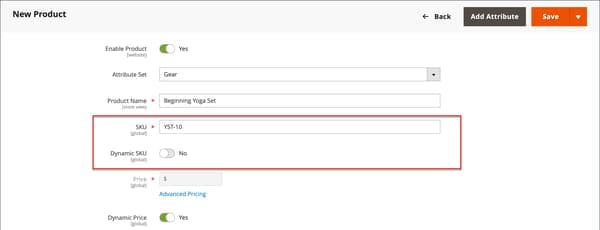
Three other settings follow from that choice, per the same guide:
- Tax. With dynamic pricing, tax is worked out for each bundle item. With fixed pricing, it is worked out for the whole bundle, using the bundle's own Tax Class.
- Weight and SKU. Each can be fixed or dynamic separately from price, so a bundle can have a fixed price and a dynamic weight.
- Minimum Advertised Price. Adobe notes it is not available for bundles that use dynamic pricing.
For a support agent, the first fact to write on the ticket is "dynamic" or "fixed". It decides whether to look at the item prices (dynamic) or one bundle price (fixed), and it decides which order line holds the money later.
Why is the cart price different from the listing price?
Because the cart prices a specific selection, and the listing shows a minimum. The gap is usually one of five things.
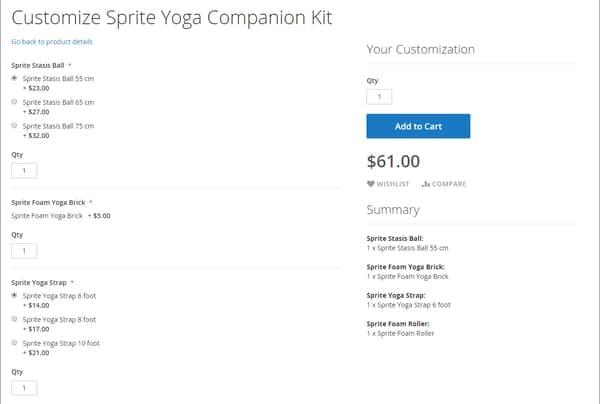
- A dearer option. Each option (drop-down, radio buttons, checkbox or multiple select) lists items with their own price. The minimum assumes the cheapest in each required option. The customer picked the 75 cm ball, not the 55 cm one.
- A quantity multiplier. Adobe's example: if a bundle item's Default Quantity is
2and the customer orders4of that bundle, the customer gets8of the item. A default quantity inside the bundle multiplies with the quantity in the cart. - A user-defined quantity. An item marked User Defined lets the customer change its quantity. Adobe warns not to use it on checkbox or multiple-select options.
- Tax. Per item on a dynamic bundle, on the whole product on a fixed one. A store showing prices without tax in the listing and with tax in the cart will also show a gap that has nothing to do with the bundle.
- A cart price rule. I come to these below.
The check that settles most of these is the Summary on the Customize page, which lists exactly what is in the selection. Ask the customer for a screenshot of it, or rebuild the selection yourself on the storefront. The WooCommerce order status guide makes a similar point for another platform: rebuild what the customer saw before you explain it.
How do special price, tier price and catalog rules hit a bundle?
All three discount a bundle, but as percentages, and the arithmetic surprises people. Start with what Adobe says, then what the code does.
Adobe's bundle page lists, under things to remember: "Special Price and Customer Group Price (Tier Price) are always set as the discount percentage for all bundle product types." Its advanced pricing guide says advanced pricing applies to simple, virtual, downloadable and bundle products, and sends other types to a catalog price rule.
Now the code. In the bundle price class, a special price is applied by multiplying the price by the stored value divided by 100, then taking the lower of that and the current price. A tier price is applied the other way: it subtracts the stored percentage from the price. A tier row that is not a percentage is skipped.
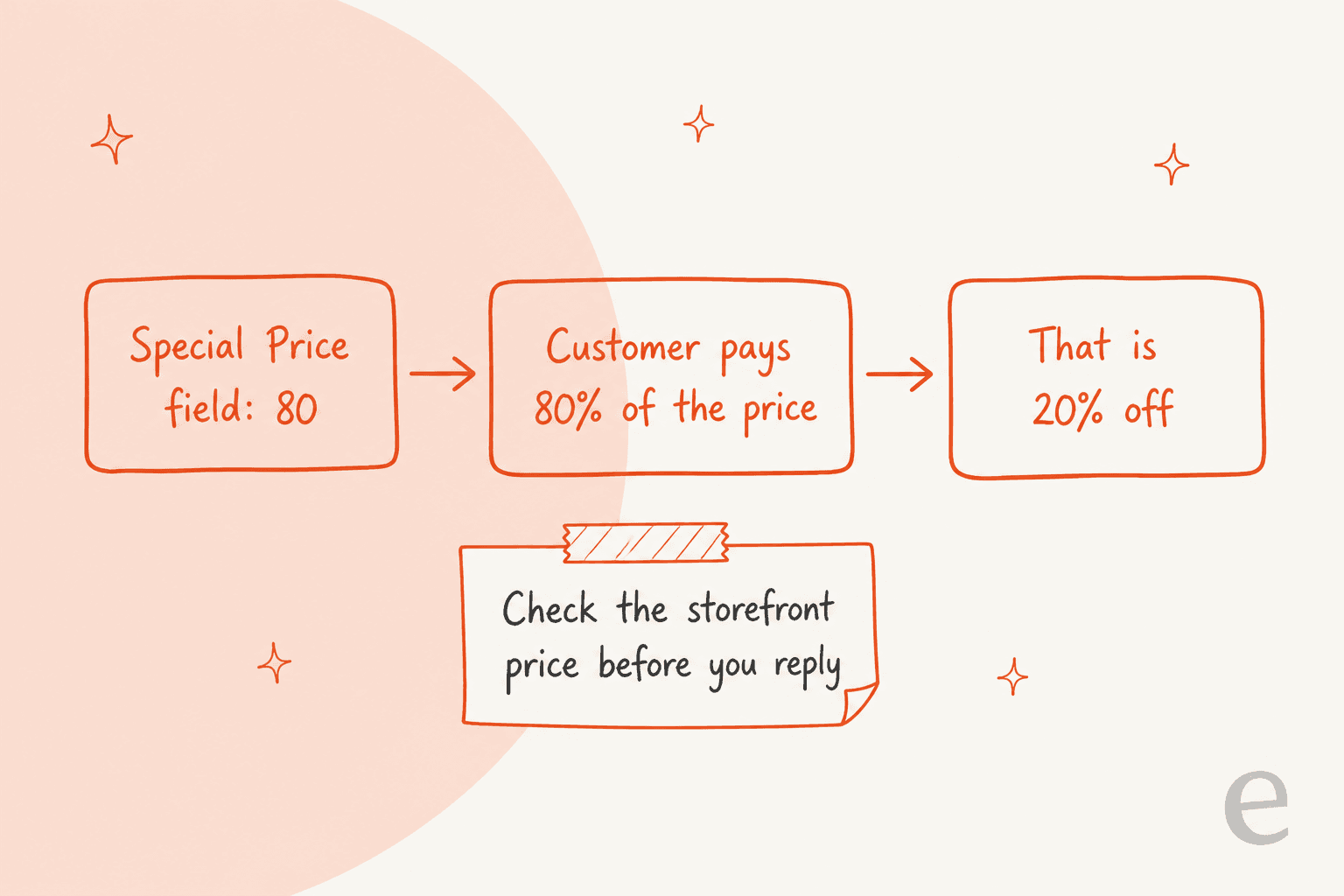
So the same bundle can use two different percentage conventions: a tier price of 20 takes 20% off, and a special price of 80 charges 80%. I could not confirm from Adobe's docs how the admin labels the special price field for bundles in every version, so I would test one bundle on a staging store and read the storefront price before writing a macro. If a customer says "my 20% bundle discount came out as 80% off", this is the first place to look.
| Discount type | Where it is set | Bundle behaviour | What to check |
|---|---|---|---|
| Special price | Advanced Pricing on the bundle | Percentage; in code, a share of the price | The stored value, and the from and to dates |
| Tier or group price | Advanced Pricing, per customer group | Percentage only; fixed-amount rows are skipped | The customer group and quantity break |
| Catalog price rule | Marketing, catalog rules | Applied by rule conditions | A Category condition on a bundle only works if all children share the category |
| Cart price rule | Marketing, cart rules | Applied to children or parent | See the next section |
Dates matter too. In Magento Open Source, per Adobe's special price guide, a special price starts just after midnight at the start date (00:01) and runs to just before midnight (23:59) on the day before the end date. A "the sale was still on yesterday" ticket is often a one-day boundary. Adobe Commerce adds scheduled updates, which set start and end by time of day instead.
Adobe also gives the general formula for the final price: the minimum of the regular price, group or tier price, special price and catalog price rule, plus the cheapest required custom options. For catalog rules, Adobe's catalog rule guide warns that a Category condition on a bundle or grouped product works correctly only when all child items share the category, and otherwise recommends a cart price rule.
Do cart price rules treat bundles differently?
Yes, and the difference depends on dynamic or fixed pricing. Adobe's cart rule pages do not mention bundles, so this part comes from Magento's source code, which I read in the RulesApplier class on the same 2.4-develop branch.
For a bundle whose children carry the price (dynamic), the rule is tested against each child. Children that match the rule's conditions get the discount. If none match, Magento checks the bundle parent itself, and if that matches, it works out the discount at the parent level and spreads it across the children in proportion. A fixed-price bundle, where the parent carries the price, is handled as one item.
What that means for a ticket: a coupon that "only works on one thing in my bundle" is not a bug. With a dynamic bundle, a rule keyed on a child's SKU or attribute discounts just that child. Before you promise a code works on a bundle, check what the rule's conditions test. The Magento credit memo guide covers what happens when that discounted line is refunded later.
How does a bundle appear on a Magento order?
As a parent line and one child line per selected item, with the price on one side or the other. This is the single most useful thing to know when reading a bundle order, and the code is explicit about it.
In Magento's Order\Item class, an item is a "dummy" for calculation when it has children and its children are calculated, or when it is a child and the parent is calculated. The bundle type decides which: when the bundle's price type is dynamic, the order records the calculation as CALCULATE_CHILD, and when it is fixed, as CALCULATE_PARENT.
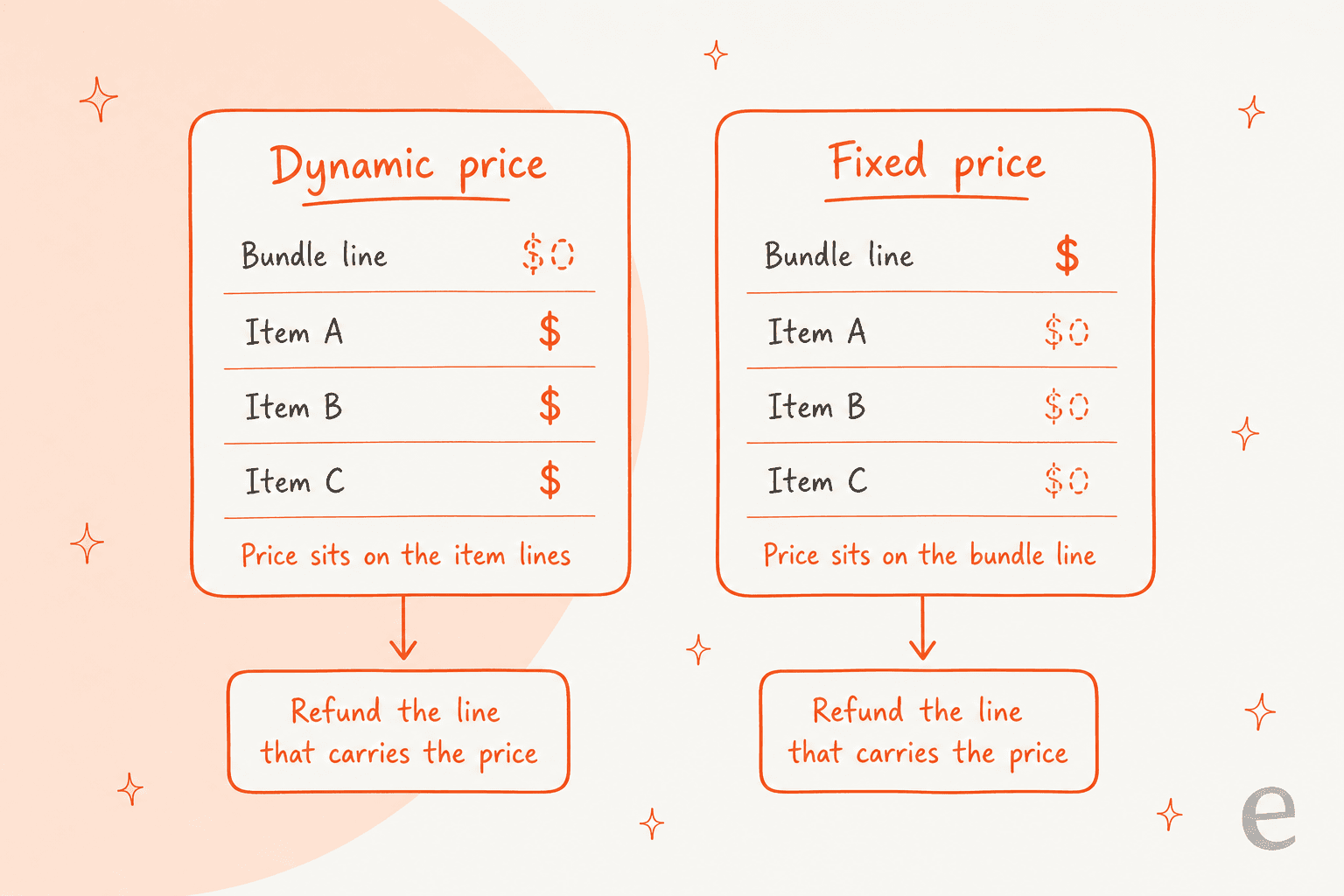
In plain terms:
- Dynamic price. The child lines carry the prices. The parent line is the container, with no price of its own.
- Fixed price. The parent carries the one price. The child lines show what is inside, but they are not priced lines.
I would check this on a test order before building a macro, because it is read from the code and not from an Adobe order screen. Adobe's order view page was not available to me when I wrote this, so I could not confirm how the admin labels the lines. The same code also keeps the shipping choice. Ship Bundle Items (Together or Separately) is saved on the order, and Adobe notes that Together requires all items to share one inventory source.
For the grouped product version of "what did the order actually record?", see grouped product orders. A bundle keeps its parent line, which a grouped product never has.
How do shipping, invoices and refunds work on a bundle?
By line, following the same dummy logic. The line that is not a dummy is the one you act on, and that depends on whether you are shipping or pricing.
- Shipping. If items ship separately, the child lines are what gets shipped and the parent is the container. If they ship together, the parent is what ships and the children are along for the ride. A customer who got "half a bundle" may simply have a separate-shipment bundle part-way through.
- Refunds. In the same class, the quantity available to refund is zero for a dummy line. So the line that carries the price is the one with a refundable quantity: the children on a dynamic bundle, the parent on a fixed one.
- The credit memo screen. Adobe's credit memo guide gives each line a Qty to Refund box and a Return to Stock checkbox, plus Refund Shipping, Adjustment Refund and Adjustment Fee for the order as a whole. It does not mention bundles.

So "refund just the mug from my bundle" has a clean answer on a dynamic bundle, where the mug is a priced line, and a harder one on a fixed bundle, where the mug has no price of its own. For a fixed bundle, the honest options are a partial quantity of the bundle or an adjustment refund, and which one the shop wants is a policy call, not a Magento default. I could not verify from Adobe's docs how a partial refund behaves on a fixed bundle, so run one on a test order first. For the money side, including why a memo can say Refunded before the money moves, see the credit memo questions post and the AI for refund requests guide.
What should support check in admin before replying?
Check six things in this order, and write the answer to each on the ticket. They take a couple of minutes once you know where they are.
| Customer says | Look at first | Safe reply stance |
|---|---|---|
| "The listing said $42, I paid more" | Price View, Dynamic Price, the options and quantities in the order | Say which options give the floor price and which the customer picked |
| "The cart is higher than the page" | Default Quantity, User Defined, tax and any cart rule | Compare the Summary to the order; name the line that differs |
| "My 20% off came out wrong" | Special price vs tier price, stored value, dates | Quote the percentage actually applied; do not assume 80 means 80% off |
| "The coupon only took one item off" | Cart rule conditions, dynamic or fixed | Explain the rule applies to matching children |
| "Refund only the mug" | Which line carries the price, Return to Stock, payment method | Offer the lines that are priced; hand a fixed-bundle split to a person |
| "Half my bundle arrived" | Ship Bundle Items, shipment per child line | Give per-line shipment status before promising a resend |
Three rules cover people and bots alike. Quote option names and line prices, never "the bundle price" on its own. Never say a bundle was refunded or shipped without naming the lines. And hand over to a person when the lines do not explain the gap, which the AI escalation and agent handoff guides cover.
The same line-by-line habit helps with BigCommerce modifier questions, variant inventory and pre-order availability.
For the where-is-it side of these tickets, see order tracking and WISMO automation.
What can a helpdesk or AI agent see about a bundle order?
The order's lines, status, payment and tracking, plus the product by SKU. That is enough to answer most of the table above, and the docs are clear about what it does not cover.
eesel's Magento docs list the read actions: Get Order by ID, Get Orders by Email, Get Order Tracking, Get Payment Status, Search Products, Get Product (full details from a SKU) and Check Stock Status. The Products source holds the catalogue "with SKUs, pricing, descriptions and variants", and an order answer includes customer, items, status, payment, shipment tracking and current stock for each item.
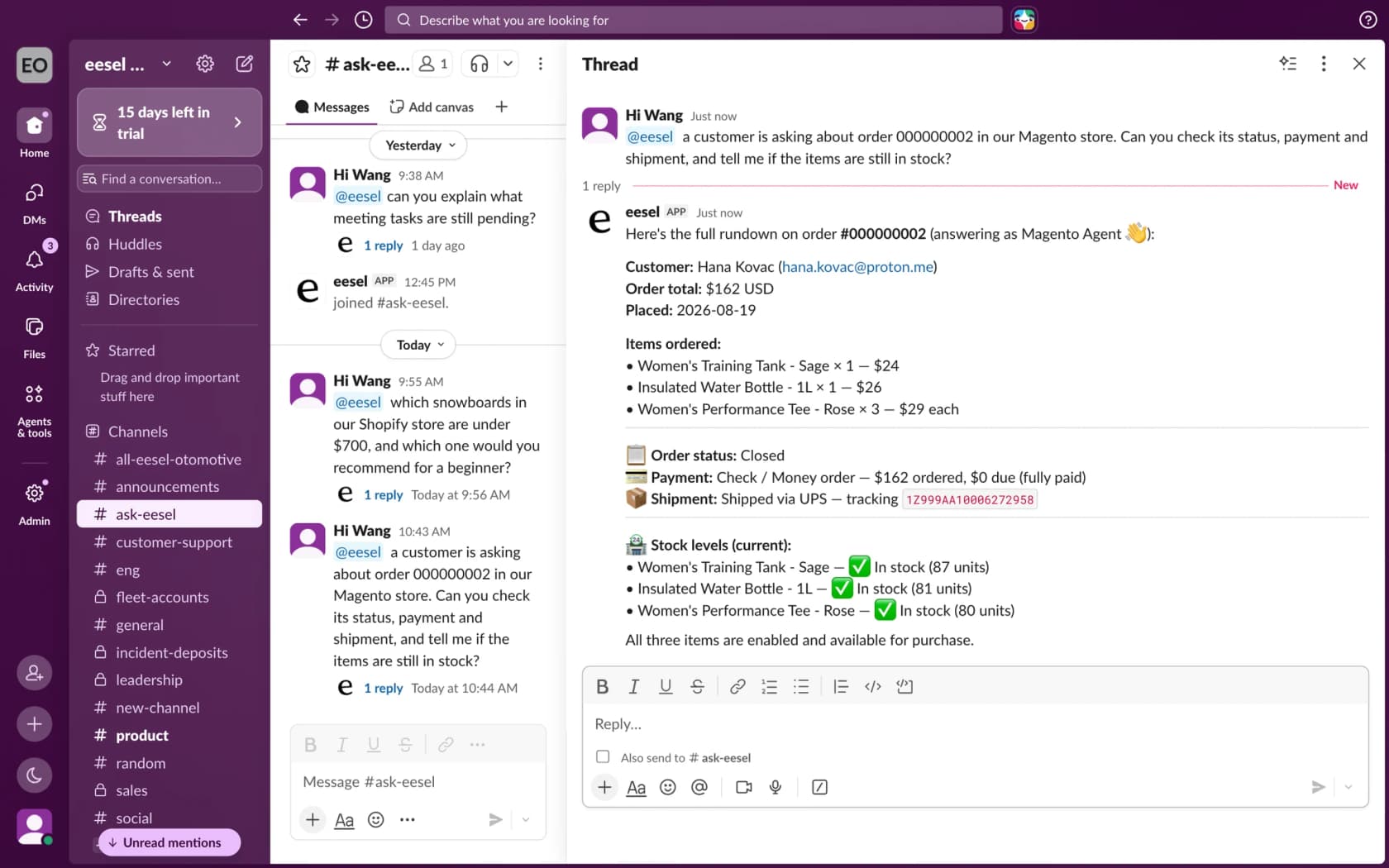
The limits matter for bundles. The docs do not say the agent can read a bundle's Price View, its option list or its special-price percentage, and they do not mention bundles at all, so I would not assume it can explain a range or a percentage. Test it on a real bundle order and see which lines come back. Customer orders are found by exact order number or email, with no name or phone search, and a stock check reads one SKU at a time. For refunds, the agent can refund specific items, but only on orders paid offline (check, bank transfer or cash on delivery), and a card refund has to be issued by a person in the Magento admin.
That is why I read the lookup as "evidence for a person or a draft", not a full answer on a bundle. A careful pattern is Question Beauty, a cosmetics brand that runs on Shopify and Gorgias, not Magento. Many of its messages are a product name and "price?", and eesel answers a price only from the current product page or shares the link instead. It also checks the Shopify order before answering any order question. Between 8 August and 8 September 2026, eesel handled about 990 Gorgias tickets for it, sent about 960 replies and looked up about 290 orders. Refunds, returns and complaints go to a person with a note. The same rule works for bundles: the price comes from the live record, and a person owns anything that moves money.
How eesel handles bundle price tickets in Magento
eesel works on Magento 2, Open Source and Adobe Commerce, and answers in your helpdesk, in Slack or in the storefront chat bubble. For a bundle ticket, the read-only actions look up the order, read its lines and payment, fetch the product by SKU, and draft a reply that names each line. The setup docs say read-only access is a valid setup, and granting the Sales and Catalog read resources is what lets it work.
If you want to script the setup, the eesel CLI lets a coding agent start the Magento connection, upload your approved refund and pricing policy, and ask test questions such as "why is my bundle more in the cart than on the page?", so you can compare answers with real orders before anything goes live. Creating the Magento integration and pasting its keys still needs someone with Magento admin access.
Pricing is by credit, not per seat: a free plan with 100 credits, then from $299 a month for 500 credits, per eesel pricing. Test it on past tickets first, as the simulation testing guide describes.
For setup and the wider picture, see add AI to Magento and the Magento chat widget guide.
Comparing tools? See best AI for Magento, Magento AI and Gorgias and Magento.
Related reading on Magento pricing, the Magento review and Magento alternatives.
Support teams will also like ecommerce support contact rates and ticket routing.
On macros, see refund macros and ecommerce FAQ examples fill in the rest.
Try eesel for Magento order questions
If your queue has "why is my bundle price different?" tickets, eesel can read each Magento order's lines and payment before anyone opens the ticket, and draft the answer from your own pricing and refund policy, with a person still sending anything that makes a promise. It works inside your Gorgias queue, or Zendesk or Freshdesk, and the free plan's 100 credits are enough to try it on a batch of real order tickets. Try eesel and see how it does on yours.