Magento multiple invoices per order: why it happens and what to say

Riellvriany Indriawan

Katelin Teen
Last edited November 6, 2026

A Magento order has several invoices because each invoice bills only the items someone picked: a partial invoice with Qty to Invoice below the ordered quantity, an invoice per shipment, or an API call that lists some items. Every invoice is its own document with its own email, and on gateways that capture per invoice it is its own charge, so "charged twice" often means "charged in two parts". The first invoice carries the shipping, and an online refund has to start from the invoice it belongs to. eesel's Magento integration reads orders and payment status live, but its docs list no action that reads, creates or resends an invoice. With the eesel CLI, a coding agent can upload your invoice wording and ask test questions like "why do I have two invoices?" before go-live. A Magento admin still approves the connection.
Why does one Magento order have more than one invoice?
Because an invoice in Magento is a record of payment for some of the order, not a copy of the whole order. Adobe's invoice documentation says "Multiple invoices can be created" for one order, and each can hold as many or as few of the purchased products as you specify. I work eesel's support queue, and this is the sentence I would pin above every Magento ticket that mentions an invoice, because it explains most of them.
There are three ways an order ends up with two or more.
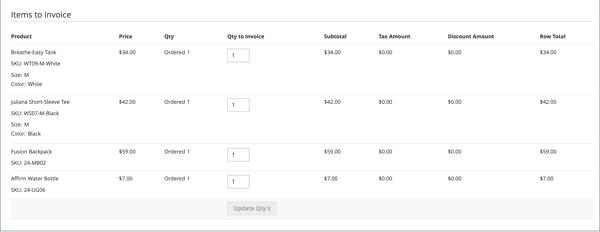
- Partial invoice. On the invoice page the admin lowers Qty to Invoice for the items not ready yet, clicks Update Qty's and submits. The remaining quantity stays open for a later invoice.
- Invoice per shipment. Adobe says orders are normally invoiced and captured when shipping starts, and that a single order can be divided into partial shipments that are invoiced separately, if necessary. For example, a back-ordered item that ships a week later gets its own invoice.
- An API call with items. The REST route
POST /V1/order/{orderId}/invoicemakes a full invoice by default, and Adobe's REST tutorial says you create a partial one by adding an array of items to the payload. In Adobe'sInvoiceOrderInterfacesource thecaptureflag defaults to false, so a script can create an invoice without charging.
Where it will not happen is just as useful for support. With the Authorize and Capture payment action, Adobe says the payment is captured and an invoice is created automatically. I would expect one invoice there, since nothing is left to bill later, though that is my inference and not an Adobe statement. Orders paid by Gift Card, Store Credit, Reward Points or other offline methods get no automatic invoice at all, per the same docs, so a person invoices them by hand. If your catalog has odd line items, the grouped product and bundle price guides explain how those show up per line.
What does each Magento invoice contain?
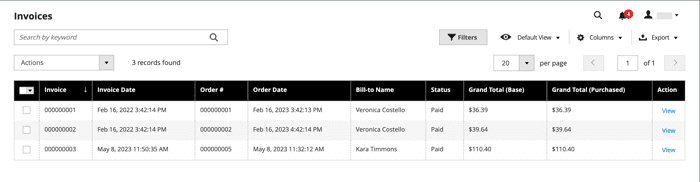
Its own items, its own subtotal and tax, and its own grand total. The Invoices grid in Adobe's docs lists an invoice number, date, linked order number, status, base grand total, payment method and subtotal as separate columns, and the order's Invoices tab lists every invoice tied to it. An admin needs Sales or Archive permissions to see that tab, which is why a support agent sometimes cannot see what the customer is describing.
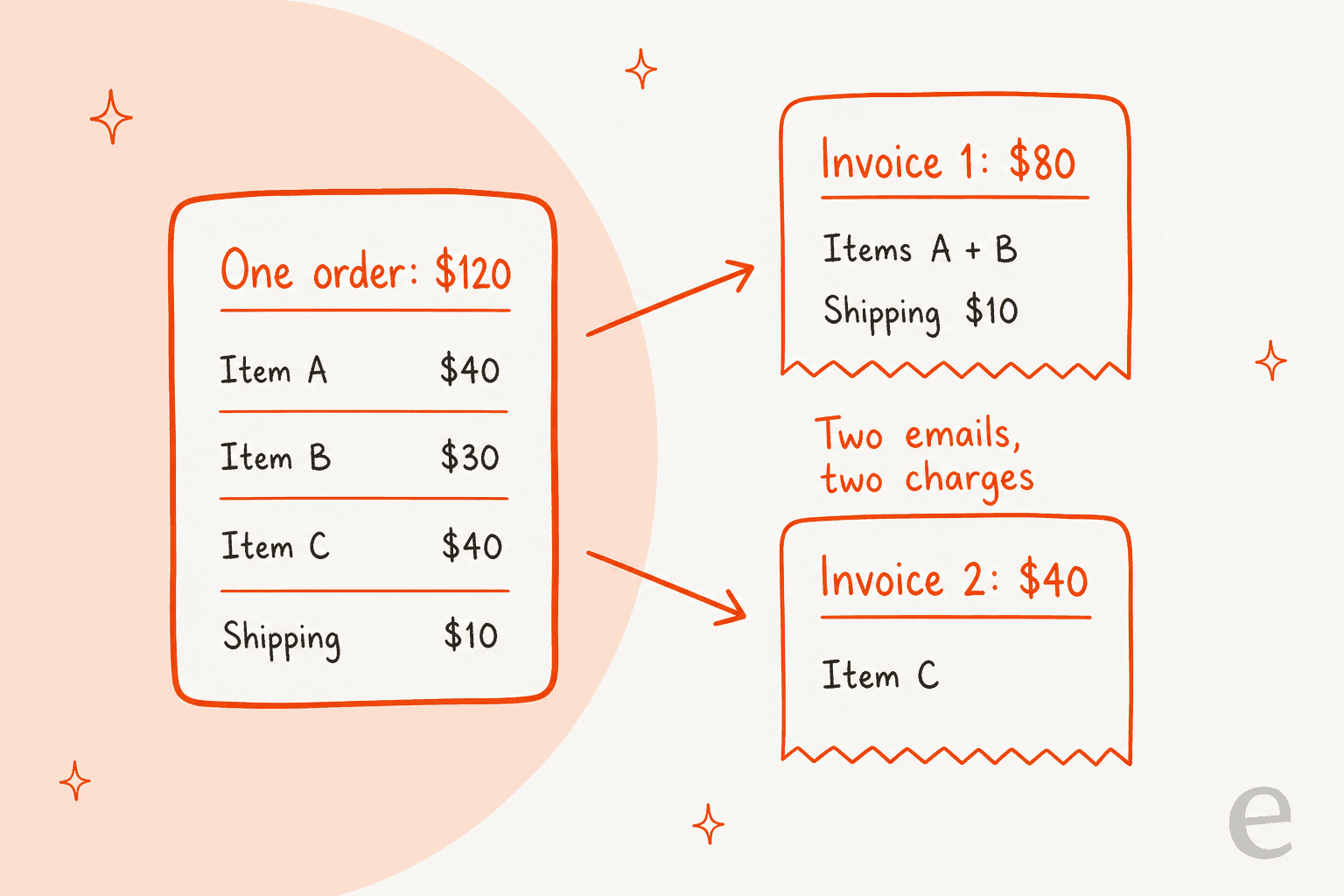
The detail that trips up customers is shipping. In Magento's shipping total code, the invoice checks previous invoices and, if one that is not canceled already exists, adds no shipping. So the first invoice carries the whole shipping charge and later invoices carry none. A customer who ordered three items and sees an $80 invoice followed by a $40 one is not being billed oddly. The first one just includes shipping. The example below uses made-up numbers to show the split.
Each invoice also has a state. The code defines three, labelled Pending, Paid and Canceled in Magento's invoice model. In the code I read, an invoice that has not been paid stays in the open state, which the admin shows as Pending: it exists but has not been captured. That comes up again below. On the order itself, Adobe's order status page describes Complete as created, paid and shipped, and Closed as an order that was assigned a credit memo with the customer refunded. The same status logic runs through the WooCommerce order status guide, if you support both platforms.
Why does the customer say they were charged twice?
Sometimes they were charged twice, in two parts. When Magento captures money invoice by invoice, each invoice can be its own capture at the gateway. Adobe's PayPal Payments Pro page says that for each partial invoice submitted, a separate Capture transaction with a unique ID becomes available and a separate invoice is generated. A customer's card statement then shows two charges, days apart, that together equal the order total.
Which behavior you get depends on the payment action, which is set per payment method. This table is from Adobe's payment actions table, plus one inference I flag.
| Setting | What Adobe says | What the customer sees |
|---|---|---|
Authorize | Approves the purchase and holds the funds; you capture by creating an invoice | A hold at checkout, then a charge when each invoice is captured (per-invoice capture depends on the gateway) |
Authorize and Capture | Captures the payment and creates the invoice automatically | One charge at checkout (one invoice is my inference) |
Not Capture on the invoice | Invoice is submitted without capture; a Capture button appears on it | An invoice in Pending state, charged later |
| Offline methods (check, bank transfer) | No gateway; the invoice is recorded by hand | Whatever the merchant records |
The Amount dropdown on the invoice page is where the admin picks. The screenshot below shows Capture Online; in Adobe's code the three values are online, offline and not_capture. In the register() method I read, Capture Online calls the gateway, while Capture Offline marks the invoice paid without a capture call. A merchant who picked Capture Offline on a card order therefore has an invoice that says paid while the processor never moved money. That is a plausible root cause for a reconciliation ticket, and I would send it to a person.
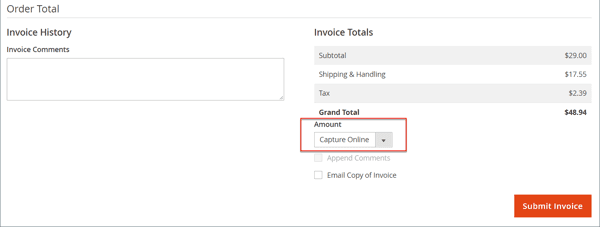
Partial capture is also not guaranteed on every method. Adobe has a knowledge base article on a Braintree Venmo issue in Adobe Commerce 2.4.0 and 2.4.1, where a second invoice for the remaining products failed with a vault_capture command error, and the workaround was to capture the whole amount at once. Adobe lists affected versions as 2.4.0 and 2.4.1 only, so I would not assume it applies to a current store, but it shows why a "why was my second invoice refused?" ticket needs the payment method named. For methods Adobe does not document, check the gateway's own docs before you promise anything.
How do you tell a real duplicate from a split? Compare the invoice grand totals with the order grand total and look at the dates. Two charges whose sum is the order total are a split. The same amount twice, or a sum above the order total, is a different problem, possibly a second order or a payment retry, and it belongs in the billing dispute or chargeback lane. A bank hold is a third case: an authorization for the full amount can still show on the statement beside the first capture, and the customer reads that as a duplicate.
Why did the customer get two invoice emails?
Usually because there are two invoices. Adobe's sales email settings have an Invoice group where Enabled sends a transactional email for each invoice generated, using the New Invoice template for customers and New Invoice for Guest for guests. The admin also chooses per invoice whether to tick Email Copy of Invoice at submit, so one invoice may email the customer and the next may not.
There is a second source that looks identical from the customer's side. A separate Invoice Comments group sends an email for each invoice comment, using the Invoice Update template. A merchant who adds a comment to an invoice with Append Comments ticked can therefore trigger a second message that arrives under an invoice subject. There is also a Send Invoice Email Copy To setting that adds a BCC or separate copy to a store address, which explains why the merchant sometimes sees one more email than the customer does.
| What the customer says | Likely cause | Check |
|---|---|---|
| Two "invoice" emails, same day | Two invoices on the order | Order's Invoices tab |
| A second email with a note in it | An invoice comment triggered "Invoice Update" | Invoice comments history |
| An invoice email but no shipping email | Invoice and shipment are separate documents | Shipments tab |
| No invoice email for the second part | Email Copy of Invoice was not ticked | Invoice comments and settings |
Shipments are their own records, and Adobe says a shipment can be generated when an order is invoiced or later. That is why a customer can hold an invoice for items that have not shipped, and the order tracking questions that follow often need a look at both tabs.
Which invoice should support refund?
The one that contained the item, and for a card refund you start from that invoice. Adobe's credit memo steps say that for an online refund you click Invoices in the left panel, open the invoice and click Credit Memo in its button bar. The reason is visible in the code: in Magento's payment refund method, an online refund reads the credit memo's invoice and uses that invoice's transaction ID, so the refund is sent against that invoice's capture. A credit memo with no invoice behind it is not an online refund.
The order-level button works differently. In the order view code, clicking Credit Memo on a gateway-paid order raises a confirmation that it will create an offline refund and tells the admin to open an invoice for an online one. An offline refund is a record, not a card transaction, which is a classic cause of "my refund never arrived" tickets, covered in the credit memo guide.
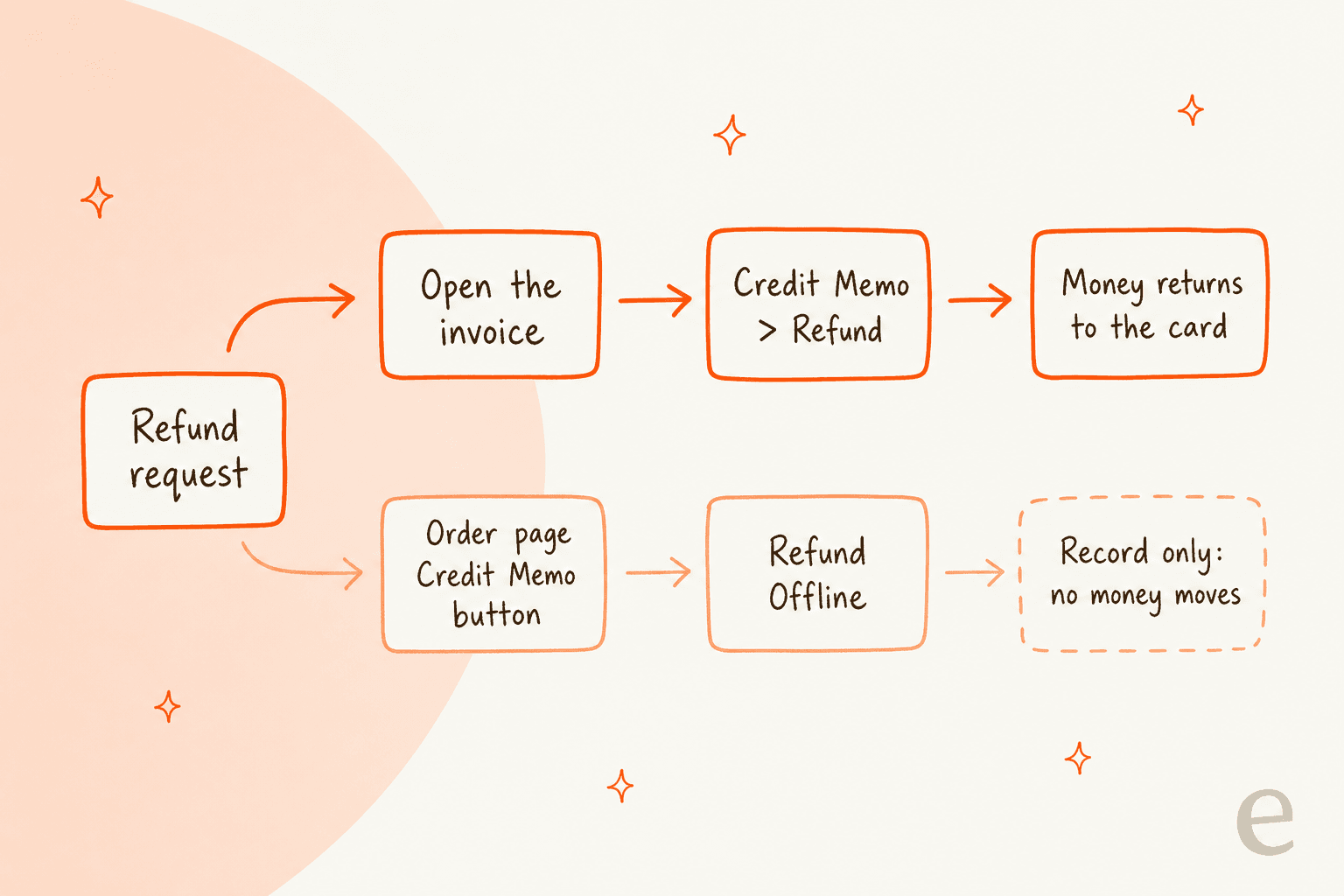
Adobe's credit memo page says you can refund a full invoice, a partial amount of an invoice, multiple partial amounts of one invoice, multiple invoices per order (not to exceed the order total), and a portion of one line's quantity. So an order with invoices of $80 and $40 can be refunded from either, as long as the total stays inside the order. The Refund Shipping field starts at the order's shipping amount less what was already refunded.
I could not find Adobe saying whether Magento blocks, or warns about, a shipping refund on a credit memo opened from an invoice that carried no shipping. Since the shipping sits on the first invoice, I would test that in a staging store before writing a macro for it. Adobe also says refunds cannot be issued until the transaction is settled, so a credit memo from an invoice captured an hour ago can fail for timing alone. When money rules are involved, route the decision through an approval workflow rather than leaving it to a macro.
What should support check on a multi-invoice ticket?
Open the order first, then match what the customer sees to a document. I would use this table as the internal macro, and I would keep the wording plain: say what each invoice covers, then what happens next.
| Ticket says | Open | Tell the customer |
|---|---|---|
| "Why do I have two invoices?" | Order's Invoices tab | The order was billed in parts: list the items and total on each |
| "You charged me twice" | Invoice grand totals and dates | The two charges add up to the order total, or escalate if they do not |
| "My invoice is bigger than my items" | First invoice's shipping line | Shipping was added to the first invoice only |
| "Refund invoice 2 only" | Invoice 2, then Credit Memo | You are refunding items on that invoice, with a time window from the processor |
| "Where is my second invoice email?" | Invoice email settings and the comments history | It was created but the email option was not ticked, or a person resends it |
| "Invoice still says pending" | Invoice state | It exists but the charge has not been captured yet |
Two habits keep these tickets short. Quote the amounts and the item names from each invoice rather than "your order was split", because a number is what a customer checks against a card statement. And hand over anything with a mismatch to a human with the order number, invoice numbers and both totals already written into the note, as the agent handoff and escalation guides describe. For wording on the money side, the refund macro templates and the returns management guide are good starting points. For volume context, the contact rate benchmarks show how many tickets per 100 orders a store should expect.
What can eesel do on a Magento invoice ticket?
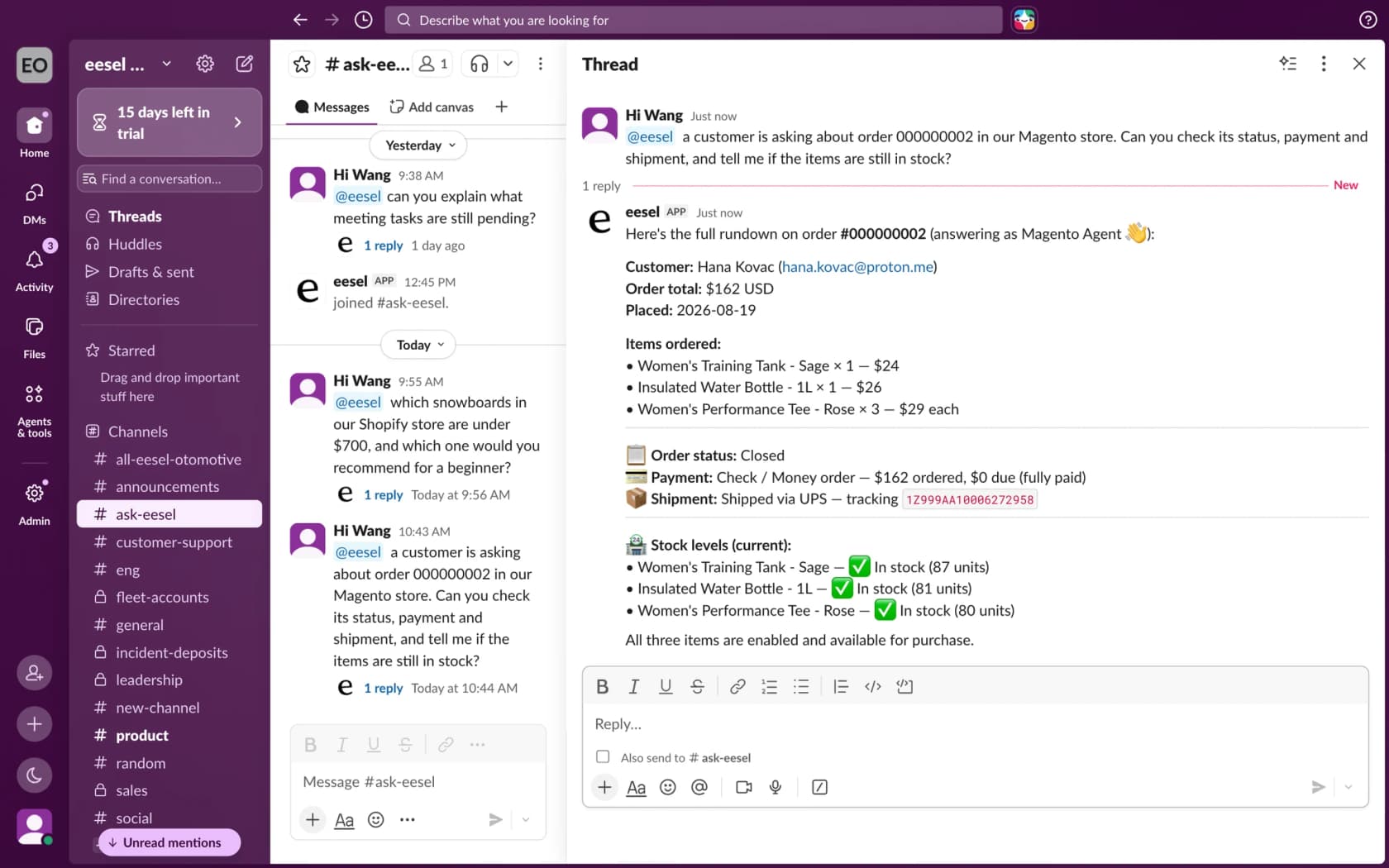
Look up the order and its payment, then draft a reply from your policy. eesel's Magento docs list these read actions: Get Order by ID, Get Orders by Email, Get Order Tracking and Get Payment Status, which returns the payment method, whether it cleared and any balance due. The write actions are Refund Order, Cancel Order, Hold Order, Unhold Order, Send Order Notice, Update Customer Address and Create Return (Adobe Commerce only). Not one of them is described as reading, creating or resending an invoice, so I would not tell a customer the agent "sent you the invoice".
Two details matter for these tickets. First, Refund Order records a credit memo and only works for an order paid by an offline method (check, bank transfer, cash on delivery). A card or other online-gateway order is refused, because that refund has to be issued by a person in Magento Admin, which is exactly the "open the invoice" path above. The docs also say it needs an invoice on the order to refund against. Second, whether Get Order by ID returns invoice rows is not stated in the docs, so I would run it on a real two-invoice order and read what comes back before promising the agent can list invoice totals.
Koffer.ch, a Swiss luggage shop, shows the safe pattern for the same kind of ticket, though its story names Freshdesk and not Magento. Missing invoices are one of its routine ticket types, and eesel looks for a matching Freshdesk macro first, uses it as written in the customer's language, and leaves a draft that the team sends. Between 8 August and 8 September 2026 it drafted replies on about 60 tickets, about 100 drafts counting follow-ups. For a Magento queue, the equivalent is a macro per row in the table above, with the order's numbers filled in by the agent and a person sending anything that touches money. A Gorgias helpdesk can call the same lookups, and the Gorgias and Magento guide covers that setup.
How eesel handles invoice questions in Magento
eesel works on Magento 2, Open Source and Adobe Commerce, and answers in your helpdesk, in Slack or in the storefront chat bubble. For invoice tickets I would set the agent to do four things: read the order and its payment status, name what it can and cannot see, draft the split explanation from your policy, and pass anything with a mismatched total to a person. Give it the Sales / Orders read resource and keep refunds and cancellations behind approval. Read-only is a valid setup, and the access you grant the Magento integration is the ceiling for what the agent can reach.
If you want to script the setup, the eesel CLI lets a coding agent upload your approved policy files, like an "invoices and refunds" page, and ask test questions with eesel chat before anything goes live. Creating the Magento integration and pasting its keys still needs a person with Magento admin access. Uploaded text is not the same as a trained answer, so test it first on past tickets, as the simulation testing guide describes.
Pricing is by credit, not per seat: a free plan with 100 credits, then from $299 a month for 500 credits, per eesel pricing. For the wider picture, see add AI to Magento, Magento AI, the Magento AI chatbot, best AI for Magento and the chat widget guide. Related reading: Magento reorder, configurable stock, downloadable products, WooCommerce refund status, AI refund automation, AI for refund requests and billing questions.
Try eesel for Magento invoice tickets
If your queue has "why do I have two invoices?" and "was I charged twice?" tickets, eesel can read each Magento order and its payment status before anyone opens the ticket, and draft a reply that matches the amounts to the order, with a person still sending anything that moves money. The free plan's 100 credits are enough to run it over a batch of real order tickets. Try eesel and see how it does on yours.